



Pico MicroPython: Build Digital Alarm Clock Using DS1302 RTC
Practical embedded tutorial to implement digital alarm clock based on Raspberry Pi Pico and DS1302 RTC under MicroPython.
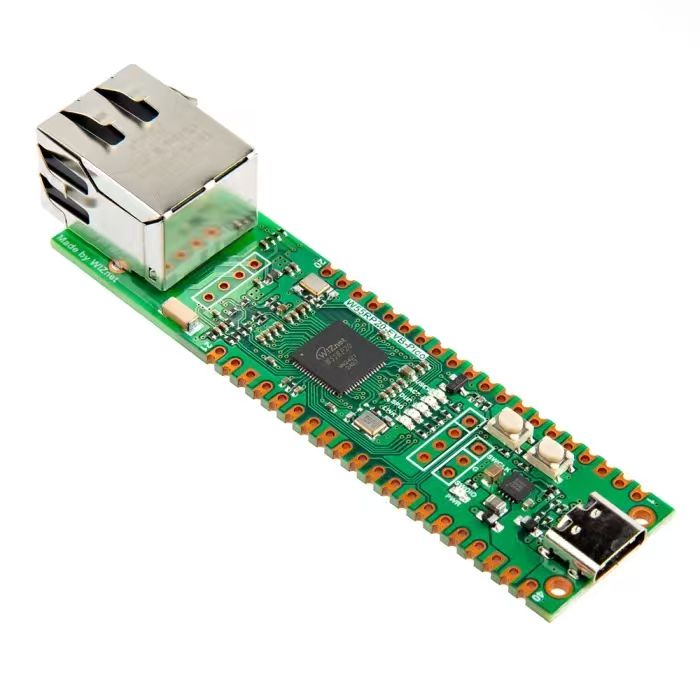
- Implement a simple digital alarm clock using the DS1302 RTC clock
You can find the source code in the provided resource package under elegance‑devkit v1\Demo\51 RTC_DS1302.
1.1 Implementation of custom DS1302 class
In the following code, a custom DS1302 class is implemented to get and set time and date, and use the on‑chip RAM to store custom user data. The sample code is shown below:
# Python env   : MicroPython v1.23.0
# -*- coding: utf-8 -*-
# @Time    : 2024/10/3 2:41 PM
# @Author  : Li Qingshui
# @File    : ds1302.py
# @Description : Custom DS1302 class for chip control
# ======================================== Import related modules ========================================
# Import hardware‑related modules
from machine import Pin
# Import MicroPython related modules
from micropython import const
# ======================================== Global variables ============================================
# ======================================== Function definitions ============================================
# ======================================== Custom classes ============================================
# Custom control class for DS1302 chip
class DS1302:
    """
    DS1302 class for operating DS1302 real‑time‑clock chip via three‑wire interface (CLK, DIO, CS).
    This class encapsulates communication with the DS1302 chip and provides functions for reading and setting time, date and weekday.
    Supports starting and stopping the clock, as well as reading and writing the chip internal RAM registers.
    Attributes:
        clk (Pin): Clock pin for generating clock signals.
        dio (Pin): Data pin for reading and writing data.
        cs  (Pin): Chip‑select pin for enabling chip communication.
    Methods:
        __init__(self, clk: Pin, dio: Pin, cs: Pin) -> None:
            Initialize DS1302 class instance.
        _dec2hex(self, dat: int) -> int:
            Convert decimal number to hexadecimal BCD value.
        _hex2dec(self, dat: int) -> int:
            Convert hexadecimal BCD value to decimal number.
        _write_byte(self, dat: int) -> None:
            Write one byte to DS1302.
        _read_byte(self) -> int:
            Read one byte from DS1302.
        _get_reg(self, reg: int) -> int:
            Read value from specified register.
        _set_reg(self, reg: int, dat: int) -> None:
            Write value to specified register.
        _wr(self, reg: int, dat: int) -> None:
            Write data to register and handle write‑protect bit.
        start(self) -> None:
            Start the RTC clock oscillator.
        stop(self) -> None:
            Stop the RTC clock oscillator.
        second(self) -> int:
            Read current seconds value.
        second(self, value: int) -> None:
            Set seconds value.
        minute(self) -> int:
            Read current minutes value.
        minute(self, value: int) -> None:
            Set minutes value.
        hour(self) -> int:
            Read current hours value.
        hour(self, value: int) -> None:
            Set hours value.
        weekday(self) -> int:
            Read current weekday value.
        weekday(self, value: int) -> None:
            Set weekday value.
        day(self) -> int:
            Read current day‑of‑month value.
        day(self, value: int) -> None:
            Set day‑of‑month value.
        month(self) -> int:
            Read current month value.
        month(self, value: int) -> None:
            Set month value.
        year(self) -> int:
            Read current year value.
        year(self, value: int) -> None:
            Set year value.
        date_time(self, dat: list[int] | None = None) -> list[int] | None:
            Read or set complete date‑time tuple.
        ram(self, reg: int, dat: int | None = None) -> int | None:
            Read or write RAM register value.
    """
    # Class‑level constants: DS1302 register addresses
    DS1302_REG_SECOND = const(0x80)  # Seconds register
    DS1302_REG_MINUTE = const(0x82)  # Minutes register
    DS1302_REG_HOUR = const(0x84)    # Hours register
    DS1302_REG_DAY = const(0x86)     # Day‑of‑month register
    DS1302_REG_MONTH = const(0x88)   # Month register
    DS1302_REG_WEEKDAY = const(0x8A) # Weekday register
    DS1302_REG_YEAR = const(0x8C)    # Year register
    DS1302_REG_WP = const(0x8E)      # Write‑protect register
    DS1302_REG_CTRL = const(0x90)    # Control register
    DS1302_REG_RAM = const(0xC0)     # RAM base register address
    def __init__(self, clk: Pin, dio: Pin, cs: Pin) -> None:
        """
        Initialize DS1302 class.
        Args:
            clk (Pin): Clock pin.
            dio (Pin): Data pin.
            cs  (Pin): Chip‑select pin.
        Returns:
            None
        """
        self.clk = clk
        self.dio = dio
        self.cs = cs
        # Set clock pin as output
        self.clk.init(Pin.OUT)
        # Set chip‑select pin as output
        self.cs.init(Pin.OUT)
    def _dec2hex(self, dat: int) -> int:
        """
        Convert decimal integer to BCD‑hexadecimal format.
        Args:
            dat (int): Decimal input number.
        Returns:
            int: BCD‑encoded byte value.
        """
        return (dat // 10) * 16 + (dat % 10)
    def _hex2dec(self, dat: int) -> int:
        """
        Convert BCD‑hexadecimal byte back to decimal integer.
        Args:
            dat (int): BCD‑format byte read from chip.
        Returns:
            int: Converted decimal number.
        """
        return (dat // 16) * 10 + (dat % 16)
    def _write_byte(self, dat: int) -> None:
        """
        Write one byte to DS1302.
        Args:
            dat (int): Byte value to send.
        Returns:
            None
        """
        # Set data pin to output mode
        self.dio.init(Pin.OUT)
        # Send 8 data bits
        for i in range(8):
            # Output each bit; data is sampled on rising clock edge
            self.dio.value((dat >> i) & 1)
            self.clk.value(1)
            self.clk.value(0)
    def _read_byte(self) -> int:
        """
        Read one byte from DS1302.
        Returns:
            int: Received byte value.
        """
        d = 0
        # Switch data pin to input mode
        self.dio.init(Pin.IN)
        # Read 8 bits sequentially
        for i in range(8):
            # Capture each bit on falling clock edge
            d = d | (self.dio.value() << i)
            self.clk.value(1)
            self.clk.value(0)
        return d
    def _get_reg(self, reg: int) -> int:
        """
        Read value from specified register address.
        Args:
            reg (int): Target register address.
        Returns:
            int: Register byte value.
        """
        # Assert chip‑select to start communication
        self.cs.value(1)
        # Send register address byte
        self._write_byte(reg)
        # Read response byte
        t = self._read_byte()
        # De‑assert chip‑select to end transaction
        self.cs.value(0)
        return t
    def _set_reg(self, reg: int, dat: int) -> None:
        """
        Write value to specified register address.
        Args:
            reg (int): Target register address.
            dat (int): Byte value to write.
        Returns:
            None
        """
        self.cs.value(1)
        self._write_byte(reg)
        self._write_byte(dat)
        self.cs.value(0)
    def _wr(self, reg: int, dat: int) -> None:
        """
        Write data with write‑protect handling.
        Args:
            reg (int): Target register address.
            dat (int): Byte value to write.
        Returns:
            None
        """
        # Clear write‑protect bit
        self._set_reg(DS1302.DS1302_REG_WP, 0)
        # Perform register write
        self._set_reg(reg, dat)
        # Re‑enable write‑protection
        self._set_reg(DS1302.DS1302_REG_WP, 0x80)
    def start(self) -> None:
        """
        Start the DS1302 clock oscillator.
        Args:
            None
        Returns:
            None
        """
        t = self._get_reg(DS1302.DS1302_REG_SECOND + 1)
        # Clear the STOP bit (bit7)
        self._wr(DS1302.DS1302_REG_SECOND, t & 0x7f)
    def stop(self) -> None:
        """
        Halt the DS1302 clock oscillator.
        Args:
            None
        Returns:
            None
        """
        t = self._get_reg(DS1302.DS1302_REG_SECOND + 1)
        # Set the STOP bit (bit7)
        self._wr(DS1302.DS1302_REG_SECOND, t | 0x80)
    @property
    def second(self) -> int:
        """
        Read current seconds.
        Args:
            None
        Returns:
            int: Seconds value 0‑59.
        """
        return self._hex2dec(self._get_reg(DS1302.DS1302_REG_SECOND + 1)) % 60
    @second.setter
    def second(self, value: int) -> None:
        """
        Set seconds value.
        Args:
            value (int): Seconds value to configure.
        Returns:
            None
        """
        self._wr(DS1302.DS1302_REG_SECOND, self._dec2hex(value % 60))
    @property
    def minute(self) -> int:
        """
        Read current minutes.
        Args:
            None
        Returns:
            int: Minutes value 0‑59.
        """
        return self._hex2dec(self._get_reg(DS1302.DS1302_REG_MINUTE + 1))
    @minute.setter
    def minute(self, value: int) -> None:
        """
        Set minutes value.
        Args:
            value (int): Minutes value to configure.
        Returns:
            None
        """
        self._wr(DS1302.DS1302_REG_MINUTE, self._dec2hex(value % 60))
    @property
    def hour(self) -> int:
        """
        Read current hours.
        Args:
            None
        Returns:
            int: Hours value.
        """
        return self._hex2dec(self._get_reg(DS1302.DS1302_REG_HOUR + 1))
    @hour.setter
    def hour(self, value: int) -> None:
        """
        Set hours value.
        Args:
            value (int): Hours value to configure.
        Returns:
            None
        """
        self._wr(DS1302.DS1302_REG_HOUR, self._dec2hex(value % 24))
    @property
    def weekday(self) -> int:
        """
        Read current weekday.
        Args:
            None
        Returns:
            int: Weekday value.
        """
        return self._hex2dec(self._get_reg(DS1302.DS1302_REG_WEEKDAY + 1))
    @weekday.setter
    def weekday(self, value: int) -> None:
        """
        Set weekday value.
        Args:
            value (int): Weekday value to configure.
        Returns:
            None
        """
        self._wr(DS1302.DS1302_REG_WEEKDAY, self._dec2hex(value % 8))
    @property
    def day(self) -> int:
        """
        Read current day‑of‑month.
        Args:
            None
        Returns:
            int: Day‑of‑month value.
        """
        return self._hex2dec(self._get_reg(DS1302.DS1302_REG_DAY + 1))
    @day.setter
    def day(self, value: int) -> None:
        """
        Set day‑of‑month value.
        Args:
            value (int): Day‑of‑month value to configure.
        Returns:
            None
        """
        self._wr(DS1302.DS1302_REG_DAY, self._dec2hex(value % 32))
    @property
    def month(self) -> int:
        """
        Read current month.
        Args:
            None
        Returns:
            int: Month value.
        """
        return self._hex2dec(self._get_reg(DS1302.DS1302_REG_MONTH + 1))
    @month.setter
    def month(self, value: int) -> None:
        """
        Set month value.
        Args:
            value (int): Month value to configure.
        Returns:
            None
        """
        self._wr(DS1302.DS1302_REG_MONTH, self._dec2hex(value % 13))
    @property
    def year(self) -> int:
        """
        Read current full year. DS1302 stores only two‑digit year.
        Args:
            None
        Returns:
            int: Four‑digit year (adds offset of 2000).
        """
        return self._hex2dec(self._get_reg(DS1302.DS1302_REG_YEAR + 1)) + 2000
    @year.setter
    def year(self, value: int) -> None:
        """
        Set year value, stores last two digits into DS1302.
        Args:
            value (int): Four‑digit year value to configure.
        Returns:
            None
        """
        self._wr(DS1302.DS1302_REG_YEAR, self._dec2hex(value % 100))
    def date_time(self, dat: list[int] | None = None) -> list[int] | None:
        """
        Read or write complete date‑time information.
        Args:
            dat (list[int] | None): Date‑time list [year, month, day, weekday, hour, minute, second]. If None, read current time.
        Returns:
            list[int] | None: Return date‑time list when reading; return None when writing.
        """
        if dat is None:
            return [self.year, self.month, self.day, self.weekday, self.hour, self.minute, self.second]
        else:
            self.year = dat[0]
            self.month = dat[1]
            self.day = dat[2]
            self.weekday = dat[3]
            self.hour = dat[4]
            self.minute = dat[5]
            self.second = dat[6]
    def ram(self, reg: int, dat: int | None = None) -> int | None:
        """
        Read or write DS1302 internal RAM registers.
        Args:
            reg (int): RAM index from 0 to 30.
            dat (int | None): Byte value to write. If None, perform read operation.
        Returns:
            int | None: Return read byte value when reading; return None when writing.
        """
        if dat is None:
            return self._get_reg(DS1302.DS1302_REG_RAM + 1 + (reg % 31) * 2)
        else:
            self._wr(DS1302.DS1302_REG_RAM + (reg % 31) * 2, dat)
# ======================================== Initialization ==========================================
# ======================================== Main program ============================================
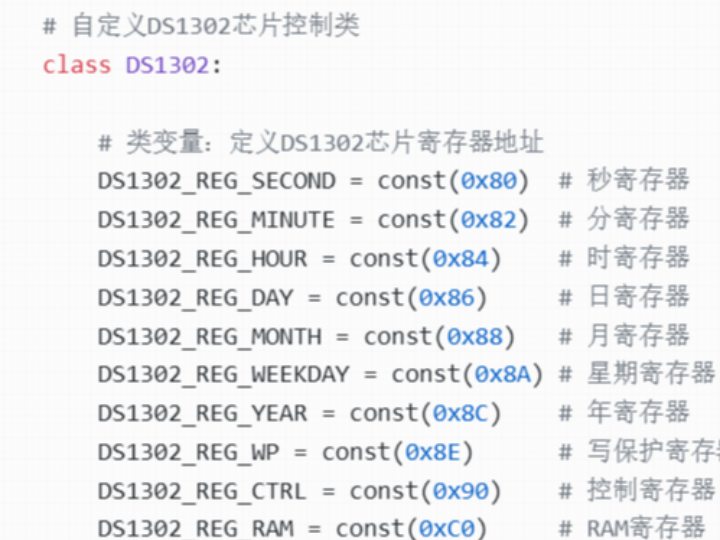
First, several constants are defined representing register addresses of the DS1302 chip:
# Custom control class for DS1302 chip
class DS1302:
    # Class‑level constants: DS1302 register addresses
    DS1302_REG_SECOND = const(0x80)  # Seconds register
    DS1302_REG_MINUTE = const(0x82)  # Minutes register
    DS1302_REG_HOUR = const(0x84)    # Hours register
    DS1302_REG_DAY = const(0x86)     # Day‑of‑month register
    DS1302_REG_MONTH = const(0x88)   # Month register
    DS1302_REG_WEEKDAY = const(0x8A) # Weekday register
    DS1302_REG_YEAR = const(0x8C)    # Year register
    DS1302_REG_WP = const(0x8E)      # Write‑protect register
    DS1302_REG_CTRL = const(0x90)    # Control register
    DS1302_REG_RAM = const(0xC0)     # RAM base register address
In the constructor method, clock pin (clk), data pin (dio) and chip‑select pin (cs) are configured.
Low‑level operation methods for DS1302:
Single‑byte write _write_byte method Set DIO pin to output mode. Loop to transmit every bit, generating clock pulses (high then low level) for each bit sent.
Single‑byte read _read_byte method Set DIO pin to input mode. Loop to read every bit and assemble the complete received byte for return.
Register read‑write functions are implemented by calling _write_byte() and _read_byte():
_get_reg register read method Pull CS pin high, send target register address, read data returned by DS1302, then pull CS pin low to terminate communication session.
_set_reg register write method Pull CS pin high, send target register address and payload byte, then pull CS pin low to terminate communication session.
_wr write‑protected register write method This method handles write‑protect register operations. First write 0 to WP register to disable write‑protection, write target register data, finally write 0x80 back to WP register to re‑enable write‑protection.
These methods encapsulate low‑level register access. Other member functions call these primitives to control DS1302 chip:
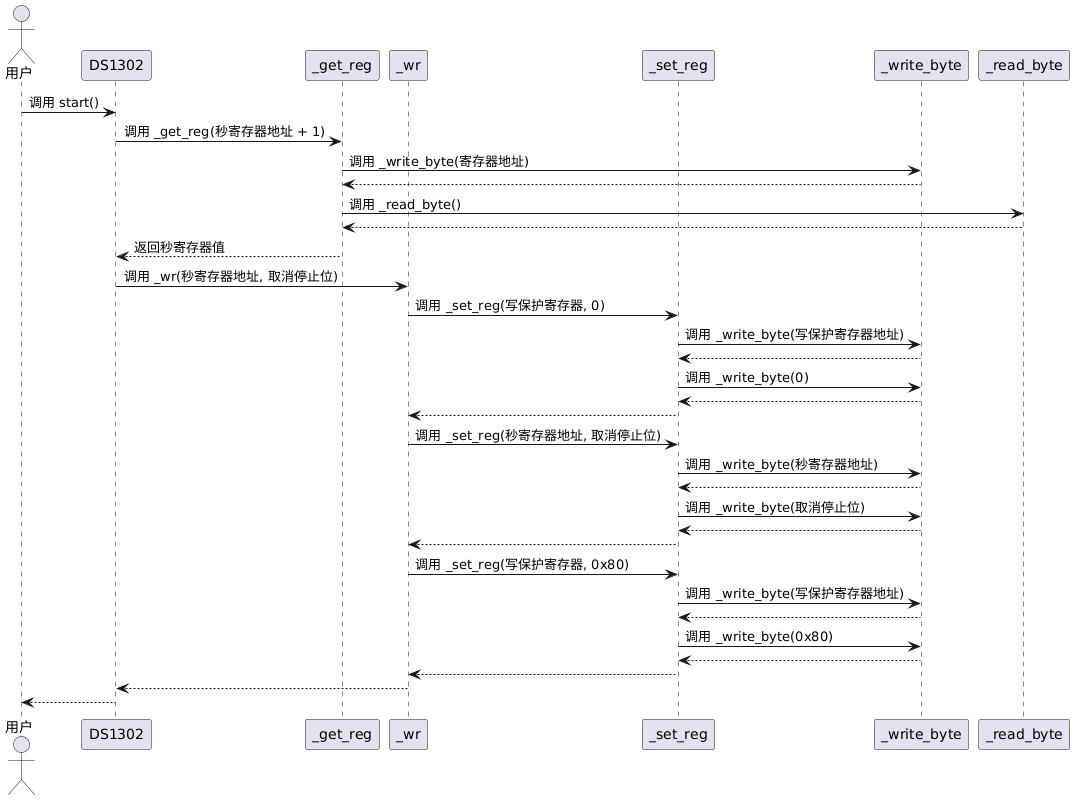
start clock start method Read current seconds register value, clear highest STOP bit, so DS1302 begins time‑counting. Call flow shown in figure below:
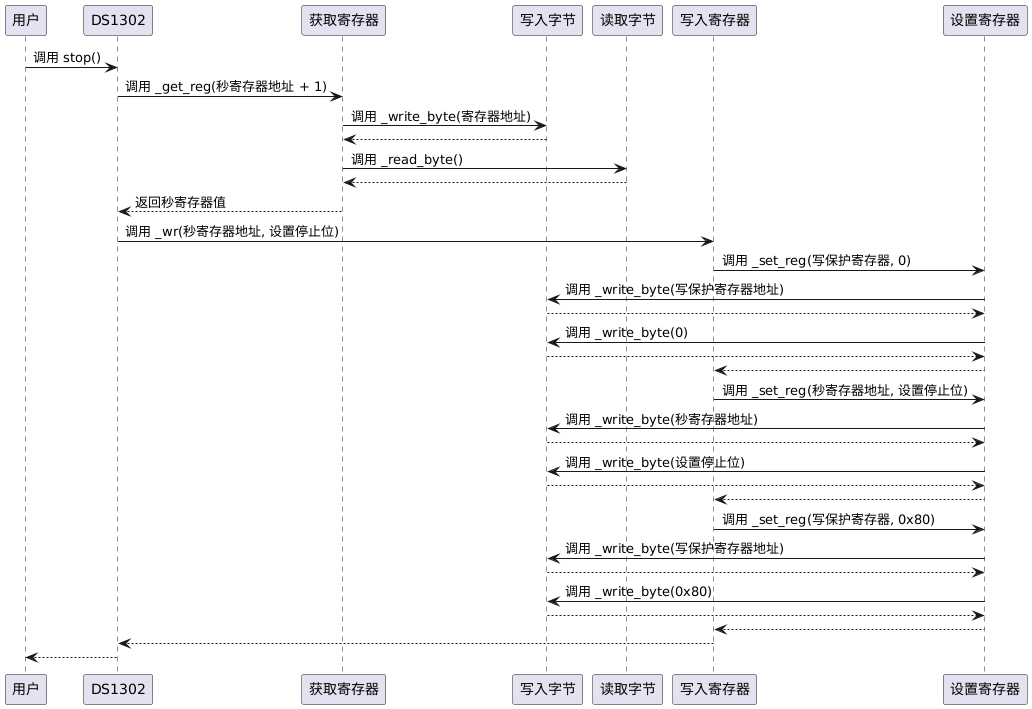
stop clock stop method Read current seconds register value, set highest STOP bit to halt DS1302 time‑counting. Call flow shown in figure below:
Time get‑set operations for second, minute, hour, weekday, day, month, year are implemented by reading‑writing corresponding registers:
@property
def second(self) -> int:
    """
    Read current seconds.
    Args:
        None
    Returns:
        int: Seconds value 0‑59.
    """
    return self._hex2dec(self._get_reg(DS1302.DS1302_REG_SECOND + 1)) % 60
@second.setter
def second(self, value: int) -> None:
    """
    Set seconds value.
    Args:
        value (int): Seconds value to configure.
    Returns:
        None
    """
    self._wr(DS1302.DS1302_REG_SECOND, self._dec2hex(value % 60))
Read time Use _get_reg to fetch register raw byte, convert BCD hexadecimal value to decimal via _hex2dec.
Write time Convert decimal input number to BCD‑hexadecimal by _dec2hex, then write into target register with _wr.
Python @property decorator is applied for each date‑time component (second, minute, hour, weekday, day, month, year). Internal register access details are encapsulated. External code accesses time values like ordinary object attributes instead of invoking function calls, improving code readability.
For convenience, date_time method can read‑write full date‑time tuple. When called without arguments, returns list [year, month, day, weekday, hour, minute, second]. When passing a date‑time list parameter, it sequentially configures every time component inside DS1302:
def date_time(self, dat: list[int] | None = None) -> list[int] | None:
    """
    Read or write complete date‑time information.
    Args:
        dat (list[int] | None): Date‑time list [year, month, day, weekday, hour, minute, second]. If None, read current time.
    Returns:
        list[int] | None: Return date‑time list when reading; return None when writing.
    """
    if dat is None:
        return [self.year, self.month, self.day, self.weekday, self.hour, self.minute, self.second]
    else:
        self.year = dat[0]
        self.month = dat[1]
        self.day = dat[2]
        self.weekday = dat[3]
        self.hour = dat[4]
        self.minute = dat[5]
        self.second = dat[6]
For accessing DS1302 on‑chip RAM, ram method is provided:
Read RAM Omit dat parameter to read byte from specified RAM address.
Write RAM Supply dat parameter to write byte into specified RAM address.
def ram(self, reg: int, dat: int | None = None) -> int | None:
    """
    Read or write RAM registers.
    Args:
        reg (int): RAM register index.
        dat (int | None): Data byte for write operation. If None, perform read.
    Returns:
        int | None: Read‑back byte when reading; None when writing.
    """
    if dat is None:
        return self._get_reg(DS1302.DS1302_REG_RAM + 1 + (reg % 31) * 2)
    else:
        self._wr(DS1302.DS1302_REG_RAM + (reg % 31) * 2, dat)
RAM write base address is 0xC0, RAM read base address is 0xC1. Expression (reg % 31) * 2 constrains index within 0‑30 and computes address offset.
1.2 Experiment procedure and phenomena
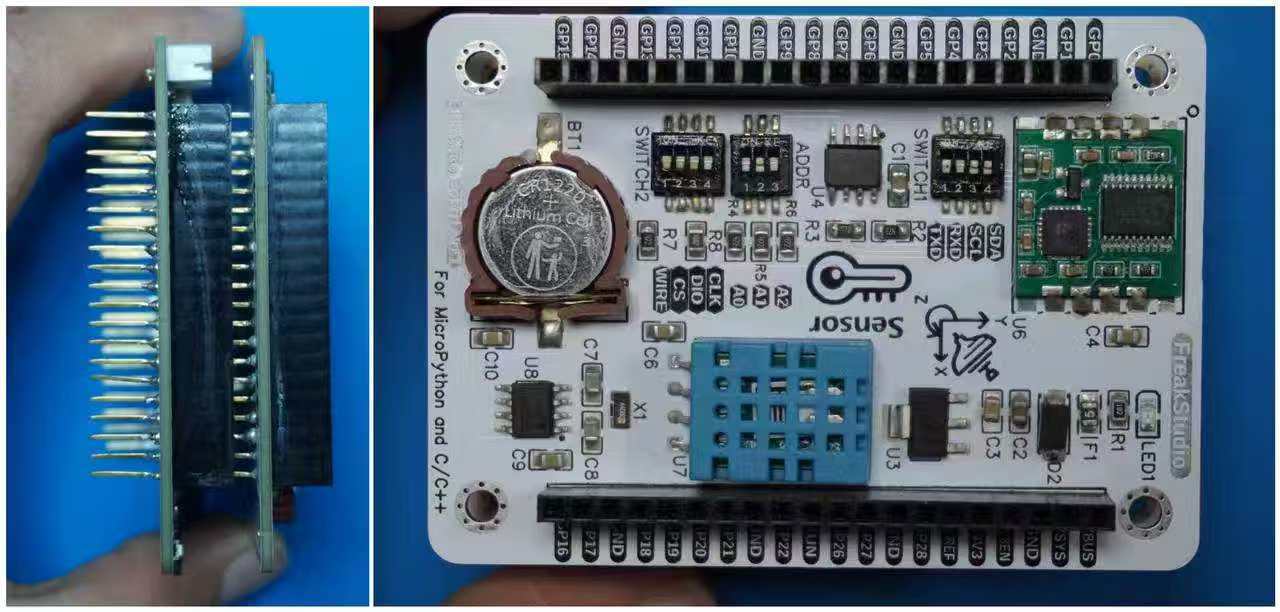
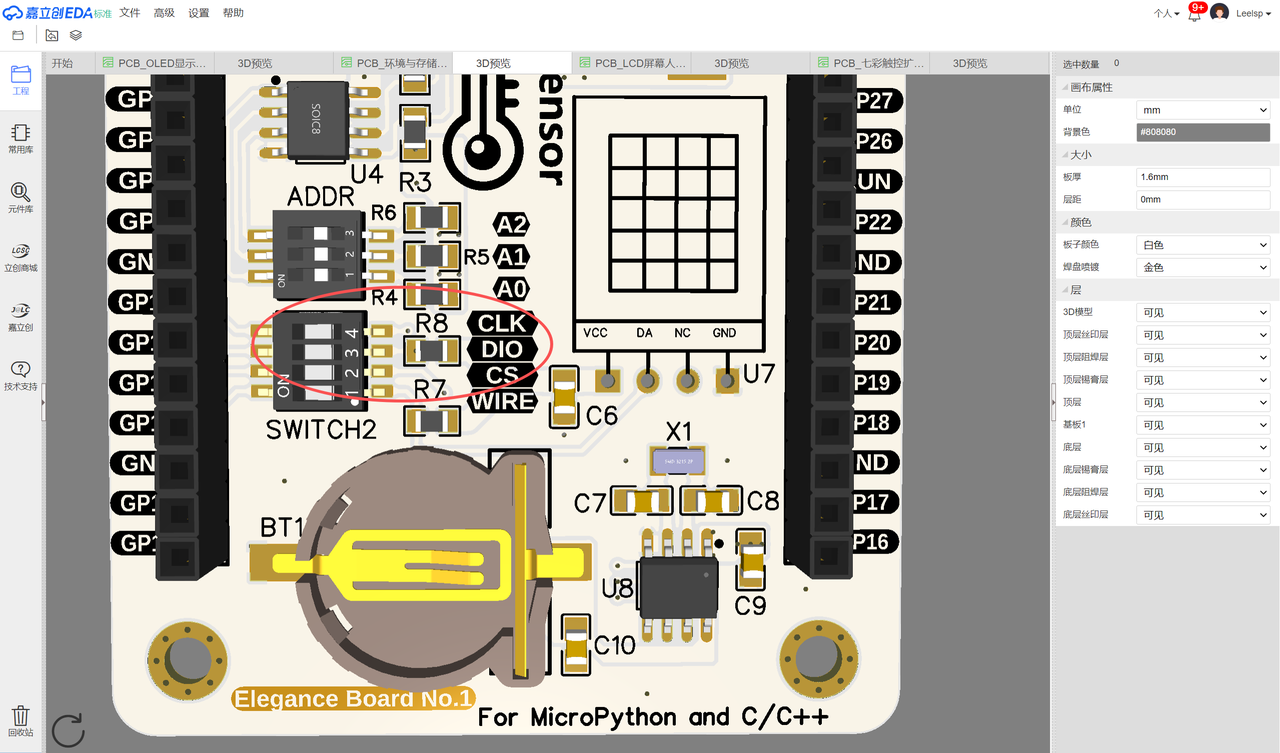
For this experiment, insert Elegance‑One Environment‑Storage Expansion Board onto Elegance‑One Universal Compatible Expansion Board. Toggle on CLK, DIO and CS switches inside SWITCH2 on Environment‑Storage Expansion Board:
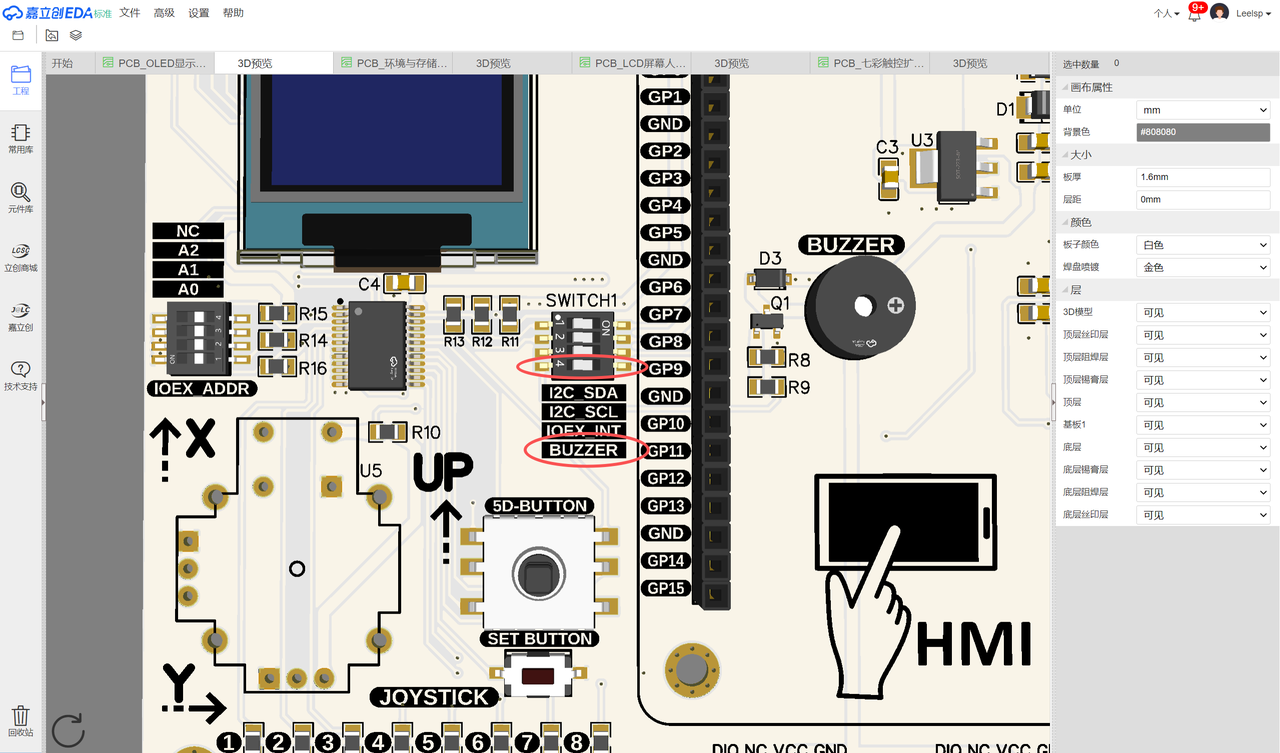
Then mount Elegance‑One Universal Compatible Expansion Board onto Elegance‑One OLED Interaction Expansion Board. Turn on I2C_SDA, I2C_SCL and BUZZER switches inside SWITCH1 on OLED expansion board:
Select OLED I²C address via OLED_ADDR dip‑switch. This example uses 0x3C as OLED device address:
Hardware connection diagram between each module and Raspberry Pi Pico:
The sample code below uses custom DS1302 class together with SSD1306 OLED display to build an alarm clock system. The system displays date‑time on screen and triggers buzzer alert when preset alarm time arrives.
# Python env   : MicroPython v1.23.0
# -*- coding: utf-8 -*-
# @Time    : 2024/10/3 2:41 PM
# @Author  : Li Qingshui
# @File    : main.py
# @Description : External RTC demo, implement alarm clock with DS1302
# ======================================== Import related modules ========================================
# Import hardware‑related modules
from machine import Pin, I2C, Timer, PWM, RTC
# Import time‑related modules
import time
# Import external RTC module
from ds1302 import DS1302
# Import SSD1306_I2C class
from SSD1306 import SSD1306_I2C
# ======================================== Global variables ============================================
# OLED screen address
OLED_ADDRESS = 0
# ======================================== Function definitions ============================================
def display_time(timer: Timer) -> None:
    """
    Timer callback function to render current time on OLED screen.
    Periodically invoked by hardware timer. Fetch time from DS1302, draw centered date‑time text.
    Also check whether alarm condition matches current time, trigger buzzer or stop buzzer accordingly.
    Args:
        timer (Timer): Timer instance invoking this callback.
    Returns:
        None
    """
    global ds1302, oled, alarm_clock
    current_time = ds1302.date_time()
    # Clear title area
    oled.fill_rect(0, 0, 128, 16, 0)
    title = "RTC Clock"
    title_width = len(title) * 8
    title_x = (128 - title_width) // 2
    oled.text(title, title_x, 0)
    # Format date string
    date_str = "{:04}-{:02}-{:02}".format(current_time[0], current_time[1], current_time[2])
    date_width = len(date_str) * 8
    date_x = (128 - date_width) // 2
    # Format time string
    time_str = "{:02}:{:02}:{:02}".format(current_time[4], current_time[5], current_time[6])
    time_width = len(time_str) * 8
    time_x = (128 - time_width) // 2
    # Clear date‑time drawing area
    oled.fill_rect(0, 16, 128, 32, 0)
    oled.text(date_str, date_x, 16)
    oled.text(time_str, time_x, 32)
    # Alarm checking logic
    if alarm_clock.check_alarms(current_time):
        timer.deinit()
        timer.init(period=100, mode=Timer.PERIODIC, callback=display_time)
    else:
        alarm_clock.stop_alarm()
        oled.show()
# ======================================== Custom classes ============================================
# Custom alarm‑clock management class
class AlarmClock:
    """
    AlarmClock class for alarm‑function management.
    Supports add, delete and trigger alarms, output status to OLED and drive buzzer for alert tone.
    Multiple alarm entries can be stored and triggered at configured time points.
    Attributes:
        oled (SSD1306_I2C): OLED screen object for status display.
        buzzer (PWM): PWM object controlling buzzer hardware.
        alarms (list): List storing alarm tuples [(hour, minute), ...].
    Methods:
        __init__(self, oled: SSD1306_I2C, buzzer_pin: Pin) -> None:
            Initialize alarm‑clock instance.
        set_alarm(self, hours: int, minutes: int) -> None:
            Add new alarm entry.
        delete_alarm(self, hours: int, minutes: int) -> None:
            Remove specified alarm entry.
        check_alarms(self, current_time: tuple[int, int, int]) -> None:
            Compare current time against stored alarm list.
        trigger_alarm(self) -> None:
            Activate buzzer for alarm alert.
        stop_alarm(self) -> None:
            Deactivate buzzer.
    """
    def __init__(self, oled: SSD1306_I2C, buzzer_pin: Pin) -> None:
        """
        Initialize alarm‑clock object.
        Args:
            oled (SSD1306_I2C): OLED display instance.
            buzzer_pin (Pin): Buzzer control pin.
        """
        self.oled = oled
        # Initialize buzzer PWM, duty cycle zero (silent)
        self.buzzer = PWM(buzzer_pin, freq=1000, duty_u16=0)
        # List to hold alarm time tuples
        self.alarms = []
    def set_alarm(self, hours: int, minutes: int) -> None:
        """
        Add one alarm entry.
        Args:
            hours (int): Hour value 0‑23.
            minutes (int): Minute value 0‑59.
        Returns:
            None
        Raises:
            ValueError: Input hour or minute out‑of‑range.
        """
        if (hours < 0 or hours > 23) or (minutes < 0 or minutes > 59):
            raise ValueError("Invalid time for alarm")
        self.alarms.append((hours, minutes))
    def delete_alarm(self, hours: int, minutes: int) -> None:
        """
        Delete specified alarm entry.
        Args:
            hours (int): Target alarm hour.
            minutes (int): Target alarm minute.
        Returns:
            None
        """
        try:
            self.alarms.remove((hours, minutes))
        except ValueError:
            print("Alarm not found")
    def check_alarms(self, current_time: tuple[int, int, int]) -> None:
        """
        Compare current time with stored alarm entries.
        Args:
            current_time (tuple[int, int, int]): Time tuple (year‑month‑day‑weekday‑hour‑minute‑second).
        Returns:
            None
        """
        current_hours, current_minutes = current_time[4], current_time[5]
        for alarm in self.alarms:
            if alarm[0] == current_hours and alarm[1] == current_minutes:
                self.trigger_alarm()
                self.oled.fill(0)
                self.oled.text("Alarm!", 0, 0)
                self.oled.show()
    def trigger_alarm(self) -> None:
        """
        Turn on buzzer for alarm sound.
        Args:
            None
        Returns:
            None
        """
        self.buzzer.duty_u16(32000)
    def stop_alarm(self) -> None:
        """
        Mute buzzer.
        Returns:
            None
        """
        self.buzzer.duty_u16(0)
# ======================================== Initialization ==========================================
# Power‑on stabilization delay
time.sleep(3)
print("FreakStudio: Implement an alarm clock using DS1302")
# Create DS1302 object
ds1302 = DS1302(clk=Pin(10), dio=Pin(11), cs=Pin(12))
# Before flashing firmware: use mpremote rtc --set to sync Pico internal RTC with PC host time
# Then enter REPL and run these commands:
#   from machine import Pin,  RTC
#   from ds1302 import DS1302
#   rtc = RTC()
#   year, month, day, weekday, hour, minute, second, _ = rtc.datetime()
#   ds1302 = DS1302(clk=Pin(10), dio=Pin(11), cs=Pin(12))
#   ds1302.date_time([year, month, day, weekday, hour, minute, second])
# Exit REPL and reset board: mpremote reset

# Initialize hardware I2C peripheral, I2C1, SDA=Pin6, SCL=Pin7, baudrate 400kHz
i2c = I2C(id=1, sda=Pin(6), scl=Pin(7), freq=400000)
devices_list = i2c.scan()
print('START I2C SCANNER')
if len(devices_list) == 0:
    print("No i2c device !")
else:
    print('i2c devices found:', len(devices_list))
    for device in devices_list:
        if device == 0x3c or device == 0x3d:
            print("I2C hexadecimal address: ", hex(device))
            OLED_ADDRESS = device
# Create SSD1306 OLED instance, resolution 128×64
oled = SSD1306_I2C(i2c, OLED_ADDRESS, 128, 64,False)
# Create alarm‑clock instance
alarm_clock = AlarmClock(oled, buzzer_pin=Pin(9))
# Example alarm setting
alarm_clock.set_alarm(18, 3)
# Create software timer
timer = Timer(-1)
# Every 100 ms invoke display_time callback to refresh screen
timer.init(period=100, mode=Timer.PERIODIC, callback=display_time)
# ======================================== Main program ============================================
while True:
    current_time = ds1302.date_time()
    time.sleep(1)
    print("Current Time: {:02}:{:02}:{:02}".format( current_time[4], current_time[5], current_time[6]))
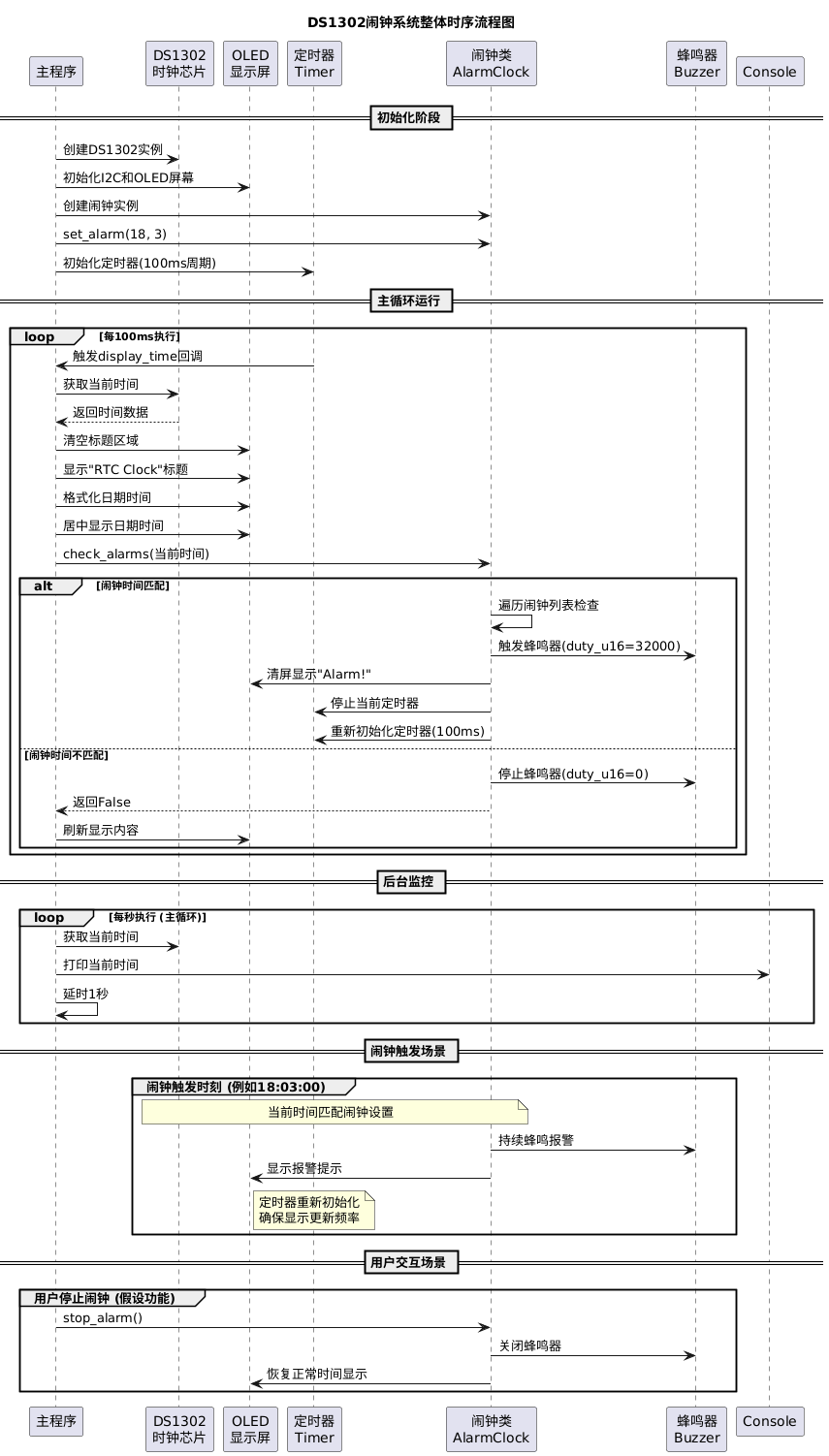
AlarmClock custom‑class handles alarm adding, deleting and triggering logic. When wall‑clock time matches any stored alarm entry, buzzer activates and OLED shows alert text. Method descriptions are shown below:
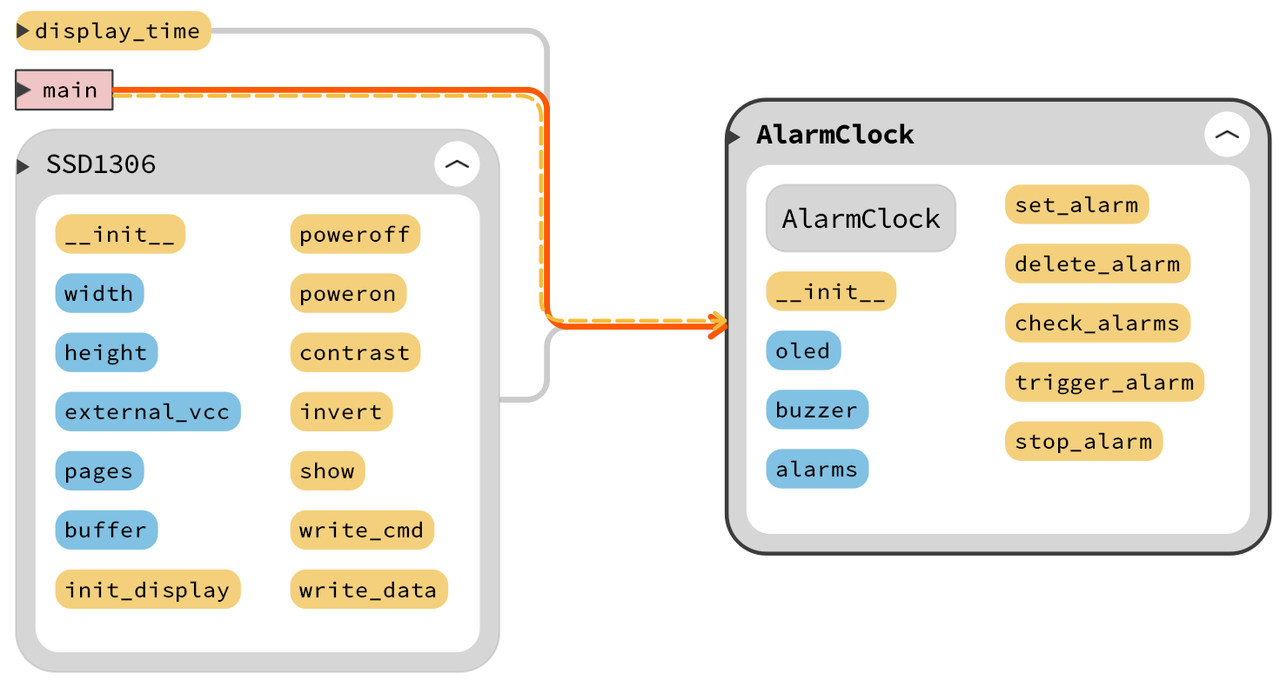
__init__ constructor method Store OLED reference, initialize buzzer PWM peripheral, initialize empty alarm list self.alarms = [] for holding multiple alarm time tuples.
set_alarm method Validate hour (0‑23) and minute (0‑59) input range, append (hours, minutes) tuple to alarm list.
delete_alarm method Remove target alarm tuple from list. Catch ValueError exception if alarm entry is absent and print hint text.
check_alarms method Compare hour‑minute components of current time with every alarm entry. On match condition, trigger buzzer, draw alert message on OLED and return True; return False when no alarm matches.
Program workflow: instantiate DS1302 and AlarmClock objects. Configure software timer with 100 ms period to repeatedly execute display_time. Inside display_time, fetch time from DS1302, refresh OLED showing title “RTC Clock”, date and time string, invoke alarm_clock.check_alarms():
- When time matches configured alarm: buzzer turns on, OLED prints “Alarm!”.
- When no match occurs: buzzer is muted by setting PWM duty‑cycle to zero.
Main loop reads DS1302 time every second and prints formatted HH:MM:SS string to serial terminal.
Overall timing‑sequence diagram:
Important pre‑flash step: synchronize external DS1302 RTC time with PC host time.
Run command mpremote rtc --set to synchronize Raspberry Pi Pico internal RTC with PC system time:
Without this step: RP2040 on‑chip RTC loses time information after power‑cycle (no VBAT backup battery). After power‑on it resets to default timestamp like 2021‑01‑01 00:00:00. If this wrong timestamp gets written to DS1302, whole alarm‑clock system runs on incorrect time and alarm function fails completely.
Open REPL and input following statements to copy internal RTC timestamp to external DS1302 chip:
from machine import Pin, RTC
from ds1302 import DS1302
rtc = RTC()
year, month, day, weekday, hour, minute, second, _ = rtc.datetime()
ds1302 = DS1302(clk=Pin(10), dio=Pin(11), cs=Pin(12))
ds1302.date_time([year, month, day, weekday, hour, minute, second])
After executing above commands, exit REPL session and execute mpremote reset to reboot hardware, guaranteeing time configuration takes full effect.
Flash firmware and open serial terminal:
Serial terminal continuously outputs current time, OLED screen refreshes synchronously:
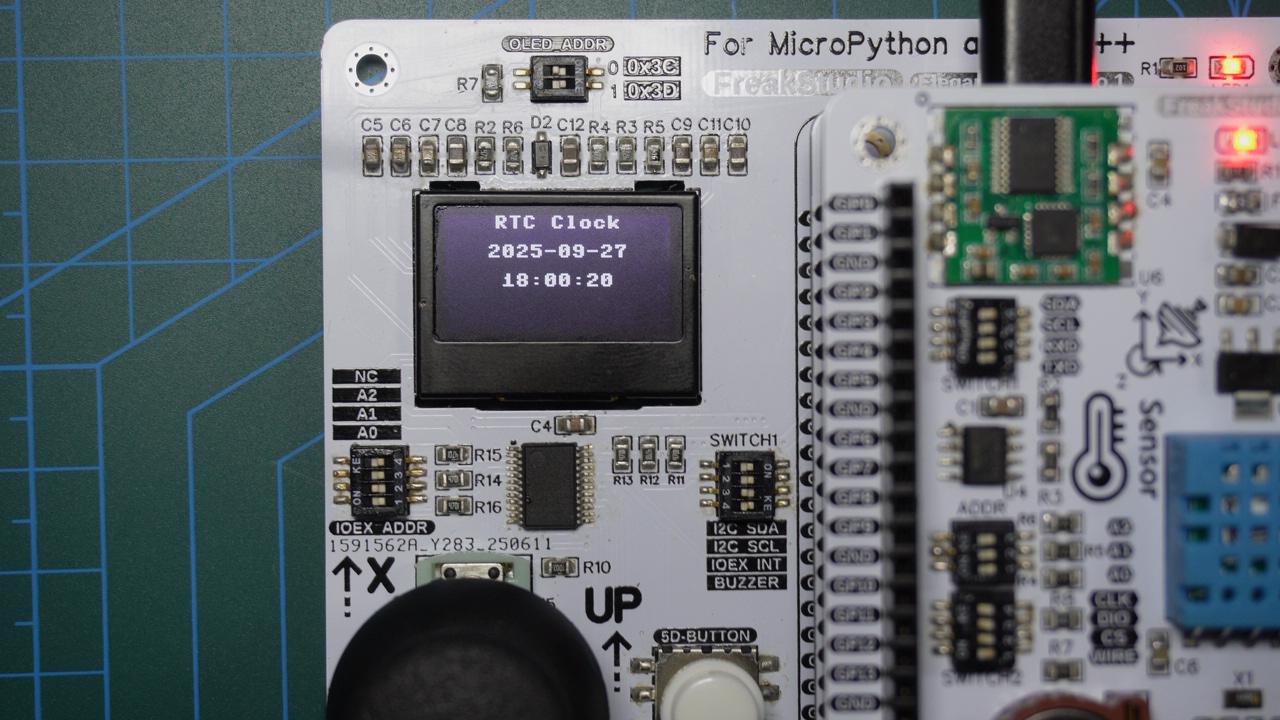
When alarm time arrives, buzzer beeps intermittently and OLED shows alarm prompt message: