



No More Memorizing IPs: DNS Principle & Workflow Explained
It explains DNS domain‑name system fundamentals and resolution workflow.

DNS Protocol
- DNS Protocol Introduction
DNS (Domain Name System) is a critical Internet service. It implements mapping between domain names and IP addresses and forms a distributed database. This service enables users to access the Internet conveniently without remembering numeric IP addresses which machines read directly. Every computer on the Internet is assigned a unique identifier known as an IP address. However, IP addresses consist of digits and are hard for humans to memorize. Therefore, domain names are commonly used to visit websites. For instance, the domain name www.st.com.cn can be used to open STMicroelectronics official website.
- DNS Protocol Workflow
The DNS workflow is shown below:
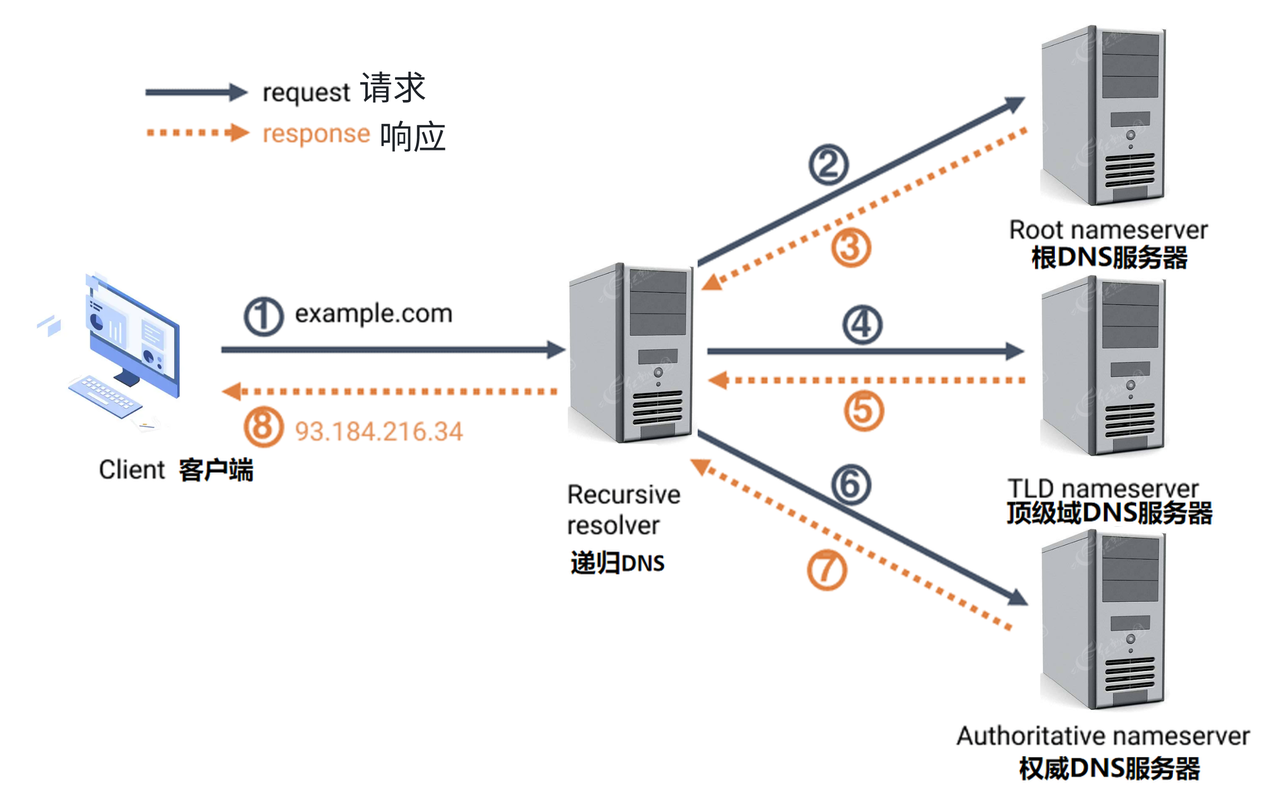
DNS protocol workflow, recursive query from domain‑name lookup to IP‑address resolution
User device initiates query When a user enters www.example.com in the browser and presses enter, the browser sends a DNS query request to the local DNS resolver (usually provided by ISP) to obtain the IP address of www.example.com.
Local DNS resolver lookup The local DNS resolver checks its cache for the cached IP address of www.example.com. If no cached record exists, it starts a recursive query.
Recursive query procedure
Root DNS Server The local DNS resolver first sends a request to the root DNS server. The root DNS server will not return the IP address of www.example.com directly, but it knows the address of the DNS server responsible for the .com top‑level domain. The root DNS server replies with the address of the .com top‑level‑domain DNS server.
Top‑Level Domain DNS Server Next, the local DNS resolver sends a request to the .com top‑level‑domain DNS server. This server knows the address of the authoritative DNS server for example.com. The top‑level‑domain DNS server returns the address of the authoritative DNS server for example.com.
Authoritative DNS Server Finally, the local DNS resolver sends a request to the authoritative DNS server of example.com. The authoritative DNS server holds the genuine DNS records for www.example.com. The authoritative DNS server returns the IP address of www.example.com, for example 93.184.216.34.
Cache and response The local DNS resolver caches the IP address of www.example.com for a certain period, so future requests for the same domain name can get faster replies. The resolver sends the IP address 93.184.216.34 back to the user‑side device.
User device accesses website Now the user browser obtains 93.184.216.34, the IP address of www.example.com. It sends an HTTP request to the target server using this IP address to load web content.
Well‑known public DNS servers:
114DNS IPv4 114.114.114.114 and 114.114.115.115
Alibaba DNS IPv4 223.5.5.5 and 223.6.6.6
Google Public DNS IPv4 8.8.8.8 and 8.8.4.4