



MicroPython Raspberry Pi Pico WDT Practical Guide: From API to Built‑in Watchdog Experiments
Practical guide for Raspberry Pi Pico WDT under MicroPython, covering API usage and built‑in watchdog test example.
- Software control methods
1.1 Constructor method of machine.WDT
The constructor for the machine.WDT class is shown below:
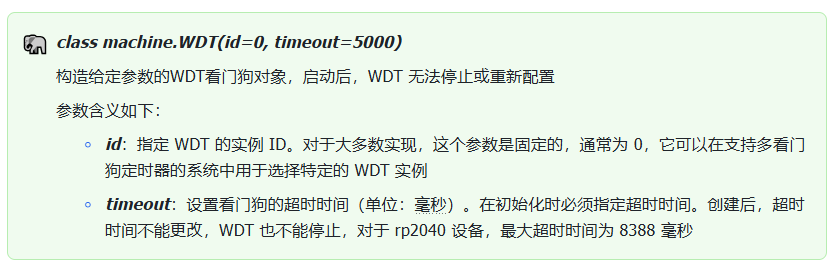
class machine.WDT(id=0, timeout=5000)
Construct a WDT watchdog‑timer object with given parameters. Once started, the WDT cannot be stopped or re‑configured.
Parameter descriptions:
1.2 Other methods of machine.WDT
Other methods available for the machine.WDT class:

- Built‑in watchdog experiment
In the code below, a WDT object is created with a 4‑second timeout. Note: Do not set the timeout value below approximately 2 seconds. An overly short timeout will trigger continuous device resets after the watchdog activates, which prevents firmware flashing and remote connections.
The system will perform a reboot if the feed() method is not invoked within 4 seconds. The program then enters a loop lasting around 30 seconds. On each iteration, it prints the current test timestamp, delays for 3 seconds, and calls feed() to feed the watchdog and avoid WDT timeout. After ten iterations, the loop exits and feeding stops. The device will reset shortly afterwards.
The source code can be found inside the provided resource package under elegance‑devkit v1\Demo\52 WDG_Hardware.
Sample code:
# Python env   : MicroPython v1.23.0
# -*- coding: utf-8 -*-
# @Time    : 2024/8/15 3:12 PM
# @Author  : Li Qingshui
# @File    : main.py
# @Description : WDT watchdog timer test, using Pico built‑in watchdog peripheral
# ======================================== Import related modules ========================================
# Import hardware‑related modules
from machine import WDT
# Import time‑related modules
import time
# ======================================== Global variables ============================================
# ======================================== Function definitions ============================================
# ======================================== Custom classes ============================================
# ======================================== Initialization ==========================================
# 3‑second power‑on stabilization delay
time.sleep(3)
# Print debug information
print("FreakStudio : Built‑in Watchdog Timer Test")
# Initialize watchdog object
# Set watchdog timeout to 4000 ms (4 seconds)
wdt = WDT(timeout=4000)
# ======================================== Main program ===========================================
# Feed the watchdog ten times inside loop
for i in range(10):
    # Print debug message
    print("FreakStudio : Run Test in {} seconds".format(i))
    # Delay 3 seconds
    time.sleep(3)
    # Feed the watchdog
    wdt.feed()
# After roughly 37 seconds runtime, watchdog times out and triggers reboot
print("FreakStudio : Watchdog Timer Timeout, Restarting...")
Overall timing‑sequence diagram for this test:
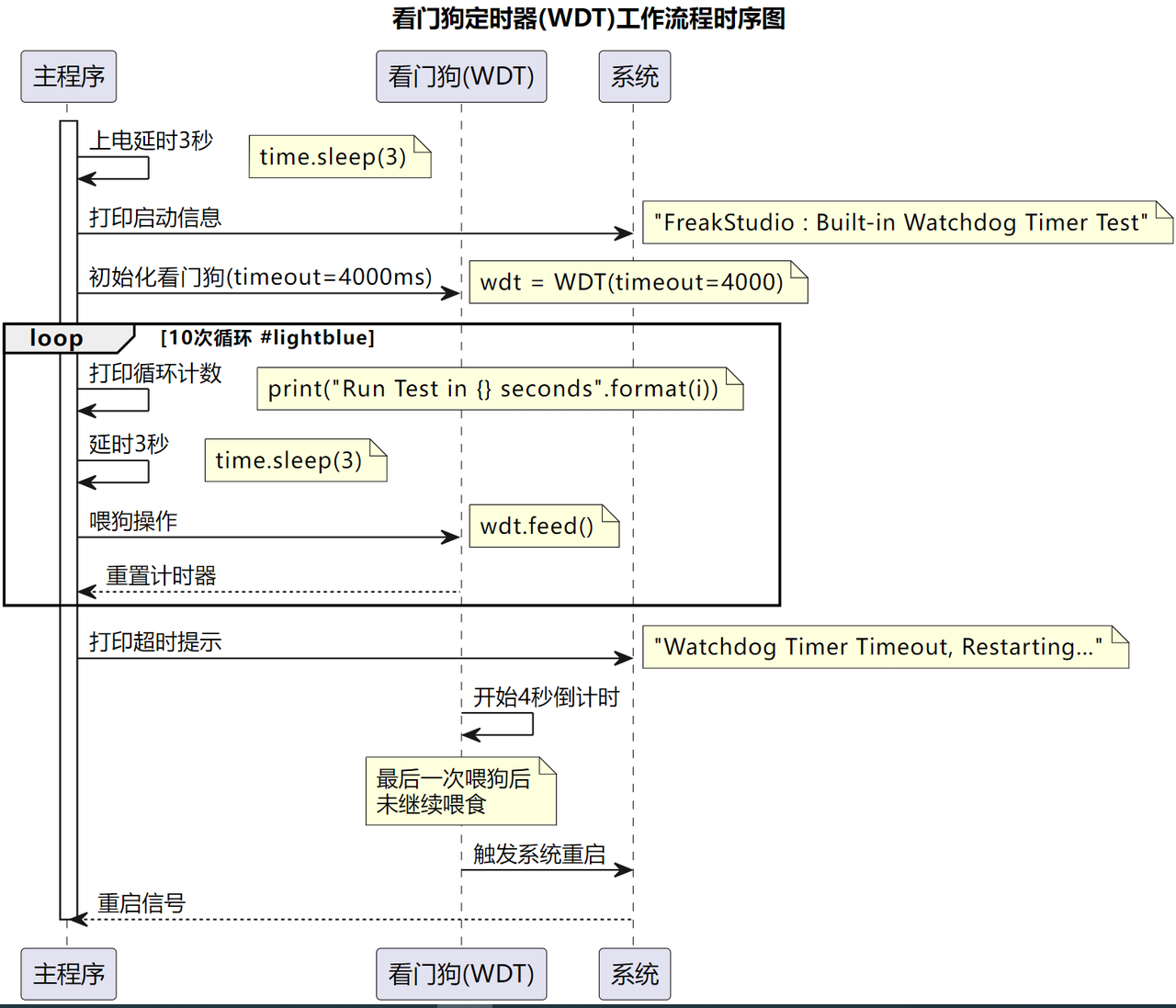
Flash the firmware, open the terminal and connect to Raspberry Pi Pico via mpremote. The output is shown below:
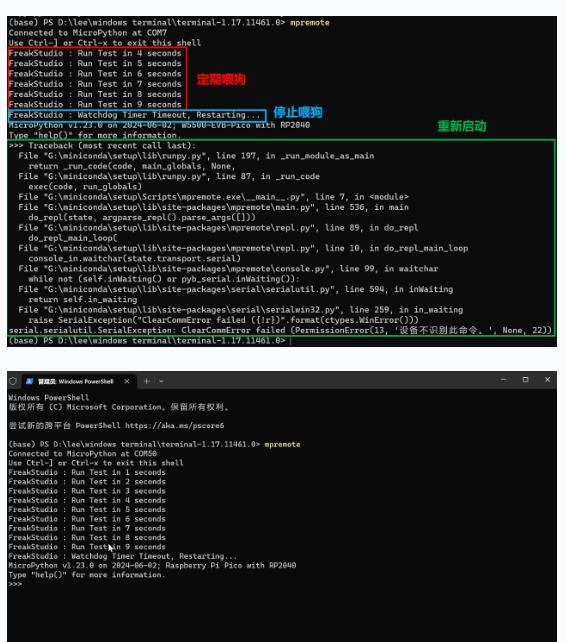
You can observe that after stopping the feed‑dog operations, the watchdog timer expires and restarts the device.