



HTTP Protocol Explained: How Browsers Communicate With Servers
It covers HTTP message formats, request‑response model and browser‑server communication principles.

HTTP Protocol
- HTTP Protocol Working Principle and Message Structure
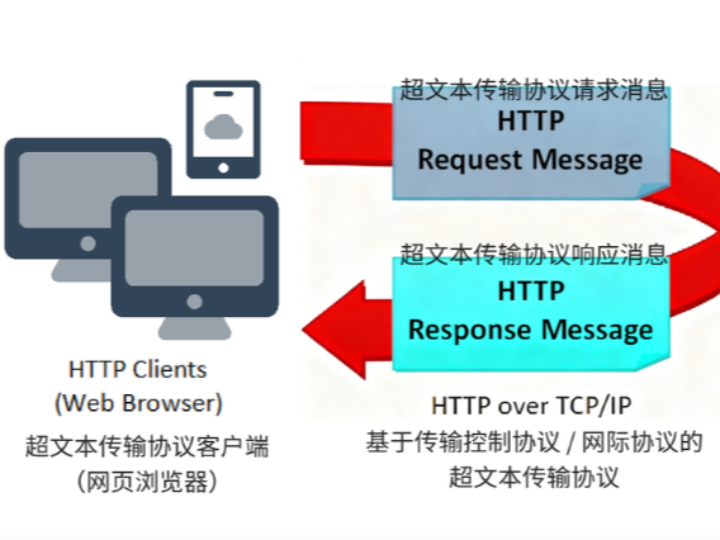
HTTP (Hypertext Transfer Protocol) is a protocol used to transmit and receive hypertext such as web pages over the Internet. It is an application‑layer protocol running on the application layer of the TCP/IP protocol stack. HTTP defines the communication pattern between clients (typically browsers) and servers. Data exchange takes the form of requests and responses: the client sends an HTTP request message to the server; the server processes the incoming request and returns a response back to the client.
HTTP working principle: request‑response interaction mechanism between client and server
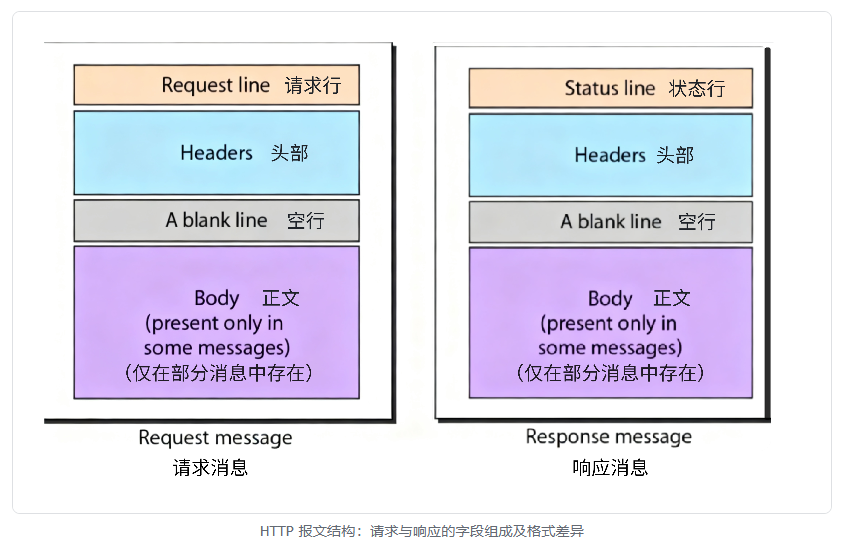
The structures of HTTP request messages and response messages are shown below:
- HTTP Request Message
An HTTP request message is the data format used when a client (browser for example) sends a request to a server. It consists of a request line, request headers, and an optional request body.
Request Line It contains three parts.
Method Specifies the operation type of the request, e.g. GET, POST, PUT, DELETE.
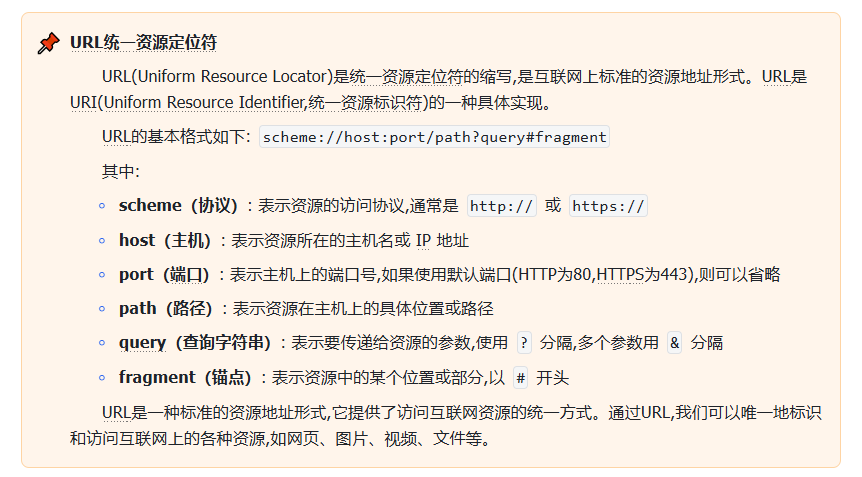
Request‑URI Specifies the path or URL of the target resource. A URL (Uniform Resource Identifier) is the string used in an HTTP request to locate the requested resource. URIs can be absolute or relative.
HTTP Version Specifies which HTTP protocol version is used, e.g. HTTP/1.1.
Request Headers Request headers carry supplementary information about the request and the client. Each header follows the format <Header‑Name>: <Header‑Value>. Common request headers include:
Host Specifies the hostname and port number of the server, e.g. Host: www.example.com.
User‑Agent Provides information about the client software issuing the request, e.g. User‑Agent: Mozilla/5.0.
Accept Declares media types the client can process, e.g. Accept: text/html.
Accept‑Language Lists languages accepted by the client, e.g. Accept‑Language: en‑US.
Request Body The request body transports data for certain HTTP methods such as POST and PUT. It is optional and usually empty for GET requests. Its content format is defined by the Content‑Type request header.
Common HTTP request methods:
GET Requests the specified resource, normally for data retrieval. Request body is empty.
POST Submits data to the target resource, commonly used for form submission or file upload. Carries data inside request body.
PUT Updates an existing resource or creates a new resource. Carries data inside request body.
DELETE Deletes the specified resource.
HEAD Similar to GET, but only fetches response headers without returning the response body.
OPTIONS Queries which HTTP methods the server supports.
- HTTP Response Message
An HTTP response message is the format used by servers to return request results to clients. It consists of three parts: status line, response headers and response body.
Status Line It contains three parts.
HTTP Version Specifies the HTTP protocol version, e.g. HTTP/1.1.
Status Code A three‑digit numeric code indicating how the server processed the request, e.g. 200, 404.
Reason Phrase Short textual description for the status code, e.g. OK, Not Found.
Response Headers Response headers deliver additional information from the server, including resource type, server type, content length, cache control and more. They also adopt key‑value pairs in <Header‑Name>: <Header‑Value> format.
Response Body The response body holds the actual data returned to the client. Its format is defined by the Content‑Type response header and its length is given by Content‑Length. It can contain HTML pages, JSON data, images and other content.
Common categories of HTTP status codes:
1xx Informational Informational status codes, meaning request has been received and processing continues. Example: 100 Continue.
2xx Success Request processed successfully. Examples: 200 OK for successful request, 201 Created for successful resource creation.
3xx Redirection Further actions required to complete the request. Examples: 301 Moved Permanently for permanent resource relocation, 302 Found for temporary relocation.
4xx Client Error Errors originating from the client‑side request. Examples: 400 Bad Request for invalid request, 404 Not Found when target resource cannot be located.
5xx Server Error Server failed to fulfill a valid request. Examples: 500 Internal Server Error, 502 Bad Gateway.
- HTTP Protocol Features and Versions
HTTP supports Cookies, small pieces of data stored on the client side, allowing servers to track user sessions and personalized settings.
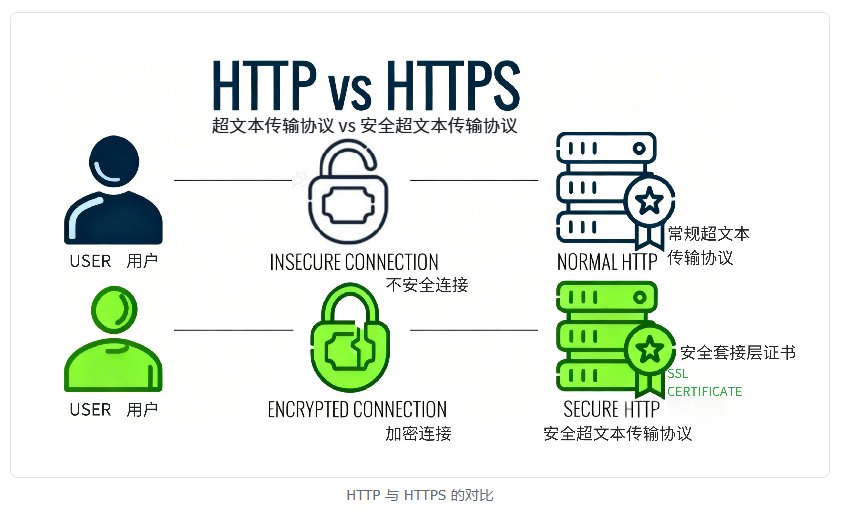
HTTP itself provides no encryption, so transmitted data may be eavesdropped or tampered with. For higher security, HTTPS is adopted, which adds data encryption via SSL/TLS on top of HTTP.
HTTP keeps evolving alongside Internet development. The mainstream version is HTTP/2, which brings multiplexing, header compression and other improvements based on HTTP/1.1 to boost web page loading speed and overall performance.
HTTP/1.0 Early HTTP version supporting basic request‑response logic. Each request‑response pair requires an independent connection.
HTTP/1.1 Introduces persistent connections (connection reuse) and pipelining allowing multiple requests over one connection. Reduces overhead for connection setup and teardown.
HTTP/2 Implements binary framing, multiplexing and header compression for better performance and efficiency.
HTTP/3 Built upon the QUIC protocol, improving connection establishment speed and data transmission reliability.
- HTML Markup Language
HTML (HyperText Markup Language) is a markup language for building and designing web pages. It defines web‑page structure and content. Tags such as <div>, <h1>, <p> describe placement and styling of text, images, hyperlinks and other multimedia elements on the page. When you enter a URL such as www.example.com inside a browser, the browser sends an HTTP request to the server. The server replies with a response containing HTML content. The browser parses the HTML and renders the finished webpage for users.
HTML and web request workflow: technical chain from URL input to webpage rendering
Simply put, HTML defines webpage content and structure, while HTTP handles transmission of that content between client and server.
A standard HTML document includes these components:
<!DOCTYPE html> <!-- Document type declaration -->
<html lang="en"> <!-- HTML document root -->
  <head> <!-- Document header -->
    <meta charset="UTF-8"> <!-- Character set -->
    <meta name="viewport" content="width=device-width, initial-scale=1.0"> <!-- Responsive design -->
    <title>Document Title</title> <!-- Webpage title -->
  </head>
  <body> <!-- Main page content -->
    <!-- Content goes here -->
  </body>
</html>
Fundamental tags:
<!DOCTYPE html> Declares HTML5 document type and guides browser rendering.
<html> Root element wrapping the entire HTML document.
<head> Document header holding metadata: page title, meta tags, links to CSS files and more.
<body> Document body containing visible webpage content.
Common tags include heading tags, paragraph‑text formatting, hyperlinks‑images, lists, tables and forms.
Heading tags
<h1>Heading 1</h1>
<h2>Heading 2</h2>
<h3>Heading 3</h3>
<h4>Heading 4</h4>
<h5>Heading 5</h5>
<h6>Heading 6</h6>
Paragraph and text formatting
<p>This is a paragraph.</p>
<b>Bold text</b>
<i>Italic text</i>
<strong>Important text</strong>
<em>Emphasized text</em>
Links and images
<a href="https://www.example.com">Click here to visit Example.com</a>
<img src="image.jpg" alt="Alternative description">
Lists
<!-- Unordered list -->
<ul>
  <li>Item 1</li>
  <li>Item 2</li>
  <li>Item 3</li>
</ul>
<!-- Ordered list -->
<ol>
  <li>First item</li>
  <li>Second item</li>
  <li>Third item</li>
</ol>
Tables
<table>
  <thead>
    <tr>
      <th>Header 1</th>
      <th>Header 2</th>
    </tr>
  </thead>
  <tbody>
    <tr>
      <td>Cell 1</td>
      <td>Cell 2</td>
    </tr>
    <tr>
      <td>Cell 3</td>
      <td>Cell 4</td>
    </tr>
  </tbody>
</table>
Forms
<form action="/submit" method="post">
  <label for="name">Name:</label>
  <input type="text" id="name" name="name">
  <label for="email">E‑mail:</label>
  <input type="email" id="email" name="email">
  <input type="submit" value="Submit">
</form>
HTML elements support attributes which supply extra metadata or control element display behavior. Frequently‑used attributes:
id: Unique identifier for an element.
class: Defines element class name for CSS styling or JavaScript operations.
style: Inline style definitions.
href: Target URL for hyperlinks.
src: Source URL for images.
alt: Alternative text for images.
HTML comments are written in the following format:
<!-- This is a comment -->
Various controls improve webpage interactivity and user experience, such as text input boxes, multi‑line text areas, buttons, selectors, file upload controls, range sliders and others.
Input Receives user input including text, numeric values and passwords.
<input type="text" placeholder="Enter your name">
Select Drop‑down list Provides drop‑down options for users.
<select>
  <option value="option1">Option 1</option>
  <option value="option2">Option 2</option>
  <option value="option3">Option 3</option>
</select>
Checkbox Lets users select one or multiple options.
<input type="checkbox" name="option1" value="option1"> Option 1<br>
<input type="checkbox" name="option2" value="option2"> Option 2<br>
<input type="checkbox" name="option3" value="option3"> Option 3
Radio button Allows users to pick exactly one choice from multiple options.
<input type="radio" name="gender" value="male"> Male<br>
<input type="radio" name="gender" value="female"> Female
Button Triggers specific actions such as form submission or click‑event callbacks.
<button type="button" onclick="alert('Hello, World!')">Click me</button>
File upload Enables users to upload files to the server.
<input type="file" name="file_upload">
Date picker Provides date‑selection UI.
<input type="date" name="user_date">
Range slider Lets users select numeric values within a defined range.
<input type="range" name="volume" min="0" max="100">
In real‑world applications, besides regular form widgets and basic UI components, combinations of HTML, CSS and JavaScript can implement complex custom components, for example:
Progress bar (<progress> tag)
Rating components (usually built with custom CSS and JavaScript)
Pop‑up dialogs (modal windows or JavaScript libraries)
HTML defines the base structure of these controls, CSS handles visual styling, and JavaScript adds interactive behaviors. For instance, CSS animations can beautify progress‑bar visuals, and JavaScript can build dynamic rating systems.