



Finally Understood! Mount Filesystem on EEPROM: MicroPython Makes AT24C256 Read‑Write Files Like SD‑
Run filesystem on AT24C256 EEPROM under MicroPython, treat EEPROM just like SD card for file operations.
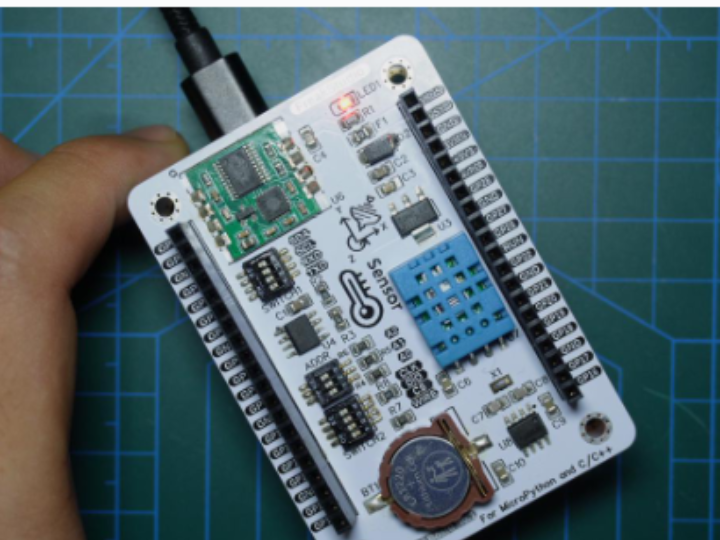
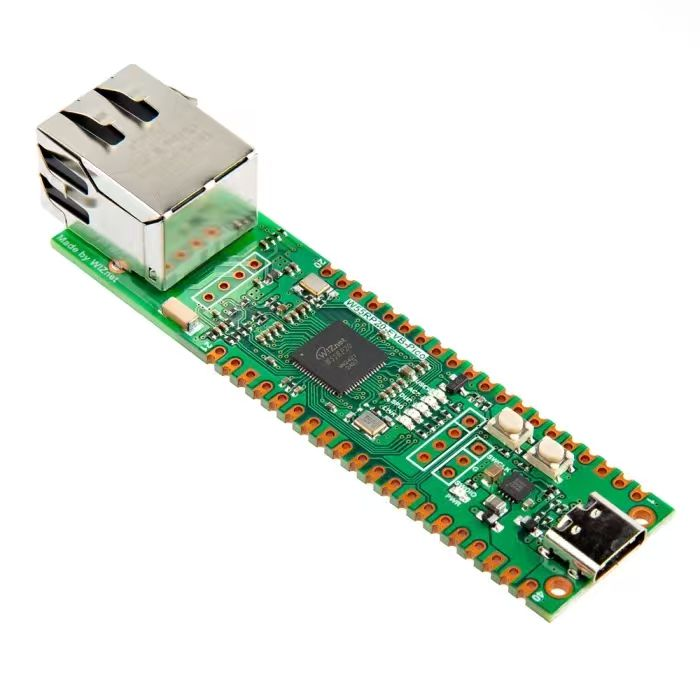
1.Pre‑experiment preparation
We need to plug the Elegance‑Devkit‑Environment‑Storage‑Collection board into the Elegance‑Devkit‑Universal‑Compatible‑Expansion‑Board. At the same time turn on the SCL and SDA options of the SWITCH1 DIP switch on the Elegance‑Devkit‑Environment‑Storage‑Collection board.
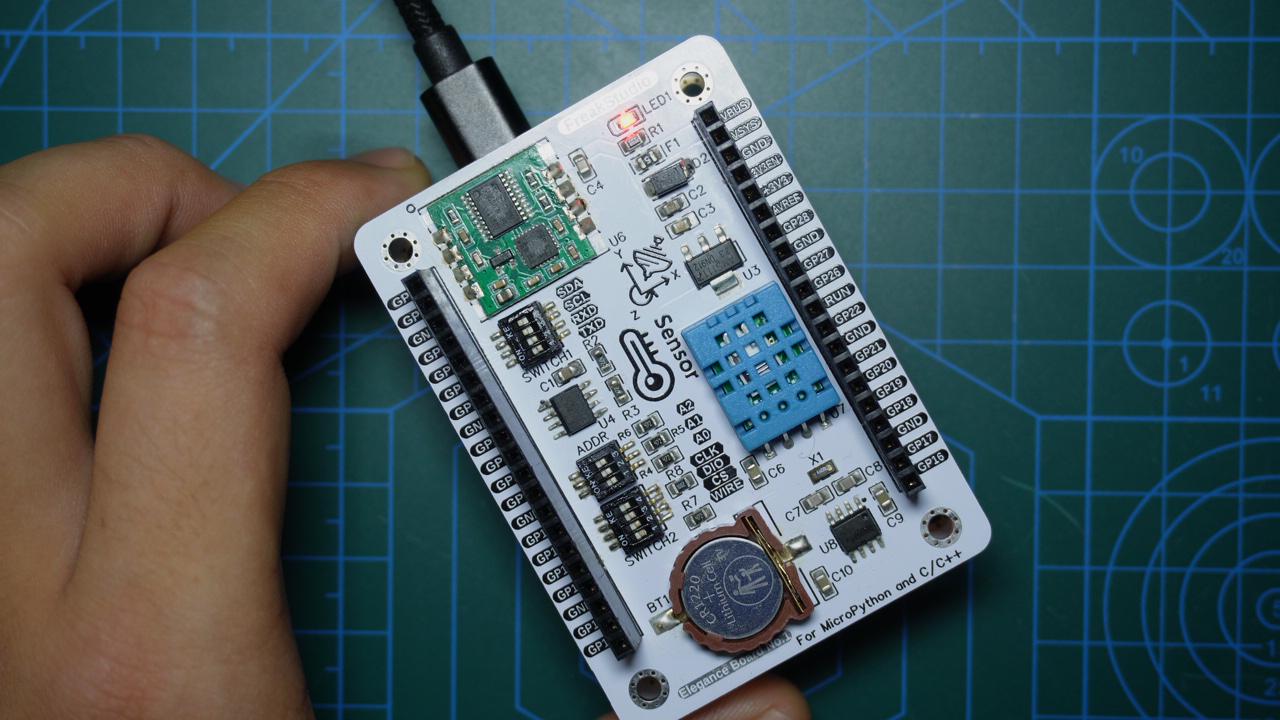
You can set its address by adjusting the ADDR DIP switch on the Elegance‑Devkit‑Environment‑Storage‑Collection board.
By default, pins A2, A1 and A0 on the external EEPROM chip AT24C256 are all connected to GND (internal pull‑down).
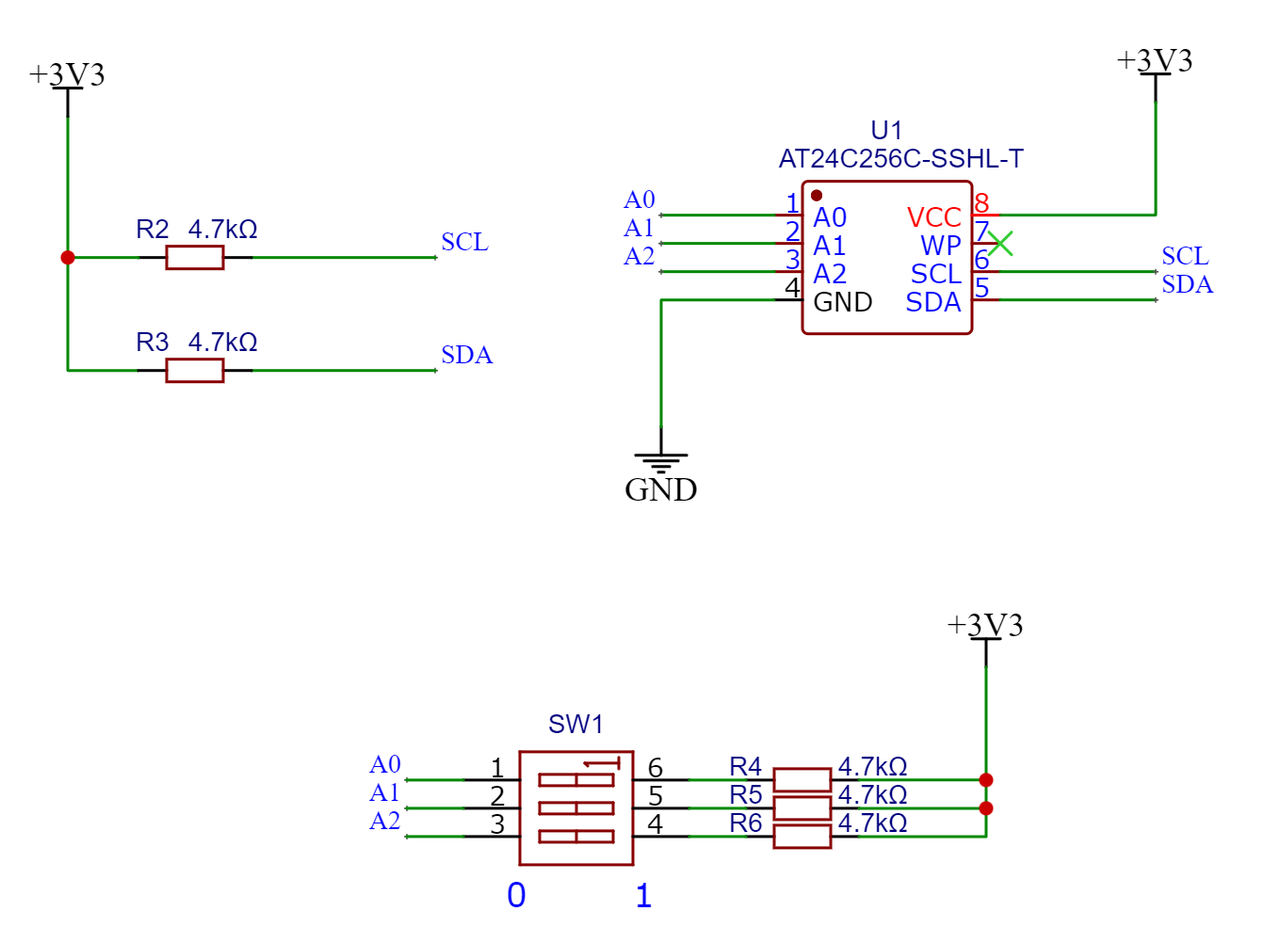
Device address calculation:
$$ \text{Device address} = 0b1010 , 0000 + (0 \times 2^2 + 0 \times 2^1 + 0 \times 2^0) = 0x50 $$
Connection table between Raspberry‑Pi Pico and external EEPROM module (AT24C256 chip):

Put the custom AT24CXX class we implemented when explaining the I2C protocol into a separate Python file named at24cxx.py. Sample code is shown below:
# Python env   : MicroPython v1.23.0
# -*- coding: utf-8 -*-
# @Time    : 2024/9/27 10:42 PM
# @Author  : Li Qingshui
# @File    : at24cxx.py
# @Description : Implements AT24CXX class for operating AT24CXX series EEPROM
# ======================================== Import related modules =========================================
# Hardware‑related modules
from machine import I2C, Pin
# Time‑related modules
import time
# ======================================== Global variables ============================================
# ======================================== Function definitions ============================================
# ======================================== Custom classes ============================================
class AT24CXX:
    """
    AT24CXX class for operating AT24CXX‑series EEPROM chips over I2C bus, supporting multiple EEPROM capacities.
    This class encapsulates I2C communication for AT24CXX EEPROM. It provides functions for byte/page write, read, and data erase.
    Supports EEPROM chips of different capacities (32KiB to 64KiB) via I2C read‑write operations.

    Attributes:
        i2c (I2C): I2C instance for communicating with AT24CXX chip.
        chip_size (int): EEPROM chip size, default 64KiB.
        addr (int): I2C device address, default 0x50.
        max_address (int): Maximum accessible device address, determined by EEPROM capacity.

    Methods:
        __init__(self, i2c, chip_size=AT24C512, addr=0x50):
            Initialize AT24CXX class instance.
        write_byte(self, address: int, data: int) -> None:
            Write one byte to specified address.
        read_byte(self, address: int) -> int:
            Read one byte from specified address.
        write_page(self, address: int, data: bytes) -> None:
            Write one page of data to specified address.
        read_sequence(self, start_address: int, length: int) -> bytes:
            Sequentially read data of specified length.
    """

    # Capacity constants for AT24CXX‑series EEPROM
    AT24C32 = 4096      # 4KiB
    AT24C64 = 8192      # 8KiB
    AT24C128 = 16384    # 16KiB
    AT24C256 = 32768    # 32KiB
    AT24C512 = 65536    # 64KiB

    def __init__(self, i2c, chip_size: int = AT24C512, addr: int = 0x50) -> None:
        """
        Initialize AT24CXX class instance.

        Args:
            i2c (I2C): I2C instance used to communicate with AT24CXX chip.
            chip_size (int): EEPROM chip size, default AT24C512.
            addr (int): I2C device address, default 0x50.

        Raises:
            ValueError: Raised if chip_size is not within supported range.
        """
        if chip_size not in [AT24CXX.AT24C32, AT24CXX.AT24C64, AT24CXX.AT24C128,
                             AT24CXX.AT24C256, AT24CXX.AT24C512]:
            raise ValueError("chip_size is not in the range of AT24CXX")
        self.i2c = i2c
        self.chip_size = chip_size
        self.addr = addr
        # Maximum address accessible by user
        self.max_address = chip_size - 1

    def write_byte(self, address: int, data: int) -> None:
        """
        Write one byte to specified address.

        Args:
            address (int): Target write address.
            data (int): Byte data to write, range 0‑255.

        Raises:
            ValueError: Raised if address or data is out of valid range.
        """
        if address < 0 or address > self.max_address:
            raise ValueError('address is out of range')
        if data < 0 or data > 255:
            raise ValueError("data must be 0‑255")
        # Write one‑byte data starting from memory address over 16‑bit memory address
        self.i2c.writeto_mem(self.addr, address, bytes([data]), addrsize=16)
        # 5 ms delay for EEPROM write completion
        time.sleep_ms(5)

    def read_byte(self, address: int) -> int:
        """
        Read one byte from specified address.

        Args:
            address (int): Target read address.

        Returns:
            int: Byte value read from EEPROM.

        Raises:
            ValueError: Raised if address is out of valid range.
        """
        if address < 0 or address > self.max_address:
            raise ValueError("address is out of range")
        value_read = self.i2c.readfrom_mem(self.addr, address, 1, addrsize=16)
        # Convert bytearray to integer using big‑endian
        return int.from_bytes(value_read, "big")

    def write_page(self, address: int, data: bytes) -> None:
        """
        Write one page of data starting from specified address, handles cross‑page writing.

        Args:
            address (int): Starting write address.
            data (bytes): Data bytes to write, no strict maximum length limit.

        Raises:
            ValueError: Raised if address, data length or data value exceeds valid range.
        """
        if address < 0 or address > self.max_address:
            raise ValueError("address is out of range")
        for i in data:
            if i < 0 or i > 255:
                raise ValueError("data must be 0‑255")
        if address + len(data) > self.max_address:
            raise ValueError("data exceeds maximum limit")
        # Calculate boundary of starting page
        page_boundary = (address // 64 + 1) * 64
        # Write data in segments
        while data:
            write_length = min(len(data), page_boundary - address)
            self.i2c.writeto_mem(self.addr, address, data[:write_length], addrsize=16)
            time.sleep_ms(5)
            address += write_length
            data = data[write_length:]
            page_boundary = (address // 64 + 1) * 64
            if address > self.max_address:
                raise ValueError("address exceeds maximum limit")

    def read_sequence(self, start_address: int, length: int) -> bytes:
        """
        Sequentially read data of given length. AT24CXX supports cross‑page read without page‑boundary restriction.

        Args:
            start_address (int): Starting read address.
            length (int): Number of bytes to read.

        Returns:
            bytes: Read‑out data bytes.

        Raises:
            ValueError: Raised if start address plus length exceeds valid memory range.
        """
        if start_address < 0 or (start_address + length) > self.max_address:
            raise ValueError("address is out of range")
        return self.i2c.readfrom_mem(self.addr, start_address, length, addrsize=16)
# ======================================== Initialization ==========================================
# ======================================== Main program ===========================================
2.Implementation of EEPROM block‑device class
Here we define the EEPROMBlockDevice class to manage EEPROM devices such as AT24C256. It provides block read‑write and device‑control functions. Similar to the RAM‑based block‑device class RAMBlockDev, this class inherits from abstract base class AbstractBlockDev, and implements block read, write, control and erase methods.
Sample code is shown below:
# Python env   : MicroPython v1.23.0
# -*- coding: utf-8 -*-
# @Time    : 2024/9/27 10:45 PM
# @Author  : Li Qingshui
# @File    : eeprom_block_dev.py
# @Description : Defines EEPROMBlockDevice class with block read‑write and device control functions
# ======================================== Import related modules =========================================
# Import abstract base class for virtual‑filesystem block device
from AbstractBlockDevInterface import AbstractBlockDev
# Import AT24CXX driver class
from at24cxx import AT24CXX
# ======================================== Global variables ============================================
# POSIX‑compliant error‑code constants
ENOERR = 0       # Operation success
EPERM = 1        # Operation not permitted
EIO = 5          # I/O error
ENODEV = 19      # Invalid device / block number
EROFS = 30       # Read‑only filesystem
EINVAL = 22      # Invalid argument
ENOSPC = 28      # No storage space left
# ======================================== Function definitions ============================================
# ======================================== Custom classes ============================================
# Custom EEPROM block‑device class inherited from abstract block‑device base class
class EEPROMBlockDevice(AbstractBlockDev):
    """
    EEPROM block‑device implementation class conforming to MicroPython filesystem block‑device interface.
    Implements AbstractBlockDev abstract interface. Uses EEPROM memory to emulate block device,
    which can be mounted with MicroPython filesystems such as FAT and LittleFS.

    Attributes:
        eeprom (AT24CXX): AT24CXX‑series EEPROM driver instance
        block_size (int): Block size in bytes, must be integer multiple of EEPROM page size
        _is_initialized (bool): Device initialization status flag

    Methods:
        __init__(self, eeprom, block_size=512):
            Initialize EEPROM block‑device instance
        readblocks(self, block_num, buf, offset=0):
            Read data from specified block into buffer
        writeblocks(self, block_num, buf, offset=0):
            Write data or erase specified block
        ioctl(self, op, arg):
            Device control operations
        _validate_block_num(self, block_num):
            Validate block‑number validity (internal method)

    Note:
        - Block size must be integer multiple of EEPROM page size (usually multiple of 8)
        - Blocks shall be pre‑erased to 0xFF before write operations
        - All methods are thread‑safe
    """
    def __init__(self, eeprom: AT24CXX, block_size: int = 512) -> None:
        """
        Initialize EEPROM block‑device instance.

        Args:
            eeprom (AT24CXX): AT24CXX‑series EEPROM driver instance
            block_size (int, optional): Block size in bytes, must align with filesystem block size. Default 512,
                                        and must be integer multiple of EEPROM page size.

        Returns:
            None

        Raises:
            ValueError (EINVAL): If block‑size requirement not satisfied
            OSError (ENODEV): If passed EEPROM instance is invalid
        """
        # AT24CXX page size is multiple of 8 bytes, so block_size must also be multiple of 8
        if block_size % 8 != 0 or block_size < 8:
            raise ValueError(EINVAL, "Block size must be multiple of 8")
        if not isinstance(eeprom, AT24CXX):
            raise OSError(ENODEV, "Invalid EEPROM device")
        super().__init__()
        self.eeprom = eeprom
        self.block_size = block_size
        self.device_open = False

    def readblocks(self, block_num: int, buf: bytearray, offset: int = 0) -> None:
        """
        Read data from specified block into buffer.

        Args:
            block_num (int): Starting block index (zero‑based).
            buf (bytearray): Destination buffer, length shall not exceed block size.
            offset (int, optional): Intra‑block offset (not implemented for now). Default 0.

        Returns:
            None

        Raises:
            ValueError (EINVAL): offset is non‑zero or buffer length invalid
            OSError (EIO): Read operation failure
            OSError (ENODEV): Invalid block number
        """
        if offset != 0:
            raise ValueError(EINVAL, "Offset must be 0")
        if len(buf) > self.block_size:
            raise ValueError(EINVAL, "Buffer length exceeds block size")
        if block_num < 0 or block_num >= self.ioctl(4, 0):
            raise OSError(ENODEV, "Invalid block number")
        try:
            addr = block_num * self.block_size
            buf[:] = self.eeprom.read_sequence(addr, len(buf))
        except Exception as e:
            raise OSError(EIO, "Read failed") from e

    def writeblocks(self, block_num: int, buf: bytearray | None, offset: int = 0) -> None:
        """
        Write data to specified block or erase target block.

        Args:
            block_num (int): Target block index (zero‑based).
            buf (bytearray | None): Data to write; None means perform block erase.
            offset (int, optional): Intra‑block offset (not implemented for now). Default 0.

        Returns:
            None

        Raises:
            ValueError (EINVAL): Invalid input arguments
            OSError (EIO): Write operation failure
            OSError (ENOSPC): Block index out of range
        """
        if offset != 0:
            raise ValueError(EINVAL, "Offset must be 0")
        length = len(buf)
        if length > self.block_size:
            raise ValueError(EINVAL, "Buffer too large")
        if block_num < 0 or block_num >= self.ioctl(4, 0):
            raise OSError(ENOSPC, "Block number out of range")
        try:
            addr = block_num * self.block_size
            if buf is None:
                self.eeprom.write_page(addr, bytearray([0xFF]*self.block_size))
            else:
                self.eeprom.write_page(addr, buf)
        except Exception as e:
            raise OSError(EIO, "Write failed") from e

    def ioctl(self, op: int, arg: int) -> int | None:
        """
        Device control operations.

        Args:
            op (int): Operation code (use constants from AbstractBlockDev):
                - IOCTL_INIT (1): Initialize device
                - IOCTL_SHUTDOWN (2): Close device
                - IOCTL_SYNC (3): Data synchronization
                - IOCTL_BLK_COUNT (4): Get total block count
                - IOCTL_BLK_SIZE (5): Get block size
                - IOCTL_BLK_ERASE (6): Erase specified block
            arg (int): Argument for selected operation:
                - IOCTL_BLK_ERASE: Block number to erase
                - Ignored for other operations

        Returns:
            int | None:
                - IOCTL_BLK_COUNT: Returns total block count
                - IOCTL_BLK_SIZE: Returns block‑size value
                - Returns 0 for successful other operations
                - Returns None for unsupported op‑codes

        Raises:
            ValueError: Invalid block‑number for erase operation
            NotImplementedError: Unsupported ioctl operation code
        """
        if op == AbstractBlockDev.IOCTL_INIT:
            self.device_open = True
            return ENOERR
        elif op == AbstractBlockDev.IOCTL_SHUTDOWN:
            self.device_open = False
            return ENOERR
        elif op == AbstractBlockDev.IOCTL_SYNC:
            return ENOERR
        elif op == AbstractBlockDev.IOCTL_BLK_COUNT:
            return self.eeprom.chip_size // self.block_size
        elif op == AbstractBlockDev.IOCTL_BLK_SIZE:
            return self.block_size
        elif op == AbstractBlockDev.IOCTL_BLK_ERASE:
            block_num = arg
            if block_num < 0 or block_num >= self.eeprom.chip_size // self.block_size:
                raise ValueError(EINVAL, "Invalid block number")
            self.writeblocks(arg, None)
            return ENOERR
        else:
            raise NotImplementedError("Unsupported ioctl operation")
# ======================================== Initialization ==========================================
# ======================================== Main program ===========================================
The EEPROMBlockDevice class contains the following methods:
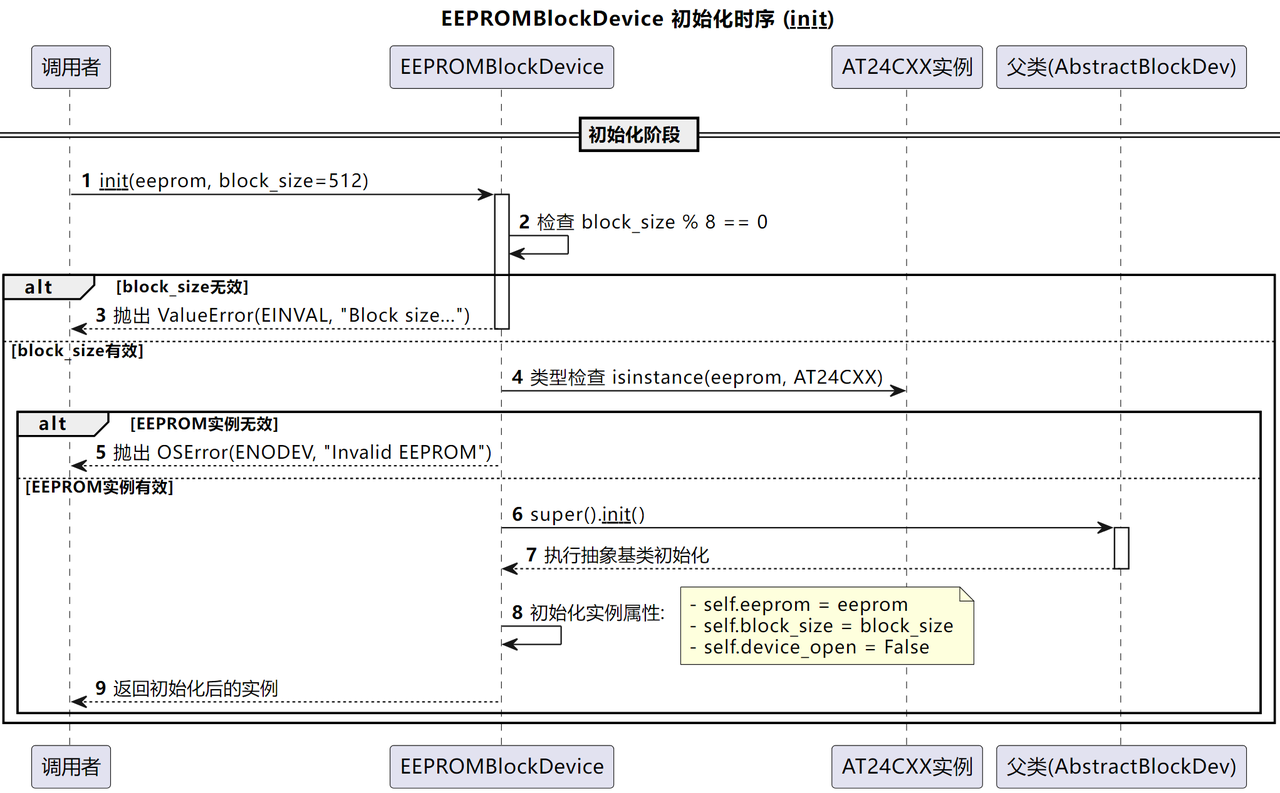
init method: This method firstly verifies that block_size satisfies AT24CXX EEPROM page‑size requirement (must be integer multiple of 8 bytes). Then validates that the passed eeprom object is an AT24CXX instance. After validation completes, it calls parent class AbstractBlockDev initializer, stores eeprom instance, assigns block_size, and marks device status as closed (device_open = False).
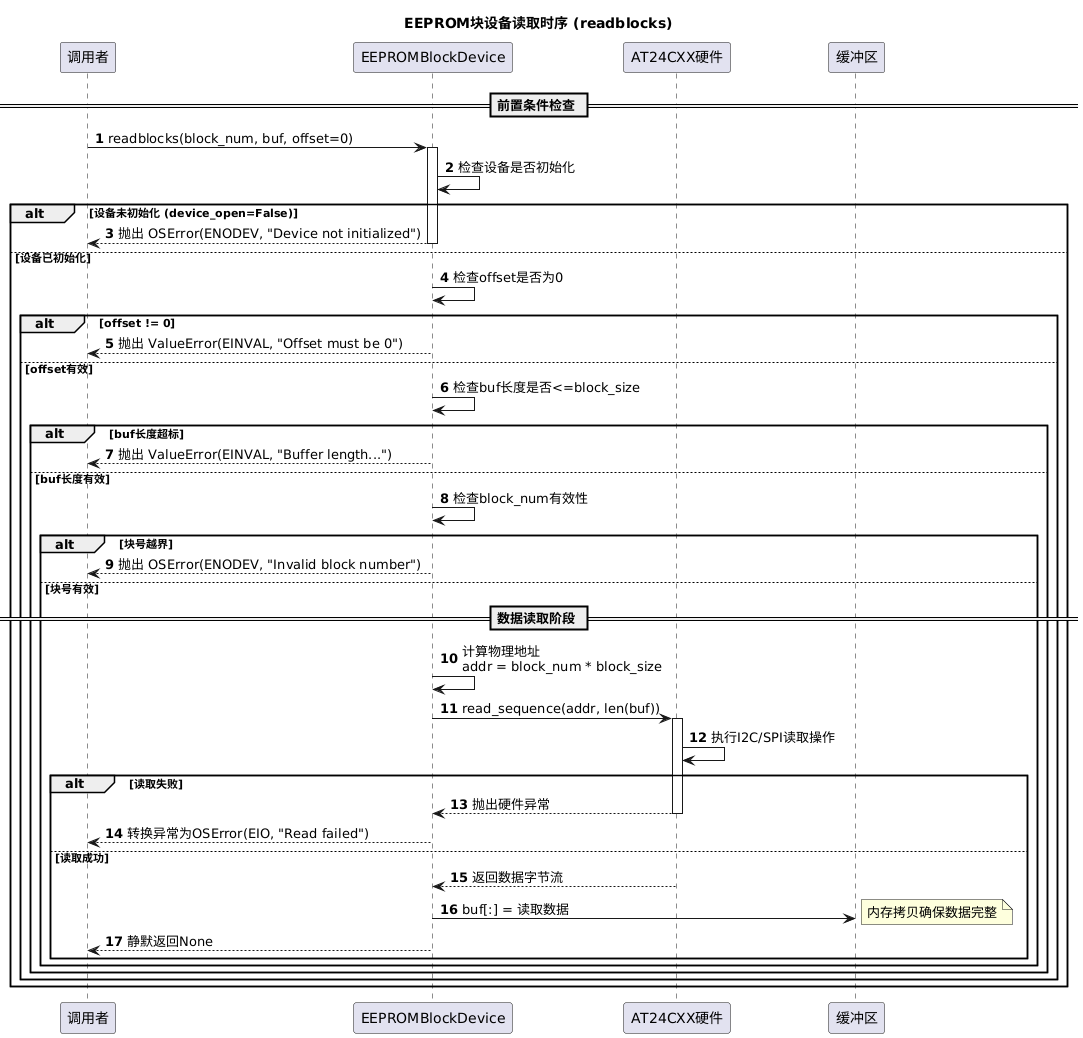
readblocks method: Reads data from target block into buffer. It calculates starting EEPROM memory address: addr = block_num * block_size. Then invokes self.eeprom.read_sequence(addr, len(buf)) to fetch data and fill buf for upper‑layer filesystem access. Note that AT24CXX supports cross‑page read without page‑boundary restrictions.
writeblocks method: Writes data to specified block or performs block erase. It calculates starting block address: addr = block_num * block_size. If buf equals None, execute erase operation (fill block with all‑0xFF bytes); otherwise write buf content into EEPROM. Note cross‑page write logic has already been handled inside AT24CXX driver, so no extra page‑split handling is required here even when block size exceeds physical EEPROM page size.
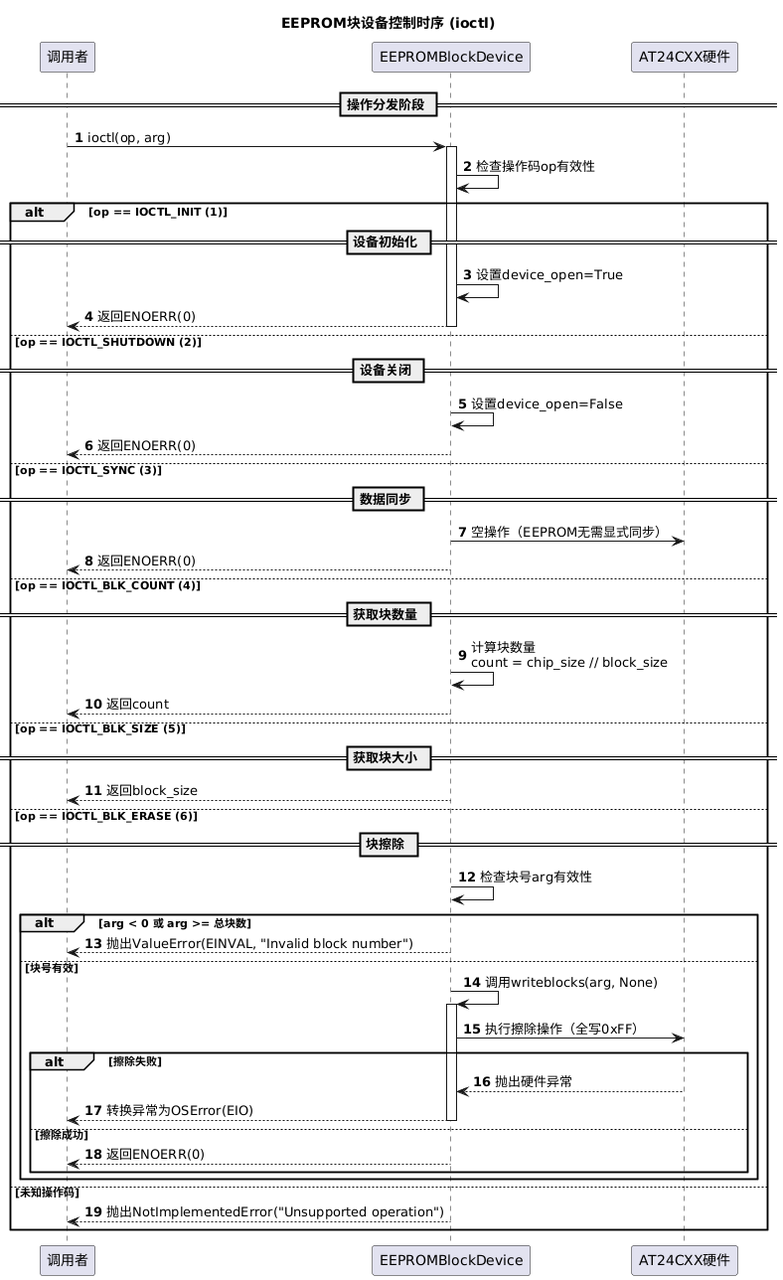
ioctl method: Executes block‑device control commands including initialization, synchronization and status query. Its behaviors are similar to RAMBlockDev. For block‑erase requests, it creates buffer filled with 0xFF and writes it to target block.
3.Application experiment
Source code can be found inside resource‑package path elegance‑devkit v1\Demo\74 FileSys_EEPROM.
Inside main program, we create and mount FAT filesystem on AT24C256 EEPROM chip for file data storage and reading. It also tests filesystem read‑write functions and EEPROM power‑fail data retention capability.
Sample code:
# Python env   : MicroPython v1.23.0
# -*- coding: utf-8 -*-
# @Time    : 2024/9/27 10:43 PM
# @Author  : Li Qingshui
# @File    : mian.py
# @Description : Virtual filesystem usage, mount filesystem on external EEPROM chip
# ======================================== Import related modules =========================================
# Hardware‑related modules
from machine import I2C, Pin
# Time‑related modules
import time
# Import AT24CXX class
from at24cxx import AT24CXX
# Import custom EEPROM block‑device class
from eeprom_block_dev import EEPROMBlockDevice
# Import virtual filesystem module
import vfs
# Import file‑operation module
import os
# Import JSON module
import json
# ======================================== Global variables ============================================
# AT24C256 chip address 0x50, binary 0b1010000
# High 7 bits for address, lowest bit for read‑write control: 0 for write, 1 for read
AT24C256_ADDRESS = 0x50
# ======================================== Function definitions ============================================
# ======================================== Custom classes ============================================
# ======================================== Initialization ==========================================
# Power‑on delay 3s
time.sleep(3)
# Print debug log
print("FreakStudio: Mount the external EEPROM to the file system")
# Create hardware I2C instance, I2C0, 400KHz clock, SDA=Pin4, SCL=Pin5
i2c_at24c256 = I2C(id=0, sda=Pin(4), scl=Pin(5), freq=400000)
# Instantiate AT24C256 driver
at24c256 = AT24CXX(i2c_at24c256, AT24CXX.AT24C256, AT24C256_ADDRESS)
# Create block device using external EEPROM, block size 512 bytes
block_device = EEPROMBlockDevice(eeprom=at24c256, block_size=512)
# Format block device as FAT filesystem
vfs.VfsFat.mkfs(block_device)
# Mount block‑device to virtual‑filesystem path /eeprom
vfs.mount(block_device, '/eeprom')
# ======================================== Main program ===========================================
# List and print current directory contents
print("Directory contents :",os.listdir())
# Configuration data dictionary
config_data = {
    "micropython_version": "v1.23.0",
    "required_modules": ["machine", "time", "vfs", "os", "json"],
    "author": "leeqingshui",
    "company": "FreakStudio"
}
# Serialize dict to JSON string
json_data = json.dumps(config_data)
# Create config file and write JSON content
with open('/eeprom/config.json', 'w') as file:
    file.write(json_data)
print("Config file created.")
# Read‑back file content
try:
    with open('/eeprom/config.json', 'r') as file:
        content = file.read()
        print("Config file content:")
        print(content)
except OSError as e:
    print("Error reading file:", e)

print("Monitoring EEPROM power...")
# Loop detecting EEPROM power‑off event
while True:
    try:
        devices = i2c_at24c256.scan()
        if AT24C256_ADDRESS in devices:
            print("EEPROM is powered on.Waiting...")
        else:
            print("EEPROM is powered off.")
            break
        time.sleep(1)
    except Exception as e:
        print("Error scanning I2C devices:", e)
        time.sleep(1)

# After power‑off, wait for EEPROM re‑power‑up and read stored file
while True:
    devices = i2c_at24c256.scan()
    if AT24C256_ADDRESS in devices:
        print("EEPROM is powered on.")
        try:
            with open('/eeprom/config.json', 'r') as file:
                content = file.read()
                print("Config file content after power restoration:")
                print(content)
        except OSError as e:
            print("Error reading file after power restoration:", e)
        break
    time.sleep(1)
Workflow performed in this demo:
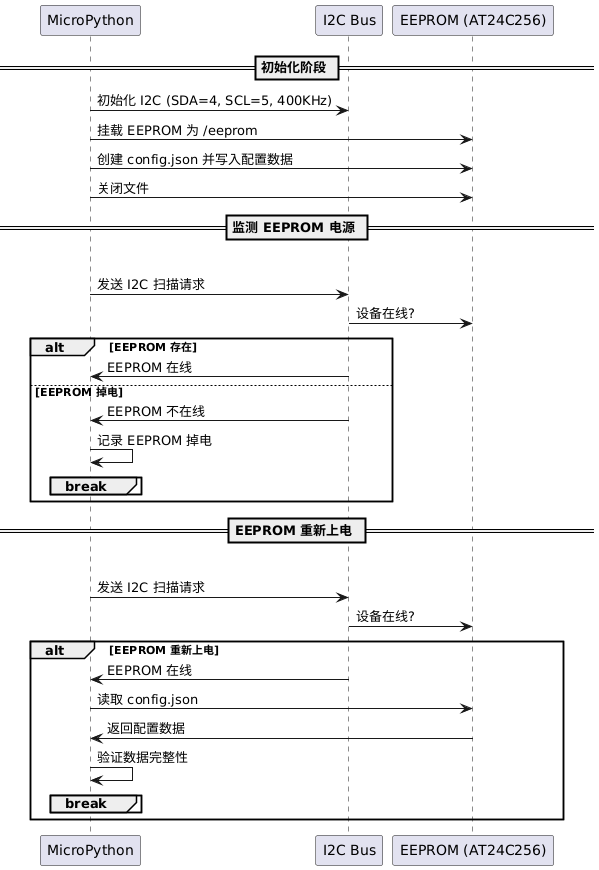
- Create block‑device instance from AT24C256 object with block size set to 512 bytes.
- Format block‑device into FAT filesystem and mount it at
/eepromvirtual path. - Define configuration dictionary, serialize to JSON string and write into
/eeprom/config.json. - Open config file, read and print its content.
- Enter infinite loop continuously monitoring EEPROM power status; exit loop once power‑off is detected.
- Enter second infinite loop scanning I2C bus. When EEPROM re‑power‑up is detected, open and read config file then terminate program.
Flash firmware and open serial terminal, output shown as below:
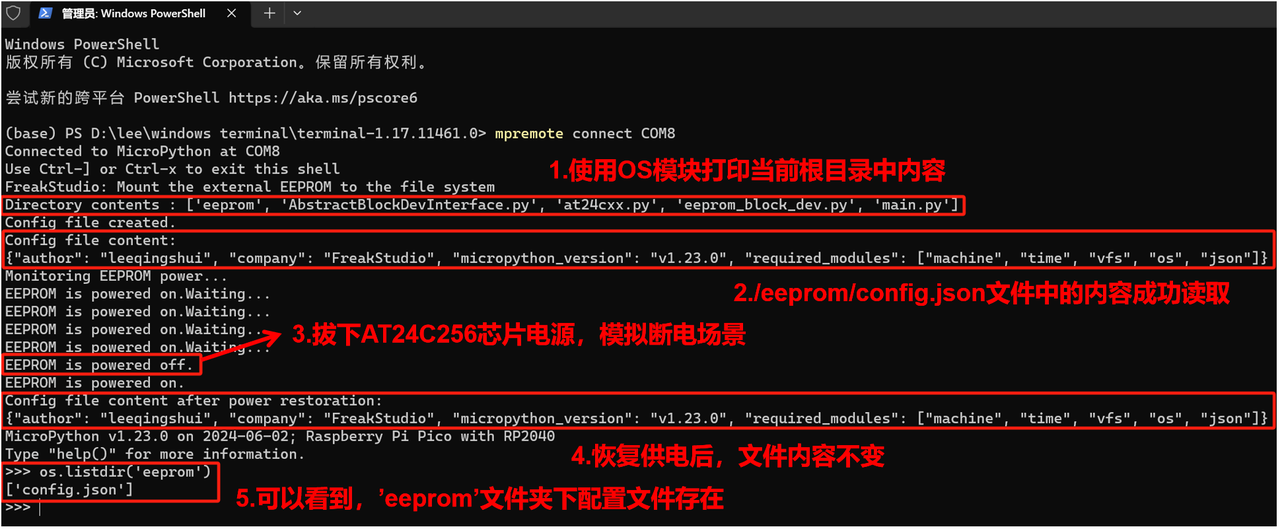
While terminal keeps printing EEPROM is powered on.Waiting..., unplug the Elegance‑Devkit‑Environment‑Storage‑Collection board to cut power supply. After short delay plug the board back for power‑up.
We can verify that filesystem read‑write and power‑fail data retention functions of EEPROM work correctly.
Use the following REPL command to test erase / delete function:
os.remove('eeprom/config.json')
This command deletes file config.json. Execute below command to list files under eeprom folder:
os.listdir('eeprom')
You can observe that target file has been removed.