This article covers MicroPython memory optimization tactics including frozen modules, .mpy, const, buffer reuse and garbage collection tuning.
COMPONENTS
PROJECT DESCRIPTION
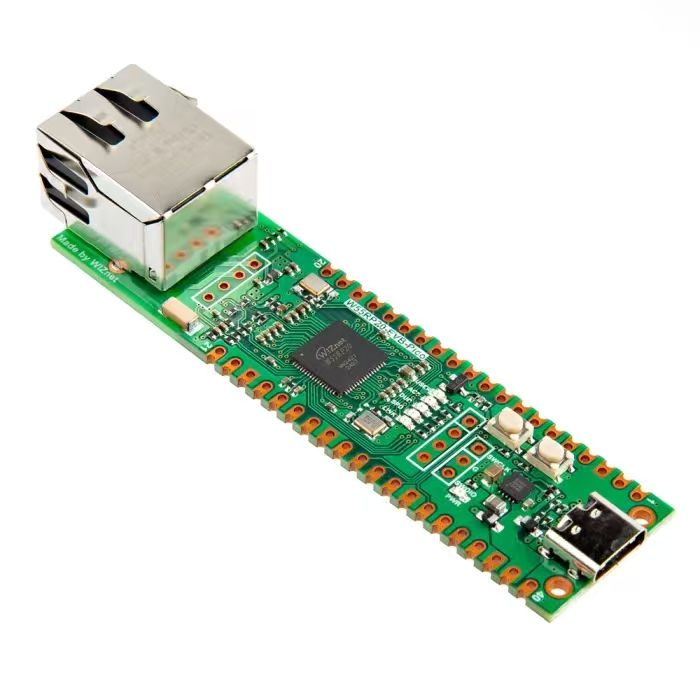
【Preliminary Note】The original hardware example in this article was written based on the RP2040. The actual hardware used in this hands-on demonstration features the W55RP20 as the main controller chip. The circuit logic and UF2 flashing operation principles are universally applicable, with only the main controller model differing. The original chip model mentioned in the circuit descriptions below is provided for reference purposes only.
Tweet:
1. Preliminary Concepts
The core application scenario of MicroPython is microcontrollers (such as Raspberry Pi Pico, ESP32, ESP8266), whose hardware resources differ by orders of magnitude from those of computers/servers — typically, the Random Access Memory is only tens to hundreds of KB, and the Flash storage memory is merely a few MB. Given that Python code is inherently dynamic and consumes a certain amount of memory resources during runtime, memory optimization is the key to ensuring stable program operation when using MicroPython on microcontrollers.This article elaborates on the memory optimization methods for MicroPython, in which the technical terms that are not easy for beginners to understand will be marked and explained. Meanwhile, test codes that can be run in REPL (MicroPython interactive command line) are provided for core knowledge points to help you verify while learning.
Before learning specific optimization methods, understanding the following core technical terms first will make the subsequent content easier to comprehend:
RAM (Random Access Memory): Also known as Random Access Memory, it is an area used by microcontrollers to temporarily store running code and data. It features fast read and write speeds, but data will be lost after power off, and its capacity is extremely small (the RAM of Raspberry Pi Pico is 264KB).
Flash: Also known as storage memory, it is the area used by microcontrollers to permanently store firmware, user code and data. It is characterized by non-volatile data after power-off, a larger capacity than RAM, but a slower read-write speed (the Flash of Raspberry Pi Pico is 2MB).
Bytecode: MicroPython does not directly execute the source code (. py files) written by humans. Instead, it first compiles the source code into an intermediate code (namely bytecode) that lies between source code and machine code, which is then executed by the MicroPython interpreter. Bytecode features a smaller size and higher execution efficiency.
Firmware: Low-level software burned into the microcontroller's Flash, which integrates core functions including the MicroPython interpreter and hardware drivers, serving as the foundation for MicroPython to run.
REPL: short for Read-Eval-Print Loop, is an interactive command-line tool for MicroPython (such as the Shell panel in Thonny and the interactive window of serial port tools), which allows users to input code line by line and execute it immediately. It is an essential tool for beginners to debug and test code.
SPI Bus: A serial peripheral interface, which is a common protocol for communication between microcontrollers and external devices (such as SD cards and sensors), featuring simple wiring and high transmission speed.
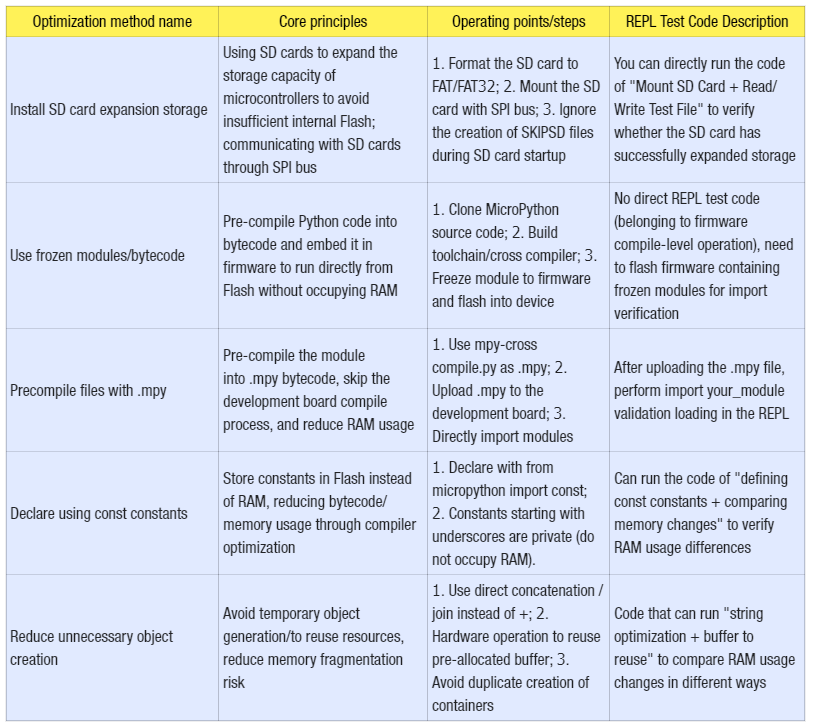
2. Optimization Methods
Optimization method name
Core principles
Operating points/steps
REPL Test Code Description
Install SD card expansion storage
Using SD cards to expand the storage capacity of microcontrollers to avoid insufficient internal Flash; communicating with SD cards through SPI bus
1. Format the SD card to FAT/FAT32; 2. Mount the SD card with SPI bus; 3. Ignore the creation of SKIPSD files during SD card startup
You can directly run the code of "Mount SD Card + Read/Write Test File" to verify whether the SD card has successfully expanded storage
Use frozen modules/bytecode
Pre-compile Python code into bytecode and embed it in firmware to run directly from Flash without occupying RAM
1. Clone MicroPython source code; 2. Build toolchain/cross compiler; 3. Freeze module to firmware and flash into device
No direct REPL test code (belonging to firmware compile-level operation), need to flash firmware containing frozen modules for import verification
Precompile files with .mpy
Pre-compile the module into .mpy bytecode, skip the development board compile process, and reduce RAM usage
1. Use mpy-cross compile.py as .mpy; 2. Upload .mpy to the development board; 3. Directly import modules
After uploading the .mpy file, perform import your_module validation loading in the REPL
Declare using const constants
Store constants in Flash instead of RAM, reducing bytecode/memory usage through compiler optimization
1. Declare with from micropython import const; 2. Constants starting with underscores are private (do not occupy RAM).
Can run the code of "defining const constants + comparing memory changes" to verify RAM usage differences
1. Use direct concatenation /join instead of +; 2. Hardware operation to reuse pre-allocated buffer; 3. Avoid duplicate creation of containers
Code that can run "string optimization + buffer to reuse" to compare RAM usage changes in different ways
2.1 Basic Concepts
Before learning specific optimization methods, understanding the following core technical terms first will make the subsequent content easier to comprehend:
RAM (Random Access Memory): Also known as Random Access Memory, it is an area used by microcontrollers to temporarily store running code and data. It features fast read and write speeds, but data will be lost after power off, and its capacity is extremely small (the RAM of Raspberry Pi Pico is 264KB).
Flash: Also known as storage memory, it is the area used by microcontrollers to permanently store firmware, user code and data. It is characterized by non-volatile data after power-off, a larger capacity than RAM, but a slower read-write speed (the Flash of Raspberry Pi Pico is 2MB).
Bytecode: MicroPython does not directly execute the source code (. py files) written by humans. Instead, it first compiles the source code into an intermediate code between source code and machine code (i. e., bytecode), which is then executed by the MicroPython interpreter. Bytecode features a smaller size and higher execution efficiency.
Firmware: Low-level software burned into the flash memory of a microcontroller, which integrates core functions such as the MicroPython interpreter and hardware drivers, serving as the foundation for MicroPython to operate.
REPL: short for Read-Eval-Print Loop, is an interactive command-line tool for MicroPython (such as the Shell panel in Thonny and the interactive window of serial port tools), which allows users to input code line by line and execute it immediately. It is an essential tool for beginners to debug and test code.
SPI Bus: A serial peripheral interface, which is a common protocol for communication between microcontrollers and external devices (such as SD cards and sensors), featuring simple wiring and high transmission speed.
2.2 Install the SD card
MicroPython-enabled development boards can expand memory by inserting an SD card. First, the card needs to be formatted to FAT/FAT32 format (a universal file system format supported by the vast majority of devices, and also a necessary format for MicroPython to recognize SD cards). SD cards are usually mounted via the SPI bus; after inserting the card, MicroPython will boot from the SD card. If there are boot. py and main. py files on the SD card, they will also be executed automatically during startup.
We can also boot from the internal flash while using the SD card to store data. In this case, you need to create a SKIPSD file in the root directory of the SD card. When the system detects this file on the SD card during boot, it will ignore the SD card and still boot from the internal Flash.
For the usage of MicroPython on SD cards, you can refer to the following tutorial:
In actual development, we usually have multiple. py files to store different pieces of code. The main. py file runs the core business process, and it references other. py files, modules or packages (such as classes for other sensors) via import statements to complete the entire task. Both the main. py file and other related files are typically located in the root directory of the development board's file system.
Loading modules and packages from Python files on the file system to store and run code has some significant limitations: these Python codes must be loaded and processed by the MicroPython interpreter, a process that consumes time and memory, and in some cases, these code files are too large to be loaded into Flash memory and processed by the MicroPython interpreter.The Frozen module and Frozen bytecode can compile Python code into native code/bytecode and store it together with the firmware, which helps to save memory. Once the code is frozen, MicroPython can load and interpret it quickly without consuming excessive memory and processing time.
2.3.1 Python Bytecode
MicroPython code is first compiled into bytecode, which is then executed by the interpreter. The bytecode of MicroPython is an intermediate language similar to assembly instructions: one MicroPython statement corresponds to several bytecode instructions, and the interpreter executes these bytecode instructions in sequence to complete the execution of the program.
The code is pre-compiled into bytecode, eliminating the need to compile MicroPython source code during loading. The bytecode can be executed directly from Flash without being copied to RAM. Similarly, any constant objects (such as strings, tuples, etc.) are also loaded from ROM. This frees up more memory for applications. On devices without a file system, this is the only way to load Python code.
2.3.2 Steps for Generating Freeze Module and Bytecode
A typical process for generating frozen modules and bytecode is as follows:
Clone the MicroPython source code repository
Obtain the (platform-specific) toolchain to build the firmware
Build a cross compiler
Place the modules to be frozen in the specified directory (depending on whether the modules are frozen as source code or bytecode)
Build the firmware. Specific commands may be required to build either type of Code Freezing
Flash the firmware into the device
2.3.3 Main Features of MicroPython Frozen Modules
The main features of MicroPython's frozen are as follows:
It can use a "manifest" file to list the Python files to be frozen into the firmware. The manifest file is a Python file containing a series of function calls, which can be written in the board definition, or you can create a separate manifest file to use with the existing board definition.
It can define dependencies on libraries from micropython-lib, Python files on the file system, as well as dependencies on other manifest files.
It allows users to create and manipulate various types of objects in Python, such as numbers, strings, lists, dictionaries, functions, modules and so on.
For how to use frozen modules and frozen bytecode, please refer to the tutorial:
Precompile the Python module into bytecode (also known as. mpy file, the precompiled bytecode file format of MicroPython, which is different from the. pyc file of standard Python), and then copy it to the development board. The advantage of this approach is that it can skip the precompile stage on the development board, thus avoiding the lack of RAM resources during this process. Unfortunately, this method still requires the development board to load the module into RAM.
Convert the Python module into a. c file, which is then compiled into the firmware itself. This retains the advantages of the aforementioned approach, plus the additional benefit of running the module from flash memory instead of loading it into RAM.
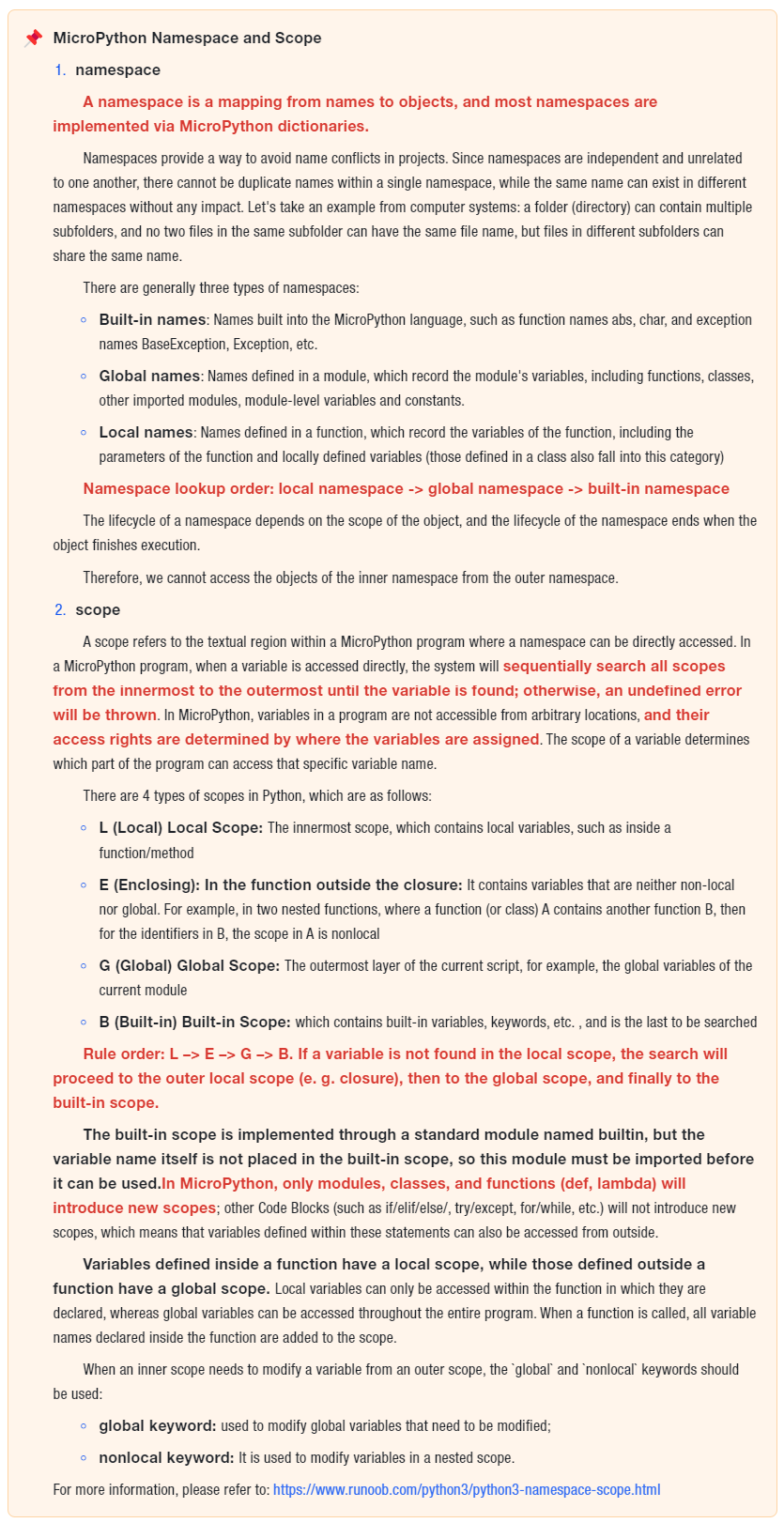
In MicroPython, all modules loaded into RAM are stored in sys. modules, sys. modules which is a global dictionary that is loaded into memory as soon as the Python program starts up. It is used to store the names and objects of all currently imported (loaded) modules, and acts as a cache during MicroPython's module lookup process to prevent duplicate module loading.
When a program imports a module, it first checks sys. modules for the presence of the module name; if it exists, the module name only needs to be added to the current module's Local namespace; if not, the program will search for the module file in the directories specified by sys. path by module name, load the module into memory once found, add it to the sys. modules dictionary, and finally add the module name to the current module's Local namespace.
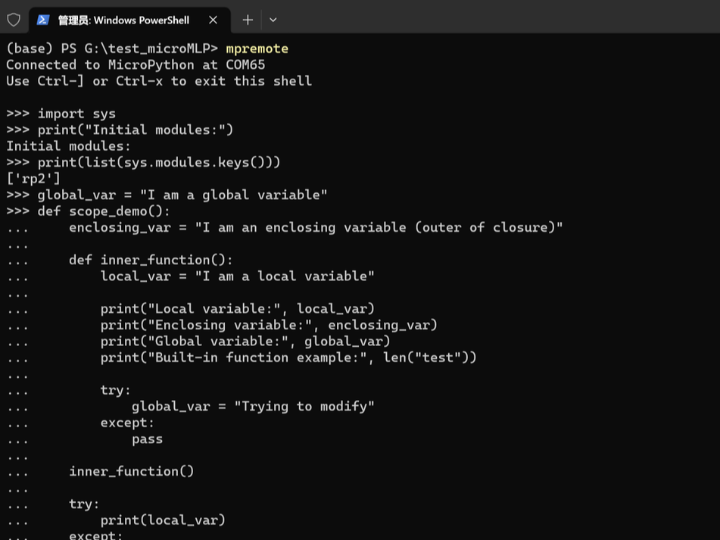
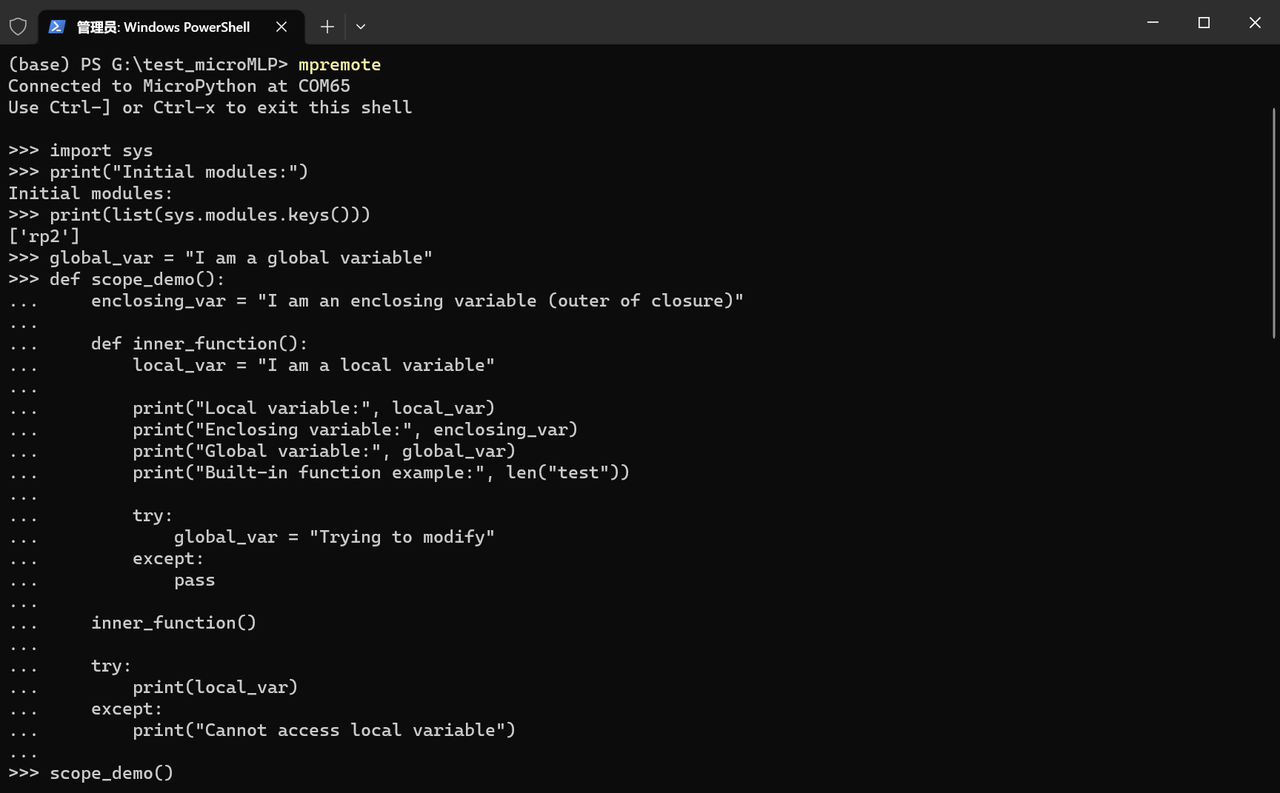
Next, we will conduct a test in the terminal's REPL:
import sys

# sys.modules显示当前已导入 (加载) 的所有模块名和模块对象
print("Initial modules:")
print(list(sys.modules.keys()))

# 定义全局变量
global_var = "I am a global variable"

# enclosing_var 闭包外层变量
# local_var 函数inner_function内部局部变量
# len 是内置函数
# 尝试修改全局变量global_var (不使用global会创建局部变量)
# 闭包外层无法访问内部局部变量
def scope_demo():
    enclosing_var = "I am an enclosing variable (outer of closure)"

    def inner_function():
        local_var = "I am a local variable"

        print("Local variable:", local_var)
        print("Enclosing variable:", enclosing_var)
        print("Global variable:", global_var)
        print("Built-in function example:", len("test"))

        try:
            global_var = "Trying to modify"
        except:
            pass

    inner_function()

    try:
        print(local_var)
    except:
        print("Cannot access local variable")

# 使用global修改全局变量
def modify_global():
    global global_var
    global_var = "Modified global variable"
    print("Inside function:", global_var)

# 多层嵌套中的nonlocal使用
# 内部middle()函数和inner()函数中修改嵌套作用域中的变量outer_var
def nonlocal_demo():
    outer_var = "Outer layer"

    def middle():
        nonlocal outer_var
        outer_var = "Modified by middle layer"

        def inner():
            nonlocal outer_var
            outer_var = "Modified by inner layer"

        inner()
        print("In middle:", outer_var)

    middle()
    print("In nonlocal_demo:", outer_var)

# 作用域演示
print("\n=== Scope Demonstration ===")
scope_demo()
print("Access in global scope:", global_var)

# 修改全局变量
print("\n=== Modify Global Variable ===")
modify_global()
print("In global scope:", global_var)

# nonlocal演示
print("\n=== nonlocal Demonstration ===")
nonlocal_demo()

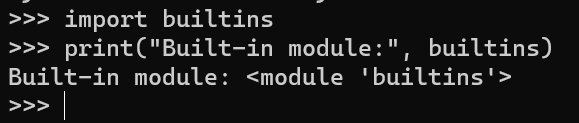
# 尝试访问内置作用域
import builtins
print("Built-in module:", builtins)
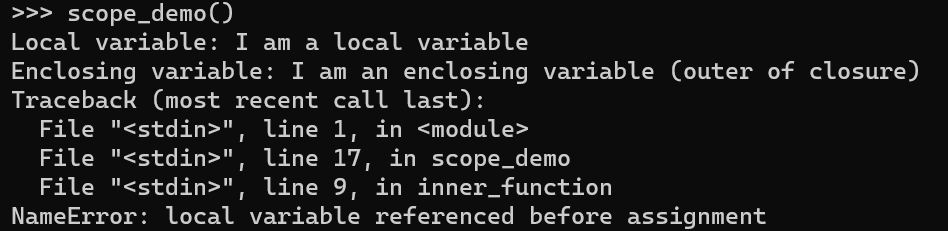
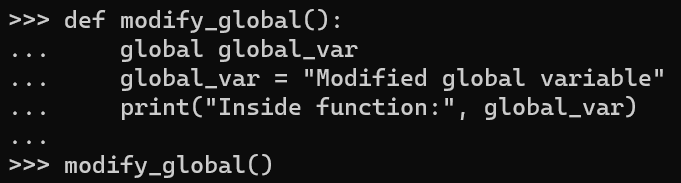
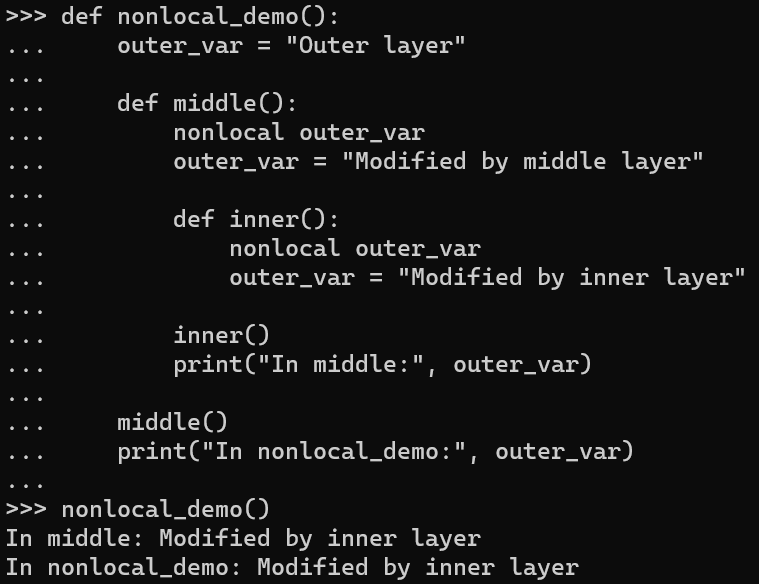
Run in the terminal, the output is as follows:
2.5.2 Definition and Optimization Principles of const Constants
A constant refers to a value that does not change during program execution, and is generally used to store unalterable data such as mathematical constants and configuration information. In a microcontroller unit, constants are stored in ROM/Flash memory, which can save RAM space.
In MicroPython, the keyword `const` is used to declare that an expression is a constant so that the compiler can optimize it. In the two scenarios where a constant is assigned to a variable, the compiler will avoid generating a lookup for the constant name by substituting the literal value of the constant directly. This can save bytecode and thus conserve RAM.
However, it should be noted that when using the const keyword, you need to use the mpy-cross tool to compile it into an mpy file to make it function properly.
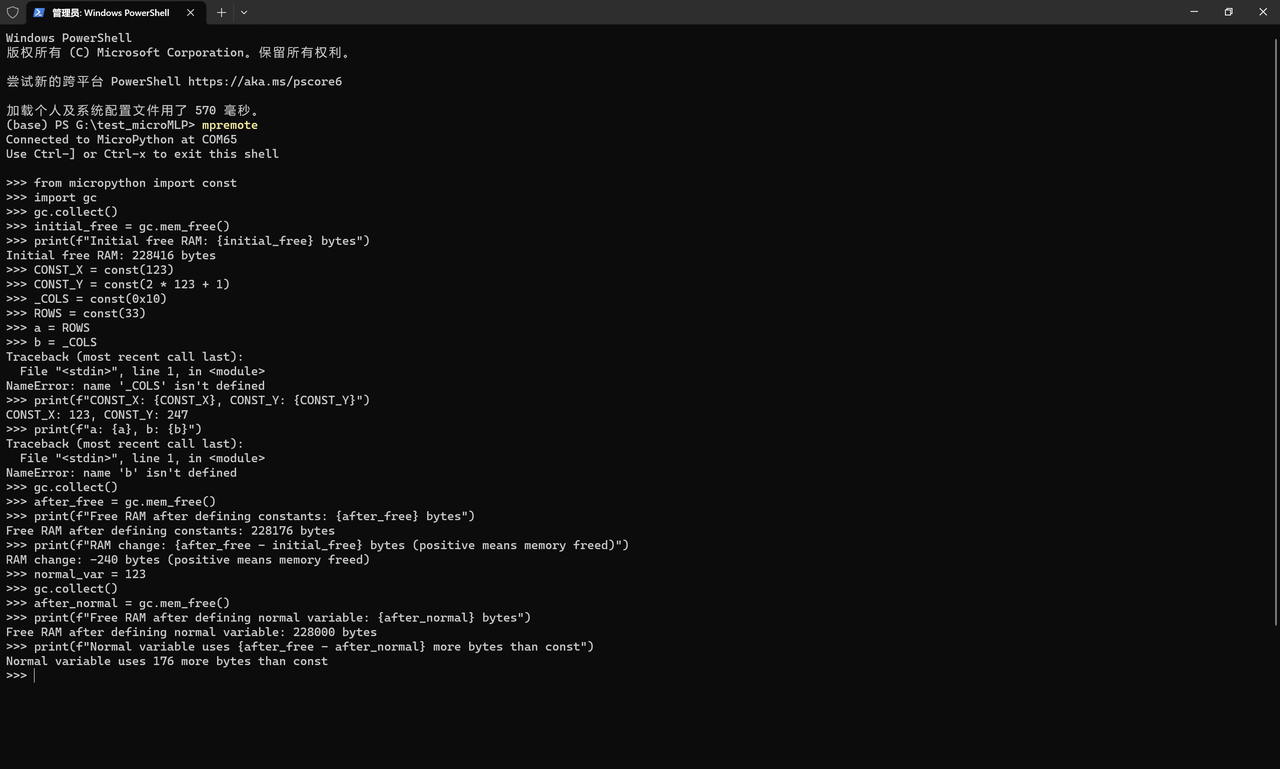
The ROWS value will occupy at least two machine words, one each for the key and the value in the global dictionary. The presence in the dictionary is necessary because another module might import or use it. This RAM can be saved by prefixing the name with an underscore, as shown for _COLS: this symbol is not visible outside the module, so it does not occupy RAM.
The terminal output is as follows:
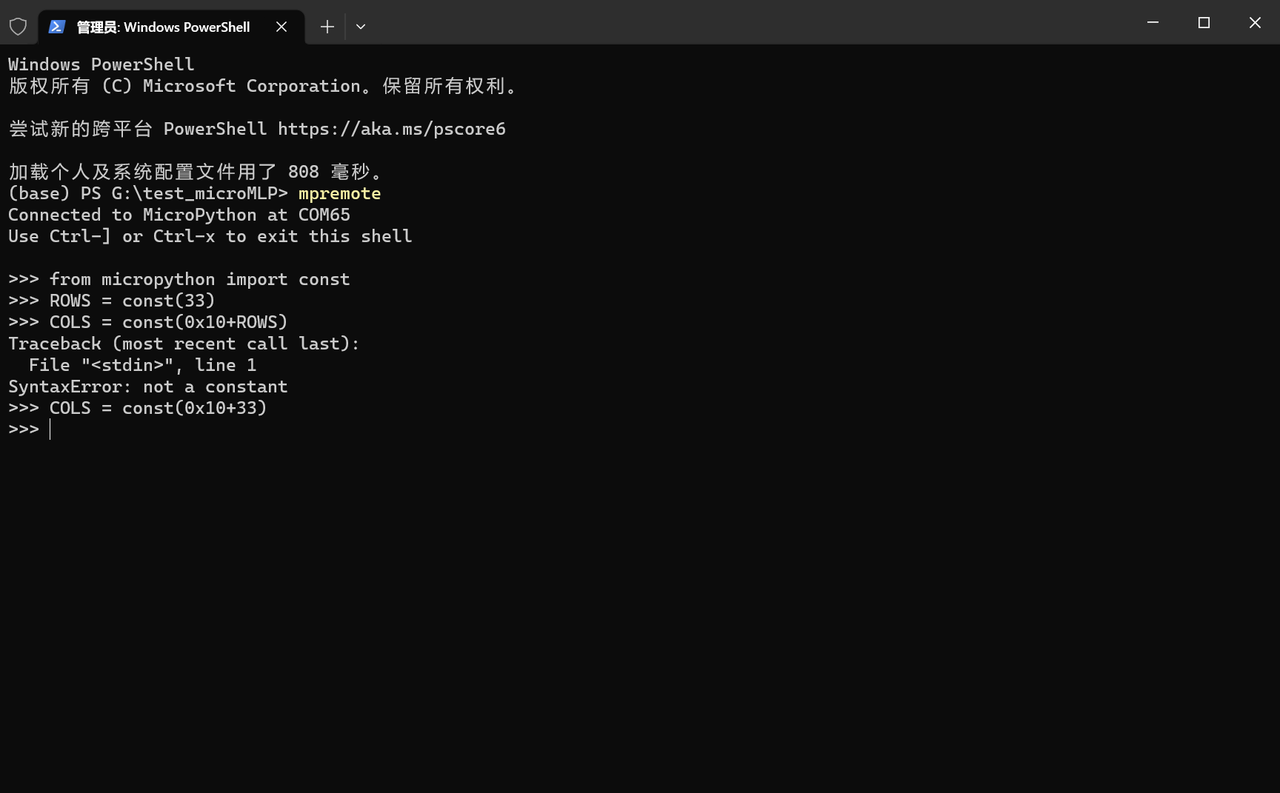
The argument of `const ()` must be any value that evaluates to an integer at compile time.
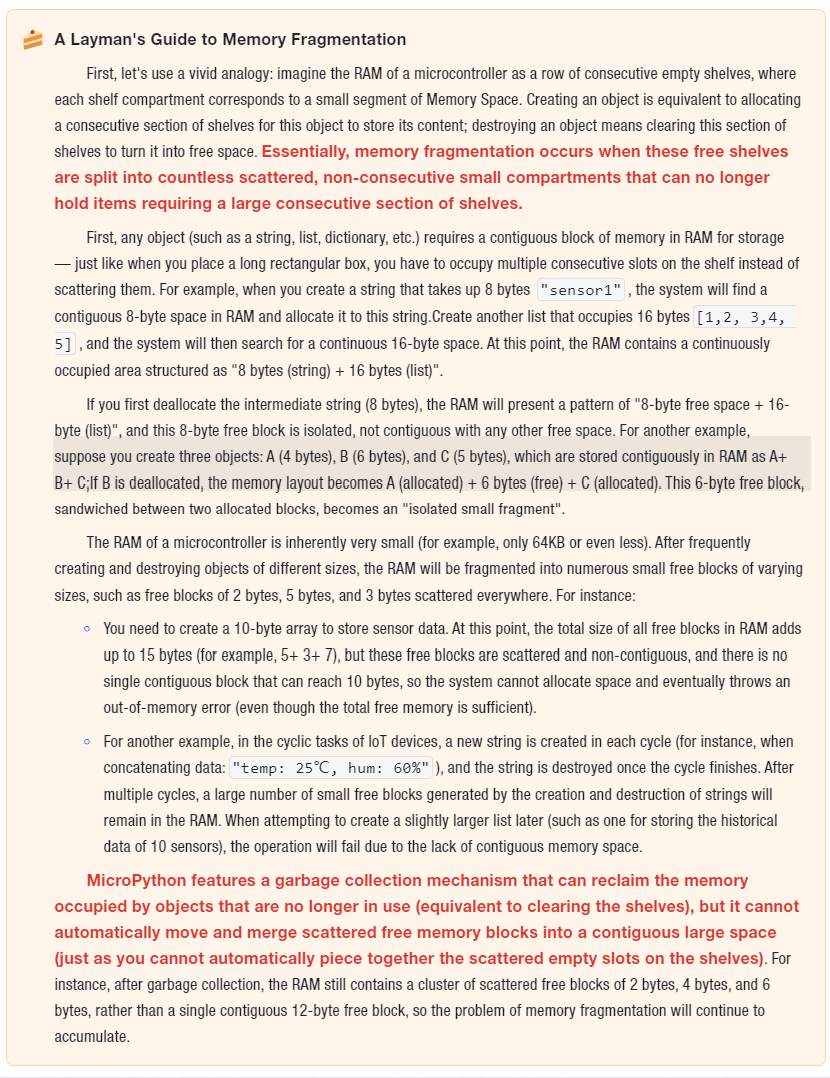
In MicroPython, the creation of objects (such as strings, lists, dictionaries, byte arrays, numerical containers, etc.) consumes RAM resources. Given the extremely small RAM capacity of microcontrollers, frequent creation and destruction of objects not only directly depletes memory but also leads to memory fragmentation (i. e., a large number of small free memory blocks appear in RAM that cannot be utilized by large objects), ultimately triggering the problem of insufficient memory.
It should be noted that the sys. getsizeof () function in standard Python is not supported on most platforms in MicroPython (this is a feature of MicroPython designed to streamline firmware). Therefore, we can use the struct module to pack variables/data into a ByteFlow, then use the len () function to get the length of the ByteFlow, so as to test the byte size occupied by the data; at the same time, combine the gc module (garbage collection) to check the actual usage change of RAM, and complete the comparison before and after optimization.
Strings in MicroPython are immutable objects; when using + to concatenate strings, each occurrence of + will create a temporary string object (for example, "a"+"b"+"c" will first create "ab", then create "abc", resulting in a total of 2 temporary objects). These temporary objects consume extra RAM and are frequently cleaned up by the garbage collector, which degrades performance.
Optimization Idea:
Use direct string concatenation (merged at compile time, no temporary objects);
Use the join () method (only one final string object is created);
Use multi-line strings (""" or ''', which will be merged at compile time).
2.6.2 Buffer to reuse in hardware operations (UART/SPI/I2C scenarios)
In MicroPython hardware operations (such as reading sensor data via SPI or receiving data via UART), frequent creation of new byte buffers (bytearray / bytes) will consume a large amount of RAM. For example, if you create buf = bytearray (10) every time you read a sensor, 100 buffer objects will be created after 100 loop iterations.
We can pre-allocate a buffer to reuse it in loops or multiple operations, which means we only create the object once and completely avoid the creation of temporary buffers.
Next, we pre-allocate the serial port receive buffer and to reuse it in the loop to avoid repeated creation of bytearray.
from machine import UART, Pin

# 初始化UART
uart = UART(0, baudrate=9600, tx=Pin(0), rx=Pin(1))
# 预分配缓冲区(仅创建1次)
uart_buf = bytearray(16)

# 循环接收(复用缓冲区)
for _ in range(5):
    uart.readinto(uart_buf)
    print("UART data:", uart_buf)
Next, we pre-allocate the SPI read-write buffer to reuse it for reducing memory overhead.
from machine import SPI, Pin

# 初始化SPI
spi = SPI(0, baudrate=1000000, sck=Pin(2), mosi=Pin(3), miso=Pin(4))
# 预分配缓冲区
spi_buf = bytearray(8)

# 循环读写(复用缓冲区)
for _ in range(5):
    spi.readinto(spi_buf)
    print("SPI data:", spi_buf)
2.6.3 Numerical Storage Optimization (Replace Lists with struct/bytearray)
In MicroPython, storing values in a list (such as[1,2, 3,255]) consumes a relatively large amount of RAM, because each integer object in the list incurs additional memory overhead (for example, an int type occupies 4 bytes in MicroPython, and the list itself also has pointer overhead).
Optimization Idea:
Use the struct module to pack multiple values into a ByteFlow (for example, pack 4 integers into a 4-byte ByteFlow);
Use bytearray (a mutable byte array) to store small values (0-255), where each element occupies only 1 byte, which is far less than the space taken by integers in a list;
str and bytes can be converted via encode ()/ decode (), but such conversion will create new objects, so frequent operations should be avoided.
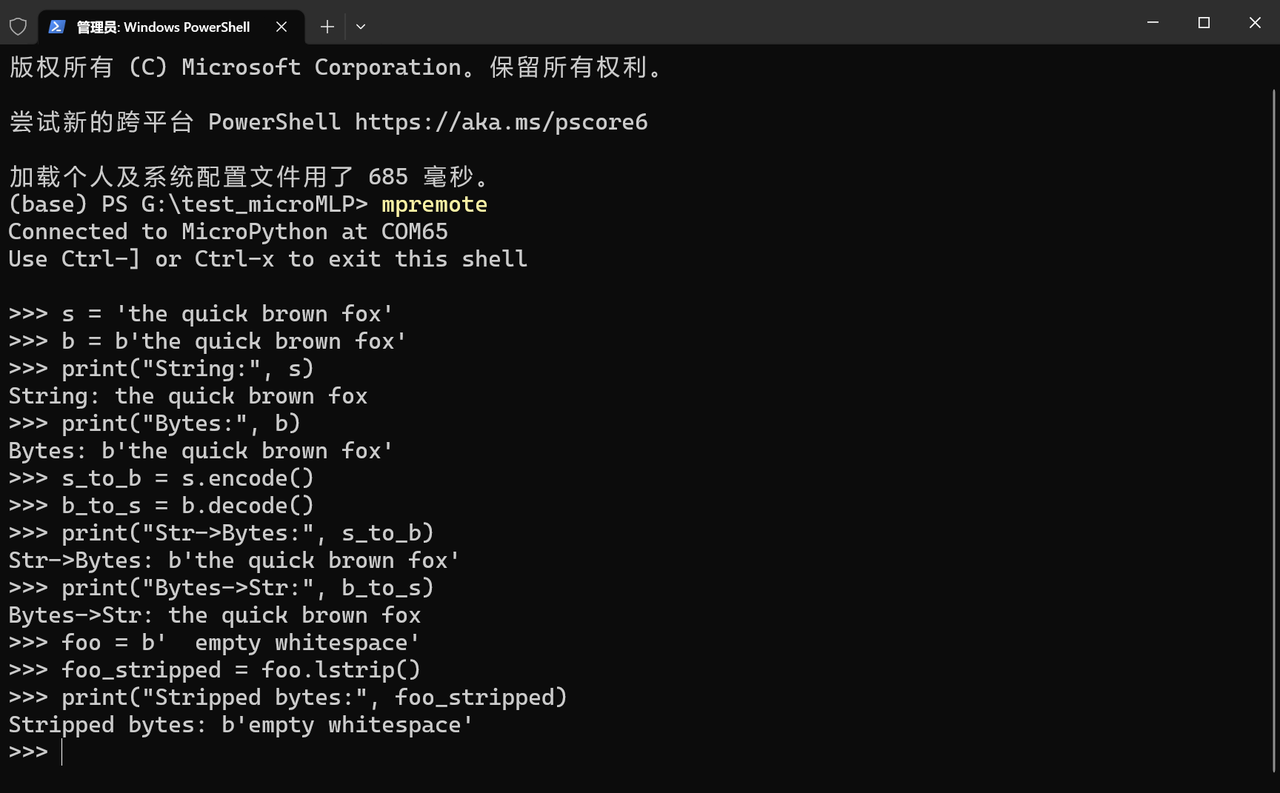
# 1. str vs bytes(内存占用一致,ASCII场景)
# String (ASCII)
s = 'the quick brown fox'
# Bytes (1 byte per char)
b = b'the quick brown fox'
print("String:", s)
print("Bytes:", b)

# 2. 字符串与字节的转换(注意:转换会创建新对象)
# str -> bytes
s_to_b = s.encode()
# bytes -> str
b_to_s = b.decode()
print("Str->Bytes:", s_to_b)
print("Bytes->Str:", b_to_s)

# 3. bytes支持字符串方法(如lstrip)
foo = b'  empty whitespace'
foo_stripped = foo.lstrip()
print("Stripped bytes:", foo_stripped)
Run in the terminal, the output is as follows:
2.6.4 Avoid Creating Temporary Containers in Loops
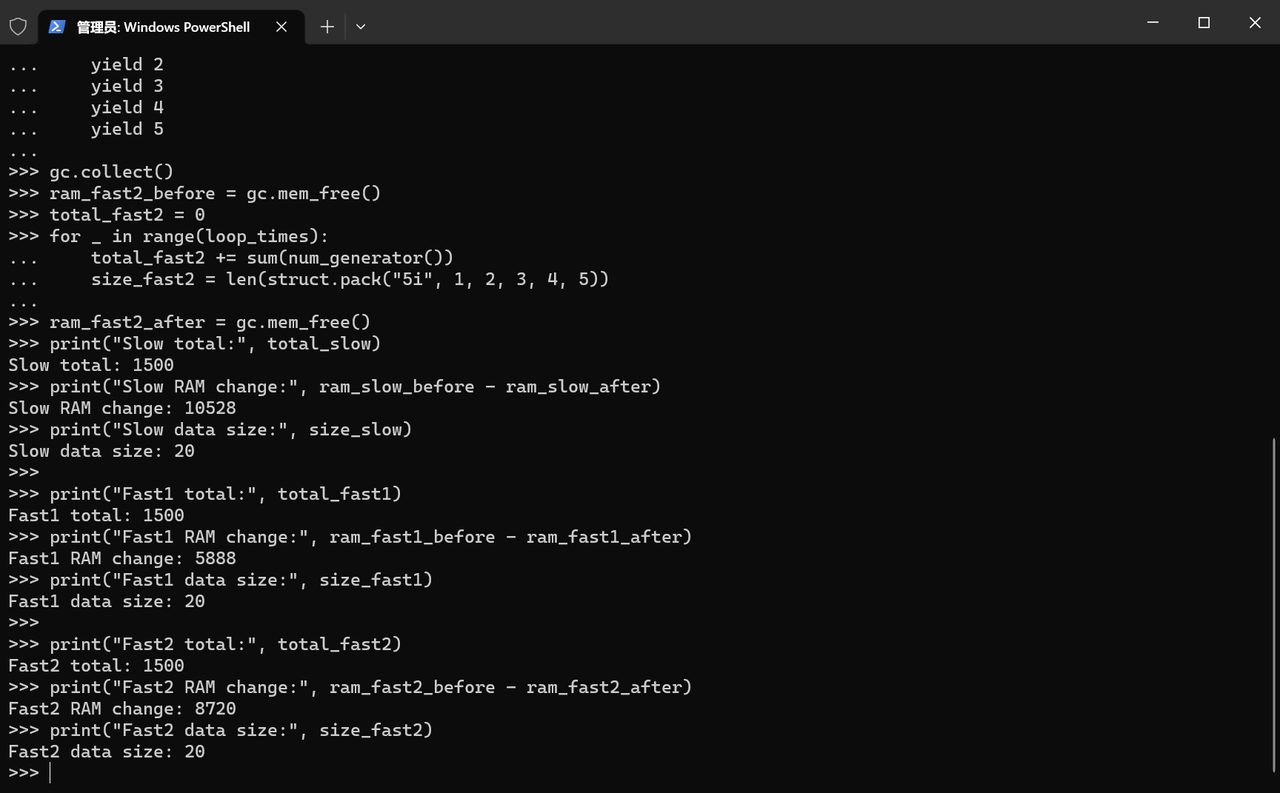
Frequently creating temporary containers in a loop (e. g. for _ in range (100): temp = [1,2,3]) will generate a large number of temporary objects and occupy RAM. The optimization idea is to move the temporary container outside the loop to reuse the object, or use a generator/iterator instead of the temporary list.
A new list object is created in each loop: the memory consumption is 10528 bytes;
Create a list outside the loop to reuse the container: the memory consumption is 5888 bytes;
Using a generator: Memory consumption is 8720 bytes.
In the scenario where a small amount of data (5 fixed numbers) is repeated 100 times, to reuse a list indeed consumes less memory than using a generator; when it is necessary to process a large amount of data or streaming data, generators avoid loading all data at once.
eval ()/ exec () will invoke the MicroPython compiler at runtime, creating a large number of temporary objects and consuming a significant amount of RAM; using direct computation or JSON serialization as an alternative can reduce memory overhead.
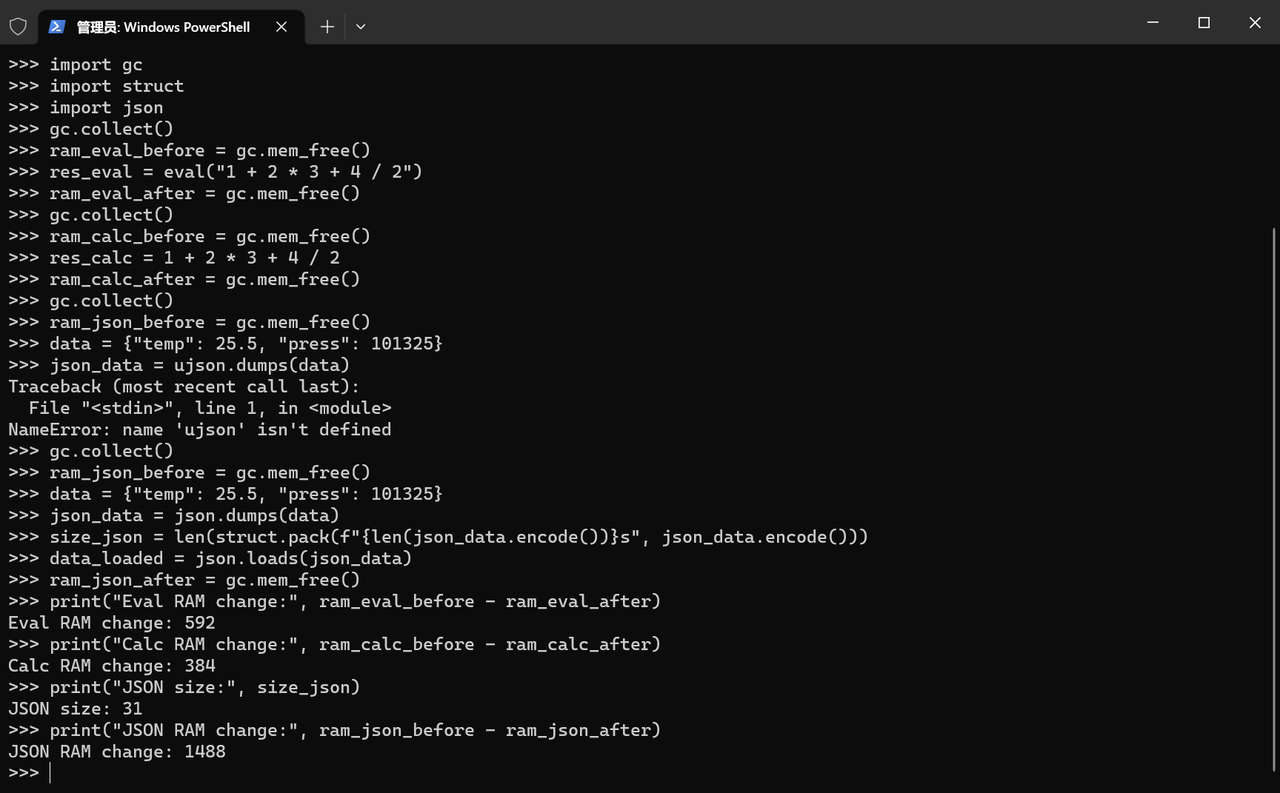
As we can see, dynamic parsing (eval ()) and JSON processing create a large number of hidden temporary objects:
eval ("1+ 2*3+ 4/2") Although the result is the same, it consumes 592 bytes of memory, which is 208 bytes more than direct calculation (384 bytes);
By contrast, JSON serialization of 31-byte data consumes 1488 bytes of memory, as each step such as parsing strings, creating intermediate dictionaries, and converting floating-point numbers generates fragmented allocations, resulting in an actual memory overhead that is 48 times the size of the data.
This is exactly a typical manifestation of memory fragmentation on microcontrollers: behind seemingly simple operations lies exponential memory consumption.
2.6.6 Storing Strings in Flash (qstr Mechanism)
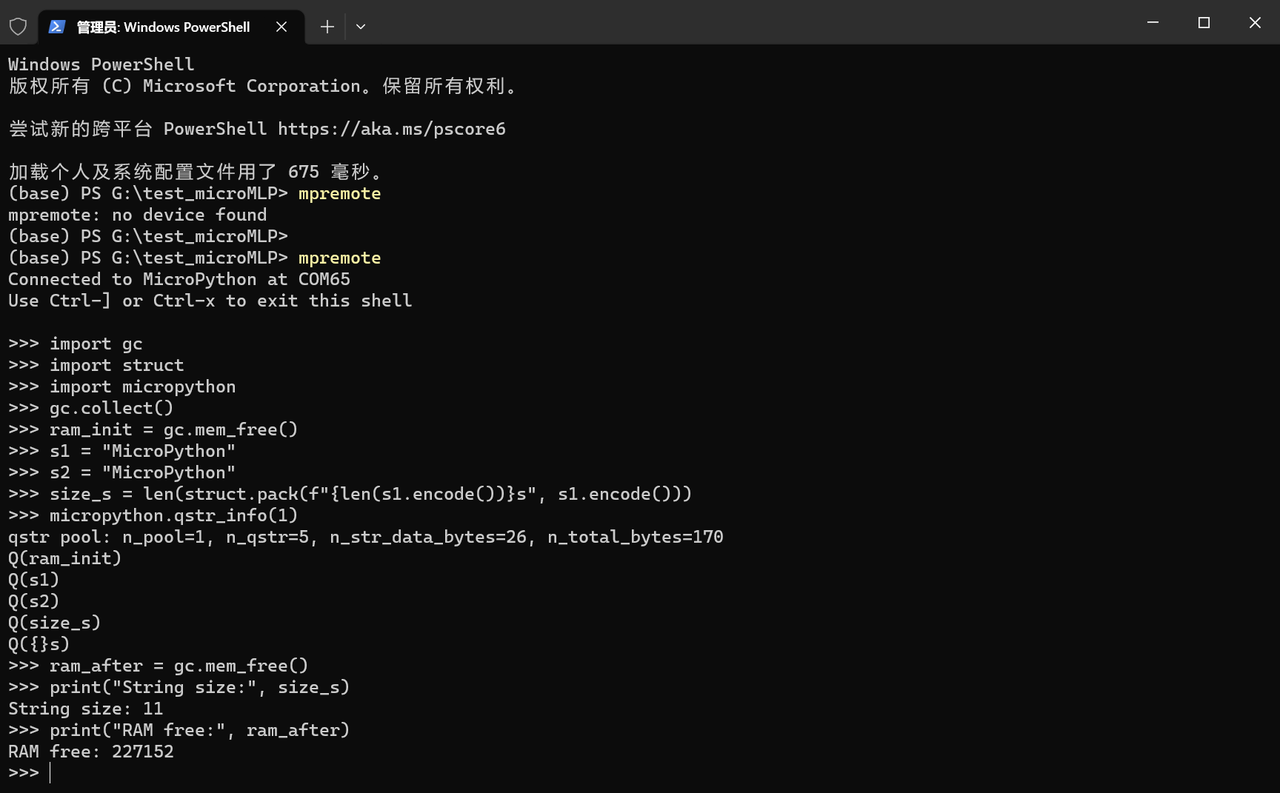
The qstr (quantized string) mechanism of MicroPython stores duplicate strings in flash memory instead of RAM, reducing RAM usage. We can use micropython. qstr_info () to check the string storage status, use struct to test the byte size of strings, and use gc to observe RAM changes.
We can see that the two strings s1 and s2 have the same content, both being "MicroPython". The qstr mechanism of MicroPython reuses identical strings; in fact, s1 and s2 point to the same string object in memory, which saves the memory that would otherwise be occupied by storing duplicate identical strings.
n_qstr= 5: There are currently 5 resident strings;
n_str_data_bytes= 26: Total size of string data is 26 bytes;
n_total_bytes= 170: The qstr system occupies a total of 170 bytes (the qstr management structure itself has an overhead of approximately 144 bytes).
and the 5 listed qstr:
ram_init: Variable name (8 characters);
s1: Variable name (2 characters);
s2: Variable name (2 characters);
size_s: variable name (5 characters);
{}s: Part of the format string (3 characters).
However, "MicroPython" this string is not present in the listed qstrs, because MicroPython stores it as read-only data in Flash rather than in RAM.
2.7 Heap and Garbage Collection Mechanism
The heap is a dynamically allocated memory region used to store object instances and dynamic data structures created during program runtime (such as lists, dictionaries, and instances of custom classes in Python):
The size of the heap is not fixed and will dynamically expand according to the program's needs (subject to the total system memory);
In languages such as Python and Java, heap allocation is automatically handled by the language's virtual machine (VM), so developers do not need to manually apply for memory.
When you execute lst = [1,2,3], Python will:
Allocate a block of memory in the heap to store the object data of the list[1,2, 3];
A variable named lst is allocated in the stack, which stores the memory address (reference) of the corresponding object in the heap. In other words, the variable lst is merely a "pointer" that points to the actual data in the heap.
An object in the heap becomes "garbage" if there are no references pointing to it (meaning the program can no longer access it): for example, after executing lst = None, the original[1,2, 3]object in the heap loses its references and becomes garbage.
In MicroPython, the GC (garbage collector) can automatically identify and clean up garbage objects in the heap, release the occupied memory, and prevent memory leaks (a situation where memory is continuously occupied by useless objects, resulting in less and less available memory for the program and eventual crash).
The trigger modes of garbage collection include the following two types:
Automatic Trigger: When the heap memory usage reaches the threshold or the object reference count is 0, the language engine automatically triggers GC.
Manual Trigger: Developers can proactively call GC via code (for example, gc. collect () in Python).
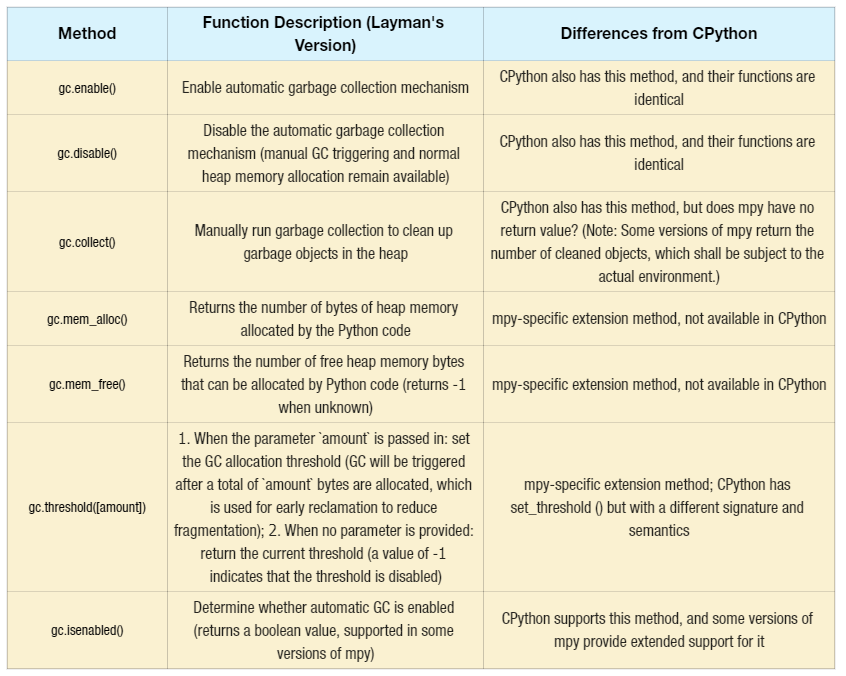
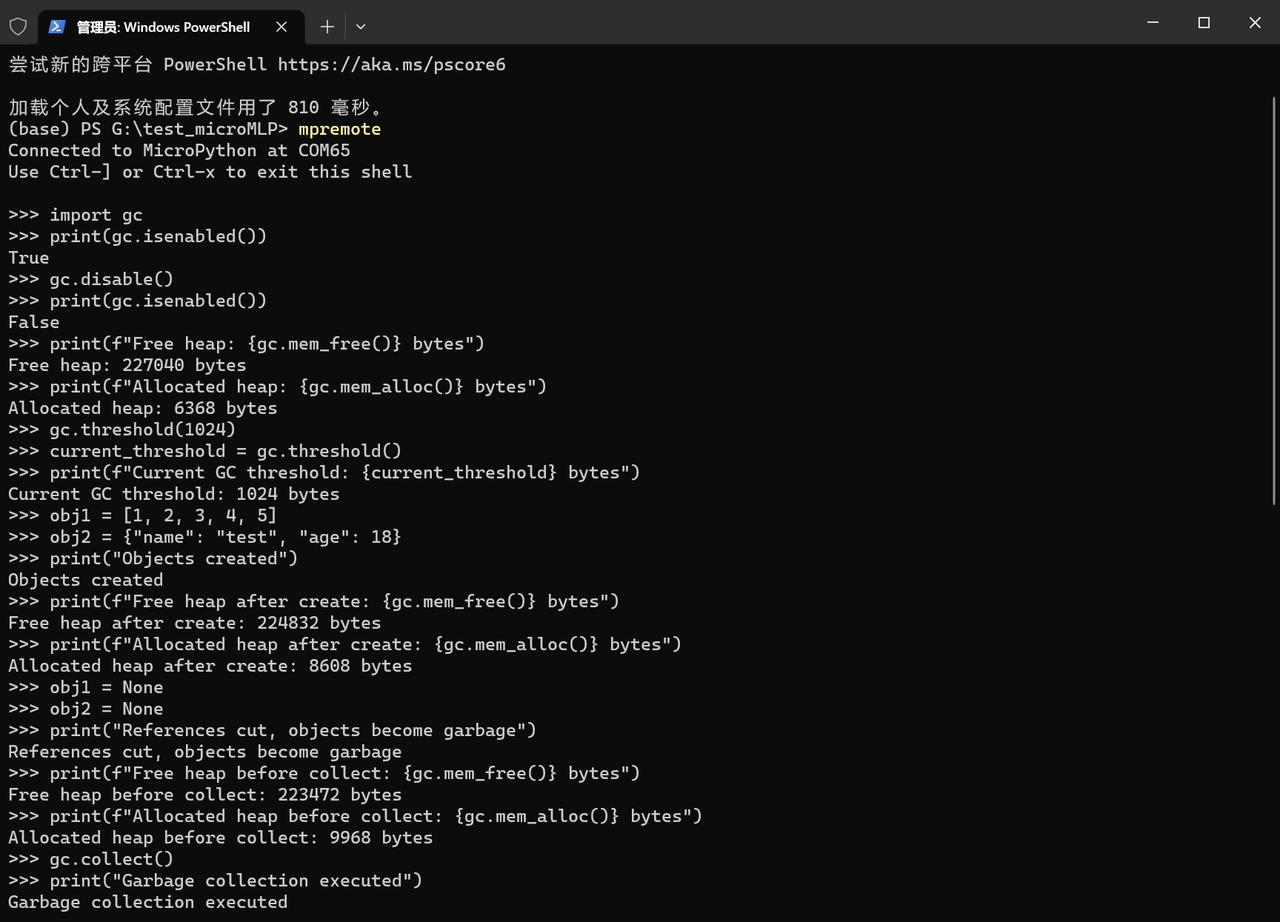
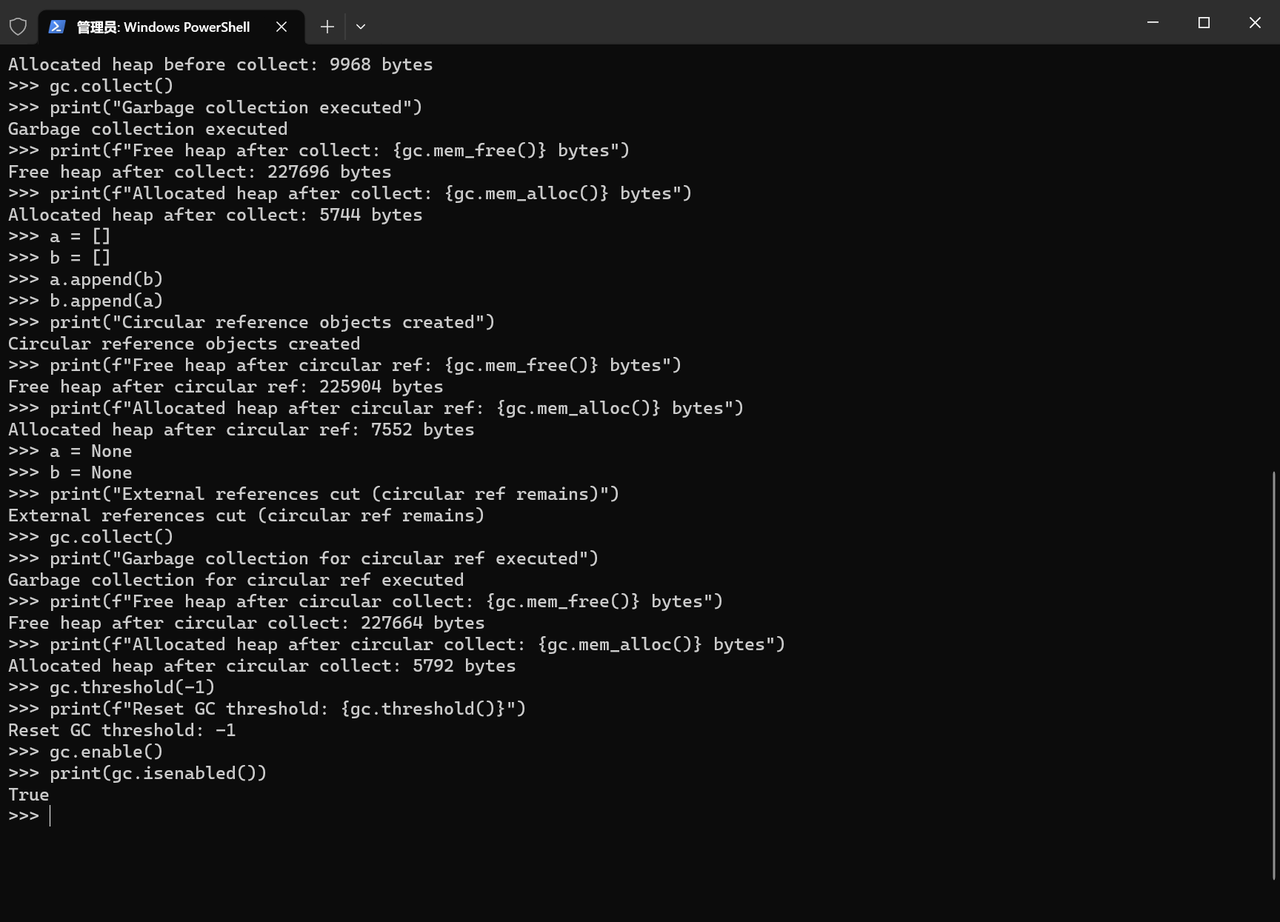
The gc module of MicroPython has the following commonly used core methods:
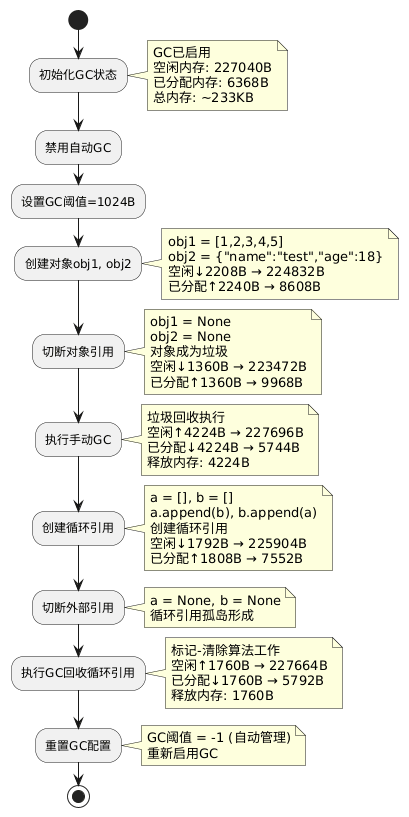
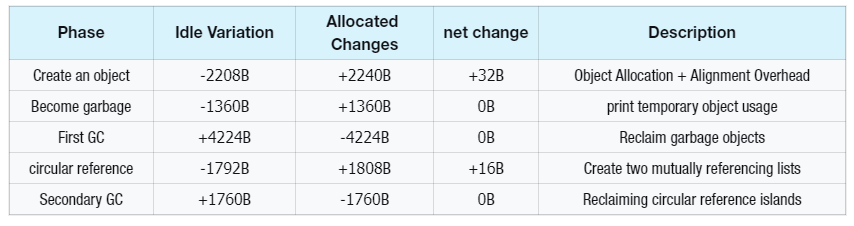
The overall process is shown in the following figure:
The memory changes are shown in the following table:
阶段
空闲变化
已分配变化
净变化
说明
创建对象
-2208B
+2240B
+32B
对象分配+对齐开销
成为垃圾
-1360B
+1360B
0B
print临时对象占用
首次GC
+4224B
-4224B
0B
回收垃圾对象
循环引用
-1792B
+1808B
+16B
创建两个相互引用列表
二次GC
+1760B
-1760B
0B
回收循环引用孤岛
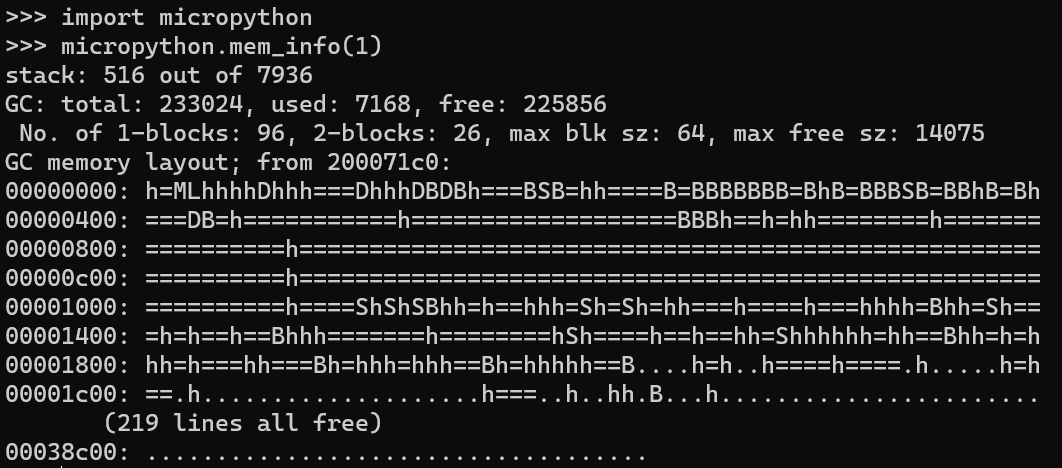
We can also use the micropython. mem_info (1) method to view the heap utilization table:
This is the detailed memory information output of MicroPython, which is used to check the overall status of the stack and heap and serves as the basis for memory analysis:
stack: 516 out of 7936
GC: total: 233024, used: 7168, free: 225856
 No. of 1-blocks: 96, 2-blocks: 26, max blk sz: 64, max free sz: 14075
...(内存布局省略)
stack: 516 out of 7936: 516 bytes of stack memory have been used, with a total size of 7936 bytes. Stack memory is used to store local variables and function call contexts; the current stack usage is very low, indicating a safe state.
used: The currently allocated heap memory (7168 bytes), which refers to the heap space occupied by objects in the program.
free: Currently free heap memory (225856 bytes) that can be allocated to new objects.
Block Information (1-blocks/2-blocks, etc.): The heap memory of MicroPython is allocated in units of "blocks". This section displays the number of blocks of different sizes, the maximum block size, and the maximum free block size, which reflects the fragmentation degree of the heap.
Memory Layout: Displays the usage status of heap memory in the form of characters (e. g., h denotes used blocks, = denotes free blocks, and D / B / S are special markers). The subsequent 219 lines all free indicates that most of the heap memory is idle.