Timer‑driven button‑detection FSM in MicroPython for single‑click, double‑click and long‑press.
COMPONENTS
PROJECT DESCRIPTION
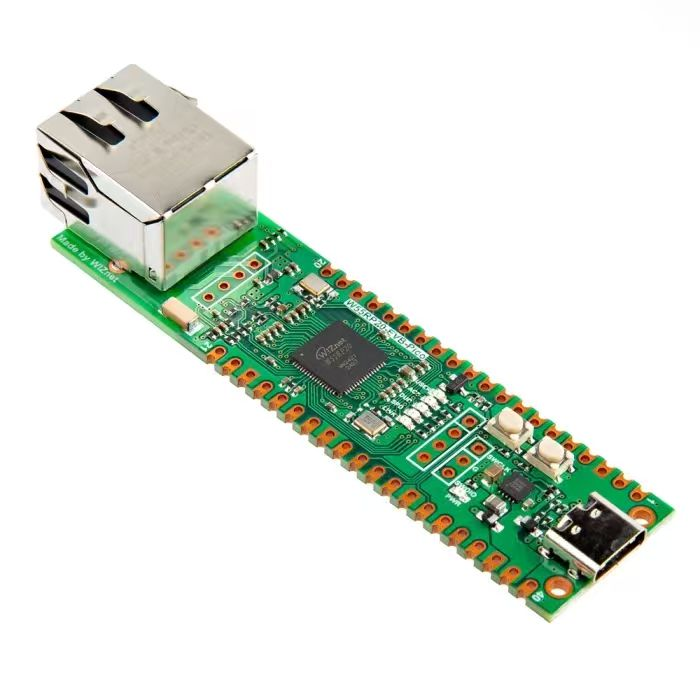
【Preliminary Note】The original hardware example in this article was written based on the RP2040. The actual hardware used in this hands-on demonstration features the W55RP20 as the main controller chip. The circuit logic and UF2 flashing operation principles are universally applicable, with only the main controller model differing. The original chip model mentioned in the circuit descriptions below is provided for reference purposes only.
Key Detection finite-state machine Framework Implemented by Timer
1. Basic Principles of the Key Detection Finite-State Machine Framework
1.1 Types of Key Operations
Key operations can be subdivided into the following types:
Long press: Press and hold the button for an extended period; in this context, a press-and-release action lasting longer than 1.2 seconds is defined as a long press
Short press: Press and hold the button briefly
Single Click: Press and release a button; here we define a single click as an action where the press duration is less than 1 second, and no subsequent press occurs within 500ms after the button is released
Double-click: Two single-click operations with an interval of less than 500ms are combined into a double-click
1.2 Basic Concepts of finite-state machine
Before explaining the finite-state machine, we first need to understand what a state is. A state refers to the form manifested by a person or a thing, specifically the form or situation of a real (or virtual) thing when it is in the stages of generation, existence, development, extinction, or at various critical points of transformation. Simply put, it is the various corresponding forms of an object under different circumstances.
A finite-state machine (Finite State Machine, abbreviated as FSM) is a mathematical model used to describe the states an object undergoes during its lifecycle and how transitions occur between these states. It consists of a set of states, an initial state, a set of input events, and a state transition function. When a certain input event is received, the finite-state machine will determine which new state to transition to based on the current state and the input event, and may generate an output. Finite-state machines have a wide range of applications in computer science, such as compiler design, network protocol analysis, game AI, etc.
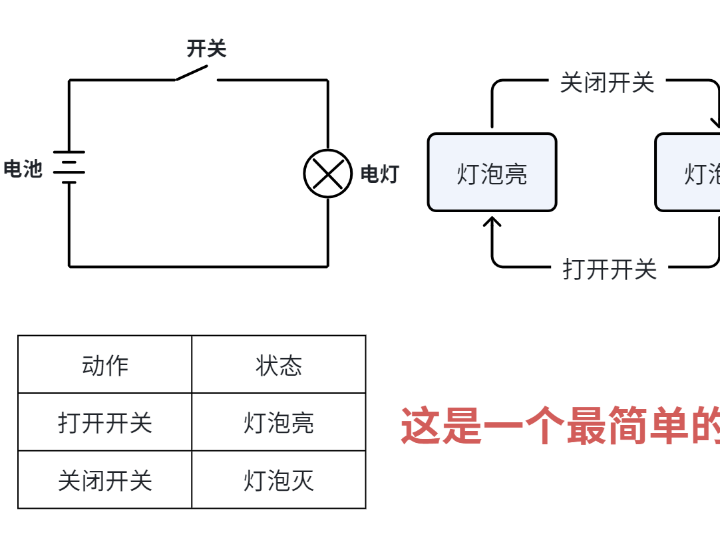
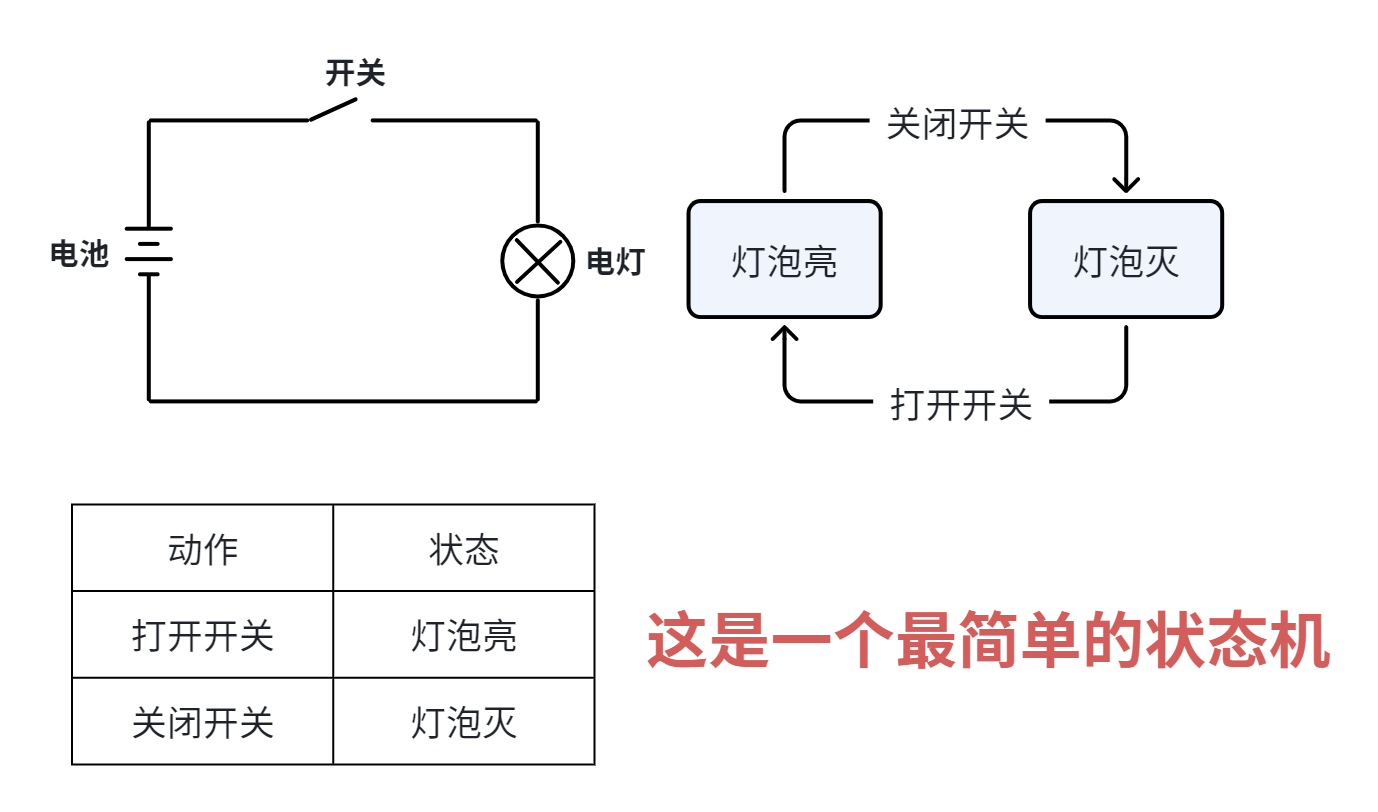
For example, the switch of a small light bulb is a most basic small finite-state machine:
Schematic diagram of a switch-controlled bulb circuit and a finite-state machine
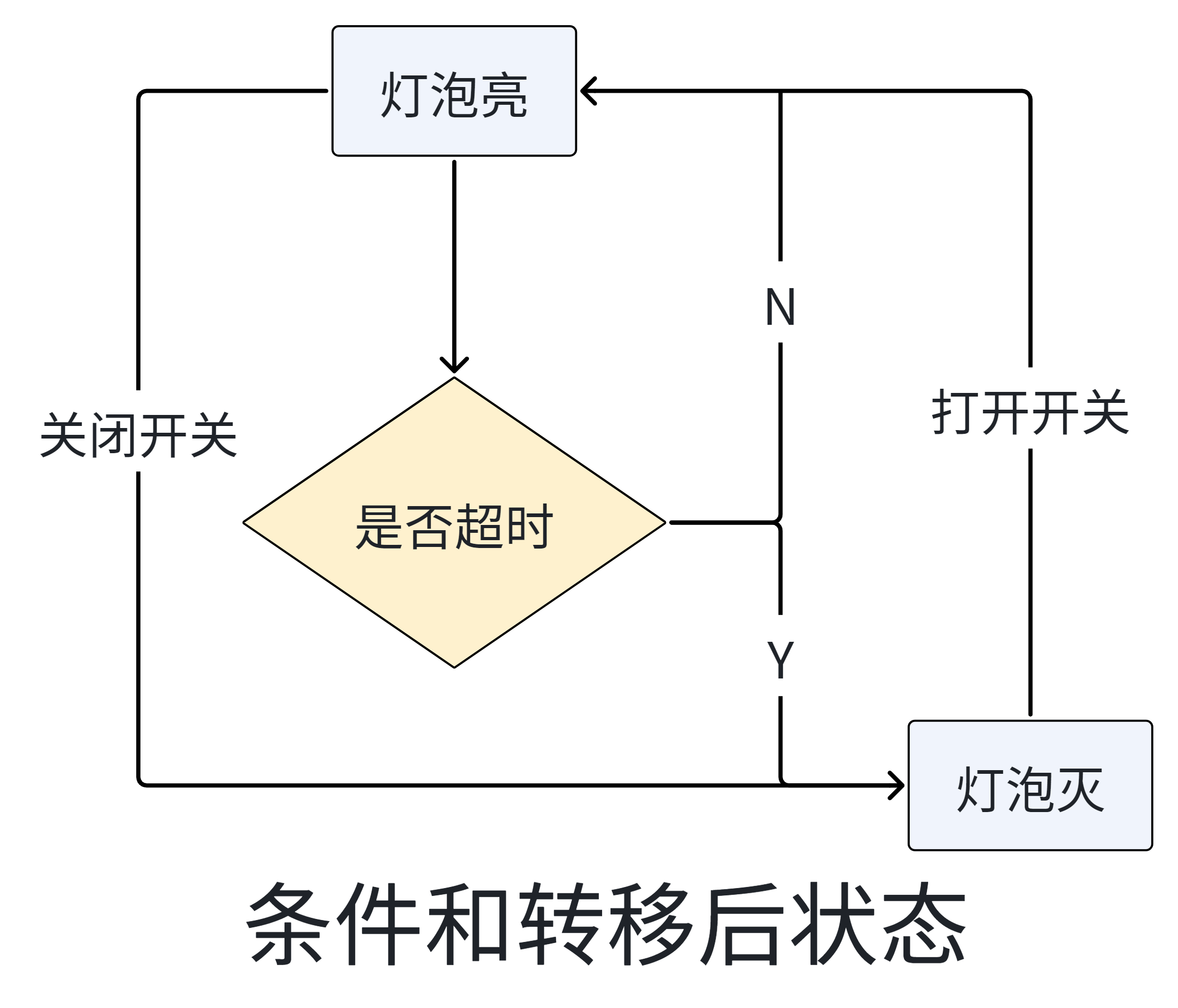
The convenience of a finite-state machine is that if we currently only have two states, which transition between the two conditions of turning the switch on and turning the switch off, and we want to add a new condition — for example, we set a timer to switch the light on and off, adding an extra transition condition: the bulb will turn off automatically if it has been on for more than 8 hours, and will remain off unless the switch is turned on again — the corresponding state diagram is as follows:
State transition flowchart for light bulb state switching
Based on the above overview, we can see that a finite-state machine can be summarized as current state, condition, action, next state four core elements, among which "current state" and "condition" are the "cause", while "action" and "next state" are the "effect"; the details of each element are as follows:
Present State: refers to the state that is currently in.
Condition (also referred to as "event"): When a given condition is met, it will trigger an action or execute a state transition.
Action: An operation to be executed when the condition is met; after the action is completed, the system can either transition to a new state or remain in the original state (actions are not mandatory, and the system can directly transition to a new state once the condition is satisfied).
Next state: the new state to transition to once the conditions are met; once the "next state" is activated, it will become the new "current state".
Since the states of a common finite-state machine are discrete and enumerable, meaning they are finite, the finite-state machine we use is also known as a finite state machine.
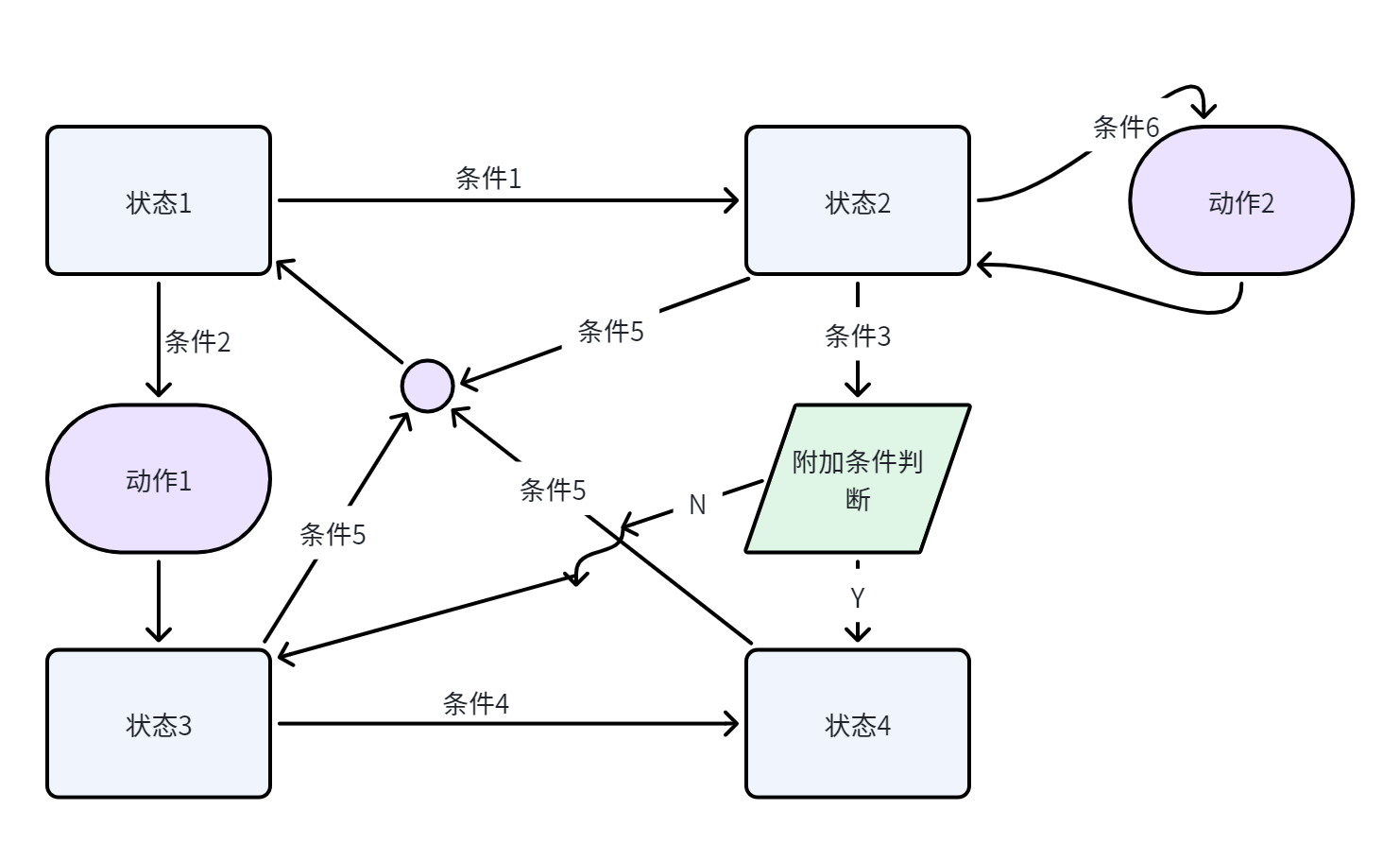
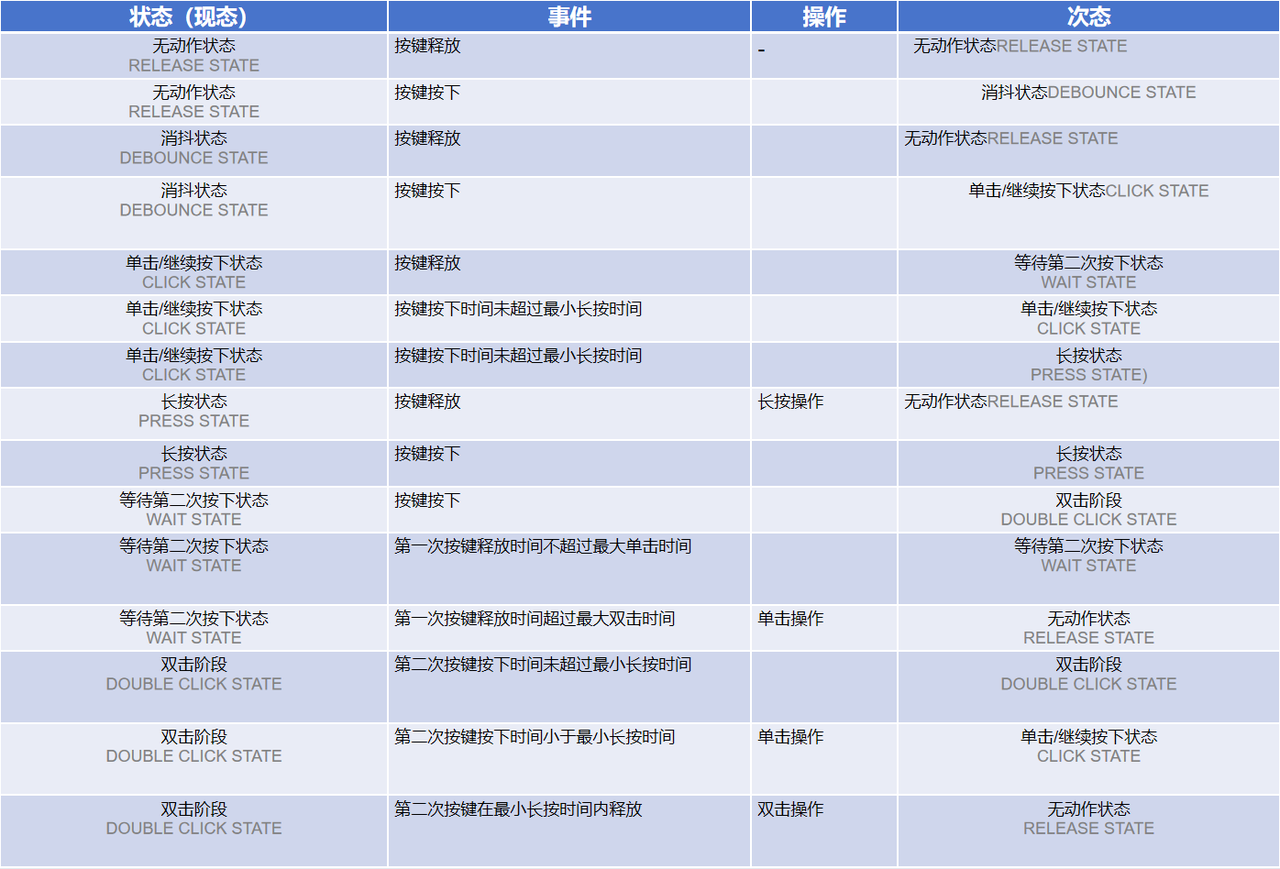
We typically use state transition diagrams (STD) and state transition tables to describe the set of states, events and behaviors of a finite-state machine:
Schematic Diagram of State Transition Diagram (STD) Figure 3-3
State (Current State)
Status Description
Conditions
Action
post-state
Status 1
……
Condition 1
-
State 2
Condition 2
Action 1
Status 3
State 2
……
Condition 3
Additional conditions: Met
-
State 4
Additional conditions: Not satisfied
-
Status 3
Condition 5
-
Status 1
Condition 6
Action 2
-
Status 3
……
Condition 4
-
State 4
Condition 5
-
Status 1
State 4
……
Condition 5
-
Status 1
1.3 Basic Implementation of the Key Detection finite-state machine
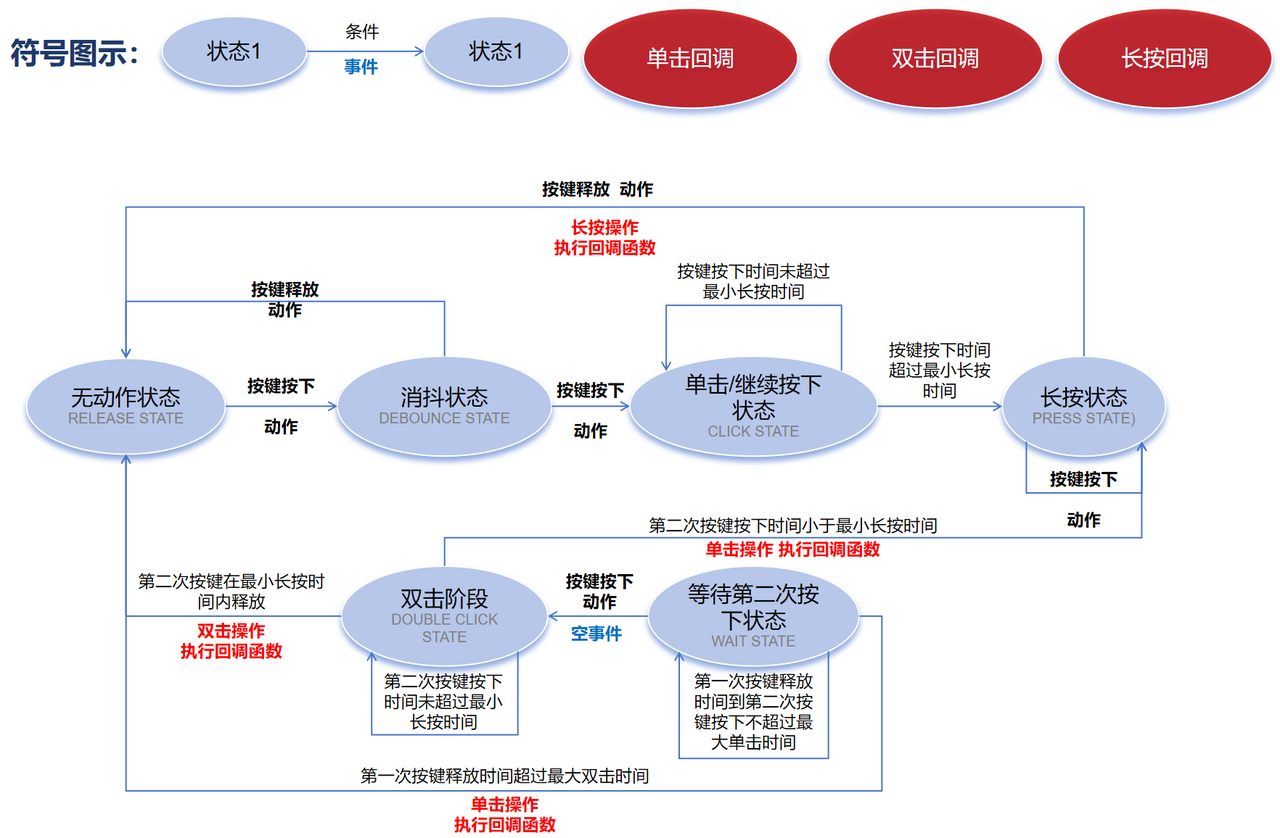
Simply put, the principle of the key detection finite-state machine is as follows: periodically detect whether the key is pressed or released (here we refer to these as the press action and release action), and perform state transition according to the key action and the current state:
When the key is in the clicked state and released within the specified time: A single click operation is completed, and the corresponding callback function is executed
When the key is in a long-press state and then released: a long-press operation is completed, and the corresponding callback function is executed
When the key is in the double-click state and released within the specified time: a long press operation is completed, and the corresponding callback function is executed
As is known to all, a key can perform two actions: being pressed and being released.
We first define the key operations as follows:
Long press: Press and hold the button for an extended period; in this context, a press-and-release action lasting longer than 1.2 seconds is defined as a long press
Short press: Press and hold the button briefly
Single Click: Press and release a key; here we define a single click as an action where the press duration is less than 1 second, and no subsequent key press occurs within 500ms after the key is released.
Double-click: Two single-click operations with an interval of less than 500ms are combined into a double-click
In the GPIO chapter, we mentioned that there will be jitter when a key is pressed, and we can divide the keys into the following states:
Release state: Both the state where no key is pressed and the state where a key is released after being pressed fall under the release state.
Debounce Status: Jitter will occur within 20ms after the key press action, which is defined as the debounce status
Click Status: After the debounce state, if the key remains pressed in the next detection and the pressing duration is less than 1.2 seconds, it is defined as a click state.
Long press state: When the previous state of the key is a single press state and the press duration exceeds 1.2s, it is defined as the long press state
Waiting state: When the previous state of the key was pressed, the period within 500ms after its release during which no key press event occurs is defined as the waiting state.
Double-click status: When the previous state of the key was pressed, if the key is pressed again within 500ms after being released, it is defined as the double-click status
Here, we first define the Button class and a series of class attribute constants in the key detection finite-state machine:
We define both key press events and states as class attributes, and the variables in this section are available in every instance of the Button class.
In the initialization method of the Button class, we need to pass the pin used by the button, the timer object, the initial state of the button (high level or low level), the long press callback function, the short press callback function and the double-click callback function into it:
Here, the timer is configured to trigger periodically with a period of 20 ms. Each time the timer is triggered, the detect method will be called to check the key status.
Then, we define the detect method, which updates the finite-state machine of the key according to the current key state and action:
Obtain the current key event, including press, release, etc. , by calling the get_action () method
Based on the current state and key press events, the code will enter different state processing branches:
No-action State (RELEASE_STATE)
If a key press event is detected, the system will enter the debounce state (DEBOUNCE_STATE)
If a key release event is detected, the release state (RELEASE_STATE) shall be maintained
Debounce State (DEBOUNCE_STATE)
If a key press event is detected, the system will enter the click state (CLICK_STATE)
If a key release event is detected, the system will enter the release state (RELEASE_STATE)
Click/Continuous Press State (CLICK_STATE)
If a key press event is detected and the key press duration exceeds the minimum long press time (BtnPressMinTime), the system will enter the long press state (PRESS_STATE)
If a key press event is detected and the key press duration does not exceed the minimum long press time, continue timing and maintain the click state (CLICK_STATE)
If a key release event is detected, the system will enter the second press waiting state (WAIT_STATE)
Long Press State (PRESS_STATE)
If a key press event is detected, continue waiting for the key to be released
If a key release event is detected, the system will enter the release state (RELEASE_STATE), confirm that it is a long press, and execute the long press callback function
Waiting for the second press state (WAIT_STATE)
If a key press event is detected and the time interval from the first key release to the second key press exceeds the maximum double-click time (BtnDoubleClickMaxTime), it is determined as a single click and the single click callback function is executed
If the release time of the first key press does not exceed the maximum double-click time, continue to wait for the second key press
If a second press is detected during the waiting period, the system will enter the double-click state (DOUBLE_CLICK_STATE).
Double Click State (DOUBLE_CLICK_STATE)
If the duration of the second key press exceeds the minimum long press time (BtnPressMinTime), the system enters the long press state (PRESS_STATE), responds with a single-click event, and executes the single-click callback function
If the duration for which the second key press is held down does not exceed the minimum long press duration, the system will remain in the double-click state (DOUBLE_CLICK_STATE)
If the second key press is released within the minimum long press time, the system will respond as a double click, execute the double click callback and enter the release state (RELEASE_STATE)
Furthermore, based on the current key event, the function will update the corresponding state variable (self. state). When the corresponding key operation (single click, double click, long press) is detected, the corresponding callback function will be executed.
It should be noted that there are the following three special cases:
If a long press is performed within 500 ms after a short press, a single click and a long press will be triggered, while no double-click action will be registered.
After performing consecutive 2n short press operations with time intervals of less than 500ms, the system will respond as n double-click operations
After performing consecutive short press operations with an interval of less than 500ms for an odd number of times of 2n+ 1, the response is n double-click operations and 1 single-click operation
It is recommended here that after completing one operation (single-click, double-click, or long press), wait for 500ms before performing the next operation, otherwise misoperation may be caused.
2. Touch Button Detection Experiment
Here, we use capacitive touch keys to implement the detection of single click, double click and long press of the keys.
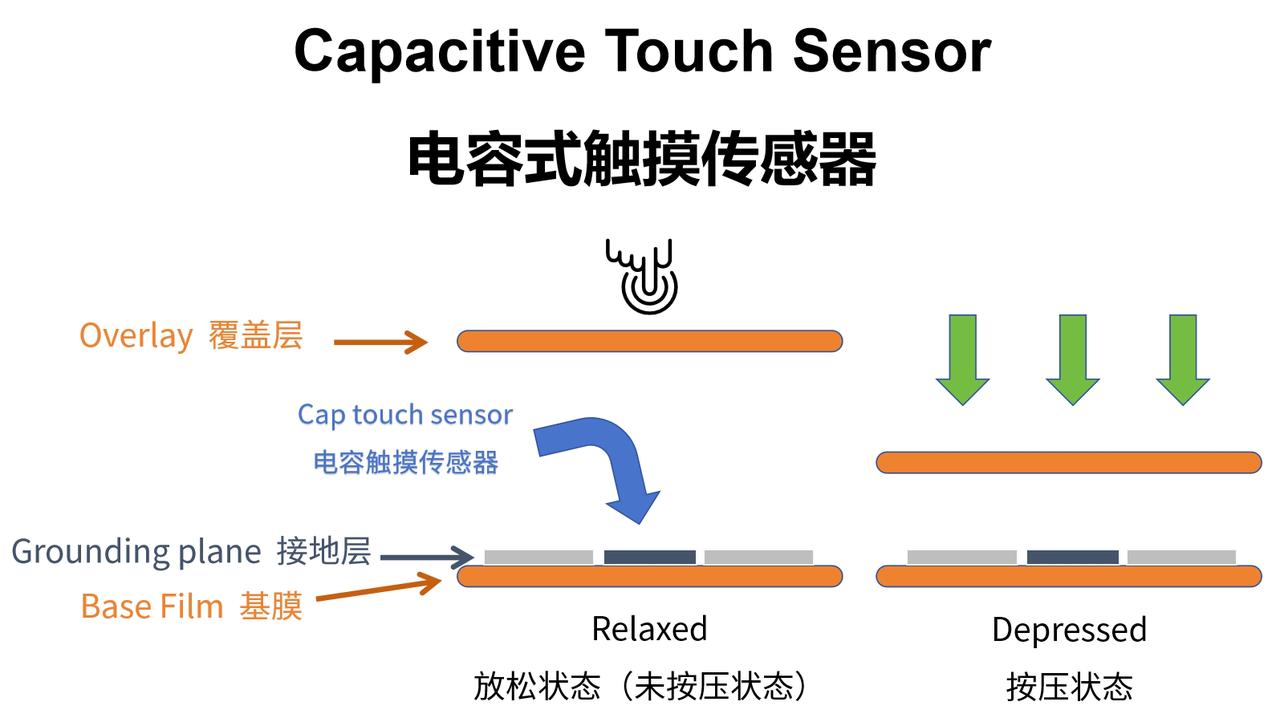
The working principle of capacitive touch keys relies on changes in capacitance. Under a constant surrounding environment, the capacitance between the key and the ground is a very small fixed value, and there is also capacitance between the human body and the ground. When a finger approaches the touch key, it is equivalent to connecting the capacitance between the human body and the ground in parallel with the capacitance between the touch key and the ground, thus increasing the total capacitance:
Schematic Diagram of the Working Principle of Capacitive Touch Sensor (Figure 3-10)
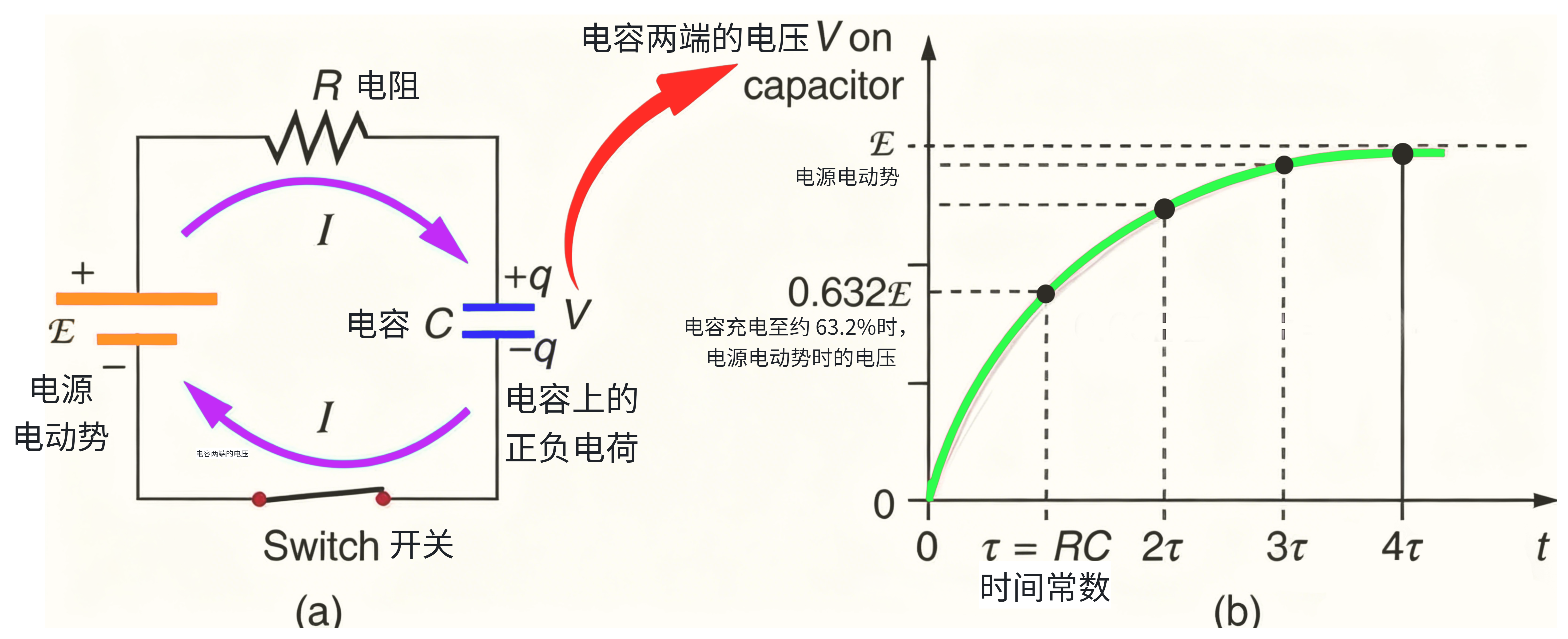
We usually use a power supply connected in series with a resistor and then in parallel with a capacitive touch key. When the system is powered on, the power supply will charge the capacitor; when a finger approaches the touch key, the total capacitance increases, and the RC time constant of the capacitor charging circuit also changes. By measuring the capacitor charging time, the state of the key can be detected.
Schematic Diagram of Charging Process and Capacitor Voltage Variation Curve of RC Series Circuit
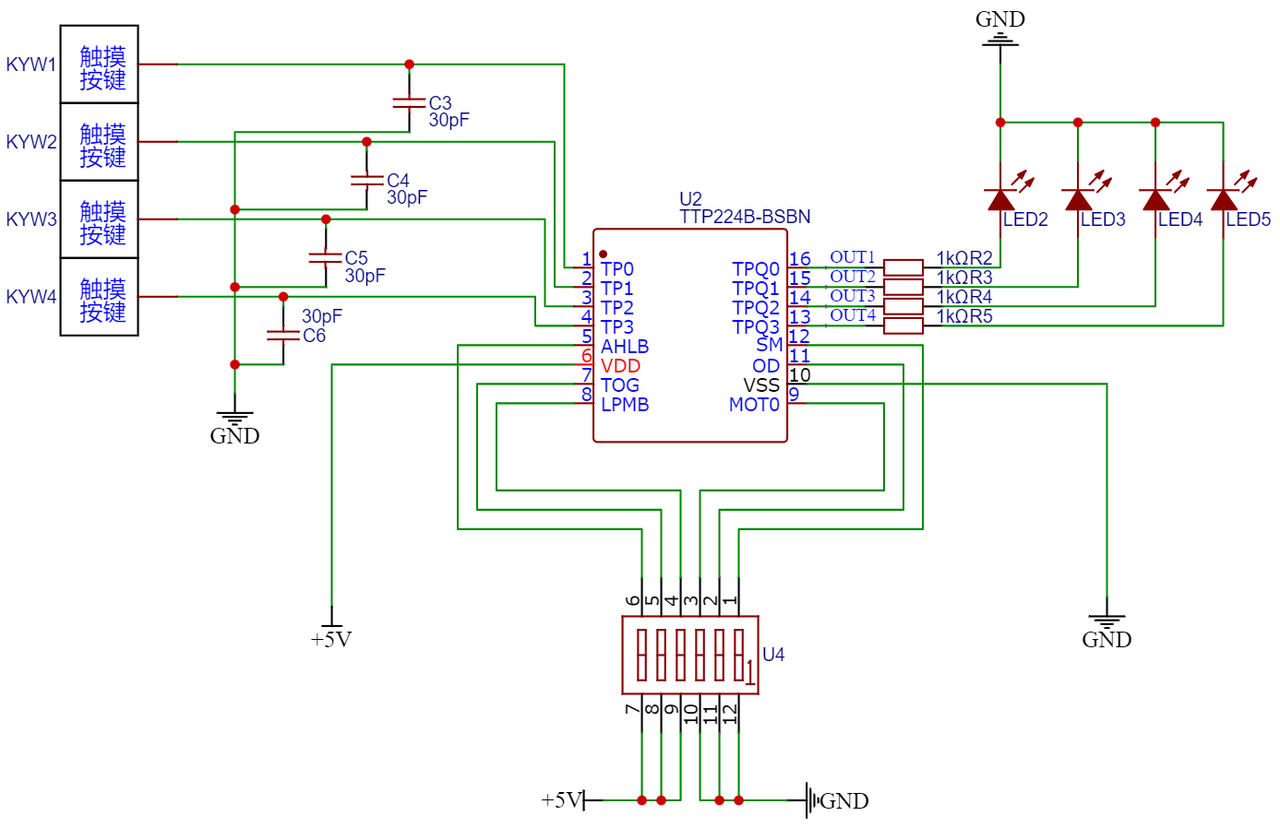
Here, we do not need to measure the capacitor charging time via an analog-to-digital converter to determine whether a key is pressed; instead, we use a dedicated 4-channel touch key chip TTP224 to assist us in the judgment. The TTP224 integrates internal components such as a sensor oscillation circuit, a timer, and a touch detection circuit. When a capacitive key is pressed, it directly outputs a high or low level after internal circuit processing, allowing us to use capacitive touch keys just like mechanical keys.
Here, in the 4-channel touch key module we designed, an LED is also connected to the OUT output terminal to indicate the key press status. When the capacitive key is not pressed, OUT the output terminal is at low level and the LED is off; when the capacitive key is pressed, the OUT output terminal is at high level and the LED is lit.
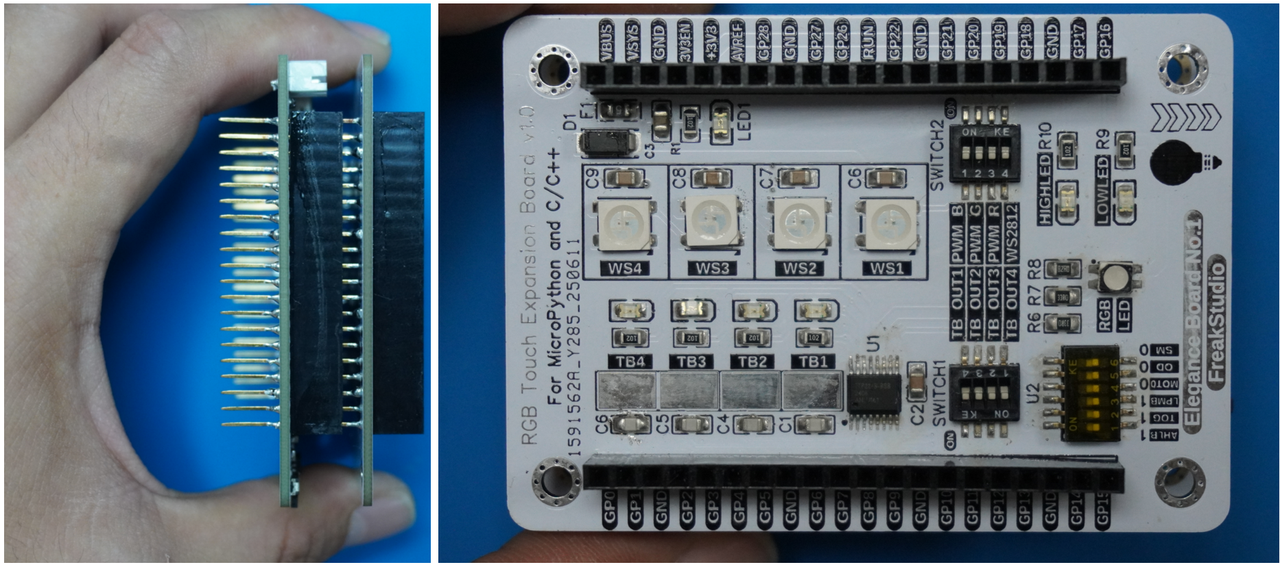
In the following experiment, we need to insert Fengya No. 1 Board - Universal Compatible Expansion Board into Fengya No. 1 Board - RGB Touch Expansion Board, and at the same time turn on all options of the Fengya No. 1 Board - RGB Touch Expansion Board 's SWITCH1 dip switch (TB_OUTx):
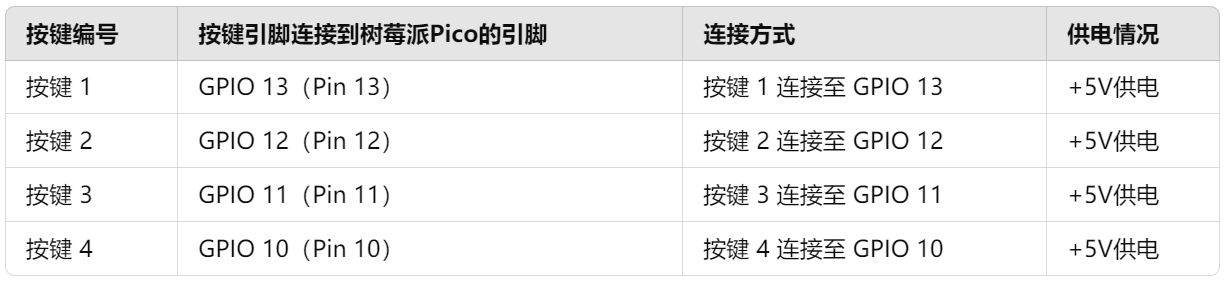
Here, the connection between the four-channel touch key interface and the Raspberry Pi Pico is shown as follows:
All the code for the following experiments is open-source and can be found in the material package we provide, under the folder elegance-devkit v1\Demo\22 TIMER_ButtonFSM.
Next, let's start explaining the experimental code. First, we will put the framework of the key detection finite-state machine Button class code into the ButtonDetect. py file, and then in our main. py file, first import the necessary modules:
Here, we have defined the callback functions for the key after three different operations, and these callback functions indicate the key operation and the key number:
Next, we create an infinite while loop, which is mainly to prevent the main. py file from exiting directly:
# ========================================  主程序  ============================================

while True:
    pass
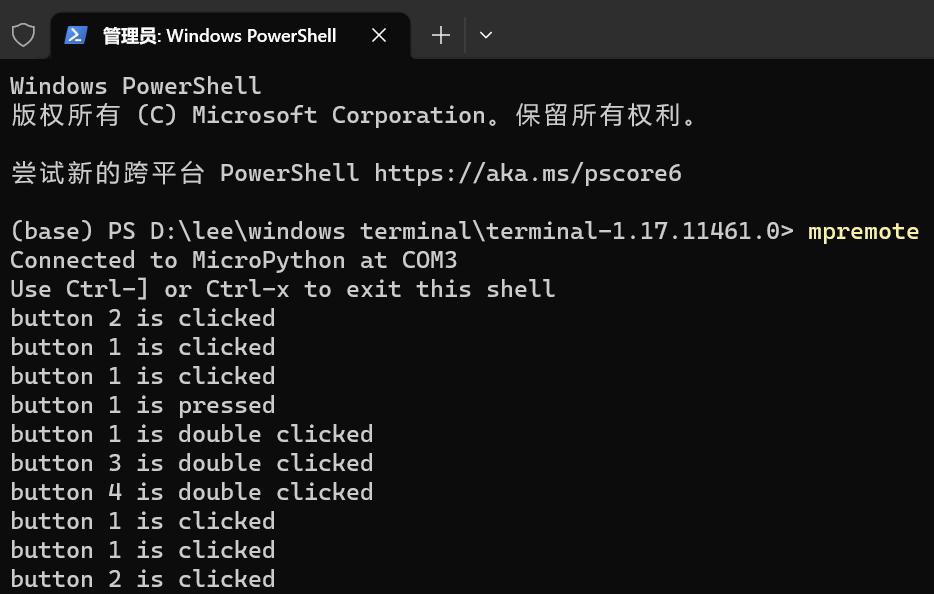
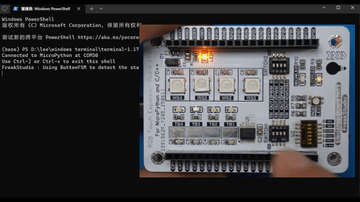
Burn the program, connect to the Raspberry Pi Pico via mpremote, and you can see the corresponding operation output in the terminal when pressing the button: