


W55MH32 RT-Thread + UDP Communication Test
Implement dual UDP server/client loopback communication on W55MH32 with RT-Thread using independent threads for bidirectional data transfer.
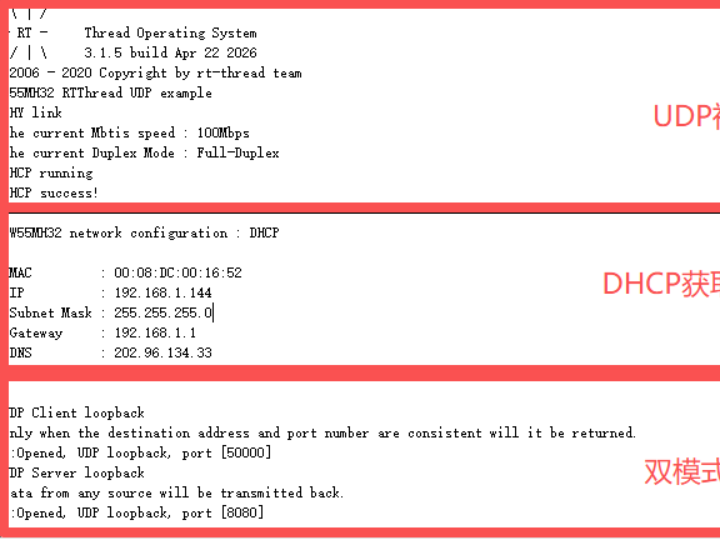
In this article, we will introduce how to implement a loopback test program on the W55MH32 Ethernet chip with the RT-Thread real-time operating system that simultaneously supports dual-mode parallel operation of UDP Server + UDP Client. Through two independent threads handling UDP listening and active sending logic respectively, combined with the W55MH32 hardware protocol stack features, we complete bidirectional data transceiver verification, providing a directly reusable practical solution for embedded multi-role network communication.
For other network protocols used in this example, such as DHCP , please refer to the relevant sections. For the W55MH32 initialization process, please refer to Network install which will not be repeated here.
UDP Protocol Introduction
UDP is a connectionless, unreliable lightweight transport layer communication protocol that implements datagram transmission based on the IP protocol. UDP does not require establishing a connection in advance and directly sends datagrams to the target address. It features high speed, low latency, and low resource consumption, making it one of the most commonly used communication protocols in embedded devices, real-time communication, and LAN broadcast scenarios.
Basic Principles of UDP
- Connectionless: The sender does not need to establish a connection with the receiver.
- Unreliable: Data may be lost, duplicated, or arrive out of order.
- Supports unicast, broadcast, and multicast: Can be used for one-to-one sessions or one-to-many group sending.
- Extremely fast: No handshake, acknowledgment, or retransmission mechanisms, resulting in very low latency.
Advantages of UDP
- Lightweight and efficient: Small protocol header, extremely low CPU and memory usage.
- High transmission speed: No handshake, no acknowledgment, suitable for high-speed data transmission.
- Supports one-to-many communication: Enables multicast and broadcast, suitable for multi-device coordination.
- Strong real-time performance: Suitable for sensor data, control commands, status reporting, and other scenarios.
- Simple structure: Very easy to implement on embedded devices with high stability.
RT-Thread Introduction
RT-Thread is an open-source, hard real-time embedded operating system (RTOS) led and developed by the Chinese community. Born in 2006, after nearly 20 years of development, it has evolved from a small kernel into an IoT operating system platform with rich components and a complete ecosystem.
Simply put, it acts as the "brain" and "butler" for IoT devices, responsible for managing hardware resources, scheduling tasks, and providing advanced features like network connectivity.
RT-Thread Features
- Extremely lightweight and scalable: Its kernel is very compact; the Nano version requires only 3KB ROM and 1KB RAM, capable of running on extremely resource-constrained chips (such as Cortex-M0). Additionally, it adopts a "kernel + components" architecture, allowing you to customize system functions as needed using graphical tools (Env).
- Hard real-time: Uses a preemptive scheduling algorithm to ensure high-priority tasks can immediately preempt low-priority ones, with interrupt response times reaching microseconds, making it very suitable for time-critical industrial control and automotive electronics scenarios.
- Rich software ecosystem: This is one of RT-Thread's biggest highlights. It features a software package mechanism similar to mobile app stores, incorporating TCP/IP protocol stacks, file systems, GUI engines, and a large number of sensor drivers and cloud connectivity components (such as MQTT, AWS, Alibaba Cloud). Developers can directly reuse these resources, greatly accelerating development.
- Open-source with commercial-friendly license: Follows the Apache License 2.0, meaning you can use it for commercial products free of charge without needing to disclose your product's source code.
Precautions
- Data unreliability: No retransmission mechanism; critical data requires its own validation.
- Connectionless: Cannot guarantee whether the peer is online or has received the data.
- LAN primarily: Multicast and broadcast typically only work within a local area network.
- Port occupation: Only one application can use a specific port at a time.
Application Scenarios
- LAN device discovery: Automatically discover devices via broadcast or multicast.
- High-speed data acquisition: Sensors and data loggers upload real-time data to the host.
- Multi-device coordinated control: One host controlling multiple slaves.
- Real-time command distribution: Fast control of LEDs, relays, motors.
- Multicast synchronization data: Multiple devices receiving the same data synchronously.
- RT-Thread multi-task communication: Simultaneously running multiple protocols like UDP + HTTP + TCP.
UDP Packet Structure
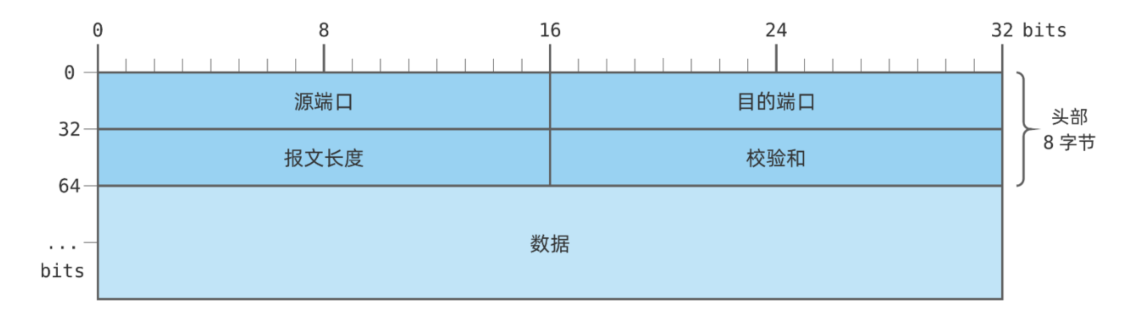
The UDP packet is very simple, containing only a basic header plus data section:
- Source Port: The port number of the sender
- Destination Port: The port number of the receiver
- Length: The length of the entire UDP packet, including header and data, in bytes
- Checksum: Checksum for error detection
Simple structure and extremely fast processing, making it highly suitable for embedded platforms.
UDP Packet Example
Packet Raw Data:
C0A8 0001 C0A8 0002 1F90 1F91 0021 F7DF 4865 6C6C 6F2C 2055 4450 21
Packet Analysis:
IP Section (first 16 bytes):
C0A8 0001: Source IP address (192.168.0.1)
C0A8 0002: Destination IP address (192.168.0.2)
UDP Section (remaining part):
1F90: Source port (8080)
1F91: Destination port (8081)
0021: Packet length (33 bytes)
F7DF: Checksum (validates data integrity)
4865 6C6C 6F2C 2055 4450 21: Data section (ASCII representation of "Hello, UDP!")
In the W55MH32, the UDP protocol is implemented in the internal hardware protocol stack, so we only need to read and write the corresponding register values to achieve data transmission and reception, without manually constructing packets.
RT-Thread Runtime Environment Description
Multi-threaded concurrent design: UDP server and client are split into two independent tasks, non-blocking and independently scheduled.
RT-Thread critical section interface protection: Protects SPI hardware bus resources to avoid hardware communication anomalies caused by multi-thread preemption.
System millisecond-level delay and task time-slice round-robin scheduling: Ensures network communication stability and real-time performance.
Native support for dynamic thread creation and resource management: Highly modular code, facilitating subsequent expansion with multi-protocol concurrency such as TCP, MQTT, and HTTP.
Implementation Process
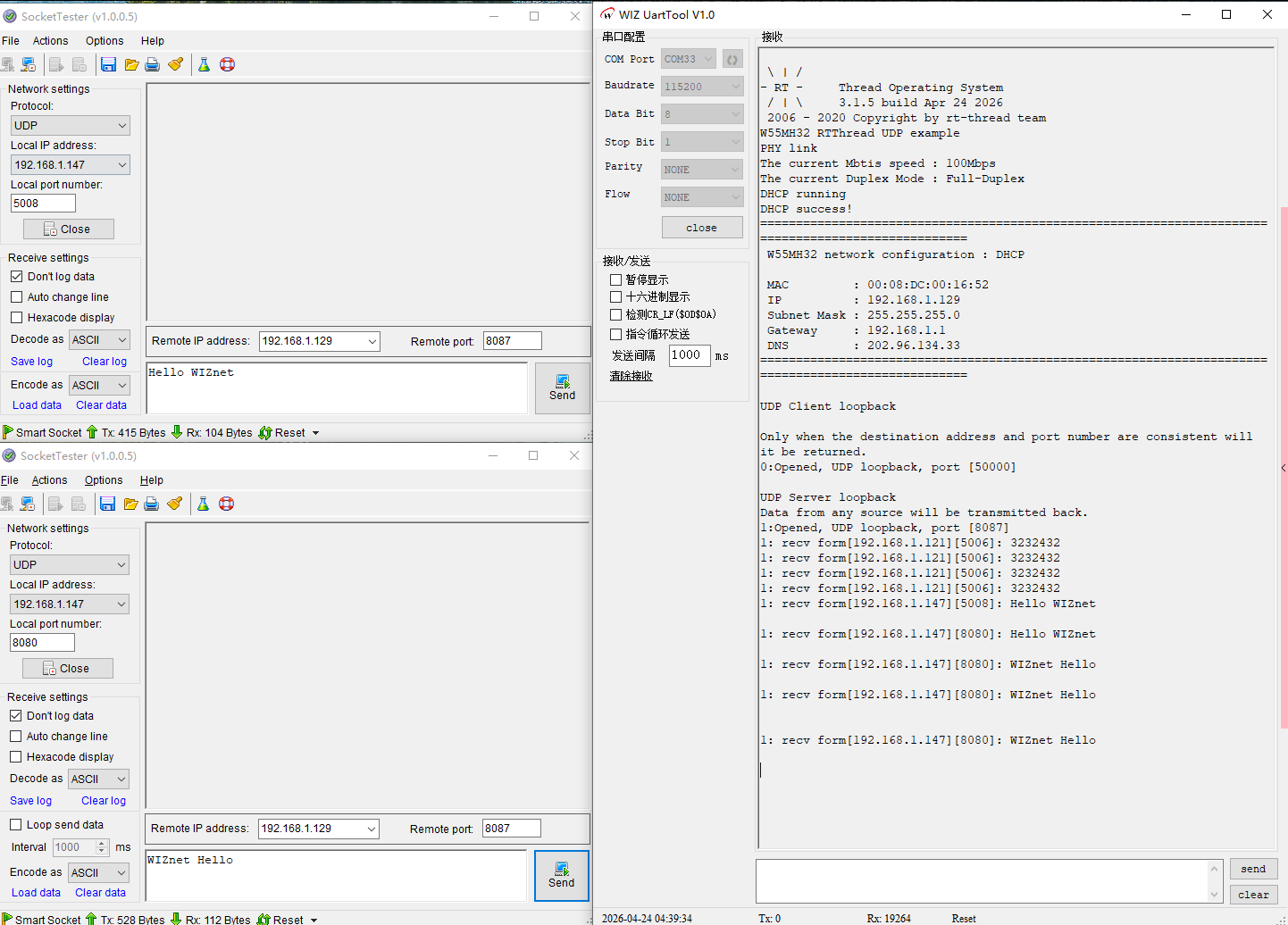
Note: The test example requires both the PC and the W55MH32 to be on the same network segment.
UDP Server: Listens on port 8080, receives arbitrary data and sends it back unchanged.
UDP Client: Actively sends data to the computer at 192.168.1.147:8080, implementing request-response loopback.
Step 1: Initialize W55MH32 and RT-Thread Environment
Initialize the network card hardware, SPI interface, PHY link, DHCP auto-obtain IP, and configure RT-Thread critical section protection.
Reference Code:
wiz_toe_init();
reg_wizchip_cris_cbfunc(rt_enter_critical, rt_exit_critical);
wiz_phy_link_check();
network_init(ethernet_buf, &default_net_info);
Step 2: Create Dual UDP Tasks Based on RT-Thread
Create two independent threads using RT-Thread multi-tasking:
Reference Code:
Task_UDPC_Handler = rt_thread_create("Task UDP Client", Task_UDPC, RT_NULL, 256, 1, 20);
Task_UDPS_Handler = rt_thread_create("Task UDP Server", Task_UDPS, RT_NULL, 256, 1, 20);
rt_thread_startup(Task_UDPC_Handler);
rt_thread_startup(Task_UDPS_Handler);
Step 3: UDP Server Task Logic (RT-Thread Independent Thread)
Listens on local port 8080, sends back any received data.
Reference Code:
void Task_UDPS(void *parameter)
{
    printf("UDP Server loopback\r\n");
    printf("Data from any source will be transmitted back.\r\n");
    while (1)
    {
        loopback_udps(SOCKET_UDPS, tcps_ethernet_buf, local_port);
        rt_thread_mdelay(1);
    }
}
Step 4: UDP Client Task Logic (RT-Thread Independent Thread)
Actively sends data to computer 192.168.1.147:8080, sends back upon receiving a reply.
Reference Code:
void Task_UDPC(void *parameter)
{
   printf("UDP Client loopback\r\n");
   printf("Only when the destination address and port number are consistent will it be returned.\r\n");
   while (1)
   {
       loopback_udpc(SOCKET_UDPC, tcpc_ethernet_buf, dest_ip, dest_port);
       rt_thread_mdelay(1);
   }
}
Step 5: Network Parameter Configuration
Reference Code:
wiz_NetInfo default_net_info = {
   .mac  = {0x00, 0x08, 0xdc, 0x12, 0x22, 0x12},
   .ip   = {192, 168, 1, 30},
   .gw   = {192, 168, 1, 1},
   .sn   = {255, 255, 255, 0},
   .dns  = {8, 8, 8, 8},
   .dhcp = NETINFO_DHCP
};
// 目标电脑 IP + 端口
uint8_t  dest_ip[4]    = {192, 168, 1, 147};
uint16_t dest_port     = 8080;
uint16_t local_port    = 8080;
Complete Reference Code (UDP Task Main Logic)
The application is mounted using the RT-Thread auto-initialization macro INIT_APP_EXPORT. Upon power-on, the system automatically executes network and task initialization without manual invocation.
Reference Code:
#define DEFAULT_MAC_EN        1
#define SOCKET_UDPC           0
#define SOCKET_UDPS           1
#define ETHERNET_BUF_MAX_SIZE (1024 * 2)

#define TASK_UDPC_PRIO     1
#define TASK_UDPC_STK_SIZE 256
static rt_thread_t Task_UDPC_Handler = RT_NULL;
void               Task_UDPC(void *pvParameters);

#define TASK_UDPS_PRIO     1
#define TASK_UDPS_STK_SIZE 256
static rt_thread_t Task_UDPS_Handler = RT_NULL;
void               Task_UDPS(void *pvParameters);

wiz_NetInfo default_net_info = {
    .mac  = {0x00, 0x08, 0xdc, 0x12, 0x22, 0x12},
    .ip   = {192, 168, 1, 30},
    .gw   = {192, 168, 1, 1},
    .sn   = {255, 255, 255, 0},
    .dns  = {8, 8, 8, 8},
    .dhcp = NETINFO_DHCP
};

uint8_t  dest_ip[4]                          = {192, 168, 1, 147};
uint16_t dest_port                           = 8080;
uint8_t  tcpc_ethernet_buf[ETHERNET_BUF_MAX_SIZE] = {0};

uint16_t local_port = 8080;
uint8_t  tcps_ethernet_buf[ETHERNET_BUF_MAX_SIZE] = {0};

int main(void)
{
    while (1)
    {
        rt_thread_mdelay(1);
    }
}

int app_init(void)
{
    rt_kprintf("%s RTThread UDP example\n",_WIZCHIP_ID_);
    wiz_toe_init();
    reg_wizchip_cris_cbfunc(rt_enter_critical,rt_exit_critical);

#if DEFAULT_MAC_EN == 1
    getSHAR(default_net_info.mac);
#endif

    wiz_phy_link_check();
    network_init(tcpc_ethernet_buf, &default_net_info);

    setSn_KPALVTR(SOCKET_UDPC, 6);
    setSn_KPALVTR(SOCKET_UDPS, 6);

    Task_UDPC_Handler = rt_thread_create("Task UDP Client Handler", Task_UDPC, RT_NULL, TASK_UDPC_STK_SIZE, TASK_UDPC_PRIO, 20);
    Task_UDPS_Handler = rt_thread_create("Task UDP Server Handler", Task_UDPS, RT_NULL, TASK_UDPS_STK_SIZE, TASK_UDPS_PRIO, 20);
    rt_thread_startup(Task_UDPC_Handler);
    rt_thread_startup(Task_UDPS_Handler);
    return 0;
}
INIT_APP_EXPORT(app_init);

void Task_UDPC(void *parameter)
{
    printf("UDP Client loopback\r\n");
    printf("Only when the destination address and port number are consistent will it be returned.\r\n");
    while (1)
    {
        loopback_udpc(SOCKET_UDPC, tcpc_ethernet_buf, dest_ip, dest_port);
        rt_thread_mdelay(1);
    }
}

void Task_UDPS(void *parameter)
{
    printf("UDP Server loopback\r\n");
    printf("Data from any source will be transmitted back.\r\n");
    while (1)
    {
        loopback_udps(SOCKET_UDPS, tcps_ethernet_buf,local_port);
        rt_thread_mdelay(1);
    }
}
After loading the program, the serial port prints as follows:
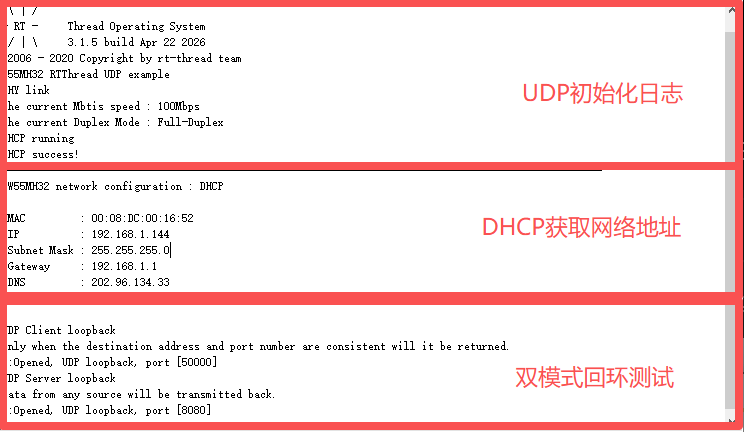
(Expected serial output showing dual-mode operation running simultaneously without interference)
Summary
This article implements dual-thread UDP parallel communication based on the W55MH32 hardware TCP/IP protocol stack and RT-Thread real-time operating system:
UDP Server: Listens on port 8080, echoes received data.
UDP Client: Actively connects to a computer, implements request-response echo.
It fully demonstrates the core process of embedded UDP development: initialization, multi-thread creation, socket configuration, data transceiver, and loopback testing. This solution can be directly used in IoT devices, data acquisition, real-time control, and similar projects.
-
W55MH32 RTThread+UDP
