


W55MH32 RT-Thread + TCP Communication Test
Implement dual TCP client/server loopback communication on W55MH32 with RT-Thread using independent threads and hardware TOE engine for reliable full-duplex dat
This article details how to implement efficient TCP communication on the W55MH32 chip with the RT-Thread real-time operating system. Using the W55MH32's built-in TOE (TCP/IP Offload Engine), we eliminate the need to handle complex protocol stacks in software. With simple socket programming and register configuration, we can easily build stable network applications. Through practical examples, we demonstrate how to run both TCP Client and TCP Server modes simultaneously in a single project. This example leverages RT-Thread's multi-threading capabilities, creating two independent tasks to handle different socket connections for loopback testing. It showcases the W55MH32's powerful hardware concurrency capabilities and provides a standard reference for developing complex multi-task network applications.
For other network protocols like DHCP, please refer to relevant sections. For W55MH32 initialization, refer to the Network Install chapter.
TCP Protocol Introduction
TCP (Transmission Control Protocol) is a connection-oriented, reliable transport layer protocol used for reliable data transmission over networks. TCP is one of the core protocols in the Internet protocol suite, typically used with IP (Internet Protocol) for socket communication.
TCP Protocol Features
- Connection-oriented: Requires a connection establishment before data transmission via three-way handshake, ensuring reliable communication between both parties.
- Reliability: Ensures data integrity and in-order delivery to the receiver. Automatically retransmits lost packets if data loss or errors occur.
- Flow control: Regulates data transmission speed to prevent receiver overload using sliding window mechanisms.
- Congestion control: Dynamically adjusts transmission rate to avoid network congestion using algorithms like slow start, congestion avoidance, and fast retransmit.
- Full-duplex communication: Enables simultaneous bidirectional data transmission after connection establishment.
- Ordered data transmission: Numbers packets to ensure sequential transmission even with network delays.
- Byte stream oriented: Treats data as a byte stream without message boundary preservation; application layer must parse data boundaries.
RT-Thread Introduction
RT-Thread is an open-source, hard real-time embedded operating system (RTOS) led and developed by the Chinese community. Born in 2006, after nearly 20 years of development, it has evolved from a small kernel into an IoT operating system platform with rich components and a complete ecosystem.
Simply put, it acts as the "brain" and "butler" for IoT devices, responsible for managing hardware resources, scheduling tasks, and providing advanced features like network connectivity.
RT-Thread Features
- Extremely lightweight and scalable: Nano version requires only 3KB ROM and 1KB RAM, capable of running on resource-constrained chips like Cortex-M0. Adopts a "kernel + components" architecture allowing on-demand system customization.
- Hard real-time: Preemptive scheduling ensures high-priority tasks immediately preempt low-priority ones, with interrupt response reaching microseconds, suitable for industrial control and automotive electronics.
- Rich software ecosystem: Features a software package mechanism similar to app stores, including TCP/IP stacks, file systems, GUI engines, sensor drivers, and cloud connectivity components (MQTT, AWS, Alibaba Cloud).
- Commercial-friendly open source: Licensed under Apache License 2.0, allowing free commercial use without disclosing product source code.
TCP Application Scenarios
- Remote monitoring and data acquisition: Collect sensor data and upload to remote servers via Ethernet
- Device remote control: Receive control commands over network for industrial automation and PLC control
- Internet of Things (IoT): Communicate with cloud servers or other devices for data transmission and command execution
- Embedded Web servers: Provide web interfaces for configuration and monitoring on routers, gateways, and sensor devices
TCP Data Exchange Process
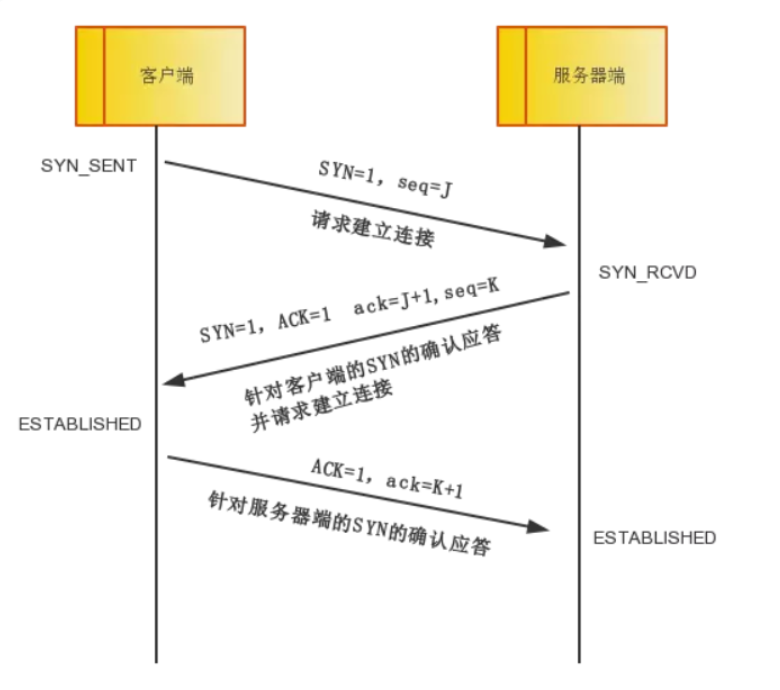
TCP Connection Establishment (Three-Way Handshake):
- First handshake: Client sends SYN packet requesting connection
- Second handshake: Server replies with SYN+ACK packet agreeing to connection
- Third handshake: Client sends ACK packet, connection established
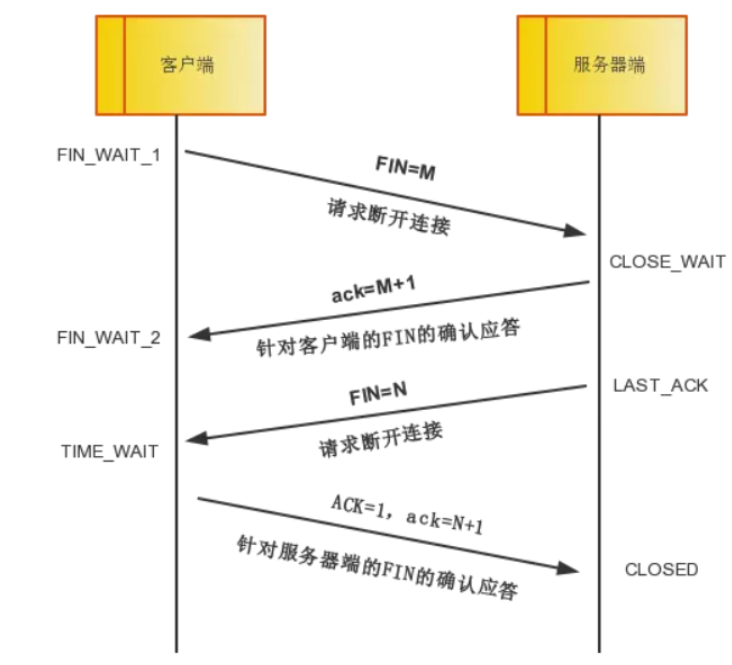
TCP Connection Termination (Four-Way Handshake):
- First handshake: Client sends FIN packet indicating data transmission complete
- Second handshake: Server replies with ACK packet agreeing to close
- Third handshake: Server sends FIN packet indicating ready to close
- Fourth handshake: Client sends ACK packet, connection formally closed
TCP ACK, Retransmission, and Keepalive Mechanisms
ACK Mechanism: Confirms successful packet reception. Each packet contains a sequence number, and ACK tells the sender which bytes have been successfully received. Features cumulative acknowledgment and timeout retransmission.
Retransmission Mechanism:
- Timeout retransmission: Sender sets a timer; retransmits if no ACK received within timeout period
- Fast retransmission: Sender retransmits upon receiving 3 duplicate ACKs without waiting for timeout
- Selective retransmission (SACK): Tells sender which specific blocks were received, reducing unnecessary retransmissions
Keepalive Mechanism: Detects if long-idle connections remain valid. Maintains connection state, releases dead connections, and prevents intermediate devices from timing out. On W55MH32 TOE, set Keepalive time in the Sn_KPALVTR register and send one data packet after connection to activate.
Implementation Process
Step 1: Network Parameter Configuration
#define DEFAULT_MAC_EN        1 // 1:默认MAC 0:自定义MAC
#define SOCKET_TCPC           0 // TCP客户端Socket号
#define SOCKET_TCPS           1 // TCP服务器Socket号
#define ETHERNET_BUF_MAX_SIZE (1024 * 2) // 网络缓冲区大小(2KB)

// TCP客户端:目标服务器IP+端口
uint8_t  dest_ip[4] = {192, 168, 1, 120};
uint16_t dest_port  = 8087;
// TCP服务器:本地监听端口
uint16_t local_port = 8084;
Step 2: RT-Thread Thread Configuration
// TCP客户端线程参数
#define TASK_TCPC_PRIO     1
#define TASK_TCPC_STK_SIZE 256
static rt_thread_t Task_TCPC_Handler = RT_NULL;

// TCP服务器线程参数
#define TASK_TCPS_PRIO     1
#define TASK_TCPS_STK_SIZE 256
static rt_thread_t Task_TCPS_Handler = RT_NULL;
Step 3: Network Parameter Initialization
wiz_NetInfo default_net_info = {
    .mac  = {0x00, 0x08, 0xdc, 0x12, 0x22, 0x12}, // 自定义MAC
    .ip   = {192, 168, 1, 30},                     // 静态IP
    .gw   = {192, 168, 1, 1},                      // 网关
    .sn   = {255, 255, 255, 0},                    // 子网掩码
    .dns  = {8, 8, 8, 8},                          // DNS
    .dhcp = NETINFO_DHCP                           // 开启DHCP
};
Step 4: Enable TCP Keepalive
setSn_KPALVTR(SOCKET_TCPC, 6); // TCP客户端 30s保活
setSn_KPALVTR(SOCKET_TCPS, 6); // TCP服务器 30s保活
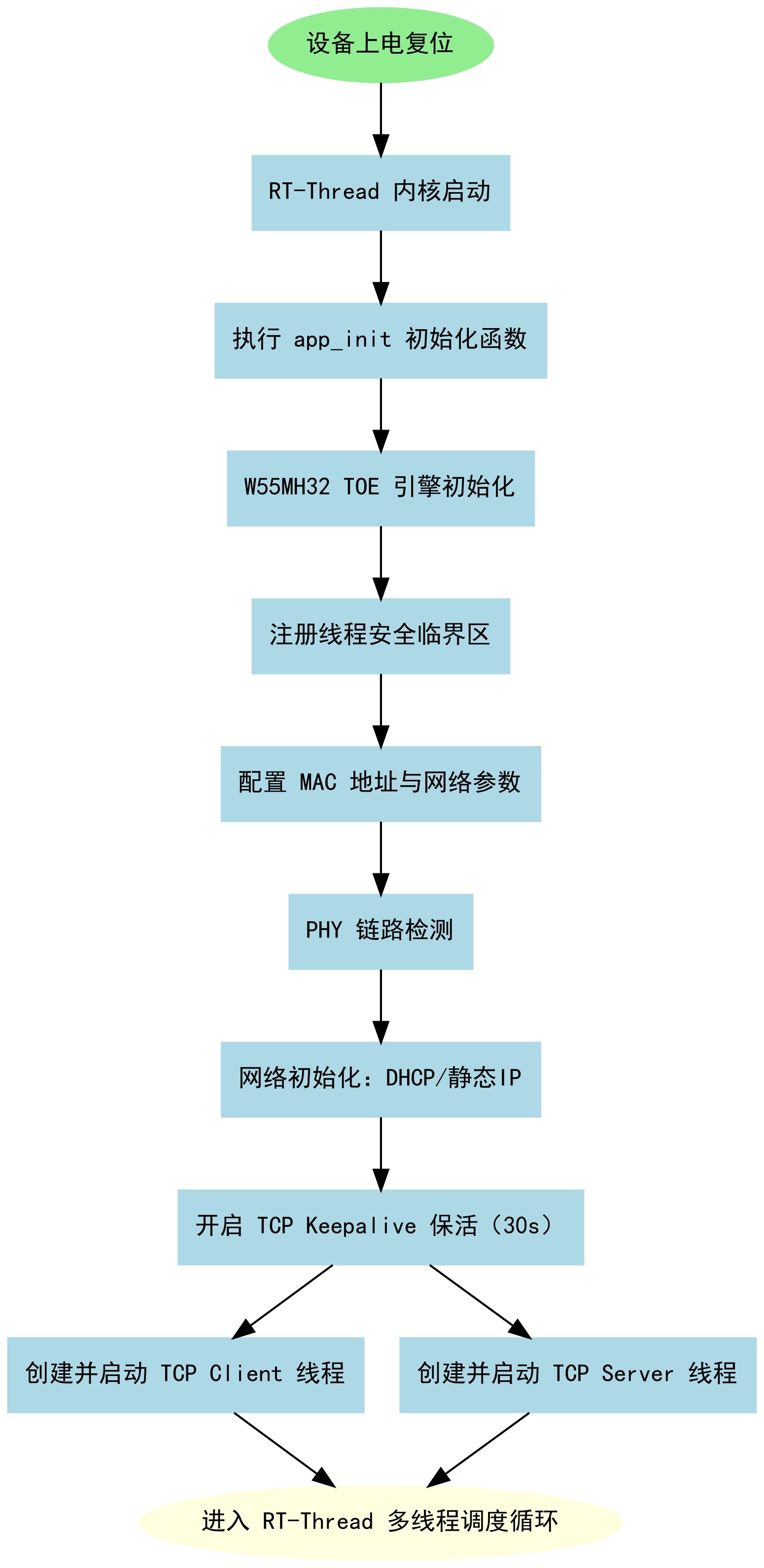
Step 5: System Initialization and Thread Startup
int app_init(void)
{
    rt_kprintf("%s RTThread TCP example\n", _WIZCHIP_ID_);
    wiz_toe_init(); // W55MH32 TOE引擎初始化
    // 注册RT-Thread临界区函数(线程安全)
    reg_wizchip_cris_cbfunc(rt_enter_critical, rt_exit_critical);
#if DEFAULT_MAC_EN == 1
    getSHAR(default_net_info.mac); // 使用芯片默认MAC
#endif
    wiz_phy_link_check(); // 检测以太网物理链路
    network_init(tcpc_ethernet_buf, &default_net_info); // 网络初始化

    // 开启Keepalive + 创建并启动双TCP线程
    setSn_KPALVTR(SOCKET_TCPC, 6);
    setSn_KPALVTR(SOCKET_TCPS, 6);
    Task_TCPC_Handler = rt_thread_create("Task TCP Client", Task_TCPC, RT_NULL, TASK_TCPC_STK_SIZE, TASK_TCPC_PRIO, 20);
    Task_TCPS_Handler = rt_thread_create("Task TCP Server", Task_TCPS, RT_NULL, TASK_TCPS_STK_SIZE, TASK_TCPS_PRIO, 20);
    rt_thread_startup(Task_TCPC_Handler);
    rt_thread_startup(Task_TCPS_Handler);
    return 0;
}
INIT_APP_EXPORT(app_init); // RT-Thread自动初始化
Step 6: TCP Thread Task Functions
// TCP客户端线程:循环连接服务器+数据回环
void Task_TCPC(void *parameter)
{
    while (1)
    {
        loopback_tcpc(SOCKET_TCPC, tcpc_ethernet_buf, dest_ip, dest_port);
        rt_thread_mdelay(1);
    }
}

// TCP服务器线程:循环监听端口+数据回环
void Task_TCPS(void *parameter)
{
    while (1)
    {
        loopback_tcps(SOCKET_TCPS, tcps_ethernet_buf, local_port);
        rt_thread_mdelay(1);
    }
}
Socket State Machine
The program runs dual TCP Client + Server state machines:
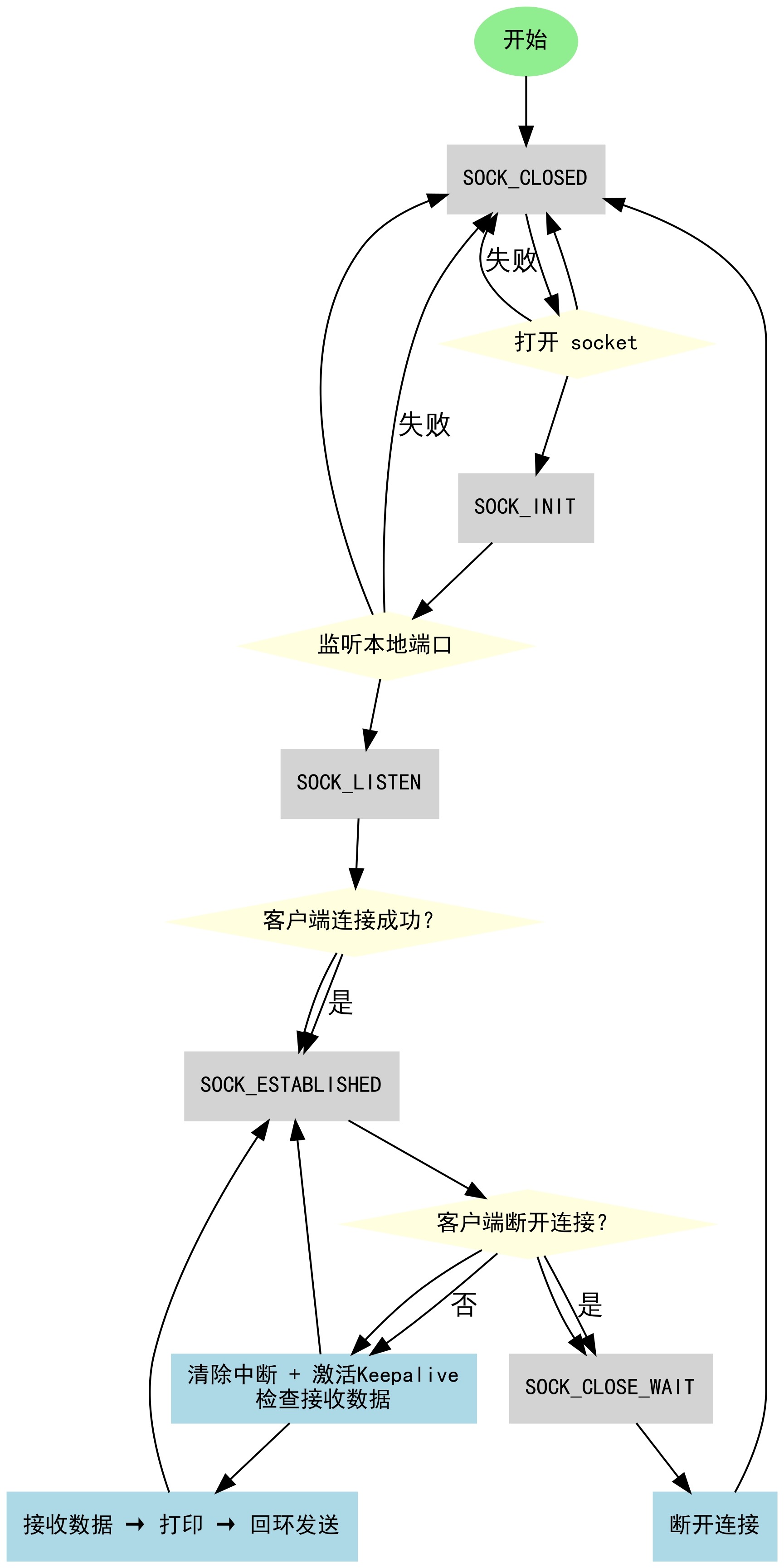
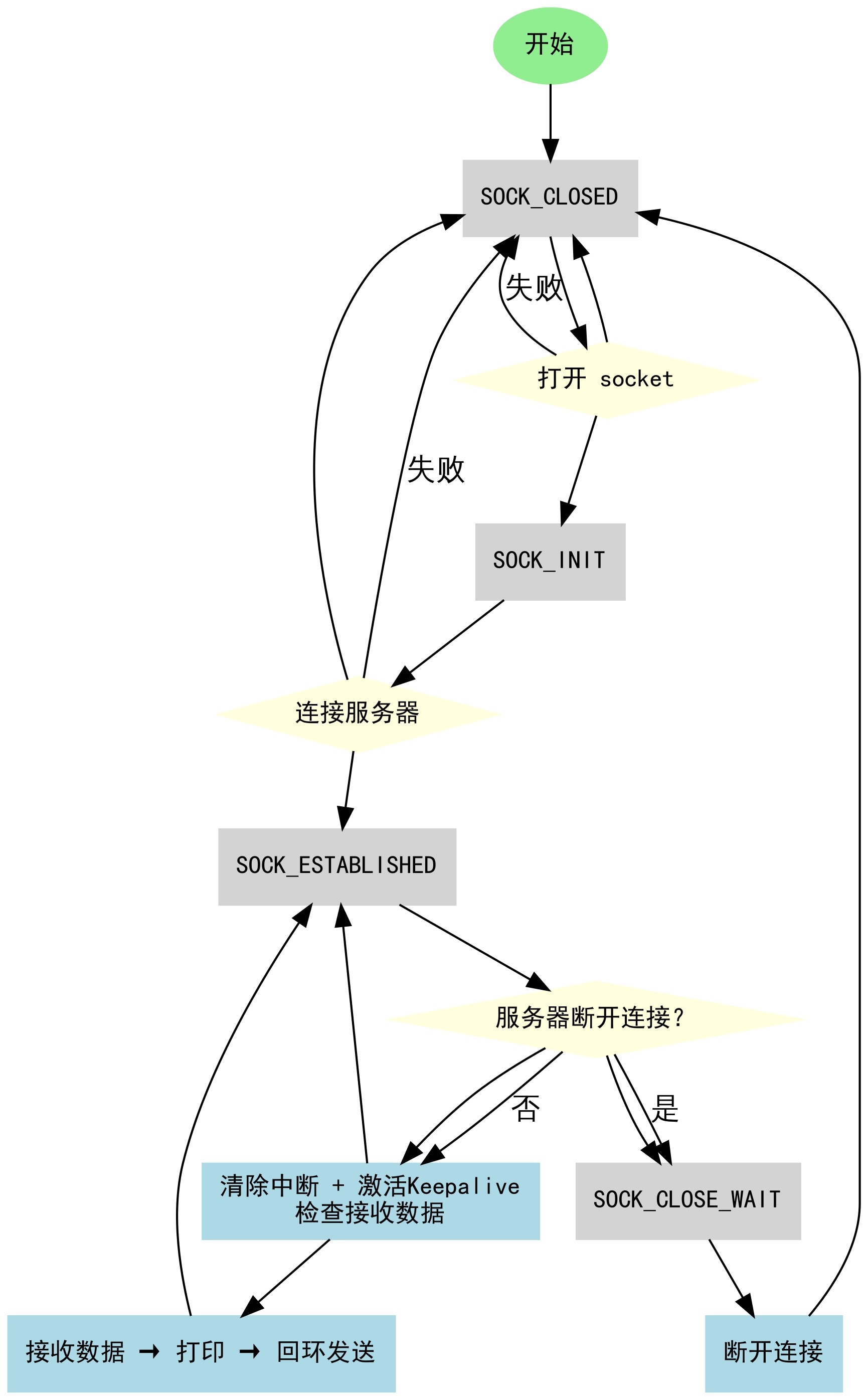
SOCK_CLOSED: Socket not open. Configure and open socket, then enter SOCK_INIT state.
SOCK_INIT: Attempt server connection. On success → SOCK_ESTABLISHED; on failure → closed.
SOCK_ESTABLISHED: Clear connection interrupt, send 1 packet to activate Keepalive, read Sn_RX_RSR register, receive and loopback data.
SOCK_CLOSE_WAIT: Server actively disconnects → semi-closed state. Use disconnect() to fully close.
Test Results
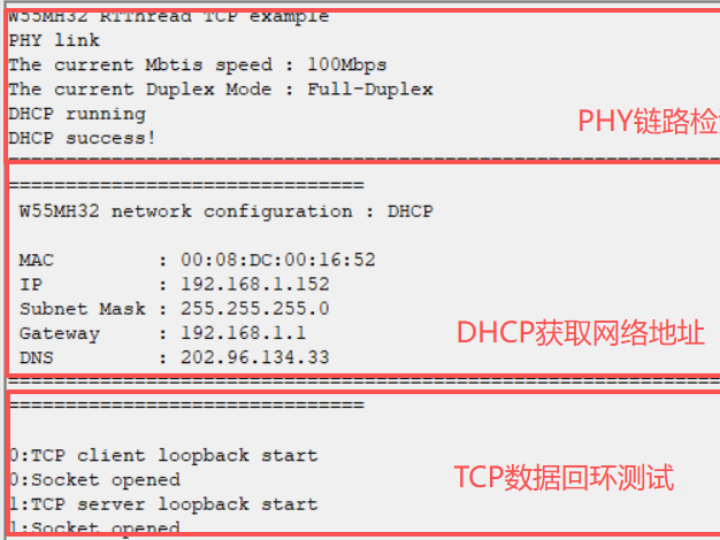
After flashing, observe PHY link detection, DHCP IP acquisition, TCP initialization, and port listening.
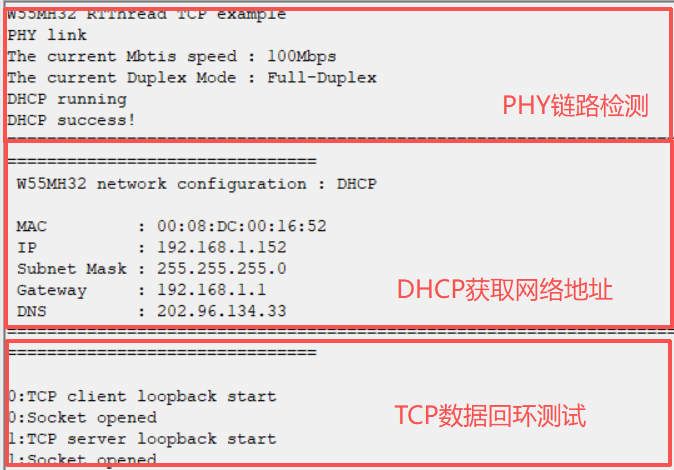
Important Notes:
PC and W55MH32 must be on the same network segment
TCP Client automatically retries connection on failure
RT-Thread thread stack size must be sufficient
Increase ETHERNET_BUF_MAX_SIZE and adjust socket buffers for higher throughput
RT-Thread critical section functions ensure thread-safe hardware operations
Dual Testing with Network Debug Tools
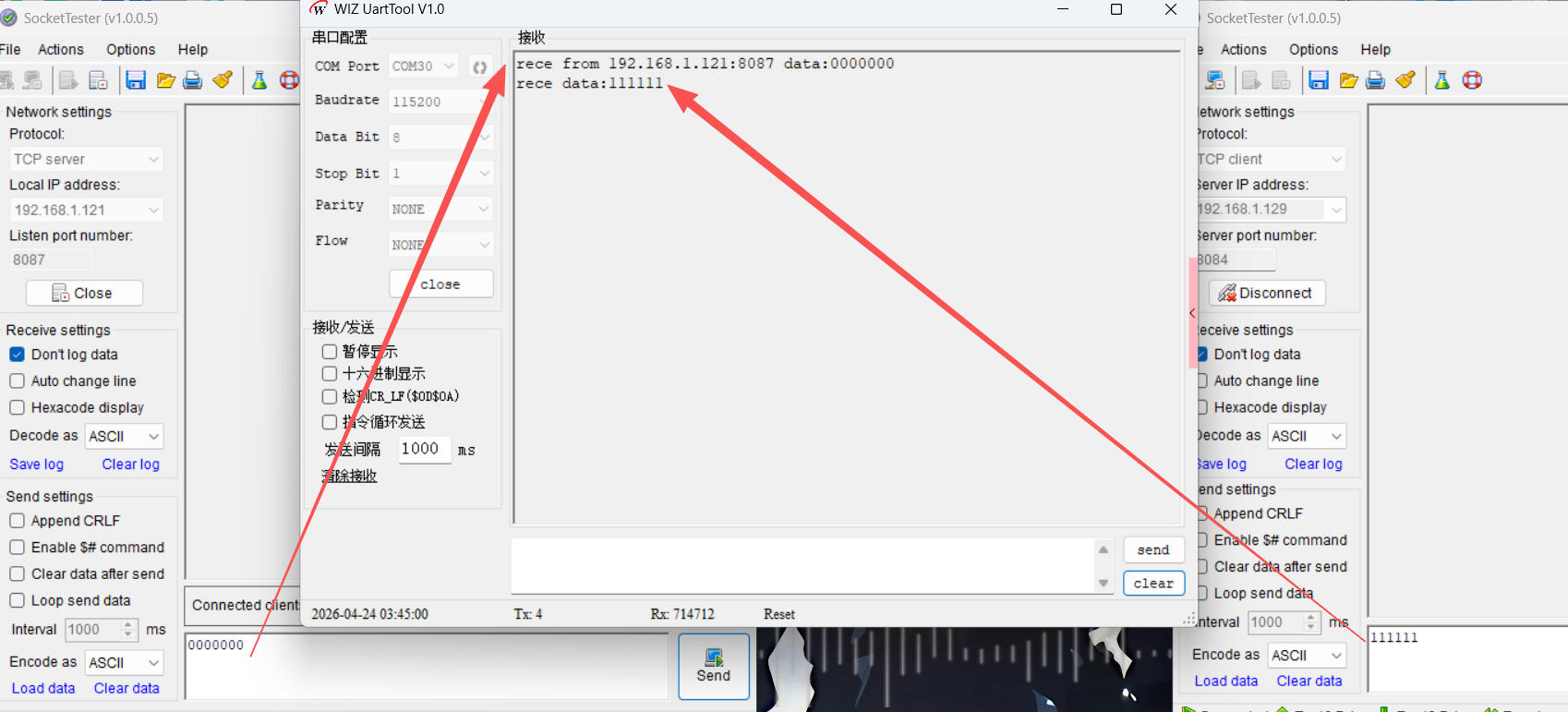
TCP Server Mode (PC): Open NetAssist as TCP Server on IP 192.168.1.121:8087. W55MH32 TCP Client connects automatically. Send data (e.g., "WIZNET") for loopback test.
TCP Client Mode (PC): Open another NetAssist as TCP Client connecting to W55MH32 IP:8084. TCP Server responds. Send data for loopback verification.
Monitor both TCP client and server threads via serial debug tool for connection status, data transmission, and concurrent communication stability.
Summary
This article introduced implementing dual TCP Client and Server modes on the W55MH32 with RT-Thread. By creating independent RT-Thread threads to manage client and server socket state machines, full-duplex data loopback testing was achieved. The example demonstrated Keepalive configuration for long connections and socket state transition handling.
Next article: UDP Client + Server dual-mode parallel communication on W55MH32, covering UDP principles and implementation steps. Stay tuned!
-
W55MH32 RT-Thread + TCP
