


W5100S/W5500+RP2040 Raspberry Pi Pico<Static configuration network information>
W5100S/W5500+RP2040 Raspberry Pi Pico<Static configuration network information>

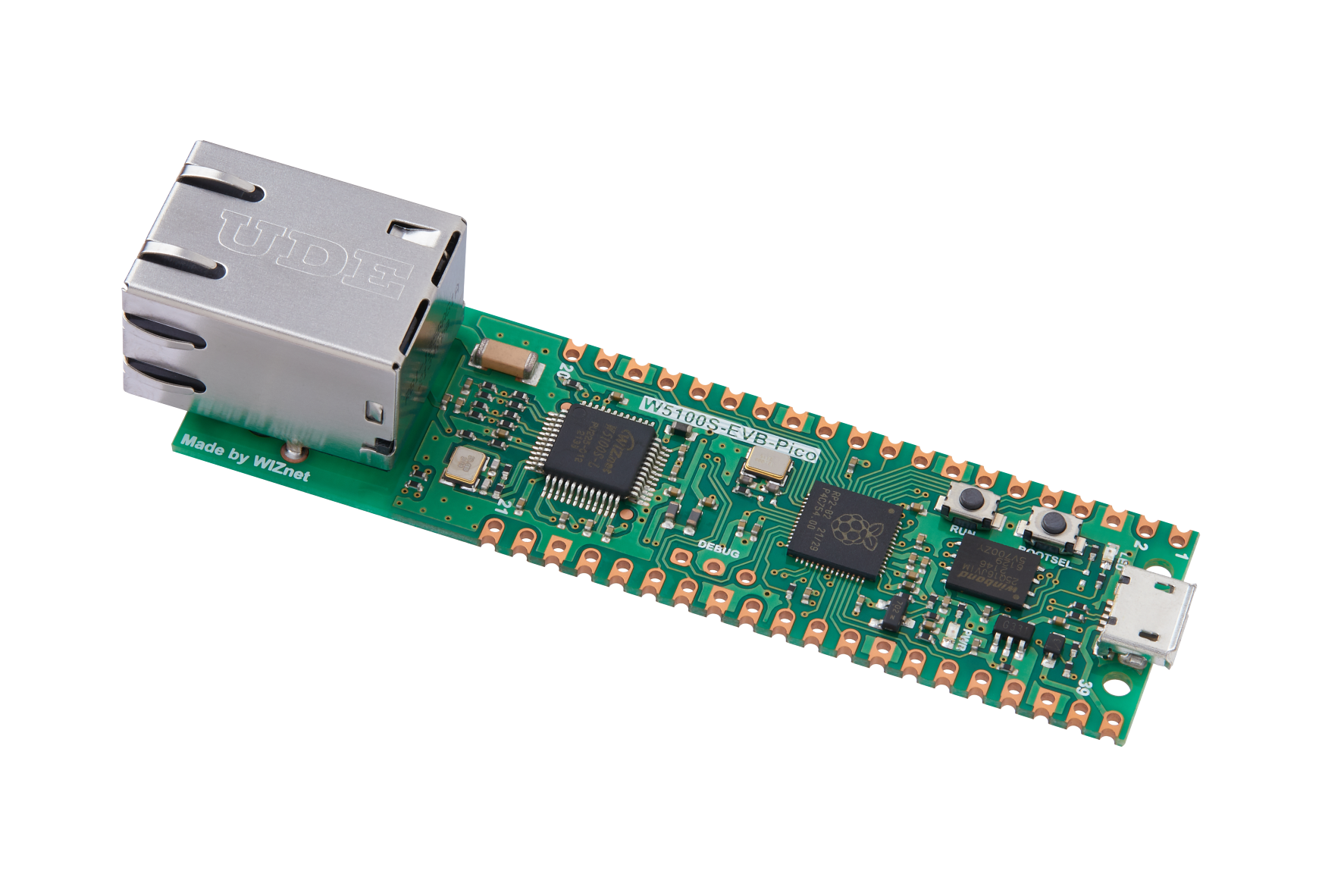
WIZnet - W5100S-EVB-Pico
x 1

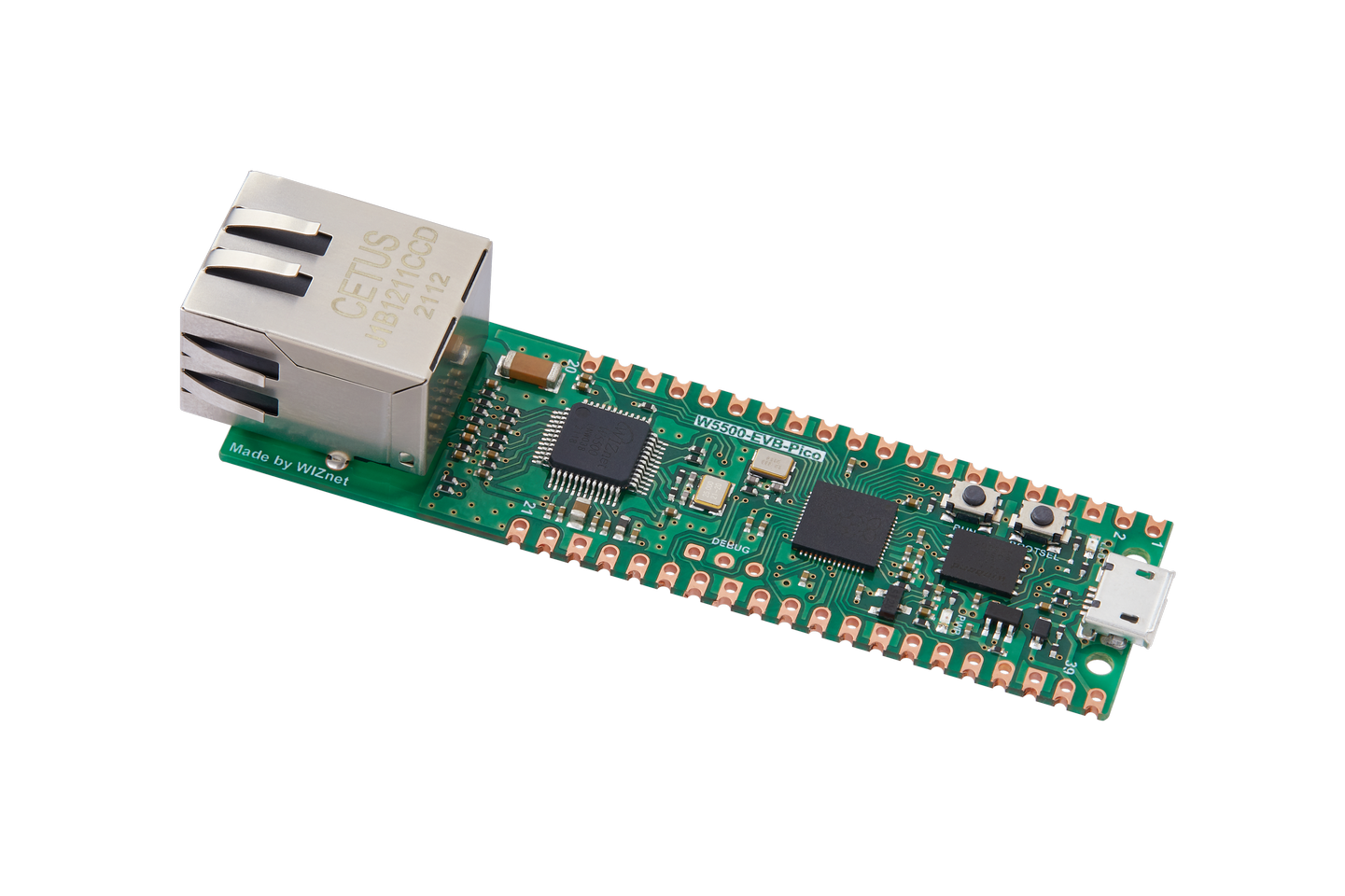
WIZnet - W5500-EVB-Pico
x 1
Translation results
Translation result
1 Introduction
Translation results
Translation result
Starting from this chapter, we will use WIZnet's W5100S/W5500 Ethernet chip combined with the PR2040 Raspberry Pi Pico. Through simple explanations and demonstration examples, we will let everyone get started quickly and better apply WIZnet's products to facilitate rapid development.
2. Related network information
2.1 Introduction
MAC address (Media Access Control Address): The MAC address is the unique identification of a network device in the local area network. It is a 48-bit address composed of 6 groups of 2 hexadecimal digits. For example: 00:0A:95:9D:68:16. A MAC address is typically assigned to each network interface card (NIC) by the hardware manufacturer for unique identification within a local area network. MAC addresses are used to define communications at the data link layer and are only valid within the same LAN.
IP address (Internet Protocol Address): The IP address is the unique identification of a network device in the global Internet. It consists of four numbers between 0 and 255, and is divided into a network part and a host part. For example: 192.168.1.1. IP addresses are used to define communications at the network layer and can be valid anywhere on the Internet. IP addresses are divided into public IP and private IP. Public IP is unique globally, while private IP is used in the internal network.
Subnet Mask: The subnet mask is used to divide the network address and the host address. In IPv4, a subnet mask usually consists of consecutive 1s and 0s, where consecutive 1s represent the network part and consecutive 0s represent the host part. For example, the common subnet mask 255.255.255.0 means that the first three digits are the network part (i.e. 24 bits) and the last digit is the host part (i.e. 8 bits). Subnet masks can be used to determine whether two IP addresses are on the same network.
Gateway: A gateway is a device that connects different networks and can transmit data from one network to another. In a LAN, the gateway is usually a router or a switch with routing functionality. For every IP address, there is a default gateway, which is the device through which packets must pass when leaving the current network. When the packet reaches the destination network, the destination network's device sends the packet back to the original network, through the original network's gateway and back to the original device.
DNS (Domain Name System): DNS is the Domain Name System, which is used to convert easy-to-remember domain names into IP addresses that computers can understand. For example, when you type www.example.com into your browser, DNS will resolve the domain name www.example.com to the corresponding IP address (which may be 192.168.1.1 or other). DNS is typically provided by a DNS server, which can be set up on a public DNS server (such as Google's 8.8.8.8) or a private DNS server (such as one running on your own network).
2.2 Advantages
Convenient remote access: Because the static IP address is fixed, it is very convenient for remote access.
Suitable for servers: Static IP addresses are suitable for servers and other scenarios that require stable operation for a long time.
Easy to manage: Because static IP addresses are fixed, they are easy to manage and maintain.
2.3 Application
Major servers, remote office, security monitoring, VoIP phones and some occasions where the IP address is fixed and does not need to be changed frequently.
3. WIZnet Ethernet chip
WIZnet mainstream hardware protocol stack Ethernet chip parameter comparison
| Model | Embedded Core | Host I/F | TX/RX Buffer | HW Socket | Network Performance |
|---|---|---|---|---|---|
| W5100S | TCP/IPv4, MAC & PHY | 8bit BUS, SPI | 16KB | 4 | Max 25Mbps |
| W6100 | TCP/IPv4/IPv6, MAC & PHY | 8bit BUS, Fast SPI | 32KB | 8 | Max 25Mbps |
| W5500 | TCP/IPv4, MAC & PHY | Fast SPI | 32KB | 8 | Max 15Mbps |
W5100S/W6100 supports 8-bit data bus interface, and the network transmission speed will be better than W5500.
W6100 supports IPV6 and is compatible with W5100S hardware. If users who already use W5100S need to support IPv6, they can be Pin to Pin compatible.
W5500 has more Sockets and send and receive buffers than W5100S
4. Static IP network setting example explanation and usage
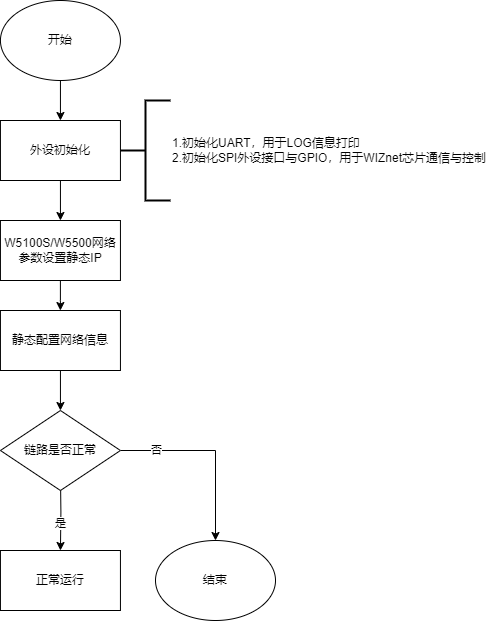
4.1 Program flow chart
4.2 Test preparation
Software:
Visual Studio Code
WIZnet UartTool
Hardware:
W5100SIO module + PR2040 Raspberry Pi Pico development board or WIZnet W5100S-EVB-Pico development board
Micro USB interface data cable
TTL to USB
cable
4.3 Connection method
Connect the USB port of the PC through the data cable (mainly used for burning programs, but can also be used as a virtual serial port)
Convert TTL serial port to USB and connect the default pin of UART0:
RP2040 GPIO0 (UART0 TX) <----> USB_TTL_RX
RP2040 GPIO1 (UART0 RX) <----> USB_TTL_TX
When using the module to connect RP2040 for wiring
RP2040 GPIO016 <----> W5100S MOSI
RP2040 GPIO017 <----> W5100S CS
RP2040 GPIO018 <----> W5100S SCK
RP2040 GPIO019 <----> W5100S MOSI
RP2040 GPIO020 <----> W5100S RST
Directly connect to the PC network port through a network cable (or: both the PC and the device are connected to the switch or router LAN port through a network cable)
4.4 Related code
We directly open the network_install.c file (path: examples/network_install/network_install.c) to see the specific implementation: first, we use a structure variable to initialize our basic network information, including MAC address, IP address, subnet mask, and gateway. , DNS address; then a structure variable is declared to read back the configuration information and print it out through the serial port, so that we can see whether our configuration information is configured successfully through the serial port.
The main function is carried out according to our flow chart. First, the system is initialized, then our chip is initialized, the configuration information is written, read back and printed out through the serial port, and then the phy link is detected. Note that PHY detection has been performed when initializing the chip. This is done once after configuring the information to ensure that the next test is normal; after the PHY detection abnormality times out, an error will be reported and then it will enter the while loop to block. If normal, the PHY working mode will be printed, 10M/100M, half duplex/full duplex. It works, and prompts us to operate the PING command, and then enters blocking; the whole is relatively simple, as shown below:
/* Network information to be configured. */
wiz_NetInfo net_info = {
.mac = {0x00, 0x08, 0xdc, 0x1e, 0xed, 0x2e}, // Configured MAC address
.ip = {192, 168, 1, 10}, // Configured IP address
.sn = {255, 255, 255, 0}, // Configured subnet mask
.gw = {192, 168, 1, 1}, // Configured gateway
.dns = {8, 8, 8, 8}, // Configured domain address
};
/* This parameter is used to receive the configuration information read back. */
wiz_NetInfo get_info;
int main()
{
uint8_t link_status;
wiz_PhyConf phyconf;
uint32_t count = 0;
stdio_init_all(); // Initialize the main control peripheral
wizchip_initialize(); // Chip initialization
printf("wiznet chip network install example.\r\n");
wizchip_setnetinfo(&net_info); // Write configuration information
print_network_information(&get_info); // Read the configuration information and print it
do
{
link_status = wizphy_getphylink();
if (link_status == PHY_LINK_OFF)
{
count++;
if (count > 10)
{
printf("Link failed of Internal PHY.\r\n");
break;
}
}
sleep_ms(500);
} while (link_status == PHY_LINK_OFF);
if (link_status == PHY_LINK_ON)
{
wizphy_getphyconf(&phyconf);
printf("Link OK of Internal PHy.\r\n");
printf("the %d Mbtis speed of Internal PHYrn.\r\n", phyconf.speed == PHY_SPEED_100 ? 100 : 10);
printf("The %s Duplex Mode of the Internal PHy.\r\n", phyconf.duplex == PHY_DUPLEX_HALF ? "Half-Duplex" : "Full-Duplex");
printf("\r\nTry ping the ip:%d.%d.%d.%d.\r\n", get_info.ip[0], get_info.ip[1], get_info.ip[2], get_info.ip[3]);
}
else
{
printf("\r\nPlease check whether the network cable is loose or disconnected.\r\n");
}
while (true)
{
}
}
4.5 Compile and burn
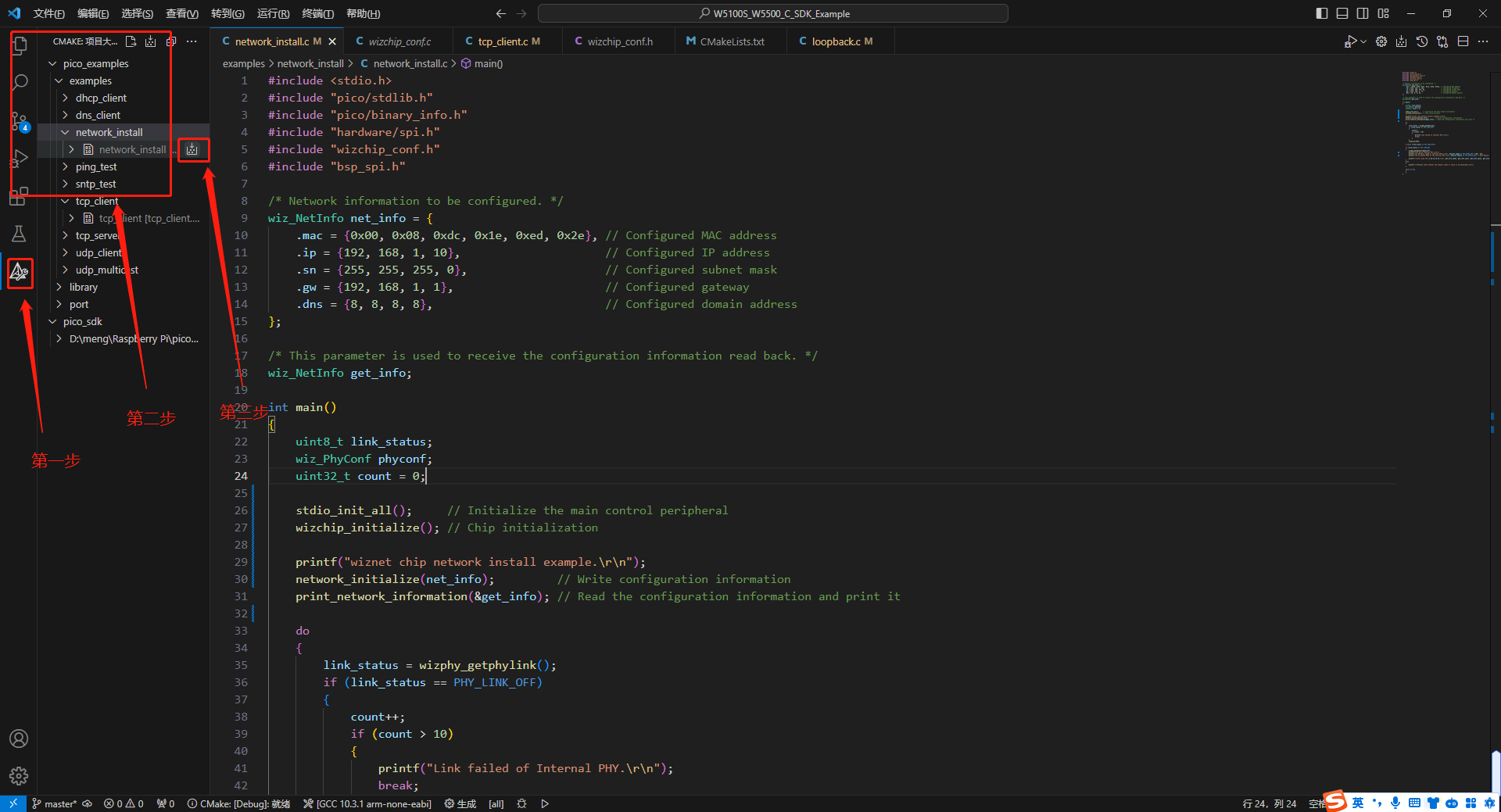
Compile, generate
点击左边的CMake
Find the corresponding project network_install under examples
Click Generate on the right to start compilation, as shown in the figure below:
Burn
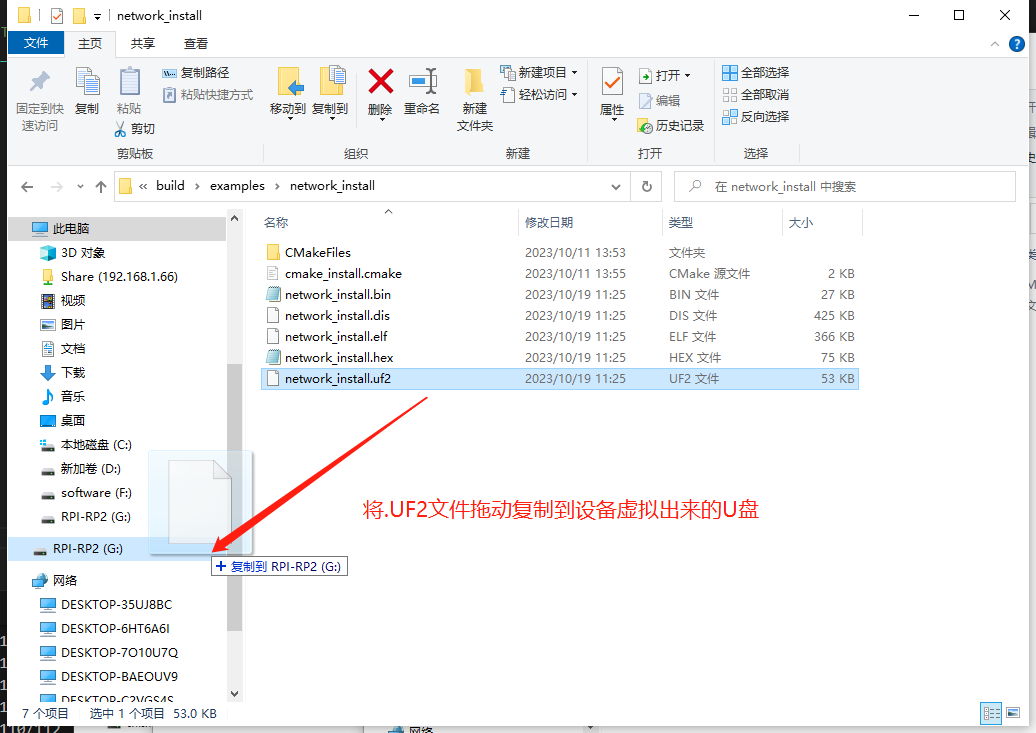
Click the resource manager on the left: After compilation is completed, the .uf2 file will be generated under the corresponding project folder (path: build/examples/network_install) in the examples folder under the build folder. This is the binary we need for burning document
Find the corresponding network_install.uf2 file under the corresponding project file
Right-click and select Show in File Explorer, as shown below:

Next, burn. After the board is connected to the computer with a data cable through the USB interface, press the boot button, then press reset to power on and enter the program burning mode.
Then you can see the USB disk virtualized by the development board. If you do not see the USB disk virtualized, try the first step again.
Then drag the .uf2 file to be burned and copy it to the virtual USB disk to complete the burning, as shown in the figure below:
Phenomenon
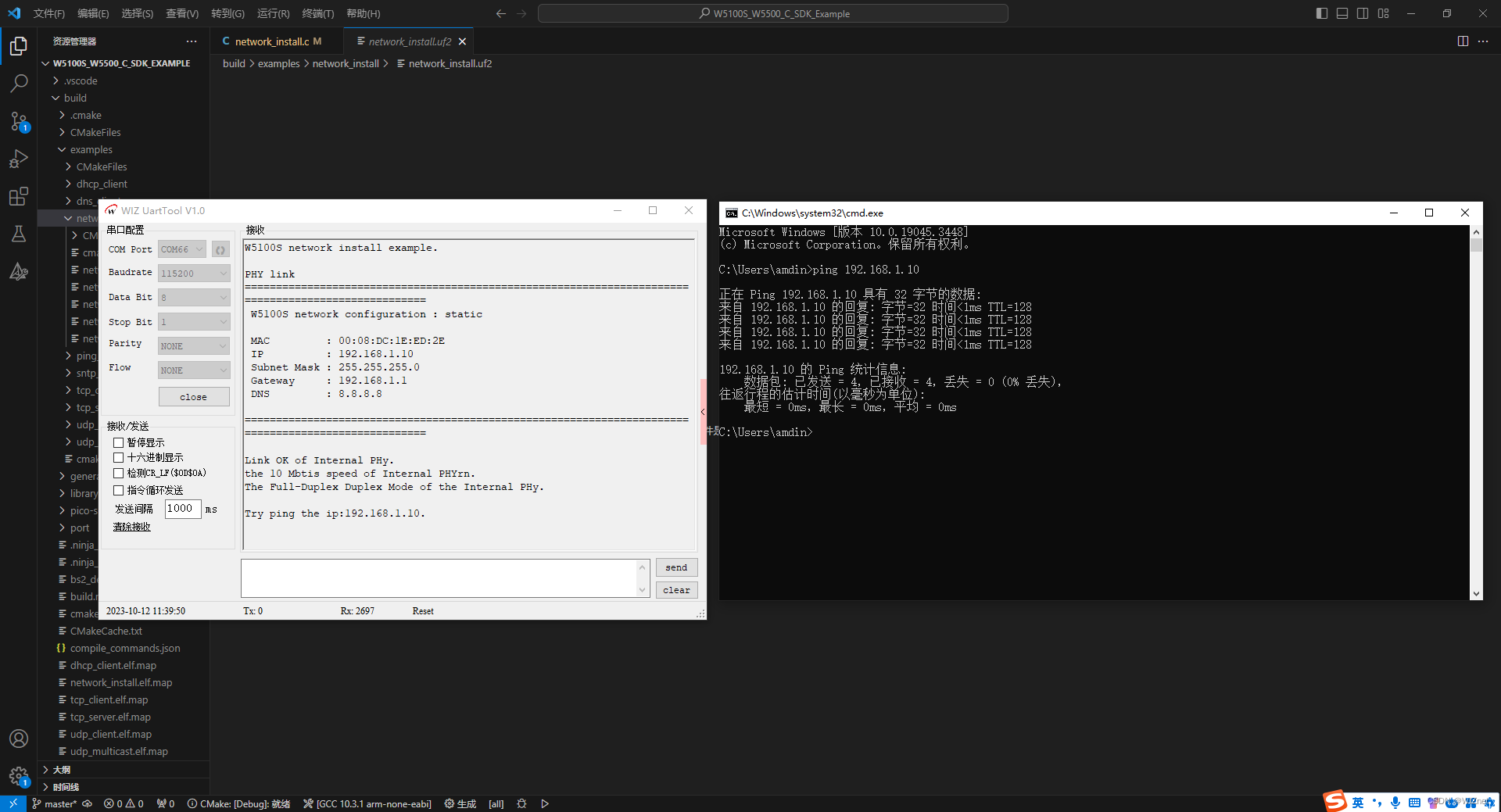
Open WIZ UartTool, select the corresponding COM port, fill in the parameters: baud rate 115200, 8 data bits, 1 stop bit, no parity bit, no flow control, click open after filling in the parameters.
Press the reset key and you can see the readback printed configuration information, etc.; after we press "Windows + R" and enter "cmd" to open the cmd terminal
Use the PING command based on the information printed on the serial port to PING the IP configured under it. You can see the PING reply with successful PING, as shown below:
5. Precautions
Static configured IP settings should avoid IP duplication causing IP conflicts.
If WIZnet's W5500 is used to implement the example in this chapter, we only need to modify two places.
Find the wizchip_conf.h header file under library/ioLibrary_Driver/Ethernet/ and modify the WIZCHIP macro definition to W5500;
Find the CMakeLists.txt file under the library and set COMPILE_SEL to ON. OFF is W5100S and ON is W5500.
-
Code for this Article

-
WIZnet official website
-
WIZnet official library link
-
YouTube Video