


Part 14: W55RP20-EVB-MKR MicroPython in Action (14): MQTT Protocol and OneNET Platform Integration
This is the 14th article in the WIZnet W55RP20 chip MicroPython tutorial series, based on the latest official firmware
This is the 14th article in the WIZnet W55RP20 chip MicroPython tutorial series, based on the latest official firmware. All code has been verified in practice and can be flashed and run directly. Copyright Notice: This is an original technical article from WIZnet official. Please indicate the source when reprinting.
In the previous tutorial, we completed the development of MQTT protocol integration with Alibaba Cloud platform, achieving device cloud connectivity, Thing Model data periodic reporting, and cloud monitoring. In the domestic IoT development scenario, China Mobile OneNET platform, with its simple access, lightweight ease of use, and generous free quota, has become a cost-effective choice for embedded devices to quickly connect to the cloud.
This article will guide you through getting started with MicroPython development on the W55RP20-EVB-MKR module, focusing on implementing MQTT protocol integration with OneNET platform. After completing this article, you will master:
Core principles of OneNET platform MQTT access and Thing Model specifications
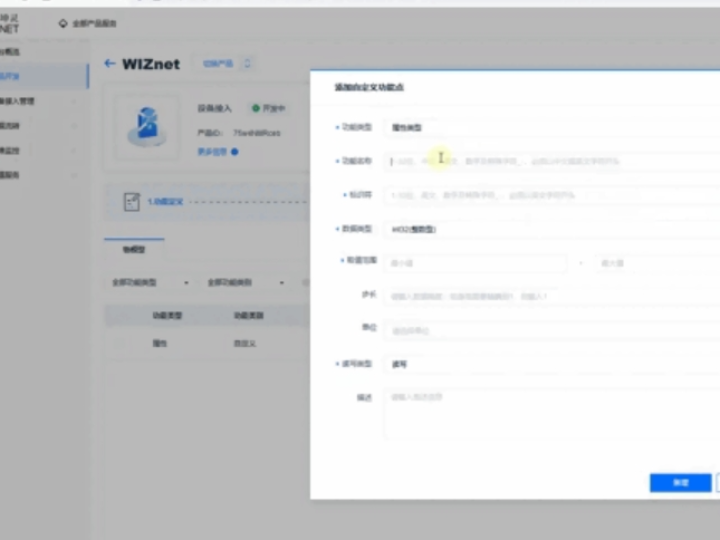
Full process of OneNET product creation, device registration, and permission configuration
Generation methods for MQTT connection parameters (ProductID, DeviceName, Token)
Implementation of bidirectional communication: device reporting + cloud command delivery
MQTT disconnection auto-reconnection and heartbeat keepalive solution
OneNET platform joint debugging testing and log viewing methods
One-stop troubleshooting for MQTT connection exceptions and faults
Core advantages of WIZnet hardware protocol stack in lightweight cloud scenarios
Series Tutorial Learning Path
This column consists of 16 articles, progressively covering the full MicroPython development process for the W55RP20-EVB-MKR module:
Part 1: Static IP Configuration and Network Basics
Part 2: DHCP Auto-Networking and Network Diagnostics
Part 3: TCP Client Communication
Part 4: TCP Server Communication
Part 5: UDP Unicast Data Communication
Part 6: UDP Multicast/Broadcast Data Communication
Part 7: DNS Domain Name Resolution
Part 8: NTP Time Retrieval from Network
Part 9: HTTP Client Request
Part 10: HTTP Server Setup
Part 11: HTTP Protocol and OneNET Platform Data Upload
Part 12: MQTT Protocol Basic Communication Verification
Part 13: MQTT Protocol and Alibaba Cloud Platform Integration
Part 14: MQTT Protocol and OneNET Platform Integration (This Article)
Part 15: MQTT Protocol and ThingSpeak Platform Integration
Part 16: Modbus Industrial Protocol Communication
It is recommended to bookmark this column and follow the tutorials step by step. All code will be synchronized to the official Gitee repository.
Table of Contents
2. Flash W55RP20-EVB-MKR Module Specific MicroPython Firmware
3. Hardware Connection and Development Environment Configuration
3.1.1 Basic Connection (Power + Debug)
3.1.3 Module and Development Board Wiring
3.2 Thonny Development Environment Configuration
4. MQTT + OneNET Core Principles
4.1 MQTT Protocol Introduction
4.2 OneNET Platform Access Process
5. OneNET Platform Configuration Process
6.2 Key Code Steps Explanation
7. Running Results and Testing Verification
7.2 OneNET Platform Verification
8. One-Stop Troubleshooting Guide for Common Issues
8.1 Network Connection Troubleshooting
8.2 MQTT Connection Failure Troubleshooting
8.3 Data Reporting / Platform Command No Response Troubleshooting
9. W55RP20 Core Advantages Comparison
10. Typical Application Scenarios
12. Series Preview and Resource Acquisition
1. Preparation
1.1 Software Preparation
All required software are free versions. Download and install them according to the requirements, no additional payment needed.
| Software Name | Version Requirement | Download Link | Description |
|---|---|---|---|
| Thonny | 4.0 and above | Thonny Official Download | Lightweight MicroPython IDE, supports code editing, flashing, and serial debugging, beginner-friendly |
| W55RP20-EVB-MKR Module MicroPython Driver Library | Latest stable version | WIZnet Official Firmware/Driver Library Download | Specifically written for W55RP20-EVB-MKR module, integrated with WIZnet hardware driver, TCP/IP protocol stack, and MQTT client library |
| Serial Debugging Tool (e.g., SecureCRT) | Any version | Official download or third-party tools | For viewing serial output logs, debugging information, locating connection and data upload issues |
| OneNET IoT Platform | Online version | OneNET IoT Platform Official Website | Create products, register devices, obtain MQTT connection parameters, view uploaded temperature and humidity data |
1.2 Hardware Preparation
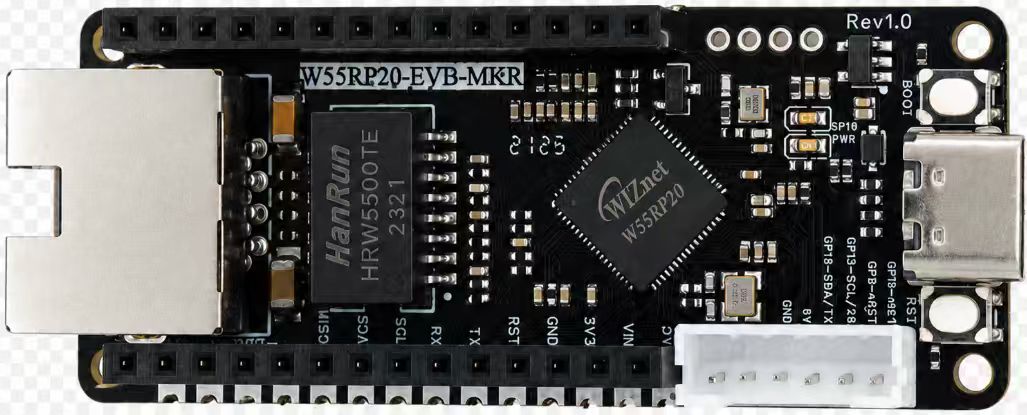
W55RP20-EVB-MKR x 1
Micro USB data cable (must support data transfer, cannot use charging-only cable) x 1
Standard network cable x 1
Router / switch with DHCP enabled x 1 (for obtaining network parameters, enabling external network access)
OneNET platform account (free registration)
2. Flash W55RP20-EVB-MKR Module Specific MicroPython Firmware
The W55RP20-EVB-MKR module is fully compatible with the Raspberry Pi MKR UF2 firmware flashing method. The operation is simple and requires no additional programmer, making it easy for beginners to get started:
Hold down the BOOTSEL button on the RP2040 development board;
Connect the development board to the computer using a Micro USB data cable;
After the computer recognizes the RPI-RP2 USB drive, release the BOOTSEL button;
Drag and drop the downloaded W5500_RP2040_firmware.uf2 firmware file into the USB drive;
The development board will restart automatically, and the firmware flashing is complete.
Note: If the computer does not recognize the RPI-RP2 USB drive, please try changing the USB data cable, reconnecting the development board, or switching to a different computer USB port (preferably USB 2.0).
3. Hardware Connection and Development Environment Configuration
3.1 Hardware Connection
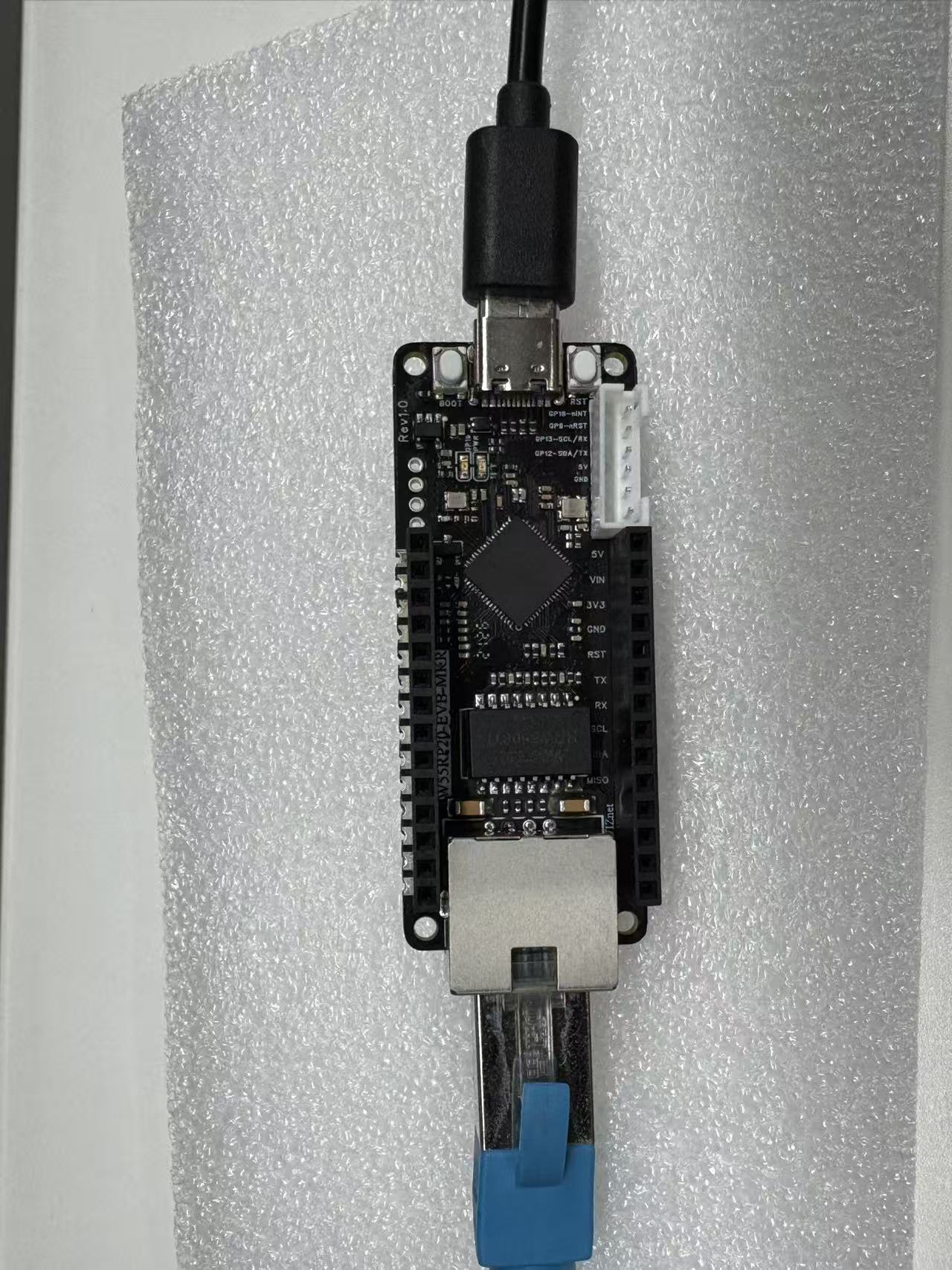
The W55RP20-EVB-MKR module connection is divided into two steps: power/debug and Ethernet connection. The operation is simple and requires no complex wiring:
3.1.1 Basic Connection (Power + Debug)
Connect the RP2040 development board to the computer using a Micro USB data cable for power supply, code flashing, and serial debugging.
3.1.2 Ethernet Connection
Connect the Ethernet port of the W55RP20-EVB-MKR module to the LAN port of the router (or directly to the computer's Ethernet port; manual configuration of the computer IP to the same subnet as the development board is required).
3.1.3 Module and Development Board Wiring
If using a separate module and development board, connect them according to the following pin correspondence (SPI communication):
3.2 Thonny Development Environment Configuration
Open the Thonny software and configure the development environment according to the following steps to ensure normal code flashing and running:
Click the top menu bar "Run" -> "Configure Interpreter";
Switch to the "Interpreter" tab;
Select MicroPython (Generic) from the "Interpreter" dropdown list;
Select the corresponding serial port of the development board from the "Port" dropdown list (usually displayed as Board CDC @ COMx);
Check "Restart interpreter before running" and "Synchronize device real-time clock";
Click "OK" to complete the configuration.
If the development board does not appear in the port list, please try:
Reconnect the USB data cable;
Change to a USB data cable that supports data transfer;
Close other software occupying the serial port (such as serial assistant, Arduino IDE, etc.);
Re-flash the MicroPython firmware;
Install the Raspberry Pi Pico USB driver.
4. MQTT + OneNET Core Principles
4.1 MQTT Protocol Introduction
MQTT (Message Queuing Telemetry Transport) is a lightweight IoT communication protocol based on the publish/subscribe model, transmitted over TCP protocol. It features short messages, low bandwidth usage, low power consumption, and high stability, and is the world's mainstream IoT device-to-cloud standard protocol.
4.2 OneNET Platform Access Process
Create product on OneNET platform -> Define Thing Model (temperature temp, humidity humi);
Create device -> Obtain PRODUCT_ID, DEVICE_NAME, TOKEN
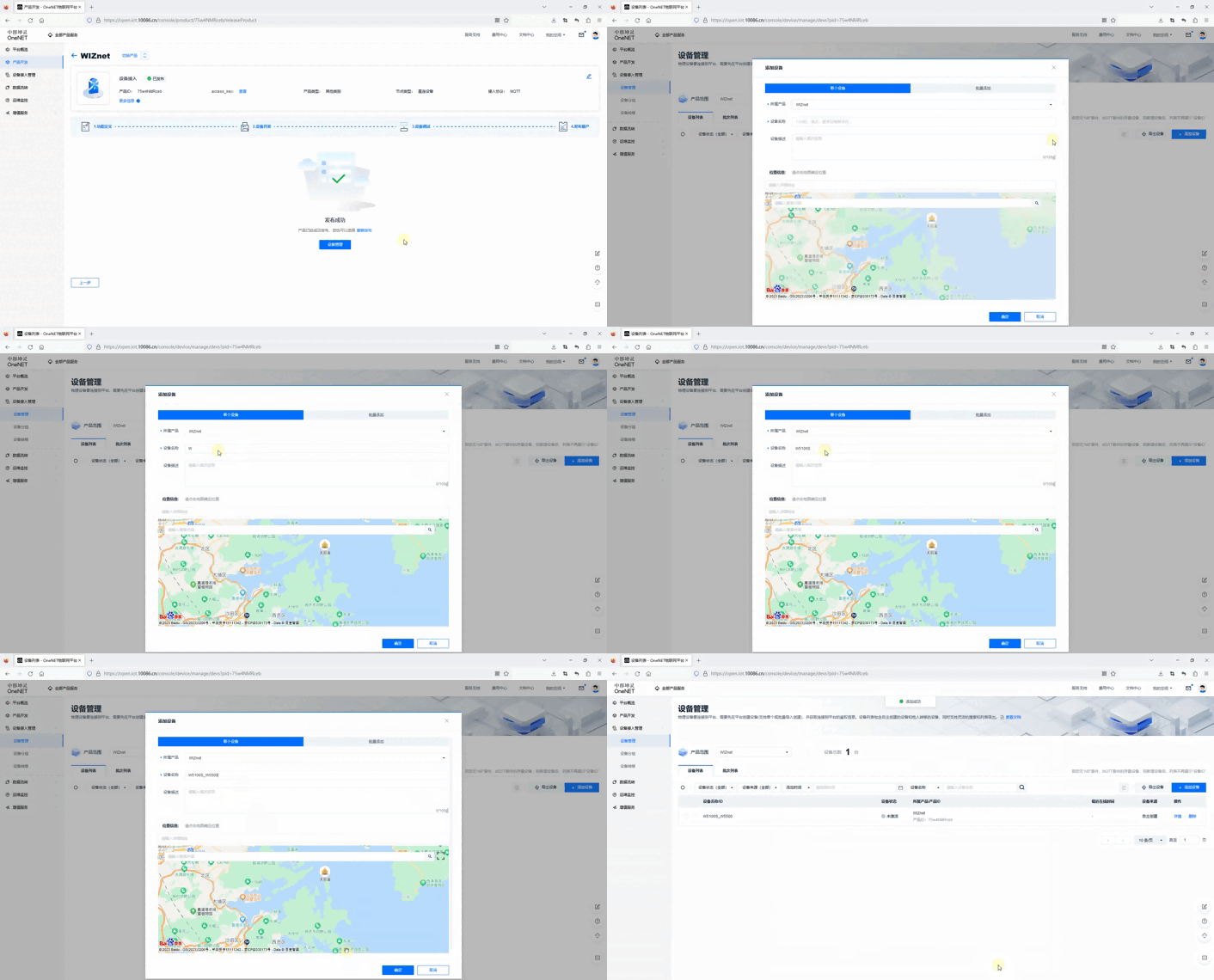
Configure MQTT access address, port, and subscription topics;
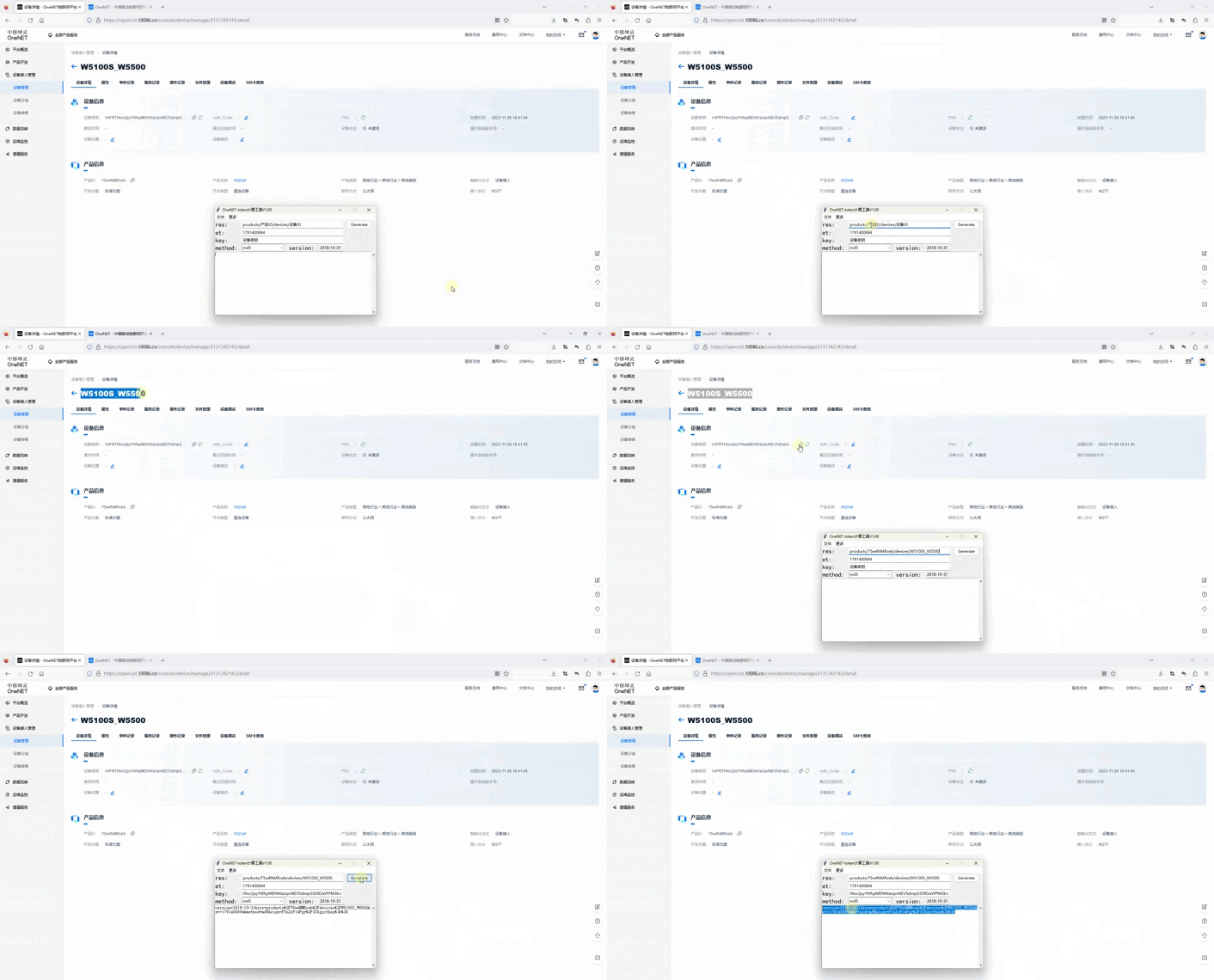
The {device-name} in the topic needs to be replaced with the device name (or device ID) Password generation tool: https://open.iot.10086.cn/doc/iot_platform/images/tools/token.exe
| Parameter Name | Parameter Value |
|---|---|
| mqttHostUrl | mqtts.heclouds.com (fixed) |
| port | 1883 (fixed) |
| clientId | W5100S_W5500 (Device ID) |
| username | 75w4NMRceb (Product ID) |
| passwd | version=2018-10-31&res=products%2F75w4NMRceb%2Fdevices%2FW5100S_W5500&et=1791400694&method=md5&sign=FTnZrF14Pqy%2F3CXggctheg%3D%3D (tool calculated) |
| Temperature/Humidity Reporting Topic | $sys/75w4NMRceb/W5100S_W5500/thing/property/post (publish permission) |
| Reporting Reply Topic | $sys/75w4NMRceb/W5100S_W5500/thing/property/post/reply (subscribe permission) |
| Set LED Status | $sys/75w4NMRceb/W5100S_W5500/thing/property/set (subscribe permission) |
| Set Status Reply | $sys/75w4NMRceb/W5100S_W5500/thing/property/set_reply (publish permission) |
Device connects to network via W55RP20 -> Establishes MQTT connection;
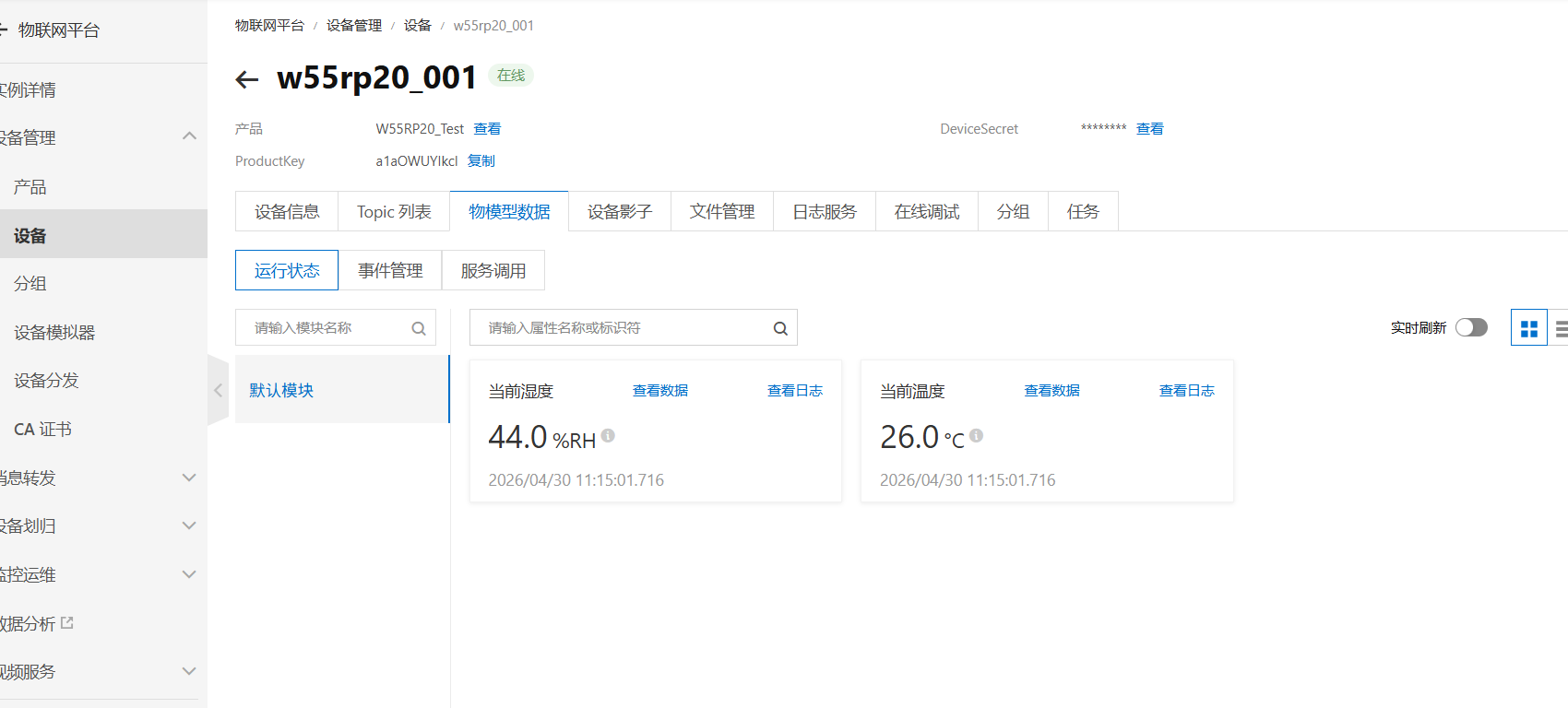
Device periodically reports attribute data -> Platform displays in real-time.
4.3 Core Advantages
Extremely simple access process, no complex signature encryption required;
Supports reporting + command delivery bidirectional communication;
Generous free quota, suitable for learning and small projects;
Hardware protocol stack independently handles networking, zero MCU usage.
5. OneNET Platform Configuration Process
Log in to China Mobile OneNET platform, enter the IoT Core Suite;
Create a product, select MQTT protocol access;
Define Thing Model: Add temp (temperature), humi (humidity) attributes;
Create device, copy PRODUCT_ID, DEVICE_NAME, TOKEN;
Record system topics: attribute reporting, command delivery, command response;
Enable device permissions, complete platform configuration.
6. Core Code Analysis
The W55RP20-EVB-MKR module's MicroPython library has fully encapsulated the underlying network and MQTT functions. Integrating with OneNET only requires simple configuration to run.
6.1 Complete Runnable Code
# main.py
from wiznet_init import wiznet
from umqttsimple import MQTTClient
from machine import Pin
import time
import json
import random
# ================= Configuration Area =================
BOARD = "W55RP20-EVB-Pico"
# OneNET MQTT Configuration
ONENET_HOST = "mqtts.heclouds.com"
ONENET_PORT = 1883
PRODUCT_ID = "ZGB6zBD0nS"
DEVICE_NAME = "led"
TOKEN = "version=2018-10-31&res=products%2FZGB6zBD0nS%2Fdevices%2Fled&et=1780105717&method=md5&sign=wj69s4%2FXpLuMus4JVb65ww%3D%3D"
# System Topics
TOPIC_PROP_POST = f"$sys/{PRODUCT_ID}/{DEVICE_NAME}/thing/property/post"
TOPIC_PROP_SET = f"$sys/{PRODUCT_ID}/{DEVICE_NAME}/thing/property/set"
TOPIC_PROP_SET_REPLY = f"$sys/{PRODUCT_ID}/{DEVICE_NAME}/thing/property/set_reply"
# Reporting Interval (seconds)
REPORT_INTERVAL = 5
# Simulated Temperature/Humidity Data
TEMP_VALUE = 25.5
HUMI_VALUE = 48.8
client = None
# ================= Data Reporting =================
def report_data():
message_id = str(random.randint(100000, 999999))
# OneNET Standard Thing Model Format
payload = {
"id": message_id,
"version": "1.0",
"params": {
"temp": {
"value": TEMP_VALUE
},
"humi": {
"value": HUMI_VALUE
}
}
}
message = json.dumps(payload)
print(f"\n📤 Reporting Data:")
print(f" {message}")
try:
result = client.publish(TOPIC_PROP_POST, message, qos=1)
print(f" ✅ Sent")
return True
except Exception as e:
print(f" ❌ Failed: {e}")
return False
# ================= MQTT Message Callback =================
def sub_cb(topic, message):
try:
topic_str = topic.decode('utf-8')
msg_str = message.decode('utf-8')
print(f"\n📥 Command Received:")
print(f" Topic: {topic_str}")
print(f" Content: {msg_str}")
# Parse JSON and auto-respond
data = json.loads(msg_str)
if 'params' in data:
msg_id = data.get('id', '')
reply = {
"id": msg_id,
"code": 200,
"msg": "success"
}
client.publish(TOPIC_PROP_SET_REPLY, json.dumps(reply), qos=1)
print(" ✅ Responded to platform")
except Exception as e:
print(f" ❌ Processing Error: {e}")
# ================= MQTT Connection =================
def mqtt_connect():
global client
client = MQTTClient(
client_id=DEVICE_NAME,
server=ONENET_HOST,
port=ONENET_PORT,
user=PRODUCT_ID,
password=TOKEN,
keepalive=30,
ssl=False
)
client.set_callback(sub_cb)
print("Connecting to OneNET...")
client.connect()
print("✅ Connection Successful")
# Subscribe to command topic
client.subscribe(TOPIC_PROP_SET)
print(f"Subscribed: {TOPIC_PROP_SET}")
# Auto-reconnect
def reconnect():
while True:
try:
mqtt_connect()
break
except Exception as e:
print(f"Reconnecting... {e}")
time.sleep(2)
# ================= Main Program =================
def main():
print("=" * 50)
print("W55RP20 OneNET Temperature/Humidity Reporting + Command Control")
print("=" * 50)
# Initialize Network
nic = wiznet(BOARD, dhcp=True)
print(f"IP: {nic.ifconfig()}")
# Connect MQTT
mqtt_connect()
last_report = time.time()
count = 0
while True:
try:
# Process Messages
client.check_msg()
# Periodic Reporting
if time.time() - last_report > REPORT_INTERVAL:
count += 1
print(f"\n{'='*20} Report #{count} {'='*20}")
report_data()
last_report = time.time()
time.sleep(0.5)
except Exception as e:
print(f"Disconnected: {e}")
reconnect()
last_report = time.time()
if __name__ == "__main__":
main()# umqttsimple.py file
import usocket as socket
import ustruct as struct
from ubinascii import hexlify
class MQTTException(Exception):
pass
class MQTTClient:
def __init__(
self,
client_id,
server,
port=0,
user=None,
password=None,
keepalive=0,
ssl=False,
ssl_params={},
):
if port == 0:
port = 8883 if ssl else 1883
self.client_id = client_id
self.sock = None
self.server = server
self.port = port
self.ssl = ssl
self.ssl_params = ssl_params
self.pid = 0
self.cb = None
self.user = user
self.pswd = password
self.keepalive = keepalive
self.lw_topic = None
self.lw_msg = None
self.lw_qos = 0
self.lw_retain = False
def _send_str(self, s):
self.sock.write(struct.pack("!H", len(s)))
self.sock.write(s)
def _recv_len(self):
n = 0
sh = 0
while 1:
b = self.sock.read(1)[0]
n |= (b & 0x7F) << sh
if not b & 0x80:
return n
sh += 7
def set_callback(self, f):
self.cb = f
def set_last_will(self, topic, msg, retain=False, qos=0):
assert 0 <= qos <= 2
assert topic
self.lw_topic = topic
self.lw_msg = msg
self.lw_qos = qos
self.lw_retain = retain
def connect(self, clean_session=True):
self.sock = socket.socket()
addr = socket.getaddrinfo(self.server, self.port)[0][-1]
self.sock.connect(addr)
if self.ssl:
import ussl
self.sock = ussl.wrap_socket(self.sock, **self.ssl_params)
premsg = bytearray(b"\x10\0\0\0\0\0")
msg = bytearray(b"\x04MQTT\x04\x02\0\0")
sz = 10 + 2 + len(self.client_id)
msg[6] = clean_session << 1
if self.user is not None:
sz += 2 + len(self.user) + 2 + len(self.pswd)
msg[6] |= 0xC0
if self.keepalive:
assert self.keepalive < 65536
msg[7] |= self.keepalive >> 8
msg[8] |= self.keepalive & 0x00FF
if self.lw_topic:
sz += 2 + len(self.lw_topic) + 2 + len(self.lw_msg)
msg[6] |= 0x4 | (self.lw_qos & 0x1) << 3 | (self.lw_qos & 0x2) << 3
msg[6] |= self.lw_retain << 5
i = 1
while sz > 0x7F:
premsg[i] = (sz & 0x7F) | 0x80
sz >>= 7
i += 1
premsg[i] = sz
self.sock.write(premsg, i + 2)
self.sock.write(msg)
self._send_str(self.client_id)
if self.lw_topic:
self._send_str(self.lw_topic)
self._send_str(self.lw_msg)
if self.user is not None:
self._send_str(self.user)
self._send_str(self.pswd)
resp = self.sock.read(4)
assert resp[0] == 0x20 and resp[1] == 0x02
if resp[3] != 0:
raise MQTTException(resp[3])
return resp[2] & 1
def disconnect(self):
self.sock.write(b"\xe0\0")
self.sock.close()
def ping(self):
self.sock.write(b"\xc0\0")
def publish(self, topic, msg, retain=False, qos=0):
pkt = bytearray(b"\x30\0\0\0")
pkt[0] |= qos << 1 | retain
sz = 2 + len(topic) + len(msg)
if qos > 0:
sz += 2
assert sz < 2097152
i = 1
while sz > 0x7F:
pkt[i] = (sz & 0x7F) | 0x80
sz >>= 7
i += 1
pkt[i] = sz
self.sock.write(pkt, i + 1)
self._send_str(topic)
if qos > 0:
self.pid += 1
pid = self.pid
struct.pack_into("!H", pkt, 0, pid)
self.sock.write(pkt, 2)
self.sock.write(msg)
if qos == 1:
while 1:
op = self.wait_msg()
if op == 0x40:
sz = self.sock.read(1)
assert sz == b"\x02"
rcv_pid = self.sock.read(2)
rcv_pid = rcv_pid[0] << 8 | rcv_pid[1]
if pid == rcv_pid:
return
elif qos == 2:
assert 0
def subscribe(self, topic, qos=0):
assert self.cb is not None, "Subscribe callback is not set"
pkt = bytearray(b"\x82\0\0\0")
self.pid += 1
struct.pack_into("!BH", pkt, 1, 2 + 2 + len(topic) + 1, self.pid)
self.sock.write(pkt)
self._send_str(topic)
self.sock.write(qos.to_bytes(1, "little"))
while 1:
op = self.wait_msg()
if op == 0x90:
resp = self.sock.read(4)
assert resp[1] == pkt[2] and resp[2] == pkt[3]
if resp[3] == 0x80:
raise MQTTException(resp[3])
return
def wait_msg(self):
res = self.sock.read(1)
if res is None:
return None
if res == b"":
raise OSError(-1)
if res == b"\xd0": # PINGRESP
sz = self.sock.read(1)[0]
assert sz == 0
return None
op = res[0]
if op & 0xF0 != 0x30:
return op
sz = self._recv_len()
topic_len = self.sock.read(2)
topic_len = (topic_len[0] << 8) | topic_len[1]
topic = self.sock.read(topic_len)
sz -= topic_len + 2
if op & 6:
pid = self.sock.read(2)
pid = pid[0] << 8 | pid[1]
sz -= 2
msg = self.sock.read(sz)
self.cb(topic, msg)
if op & 6 == 2:
pkt = bytearray(b"\x40\x02\0\0")
struct.pack_into("!H", pkt, 2, pid)
self.sock.write(pkt)
elif op & 6 == 4:
assert 0
return op
def check_msg(self):
self.sock.setblocking(False)
return self.wait_msg()# wiznet_init.py
import network
import time
try:
from machine import Pin, WIZNET_PIO_SPI
except ImportError:
WIZNET_PIO_SPI = None
Pin = None
_DEFAULTS = {
# Auto-construct boards (no explicit PIO SPI)
"w5100s-evb-pico": {},
"w5500-evb-pico": {},
"w6100-evb-pico": {},
"w5100s-evb-pico2": {},
"w5500-evb-pico2": {},
"w6100-evb-pico2": {},
# W55RP20 — single SPI (PIO SPI)
"w55rp20-evb-pico": {"baudrate": 31250000, "sck": 21, "cs": 20, "mosi": 23, "miso": 22, "reset": 25},
# W6300 — QSPI QUAD(io0..io3)
"w6300-evb-pico": {"baudrate": 31250000, "sck": 17, "cs": 16, "io0": 18, "io1": 19, "io2": 20, "io3": 21, "reset": 22},
"w6300-evb-pico2": {"baudrate": 31250000, "sck": 17, "cs": 16, "io0": 18, "io1": 19, "io2": 20, "io3": 21, "reset": 22},
}
_AUTO = {
"w5100s-evb-pico", "w5500-evb-pico", "w6100-evb-pico",
"w5100s-evb-pico2","w5500-evb-pico2","w6100-evb-pico2",
}
_SINGLE = {"w55rp20-evb-pico"} # PIO single-SPI
_QSPI = {"w6300-evb-pico", "w6300-evb-pico2"}
def _pin(x): return x if isinstance(x, Pin) else Pin(x)
def wiznet(board, *, dhcp=True, spi=None, cs=None, reset=None, **kw):
board = board.strip().lower()
if board not in _DEFAULTS:
raise ValueError("Unsupported board: {}".format(board))
cfg = _DEFAULTS[board].copy()
cfg.update(kw)
if spi is not None:
if cs is None or reset is None:
raise ValueError("When passing custom spi, also pass cs and reset")
nic = network.WIZNET6K(spi, cs, reset)
else:
if board in _AUTO:
nic = network.WIZNET6K()
elif board in _SINGLE:
if WIZNET_PIO_SPI is None or Pin is None:
raise RuntimeError("WIZNET_PIO_SPI/Pin not available on this port")
required = ["sck", "cs", "mosi", "miso", "reset"]
missing = [k for k in required if k not in cfg]
if missing:
raise ValueError("Missing pins for W55RP20 single-SPI: " + ", ".join(missing))
spi = WIZNET_PIO_SPI(
baudrate=cfg.get("baudrate", 31250000),
sck=_pin(cfg["sck"]), cs=_pin(cfg["cs"]),
mosi=_pin(cfg["mosi"]), miso=_pin(cfg["miso"]),
)
nic = network.WIZNET6K(spi, _pin(cfg["cs"]), _pin(cfg["reset"]))
elif board in _QSPI:
if WIZNET_PIO_SPI is None or Pin is None:
raise RuntimeError("WIZNET_PIO_SPI/Pin not available on this port")
for k in ["sck","cs","io0","io1","io2","io3"]:
if k not in cfg: raise ValueError("Missing pin '{}' for W6300 QSPI".format(k))
spi = WIZNET_PIO_SPI(
baudrate=cfg.get("baudrate", 31250000),
sck=_pin(cfg["sck"]), cs=_pin(cfg["cs"]),
io0=_pin(cfg["io0"]), io1=_pin(cfg["io1"]),
io2=_pin(cfg["io2"]), io3=_pin(cfg["io3"]),
)
nic = network.WIZNET6K(spi, _pin(cfg["cs"]), _pin(cfg.get("reset", cfg["cs"])))
else:
raise ValueError("Unexpected board mapping")
try: nic.active(True)
except AttributeError: pass
if dhcp:
try: nic.ifconfig("dhcp")
except Exception: pass
else:
ip = cfg.get("ip"); sn = cfg.get("sn"); gw = cfg.get("gw"); dns = cfg.get("dns", gw or "8.8.8.8")
if not (ip and sn and gw): raise ValueError("Static mode requires ip/sn/gw")
nic.ifconfig((ip, sn, gw, dns))
while not nic.isconnected():
print("Waiting for the network to connect...")
time.sleep(1)
print("MAC Address:", ":".join("%02x" % b for b in nic.config("mac")))
print("IP Address:", nic.ifconfig())
return nic6.2 Key Code Steps Explanation
Network Initialization: Quick networking based on wiznet_init, DHCP auto IP acquisition;
MQTT Connection: Use OneNET standard parameters, simple and direct, no encryption calculation required;
Periodic Reporting: Automatically upload temperature/humidity every 5 seconds, platform can directly parse;
Command Callback: Subscribe to platform delivery topics, receive commands and auto-respond;
Exception Reconnection: Auto loop reconnection after network disconnection, ensuring long-term stable operation;
QoS=1: Ensures reliable message transmission, no packet loss.
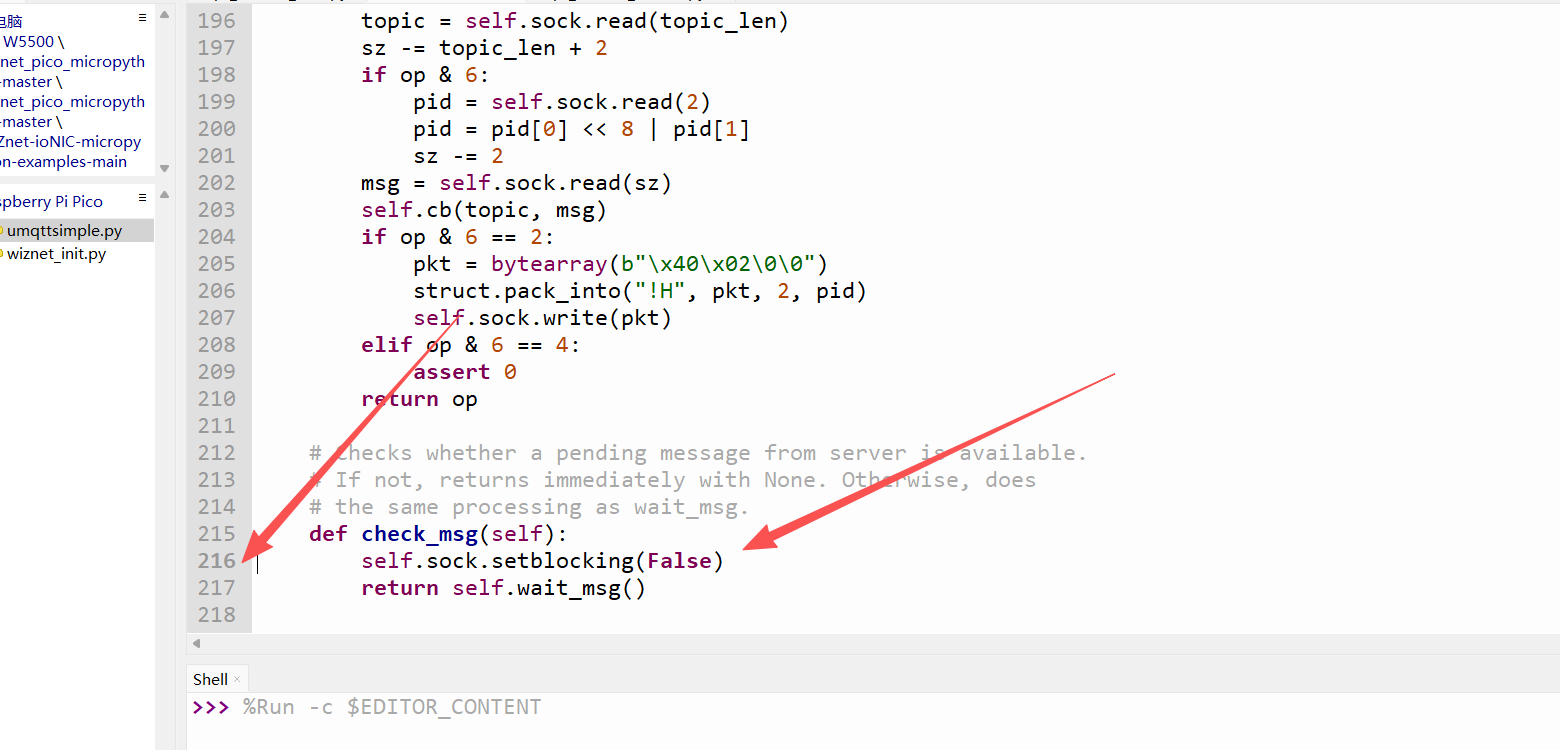
Note: In the original code below, the red arrow position was commented out; uncomment it. The code above is already commented out. Git may not have commented it, remember to comment it out otherwise there will be problems.
7. Running Results and Testing Verification
7.1 Serial Output Results
==================================================
W55RP20 OneNET Temperature/Humidity Reporting + Command Control
==================================================
IP: ('192.168.1.119', '255.255.255.0', '192.168.1.1', '114.114.114.114')
Connecting to OneNET...
✅ Connection Successful
Subscribed: $sys/ZGB6zBD0nS/led/thing/property/set
==================== Report #1 ====================
📤 Reporting Data:
{"id":"123456","version":"1.0","params":{"temp":{"value":25.5},"humi":{"value":48.8}}}
✅ Sent
📥 Command Received:
Topic: $sys/ZGB6zBD0nS/led/thing/property/set
Content: {"id":"666666","params":{"led":1}}
✅ Responded to platform
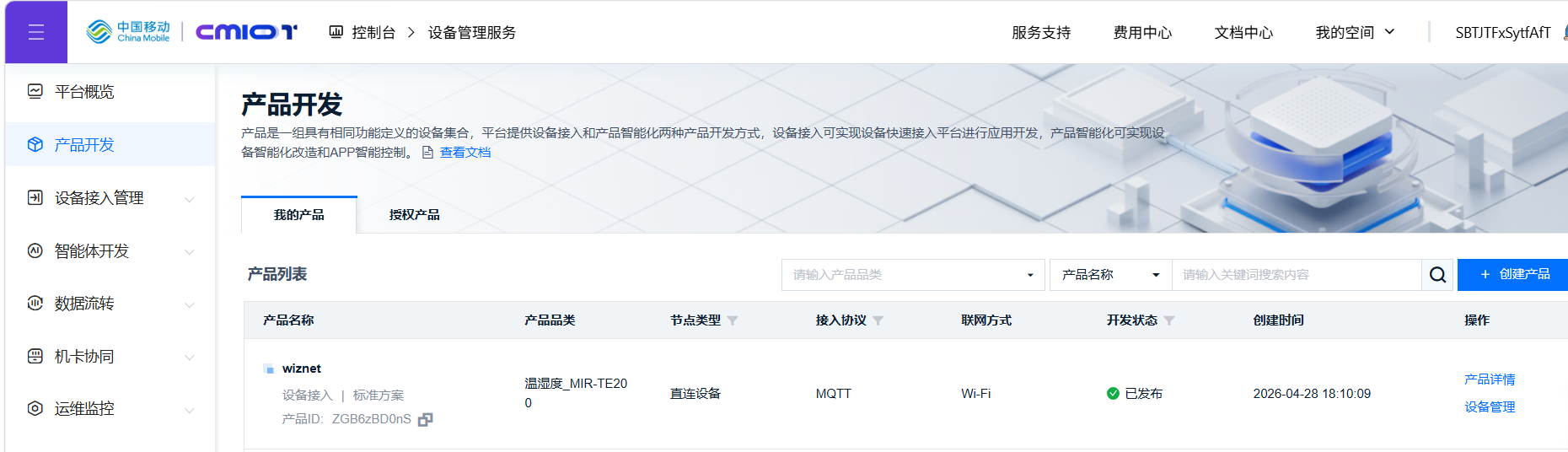
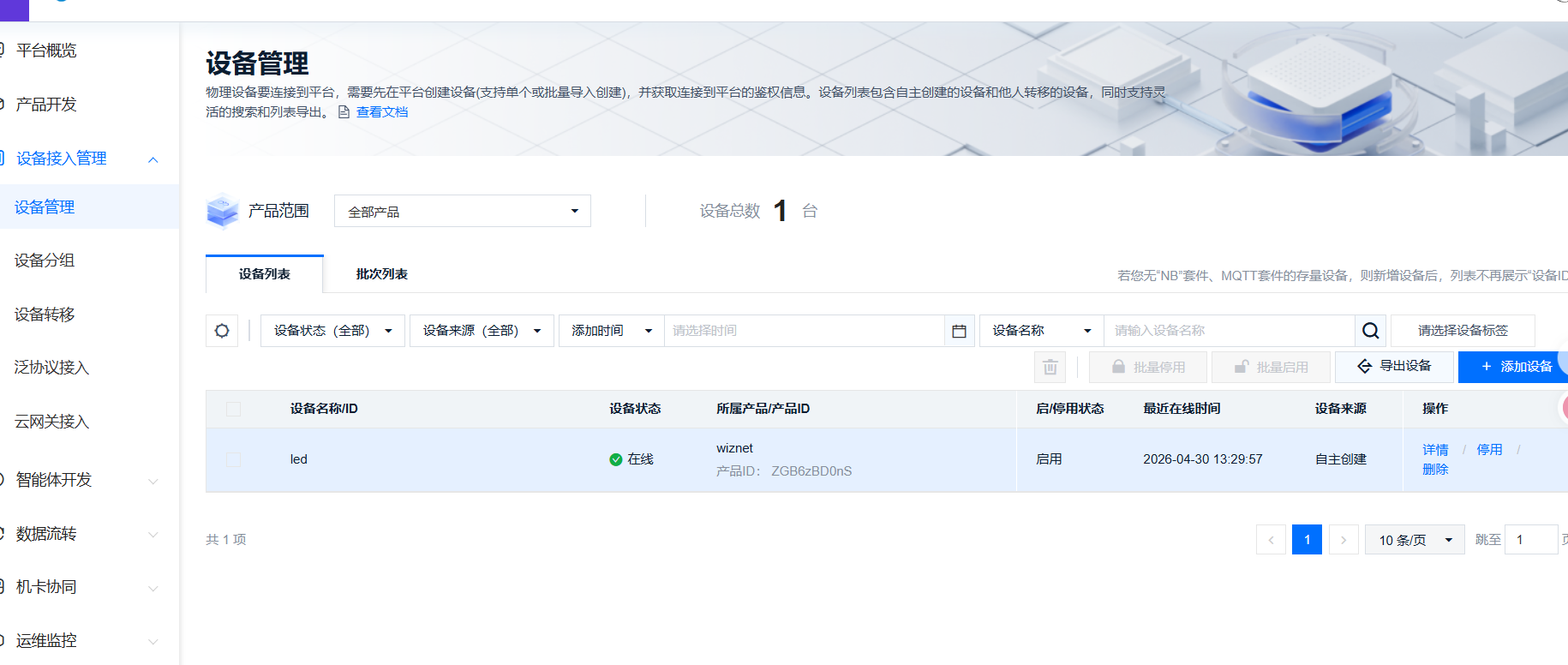
The two images above are my specific parameters during configuration. Users can set their own. The key is to ensure the product is published after creation before it can be used.
7.2 OneNET Platform Verification
Enter OneNET console -> Device -> Thing Model Data, you can see temperature/humidity refreshing in real-time
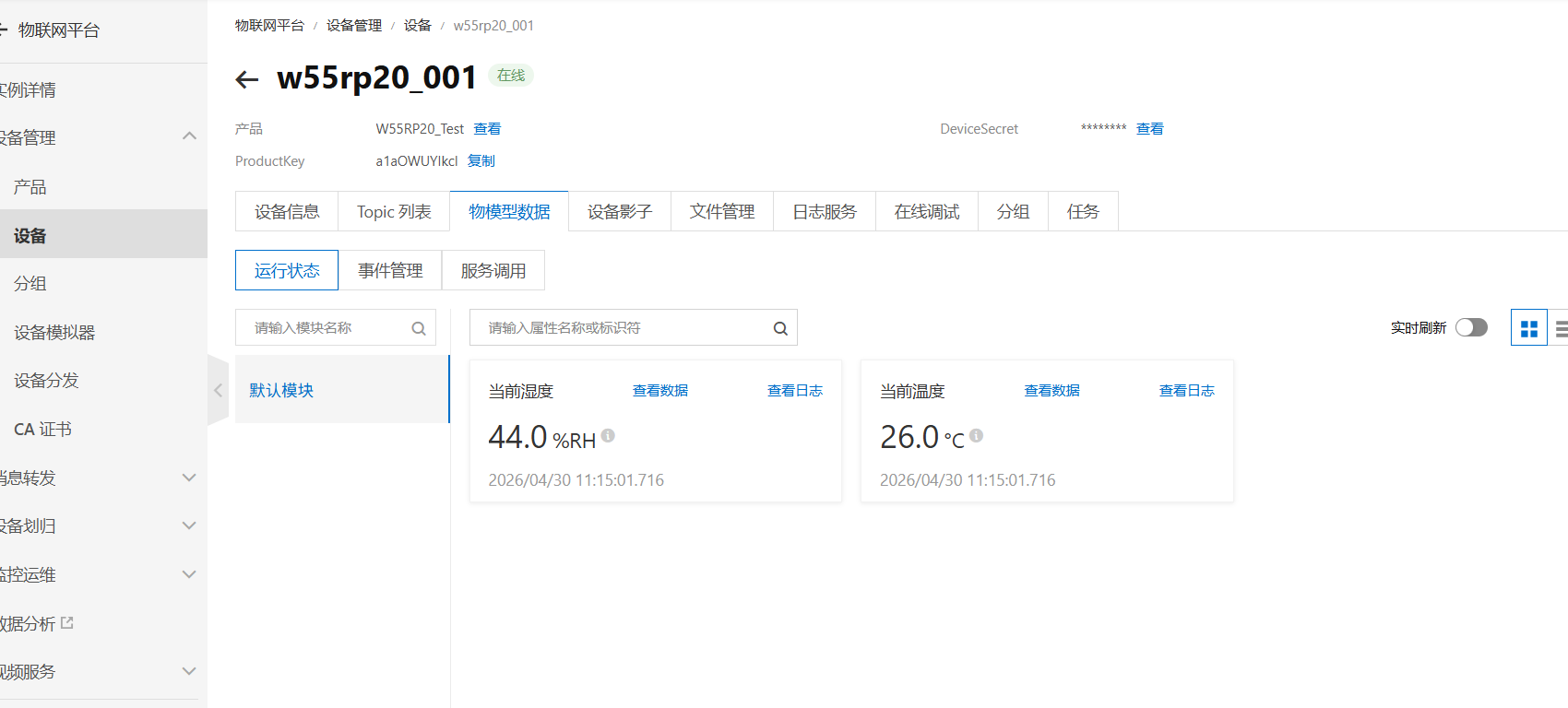
Platform delivers commands, device serial port can receive and auto-respond in real-time;
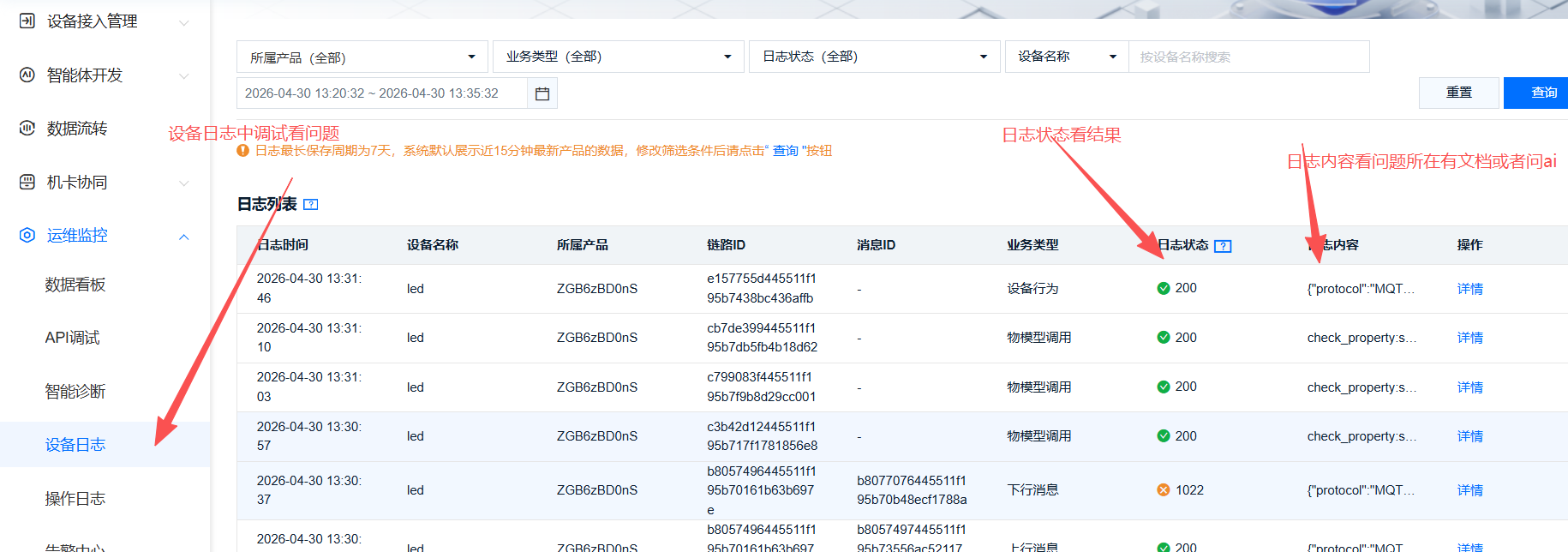
Log service can view complete reporting and delivery messages, verifying normal communication.
8. One-Stop Troubleshooting Guide for Common Issues
8.1 Network Connection Troubleshooting
| Fault Phenomenon | Troubleshooting Steps | Solution Points |
|---|---|---|
| Unable to connect to network | 1. Check physical network cable connection 2. Verify router internet status 3. Check router DHCP function | 1. Ensure both ends of network cable are firmly inserted, observe network port indicator light is normally on/flashing regularly 2. Router is normally powered, phone connected to same WiFi can access internet normally 3. Enable DHCP in router backend, restart router and device when abnormal |
| Unable to obtain IP | 1. Check DHCP address pool capacity 2. Switch to static IP for testing | 1. If address pool is full, release idle IPs or expand address pool range 2. Static IP in same subnet as router, mask 255.255.255.0, gateway consistent with router gateway |
8.2 MQTT Connection Failure Troubleshooting
| Fault Cause | Problem Description | Solution |
|---|---|---|
| Incorrect access address | Address spelling error, filled non-official address, causing connection timeout/rejection | Fixed use of official address: mqtts.heclouds.com, no extra spaces, no spelling errors |
| Incorrect identity parameters | PRODUCT_ID, DEVICE_NAME, TOKEN mismatch, case confusion | 1. The three parameters must be completely consistent with the platform product device, case-sensitive 2. TOKEN is generated through the platform tool normally, verify res, et, method and other parameters |
| Incorrect port configuration | Misuse of encrypted port 8883 or other ports, router blocking port traffic | 1. Fixed use of non-encrypted port 1883 2. Turn off router firewall for testing, ensure port 1883 is open |
8.3 Data Reporting / Platform Command No Response Troubleshooting
| Fault Type | Fault Description | Specification Requirements and Solutions |
|---|---|---|
| Incorrect topic | Custom topic, missing fields, wrong prefix, insufficient permissions | 1. Strictly follow format: $sys/[PRODUCT_ID]/[DEVICE_NAME]/thing/property/xxx 2. Do not omit $sys prefix, product/device ID filled correctly 3. Reporting topic with publish permission, command topic with subscribe permission |
| JSON format error | Missing hierarchy, punctuation syntax error, does not match Thing Model structure | 1. Standard structure: {"params":{"attribute_name":{"value":attribute_value}}} 2. Avoid missing commas, mismatched quotes, unclosed brackets 3. Print JSON raw text from serial port, validate format line by line |
| Thing Model not matched | Thing Model not created, attribute identifier case/name inconsistent | 1. Create corresponding temperature, humidity and other Thing Model attributes in advance on platform 2. Platform attribute identifier must be completely consistent with code reporting name (case-sensitive) 3. Data type consistent with code definition |
9. W55RP20 Core Advantages Comparison
To help you more intuitively understand the value of W55RP20, we compared the three mainstream embedded Ethernet solutions currently available:
| Comparison Dimension | W55RP20 Integrated Solution | External PHY Chip Solution | External Serial-to-Ethernet Module Solution |
|---|---|---|---|
| BOM Cost | Low (single chip) | Medium-High (MCU + module + peripheral components) | High |
| PCB Area | Small (only network port circuit required) | Large (requires chip and routing space) | High |
| Development Difficulty | Low (one line of code for networking) | Medium-High (debugging protocol stack, writing drivers) | Low |
| Network Stability | Extremely High (WIZnet focuses on hardware TCP/IP protocol stack for 25 years) | Variable (requires high R&D personnel requirements, familiarity with protocol stack and network development to debug stability) | Variable (depends on R&D company capability) |
| CPU Resource Usage | 0% (protocol stack network processing completely handled by hardware) | 50%+ (protocol stack completely runs on MCU, occupying related resources) | 0% |
| Hardware Socket Count | 8 independent hardware Sockets | Depends on MCU capability, theoretically supports multi-channel expansion | Generally single-channel transparent transmission |
| Network Throughput | Up to 15Mbps | Depends on MCU capability | About 3-5Mbps |
| Interface Usability | Single chip integration | Requires MCU with MII/RMII and other interfaces | TTL interface |
| Deployment Difficulty | Low (mature MicroPython firmware, most application layer protocols have library files, can be flexibly added and deployed) | High (application layer protocols need manual porting of open source libraries for adaptation) | Depends on module integration, functions without integration need self-encapsulation and decapsulation |
10. Typical Application Scenarios
The W55RP20 chip integrates Ethernet functionality, combined with its industrial-grade stability, making it very suitable for the following application scenarios:
Industrial data acquisition gateway: Simplify on-site deployment, achieve stable upload of sensor data
Remote monitoring terminal: For equipment status remote monitoring in factories, machine rooms, substations, and other environments
Serial-to-Ethernet device: Quickly upgrade traditional RS232/RS485 serial devices to Ethernet devices
Smart building node: For network control of lighting, air conditioning, access control, and other building equipment
Industrial PLC expansion module: Add Ethernet communication capability to PLC, achieve remote programming and data acquisition
11. Summary
This article detailed the complete process of using MicroPython on the W55RP20-EVB-MKR development board to implement MQTT protocol integration with OneNET platform. From OneNET platform product creation, Thing Model definition, device registration, to MQTT connection parameter acquisition and configuration, to core code implementation and flashing, and finally verifying successful data reporting and command delivery through serial output and OneNET platform, we completed the IoT device-to-cloud setup step by step.
Through this article, you should have mastered:
How to create products, define Thing Models, and register devices on the OneNET platform
Basic working principles of MQTT protocol (publish/subscribe model, QoS levels, etc.)
Generation methods for OneNET MQTT access parameters (ProductID, DeviceName, Token)
Using umqtt.simple library to implement MQTT client connection with OneNET platform
Standard Thing Model JSON format data reporting methods
Platform command delivery and device auto-response implementation mechanism
Joint debugging and testing process of periodic reporting + cloud real-time monitoring
Troubleshooting ideas for common connection issues (network, MQTT, reporting, commands)
The W55RP20 chip, with its built-in Ethernet MAC+PHY high-integration design, combined with the WIZnet hardware TCP/IP protocol stack, demonstrates significant advantages in IoT cloud scenarios. Whether for industrial data acquisition, remote monitoring, or smart building control, it can achieve stable and reliable cloud communication at extremely low cost.
12. Series Preview and Resource Acquisition
12.1 Series Preview
Next tutorial: MQTT Protocol and ThingSpeak Platform Integration will explain ThingSpeak open-source cloud platform access, MQTT data reporting and visualization chart display, achieving IoT data cloud storage and real-time monitoring.
12.2 Resource Acquisition
Full code for this article: WIZnet Pico MicroPython Sample Project
W55RP20 chip manual: WIZnet Official Materials Page
If this article is helpful to you, welcome to like, bookmark, and follow. Your support is our motivation for continuous updates!
If you have any questions, please feel free to leave a comment, and we will reply as soon as possible.