



How to Test Static-IP UDP Networking with WIZnet W5500 on ESP32 MicroPython?
This robotics-focused ESP32 MicroPython project tests a WIZnet W5500 Ethernet module with a direct cable connection to a PC using static IP settings.
How to Test Static-IP UDP Networking with WIZnet W5500 on ESP32 MicroPython?
Summary
This robotics-focused ESP32 MicroPython project tests a WIZnet W5500 Ethernet module with a direct cable connection to a PC using static IP settings. The ESP32 drives W5500 over SPI, disables DHCP for direct-link testing, manually writes IP/subnet/gateway/DNS values, binds the W5500 driver to a MicroPython socket abstraction, and sends UDP packets to a PC test program. W5500 provides the wired Ethernet interface, hardware TCP/IP stack, socket state machine, and packet buffering needed for deterministic robot-node communication.
What the Project Does
The project validates W5500 networking under MicroPython on ESP32. The author starts with a direct Ethernet cable connection to a PC and finds that the default driver path assumes DHCP is available. In a direct cable setup without a DHCP server, initialization fails with AssertionError: Failed to configure DHCP Server!, so the W5500 driver must be created with DHCP disabled.
The next issue is static IP configuration. The article shows that assigning dotted IPv4 strings directly to nic.ifconfig causes TypeError: can't convert str to int, because the driver expects byte-form IP values. The fix is to convert strings such as 172.16.30.119 into byte arrays before writing the W5500 network registers.
For robotics, this pattern maps well to camera nodes, sensor nodes, motor-control test stations, or embedded controllers that need a stable wired debugging path to a laptop or robot supervisor. A robot node can stream compact UDP telemetry such as pose, encoder count, target coordinates, or status flags without depending on Wi-Fi association or a router-side DHCP service.
Where WIZnet Fits
The exact WIZnet product is W5500. In this architecture, W5500 is the SPI-connected Ethernet controller between the ESP32 MicroPython runtime and the wired LAN or direct PC link. ESP32 runs the Python application and driver calls; W5500 handles Ethernet MAC/PHY operation, TCP/IP offload, hardware sockets, socket status, and internal packet buffering.
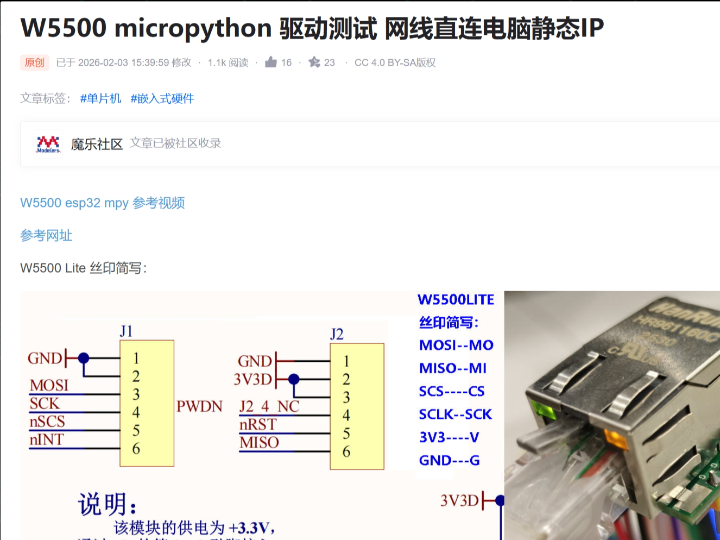
The article uses a W5500 Lite module wiring pattern: sck=Pin(26), mosi=Pin(25), miso=Pin(13), cs=Pin(27, Pin.OUT), and 3.3 V power. It also uses a reset object in software, although the note says the referenced reset GPIO can be effectively tied high in that hardware setup.
W5500 is suitable for this role because it provides 8 independent hardware sockets, with each socket having its own register group and strict state machine. The article explicitly describes states such as SOCK_CLOSED, SOCK_INIT, SOCK_LISTEN, SOCK_ESTABLISHED, and SOCK_UDP, and notes that the maximum concurrent hardware socket count is 8.
Implementation Notes
File: application test script
What it configures: ESP32 SPI pins, W5500 chip select, static IP mode, socket interface binding, and UDP transmission.
Why it matters: the W5500 driver must be initialized without DHCP for a direct PC link, and the socket abstraction must be explicitly bound to the W5500 interface before creating sockets.
from wiznet5k import WIZNET5K
from machine import Pin, SPI
import wiznet5k_socket as socket
import time

spi = SPI(2, baudrate=8000000, sck=Pin(26), mosi=Pin(25), miso=Pin(13))
cs = Pin(27, Pin.OUT)
rst = Pin(39)

nic = WIZNET5K(spi, cs, rst, is_dhcp=False)
socket.set_interface(nic)

udp_socket = socket.socket(socket.AF_INET, socket.SOCK_DGRAM)
dest_addr = ('172.16.30.133', 8080)
This code exists because the direct-cable test does not provide DHCP. The article also states that calling socket.set_interface(nic) before creating a socket is the key step that prevents the 'NoneType' object has no attribute 'get_socket' error.
File: wiznet5k.py
What it configures: static network parameters as byte values instead of strings.
Why it matters: the W5500 register write path expects byte-form IP values when writing local IP, subnet, gateway, and DNS-related fields.
def ip_to_bytes(ip_str):
    return bytes([int(part) for part in ip_str.split('.')])

nic.ifconfig = (
    ip_to_bytes('172.16.30.119'),
    ip_to_bytes('255.255.255.0'),
    ip_to_bytes('172.16.30.254'),
    ip_to_bytes('8.8.8.8')
)
This conversion exists because passing normal dotted IPv4 strings caused a type conversion error in the driver. In register terms, the MicroPython layer must eventually write four-byte values into W5500 network configuration registers, not text strings.
File: wiznet5k_socket.py
What it configures: the MicroPython socket abstraction layer over W5500 hardware sockets.
Why it matters: application code should not directly manage every W5500 socket register. The abstraction layer maps standard socket-style calls onto W5500 socket allocation, state checks, TCP/UDP mode selection, and data movement.
_the_interface = None

def set_interface(iface):
    global _the_interface
    _the_interface = iface

SOCK_STREAM = const(0x21)  # TCP
SOCK_DGRAM = const(0x02)   # UDP
AF_INET = const(3)
SOCKET_INVALID = const(255)
The article describes a three-layer model: application layer using a standard socket API, wiznet5k_socket.py as the abstraction bridge, and wiznet5k.py as the hardware driver that directly operates W5500 registers through SPI.
Practical Tips / Pitfalls
- For direct PC-to-W5500 testing, disable DHCP and use static IP on both sides.
- Convert IPv4 strings to byte values before assigning
nic.ifconfig; the driver does not accept dotted strings in that path. - Call
socket.set_interface(nic)before creating TCP or UDP sockets. - Keep SPI conservative during bring-up. The test uses an 8 MHz SPI baud rate, which is a practical starting point before optimizing throughput.
- Track W5500 socket count. The chip has 8 physical sockets, including listening sockets and data sockets.
- For robot telemetry, add sequence numbers and timestamps to UDP packets so the PC or robot supervisor can detect drops, repeats, and jitter.
- Keep Ethernet data compact. Send coordinates, status, and control values first; avoid raw image or high-rate debug streams until socket timing is proven.
FAQ
Q: Why use WIZnet W5500 for ESP32 MicroPython robotics networking?
A: W5500 gives the ESP32 a wired Ethernet path with hardware TCP/IP sockets and packet buffers. That is useful for robot nodes where predictable wired communication is more important than wireless convenience, especially during bench testing, calibration, or competition debugging.
Q: How does W5500 connect to the ESP32 platform in this project?
A: The article uses SPI wiring with SCK on GPIO26, MOSI on GPIO25, MISO on GPIO13, chip select on GPIO27, and 3.3 V power. The test script creates SPI(2, baudrate=8000000, ...) and passes the SPI bus, chip select, and reset object into WIZNET5K().
Q: What role does W5500 play in this project?
A: W5500 is the Ethernet and socket engine. ESP32 MicroPython creates the application payload and calls socket-like APIs, while W5500 handles the lower Ethernet transport, socket states, hardware socket registers, and TX/RX buffering.
Q: Can beginners follow this project?
A: Yes, if they understand ESP32 MicroPython, SPI wiring, static IPv4 addressing, and basic UDP sockets. The most important beginner lesson is that a direct cable link usually needs static IP setup, not DHCP.
Q: What should be checked first when UDP packets do not arrive?
A: Check SPI wiring, W5500 initialization, static IP/subnet settings on both ESP32 and PC, socket.set_interface(nic), destination IP and port, PC firewall rules, and whether the receiving PC program is listening on the correct port.
Source
Original article: CSDN, “W5500 micropython 驱动测试 网线直连电脑静态IP,” first published on 2025-10-18 and modified on 2026-02-03. The article is marked CC 4.0 BY-SA.
Reference video link mentioned by the article: Bilibili, “W5500 esp32 mpy 参考视频.”
Tags
#W5500 #WIZnet #ESP32 #MicroPython #UDP #Robotics #SPI #StaticIP #Ethernet #SocketDriver #Firmware #Registers #Performance #Maker