



How to Run Wired Ethernet Communication with WIZnet W5500 on ESP32 MicroPython?
This robotics-oriented project connects an ESP32 MicroPython board to a WIZnet W5500 Ethernet module to add wired TCP/IP communication through SPI.
How to Run Wired Ethernet Communication with WIZnet W5500 on ESP32 MicroPython?
Summary
This robotics-oriented project connects an ESP32 MicroPython board to a WIZnet W5500 Ethernet module to add wired TCP/IP communication through SPI. The ESP32 runs the MicroPython application, uploads W5500 driver files through Thonny IDE, and uses a socket-style interface for network testing. W5500 provides the wired Ethernet MAC/PHY, hardware TCP/IP stack, socket resources, and internal packet buffering needed for stable robot-node communication over Ethernet instead of relying only on wireless links.
What the Project Does
The source article is a hands-on ESP32 + W5500 MicroPython networking note. It lists the working setup as an ESP32 development board, a W5500 Ethernet network module, Thonny IDE, and jumper wires. The article also provides a wiring section, a W5500 network-driver download link, and a network debugging assistant link for testing communication.
The driver package shown by the article contains five Python files: sma_esp32_w5500_requests.py, wiznet5k.py, wiznet5k_dhcp.py, wiznet5k_dns.py, and wiznet5k_socket.py. The workflow is to connect the ESP32 to the PC through Thonny, upload these files to the ESP32 board root directory, and then run MicroPython code that imports the W5500 driver and socket abstraction.
The data flow is simple. The ESP32 application creates the payload and calls MicroPython-side network/socket code. The W5500 driver talks to the Ethernet module over SPI. W5500 then handles Ethernet-side transport using its internal hardware TCP/IP engine and socket buffers. For robotics, this pattern fits wired telemetry, local controller links, calibration tools, and maintenance ports where compact messages such as status flags, sensor values, coordinates, or control commands are more appropriate than raw video streams.
Where WIZnet Fits
The exact WIZnet product is W5500. In this project, W5500 sits between the ESP32 and the wired Ethernet cable. The ESP32 controls W5500 over SPI, while W5500 provides the Ethernet MAC/PHY, hardwired TCP/IP processing, socket state machine, and packet buffering. WIZnet documents W5500 as a hardwired TCP/IP Internet controller with SPI access up to 80 MHz, embedded 10/100 Ethernet MAC and PHY, 8 independent sockets, and 32 KB internal memory.
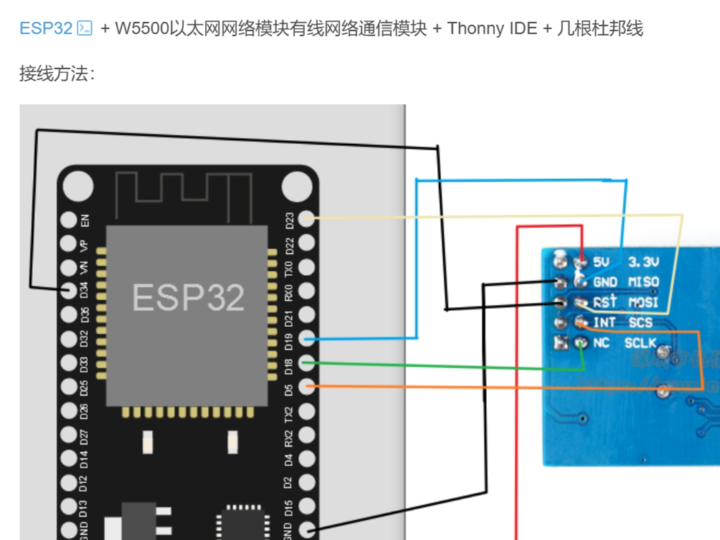
The W5500 wiring diagram in the source connects ESP32 power, ground, and SPI signals to the W5500 module pins. The module-side labels include 3.3V, GND, MISO, MOSI, SCS, and SCLK, which are the practical minimum signals for SPI-based Ethernet operation. The diagram appears to follow the common ESP32 VSPI-style mapping of MOSI, MISO, SCLK, and chip select, but the exact ESP32 board variant should always be checked against its pinout before wiring.
W5500 is a good match for this ESP32 MicroPython use case because it keeps most transport behavior inside the Ethernet controller. The ESP32 still needs a correct SPI driver, reset/control handling, IP configuration, and application-level socket logic, but it does not need to run a full software TCP/IP stack for the Ethernet path. WIZnet’s documentation also points to driver resources and application notes for TCP, UDP, IPRAW, and PPPoE use cases.
Implementation Notes
The source article confirms W5500 use and shows the driver files and the beginning of the MicroPython code, but the visible page does not expose the full application source. Therefore, only the visible project code can be quoted, and deeper socket behavior should be treated as driver-level architecture rather than confirmed project code.
File: application script, filename not disclosed by the source
What it configures: the script imports the W5500 driver, ESP32 pin/SPI classes, the W5500 socket abstraction, and a request helper module.
Why it matters: these imports define the project’s software boundary: ESP32 MicroPython controls hardware through machine, W5500 is managed through wiznet5k, and application networking is routed through a W5500 socket layer.
from wiznet5k import WIZNET5K
from machine import Pin, SPI
import wiznet5k_socket as socket
import sma_esp32_w5500_requests
The article’s visible code begins with these imports after the driver-upload workflow, which is consistent with a MicroPython project where the Ethernet adapter is not a built-in Wi-Fi interface but a separately uploaded W5500 driver stack.
At the architecture level, the driver files imply three firmware layers. wiznet5k.py is the hardware-facing W5500 driver, wiznet5k_dhcp.py and wiznet5k_dns.py provide network configuration services, and wiznet5k_socket.py maps application socket calls onto W5500 behavior. The helper sma_esp32_w5500_requests.py suggests an application convenience layer above sockets for HTTP-style communication.
For register-level debugging, the important W5500 areas are the common network registers, PHY/link status, and socket registers. MicroPython’s own WIZNET5K documentation notes that WIZnet5x00 modules are controlled through SPI, chip select, and reset pins, and it also provides a regs() method for dumping WIZnet5x00 registers during debugging.
Practical Tips / Pitfalls
- Verify wiring before software debugging. Check 3.3 V power, ground, MOSI, MISO, SCLK, chip select, and reset if the module exposes it.
- Do not assume every ESP32 board uses the same SPI pin labels. Match the source wiring diagram to the actual ESP32 module pinout.
- Upload all W5500 driver files to the ESP32 root directory; missing
wiznet5k_socket.py, DHCP, or DNS helper files can look like a network failure. - Start with link detection and a simple socket test before adding HTTP or robot-control logic.
- Keep robot telemetry compact. Send state, coordinates, counters, and commands before attempting large debug payloads.
- Add reconnect handling for Ethernet cable removal, peer reset, DHCP failure, and socket timeout.
- In mobile robots or noisy power environments, treat Ethernet wiring, grounding, and cable strain relief as part of the communication design.
FAQ
Q: Why use WIZnet W5500 for ESP32 MicroPython robotics networking?
A: W5500 gives the ESP32 a wired Ethernet path with hardware TCP/IP offload, 8 sockets, and internal packet buffers. That is useful when a robot node needs predictable bench, field, or maintenance communication without depending entirely on wireless association or RF conditions.
Q: How does W5500 connect to the ESP32 platform?
A: The module connects through SPI plus power and ground. The source wiring diagram shows W5500 module pins for MISO, MOSI, SCS, SCLK, 3.3V, and GND, and the MicroPython WIZNET5K documentation describes SPI, chip-select, and reset-pin based initialization for WIZnet5x00 modules.
Q: What role does W5500 play in this project?
A: W5500 is the Ethernet transport engine. ESP32 MicroPython runs the application and driver code, while W5500 handles the Ethernet MAC/PHY path, hardwired TCP/IP behavior, socket state, and packet buffering.
Q: Can beginners follow this project?
A: Yes, if they are comfortable with Thonny, ESP32 MicroPython file upload, SPI wiring, and basic IP networking. The source workflow is beginner-friendly because it shows the required driver files and uses Thonny to upload them to the ESP32 board before running the network code.
Q: How does this compare with using ESP32 Wi-Fi for the same robot node?
A: ESP32 Wi-Fi is simpler when no cable is acceptable, but W5500 provides a wired link with a dedicated Ethernet controller and hardwired TCP/IP support. For robotics benches, calibration fixtures, and maintenance ports, the wired W5500 path is often easier to make repeatable; Wi-Fi remains useful when mobility or cable-free deployment is the primary requirement.
Source
Original article: CSDN, “物联网开发笔记(52)- 使用Micropython开发ESP32开发板之W5500以太网网络模块有线网络通信.” The accessible page and search result identify the ESP32 + W5500 + MicroPython setup, Thonny workflow, driver files, visible import code, and CC 4.0 BY-SA marking.
WIZnet product reference: W5500 documentation and product feature list.
MicroPython reference: WIZNET5K class documentation for WIZnet5x00 Ethernet modules.
Tags
#W5500 #WIZnet #ESP32 #MicroPython #Robotics #SPI #Ethernet #HardwareWiring #Firmware #Registers #Performance #SocketDriver #Thonny #WiredNetworking
ESP32 MicroPython에서 WIZnet W5500으로 유선 Ethernet 통신을 실행하는 방법은?
요약
이 로보틱스 중심 프로젝트는 ESP32 MicroPython 보드에 WIZnet W5500 Ethernet 모듈을 연결해 SPI 기반 유선 TCP/IP 통신을 추가합니다. ESP32는 MicroPython 애플리케이션을 실행하고, Thonny IDE를 통해 W5500 드라이버 파일을 업로드하며, 네트워크 테스트에는 socket-style 인터페이스를 사용합니다. W5500은 무선 링크에만 의존하지 않고 안정적인 로봇 노드 통신을 구현하는 데 필요한 유선 Ethernet MAC/PHY, 하드웨어 TCP/IP 스택, 소켓 자원, 내부 패킷 버퍼링을 제공합니다.
프로젝트가 하는 일
원문은 ESP32 + W5500 MicroPython 유선 네트워킹 실습 노트입니다. 작업 환경은 ESP32 개발 보드, W5500 Ethernet network module, Thonny IDE, jumper wire로 구성됩니다. 원문은 배선 섹션, W5500 network-driver 다운로드 링크, 통신 테스트용 network debugging assistant 링크도 함께 제공합니다.
원문에 표시된 드라이버 패키지는 다섯 개의 Python 파일로 구성됩니다. sma_esp32_w5500_requests.py, wiznet5k.py, wiznet5k_dhcp.py, wiznet5k_dns.py, wiznet5k_socket.py입니다. 작업 흐름은 ESP32를 Thonny로 PC에 연결하고, 이 파일들을 ESP32 보드의 root directory에 업로드한 뒤, W5500 driver와 socket abstraction을 import하는 MicroPython 코드를 실행하는 방식입니다.
데이터 흐름은 단순합니다. ESP32 애플리케이션은 payload를 만들고 MicroPython 측 network/socket code를 호출합니다. W5500 driver는 SPI를 통해 Ethernet 모듈과 통신합니다. 이후 W5500은 내부 하드웨어 TCP/IP 엔진과 socket buffer를 사용해 Ethernet 측 전송을 처리합니다. 로보틱스에서는 status flag, sensor value, coordinate, control command 같은 compact message를 주고받는 wired telemetry, local controller link, calibration tool, maintenance port에 적합합니다.
WIZnet이 들어가는 위치
이 프로젝트에서 사용되는 정확한 WIZnet 제품은 W5500입니다. 이 구조에서 W5500은 ESP32와 유선 Ethernet cable 사이에 위치합니다. ESP32는 SPI로 W5500을 제어하고, W5500은 Ethernet MAC/PHY, hardwired TCP/IP processing, socket state machine, packet buffering을 제공합니다. WIZnet 문서 기준으로 W5500은 최대 80 MHz SPI, embedded 10/100 Ethernet MAC and PHY, 8 independent socket, 32 KB internal memory를 갖춘 hardwired TCP/IP Internet controller입니다.
원문의 W5500 배선도는 ESP32의 전원, ground, SPI signal을 W5500 모듈 핀에 연결합니다. 모듈 측 라벨에는 3.3V, GND, MISO, MOSI, SCS, SCLK가 포함되며, 이는 SPI 기반 Ethernet 동작에 필요한 실질적인 최소 신호입니다. 그림은 일반적인 ESP32 VSPI-style MOSI, MISO, SCLK, chip select 매핑을 따르는 것으로 보이지만, 실제 배선 전에는 사용하는 ESP32 보드의 pinout을 반드시 확인해야 합니다.
W5500은 이 ESP32 MicroPython 사용 사례에 잘 맞습니다. 대부분의 transport behavior를 Ethernet controller 내부에 유지하기 때문입니다. ESP32는 여전히 올바른 SPI driver, reset/control handling, IP configuration, application-level socket logic을 필요로 하지만, Ethernet 경로를 위해 전체 software TCP/IP stack을 직접 실행할 필요는 없습니다.
구현 참고 사항
원문은 W5500 사용, 드라이버 파일, MicroPython 코드의 시작 부분을 확인시켜 주지만, 접근 가능한 페이지에서는 전체 애플리케이션 소스가 공개되어 있지 않습니다. 따라서 보이는 프로젝트 코드만 인용할 수 있으며, 더 깊은 socket behavior는 확인된 프로젝트 코드가 아니라 driver-level architecture로 다뤄야 합니다.
파일: application script, 원문에서 파일명은 공개되지 않음
설정 내용: W5500 driver, ESP32 pin/SPI class, W5500 socket abstraction, request helper module import
중요한 이유: 이 import들은 프로젝트의 소프트웨어 경계를 정의합니다. ESP32 MicroPython은 machine을 통해 하드웨어를 제어하고, W5500은 wiznet5k를 통해 관리되며, 애플리케이션 네트워킹은 W5500 socket layer를 통해 라우팅됩니다.
from wiznet5k import WIZNET5K
from machine import Pin, SPI
import wiznet5k_socket as socket
import sma_esp32_w5500_requests
원문의 보이는 코드는 드라이버 업로드 작업 흐름 뒤에 이 import들로 시작합니다. 이는 Ethernet adapter가 내장 Wi-Fi 인터페이스가 아니라 별도로 업로드한 W5500 driver stack으로 동작하는 MicroPython 프로젝트 구조와 일치합니다.
아키텍처 수준에서 드라이버 파일들은 세 개의 펌웨어 계층을 암시합니다. wiznet5k.py는 하드웨어에 가까운 W5500 driver이고, wiznet5k_dhcp.py 및 wiznet5k_dns.py는 네트워크 설정 서비스를 제공합니다. wiznet5k_socket.py는 애플리케이션 socket 호출을 W5500 동작에 매핑합니다. sma_esp32_w5500_requests.py는 socket 위에서 HTTP-style 통신을 돕는 application convenience layer로 볼 수 있습니다.
레지스터 수준 디버깅에서는 W5500의 common network register, PHY/link status, socket register가 중요합니다. MicroPython WIZNET5K 문서도 WIZnet5x00 모듈이 SPI, chip select, reset pin을 통해 제어된다고 설명하며, WIZnet5x00 register dump용 regs() method를 제공합니다.
실무 팁 / 주의점
- 소프트웨어 디버깅 전에 배선을 먼저 확인해야 합니다. 3.3 V 전원, ground, MOSI, MISO, SCLK, chip select, 모듈에 reset이 있다면 reset도 확인해야 합니다.
- 모든 ESP32 보드가 같은 SPI pin label을 사용하는 것은 아닙니다. 원문 배선도를 실제 ESP32 모듈 pinout과 대조해야 합니다.
- 모든 W5500 driver file을 ESP32 root directory에 업로드해야 합니다.
wiznet5k_socket.py, DHCP, DNS helper file 누락은 네트워크 오류처럼 보일 수 있습니다. - HTTP 또는 robot-control logic을 추가하기 전에 link detection과 간단한 socket test부터 시작해야 합니다.
- Robot telemetry는 compact하게 유지하는 것이 좋습니다. 대용량 debug payload보다 state, coordinate, counter, command를 먼저 전송해야 합니다.
- Ethernet cable removal, peer reset, DHCP failure, socket timeout에 대한 reconnect handling을 추가해야 합니다.
- 이동 로봇이나 전원 노이즈가 큰 환경에서는 Ethernet wiring, grounding, cable strain relief를 통신 설계의 일부로 봐야 합니다.
FAQ
Q: ESP32 MicroPython 로보틱스 네트워킹에 왜 WIZnet W5500을 사용하나요?
A: W5500은 ESP32에 하드웨어 TCP/IP 오프로딩, 8개 소켓, 내부 패킷 버퍼를 갖춘 유선 Ethernet 경로를 제공합니다. 이는 로봇 노드가 무선 연결 상태나 RF 환경에 전적으로 의존하지 않고, bench test, field test, maintenance communication을 예측 가능하게 수행해야 할 때 유용합니다.
Q: W5500은 ESP32 플랫폼에 어떻게 연결되나요?
A: 모듈은 전원과 ground, SPI를 통해 연결됩니다. 원문 배선도는 W5500 모듈 핀으로 MISO, MOSI, SCS, SCLK, 3.3V, GND를 보여줍니다. MicroPython WIZNET5K 문서도 WIZnet5x00 모듈 초기화가 SPI, chip-select, reset pin 기반으로 이루어진다고 설명합니다.
Q: 이 프로젝트에서 W5500은 어떤 역할을 하나요?
A: W5500은 Ethernet transport engine입니다. ESP32 MicroPython은 애플리케이션과 드라이버 코드를 실행하고, W5500은 Ethernet MAC/PHY 경로, hardwired TCP/IP behavior, socket state, packet buffering을 처리합니다.
Q: 초보자도 이 프로젝트를 따라갈 수 있나요?
A: Thonny, ESP32 MicroPython file upload, SPI wiring, 기본 IP networking에 익숙하다면 가능합니다. 원문 작업 흐름은 필요한 드라이버 파일을 보여주고, 네트워크 코드를 실행하기 전에 Thonny로 ESP32 보드에 업로드하는 과정을 설명하므로 초보자에게 비교적 접근하기 쉽습니다.
Q: 같은 로봇 노드에서 ESP32 Wi-Fi를 사용하는 것과 비교하면 어떤가요?
A: ESP32 Wi-Fi는 케이블을 사용할 수 없는 경우 더 단순합니다. 반면 W5500은 전용 Ethernet controller와 hardwired TCP/IP 지원을 갖춘 유선 링크를 제공합니다. 로보틱스 벤치, 캘리브레이션 fixture, maintenance port에서는 W5500 기반 유선 경로가 반복성과 진단 측면에서 유리한 경우가 많고, Wi-Fi는 이동성이나 무선 배치가 가장 중요한 경우에 적합합니다.
출처
Original article: CSDN, “物联网开发笔记(52)- 使用Micropython开发ESP32开发板之W5500以太网网络模块有线网络通信.” 접근 가능한 페이지와 검색 결과에서 ESP32 + W5500 + MicroPython 구성, Thonny 작업 흐름, driver file, 보이는 import code, CC 4.0 BY-SA 표시를 확인할 수 있습니다.
https://blog.csdn.net/2401_87555412/article/details/143308951
WIZnet product reference: W5500 documentation and product feature list.
https://docs.wiznet.io/Product/Chip/Ethernet/W5500
MicroPython reference: WIZNET5K class documentation for WIZnet5x00 Ethernet modules.
https://docs.micropython.org/en/latest/library/network.WIZNET5K.html
태그
#W5500 #WIZnet #ESP32 #MicroPython #Robotics #SPI #Ethernet #HardwareWiring #Firmware #Registers #Performance #SocketDriver #Thonny #WiredNetworking