



How to Perform Network Bring-Up with W5500 Using DHCP or Static IP?
This article explains how to perform network bring-up using the WIZnet W5500 Ethernet controller with both DHCP and static IP configurations.
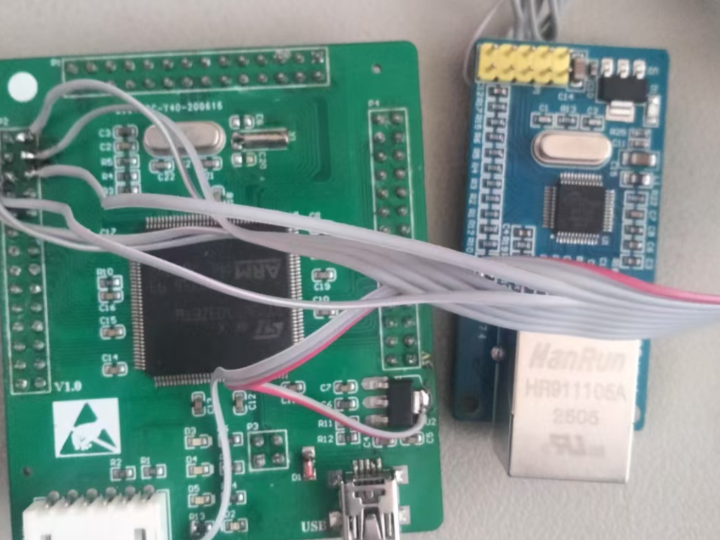
How to Perform Network Bring-Up with W5500 Using DHCP or Static IP?
End-to-End Workflow for Reliable Embedded Ethernet Initialization
(W5500에서 DHCP와 Static IP로 네트워크를 초기화하는 방법은 무엇인가?)
Summary (40–60 words)
This article explains how to perform network bring-up using the WIZnet W5500 Ethernet controller with both DHCP and static IP configurations. By analyzing the full protocol workflow—from SPI initialization to IP assignment and socket readiness—developers can understand how to reliably establish Ethernet connectivity in embedded systems.
1. Why Network Bring-Up Is the Most Critical Step
Before any TCP, UDP, or application protocol works, the system must first successfully join the network.
In W5500-based systems, many failures such as:
- “Cannot ping device”
- “Socket connect fails”
- “MQTT not working”
are not protocol issues—they are network bring-up failures.
This article focuses on the foundation layer:
SPI → W5500 init → IP assignment → Link ready → Socket usableIf this pipeline is incorrect, nothing above it will work.
2. W5500 Role in Network Initialization
The W5500 provides:
- Hardware TCP/IP stack
- Ethernet MAC + PHY
- 32KB internal buffer
- 8 hardware sockets
However, it does NOT automatically configure IP.
That responsibility belongs to the MCU.
3. Two Network Bring-Up Methods
There are only two valid approaches:
3.1 Static IP Configuration
Power on
 → SPI init
 → W5500 reset
 → Set MAC
 → Set IP / Subnet / Gateway
 → Network ready
Example:
- IP: 192.168.1.100
- Subnet: 255.255.255.0
- Gateway: 192.168.1.1
Advantages
- Deterministic behavior
- No dependency on router
- Preferred in industrial systems
Risks
- IP conflict possible
- Requires manual configuration
3.2 DHCP-Based Configuration
Power on
 → SPI init
 → W5500 reset
 → DHCP DISCOVER
 → Router assigns IP
 → Network ready
DHCP assigns:
- IP address
- Subnet mask
- Gateway
- DNS (optional)
Advantages
- Plug-and-play
- Ideal for experiments and demos
Risks
- Requires router
- IP may change
4. End-to-End Network Bring-Up Workflow
This is the full system-level flow combining hardware and protocol layers:
System Boot
   │
   ▼
SPI Initialization
   │
   ▼
W5500 Reset + Register Setup
   │
   ▼
Link Status Check (PHY)
   │
   ▼
IP Assignment (Static or DHCP)
   │
   ▼
Network Reachability (Ping OK)
   │
   ▼
Socket Initialization
Each step must succeed before moving forward.
5. Key Registers Involved (Conceptual)
Even in high-level libraries, these internal steps happen:
- SHAR → MAC address
- GAR → Gateway
- SUBR → Subnet mask
- SIPR → IP address
For DHCP:
- MCU runs DHCP client
- Writes values into registers after negotiation
6. Common Failure Modes (Very Important)
❌ Case 1 — Link Up but No Ping
Cause:
- IP not configured
- Wrong subnet
❌ Case 2 — Works on Router but Not Direct PC
Cause:
- No DHCP available
- Static IP mismatch
❌ Case 3 — DHCP Timeout
Cause:
- Router not responding
- Cable or PHY issue
❌ Case 4 — Socket Open Fails
Cause:
- IP not valid yet
- Network not initialized
👉 Key insight:
Socket errors are often caused by network bring-up failure, not TCP logic.
7. Practical Debugging Workflow
When debugging W5500 network issues, follow this strict order:
1. Check SPI communication
2. Check W5500 ID / register read
3. Check PHY link status
4. Verify IP configuration
5. Ping test
6. Then test socket
Skipping steps leads to confusion.
8. Experiment vs Industrial Deployment
🧪 Experiment / Demo
- Use DHCP
- Faster setup
- Less configuration
🏭 Industrial System
- Use static IP
- Fixed network topology
- Easier maintenance and diagnostics
9. Why W5500 Improves Reliability
Compared to software stacks:
- Saves ~30KB RAM
- Offloads TCP/IP processing
- Deterministic SPI-based communication
- No OS dependency
This makes it ideal for:
- STM32 bare-metal
- RTOS systems
- long-running industrial devices
Key Takeaway
Network bring-up is the foundation of all Ethernet communication.
With W5500, correct initialization—especially IP configuration via DHCP or static setup—determines whether higher-level protocols like TCP or MQTT will function reliably.
FAQ (WIZnet-Focused)
Q1. Why use W5500 instead of software TCP/IP?
W5500 provides a hardware TCP/IP stack, reducing MCU RAM usage by ~30KB and eliminating the need for complex software stacks like LwIP. This improves stability and simplifies debugging in embedded systems.
Q2. How does DHCP work with W5500?
The W5500 does not implement DHCP internally. The MCU runs a DHCP client, receives IP configuration from the router, and writes the assigned parameters into W5500 registers.
Q3. What role does W5500 play during network bring-up?
W5500 handles Ethernet framing, ARP, and TCP/IP transport. However, the MCU must configure network parameters before any socket communication can occur.
Q4. Can beginners follow this setup?
Yes. Using DHCP simplifies initial setup, making W5500 suitable for beginners. However, understanding static IP configuration is essential for real-world applications.
Q5. Static IP vs DHCP for W5500?
Static IP offers deterministic and stable operation for industrial systems, while DHCP is easier for testing and dynamic environments. Both are supported but serve different use cases.
Source
CSDN Blog
weixin_42550185 — W5500 Network Bring-Up Article
Tags
W5500
DHCP
Static IP
Network Bring-Up
Embedded Ethernet
STM32
🇰🇷 한국어 번역 (1:1)
W5500에서 DHCP와 Static IP로 네트워크를 초기화하는 방법은 무엇인가?
요약
본 문서는 WIZnet W5500 이더넷 컨트롤러에서 DHCP 및 Static IP를 사용하여 네트워크를 초기화하는 방법을 설명한다. SPI 초기화부터 IP 할당, 소켓 사용 가능 상태까지의 전체 프로토콜 흐름을 분석하여 안정적인 임베디드 이더넷 통신을 구현하는 방법을 제시한다.
1. 네트워크 초기화의 중요성
모든 통신은 네트워크 초기화에서 시작된다.
2. W5500의 역할
W5500은 TCP/IP를 하드웨어로 처리하지만
IP 설정은 MCU가 수행해야 한다.
3. 두 가지 방식
- Static IP → 산업용
- DHCP → 실험용
4. 전체 흐름
SPI → 초기화 → IP 설정 → Ping → Socket5. 핵심 메시지
W5500에서 네트워크 초기화가 올바르지 않으면 모든 상위 프로토콜이 실패한다.
원하시면 다음 단계로:
- 🔧 Register-level initialization deep dive
- 📡 DHCP packet sequence (DISCOVER → OFFER → REQUEST → ACK)
- 🧪 실제 디버깅 로그 기반 분석
까지 확장해 드릴 수 있습니다.