



How to Build an Ethernet Geiger–Müller Environmental Data Logger with W55RP20-EVB-PICO?
a Geiger Counter data logging system with Ethernet connectivity, SD card support, and a web-based monitoring interface.
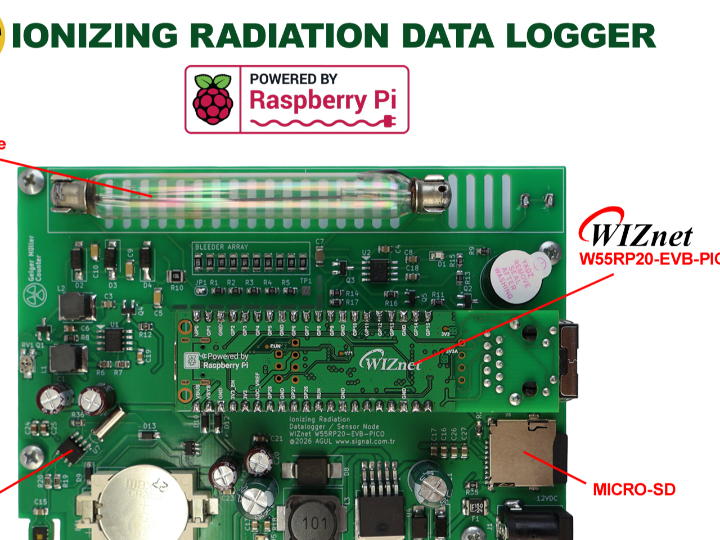
Summary
This project uses the WIZnet W55RP20-EVB-PICO to build a fixed-site environmental monitoring node that measures Geiger–Müller pulse activity, temperature, and humidity. The W55RP20 runs the acquisition, storage, local dashboard, and remote-upload logic, while its integrated W5500 controller provides wired Ethernet and hardware TCP/IP processing for local and Internet-connected monitoring.
What the Project Does
The system converts radiation events from a Geiger–Müller tube into timestamped environmental records. A high-voltage circuit drives the tube, a conditioning stage converts each detected event into a microcontroller-compatible pulse, and the firmware calculates counts per second, counts per minute, and an estimated dose rate. Temperature and humidity readings are added to the same record.
The hardware combines several subsystems on a custom carrier PCB:
- A W55RP20-EVB-PICO for processing and Ethernet communication
- A Geiger–Müller tube, high-voltage generator, and pulse-conditioning circuit
- An HDC1080 temperature and humidity sensor
- A PCF8563T real-time clock with backup power
- An SPI SD-card socket
- Power conversion from the external input to 5 V and 3.3 V rails
The schematic places the environmental sensor and RTC on I²C connections, the SD card on SPI, and the conditioned radiation pulse on a GPIO input. The W55RP20-EVB-PICO connects through its Pico-compatible header, so the external PCB does not require a separate W5500 module or an external MCU-to-Ethernet wiring harness.
Each measurement is written to the SD card in CSV format before remote transmission is attempted. The board also serves a local browser interface that displays current readings and historical SD-card records. At a configurable interval, it can send the same record to a PHP endpoint, which validates the device credentials and stores the data in MySQL. A separate remote dashboard reads the database and updates its charts through AJAX.
This separation creates two monitoring paths:
- Local path: sensor data → W55RP20 → SD card → embedded web dashboard
- Remote path: sensor data → W55RP20 → Ethernet → PHP endpoint → MySQL → hosted dashboard
The local path remains useful when Internet access fails, while the remote path supports centralized observation from another site. The design is intended for education, development, and long-duration environmental logging rather than certified radiation dosimetry.
Where WIZnet Fits
The W55RP20 combines an RP2040 microcontroller, a W5500 wired Ethernet controller, and flash memory in one package. The W5500 portion implements the IPv4 TCP/IP stack in hardware and provides eight hardware sockets with 32 KB of internal TX/RX buffer memory. The RP2040 portion remains responsible for pulse counting, sensor acquisition, storage, HTTP application logic, and dashboard generation.
That division is useful in this system because several operations can overlap: radiation pulses must be counted without loss, environmental sensors must be sampled, SD-card writes must complete, a local web server may be serving a browser, and a remote HTTP client may be waiting for a response. Hardware TCP/IP processing reduces the amount of protocol-stack work handled by the RP2040, although HTTP parsing, application state, authentication, and TLS remain firmware responsibilities.
Wired Ethernet also matches the fixed-site monitoring architecture. It provides direct access from a local browser, does not require wireless credential provisioning, and avoids dependence on local RF conditions. This is an engineering trade-off rather than a universal advantage: Ethernet requires a cable and nearby network infrastructure, while Wi-Fi, cellular, or LoRaWAN can be more appropriate when the measurement point cannot be wired.
Implementation Notes
The project page links a public firmware archive, Gerber files, KiCad resources, and a schematic. The schematic and system description were available for review, but the downloadable firmware archive could not be inspected through the available source reader. Firmware excerpts are therefore not reproduced here.
The whitepaper provides this server request format for logdata.php:
logdata.php?sensorid=*******&apikey=******&secret=******&date=01.08.2026&time=14.12.06&radiation=0.10556&temp=28.56&hum=57.64&cpm=13.00&cps=0.00The request carries device identity, credentials, timestamp, dose-rate estimate, temperature, humidity, CPM, and CPS in one transaction. The server validates the identity fields, filters numeric values, and updates an existing database row when the same device and measurement time are received again. A duplicate counter records repeated submissions.
Writing the CSV record before making the network request is an important part of the design. A short remote-request timeout prevents an unreachable server from indefinitely blocking acquisition, while the SD card preserves the original measurement for later recovery or retransmission.
The source uses several server-side names: logdata.php for the illustrated ingest request, logger.php when describing the downloadable files, and both dashboard.php and geiger_dashboard.php for the remote interface. These names should be checked against the released archive before configuring the device or server.
When HTTPS is selected, the W5500 still offloads TCP/IP, but it does not provide hardware TLS processing. Certificate validation, encryption, and TLS session memory must be handled by software on the RP2040. Socket allocation should also account for the local web server, active browser connections, DNS or DHCP activity, and the remote logging client.
Practical Tips / Pitfalls
- Treat the Geiger high-voltage section as a safety-critical circuit. Maintain clearance from low-voltage GPIO, Ethernet, SD-card, and sensor traces, and discharge the multiplier before handling the board. The schematic includes a test point associated with the high-voltage network.
- Confirm the installed tube before selecting the CPM-to-µSv/h coefficient. The article text identifies a J305-type tube, while the schematic labels the tube as SBM20; those tube types must not share an unverified conversion factor.
- Preserve the local-first write sequence. Flush complete CSV records and use the RTC timestamp so an Internet outage or reboot does not leave ambiguous record ordering.
- Handle DHCP failure, static-IP fallback, PHY link loss, DNS timeouts, and server reconnection as separate states. Network recovery should not suspend pulse counting or environmental sampling.
- Budget the W5500 sockets deliberately. Limit simultaneous dashboard clients and close failed remote connections promptly so the logging client cannot exhaust the available hardware sockets.
- Avoid sending persistent secrets through unencrypted HTTP query strings. With HTTPS, also consider certificate storage, clock validity, RP2040 memory use, and server-log exposure of query parameters.
- Keep the switching regulator, NE555 oscillator, high-voltage multiplier, and Ethernet magnetics away from the pulse input and I²C traces. Validate pulse counts with the Ethernet link active and during SD writes to identify noise-related false events.
FAQ
Q: Why is the W55RP20 used for this environmental monitoring system?
A: It combines the RP2040 and W5500 in one package, allowing the MCU to handle pulse acquisition, sensors, storage, and web application logic while the W5500 handles IPv4 TCP/IP processing and socket buffering. This reduces board complexity compared with using a separate RP2040 and Ethernet module and supports concurrent local and remote network services.
Q: How does the W55RP20 connect to the project hardware?
A: The W55RP20-EVB-PICO mounts on a Pico-compatible 40-pin footprint. Ethernet is already integrated into the evaluation board, so no external SPI connection to a separate W5500 is required. The carrier board uses GPIO for the conditioned Geiger pulse, I²C for the HDC1080 and PCF8563T, and SPI for the SD card.
Q: What role does the W55RP20 play in this specific project?
A: It is the central acquisition and communications controller. It counts radiation pulses, calculates CPS and CPM, reads temperature and humidity, obtains timestamps, writes CSV records, serves the local dashboard, stores remote-server settings, and submits records to the PHP/MySQL service over Ethernet.
Q: Can beginners reproduce this project?
A: The Arduino-based firmware and Pico-style board reduce the software entry barrier, but the complete system is not a basic starter circuit. Reproduction requires experience with interrupt-driven pulse counting, SPI and I²C peripherals, SD-card failure handling, IP configuration, server deployment, and safe construction of a Geiger-tube high-voltage supply.
Q: How does W55RP20 Ethernet compare with Wi-Fi, cellular, and LoRaWAN?
A: W55RP20 Ethernet is well suited to powered, fixed locations where a LAN cable is available and the device must host a local web page while also uploading records. Wi-Fi removes the cable but adds wireless provisioning and RF-link recovery. Cellular works beyond the local LAN but adds modem power, SIM management, and recurring service costs. LoRaWAN fits small, infrequent telemetry packets, but its constrained payload and gateway model are less suitable for directly serving the project’s local dashboard. The SD-first architecture remains valuable with any of these uplinks.
Source
Original project: Signal Elektronik, “WIZnet W55RP20 Geiger Muller Ionizing Radiation & TH Logger,” published August 1, 2026.
Hardware schematic: geiger_counter.kicad_sch, one-page KiCad schematic covering the W55RP20-EVB-PICO carrier, Geiger circuitry, SD card, RTC, environmental sensor, and power supplies.
Product documentation: WIZnet W55RP20 and W55RP20-EVB-PICO documentation.
License: CC BY-NC-SA 4.0. The project page permits personal and non-commercial use; commercial use requires written permission from Aytaç Gül / Signal Elektronik Ltd.
Tags
#W55RP20 #W55RP20EVBPICO #W5500 #GeigerMuller #RadiationMonitoring #EnvironmentalMonitoring #Ethernet #DataLogger #RP2040 #SDCard #IoT #MySQL
W55RP20-EVB-PICO로 이더넷 기반 가이거–뮐러 환경 데이터 로거를 구축하는 방법은?
요약
이 프로젝트는 WIZnet W55RP20-EVB-PICO를 사용하여 가이거–뮐러 계수관의 방사선 펄스와 온도, 습도를 측정하는 고정형 환경 모니터링 노드를 구현합니다. W55RP20은 데이터 수집, 저장, 로컬 대시보드, 원격 업로드 로직을 실행하며, 내장된 W5500 컨트롤러는 로컬 및 인터넷 기반 모니터링을 위한 유선 이더넷과 하드웨어 TCP/IP 처리를 담당합니다.
프로젝트가 수행하는 작업
이 시스템은 가이거–뮐러 계수관에서 발생한 방사선 검출 이벤트를 시간 정보가 포함된 환경 데이터로 변환합니다. 고전압 회로가 계수관을 구동하고, 신호 조정 회로가 각 검출 이벤트를 마이크로컨트롤러가 인식할 수 있는 펄스로 변환합니다. 펌웨어는 초당 계수값(CPS), 분당 계수값(CPM), 추정 방사선량률을 계산합니다. 온도와 습도 측정값도 동일한 데이터 레코드에 포함됩니다.
하드웨어는 커스텀 캐리어 PCB에 다음 서브시스템을 통합합니다.
처리 및 이더넷 통신을 담당하는 W55RP20-EVB-PICO
가이거–뮐러 계수관, 고전압 발생기, 펄스 신호 조정 회로
HDC1080 온습도 센서
백업 전원을 지원하는 PCF8563T 실시간 시계
SPI 방식 SD 카드 소켓
외부 입력 전원을 5V와 3.3V로 변환하는 전원 회로
회로도에서 환경 센서와 RTC는 I²C로 연결되고, SD 카드는 SPI로 연결됩니다. 조정된 방사선 펄스는 GPIO 입력으로 전달됩니다. W55RP20-EVB-PICO는 Pico 호환 헤더를 통해 장착되므로 외부 PCB에 별도의 W5500 모듈이나 MCU와 이더넷 컨트롤러 사이의 추가 배선이 필요하지 않습니다.
각 측정값은 원격 전송을 시도하기 전에 CSV 형식으로 SD 카드에 기록됩니다. 보드는 현재 측정값과 SD 카드에 저장된 과거 데이터를 표시하는 로컬 웹 인터페이스도 제공합니다. 설정된 주기마다 동일한 데이터를 PHP 엔드포인트로 전송할 수 있으며, 서버는 장치 인증 정보를 확인한 후 MySQL 데이터베이스에 값을 저장합니다. 별도의 원격 대시보드는 데이터베이스를 조회하고 AJAX를 사용하여 차트를 갱신합니다.
시스템에는 두 개의 모니터링 경로가 존재합니다.
로컬 경로: 센서 데이터 → W55RP20 → SD 카드 → 내장 웹 대시보드
원격 경로: 센서 데이터 → W55RP20 → 이더넷 → PHP 엔드포인트 → MySQL → 호스팅 대시보드
인터넷 연결이 중단되더라도 로컬 경로는 계속 사용할 수 있으며, 원격 경로는 다른 장소에서 중앙 집중식으로 데이터를 확인할 수 있게 합니다. 이 설계는 인증된 방사선 선량계보다는 교육, 개발, 장기간 환경 데이터 기록을 목적으로 합니다.
WIZnet 제품의 역할
W55RP20은 RP2040 마이크로컨트롤러, W5500 유선 이더넷 컨트롤러, 플래시 메모리를 하나의 패키지에 통합한 제품입니다. W5500 부분은 IPv4 TCP/IP 스택을 하드웨어로 처리하며, 8개의 하드웨어 소켓과 총 32KB의 내부 송수신 버퍼를 제공합니다. RP2040 부분은 펄스 계수, 센서 데이터 수집, 저장, HTTP 애플리케이션 로직, 대시보드 생성을 담당합니다.
이러한 역할 분리는 여러 작업이 동시에 진행되는 시스템에서 유용합니다. 방사선 펄스는 누락 없이 계수되어야 하고, 환경 센서를 주기적으로 읽어야 하며, SD 카드 기록을 완료해야 합니다. 동시에 로컬 웹 서버가 브라우저 요청에 응답하거나 원격 HTTP 클라이언트가 서버 응답을 기다릴 수 있습니다. 하드웨어 TCP/IP 처리는 RP2040이 직접 수행해야 하는 프로토콜 스택 작업을 줄여줍니다. 다만 HTTP 파싱, 애플리케이션 상태 관리, 인증, TLS 처리는 여전히 펌웨어가 담당합니다.
유선 이더넷은 고정형 환경 모니터링 구조와도 잘 맞습니다. 로컬 브라우저에서 장치에 직접 접근할 수 있고, 무선 네트워크 자격 증명을 설정할 필요가 없으며, 주변 RF 환경에 대한 의존성도 줄어듭니다. 그러나 이더넷이 모든 환경에서 우월한 것은 아닙니다. 케이블과 네트워크 인프라가 필요하므로 배선이 어려운 측정 지점에서는 Wi-Fi, 셀룰러, LoRaWAN이 더 적합할 수 있습니다.
구현 참고 사항
프로젝트 페이지는 공개 펌웨어 압축 파일, Gerber 파일, KiCad 자료, 회로도를 제공합니다. 회로도와 시스템 설명은 확인할 수 있었지만, 제공된 소스 환경에서는 다운로드 가능한 펌웨어 압축 파일 내부를 검토할 수 없었습니다. 따라서 실제 펌웨어 코드 일부는 이 문서에 인용하지 않습니다.
백서에는 logdata.php 서버 요청 형식이 다음과 같이 제시되어 있습니다.
logdata.php?sensorid=*******&apikey=******&secret=******&date=01.08.2026&time=14.12.06&radiation=0.10556&temp=28.56&hum=57.64&cpm=13.00&cps=0.00
이 요청에는 장치 식별 정보, 인증 정보, 날짜와 시간, 추정 방사선량률, 온도, 습도, CPM, CPS가 하나의 트랜잭션에 포함됩니다. 서버는 식별 필드를 검증하고 숫자 값을 필터링합니다. 동일한 장치와 측정 시간에 해당하는 데이터가 다시 수신되면 기존 데이터베이스 행을 갱신하며, 중복 수신 횟수도 별도로 기록합니다.
네트워크 요청 전에 CSV 데이터를 먼저 기록하는 것은 이 설계에서 중요한 부분입니다. 원격 요청의 제한 시간을 짧게 설정하면 서버가 응답하지 않을 때 데이터 수집 작업이 장시간 중단되는 것을 방지할 수 있습니다. 동시에 SD 카드에는 원본 측정값이 남아 있으므로 이후 복구하거나 다시 전송할 수 있습니다.
원문에서는 서버 측 파일 이름이 일관되지 않게 사용됩니다. 예시 데이터 수집 요청에서는 logdata.php가 사용되지만, 다운로드 파일 설명에는 logger.php가 언급됩니다. 원격 대시보드도 dashboard.php와 geiger_dashboard.php라는 두 이름으로 표현됩니다. 실제 장치와 서버를 설정하기 전에 배포된 압축 파일의 정확한 파일 이름을 확인해야 합니다.
HTTPS를 선택하는 경우에도 W5500은 TCP/IP 처리를 오프로드하지만 TLS 암호화는 하드웨어로 처리하지 않습니다. 인증서 검증, 암호화, TLS 세션 메모리는 RP2040 소프트웨어에서 처리해야 합니다. 또한 로컬 웹 서버, 브라우저 연결, DNS 또는 DHCP 작업, 원격 데이터 전송 클라이언트가 사용하는 소켓 수를 함께 고려해야 합니다.
실무 팁과 주의 사항
가이거 계수관의 고전압 회로는 안전과 직결되는 영역으로 취급해야 합니다. 고전압 회로와 GPIO, 이더넷, SD 카드, 센서 회로 사이에 충분한 이격 거리를 확보하고, 보드를 다루기 전에 승압 회로를 방전해야 합니다.
CPM을 µSv/h로 변환하는 계수는 실제 장착된 계수관에 맞춰 설정해야 합니다. 문서 본문에는 J305 계열 계수관이 언급되지만 회로도에는 SBM20으로 표기되어 있으므로, 검증되지 않은 동일 변환 계수를 두 계수관에 공통으로 적용해서는 안 됩니다.
로컬 데이터를 먼저 기록하는 순서를 유지해야 합니다. 완전한 CSV 레코드를 저장하고 RTC 타임스탬프를 사용하면 인터넷 장애나 재부팅이 발생해도 데이터 순서를 명확하게 복원할 수 있습니다.
DHCP 실패, 고정 IP 대체 설정, PHY 링크 끊김, DNS 시간 초과, 서버 재연결을 각각 별도의 상태로 처리해야 합니다. 네트워크 복구 작업이 펄스 계수나 환경 센서 측정을 중단해서는 안 됩니다.
W5500 소켓을 용도별로 계획해야 합니다. 동시 대시보드 접속자 수를 제한하고 실패한 원격 연결을 즉시 종료하여 데이터 전송 클라이언트가 사용 가능한 하드웨어 소켓을 모두 소진하지 않도록 해야 합니다.
암호화되지 않은 HTTP 쿼리 문자열에 장기적으로 사용하는 인증 정보를 포함하지 않는 것이 좋습니다. HTTPS를 사용할 때도 인증서 저장 공간, 시스템 시간의 정확성, RP2040 메모리 사용량, 서버 로그에 쿼리 정보가 남는 문제를 고려해야 합니다.
스위칭 레귤레이터, NE555 발진기, 고전압 승압 회로, 이더넷 마그네틱 부품을 펄스 입력과 I²C 신호선에서 떨어뜨려 배치해야 합니다. 이더넷 연결과 SD 카드 기록이 동시에 진행될 때도 펄스 계수가 정확한지 확인하여 노이즈에 의한 오검출 여부를 검증해야 합니다.
FAQ
Q: 이 환경 모니터링 시스템에서 W55RP20을 사용하는 이유는 무엇인가요?
A: W55RP20은 RP2040과 W5500을 하나의 패키지에 통합합니다. MCU는 펄스 수집, 센서 처리, 저장, 웹 애플리케이션을 실행하고, W5500은 IPv4 TCP/IP 처리와 소켓 버퍼링을 담당합니다. 별도의 RP2040 보드와 이더넷 모듈을 사용하는 구성보다 보드 복잡도를 줄이면서 로컬 및 원격 네트워크 서비스를 동시에 구현할 수 있습니다.
Q: W55RP20은 프로젝트 하드웨어와 어떻게 연결되나요?
A: W55RP20-EVB-PICO는 Pico 호환 40핀 풋프린트에 장착됩니다. 평가 보드에 이더넷 회로가 이미 통합되어 있으므로 별도의 W5500 모듈을 SPI로 연결할 필요가 없습니다. 캐리어 보드는 조정된 가이거 펄스에 GPIO를 사용하고, HDC1080과 PCF8563T에는 I²C를 사용하며, SD 카드에는 SPI를 사용합니다.
Q: 이 프로젝트에서 W55RP20은 구체적으로 어떤 역할을 하나요?
A: W55RP20은 데이터 수집과 통신을 담당하는 중앙 제어 장치입니다. 방사선 펄스를 계수하고 CPS와 CPM을 계산하며, 온도와 습도를 읽고, RTC에서 시간을 가져오고, CSV 파일을 기록합니다. 또한 로컬 대시보드를 제공하고 원격 서버 설정을 저장하며 측정값을 이더넷을 통해 PHP/MySQL 서비스로 전송합니다.
Q: 초보자도 이 프로젝트를 따라 할 수 있나요?
A: Arduino 기반 펌웨어와 Pico 형식 보드는 소프트웨어 접근성을 낮추지만, 전체 시스템은 입문용 회로라고 보기 어렵습니다. 인터럽트 기반 펄스 계수, SPI와 I²C 주변장치, SD 카드 오류 처리, IP 네트워크 설정, 서버 배포, 가이거 계수관용 고전압 회로의 안전한 제작 경험이 필요합니다.
Q: W55RP20 이더넷은 Wi-Fi, 셀룰러, LoRaWAN과 비교해 어떤 차이가 있나요?
A: W55RP20 이더넷은 전원과 LAN 케이블을 사용할 수 있는 고정형 설치 환경에 적합합니다. 로컬 웹 페이지를 제공하면서 동시에 원격 서버로 데이터를 업로드할 수 있습니다. Wi-Fi는 케이블을 제거할 수 있지만 무선 네트워크 설정과 연결 복구 로직이 필요합니다. 셀룰러는 로컬 LAN이 없는 장소에서도 사용할 수 있지만 모뎀 전력, SIM 관리, 통신 요금이 추가됩니다. LoRaWAN은 작고 드문 텔레메트리 전송에는 적합하지만, 제한된 페이로드와 게이트웨이 구조 때문에 이 프로젝트의 로컬 웹 대시보드를 직접 제공하는 용도에는 적합하지 않습니다. 어떤 통신 방식을 사용하더라도 SD 카드에 먼저 저장하는 구조는 유효합니다.
출처
원본 프로젝트: Signal Elektronik, “WIZnet W55RP20 Geiger Muller Ionizing Radiation & TH Logger,” 2026년 8월 1일 게시
https://www.signal.com.tr/whitepaper/wiznet_W55RP20-EVB-PICO_geiger_muller_counter_datalogger
하드웨어 회로도: geiger_counter.kicad_sch 기반 1페이지 KiCad 회로도. W55RP20-EVB-PICO 캐리어, 가이거 회로, SD 카드, RTC, 환경 센서, 전원 회로를 포함합니다.
https://www.signal.com.tr/files/schematics.pdf
제품 문서: WIZnet W55RP20 및 W55RP20-EVB-PICO 문서
https://docs.wiznet.io/Product/Chip/MCU/W55RP20
라이선스: CC BY-NC-SA 4.0. 프로젝트 페이지는 개인 및 비상업적 사용을 허용하며, 상업적 사용에는 Aytaç Gül 또는 Signal Elektronik Ltd.의 서면 허가가 필요합니다.
태그
#W55RP20 #W55RP20EVBPICO #W5500 #가이거뮐러 #방사선모니터링 #환경모니터링 #이더넷 #데이터로거 #RP2040 #SD카드 #IoT #MySQL