



How to Build a DHCP Client with W5500 on STM32?
This STM32 project implements a wired DHCP client using the WIZnet W5500 Ethernet controller and WIZnet ioLibrary.
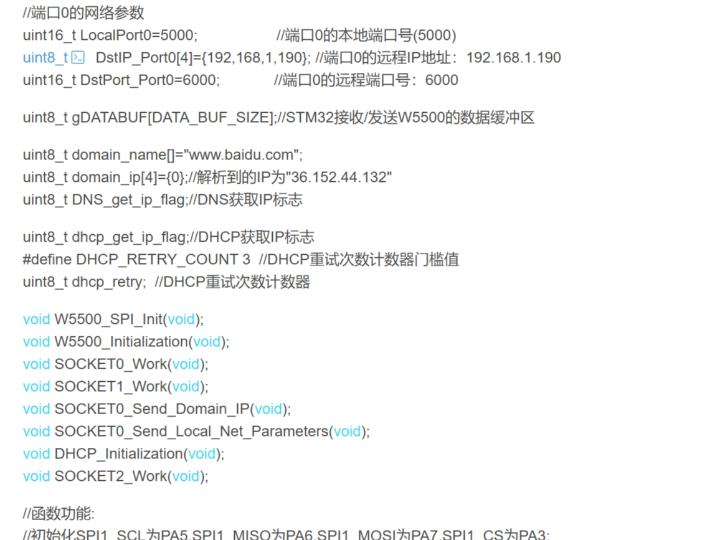
How to Build a DHCP Client with W5500 on STM32?
Summary
This STM32 project implements a wired DHCP client using the WIZnet W5500 Ethernet controller and WIZnet ioLibrary. The STM32 configures SPI, registers W5500 access callbacks, waits for PHY link, assigns socket 2 to DHCP, and then uses the acquired IP parameters for DNS resolution and TCP debug output.
What the Project Does
The project demonstrates how an STM32 microcontroller can obtain network configuration automatically from a DHCP server through a W5500 Ethernet controller. The firmware initializes SPI1, maps the W5500 chip-select line, registers ioLibrary callback functions, configures socket buffer sizes, checks Ethernet link status, and starts DHCP processing.
The network flow is split into three W5500 sockets. Socket 0 is used as a TCP debug channel, socket 1 is used for DNS resolution, and socket 2 is dedicated to DHCP. After DHCP succeeds, the firmware reads the assigned IP address, gateway, subnet mask, and DNS server, writes them into W5500 network configuration, resolves www.baidu.com, and sends the DHCP/DNS results through the debug socket.
Where WIZnet Fits
The exact WIZnet product used is W5500. In this project, W5500 is the Ethernet transport device between the STM32 application firmware and the wired LAN. The STM32 does not run a full software TCP/IP stack; instead, it accesses W5500 through SPI and uses ioLibrary socket APIs for DHCP, DNS, and TCP communication.
This is a good educational example because it exposes the full embedded Ethernet bring-up sequence: SPI setup, chip-select control, socket allocation, PHY link polling, DHCP state handling, timeout handling, and post-DHCP network parameter loading. W5500 fits this role because it provides a hardwired TCP/IP stack, SPI up to 80 MHz, 8 independent sockets, and 32 KB internal Tx/Rx buffer memory.
Implementation Notes
The original source is a CSDN article rather than a public repository, so a complete source tree and exact repository paths are not available. The snippets below are real excerpts from the article’s code sections.
W5500_HD_Driver.h — socket assignment and chip-select mapping
#define SOCK_TCPS   0  // socket 0: debug TCP connection
#define SOCK_DNS    1  // socket 1: DNS client
#define SOCKET_DHCP 2  // socket 2: DHCP client

#define DATA_BUF_SIZE   2048
extern uint8_t gDATABUF[DATA_BUF_SIZE];

#define W5500_CS_high() GPIO_SetBits(GPIOA,GPIO_Pin_4)
#define W5500_CS_low()  GPIO_ResetBits(GPIOA,GPIO_Pin_4)
This matters because the project treats W5500 sockets as independent network resources. DHCP is isolated on socket 2, DNS runs on socket 1, and the debug TCP channel remains on socket 0. That separation makes the DHCP workflow easier to observe in class because students can trace each protocol to a specific socket.
W5500 driver source section — W5500 initialization through ioLibrary callbacks
uint8_t memsize[2][8] = {{2,2,2,2,2,2,2,2},
                         {2,2,2,2,2,2,2,2}};

W5500_SPI_Init();

reg_wizchip_cris_cbfunc(SPI_CrisEnter, SPI_CrisExit);
reg_wizchip_cs_cbfunc(SPI_CS_Select, SPI_CS_Deselect);
reg_wizchip_spi_cbfunc(SPI_ReadByte, SPI_WriteByte);

ctlwizchip(CW_INIT_WIZCHIP, (void*)memsize);
This configures the STM32-to-W5500 interface. W5500_SPI_Init() prepares SPI1, the callback registration connects ioLibrary to the board-specific SPI and chip-select functions, and CW_INIT_WIZCHIP assigns 2 KB Tx/Rx buffer space per socket.
W5500 driver source section — DHCP initialization and runtime loop
void DHCP_Initialization(void)
{
    setSHAR(gWIZNETINFO.mac);
    DHCP_init(SOCKET_DHCP, gDATABUF);
    reg_dhcp_cbfunc(dhcp_assign, dhcp_update, dhcp_conflict);
    dhcp_retry = 0;
}

retval = DHCP_run();

if (retval == DHCP_IP_LEASED) {
    dhcp_get_ip_flag = 1;
}
This is the core DHCP flow. The firmware writes the MAC address into W5500, starts the DHCP client on socket 2, registers callbacks for assign/update/conflict events, and repeatedly calls DHCP_run() until an address lease is obtained or retry handling fails.
Practical Tips / Pitfalls
- Use a unique MAC address. Reusing the sample
00:08:DC:11:11:11on multiple boards can create DHCP and ARP conflicts. - Confirm the PHY link before running DHCP. The article waits for
CW_GET_PHYLINKto report link-on before continuing. - Keep socket roles fixed during debugging. Socket 0 for TCP debug, socket 1 for DNS, and socket 2 for DHCP makes packet tracing easier.
- Allocate W5500 buffers intentionally. The sample uses 2 KB Tx/Rx per socket, which is simple for teaching but may need adjustment for larger TCP payloads.
- DHCP and DNS require periodic timeout handling. The example uses TIM2 to call
DNS_time_handler()andDHCP_time_handler(). - Verify SPI mode and chip-select timing first. Many W5500 bring-up failures come from SPI mode, CS polarity, or GPIO configuration errors rather than DHCP logic.
FAQ
Q: Why use W5500 for this STM32 DHCP client?
A: W5500 lets the STM32 use Ethernet sockets without implementing a full software TCP/IP stack. For an education project, this keeps the lesson focused on SPI, socket state, DHCP flow, and network configuration instead of spending most of the firmware on TCP/IP internals.
Q: How does W5500 connect to the STM32?
A: The project connects W5500 through SPI1. The article configures PA5 as SPI clock, PA6 as MISO, PA7 as MOSI, and PA4 as the W5500 chip-select GPIO. The firmware then registers SPI read/write and CS callbacks with ioLibrary.
Q: What role does W5500 play in this project?
A: W5500 handles the wired Ethernet interface and socket-level network communication. Socket 2 runs DHCP, socket 1 runs DNS, and socket 0 sends debug output such as the leased IP address, gateway, subnet mask, and DNS result.
Q: Can beginners follow this project?
A: Yes, but it is better suited to students who already know basic STM32 GPIO, SPI, timers, and serial debugging. The project is useful for education because it shows the complete path from hardware SPI initialization to DHCP lease acquisition and DNS resolution.
Q: How does this compare with using Wi-Fi for the same lesson?
A: Wi-Fi is easier for cable-free demos, but it hides many link-layer details behind a radio module and can introduce variable latency or association issues. W5500 over Ethernet is more deterministic for teaching DHCP because the student can observe link status, sockets, DHCP retry behavior, and LAN-side IP assignment directly.
Source
Original article: CSDN, “W5500使用ioLibrary库创建DHCP客户端,” first published on May 17, 2025 and later modified on May 17, 2025.
License: CC BY-SA 4.0, as stated on the CSDN article page.
Product reference: WIZnet W5500 documentation.
Tags
#W5500 #WIZnet #STM32 #DHCP #ioLibrary #SPI #EmbeddedEthernet #DNS #Education #EthernetSockets
STM32에서 W5500으로 DHCP 클라이언트를 구축하는 방법
요약
이 STM32 프로젝트는 WIZnet W5500 이더넷 컨트롤러와 WIZnet ioLibrary를 사용해 유선 DHCP 클라이언트를 구현합니다. STM32는 SPI를 설정하고, W5500 접근 콜백을 등록하며, PHY 링크 상태를 확인한 뒤 DHCP용으로 소켓 2를 할당합니다. 이후 DHCP로 받은 IP 설정을 DNS 해석과 TCP 디버그 출력에 사용합니다.
프로젝트가 하는 일
이 프로젝트는 STM32 마이크로컨트롤러가 W5500 이더넷 컨트롤러를 통해 DHCP 서버로부터 네트워크 설정을 자동으로 받아오는 과정을 보여줍니다. 펌웨어는 SPI1을 초기화하고, W5500 칩 셀렉트 라인을 GPIO에 매핑하며, ioLibrary 콜백 함수를 등록하고, 소켓 버퍼 크기를 설정한 뒤 이더넷 링크 상태를 확인하고 DHCP 처리를 시작합니다.
네트워크 흐름은 세 개의 W5500 소켓으로 나뉩니다. 소켓 0은 TCP 디버그 채널로 사용되고, 소켓 1은 DNS 해석에 사용되며, 소켓 2는 DHCP 전용으로 사용됩니다. DHCP가 성공하면 펌웨어는 할당된 IP 주소, 게이트웨이, 서브넷 마스크, DNS 서버 정보를 읽어 W5500 네트워크 설정에 반영합니다. 이후 www.baidu.com을 DNS로 해석하고, DHCP/DNS 결과를 디버그 소켓으로 전송합니다.
WIZnet이 들어가는 위치
이 프로젝트에서 사용된 WIZnet 제품은 W5500입니다. W5500은 STM32 애플리케이션 펌웨어와 유선 LAN 사이의 이더넷 전송 장치 역할을 합니다. STM32는 전체 소프트웨어 TCP/IP 스택을 직접 실행하지 않고, SPI를 통해 W5500에 접근하며 ioLibrary의 소켓 API를 사용해 DHCP, DNS, TCP 통신을 처리합니다.
이 예제는 교육용으로 적합합니다. SPI 설정, 칩 셀렉트 제어, 소켓 할당, PHY 링크 확인, DHCP 상태 처리, 타임아웃 처리, DHCP 이후 네트워크 파라미터 적용까지 임베디드 이더넷 초기화 흐름을 한 번에 보여주기 때문입니다. W5500은 하드웨어 TCP/IP 스택, 최대 80 MHz SPI, 8개 독립 소켓, 32 KB 내부 Tx/Rx 버퍼를 제공하므로 이러한 교육용 네트워크 실습에 적합합니다.
구현 참고 사항
원본은 공개 저장소가 아니라 CSDN 기술 글이므로 전체 소스 트리와 정확한 저장소 경로는 확인할 수 없습니다. 아래 코드는 원문 코드 섹션에서 발췌한 실제 예제입니다.
W5500_HD_Driver.h — 소켓 할당 및 칩 셀렉트 매핑
#define SOCK_TCPS   0  // socket 0: debug TCP connection
#define SOCK_DNS    1  // socket 1: DNS client
#define SOCKET_DHCP 2  // socket 2: DHCP client

#define DATA_BUF_SIZE   2048
extern uint8_t gDATABUF[DATA_BUF_SIZE];

#define W5500_CS_high() GPIO_SetBits(GPIOA,GPIO_Pin_4)
#define W5500_CS_low()  GPIO_ResetBits(GPIOA,GPIO_Pin_4)
이 부분은 W5500의 소켓을 독립적인 네트워크 자원으로 사용하는 방식을 보여줍니다. DHCP는 소켓 2에 고정되고, DNS는 소켓 1에서 실행되며, TCP 디버그 채널은 소켓 0에 유지됩니다. 이렇게 역할을 분리하면 수업이나 실습 중 각 프로토콜이 어떤 소켓에서 동작하는지 추적하기 쉽습니다.
W5500 driver source section — ioLibrary 콜백을 통한 W5500 초기화
uint8_t memsize[2][8] = {{2,2,2,2,2,2,2,2},
                         {2,2,2,2,2,2,2,2}};

W5500_SPI_Init();

reg_wizchip_cris_cbfunc(SPI_CrisEnter, SPI_CrisExit);
reg_wizchip_cs_cbfunc(SPI_CS_Select, SPI_CS_Deselect);
reg_wizchip_spi_cbfunc(SPI_ReadByte, SPI_WriteByte);

ctlwizchip(CW_INIT_WIZCHIP, (void*)memsize);
이 코드는 STM32와 W5500 사이의 인터페이스를 설정합니다. W5500_SPI_Init()은 SPI1을 준비하고, 콜백 등록 함수들은 ioLibrary가 보드별 SPI 및 칩 셀렉트 함수를 사용할 수 있도록 연결합니다. CW_INIT_WIZCHIP은 각 소켓에 2 KB Tx/Rx 버퍼를 할당합니다.
W5500 driver source section — DHCP 초기화 및 실행 루프
void DHCP_Initialization(void)
{
    setSHAR(gWIZNETINFO.mac);
    DHCP_init(SOCKET_DHCP, gDATABUF);
    reg_dhcp_cbfunc(dhcp_assign, dhcp_update, dhcp_conflict);
    dhcp_retry = 0;
}

retval = DHCP_run();

if (retval == DHCP_IP_LEASED) {
    dhcp_get_ip_flag = 1;
}
이 부분이 DHCP 흐름의 핵심입니다. 펌웨어는 MAC 주소를 W5500에 기록하고, 소켓 2에서 DHCP 클라이언트를 시작하며, IP 할당·갱신·충돌 이벤트에 대한 콜백을 등록합니다. 이후 DHCP_run()을 반복 호출하여 IP 임대가 완료될 때까지 DHCP 상태를 처리합니다.
실전 팁과 주의할 점
- 고유한 MAC 주소를 사용해야 합니다. 예제의
00:08:DC:11:11:11을 여러 보드에서 그대로 사용하면 DHCP 또는 ARP 충돌이 발생할 수 있습니다. - DHCP를 실행하기 전에 PHY 링크 상태를 확인해야 합니다. 원문 예제는
CW_GET_PHYLINK로 링크가 연결되었는지 확인한 뒤 다음 단계로 진행합니다. - 디버깅 중에는 소켓 역할을 고정하는 것이 좋습니다. 소켓 0은 TCP 디버그, 소켓 1은 DNS, 소켓 2는 DHCP로 유지하면 패킷 흐름을 추적하기 쉽습니다.
- W5500 버퍼 크기를 의도적으로 설정해야 합니다. 예제는 각 소켓에 2 KB Tx/Rx를 할당하며, 교육용으로는 단순하지만 더 큰 TCP 페이로드를 다룰 때는 조정이 필요할 수 있습니다.
- DHCP와 DNS에는 주기적인 타임아웃 처리가 필요합니다. 예제는 TIM2를 사용해
DNS_time_handler()와DHCP_time_handler()를 호출합니다. - 먼저 SPI 모드와 칩 셀렉트 타이밍을 확인해야 합니다. W5500 초기화 실패는 DHCP 로직보다 SPI 모드, CS 극성, GPIO 설정 문제에서 발생하는 경우가 많습니다.
FAQ
Q: 이 STM32 DHCP 클라이언트에서 왜 W5500을 사용하나요?
A: W5500을 사용하면 STM32가 전체 소프트웨어 TCP/IP 스택을 직접 구현하지 않고도 이더넷 소켓을 사용할 수 있습니다. 교육용 프로젝트에서는 TCP/IP 내부 구현보다 SPI, 소켓 상태, DHCP 흐름, 네트워크 설정 과정을 학습하는 데 집중할 수 있습니다.
Q: W5500은 STM32에 어떻게 연결되나요?
A: 이 프로젝트에서는 W5500을 SPI1로 연결합니다. 원문은 PA5를 SPI 클록, PA6을 MISO, PA7을 MOSI, PA4를 W5500 칩 셀렉트 GPIO로 설정합니다. 이후 펌웨어에서 SPI read/write 함수와 CS 제어 함수를 ioLibrary 콜백으로 등록합니다.
Q: 이 프로젝트에서 W5500은 어떤 역할을 하나요?
A: W5500은 유선 이더넷 인터페이스와 소켓 기반 네트워크 통신을 담당합니다. 소켓 2는 DHCP, 소켓 1은 DNS, 소켓 0은 디버그 출력에 사용되며, DHCP로 받은 IP 주소, 게이트웨이, 서브넷 마스크, DNS 결과를 TCP 디버그 채널로 출력합니다.
Q: 초보자도 따라할 수 있나요?
A: 가능하지만 STM32 GPIO, SPI, 타이머, 시리얼 디버깅에 대한 기본 지식이 있는 학생에게 더 적합합니다. 이 프로젝트는 하드웨어 SPI 초기화부터 DHCP 임대 획득, DNS 해석까지 전체 흐름을 보여주기 때문에 임베디드 네트워크 교육 자료로 유용합니다.
Q: 같은 실습을 Wi-Fi로 하는 것과 비교하면 어떤 차이가 있나요?
A: Wi-Fi는 케이블이 없어 데모가 편하지만, 무선 연결 과정과 지연 변동이 실습을 복잡하게 만들 수 있습니다. W5500 기반 유선 이더넷은 링크 상태, 소켓 동작, DHCP 재시도, LAN에서의 IP 할당 과정을 직접 관찰하기 쉬워 DHCP 교육에 더 결정적인 흐름을 제공합니다.
출처
Original article: CSDN, “W5500使用ioLibrary库创建DHCP客户端,” 2025년 5월 17일 최초 게시 및 수정.
https://blog.csdn.net/weixin_42550185/article/details/148029449?spm=1001.2014.3001.5502
License: CC BY-SA 4.0, CSDN 원문 페이지 기준.
Product reference: WIZnet W5500 documentation.
https://docs.wiznet.io/Product/Chip/Ethernet/W5500
태그
#W5500 #WIZnet #STM32 #DHCP #ioLibrary #SPI #EmbeddedEthernet #DNS #Education #EthernetSockets