



How to Bring Up W5500 PHY and DHCP Debug Flow with STM32F10x?
This STM32F10x project brings up a WIZnet W5500 Ethernet controller over SPI, verifies the chip and PHY link
How to Bring Up W5500 PHY and DHCP Debug Flow with STM32F10x?
Summary
This STM32F10x project brings up a WIZnet W5500 Ethernet controller over SPI, verifies the chip and PHY link, runs DHCP through WIZnet ioLibrary, and prints the resulting MAC, IP, subnet mask, gateway, and DNS configuration over UART. W5500 acts as the hardware TCP/IP and Ethernet interface, reducing the firmware burden compared with running a full software TCP/IP stack such as LwIP on the MCU.
What the Project Does
The project demonstrates the first practical step in validating W5500 on an STM32F10x board: obtaining a dynamic IP address from a LAN DHCP server. The firmware initializes the STM32 peripheral layer, enables UART debug output, configures SPI1 for W5500 access, initializes the W5500 reset and interrupt pins, registers ioLibrary SPI callbacks, resets the chip, checks the W5500 version register, waits for PHY link, runs DHCP, and prints the assigned network information. The original article describes this as a complete path from hardware initialization to network configuration for embedded Ethernet development.
The debug flow is intentionally visible. The sample output includes reset logging, W5500 installation text, PHY link status, negotiated speed and duplex mode, DHCP progress, DHCP success, assigned IP information, and a final prompt to ping the acquired IP address. That makes the project useful for commercial bring-up because failures can be separated into SPI access, PHY link, DHCP lease, or LAN reachability instead of being treated as one generic “network not working” problem.
Where WIZnet Fits
The WIZnet product used is W5500. In this design, W5500 provides the SPI-connected Ethernet MAC, PHY, hardware TCP/IP engine, socket layer, and internal Tx/Rx buffering. The STM32F10x firmware talks to W5500 through ioLibrary instead of carrying the full TCP/IP protocol workload inside the MCU application.
This matters for a commercial STM32F10x product because the network bring-up path is narrower and easier to validate: confirm SPI register access, confirm PHY link, confirm socket/DHCP behavior, then confirm IP reachability. W5500 supports a hardwired TCP/IP stack, SPI up to 80 MHz, 8 independent sockets, and 32 KB internal Tx/Rx buffer memory, which lets a small MCU keep the business firmware separate from lower-level TCP/IP state handling.
Compared with LwIP, the trade-off is control versus integration effort. LwIP is a lightweight software TCP/IP stack designed for embedded systems with constrained RAM and ROM, but the MCU still owns the network stack integration, memory pools, timers, and driver interface. With W5500, TCP/IP handling is moved into the Ethernet controller and the STM32 application uses WIZnet socket and DHCP APIs over SPI.
Implementation Notes
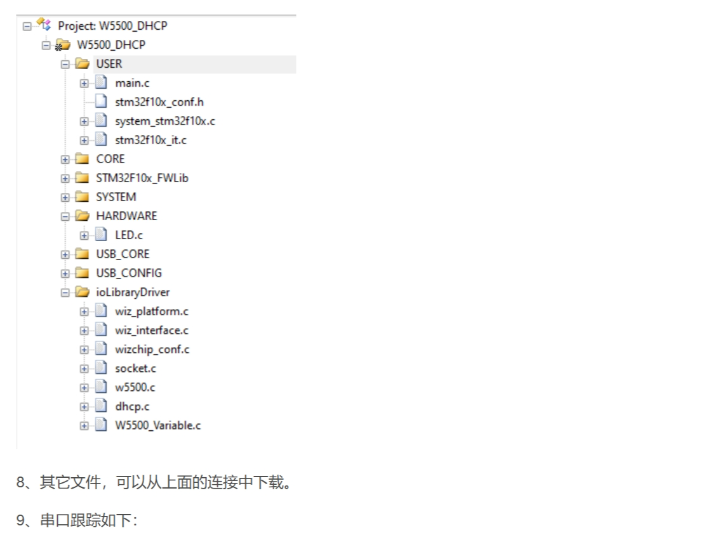
The original article exposes code sections rather than a full browsable source path for each file. The article also references the WIZnet HK Gitee repository STM32F10x_W5500_Examples, which contains W5500 examples for STM32F10x and lists 2.DHCP as the routine for obtaining network configuration through DHCP.
wiz_platform.c — STM32F10x SPI1 mode for W5500 access
SPI_InitStructure.SPI_Mode = SPI_Mode_Master;
SPI_InitStructure.SPI_DataSize = SPI_DataSize_8b;
SPI_InitStructure.SPI_CPOL = SPI_CPOL_Low;
SPI_InitStructure.SPI_CPHA = SPI_CPHA_1Edge;
SPI_InitStructure.SPI_NSS = SPI_NSS_Soft;
SPI_InitStructure.SPI_BaudRatePrescaler = SPI_BaudRatePrescaler_2;
SPI_InitStructure.SPI_FirstBit = SPI_FirstBit_MSB;
SPI_Init(SPI1, &SPI_InitStructure);
SPI_Cmd(SPI1, ENABLE);
This configures STM32F10x SPI1 as the host interface to W5500. The same file also initializes PA5 as SPI clock, PA6 as MISO, PA7 as MOSI, and PA4 as the W5500 chip-select GPIO. In a commercial board bring-up, this is the first area to verify with a logic analyzer because incorrect SPI mode, pin mapping, or chip-select timing prevents even the W5500 version register from being read reliably.
wiz_interface.c — PHY link polling and debug print path
ctlwizchip(CW_GET_PHYLINK, (void *)&phy_link_status);

if (phy_link_status == PHY_LINK_ON) {
    printf("PHY link\r\n");
    wiz_print_phy_info();
} else {
    printf("PHY no link\r\n");
}
This code separates physical Ethernet status from higher-level DHCP behavior. The firmware waits until W5500 reports link-on, then prints the negotiated speed and duplex mode before running DHCP. That is important in a commercial device because a missing cable, transformer/RJ45 issue, PHY negotiation problem, or switch compatibility issue can be diagnosed before DHCP is blamed.
main.c — ordered bring-up sequence
wiz_timer_init();
wiz_spi_init();
wiz_rst_int_init();
printf("%s network install example\r\n", _WIZCHIP_ID_);

wizchip_initialize();
network_init(ethernet_buf, &default_net_info);
wizchip_getnetinfo(&net_info);
The application initializes the DHCP timer, SPI bus, W5500 reset/interrupt pins, W5500 core state, DHCP network configuration, and finally reads back the assigned network information. This sequence is practical for production diagnostics because each stage has a clear failure boundary and can be logged over UART.
Practical Tips / Pitfalls
- Validate SPI before debugging DHCP. The article’s flow checks the W5500 version register before PHY and DHCP, which is the right order for commercial board bring-up.
- Keep W5500 reset timing deterministic. The sample toggles the reset pin with delays, so make sure the reset GPIO is not shared with other boot-critical hardware.
- Do not skip PHY link polling. DHCP should not start until
CW_GET_PHYLINKreports link-on; otherwise DHCP failures may simply mean the Ethernet link is down. - Print speed and duplex during early production tests. The example reports 10/100 Mbps and half/full duplex, which helps identify marginal cabling, magnetics, or switch negotiation problems.
- Use unique MAC addresses in commercial devices. The sample MAC is suitable for testing only; duplicated MAC addresses will create LAN-level conflicts.
- Treat DHCP timeout handling as part of the network design. The project uses TIM2 to call
DHCP_time_handler()once per second, so timer reliability affects DHCP behavior. - When comparing with LwIP, account for firmware ownership. LwIP gives more software-stack flexibility, while W5500 reduces MCU-side TCP/IP integration work by moving socket/TCP/IP handling into the Ethernet chip.
FAQ
Q: Why use W5500 instead of an STM32F10x software TCP/IP stack?
A: W5500 moves TCP/IP socket handling into the Ethernet controller, so the STM32F10x firmware mainly manages SPI, ioLibrary calls, timers, and application logic. That is useful in commercial products where deterministic bring-up, smaller firmware scope, and easier field diagnostics matter more than customizing every layer of the network stack.
Q: How does W5500 connect to the STM32F10x in this project?
A: The project uses SPI1. The article configures PA5 as SCK, PA6 as MISO, PA7 as MOSI, and PA4 as chip select, while PC5 is used for W5500 reset and PC4 for W5500 interrupt input. The firmware then registers chip-select, single-byte SPI, and burst SPI callback functions with WIZnet ioLibrary.
Q: What role does W5500 play in this project’s debug flow?
A: W5500 provides the PHY status, speed/duplex information, socket behavior, DHCP client path, and final network configuration readback. The STM32 prints these states over UART so the developer can identify whether the failure is SPI access, physical link, DHCP, or LAN reachability.
Q: Can this be used as a commercial product starting point?
A: Yes, as a bring-up reference. For a product, the sample should be extended with unique MAC provisioning, retry and recovery policy, watchdog integration, EMI-aware PCB layout, production test logs, link-loss handling, and static-IP fallback behavior.
Q: How does this compare with LwIP on STM32?
A: LwIP is a software TCP/IP stack intended for embedded systems and can be a good fit when the application needs software-level control of the network stack. W5500 is different: it exposes a hardware TCP/IP socket model over SPI, which reduces MCU-side stack integration and can simplify commercial firmware validation, at the cost of designing around W5500’s socket model and hardware buffer limits.
Source
Original article: CSDN, “测试W5500的第1步_使用ioLibrary库创建DHCP客户端,” first published on May 20, 2025 and modified on May 21, 2025. The article page states CC 4.0 BY-SA licensing.
Related source repository: WIZnet HK STM32F10x_W5500_Examples, which provides STM32F10x W5500 examples including DHCP, TCP client/server, UDP, DNS, HTTP, MQTT, Modbus TCP server, and other routines. The repository page lists MulanPSL-2.0 licensing.
Product reference: WIZnet W5500 official product documentation for hardwired TCP/IP, SPI, sockets, and buffer specifications.
Comparison reference: official lwIP project summary for the software TCP/IP stack positioning and embedded resource assumptions.
Tags
#W5500 #WIZnet #STM32F10x #SPI #DHCP #PHYLink #ioLibrary #EmbeddedEthernet #CommercialFirmware #LwIP #EthernetDebug
STM32F10x에서 W5500 PHY 및 DHCP 디버그 흐름을 구현하는 방법
요약
이 STM32F10x 프로젝트는 SPI를 통해 WIZnet W5500 이더넷 컨트롤러를 초기화하고, 칩 및 PHY 링크 상태를 확인한 뒤, WIZnet ioLibrary로 DHCP를 실행하여 MAC 주소, IP 주소, 서브넷 마스크, 게이트웨이, DNS 설정을 UART로 출력합니다. W5500은 하드웨어 TCP/IP 및 이더넷 인터페이스 역할을 하며, STM32F10x MCU에서 LwIP 같은 전체 소프트웨어 TCP/IP 스택을 직접 운용하는 부담을 줄여줍니다.
프로젝트가 하는 일
이 프로젝트는 STM32F10x 보드에서 W5500을 검증할 때 가장 먼저 수행해야 하는 절차, 즉 LAN DHCP 서버로부터 동적 IP 주소를 받아오는 과정을 보여줍니다. 펌웨어는 STM32 주변장치를 초기화하고, UART 디버그 출력을 활성화하며, W5500 접근을 위한 SPI1을 설정합니다. 이후 W5500 리셋 및 인터럽트 핀을 초기화하고, ioLibrary SPI 콜백을 등록하며, 칩을 리셋하고 W5500 버전 레지스터를 확인합니다. 그 다음 PHY 링크를 기다리고 DHCP를 실행한 뒤, 할당된 네트워크 정보를 출력합니다.
디버그 흐름은 의도적으로 잘 보이도록 구성되어 있습니다. 샘플 출력에는 리셋 로그, W5500 설치 메시지, PHY 링크 상태, 협상된 속도와 듀플렉스 모드, DHCP 진행 상태, DHCP 성공 여부, 할당된 IP 정보, 그리고 해당 IP로 ping을 수행하라는 안내가 포함됩니다. 상용 제품 개발에서는 이런 흐름이 중요합니다. 네트워크 문제가 발생했을 때 SPI 접근 문제, PHY 링크 문제, DHCP 임대 문제, LAN 도달성 문제를 분리해서 확인할 수 있기 때문입니다.
WIZnet이 들어가는 위치
이 프로젝트에서 사용된 WIZnet 제품은 W5500입니다. 이 설계에서 W5500은 SPI로 연결되는 이더넷 MAC, PHY, 하드웨어 TCP/IP 엔진, 소켓 계층, 내부 Tx/Rx 버퍼를 제공합니다. STM32F10x 펌웨어는 MCU 내부에 전체 TCP/IP 프로토콜 처리를 넣는 대신, ioLibrary를 통해 W5500과 통신합니다.
상용 STM32F10x 제품에서 이 구조가 의미 있는 이유는 네트워크 초기화 경로가 좁고 검증하기 쉽기 때문입니다. 먼저 SPI 레지스터 접근을 확인하고, 다음으로 PHY 링크를 확인하며, 이후 소켓과 DHCP 동작을 검증하고, 마지막으로 IP 도달성을 확인할 수 있습니다. W5500은 하드웨어 TCP/IP 스택, 최대 80 MHz SPI, 8개 독립 소켓, 32 KB 내부 Tx/Rx 버퍼 메모리를 제공하므로, 소형 MCU가 저수준 TCP/IP 상태 처리보다 제품 기능 로직에 집중할 수 있게 합니다.
LwIP와 비교하면 핵심 차이는 제어 범위와 통합 부담입니다. LwIP는 제한된 RAM과 ROM 환경을 위한 경량 소프트웨어 TCP/IP 스택이지만, MCU가 네트워크 스택 통합, 메모리 풀, 타이머, 드라이버 인터페이스를 직접 책임져야 합니다. W5500을 사용하면 TCP/IP 처리가 이더넷 컨트롤러로 이동하고, STM32 애플리케이션은 SPI를 통해 WIZnet 소켓 및 DHCP API를 사용하는 구조가 됩니다.
구현 참고 사항
원문은 각 파일의 전체 저장소 경로를 제공하는 공개 소스 트리라기보다 코드 섹션을 포함한 기술 글에 가깝습니다. 또한 원문은 WIZnet HK Gitee 저장소 STM32F10x_W5500_Examples를 참조하며, 해당 저장소에는 STM32F10x용 W5500 예제와 DHCP를 통해 네트워크 설정을 획득하는 2.DHCP 루틴이 포함되어 있습니다.
wiz_platform.c — W5500 접근을 위한 STM32F10x SPI1 설정
SPI_InitStructure.SPI_Mode = SPI_Mode_Master;
SPI_InitStructure.SPI_DataSize = SPI_DataSize_8b;
SPI_InitStructure.SPI_CPOL = SPI_CPOL_Low;
SPI_InitStructure.SPI_CPHA = SPI_CPHA_1Edge;
SPI_InitStructure.SPI_NSS = SPI_NSS_Soft;
SPI_InitStructure.SPI_BaudRatePrescaler = SPI_BaudRatePrescaler_2;
SPI_InitStructure.SPI_FirstBit = SPI_FirstBit_MSB;
SPI_Init(SPI1, &SPI_InitStructure);
SPI_Cmd(SPI1, ENABLE);
이 코드는 STM32F10x의 SPI1을 W5500 호스트 인터페이스로 설정합니다. 같은 파일에서는 PA5를 SPI 클록, PA6을 MISO, PA7을 MOSI, PA4를 W5500 칩 셀렉트 GPIO로 초기화합니다. 상용 보드 bring-up에서는 이 부분을 로직 애널라이저로 먼저 확인하는 것이 좋습니다. SPI 모드, 핀 매핑, 칩 셀렉트 타이밍이 잘못되면 W5500 버전 레지스터조차 안정적으로 읽을 수 없습니다.
wiz_interface.c — PHY 링크 확인 및 디버그 출력 흐름
ctlwizchip(CW_GET_PHYLINK, (void *)&phy_link_status);

if (phy_link_status == PHY_LINK_ON) {
    printf("PHY link\r\n");
    wiz_print_phy_info();
} else {
    printf("PHY no link\r\n");
}
이 코드는 물리 이더넷 상태와 상위 DHCP 동작을 분리합니다. 펌웨어는 W5500이 링크 연결 상태를 보고할 때까지 기다린 뒤, DHCP를 실행하기 전에 협상된 속도와 듀플렉스 모드를 출력합니다. 상용 장치에서는 이 단계가 중요합니다. 케이블 미연결, 트랜스포머/RJ45 문제, PHY 협상 문제, 스위치 호환성 문제를 DHCP 문제로 오해하기 전에 먼저 확인할 수 있기 때문입니다.
main.c — 순차적인 네트워크 bring-up 흐름
wiz_timer_init();
wiz_spi_init();
wiz_rst_int_init();
printf("%s network install example\r\n", _WIZCHIP_ID_);

wizchip_initialize();
network_init(ethernet_buf, &default_net_info);
wizchip_getnetinfo(&net_info);
애플리케이션은 DHCP 타이머, SPI 버스, W5500 리셋/인터럽트 핀, W5500 내부 상태, DHCP 기반 네트워크 설정을 순서대로 초기화하고, 마지막으로 할당된 네트워크 정보를 다시 읽어옵니다. 이 흐름은 생산 진단에도 유용합니다. 각 단계마다 실패 경계가 명확하고 UART 로그로 상태를 남길 수 있기 때문입니다.
실전 팁과 주의할 점
- DHCP를 디버깅하기 전에 SPI를 먼저 검증해야 합니다. 원문 흐름처럼 PHY와 DHCP 전에 W5500 버전 레지스터를 확인하는 순서가 적절합니다.
- W5500 리셋 타이밍을 결정적으로 유지해야 합니다. 예제는 지연 시간을 두고 리셋 핀을 토글하므로, 해당 GPIO가 다른 부팅 관련 회로와 충돌하지 않는지 확인해야 합니다.
- PHY 링크 확인을 생략하지 않아야 합니다.
CW_GET_PHYLINK가 link-on을 보고하기 전에는 DHCP를 시작하지 않는 것이 좋습니다. - 초기 생산 테스트에서는 속도와 듀플렉스 정보를 출력하는 것이 좋습니다. 예제처럼 10/100 Mbps 및 half/full duplex 상태를 출력하면 케이블, 마그네틱, 스위치 협상 문제를 파악하기 쉽습니다.
- 상용 장치에는 고유한 MAC 주소를 사용해야 합니다. 샘플 MAC 주소는 테스트용으로만 적합하며, MAC 주소가 중복되면 LAN 충돌이 발생합니다.
- DHCP 타임아웃 처리를 네트워크 설계의 일부로 다루어야 합니다. 이 프로젝트는 TIM2를 사용해 1초마다
DHCP_time_handler()를 호출하므로, 타이머 신뢰성이 DHCP 동작에 영향을 줍니다. - LwIP와 비교할 때는 펌웨어가 무엇을 책임지는지 확인해야 합니다. LwIP는 소프트웨어 스택의 유연성을 제공하지만, W5500은 TCP/IP 및 소켓 처리를 칩 내부로 이동시켜 MCU 측 통합 부담을 줄입니다.
FAQ
Q: STM32F10x 소프트웨어 TCP/IP 스택 대신 W5500을 사용하는 이유는 무엇인가요?
A: W5500은 TCP/IP 소켓 처리를 이더넷 컨트롤러 내부로 이동시킵니다. 따라서 STM32F10x 펌웨어는 주로 SPI, ioLibrary 호출, 타이머, 애플리케이션 로직을 관리하면 됩니다. 이는 모든 네트워크 계층을 세밀하게 커스터마이즈하는 것보다 결정적인 bring-up, 작은 펌웨어 범위, 현장 진단 용이성이 중요한 상용 제품에 유리합니다.
Q: 이 프로젝트에서 W5500은 STM32F10x에 어떻게 연결되나요?
A: 이 프로젝트는 SPI1을 사용합니다. 원문에서는 PA5를 SCK, PA6을 MISO, PA7을 MOSI, PA4를 칩 셀렉트로 설정합니다. 또한 PC5는 W5500 리셋, PC4는 W5500 인터럽트 입력으로 사용됩니다. 이후 펌웨어는 칩 셀렉트, 단일 바이트 SPI, 버스트 SPI 콜백 함수를 WIZnet ioLibrary에 등록합니다.
Q: 이 프로젝트의 디버그 흐름에서 W5500은 어떤 역할을 하나요?
A: W5500은 PHY 상태, 속도/듀플렉스 정보, 소켓 동작, DHCP 클라이언트 경로, 최종 네트워크 설정 읽기 기능을 제공합니다. STM32는 이 상태들을 UART로 출력하여 문제가 SPI 접근, 물리 링크, DHCP, LAN 도달성 중 어디에서 발생했는지 구분할 수 있게 합니다.
Q: 이 예제를 상용 제품의 시작점으로 사용할 수 있나요?
A: bring-up 참조용으로 사용할 수 있습니다. 제품화 단계에서는 고유 MAC 주소 프로비저닝, 재시도 및 복구 정책, 워치독 연동, EMI를 고려한 PCB 레이아웃, 생산 테스트 로그, 링크 손실 처리, 정적 IP fallback 동작을 추가해야 합니다.
Q: STM32에서 LwIP를 사용하는 방식과 비교하면 어떤 차이가 있나요?
A: LwIP는 임베디드 시스템용 소프트웨어 TCP/IP 스택이며, 네트워크 스택을 소프트웨어 수준에서 제어해야 하는 경우에 적합합니다. W5500은 다릅니다. SPI를 통해 하드웨어 TCP/IP 소켓 모델을 제공하므로 MCU 측 스택 통합과 검증 부담을 줄일 수 있습니다. 대신 W5500의 소켓 모델과 하드웨어 버퍼 한계에 맞춰 설계해야 합니다.
출처
Original article: CSDN, “测试W5500的第1步_使用ioLibrary库创建DHCP客户端,” 2025년 5월 20일 최초 게시, 2025년 5월 21일 수정. 원문 페이지 기준 CC 4.0 BY-SA 라이선스가 명시되어 있습니다.
https://blog.csdn.net/weixin_42550185/article/details/148085195?spm=1001.2014.3001.5502
Related source repository: WIZnet HK STM32F10x_W5500_Examples. STM32F10x W5500 예제 저장소이며 DHCP, TCP Client/Server, UDP, DNS, HTTP, MQTT, Modbus TCP Server 등의 루틴을 포함합니다. 저장소 페이지 기준 MulanPSL-2.0 라이선스가 명시되어 있습니다.
https://gitee.com/wiznet-hk/STM32F10x_W5500_Examples
Product reference: WIZnet W5500 공식 제품 문서. 하드웨어 TCP/IP, SPI, 소켓, 버퍼 사양 참고 자료입니다.
https://wiznet.io/products/ethernet-chips/w5500
Comparison reference: lwIP 공식 프로젝트 설명. 임베디드 환경을 위한 소프트웨어 TCP/IP 스택의 성격을 확인할 수 있습니다.
https://savannah.nongnu.org/projects/lwip/
태그
#W5500 #WIZnet #STM32F10x #SPI #DHCP #PHYLink #ioLibrary #EmbeddedEthernet #CommercialFirmware #LwIP #EthernetDebug