



How Does DNS Work with W5500 in Embedded Ethernet Systems?
This article explains how DNS resolution works in W5500-based embedded systems.
How Does DNS Work with W5500 in Embedded Ethernet Systems?
End-to-End Workflow from Domain Name to TCP Socket Connection
(W5500에서 DNS는 어떻게 동작하며 도메인을 IP로 변환하는가?)
Summary (40–60 words)
This article explains how DNS resolution works in W5500-based embedded systems. By analyzing the complete workflow—from network bring-up to DNS query, IP resolution, and TCP socket connection—developers can understand how domain-based communication is implemented and why proper DNS handling is critical for reliable Ethernet applications.
1. Why DNS Matters in Embedded Ethernet Systems
In many embedded projects, developers initially use static IP addresses to connect devices.
However, real-world systems rarely rely on fixed IPs. Instead, they use:
- domain names (e.g.,
example.com) - cloud endpoints
- dynamic server infrastructure
This is where DNS (Domain Name System) becomes essential.
Without DNS:
- MQTT brokers cannot be reached by domain
- HTTP servers require hardcoded IPs
- systems break when server IP changes
2. W5500 and DNS: Division of Responsibility
The W5500 does NOT implement DNS internally.
Instead:
- W5500 → handles Ethernet + TCP/UDP transport
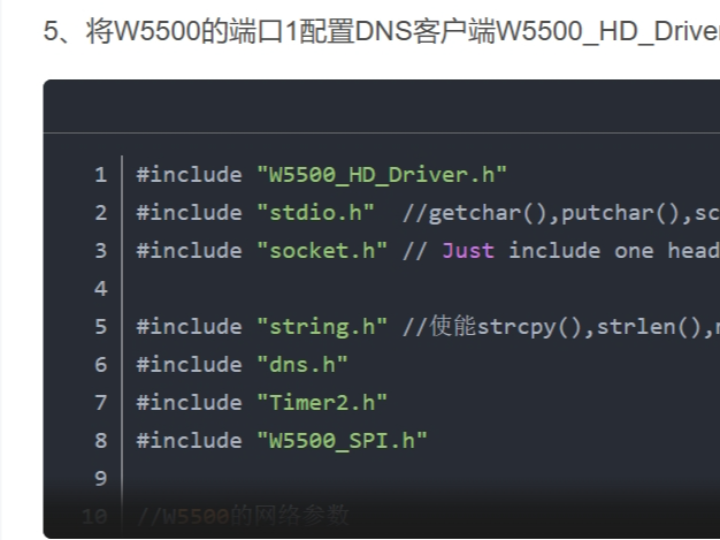
- MCU → implements DNS client logic
This is a critical architectural point.
What W5500 Handles
- UDP packet transmission
- Ethernet frame handling
- ARP resolution
- buffering
What MCU Handles
- DNS packet creation
- parsing DNS responses
- extracting resolved IP
3. DNS in the Network Bring-Up Pipeline
DNS is not the first step. It happens after network initialization.
Full workflow:
System boot
   │
   ▼
SPI + W5500 init
   │
   ▼
IP assignment (DHCP / Static)
   │
   ▼
Network reachable (Ping OK)
   │
   ▼
DNS query
   │
   ▼
IP resolved
   │
   ▼
TCP socket connect
👉 Important:
If network bring-up fails, DNS will also fail.
4. End-to-End DNS Protocol Workflow
DNS typically uses UDP (port 53).
Step-by-step DNS resolution:
1. MCU creates DNS query packet
2. W5500 sends UDP packet to DNS server
3. DNS server replies with IP address
4. W5500 receives response
5. MCU parses response
6. Extract IP address
Example
Domain: mqtt.example.com
↓
DNS response:
IP = 192.168.1.200
Now the MCU can use this IP to open a TCP socket.
5. DNS Packet Structure (Conceptual)
A DNS query contains:
Header
  ├─ Transaction ID
  ├─ Flags
  ├─ Questions
  └─ Answers

Question Section
  └─ Domain name
The MCU builds this packet manually or using a DNS library.
6. Transition from DNS to TCP Connection
Once the IP is resolved:
DNS resolved IP
       │
       ▼
Socket OPEN
       │
       ▼
CONNECT to server IP
       │
       ▼
ESTABLISHED
This step is essential for:
- MQTT connection
- HTTP requests
- cloud communication
7. Common DNS Failure Cases
❌ Case 1 — DNS Query Fails
Cause:
- DNS server not set
- wrong gateway
❌ Case 2 — No Response
Cause:
- UDP packet not sent
- firewall blocking
❌ Case 3 — Wrong IP Returned
Cause:
- DNS parsing error
- incorrect buffer handling
❌ Case 4 — TCP Connect Fails After DNS
Cause:
- resolved IP unreachable
- server port closed
👉 Key insight:
DNS success does not guarantee TCP success.
8. Debugging Workflow for DNS Issues
Follow strict debugging order:
1. Check network bring-up
2. Verify DNS server address
3. Send DNS query
4. Check UDP response
5. Parse IP correctly
6. Test TCP connection
9. Why DNS Is Critical for IoT Systems
Modern IoT systems depend heavily on DNS because:
- cloud servers use domain names
- IP addresses change dynamically
- load balancing requires DNS
Without DNS:
- system becomes rigid
- maintenance becomes difficult
10. W5500 Advantage in DNS-Based Systems
Even though DNS is handled by MCU, W5500 still provides advantages:
- reliable UDP transmission
- hardware buffering
- deterministic SPI communication
- stable network behavior
Compared to software stacks:
- lower RAM usage (~30KB saved)
- simpler debugging
- predictable performance
Key Takeaway
DNS is the bridge between human-readable domain names and machine-level IP communication.
In W5500-based systems, the MCU performs DNS resolution over UDP, and the resulting IP enables TCP socket communication for protocols like MQTT and HTTP.
FAQ (WIZnet-Focused)
Q1. Why use W5500 if it does not support DNS internally?
W5500 offloads TCP/IP and UDP communication, making DNS implementation on the MCU simpler. The MCU only handles packet logic, while W5500 ensures reliable transmission.
Q2. How does W5500 send DNS queries?
W5500 uses UDP sockets (port 53) to send DNS query packets created by the MCU. It handles transmission and reception transparently.
Q3. What is required before DNS works?
The device must complete network bring-up, including valid IP, subnet, gateway, and DNS server configuration. Without this, DNS queries will fail.
Q4. Can beginners implement DNS on W5500?
Yes. With example libraries, DNS can be implemented easily. Understanding UDP communication and packet structure is helpful but not mandatory.
Q5. DNS vs Static IP in embedded systems?
Static IP is simpler but inflexible. DNS allows dynamic server addressing and is required for cloud-based applications.
Source
CSDN Blog
weixin_42550185 — W5500 DNS Resolution Article
Tags
W5500
DNS
Embedded Ethernet
UDP Communication
IoT Networking
🇰🇷 한국어 번역 (1:1)
W5500에서 DNS는 어떻게 동작하며 도메인을 IP로 변환하는가?
요약
본 문서는 WIZnet W5500 기반 임베디드 시스템에서 DNS가 어떻게 동작하는지를 설명한다. 네트워크 초기화부터 DNS 요청, IP 해석, TCP 연결까지 전체 프로토콜 흐름을 분석하여 안정적인 Ethernet 기반 통신 구조를 이해하도록 돕는다.
1. DNS의 중요성
DNS 없이는 도메인 기반 통신이 불가능하다.
2. 역할 분리
- W5500 → UDP/TCP 처리
- MCU → DNS 처리
3. 전체 흐름
초기화 → IP 설정 → DNS → TCP 연결4. 핵심 메시지
DNS는 도메인을 IP로 변환하여 W5500 기반 시스템에서 실제 네트워크 통신을 가능하게 한다.
원하시면 다음 단계로:
- 🔬 DNS 패킷 실제 HEX 분석
- 🔧 ioLibrary 기반 DNS 구현 코드
- 📡 MQTT + DNS + TLS 연결 구조
까지 확장해 드릴 수 있습니다.