



Ethernet-W5500 TCP/IP Protocol Stack Implementation
Ethernet-W5500 TCP/IP Protocol Stack Implementation
Ethernet-W5500 TCP/IP Protocol Stack Implementation
In today's world of interconnected IoT devices, have you ever encountered this predicament: your main control MCU is struggling with a TCP handshake, running out of memory, and task scheduling is a complete mess, while your sensor data is stuck at the network layer, unable to move? 😅
Don't worry—the W5500 is here.
It's not some mysterious black technology, but it's definitely a "worry-free and effortless" hardcore performer. This Ethernet controller from WIZnet embeds the entire TCP/IP protocol stack directly into the hardware, completely freeing the MCU from the quagmire of network issues . You might call it a "network coprocessor"? No, it's more like a full-fledged proxy, handling all the dirty work for you—IP, ARP, TCP, UDP…
So here's the question: How does it do that? Why do so many industrial gateways, smart meters, and remote terminals use it? Today, let's delve into the "hardcore philosophy" behind this tiny chip.
Just how "hard" is the hardware protocol stack?
In traditional solutions, we often use lightweight protocol stacks like LwIP running on MCUs. It sounds great, but it actually has hidden problems—you need to manage memory pools, handle timeout retransmissions, and prevent stack overflows. A slight mistake can lead to deadlocks or restarts. This is especially true for resource-constrained Cortex-M0/M3 systems, making it a truly "burdened" system.
The W5500 is completely different. Its core selling point can be summed up in one sentence: the protocol stack is not in the software, but in the silicon chip.
This means:
- IP fragmentation and reassembly? ✅ Hardware-completed
- TCP three-way handshake? ✅ Automatic execution
- Retransmission mechanisms and flow control? ✅ Internal logic handled
- ARP request and response? ✅ No manual intervention required
The MCU only needs to do three things: configure parameters, send commands, and read status. Let the W5500 handle everything else! 🚀
You can think of it as a "network robot". When you say "connect to 192.168.1.100:80", it will automatically initiate SYN, receive SYN-ACK, and send back ACK. When you say "send this data", it will unpack the data, add verification, send it out, and then tell you "OK".
The benefits of this design are immediate:
- Negligible CPU utilization (typically <5%)
- Extremely low RAM consumption, used only for application data
- High real-time performance, unaffected by RTOS task scheduling
- Greater stability, with no risk of memory leaks
How does it work? Socket + Register = Network Freedom
The W5500's working model is very clear: 8 independent sockets + register mapping + data buffer management .
📦 What is a Socket? In this context, it refers to a "communication channel".
The W5500 supports 8 independent sockets (numbered 0~7), each of which can be independently configured as:
- TCP client/server
- UDP communication client
- RAW IP mode (for ICMP, etc.)
Each socket has its own set of registers and transmit/receive buffers, ensuring they do not interfere with each other. For example, Socket0 connects to the cloud server to report data, Socket1 handles the local web configuration page, and Socket2 listens for broadcast commands... completely in parallel!
🔧 Control method: SPI + register operation
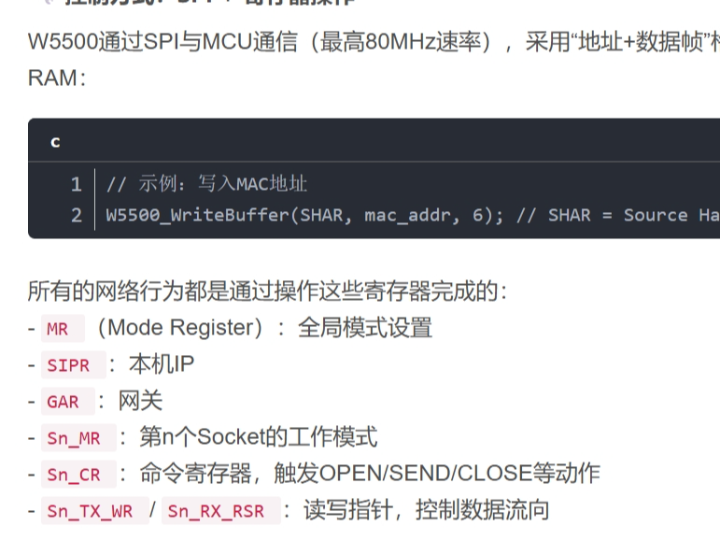
The W5500 communicates with the MCU via SPI (up to 80MHz) and accesses internal resources using an "address + data frame" format. You can think of it as a peripheral RAM with its own address space.
// 示例:写入MAC地址
W5500_WriteBuffer(SHAR, mac_addr, 6); // SHAR = Source Hardware Address Register
All network actions are accomplished by manipulating these registers:
- MR (Mode Register): Global mode settings
- SIPR Local IP address
- GAR Gateway
- Sn_MR Working mode of the nth socket
- Sn_CR Command register, triggering actions such as OPEN/SEND/CLOSE
- Sn_TX_WR / Sn_RX_RSR Read/write pointers, controlling data flow
Does it resemble old-fashioned graphics card programming? But it is precisely this "low-level controllable" design that allows it to run stably in a bare-metal environment without the need for an operating system.
💡 Interrupt-driven, say goodbye to polling blocking
The W5500 also supports interrupt output (INT pin), configurable for various event triggers:
- Data arrival
- Connection established successfully
- Timeout or disconnection
- Transmission completed
This way, the MCU no longer needs to constantly check the status register. Upon receiving an interrupt, it knows "something has happened" and can then simply read the status of the corresponding socket, greatly improving efficiency!
Key features at a glance: More than just "connectivity"
characteristic illustrate
Integrated PHY+MAC No external PHY chip is required, simplifying circuit design.
10/100M adaptive Supports Fast Ethernet and is compatible with mainstream switches.
8 Socket Concurrency Worry-free in multi-connection scenarios, suitable for server applications
32KB on-chip cache 16KB each for TX and RX, which can be flexibly allocated to different sockets.
SPI 80MHz high-speed interface Meets the requirements of high-performance platforms such as STM32F4/F7/H7, ESP32, and RP2040.
Supports DHCP/PPPoE/DNS Easily achieve functions such as automatic IP address acquisition and domain name resolution when combined with upper-layer libraries.
Of particular note is its buffer management mechanism . By default, each socket can be allocated a maximum of 2KB send + 2KB receive buffer (total 8 × 4KB = 32KB). If a socket needs to transmit a large amount of data (such as for FTP uploads), the allocation ratio can be dynamically adjusted to prevent small sockets from consuming large amounts of bandwidth.
Hands-on Practice: Establishing a TCP Connection from Scratch
The following code snippet, based on the STM32 HAL library, demonstrates how to initialize a W5500 and establish a TCP client connection. Don't worry, you don't need to understand TCP state machines!
Initialize network parameters
void W5500_Init(void) {
   uint8_t mac[6] = {0x00, 0x08, 0xDC, 0x12, 0x34, 0x56};
   uint8_t ip[4]  = {192, 168, 1, 100};
   uint8_t gw[4]  = {192, 168, 1, 1};
   uint8_t sn[4]  = {255, 255, 255, 0};
   // 软复位
   W5500_WriteByte(MR, 0x80);
   HAL_Delay(100);
   // 设置MAC/IP/网关/子网掩码
   W5500_WriteBuffer(SHAR, mac, 6);
   W5500_WriteBuffer(SIPR, ip, 4);
   W5500_WriteBuffer(GAR,  gw, 4);
   W5500_WriteBuffer(SUBR, sn, 4);
   // 设置重试次数(失败后重试7次)
   W5500_WriteByte(RCR, 0x07);
   // 分配TX/RX缓冲区:每Socket 2KB
   W5500_WriteByte(TMSR, 0x55); // 0x55 = 0b01010101 → 每个2KB
   W5500_WriteByte(RMSR, 0x55);
}
With just a few lines, your device already has an "ID card" (IP + MAC) and a "home address" (gateway)!
Establishing a TCP connection and sending data
int W5500_TCP_Client_Connect(uint8_t sock, uint8_t *dest_ip, uint16_t dest_port) {
   // 设置为TCP模式
   W5500_WriteByte(Sn_MR + sock*0x100, 0x01);
   // 可选:指定本地端口
   W5500_WriteWord(Sn_PORT + sock*0x100, 50000);
   // 设置目标IP和端口
   W5500_WriteBuffer(Sn_DIPR + sock*0x100, dest_ip, 4);
   W5500_WriteWord(Sn_DPORT + sock*0x100, dest_port);
   // 发送OPEN命令
   W5500_WriteByte(Sn_CR + sock*0x100, 0x01);  // CMD_OPEN
   // 等待连接成功
   while (W5500_ReadByte(Sn_SR + sock*0x100) != SOCK_ESTABLISHED) {
       if (W5500_ReadByte(Sn_IR + sock*0x100) & Sn_IR_TIMEOUT) {
           return -1; // 连接超时
       }
   }
   return 0;
}
See? There are no POSIX calls like socket() and connect(), and no complex error code handling. Just write to registers, send commands, and wait for the status, and the connection is established!
Let's look at the sent data:
void W5500_SendData(uint8_t sock, uint8_t *data, uint16_t len) {
   uint16_t ptr = W5500_ReadWord(Sn_TX_WR + sock*0x100);
   uint16_t offset = ptr & 0x7FFF;
   uint16_t addr = 0x8000 + (sock * 2048) + (offset % 2048); // 计算TX缓冲区地址
   W5500_WriteBuffer(addr, data, len);           // 写入数据
   W5500_WriteWord(Sn_TX_WR + sock*0x100, ptr + len); // 更新写指针
   W5500_WriteByte(Sn_CR + sock*0x100, Sn_CR_SEND);   // 触发SEND命令
   while (!(W5500_ReadByte(Sn_IR + sock*0x100) & Sn_IR_SENDOK));
   W5500_WriteByte(Sn_IR + sock*0x100, Sn_IR_SENDOK); // 清除标志
}

The whole process is like putting a letter in a mailbox and then pressing the "send" button. The W5500 automatically handles the rest of the delivery, receipt confirmation, and confirmation.
Typical application scenario: Who is using the W5500?
Don't underestimate this niche chip. In fact, it has already permeated various industrial and consumer products:
🏭 Industrial Gateway
Multiple serial port devices are connected via Modbus/TCP protocol conversion and uploaded to the SCADA system through the W5500. The 8 sockets correspond to multiple PLC connections.
🌡️ Smart Meter
Electricity meters, water meters, and temperature and humidity acquisition terminals use the W5500 to report data on a regular basis. It features low power consumption and high reliability, making it suitable for long-term unattended environments.
🖥️ Remote HMI Panel
The local web server function (HTTP Server) can listen on port 80 via Socket, and users can check the device status by scanning a QR code with their mobile phones.
🔐 Security monitoring terminal
It supports PPPoE dialing and dynamic DNS, allowing remote access to cameras or access control systems even without a public IP address.
Its advantages are: it is stable, small, and inexpensive . Compared to MCUs with Ethernet peripherals (such as the STM32F4 series), pairing it with a regular MCU + W5500 is more cost-effective, especially suitable for mass production projects.
Design Pitfalls Avoided: These Details Determine Success or Failure
Although the W5500 is easy to use, there are still a few key points to note in actual engineering:
⚡ Power supply design cannot be taken lightly
Use an independent LDO power supply (3.3V) to avoid sharing the switching power supply with digital circuits.
Add a 0.1μF ceramic capacitor and a 10μF tantalum capacitor next to each VDD pin to suppress noise.
🖨️ PCB layout has many intricacies
Keep SPI traces as short as possible (<10cm) and keep them away from clock lines and high-frequency signals.
The crystal oscillator (25MHz) should be placed close to the chip, with symmetrical traces, and no other signals should be routed below it.
The RJ45 interface has a reserved space for a TVS diode (such as SMCJ05CA) to prevent electrostatic discharge.
📈 SPI speed must be matched
For initial debugging, it is recommended to use 10MHz to ensure stable communication.
After normal operation, it can be boosted to 40MHz or even 80MHz (note whether the MCU supports it).
🛠️ Buffer zone properly allocated
If only 1-2 sockets are used, most of the buffers can be allocated centrally.
In multi-connection scenarios, avoid a single socket filling the TX cache and causing starvation in other connections.
🔄 Error handling is essential
Regularly check the socket status (CLOSED, TIMEOUT, etc.).
Implement an automatic reconnection mechanism after disconnection (combining timer and state machine).
Enable the watchdog retry function (RCR register) on the W5500.
Summary: Making focus purer
The success of the W5500 lies not in how fast or advanced it is, but in how accurately it solves a core pain point in embedded development: how to achieve reliable network communication with the lowest cost and the simplest code.
Unlike the ESP32, which integrates Wi-Fi and an MCU, or the Linux gateway, it doesn't offer a wide range of features. But it's focused enough— leave the network to the professionals, and you can concentrate on your business logic.
For products prioritizing stability, low cost, and rapid time-to-market, the W5500 remains a "low-key powerhouse." Its value is particularly evident in resource-constrained environments, those without an operating system, and those requiring extended operation.
So, the next time you're struggling with LwIP memory crashes, try a different approach:
👉 "How about letting the hardware take the blame?" 😎
Related resources: W5500 official library application library_ w5500 official library, w5500 library resources
You may be interested in related content to this article.
————————————————
Copyright Notice: This article is an original work by CSDN blogger "Mike Yang" and is licensed under CC 4.0 BY-SA. Please include the original source link and this statement when reprinting.
Original Link: https://blog.csdn.net/weixin_42355400/article/details/154920857