


Chapter 42: W55MH32 Network Speed Testing with iperf3
This article provides a detailed guide on implementing Ethernet speed testing using the W55MH32 chip, including a practical demonstration using the iperf3 tool.
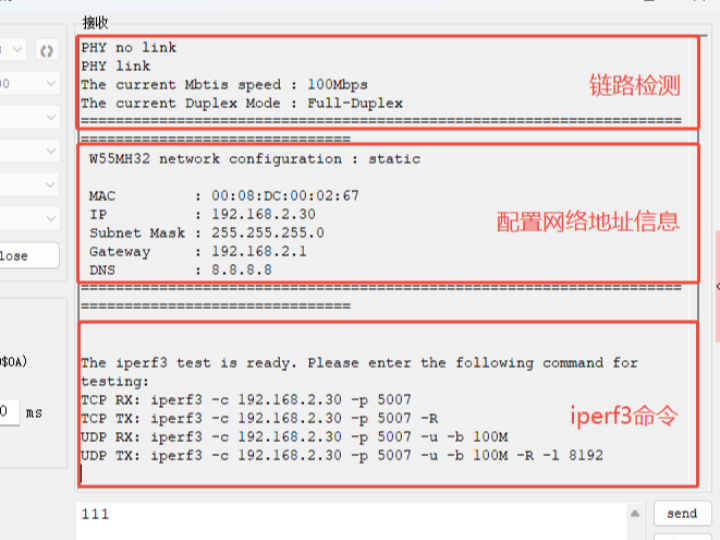
This article provides a detailed guide on implementing Ethernet speed testing using the W55MH32 chip, including a practical demonstration using the iperf3 tool. The example code utilizes network protocols like TCP and UDP. For W55MH32 initialization, refer to the Network install section, which will not be detailed here.
iperf3 Tool Overview
iperf3 is a cross-platform, open-source network performance testing tool that supports TCP/UDP protocols. It accurately measures bandwidth, packet loss, and other key metrics through simple command-line instructions. Compatible with Windows and Linux, it can interact with embedded chips like the W55MH32, providing clear insights into Ethernet communication performance and supporting hardware validation and firmware optimization.
Key Features of iperf3
- Dual-Protocol Speed Measurement: Supports TCP and UDP for precise bandwidth throughput testing.
- Lightweight & Efficient: Compatible with Windows, Linux, Mac, and embedded platforms like ARM/STM32, making it ideal for testing embedded Ethernet devices.
- Cross-Platform Compatibility: Operates via simple command-line commands—no complex setup required, even for beginners.
- Open-Source & Reliable: Free to use under the BSD license, with results closely reflecting real-world network conditions for effective debugging and validation.
Factors Affecting Speed
- MCU clock frequency
- Socket buffer size
- Single transmission data length
Ethernet Testing Process
- Open iperf3 (included in the example folder).
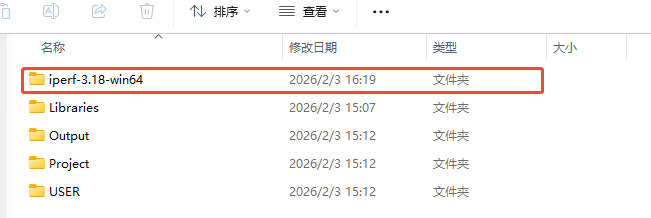
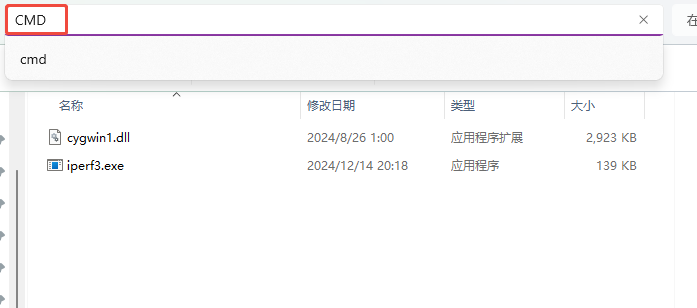
2. Navigate to the folder, enter cmd in the address bar to open the command-line window.
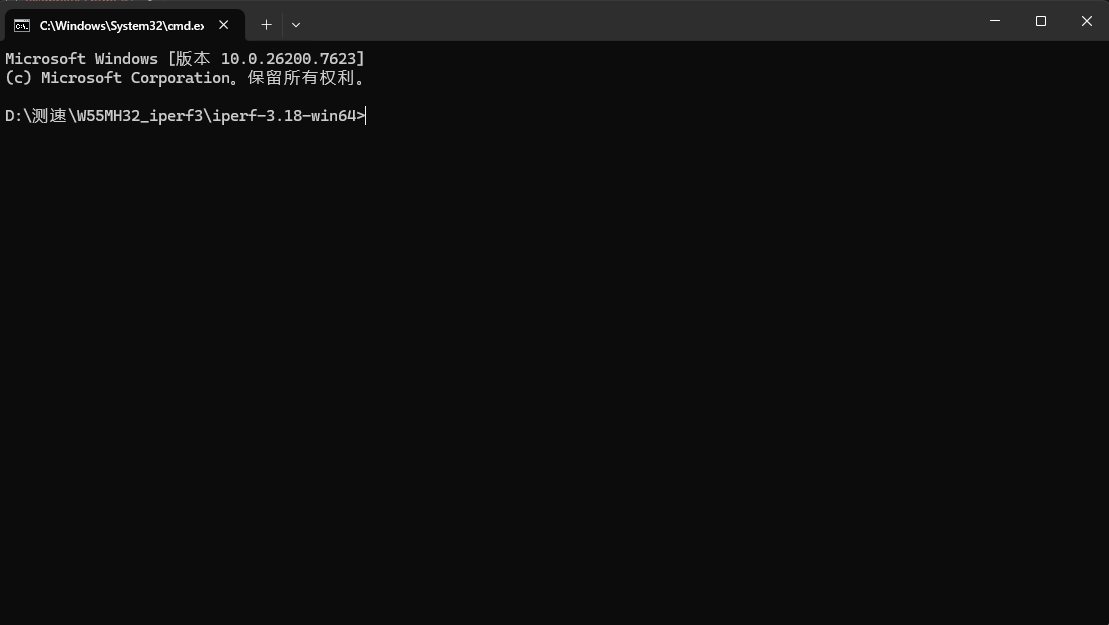
3. Once the iperf3 command window is open, proceed to configure the W55MH32.
Implementation Steps
Step 1: Configure the W55MH32 and PC to be on the same network subnet.
/* network information */
wiz_NetInfo default_net_info = {
    .mac  = {0x00, 0x08, 0xdc, 0x12, 0x22, 0x12}, //User-defined MAC address
    .ip   = {192, 168, 2, 30},
    .gw   = {192, 168, 2, 1},
    .sn   = {255, 255, 255, 0},
    .dns  = {8, 8, 8, 8},
    .dhcp = 1
};

uint8_t  ethernet_buf_tx[ETHERNET_BUF_MAX_SIZE] = {0};
uint8_t  ethernet_buf_rx[ETHERNET_BUF_MAX_SIZE] = {0};
uint8_t  dest_ip[4]                          = {192, 168, 2, 44};
uint16_t dest_port                           = 8080;
Step 2: Initialize the socket buffer.
uint8_t  tx_size[_WIZCHIP_SOCK_NUM_]         = {8, 8, 0, 0, 0, 0, 0, 0};
uint8_t  rx_size[_WIZCHIP_SOCK_NUM_]         = {8, 8, 0, 0, 0, 0, 0, 0};
Step 3: Main loop
while (1)
{
      stats_init(&stats, 1000);
    socket_status = getSn_SR(SOCKET_CTRL);
    if (socket_status == SOCK_ESTABLISHED)
    {
        handle_param_exchange(SOCKET_CTRL, &reverse, &udp);
        handle_create_streams(SOCKET_CTRL, udp, remote_ip, &remote_port);

        start_iperf_test(SOCKET_CTRL, SOCKET_DATA, &stats, reverse, udp, remote_ip, &remote_port);
        close(SOCKET_DATA);
        disconnect(SOCKET_CTRL);
    }
    else if (socket_status == SOCK_CLOSE_WAIT)
    {
        disconnect(SOCKET_CTRL);
    }
    else if (socket_status == SOCK_CLOSED)
    {
        socket(SOCKET_CTRL, Sn_MR_TCP, PORT_IPERF, Sn_MR_ND);
        listen(SOCKET_CTRL);
        printf("The iperf3 test is ready. Please enter the following command for testing:\r\n");
        printf("The iperf3 test is ready. Please enter the following command for testing:\r\n");
        printf("TCP RX: iperf3 -c %d.%d.%d.%d -p 5007\r\n",net_info.ip[0],net_info.ip[1],net_info.ip[2],net_info.ip[3]);
        printf("TCP TX: iperf3 -c %d.%d.%d.%d -p 5007 -R\r\n",net_info.ip[0],net_info.ip[1],net_info.ip[2],net_info.ip[3]);
        printf("UDP RX: iperf3 -c %d.%d.%d.%d -p 5007 -u -b 100M -l 4000\r\n",net_info.ip[0],net_info.ip[1],net_info.ip[2],net_info.ip[3]);
        printf("UDP TX: iperf3 -c %d.%d.%d.%d -p 5007 -u -b 100M -R\r\n",net_info.ip[0],net_info.ip[1],net_info.ip[2],net_info.ip[3]);
    }
}
}
Core code: receive test parameters (TCP/UDP, receive/send) via control socket, handle high-speed data transfer, track byte count and throughput in real time, respond to client start/stop commands, and return standardized test results to the client. This is the core process for accurate network speed testing.
void start_iperf_test(uint8_t socket_ctrl, uint8_t socket_data, Stats *stats, bool reverse, bool udp, uint8_t *remote_ip, uint16_t *remote_port)
{
    bool     running     = true;
    uint8_t  cmd         = 0;

    uint32_t pack_len    = 0;
    uint16_t sent_size, recv_size;

    printf("[iperf] Starting data stream test...\n");

    // Start test
    cmd = TEST_START;
    send(socket_ctrl, &cmd, 1);

    // Running test
    cmd = TEST_RUNNING;
    send(socket_ctrl, &cmd, 1);

    stats_start(stats);

    while (running)
    {
        if (getSn_RX_RSR(SOCKET_CTRL) > 0)
        {
            recv(SOCKET_CTRL, &cmd, 1);
            if (cmd == TEST_END)
            {
                printf("[iperf] TEST_END command received. Stopping test...\n");
                running = false;
                break;
            }
        }
        if (reverse)
        {
            if(udp)
            {
                sent_size = sendto(socket_data, ethernet_buf_tx, ETHERNET_BUF_MAX_SIZE, remote_ip, *(remote_port));
            }
            else
            {
                sent_size = send(socket_data, ethernet_buf_tx, ETHERNET_BUF_MAX_SIZE / 2);
            }
            stats_add_bytes(stats, sent_size);
        }
        else
        {
            getsockopt(socket_data, SO_RECVBUF, &pack_len);
            if (pack_len > 0)
            {
                if(udp)
                {
                    recv_size = recvfrom(socket_data, (uint8_t *)ethernet_buf_rx, ETHERNET_BUF_MAX_SIZE, remote_ip, remote_port); // more fast
                }
                else
                {
                    recv_size = recv(socket_data, (uint8_t *)ethernet_buf_rx, ETHERNET_BUF_MAX_SIZE); // more fast
                }
                stats_add_bytes(stats, recv_size);
            }
            else if (pack_len == 0)
            {
                stats_update(stats, false);
            }
            else
            {
                printf("[iperf] Error during data reception\n");
                break;
            }
        }
        stats_update(stats, false);
    }
    stats_stop(stats);

    exchange_results(SOCKET_CTRL, stats);
}
Test Results
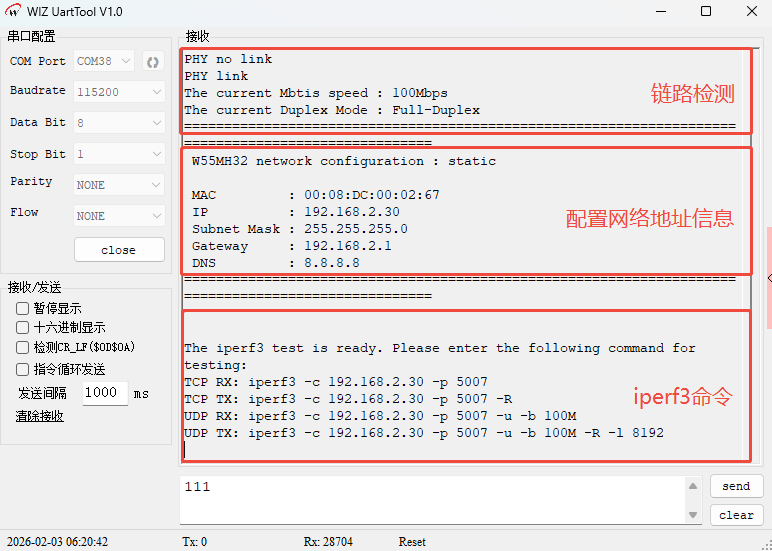
- After flashing the firmware, PHY link detection runs first, followed by network address information and iperf3 command prompts.
Note: Disable the firewall before proceeding.
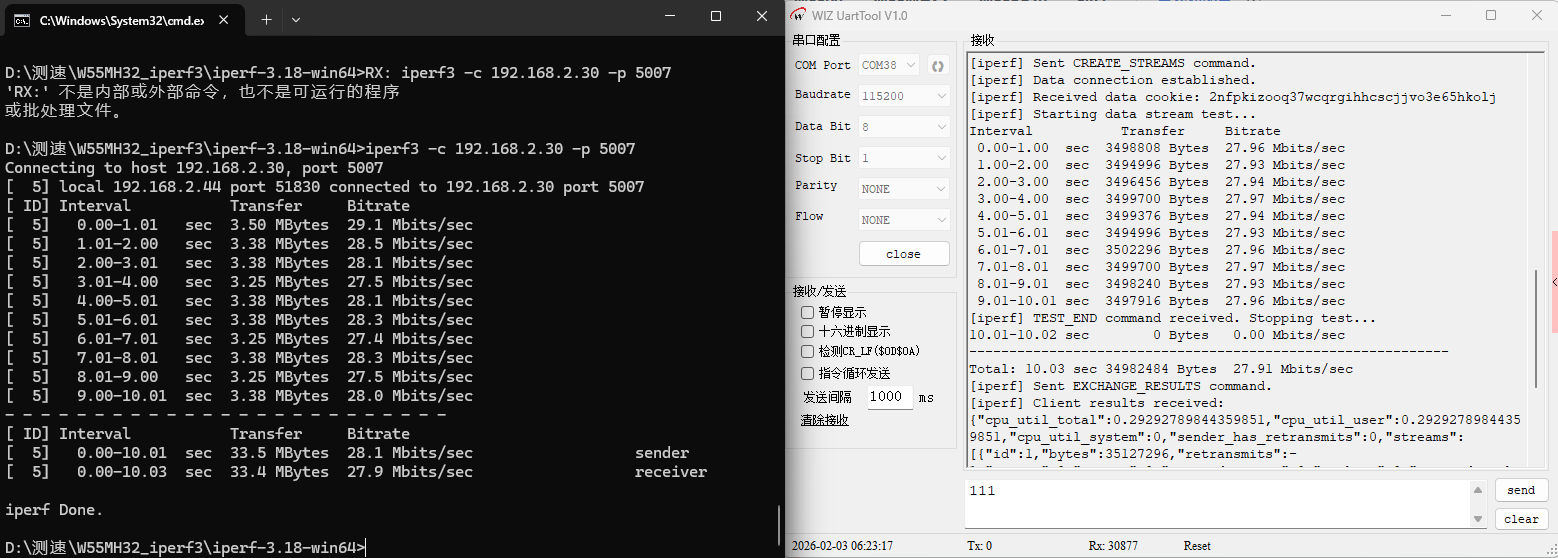
2. Copy the first command iperf3 -c 192.168.2.30 -p 5007 to the PC command line and press Enter to start TCP receive testing. Results displayed in both the command-line and serial monitor show a TCP receive speed of approximately 27.9 Mbps.
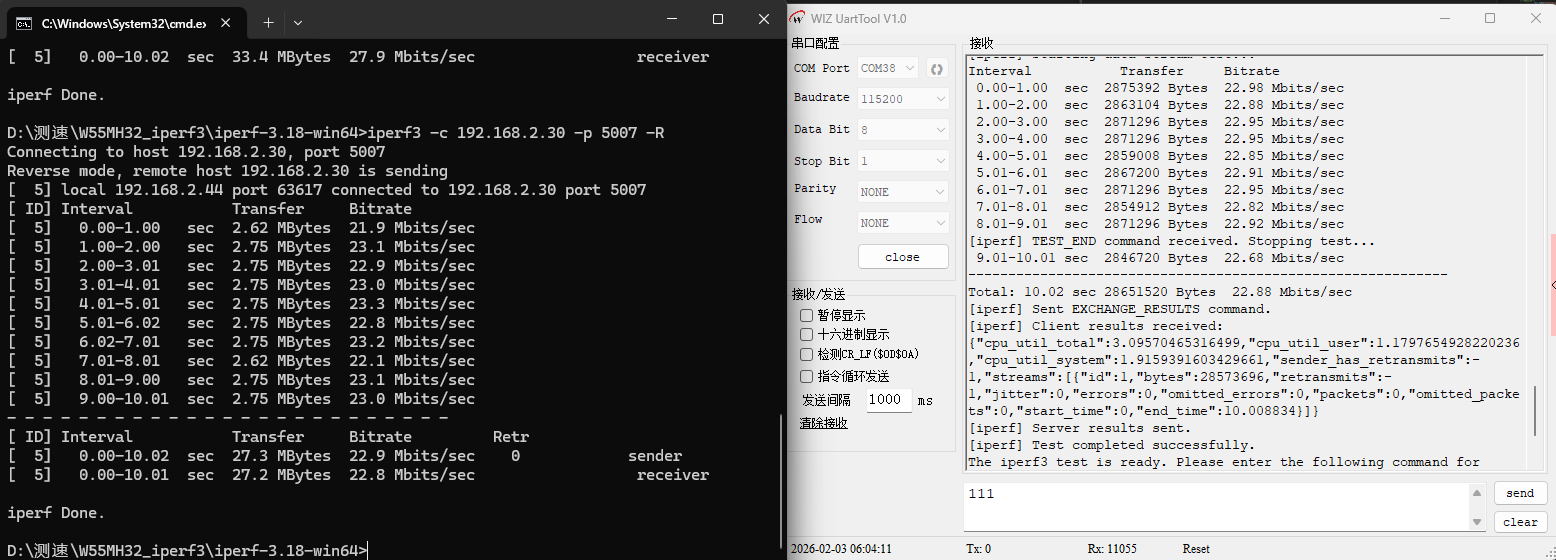
3. Copy the second command iperf3 -c 192.168.2.30 -p 5007 -R to start TCP send testing. Results show a TCP send speed of approximately 22.8 Mbps.
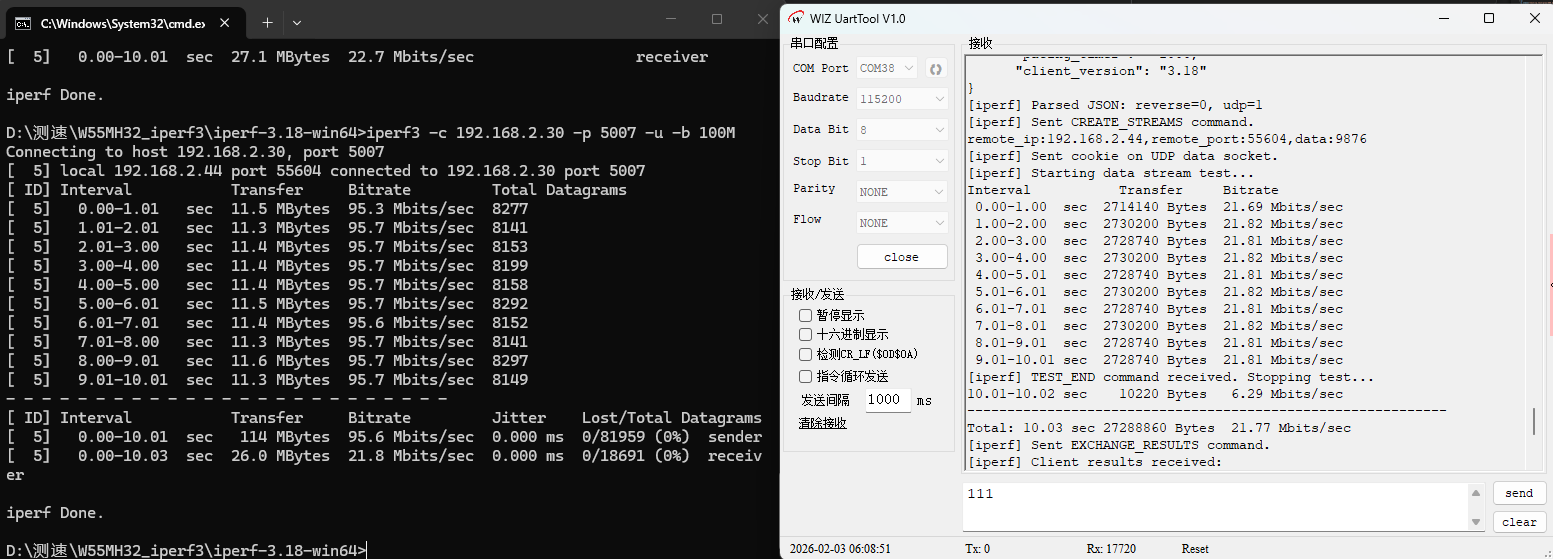
4. Copy the third command iperf3 -c 192.168.2.30 -p 5007 -u -b 100M to start UDP receive testing. Results show a UDP receive speed of approximately 21.8 Mbps.
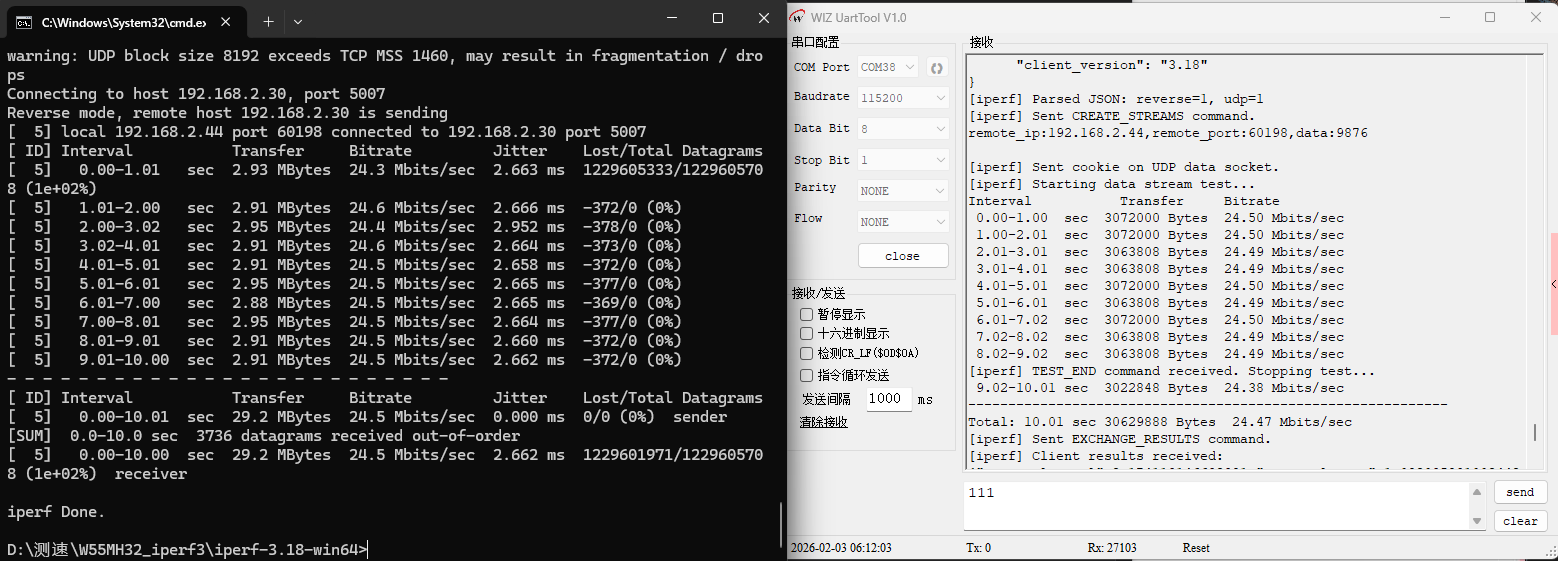
5. Copy the fourth command iperf3 -c 192.168.2.30 -p 5007 -u -b 100M -R -l 8192 to start UDP send testing. Results show a UDP send speed of approximately 24.5 Mbps.
Conclusion
This guide demonstrates a practical approach to Ethernet speed testing on the W55MH32 chip using iperf3. It covers the tool’s features, key factors influencing speed, and step-by-step implementation—from network configuration and code setup to command-line testing. The results validate the W55MH32’s TCP/UDP performance, and the provided example offers a complete workflow for efficient Ethernet performance validation and optimization.