



Building an Ethernet-Based Xiaozhi AI Robot with the W55MH32 Development Board
The W55MH32 development board Xiaozhi AI project represents an important step in bringing large language model interaction into embedded hardware through stable
Building an Ethernet-Based Xiaozhi AI Robot with the W55MH32 Development Board
The W55MH32 development board Xiaozhi AI project represents an important step in bringing large language model interaction into embedded hardware through stable wired Ethernet. As AI technology continues to evolve, the demand for integrating intelligent models into low-level hardware systems has become increasingly important. In response to this trend, WIZnet developed an Ethernet-based Xiaozhi robot powered by the W55MH32Q/L-EVB development board, offering users a practical way to build a customizable AI assistant on embedded hardware.
This project is inspired by the Xiaozhi ESP32 project, one of the fastest-growing AI hardware projects in the IoT field. Xiaozhi ESP32 allows users to interact with large language models through physical hardware terminals and supports functions such as voice-based communication and AI-driven hardware control. Building on this concept, the WIZnet team created a MicroPython-based MCP chatbot using the W55MH32Q/L-EVB board, replacing wireless networking with reliable Ethernet connectivity.
The cornerstone of this implementation is the combination of W55MH32 hardware and MicroPython software. MicroPython is widely used in embedded development because it allows developers to write embedded applications using Python instead of traditional C or C++. This greatly lowers the entry barrier for beginners while still giving developers access to a rich ecosystem of libraries and community resources. By integrating MicroPython, Ethernet networking, I2S audio, MQTT, and MCP tools, the project makes it possible for ordinary developers to build their own customized AI assistant without starting from a complex low-level firmware architecture.
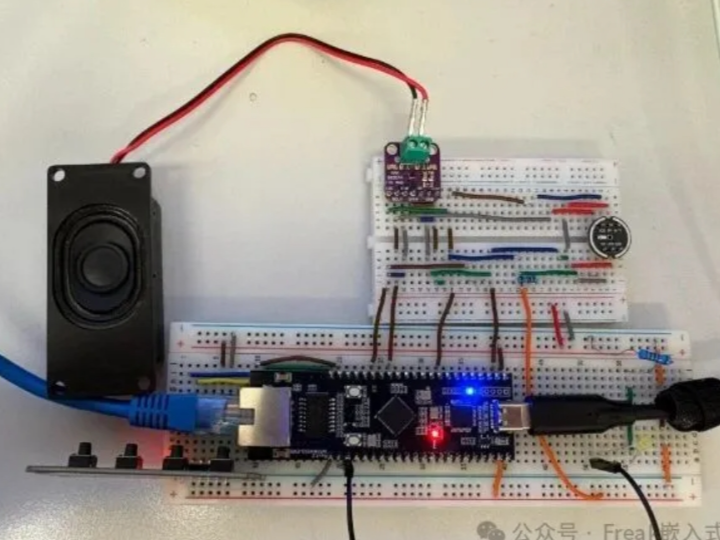
The hardware design of the W55MH32 Xiaozhi robot is centered around network communication, voice input, voice output, and user interaction. The development board connects to the internet through an Ethernet cable plugged into a router, while the USB port is used to connect the board to a computer for script upload and terminal interaction. Once the script starts, the user presses the start button to establish the communication link with the AI server. After the connection is established, the user can interact with Xiaozhi AI through the hardware terminal.
A key feature of the design is its I2S audio structure. The speaker and microphone share the same I2S connection. By default, the board stays in speaker playback mode. When the user holds the recording button, the system switches to microphone capture mode, allowing the user to speak directly to the AI agent. This design enables both voice input and audio response while keeping the hardware structure relatively simple.
The project requires the following hardware components:
| Component | Purpose |
|---|---|
| W55MH32Q_EVB or W55MH32L_EVB | Main Ethernet-enabled MCU development board |
| MAX98357A I2S amplifier | Speaker output driver |
| Speaker | AI voice playback |
| INMP441 microphone module | Voice input capture |
| 10K resistor | Supporting circuit component |
| Two push buttons | Start connection and recording control |
In the official implementation, two GPIO pins are assigned for button input. PB9 is used as the start button, while PB8 is used as the recording button. The start button is responsible for initiating the connection to the AI server, and the recording button is used to switch the device into microphone input mode. Developers may change these pins according to their own hardware requirements by modifying the project configuration.
Deployment follows a typical MicroPython development workflow. Users first flash the latest W55MH32 MicroPython firmware to the development board and prepare a MicroPython IDE such as Thonny. After that, the project code is cloned from the GitHub repository:
git clone https://github.com/wiznethk-git/w55mh32_xiaozhi_mcp_chat_bot.gitAfter opening the project folder, users upload all files except default_config.py to the MCU. The default_config.py file is used as a configuration template. Users should modify it according to their own device settings, save it as config.py, and then upload it to the board.
The configuration file includes options for general behavior, I2S audio, WebSocket delay, MCP support, OTA board type, MQTT credentials, and button pin assignment:
import uuid

client_id = uuid.uuid4()

secret = {
    'Client-Id': client_id
}

config = {
    # General
    'is_secure': False,
    'async_timeout': 10,

    # I2S
    'I2S_ENABLED': True,

    # Websocket Specific
    'ws_delay_ms': 0,

    # MCP
    'mcp_enabled': True,

    # OTA Specific
    'board_type': 'YOUR_BOARD_TYPE',

    # MQTT
    'MQTT_USERNAME': 'MQTT_USERNAME',
    'MQTT_PASSWORD': 'MQTT_PASSWORD',
    'MQTT_IP': 'MQTT_HOST',
    'MQTT_ENABLED': True,

    # Button Pins
    'START_BUTTON': 'PB9',
    'RECORD_BUTTON': 'PB8',
}
This configuration-driven structure makes the project flexible for different use cases. Users can enable or disable I2S, MCP, and MQTT depending on their hardware setup and memory requirements. For the complete experience, MCP and MQTT are recommended to remain enabled. If users want to hear the server’s voice response through the speaker, I2S should also be enabled.
For network access, the board uses DHCP by default. After connecting the Ethernet cable from the router to the development board, the device can automatically obtain an IP address and connect to the internet. If the network connection fails or a fixed network environment is required, users can modify the configuration at the beginning of setup.py and switch to a static IP setup.
The project also supports MCP tool expansion. To add or remove MCP tools, developers need to define a function with parameters in the required format and then register the corresponding MCPTool object inside the initialization logic of mcp.py. This allows the AI assistant to call board-level functions or customized hardware-control logic, making the robot more than a simple chatbot.
MQTT support provides another layer of interaction between the AI server, the hardware device, and external IoT systems. To use MQTT, users need to register a data source on the official AIoT platform. The MQTT topic path follows the format of account name plus data source title. After that, the topic path is added to the decorator inside the mqttHandler file, where users can write callback functions to define what should happen when the topic receives an update.
Before using the AI assistant officially, users also need to complete website-side configuration. First, they log in to the project website and create a dedicated AI agent through the “Add Agent” page. After the agent is created, users can configure its self-introduction, role settings, voice recognition option, input-processing model, and preferred interaction language. Most settings already have default values, so beginners can start quickly without needing to adjust every parameter.
After creating the AI agent, users need to bind the hardware device to that agent. On the website’s device page, they choose manual device addition and enter the firmware version, device type, and MAC address. The MAC address can be obtained from the board terminal after initializing the network interface:
nic = SetUpWiznetChip()

print(':'.join(['%02x' % b for b in nic.config('mac')]))
After filling in the MAC address, selecting firmware version 0.0.1, and entering the correct device type, the board will appear in the device list under the selected agent. At this point, the user can begin using and customizing their own Ethernet-based Xiaozhi AI assistant.
The documentation also highlights an important practical consideration: memory usage. Since the W55MH32 EVB may run networking, WebSocket communication, MQTT, MCP tools, and I2S audio at the same time, users should disable unused features in config.py when adding custom functions. Turning off MQTT or MCP can help reduce memory pressure and prevent runtime errors when the application becomes more complex.
Ultimately, the W55MH32 Xiaozhi AI robot project demonstrates how Ethernet, MicroPython, voice interaction, MQTT, and MCP tools can be combined into a practical embedded AI assistant. By using the W55MH32Q/L-EVB development board, developers gain stable wired connectivity, Python-based rapid development, audio input/output capability, and extensible AI tool integration. This makes the project suitable for AIoT education, smart hardware experimentation, voice-controlled embedded systems, and industrial assistant terminals.
For more details, please refer to this link:
https://mp.weixin.qq.com/s/rtxOuNO6iDgg8lQw3U8h5w