5. W5100S/W5500+RP2040 Raspberry Pi Pico<UDP Client Data Loopback Test>
5. W5100S/W5500+RP2040 Raspberry Pi Pico<UDP Client Data Loopback Test>
0

Components
Hardware components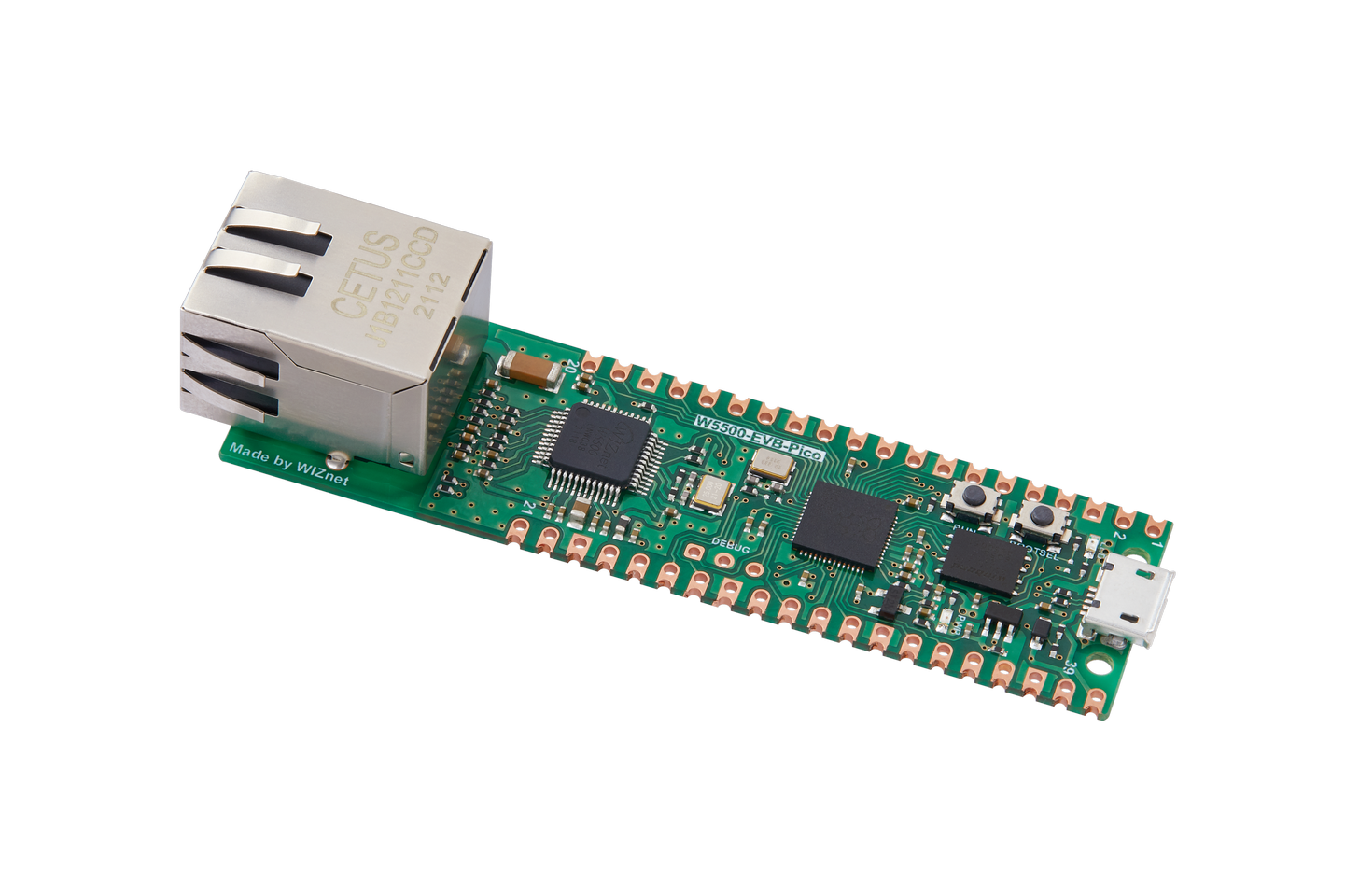
WIZnet - W5500-EVB-Pico
x 1

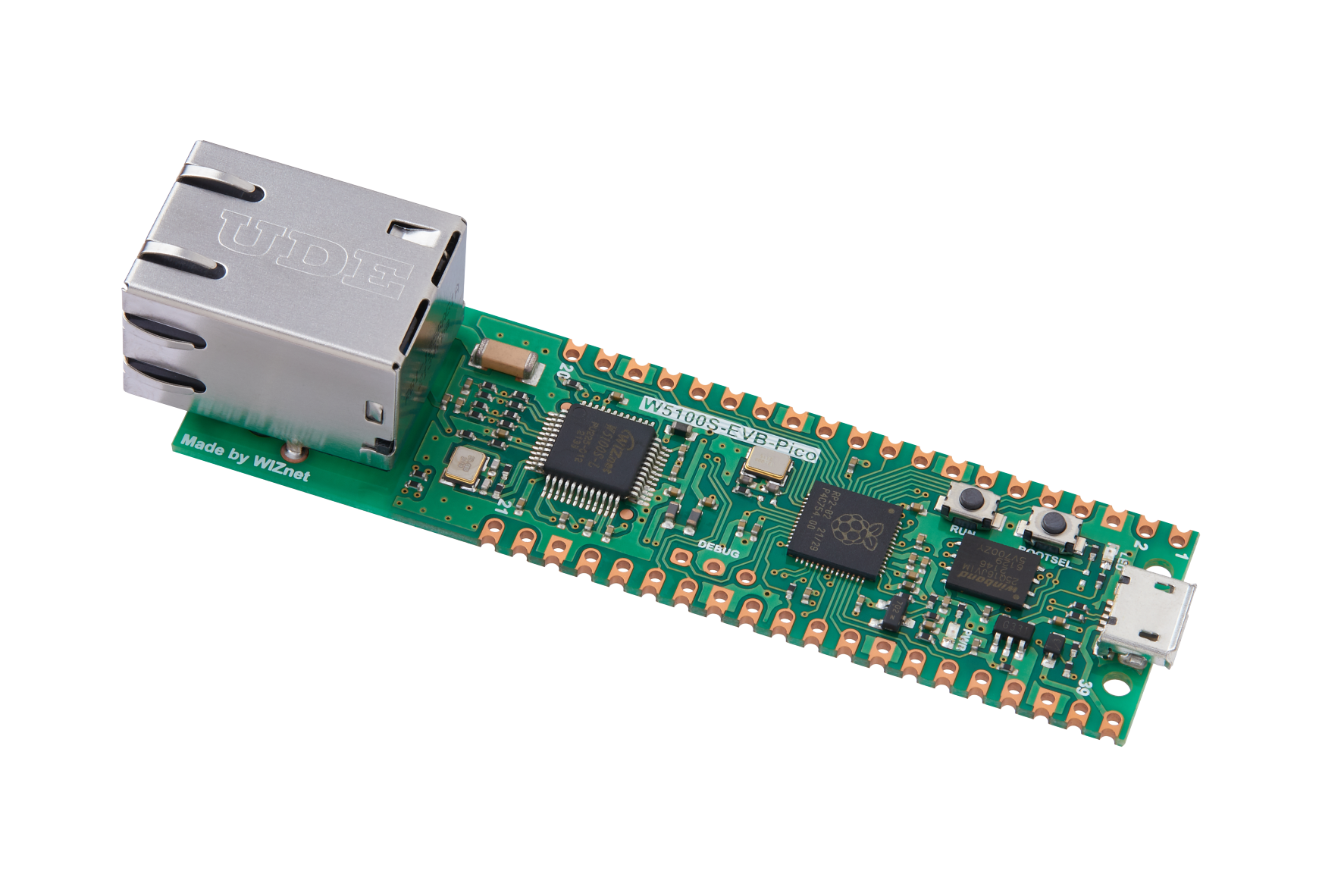
WIZnet - W5100S-EVB-Pico
x 1
Project description
1 Introduction
UDP is a connectionless network protocol that provides a simple, unreliable way to transmit data. Although it does not guarantee the integrity and sequence of data transmission, UDP has unique advantages in certain scenarios, such as in real-time applications or online games.
This chapter will conduct data loopback testing in UDP Client mode.
W5100S/W5500 is an embedded Ethernet controller integrating a full hardware TCP/IP protocol stack. It is also an industrial-grade Ethernet control chip. Using the W5100S/W5500 in Ethernet applications makes it easier for users to connect and communicate remotely between devices.
2. Introduction to the protocol
2.1 Brief description
UDP is a connectionless transport layer protocol in the Open System Interconnection reference model. It provides simple and unreliable transaction-oriented information transfer services. The protocol number of UDP in IP packets is 17. As opposed to Transmission Control Protocol (TCP), UDP is a connectionless, unreliable protocol that provides a simple data transmission service.
The UDP protocol does not provide the disadvantages of data packet grouping, assembly, and inability to sort data packets. That is to say, after a message is sent, it is impossible to know whether it has arrived safely and completely. UDP is used to support network applications that need to transmit data between computers. Many client/server network applications, including network video conferencing systems, require the use of the UDP protocol.
In general, although UDP does not have characteristics such as reliability and flow control, due to its low overhead and high transmission efficiency, UDP is widely used in audio and video transmission, real-time communication and other fields.
2.2 Advantages
Simplicity: The protocol structure of UDP is relatively simple, which makes it more convenient to implement and use. For some simple data transmission tasks, UDP can be completed faster.
Efficiency: UDP's data packet header overhead is small, and its data transmission efficiency is higher than TCP. UDP can better utilize network bandwidth when dealing with large data volumes.
Real-time: UDP supports real-time applications, such as video conferencing and online games. This is because the UDP protocol does not provide the grouping, assembly and sorting functions of data packets, but focuses more on speed and efficiency.
Wide application: Due to the simplicity and high efficiency of UDP, it is widely used in many network management tasks, network testing and real-time multimedia applications.
2.3 Application
Real-time communication: such as online games, online live broadcasts, VoIP (Voice over Internet Protocol), etc., which require real-time transmission of data streams such as audio and video, and efficient and real-time data transmission through the UDP protocol.
DNS query: DNS (Domain Name System) uses UDP protocol for address query, because UDP does not need to establish a connection and can reduce query time.
TFTP: File Transfer Protocol TFTP (Trivial File Transfer Protocol) uses the UDP protocol for file transfer, because it does not require establishing a connection and can achieve fast transfer.
SNMP: Network Management Protocol SNMP (Simple Network Management Protocol) uses the UDP protocol for network device management because UDP can implement simple requests and responses.
BOOTP: Network Boot Protocol BOOTP (Bootstrap Protocol) uses the UDP protocol for booting diskless workstations because UDP enables simple data transmission.
3. WIZnet Ethernet chip
WIZnet mainstream hardware protocol stack Ethernet chip parameter comparison
| Model | Embedded Core | Host I/F | TX/RX Buffer | HW Socket | Network Performance |
|---|---|---|---|---|---|
| W5100S | TCP/IPv4, MAC & PHY | 8bit BUS, SPI | 16KB | 4 | Max.25Mbps |
| W6100 | TCP/IPv4/IPv6, MAC & PHY | 8bit BUS, Fast SPI | 32KB | 8 | Max.25Mbps |
| W5500 | TCP/IPv4, MAC & PHY | Fast SPI | 32KB | 8 | Max 15Mbps |
W5100S/W6100 supports 8-bit data bus interface, and the network transmission speed will be better than W5500.
W6100 supports IPV6 and is compatible with W5100S hardware. If users who already use W5100S need to support IPv6, they can be Pin to Pin compatible.
W5500 has more Sockets and send and receive buffers than W5100S
4. UDP Client loopback test
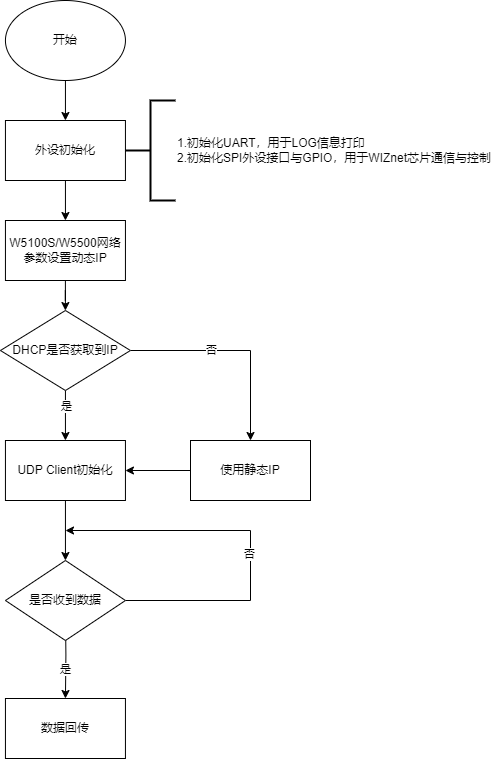
4.1 Program flow chart
4.2 Test preparation
Software:
Visual Studio Code
WIZnet UartTool
SocketTester
Hardware:
W5100SIO module + RP2040 Raspberry Pi Pico development board or WIZnet W5100S-EVB-Pico development board
Micro USB interface data cable
TTL to USB
cable
4.3 Connection method
Connect the USB port of the PC through the data cable (mainly used for burning programs, but can also be used as a virtual serial port)
Convert TTL serial port to USB and connect the default pin of UART0:
RP2040 GPIO 0 (UART0 TX) <----> USB_TTL_RX
RP2040 GPIO 1 (UART0 RX) <----> USB_TTL_TX
When using the module to connect RP2040 for wiring
RP2040 GPIO 16 <----> W5100S MISO
RP2040 GPIO 17 <----> W5100S CS
RP2040 GPIO 18 <----> W5100S SCK
RP2040 GPIO 19 <----> W5100S MOSI
RP2040 GPIO 20 <----> W5100S RST
Directly connect to the PC network port through a network cable (or: both the PC and the device are connected to the switch or router LAN port through a network cable)
4.4 Related code
We directly open the udp_client.c file (path: examples/udp_client/udp_client.c) to see the specific implementation:
You can see that the network information is configured in DHCP mode. Therefore, after the master control and W5100S are initialized, DHCP initialization will be performed, and then a timer initialization will be added to time the DHCP process for timeout processing; then enter DHCP configures network information. If it succeeds, it will directly enter the loop to call the loopback test function. If it fails, it will use the static network information we initialized to configure, and then enter the loop to call the loopback test function, as shown below:
/* Network information to be configured. */
wiz_NetInfo net_info = {
.mac = {0x00, 0x08, 0xdc, 0x1e, 0xed, 0x2e}, // Configured MAC address
.ip = {192, 168, 1, 10}, // Configured IP address
.sn = {255, 255, 255, 0}, // Configured subnet mask
.gw = {192, 168, 1, 1}, // Configured gateway
.dns = {8, 8, 8, 8}, // Configured domain address
.dhcp = NETINFO_DHCP}; // Configured dhcp model,NETINFO_DHCP:use dhcp; NETINFO_STATIC: use static ip.
wiz_NetInfo get_info;
static uint8_t ethernet_buf[ETHERNET_BUF_MAX_SIZE] = {
0,
}; // Send and receive cachestatic uint8_t destip[4]={192, 168, 1, 2}; // udp destination ip
static uint8_t des_ip[4] = {192, 168, 1, 2}; // UDP IP address
static uint16_t des_port = 8080; // UDP port
static uint8_t dhcp_get_ip_flag = 0; // Define the DHCP acquisition flag
int main()
{
struct repeating_timer timer; // Define the timer structure
/* MCU init */
stdio_init_all(); // Initialize the main control peripheral
wizchip_initialize(); // Initialize the chip interface
/*dhcp init*/
DHCP_init(SOCKET_ID, ethernet_buf); // DHCP initialization
add_repeating_timer_ms(1000, repeating_timer_callback, NULL, &timer); // Add DHCP 1s Tick Timer handler
printf("wiznet chip tcp server example.\r\n");
network_init(&net_info); // Configuring Network Information
print_network_information(&get_info); // Read back the configuration information and print it
while (true)
{
loopback_udpc(SOCKET_ID, ethernet_buf, des_ip, des_port); // udp loopback test
}
}Jump into the loopback test to see its specific implementation: This function has these parameters, socket port number, data sending and receiving cache, target IP address, and target port; you can fill in the parameters as needed. The whole process polls the socket status through a switch state machine, performs corresponding processing according to the difference, and sequentially completes the operations of initialization, opening the socket port, connecting to the server, and sending back the data after receiving the data; the local port is initialized directly within the function. . As follows:
/**
* @brief udp client loopback test
* @param sn: socket number
* @param buf: Data sending and receiving cache
* @param destip: Destination IP address
* @param destport: Destination port
* @return value for SOCK_ERRORs,return 1:no error
*/
int32_t loopback_udpc(uint8_t sn, uint8_t* buf, uint8_t* destip, uint16_t destport)
{
int32_t ret;
uint16_t size = 0, sentsize=0;
static uint16_t any_port = 50000;
switch(getSn_SR(sn))
{
case SOCK_UDP :
// sendto(sn, "test", 4, destip, destport);
if((size = getSn_RX_RSR(sn)) > 0)
{
if(size > DATA_BUF_SIZE) size = DATA_BUF_SIZE;
ret = recvfrom(sn, buf, size, destip, (uint16_t*)&destport);
buf[ret]=0x00;
printf("recv form[%d.%d.%d.%d][%d]: %s\n", destip[0],destip[1],destip[2],destip[3],destport,buf);
if(ret <= 0)
{
#ifdef _LOOPBACK_DEBUG_
printf("%d: recvfrom error. %ld\r\n",sn,ret);
#endif
return ret;
}
size = (uint16_t) ret;
sentsize = 0;
while(sentsize != size)
{
ret = sendto(sn, buf+sentsize, size-sentsize, destip, destport);
if(ret < 0)
{
#ifdef _LOOPBACK_DEBUG_
printf("%d: sendto error. %ld\r\n",sn,ret);
#endif
return ret;
}
sentsize += ret; // Don't care SOCKERR_BUSY, because it is zero.
}
}
break;
case SOCK_CLOSED:
#ifdef _LOOPBACK_DEBUG_
//printf("%d:UDP loopback start\r\n",sn);
#endif
if((ret = socket(sn, Sn_MR_UDP, any_port, 0x00)) != sn)
return ret;
#ifdef _LOOPBACK_DEBUG_
printf("%d:Opened, UDP loopback, port [%d]\r\n", sn, any_port);
#endif
break;
default :
break;
}
return 1;
}4.5 Test phenomena
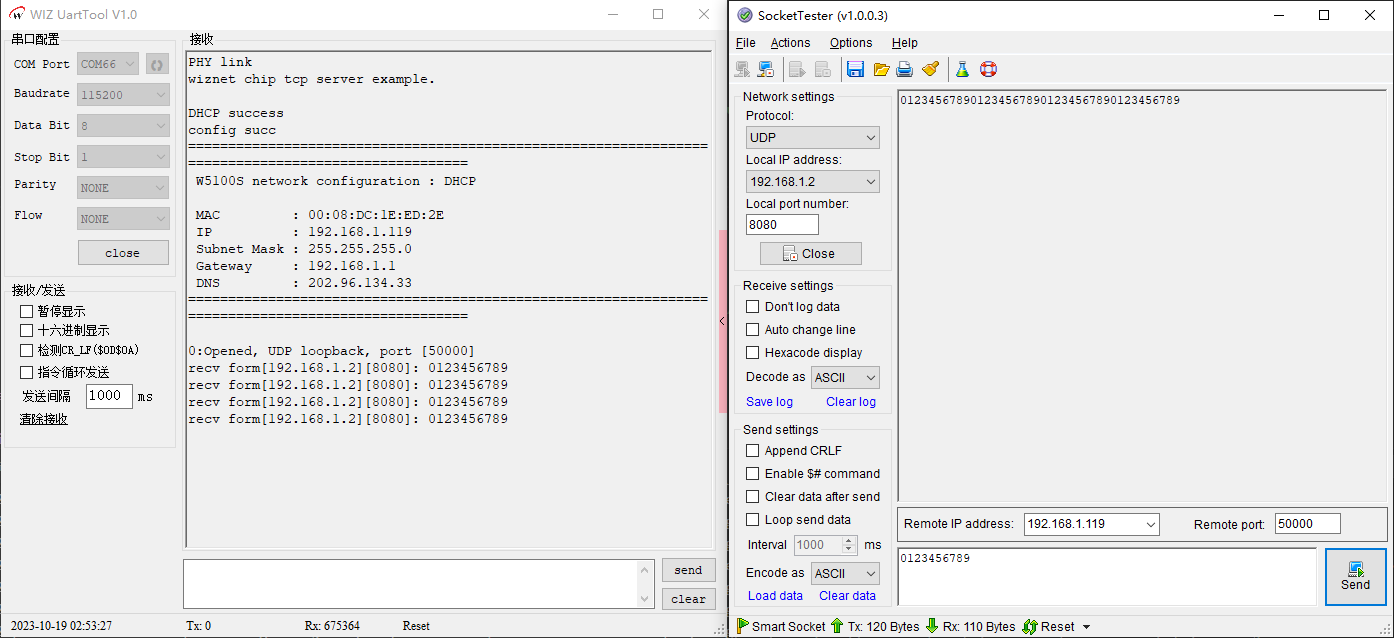
After the hardware connection is correct, compile the burning program (for details, please refer to Chapter 1), open WIZ UartTool, select the corresponding COM port, and fill in the parameters: baud rate 115200, 8 data bits, 1 stop bit, no correction Verification, no flow control, click open after filling in the parameters, observe the information printed by the serial port to obtain the device running status; open SocketTester, fill in the corresponding parameters in the left column, UDP mode, local IP fill in the IP of the computer, local The port can be filled in randomly, but try not to use special ports; then fill in the device IP and device port in the remote IP address column below based on the IP and other information obtained by the device through DHCP. Because UDP is connectionless, you can send the information directly. You can see the return phenomenon, as shown in the figure below:
5. Precautions
UDP is connectionless. The client can only see the phenomenon after the server sends the message.
If we want to use WIZnet's W5500 to implement the example in this chapter, we only need to modify two places:
Find the wizchip_conf.h header file under library/ioLibrary_Driver/Ethernet/ and modify the WIZCHIP macro definition to W5500;
Find the CMakeLists.txt file under the library and set COMPILE_SEL to ON. OFF is W5100S and ON is W5500.
Documents
-
Code for this article
-
WIZnet Official Website
-
WIZnet Official library github
-
YouTube Video


