


GSAFE: Smart Campus Safety System
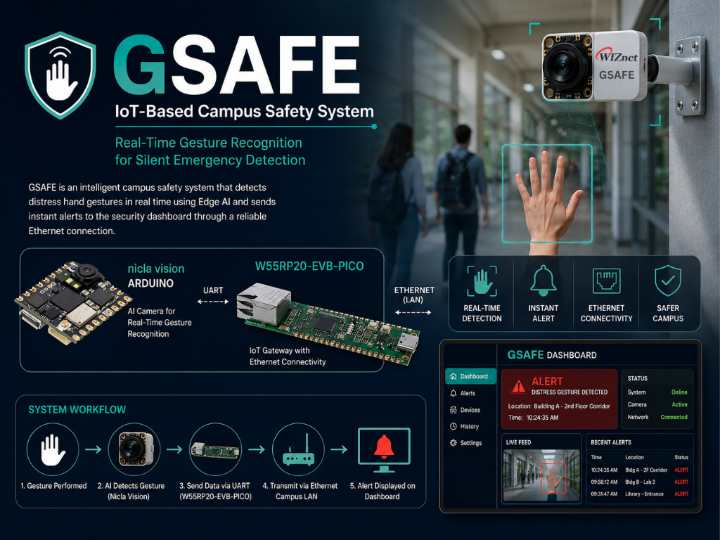
GSAFE (IoT-Based Campus Safety System) is developed as an intelligent safety solution that integrates Edge AI and IoT
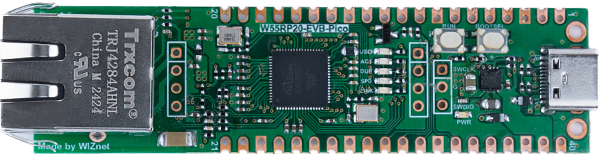
WIZnet - W55RP20-EVB-Pico
x 1


Arduino - Arduino IDE
x 1
Executive Summary
Ensuring safety within university campuses remains a growing concern as students, lecturers, and staff may encounter emergencies such as harassment, threats, or medical incidents in hallways, classrooms, laboratories, libraries, or parking areas. In many situations, victims are unable to seek help openly without drawing unwanted attention or escalating the risk. Existing surveillance systems mainly function as passive monitoring tools and cannot automatically recognize emergency situations in real time.
GSAFE (IoT-Based Campus Safety System) is developed as an intelligent safety solution that integrates Edge Artificial Intelligence (Edge AI) with Internet of Things (IoT) technologies to provide real-time emergency gesture detection and notification. The system employs an Arduino Nicla Vision equipped with an AI model to recognize predefined distress gestures directly on the device. Once a gesture is detected, the result is transmitted through UART to the W55RP20-EVB-PICO, which acts as an Ethernet gateway and forwards the alert to a web-based monitoring dashboard over the campus Local Area Network (LAN).
By performing AI inference locally, GSAFE minimizes latency, reduces dependence on cloud services, and enhances data privacy since image processing occurs entirely on the edge device. The Ethernet-based communication ensures reliable and stable connectivity for continuous monitoring within campus buildings.
The proposed system demonstrates how Edge AI and IoT can be combined to create a proactive campus safety solution capable of recognizing silent emergency gestures and delivering instant notifications to security personnel. GSAFE has the potential to improve emergency response time and contribute to a safer and smarter campus environment.
Problem Statement
Campus environments are expected to provide a safe and secure space for students, lecturers, staff, and visitors. However, emergency situations such as harassment, intimidation, physical threats, or medical incidents can occur unexpectedly in classrooms, hallways, laboratories, libraries, and parking areas. In many cases, victims are unable to verbally call for help or use a mobile phone without increasing the risk of the situation.
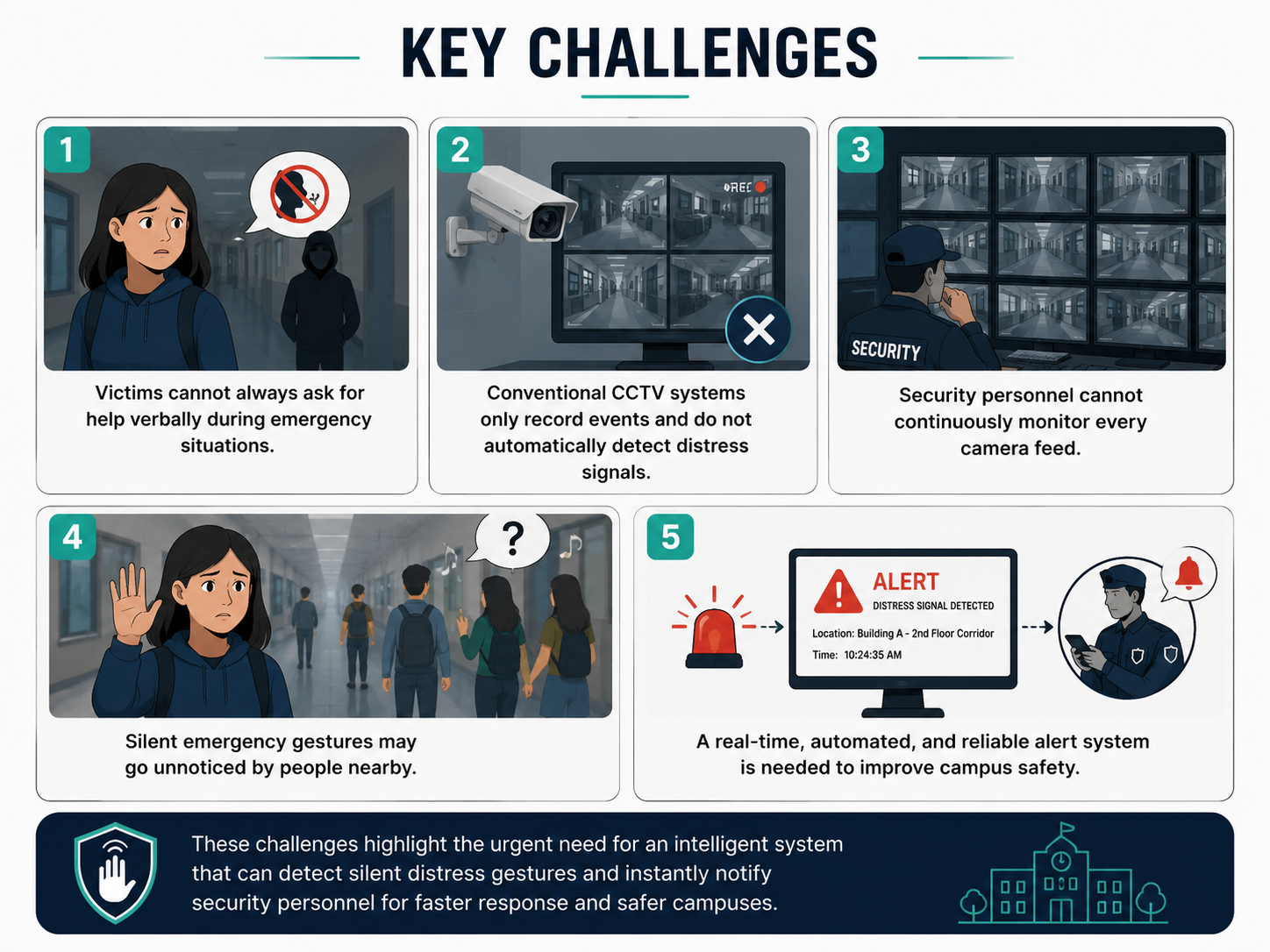
Although surveillance cameras are widely deployed across campuses, most existing systems function only as passive monitoring tools that continuously record video footage. Security personnel must manually observe multiple camera feeds, making it difficult to recognize emergency situations immediately. As a result, response times may be delayed, reducing the effectiveness of campus security.
Furthermore, silent emergency gestures, such as the internationally recognized Signal for Help, rely on nearby individuals noticing and understanding the gesture. If no one recognizes the signal, the victim may not receive timely assistance.
These challenges highlight the need for an intelligent campus safety system capable of automatically detecting distress gestures in real time and instantly notifying security personnel. Such a system should operate with low latency, maintain reliable communication within the campus network, and function independently of cloud-based services to ensure faster response and improved privacy.
Proposed Solution
To address the limitations of conventional surveillance systems, GSAFE (IoT-Based Campus Safety System) is proposed as an intelligent safety solution that combines Edge Artificial Intelligence (Edge AI) and Internet of Things (IoT) technologies for real-time emergency gesture detection and notification.
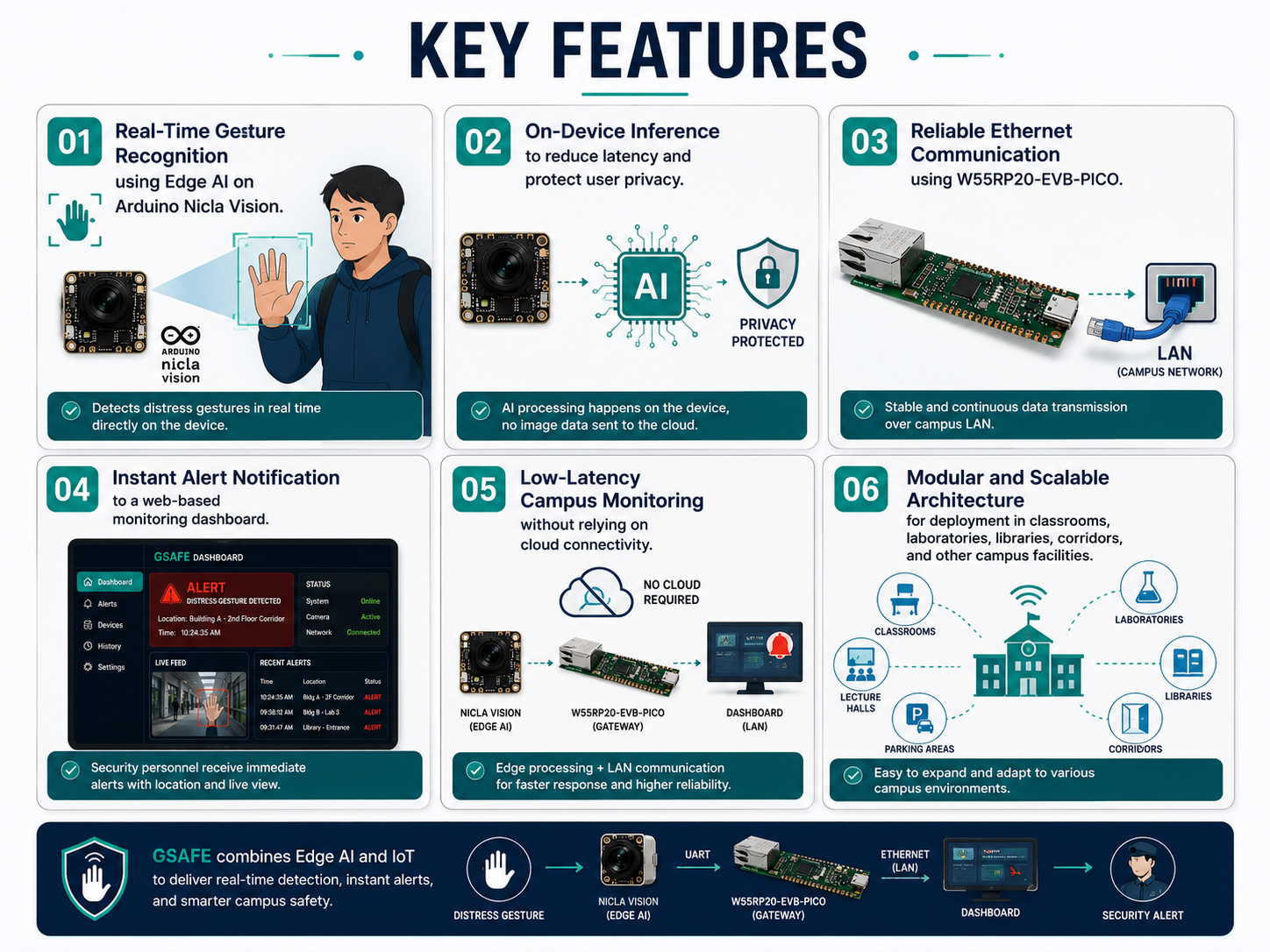
The system utilizes an Arduino Nicla Vision equipped with an AI-based gesture recognition model to continuously monitor predefined distress hand gestures. By performing inference directly on the device, GSAFE eliminates the need to transmit image data to a cloud server, resulting in lower latency, enhanced privacy, and improved reliability.
When a distress gesture is detected, the detection result is transmitted via UART to the W55RP20-EVB-PICO, which serves as an Ethernet-enabled IoT gateway. The gateway forwards the alert through the campus Local Area Network (LAN) to a web-based dashboard, allowing security personnel to receive immediate notifications and monitor the system status in real time.
The proposed architecture offers a proactive approach to campus safety by transforming traditional surveillance into an intelligent monitoring system capable of recognizing silent emergency signals and generating instant alerts. Through the integration of Edge AI, embedded systems, and Ethernet-based IoT communication, GSAFE aims to support faster emergency response while maintaining stable, secure, and efficient operation within campus environments.
1. Gesture Dataset Collection
The first stage of the project is gesture dataset collection. A dedicated image acquisition program is executed on the Arduino Nicla Vision to capture gesture images that will later be used for training the AI model. In this project, all images are collected directly using the same Nicla Vision camera that will be deployed in the final system.
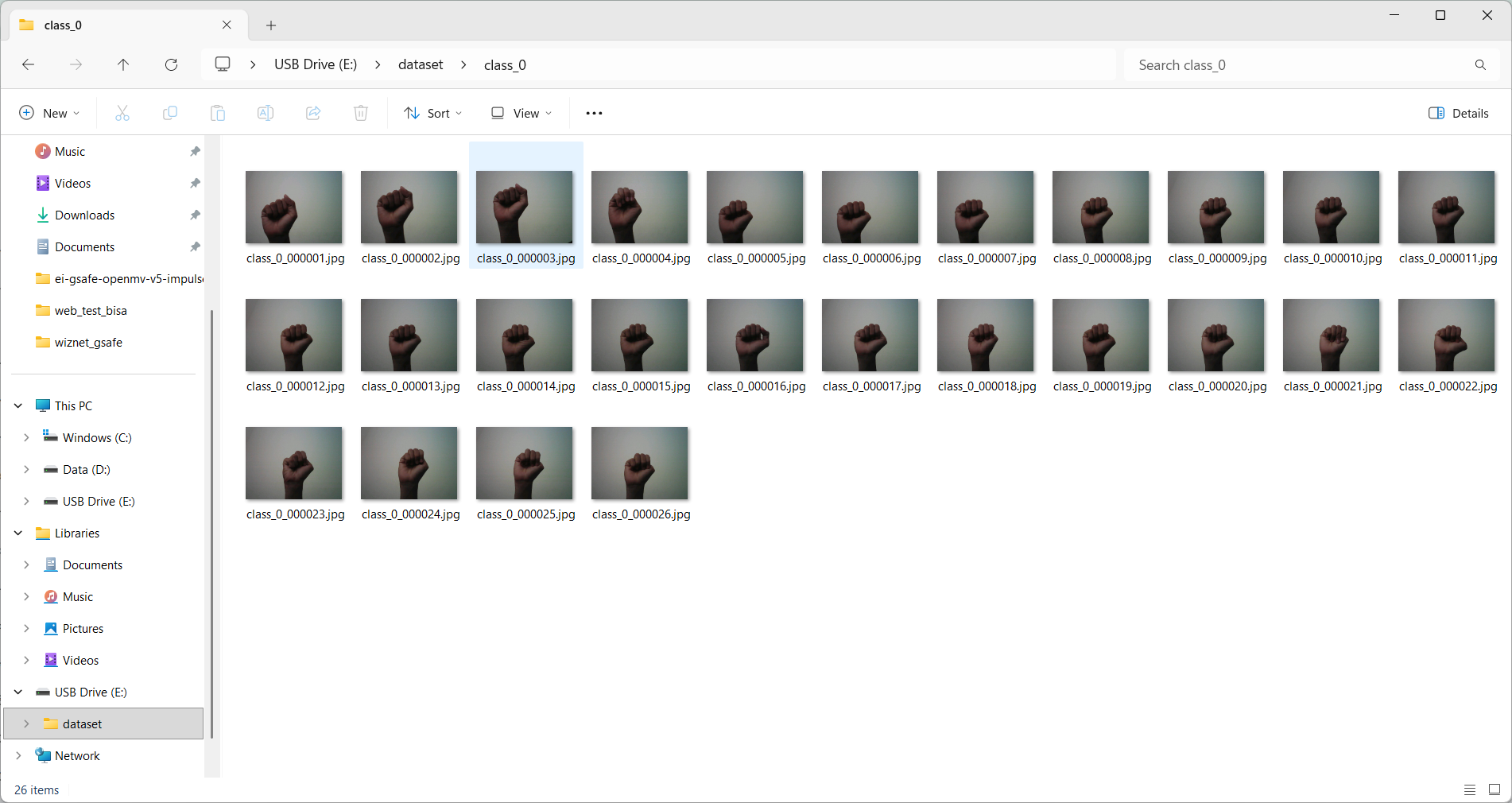
Using the same acquisition device is essential because the characteristics of the captured images, such as camera resolution, field of view (FOV), lens distortion, color reproduction, exposure, and lighting response, remain consistent between the training dataset and the deployment environment. This consistency minimizes the domain gap between training and inference, allowing the AI model to achieve better recognition accuracy during real-time operation.
The dataset consists of predefined gesture classes that the system is designed to recognize. Each gesture is captured under different conditions, including various hand positions, distances, viewing angles, and lighting environments. This diversity helps improve the robustness of the trained model against real-world variations encountered during deployment.
After each image is captured, it is temporarily stored in the internal flash memory of the Arduino Nicla Vision, allowing the complete dataset to be exported for the subsequent training stage. Since the Nicla Vision provides approximately 11 MB of available internal storage, the number of captured images must be managed carefully. Capturing an excessively large dataset in a single session may exceed the available memory and interrupt the acquisition process. Therefore, when multiple gesture classes are required, images should be collected gradually in several acquisition sessions, with the captured data exported or removed before collecting the next batch. This approach ensures efficient memory utilization while maintaining a sufficient number of training samples for each gesture class. At the end of this stage, a complete gesture image dataset is obtained and prepared for preprocessing and AI model training.
2. Dataset Preparation in Edge Impulse
After the gesture images have been collected using the Arduino Nicla Vision, the dataset is uploaded to the Edge Impulse Studio for annotation and preparation prior to model training.
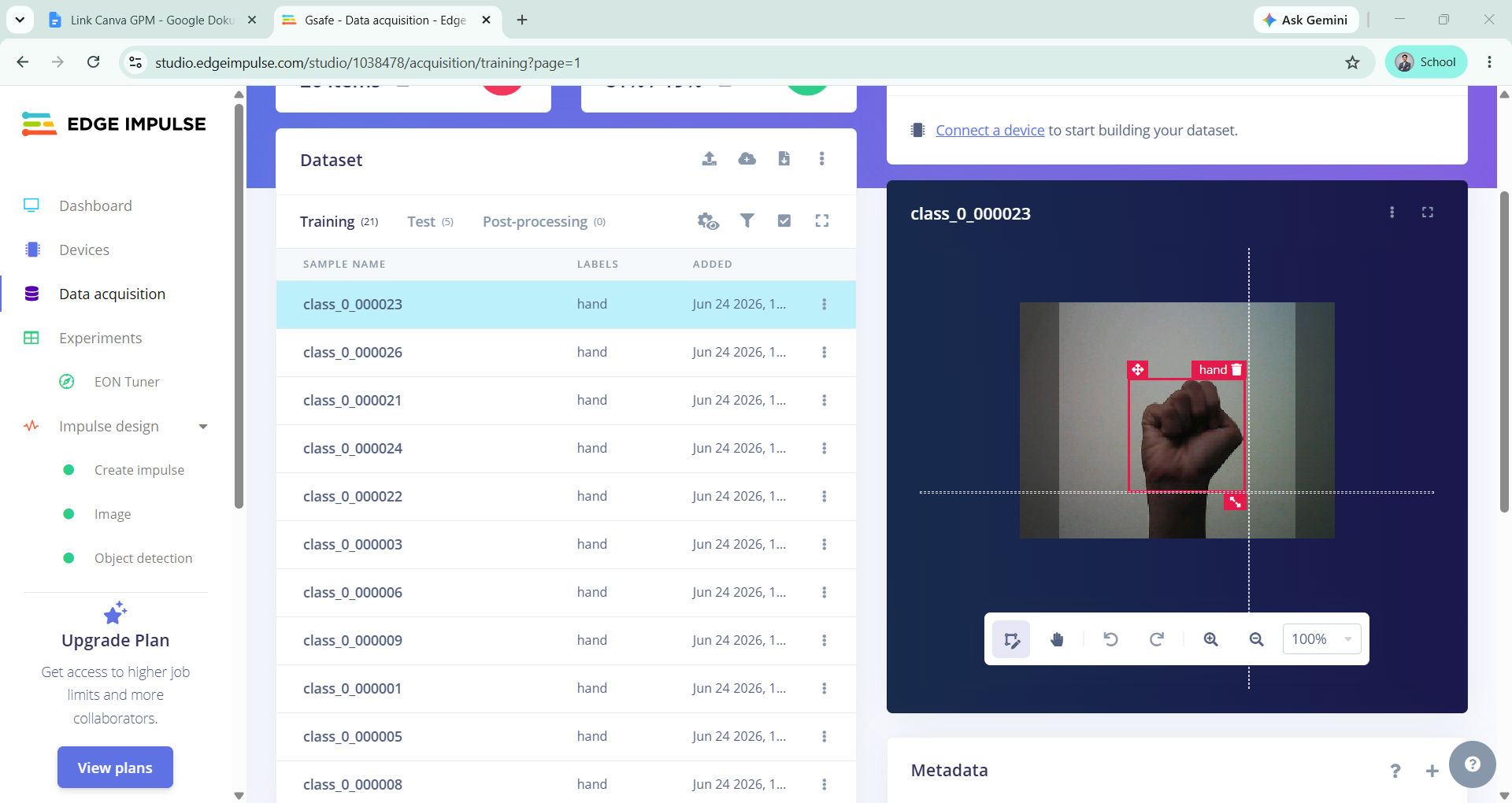
The first step in Edge Impulse is image labeling (annotation), where a bounding box is manually drawn around the target hand gesture in each image. A bounding box is a rectangular region that identifies the location of the object of interest, enabling the object detection model to learn both the appearance and position of the gesture within the image.
Once the bounding box has been created, each annotated image is assigned to its corresponding gesture class. Every image must be labeled with the correct class name according to the gesture it represents. For example, images containing an open palm are assigned to the Open Palm class, while images showing the emergency Signal for Help gesture are assigned to the Signal for Help class. This annotation process is repeated for every image in the dataset to ensure that all gesture classes are accurately represented.
Accurate annotation is one of the most critical stages in the dataset preparation process. Properly positioned bounding boxes and correct class labels enable the Edge AI model to learn meaningful visual features, resulting in higher detection accuracy and improved real-time performance after deployment on the Arduino Nicla Vision.
After all images have been annotated and classified, the dataset is organized into the training and testing sets within Edge Impulse. The prepared dataset then becomes the foundation for the subsequent image preprocessing and AI model training stages.
3. AI Model Training
After the dataset has been prepared and annotated, the next stage is to develop and train the AI model using Edge Impulse Studio. This process begins by creating an Impulse, which defines the complete machine learning pipeline, including the input data, processing block, and learning block.
For this project, the input is configured as image data captured by the Arduino Nicla Vision. Since the objective is to recognize and locate hand gestures within an image, the Object Detection learning block is selected. This approach enables the model not only to classify the gesture but also to determine its position in the camera frame by predicting the corresponding bounding box.
Following the Impulse configuration, the uploaded images are processed using the Image processing block in Edge Impulse. During this stage, relevant visual features are extracted from each image to generate feature representations suitable for model training. To simplify the processing pipeline and reduce computational complexity, the Color Depth parameter is configured as Grayscale. Converting images from RGB to grayscale reduces the amount of information processed while preserving the shape and structural characteristics of the hand gesture, making it well suited for real-time inference on resource-constrained embedded devices such as the Arduino Nicla Vision. This configuration also contributes to lower memory usage and faster inference without significantly affecting gesture recognition performance.
After feature extraction, the object detection model is trained using the annotated dataset. The training process automatically optimizes the model parameters to distinguish between gesture objects and the background while learning the spatial location of each detected hand.
The final training results obtained from the validation dataset are summarized as follows:
Performance Metric | Result |
Overall F1 Score | 88.9% |
Confusion Matrix (Validation Set)
Actual / Predicted | Background | Hand |
Background | 100% | 0% |
Hand | 20% | 80% |
Per-Class F1 Score
Class | F1 Score |
Background | 1.00 |
Hand | 0.89 |
These results indicate that the trained model successfully distinguishes the hand gesture from the background with high accuracy. The perfect classification of the background class demonstrates that the model does not falsely detect non-gesture regions as hand gestures. Meanwhile, the hand class achieves an F1 score of 0.89, indicating reliable gesture detection performance suitable for real-time deployment on the Arduino Nicla Vision. The trained model is subsequently exported and deployed to the embedded device for on-device inference in the next stage.
4. AI Model Deployment on Arduino Nicla Vision
Once the AI model has been successfully trained and validated in Edge Impulse, the next stage is to deploy the model onto the Arduino Nicla Vision for real-time on-device inference.
Edge Impulse provides several deployment options for different embedded platforms. In this project, the OpenMV Library deployment option is selected because the Arduino Nicla Vision is compatible with the OpenMV firmware environment. After selecting this deployment method, Edge Impulse automatically generates a compressed ZIP package containing the files required for deployment.

The generated package consists of three main files:
- main.py - the Python application responsible for initializing the camera, loading the AI model, performing image inference, and displaying the detection results.
- labels.txt - a text file containing the names of all gesture classes recognized by the AI model.
- trained.tflite - the TensorFlow Lite model file that contains the trained object detection network.
After extracting the ZIP package, the files are transferred to the Arduino Nicla Vision using the OpenMV IDE. In addition to the generated Python script, it is important to manually copy both labels.txt and trained.tflite into the root directory of the Nicla Vision's internal storage. These files are required at runtime because the Python application loads the class labels and TensorFlow Lite model directly from the device memory. If either file is missing, the AI inference process cannot be executed correctly.
Once all deployment files have been uploaded successfully, the Python application is executed from the OpenMV IDE. During operation, the camera continuously captures images, loads the trained TensorFlow Lite model, performs object detection in real time, and displays the detection results directly on the OpenMV interface.
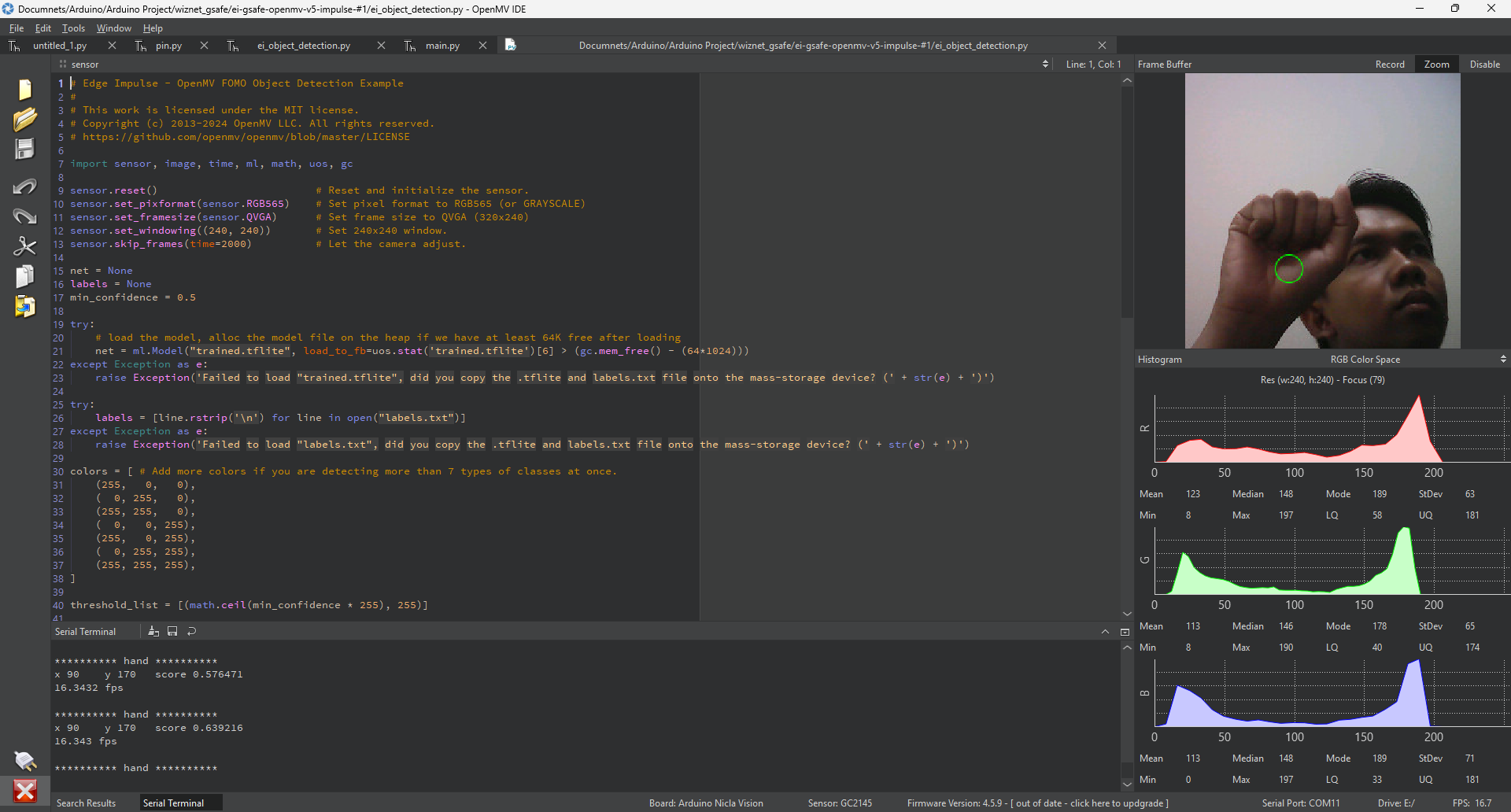
The successful deployment is indicated by a green bounding box surrounding the detected hand gesture. The green bounding box confirms that the Arduino Nicla Vision has successfully recognized the predefined distress gesture (closed fist) and correctly localized its position within the camera frame. This demonstrates that the AI model is capable of performing real-time gesture detection directly on the embedded device without requiring cloud processing, providing a low-latency and privacy-preserving Edge AI solution.
5. Ethernet Communication Using W55RP20-EVB-PICO
After the AI model has been successfully deployed on the Arduino Nicla Vision, the next stage is to establish communication between the embedded system and the monitoring computer through the W55RP20-EVB-PICO. In this project, the board functions as an Ethernet gateway, enabling reliable communication over the campus Local Area Network (LAN).
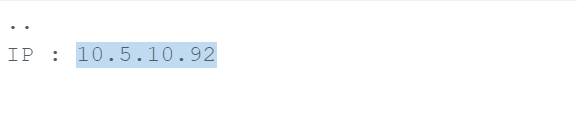
The W55RP20-EVB-PICO is connected to the local network using an Ethernet cable. Once powered on, the board initializes its Ethernet interface and automatically obtains a valid IP address from the network. This IP address allows the device to communicate with other computers connected to the same LAN.
To verify that the Ethernet connection has been established successfully, a ping test is performed from a laptop connected to the same network. The laptop sends Internet Control Message Protocol (ICMP) echo requests to the IP address assigned to the W55RP20-EVB-PICO. If the device responds successfully, it confirms that the Ethernet communication has been configured correctly and that the board is reachable through the local network.
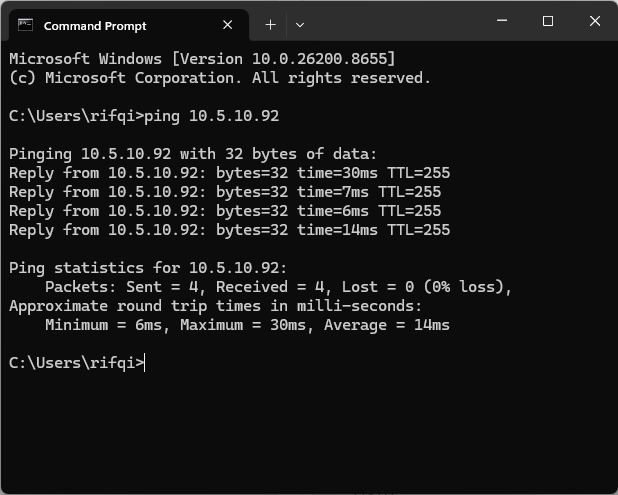
A successful ping test indicates that the Ethernet gateway is ready to exchange data with external devices, including the web-based monitoring dashboard. This communication serves as the foundation for transmitting real-time gesture detection results generated by the Arduino Nicla Vision to the monitoring system.
The communication architecture used in this project is illustrated below.
Arduino Nicla Vision
        │
     UART
        │
       ▼
W55RP20-EVB-PICO
(Ethernet Gateway)
        │
 Ethernet LAN
        │
       ▼
Router/Switch
        │
       ▼
Laptop / Dashboard
The successful Ethernet connection is demonstrated through the ping results shown below, confirming stable communication between the laptop and the W55RP20-EVB-PICO over the campus LAN.
6. Web Dashboard Development
The web dashboard is designed as the main interface for monitoring the GSAFE system in real time. In this stage, the dashboard layout is first developed using HTML to define the structure of the interface.
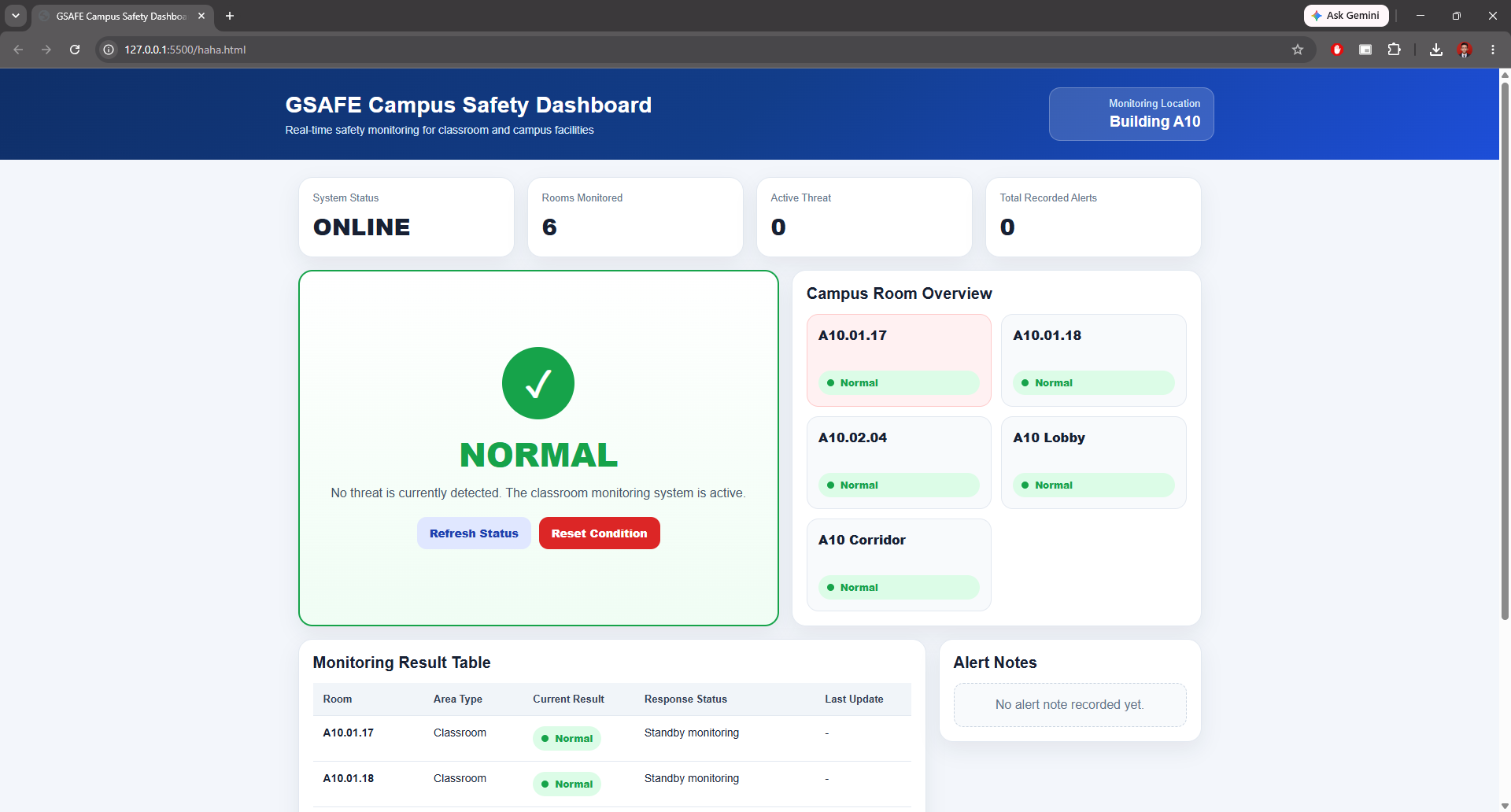
The dashboard is created to display important system information clearly, including the device status, network connection, gesture detection result, and emergency alert notification. Through this interface, security personnel can monitor whether the system is running normally and immediately identify when a distress gesture is detected.
The initial dashboard design includes several main sections:
- System Status to show whether the device is online or offline.
- Gesture Detection Status to display the latest detection result.
- Emergency Alert Panel to highlight when a distress gesture is detected.
- Timestamp Information to record when the alert occurs.
- Connection Information to show communication between the W55RP20-EVB-PICO and the dashboard.
The dashboard is implemented as a lightweight web-based interface so it can be accessed from a laptop or computer connected to the same LAN network. This makes the monitoring process simple, fast, and suitable for local campus deployment.
7. Hardware Integration
The hardware integration stage combines the Arduino Nicla Vision and the W55RP20-EVB-PICO into a complete end-to-end IoT system. In this architecture, the Arduino Nicla Vision is responsible for performing real-time gesture recognition using the deployed Edge AI model, while the W55RP20-EVB-PICO functions as the Ethernet gateway and web server that delivers the detection status to the monitoring dashboard.
Initially, the communication between the two devices was planned using UART. However, for this prototype, a simpler and more reliable approach was adopted by using digital HIGH/LOW signals. Instead of transmitting serial data, the Nicla Vision outputs a digital signal that directly indicates whether a distress gesture has been detected. This approach reduces communication complexity, minimizes synchronization issues, and is sufficient for transmitting a binary detection result ("Normal" or "Threat Detected").
When the AI model detects a distress gesture, the output pin on the Nicla Vision is driven HIGH. The W55RP20-EVB-PICO continuously monitors this input pin and updates its internal system status accordingly.
if (digitalRead(DETECTION_PIN) == HIGH) {
   threatDetected = true;
}
A key feature of the system is the implementation of a latched alert mechanism. Once a distress gesture has been detected, the system permanently stores the alert status as Threat Detected, even if the gesture is no longer visible in front of the camera. The alert remains active until an operator manually presses the Reset Condition button.
if (digitalRead(DETECTION_PIN) == HIGH) {
   threatDetected = true;      // Latch the alert status
}
if (resetCondition) {
   threatDetected = false;     // Clear the alert manually
}
This design is intentionally implemented because, in real emergency situations, a victim may only be able to perform the distress gesture for a very short period. If the system automatically returned to the normal state immediately after the gesture disappeared, the security operator could miss the alert entirely. By latching the detection result, the dashboard preserves the emergency status until it has been acknowledged, significantly increasing the likelihood of a timely response.
To display the latest system status, the web dashboard communicates with the W55RP20-EVB-PICO using AJAX (Asynchronous JavaScript and XML). Rather than reloading the entire webpage repeatedly, AJAX periodically requests only the latest detection data from the device. This asynchronous communication provides a smoother user experience, reduces network traffic, and enables near real-time monitoring.
setInterval(() => {
   fetch("/status")
       .then(response => response.json())
       .then(data => {
           document.getElementById("status").innerHTML =
               data.threat ? "Threat Detected" : "Normal";
       });
}, 1000);
The W55RP20-EVB-PICO responds to each request by returning the current detection status in JSON format.
server.on("/status", HTTP_GET, []() {
   String json = "{";
   json += "\"threat\":";
   json += threatDetected ? "true" : "false";
   json += "}";
   server.send(200, "application/json", json);
});
The dashboard also provides two control functions: Refresh Status and Reset Condition. The Refresh Status function requests the latest device status from the W55RP20-EVB-PICO, ensuring that the displayed information is synchronized with the current hardware state without requiring a full page refresh. Meanwhile, the Reset Condition button is used by the security operator to manually clear the latched alert after the emergency has been verified and resolved.
8. System Testing & Evaluation
The integrated GSAFE system was tested to verify the complete workflow, from real-time gesture detection on the Arduino Nicla Vision to alert transmission through the W55RP20-EVB-PICO and visualization on the web dashboard. The demonstration confirms that the system operates as expected and is capable of providing real-time emergency notifications.
Potential Impact
GSAFE has the potential to improve campus safety by enabling the real-time detection of distress gestures and providing immediate notifications to security personnel. Unlike conventional CCTV systems that only record events, GSAFE actively identifies emergency situations and supports faster response when assistance is needed.
By leveraging Edge AI on the Arduino Nicla Vision and Ethernet-based IoT communication through the W55RP20-EVB-PICO, the system delivers low-latency performance while preserving user privacy, as all image processing is performed locally on the device without relying on cloud services.
Although developed for campus environments, the proposed architecture can be extended to other indoor facilities such as schools, hospitals, office buildings, libraries, and laboratories. Its modular design also provides a foundation for future integration with additional AI capabilities and smart building technologies.
Limitations & Challenges
The current GSAFE prototype is designed to recognize only a limited number of predefined distress gestures. As a result, gestures performed outside the trained classes or under extreme lighting and viewing angles may reduce the detection accuracy.
The communication between the Arduino Nicla Vision and the W55RP20-EVB-PICO is implemented using a simple digital HIGH/LOW signal rather than UART or other data communication protocols. While this approach improves simplicity and reliability for the prototype, it only supports binary detection results and cannot transmit additional information such as gesture type or confidence score.
In addition, the system is intended for deployment within a Local Area Network (LAN) using Ethernet. Consequently, remote monitoring outside the campus network is not currently supported. Future versions can overcome this limitation by integrating wireless communication, cloud connectivity, and mobile notification services for wider accessibility.
Future Improvements
Several enhancements can be implemented to further improve the capability and usability of GSAFE. First, the AI model can be expanded to recognize multiple emergency gestures and operate more robustly under varying lighting conditions, viewing angles, and distances.
The communication system can also be upgraded by replacing the current digital HIGH/LOW signaling with UART or other serial communication protocols, allowing richer information such as gesture type, confidence score, and device status to be transmitted. In addition, integrating Wi-Fi or cloud services would enable remote monitoring beyond the campus Local Area Network (LAN).
Finally, future versions of GSAFE may include mobile notifications, SMS or Telegram alerts, event logging, and integration with existing campus security systems. These improvements would make the system more scalable, intelligent, and suitable for deployment in larger smart campus environments.
Conclusion
The development of GSAFE demonstrates that the integration of Edge Artificial Intelligence and Internet of Things (IoT) can provide an effective solution for improving campus safety. By enabling real-time distress gesture recognition directly on the Arduino Nicla Vision and delivering instant alerts through the W55RP20-EVB-PICO, the system offers a practical, low-latency, and privacy-preserving approach to emergency monitoring. Although this project is presented as a prototype, it establishes a solid foundation for future smart campus safety applications.
A simple gesture can save a life. GSAFE transforms silent distress into immediate action, creating a safer campus through Edge AI and IoT.
-
Github
GSAFE Code
