



BR Remote MFC2: A Broadcast Camera Controller with Optional WIZnet Ethernet Connectivity
BR Remote MFC2 combines hands-on camera control with an optional WIZ505SR-RP Ethernet interface for broadcast remote-head systems.
Overview
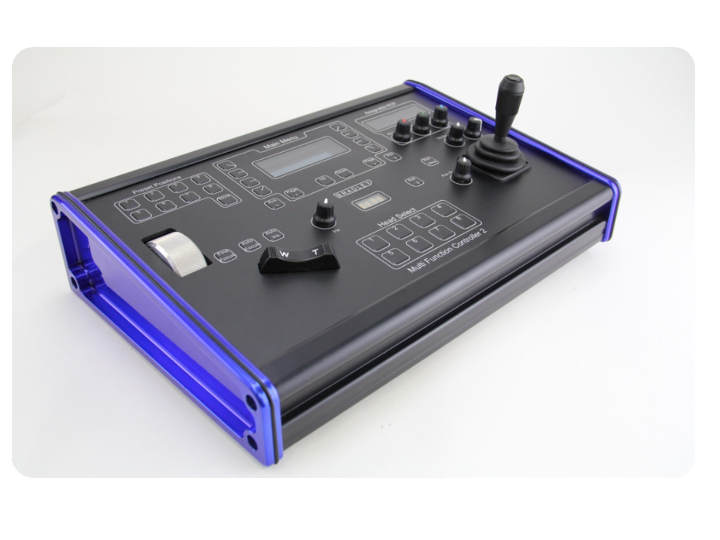
Multi-camera productions require more than changing where a camera points. Operators also need to manage zoom, focus, iris, movement settings, and stored camera positions. BR Remote’s Multi Function Controller 2 (MFC2) brings these controls together in a commercial hardware panel with a joystick, dedicated buttons, and a display. The manufacturer also offers IP connectivity, tally input, and monitor-selection modules. (BR Remote product page)
The WIZnet application discussed here is the configuration equipped with the network option. The MFC2 manual directs users to WIZ505SR-RP documentation for information about its rear Network port. This does not mean that Ethernet is included in every standard MFC2 configuration. (BR Remote features)
About BR Remote
BR Remote is a remote-camera systems manufacturer based in Brockenhurst, Hampshire, United Kingdom. Founded by former BBC cameraman David Bradley, the company draws on the experience of broadcast camera operators and engineers. It states that its equipment is designed and manufactured in its own UK workshop. (About BR Remote)
Its product range includes PTZ cameras, stabilized camera systems, remote heads, joystick controllers, and interface equipment. Alongside standard products, BR Remote develops mechanical assemblies and electronic interfaces for particular cameras, lenses, and shooting environments. Within this portfolio, the MFC is an operator panel for controlling cameras and remote heads. (BR Remote LinkedIn)
What Is MFC2?
MFC2 allows an operator to move and adjust remotely positioned cameras from a separate control location. It sends commands to a remote head—the mechanism that carries and moves the camera—and controls supported lens functions such as zoom, focus, and iris. It is not a camera, video recorder, or video encoder. (BR Remote product page)
Front-panel head-selection buttons let the operator change which camera is being controlled. Presets provide a way to return to frequently used compositions, such as a wide view of a stage or a position aimed at a particular performer. Available functions and the number of stored positions depend on the connected camera and head. (MFC2 Instructions Ver. 4.3)
Main Specifications
| Item | Manufacturer-Published Information |
|---|---|
| Main controls | Pan, tilt, zoom, focus, and iris |
| Joystick | Two-axis configuration; three-axis joystick option |
| Movement adjustment | Pan/tilt speed and ramp settings for start/stop response |
| Direct head selection | Eight dedicated buttons |
| Expanded head selection | Access to up to 99 heads with a separate Multi Camera Selector |
| Preset controls | Eight dedicated selection buttons and a save function |
| Standard data connection | RS-485 |
| Network expansion | Optional IP module; the manual references WIZ505SR-RP |
| Other options | Tally input and monitor-selection output |
| Dimensions | 375 × 250 × 90 mm, excluding the joystick |
| Weight | 3.5 kg |
| Power | External DC power; published voltage ranges differ between documents |
Functions and options are described on the manufacturer’s features page, while dimensions and weight are documented in the specifications and manual. The maximum of 99 refers to selectable control targets, not simultaneous processing of 99 video feeds. (BR Remote features)
How It Works
AI-generated image
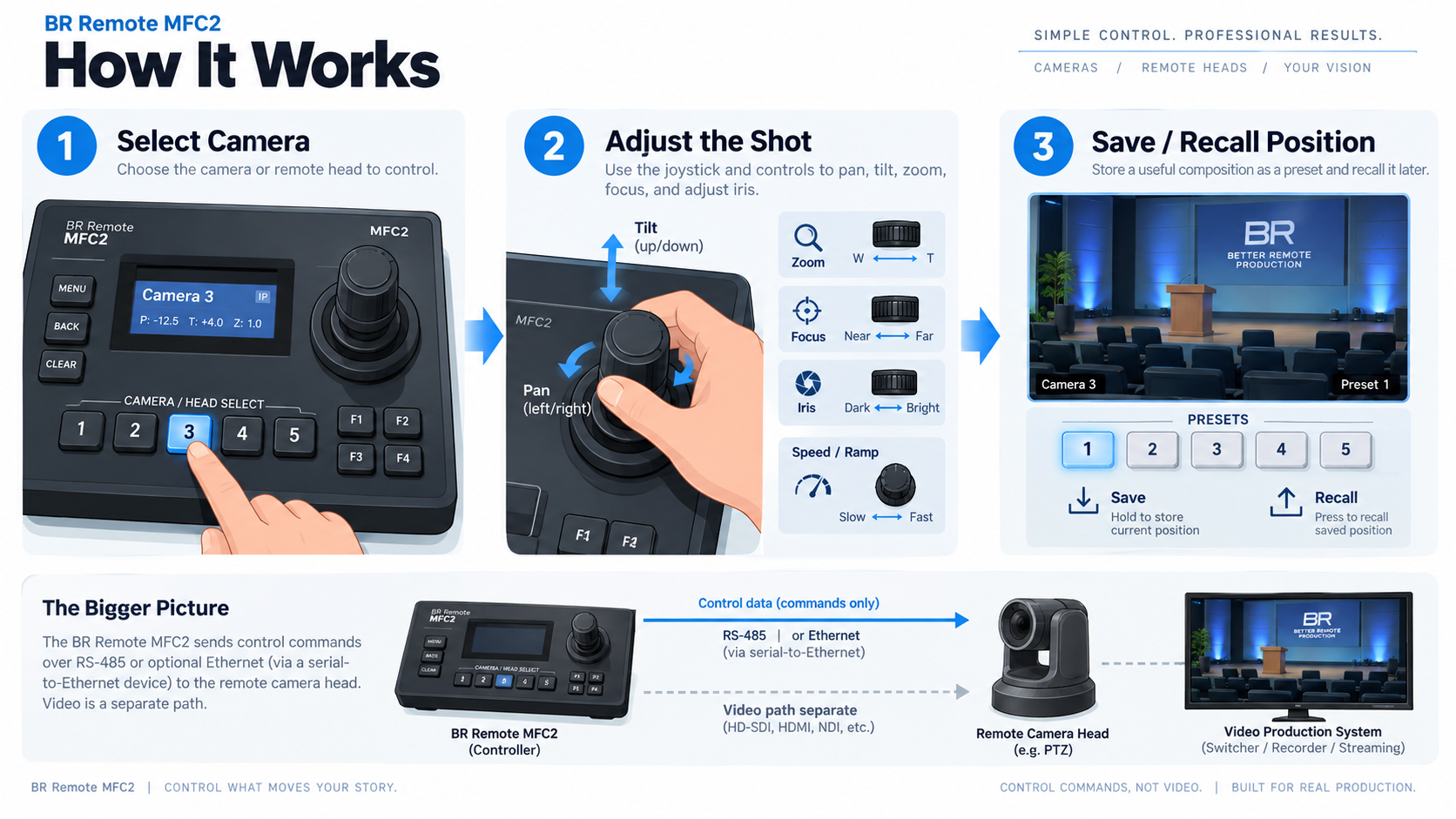
The basic workflow is select a camera → adjust the shot → save or recall a position.
Select the camera. Pressing a head-selection button recalls settings associated with that camera, including focus and iris information. The operator can move between cameras while adjusting each one’s settings. (MFC2 Instructions Ver. 4.3)
Adjust the shot. The joystick controls horizontal movement, or pan, and vertical movement, or tilt. Separate controls handle zoom, focus, and iris. Speed and ramp settings adjust how the camera responds when movement starts and stops. (BR Remote features)
Save and recall positions. Once a useful composition is established, the operator can save it as a preset and recall it later. The manufacturer lists eight preset-selection buttons and a save function. (BR Remote features)
The network option extends the connection used to carry these control commands. Camera movement commands and camera video are separate data paths: the WIZ505SR-RP is a serial-to-Ethernet module, not a video encoder. (WIZnet WIZ505SR-RP documentation)
Role of WIZnet: WIZ505SR-RP
A Network Module Referenced in the Manufacturer’s Manual
Source: BR REMOTE
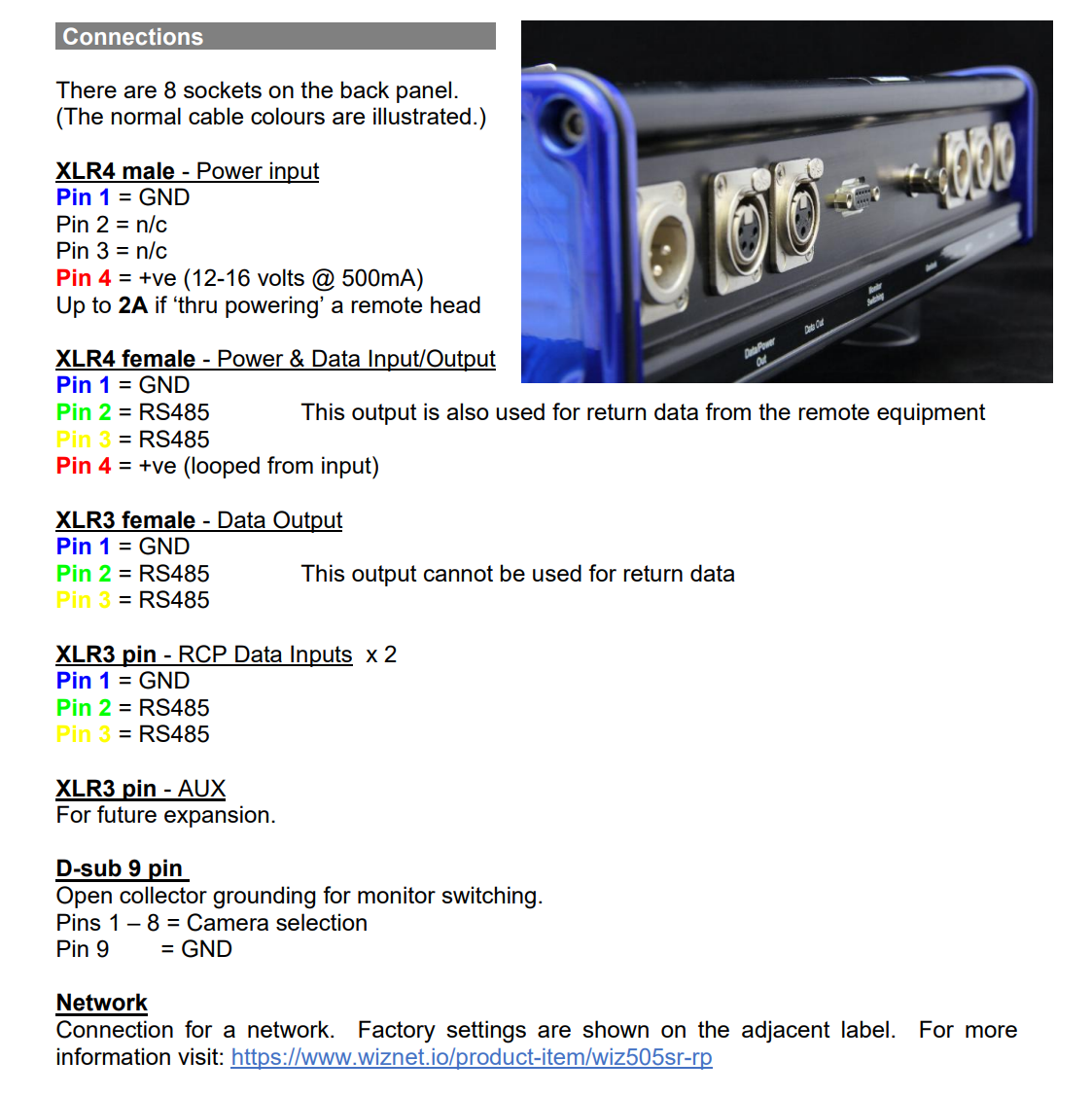
Page 19 of “MFC2 Instructions Ver. 4.3” describes the rear Network port. It directs users to the adjacent label for factory settings and to the WIZ505SR-RP product page for further information. This provides a manufacturer-published connection between the controller’s network interface and a specific WIZnet module. (Official manual, page 19)
Connecting Control Data to Ethernet
According to WIZnet’s documentation, WIZ505SR-RP is a serial-to-Ethernet module based on RP2040 and W5100S. It transfers serial-device data over a TCP/IP network and converts incoming network data back into serial data. The module includes a 10/100 Mbps Ethernet interface and an RJ45 connector. (WIZ505SR-RP documentation)
The division of responsibilities is important: MFC2 provides the camera-control functions, while WIZ505SR-RP provides the network connection for the control system. The module’s RP2040 is not identified as the main processor of the entire MFC2, and the W5100S is not described as directly driving camera motors. (MFC2 Instructions Ver. 4.3)
A Published System Application: TV Tools
BR Remote documents an IP-based remote-camera system developed for TV Tools using Proteân remote heads and Multi Function Controllers. The system also incorporated Blackmagic Design cameras and third-party touchscreen controllers, with integration work covering camera-control data, lens operation, and tally indication. (TV Tools case study)
This demonstrates an application of the MFC product family within a system combining equipment from several manufacturers. However, the case study does not identify the number of controllers, exact MFC2 hardware version, or WIZnet module installation. It is therefore evidence of MFC-family deployment, not proof that WIZ505SR-RP was used in that particular installation. (TV Tools case study)
Market Context and Purchasing Scale
IP Connectivity in Professional Camera Systems
MFC2 belongs to the market for broadcast and professional video remote-camera control equipment. Related demand extends beyond broadcasters to corporate multi-camera spaces, university studios, and houses of worship. Futuresource Consulting’s June 2026 analysis describes these organizations adopting broadcast-style production systems. (Futuresource: The Broadcastification of ProAV)
In its October 2025 professional PTZ camera market analysis, Futuresource reported that IP-enabled products accounted for 93% of units. It also reported that 2024 shipments declined 8% year over year, while market value increased by less than 1%. The picture is therefore one of shipment adjustment alongside a shift toward networked, higher-functionality products—not uniform rapid growth. These figures describe the professional PTZ camera market, not sales of MFC2 or dedicated camera controllers. (Futuresource professional PTZ market analysis)
Controllers Are Purchased as Part of Production Systems
Published manufacturer figures also demonstrate commercial demand in the related camera market. In its 2023 PTZ product-family anniversary article, Panasonic reported more than 250,000 PTZ cameras sold worldwide. This is one manufacturer’s cumulative camera sales over an extended period, not an annual controller-market figure. (Panasonic PTZ 15th anniversary)
Examples with disclosed controller quantities include:
| Purchase Example | Published Quantities | Application |
|---|---|---|
| TBN, announced by Panasonic in March 2019 | 16 AW-UE150 cameras and seven AW-RP150 controllers | New broadcast studios in the United States |
| Brown Note Productions, announced by Panasonic in March 2019 | Four AW-UE150 cameras and four AW-RP150 controllers | Mobile production systems for concerts, touring, and events |
These examples show dedicated controllers being purchased as part of complete production systems. They are not BR Remote sales figures or current market-average order sizes, and they cannot be used to calculate MFC2 or WIZnet module sales. (TBN purchase announcement, Brown Note purchase announcement)
Products and Purchasing Channels

Source: https://www.br-remote.com/sales-and-rental-partners
BR Remote supplies a complete controller with a joystick, display, and dedicated operating controls, rather than just a network module. Its controller range also includes the Micro Joystick, Mini Joystick Mk2, Quad Joystick, and Remote Camera Panel for different production requirements. (BR Remote controllers)
The MFC product page directs buyers to email and telephone enquiries, rather than publishing a fixed price and immediate checkout. IP connectivity, a three-axis joystick, tally, and monitor-selection functions depend on the required configuration. The public page does not disclose live stock quantities or cumulative MFC2 sales. (MFC product page)
Purchasing routes include direct sales and sales partners. BR Remote’s published partner list includes Broadcast and Production Services in the United Kingdom and Qvest Media Sales in Germany. The company does not rent equipment directly; it refers rental enquiries to separate partners. Availability of a particular MFC2 configuration needs to be confirmed with the relevant supplier. (Sales and rental partners)
Social Media and Product Communication
LinkedIn — Custom Projects and Technical Problem-Solving
BR Remote’s official LinkedIn page features product information and custom engineering projects. One published example describes adapting a Mini L Head for an IO Industries 8K camera and Canon CN-E lens, covering lens control, position feedback, and Free-D metadata integration before linking to a more detailed article.
This approach emphasizes the production requirement and how it was addressed technically. The example illustrates BR Remote’s engineering activity, not MFC2-specific functionality or sales. (BR Remote LinkedIn)
YouTube and the Blog — Demonstrating Movement and Operation
The official YouTube channel and product-support video page provide camera and remote-head demonstrations and operating guidance. These materials help prospective users understand movement and handling that are difficult to convey through a specification table alone. (Product videos)
The company blog also features a Micro L Head and Micro Joystick video review produced by sales partner BPS. The reviewed content combines manufacturer explanations, custom-project stories, and partner demonstrations. (Partner video review)
Why This Product Matters
The network-equipped MFC2 illustrates a commercial approach to adding Ethernet connectivity to professional serial-control equipment. The operator retains a physical joystick and dedicated buttons while the system gains a network connection. (MFC product page)
WIZnet’s role is in that connection: a serial-to-Ethernet module carries control data, rather than processing camera video. The example highlights an aspect of broadcast networking that is separate from video transport—connecting operating commands and equipment settings. Public sources do not establish whether cost, latency, or shorter development time was BR Remote’s reason for selecting the module. (MFC2 Instructions Ver. 4.3)
Current Status and Limitations
BR Remote lists the Multi-Function Controller in its product catalogue. The manual reviewed here is Version 4.3, dated November 30, 2022. The network module and supported camera or lens functions of a purchased unit should be confirmed against its supplied configuration. (MFC product page)
Published power specifications differ: the website lists 12–18 V, while page 20 of the manual lists 10–16 V, 5 W. The unit’s label and the manufacturer’s confirmation should determine the power supply used. (Website specifications, MFC2 manual)
The reviewed public sources did not establish MFC2 annual shipments, the proportion sold with the network option, complete internal circuitry, or independently measured control latency. Product-family case studies and adjacent market figures do not substitute for those product-specific measurements.
Related WIZnet Maker Projects
| Related Project | Similarity and Difference |
|---|---|
| TallyCCU Pro | Uses Arduino and a W5500 Ethernet Shield 2 to connect Blackmagic camera control over SDI with vMix tally. MFC2 differs as a commercial BR Remote control panel with a physical joystick and lens controls. |
| Project92.com PTZ Remote | Uses a wired-LAN joystick to operate dedicated DJI RS and MP-101 control units. The remote-camera application is similar, but supported equipment and system architecture differ. |
TallyCCU Pro’s hardware is documented in its original repository, while Project92’s supported devices are identified on its sales page. These references compare applications; they do not establish interoperability with MFC2. (TallyCCU Pro repository, Project92 product listing)
Conclusion
BR Remote MFC2 is a commercial controller for adjusting camera direction, lens settings, and stored shooting positions through a physical operating panel. Its manufacturer’s manual references WIZ505SR-RP for the network option, documenting the connection between a WIZnet serial-to-Ethernet module and a professional camera-control system. (MFC features, MFC2 manual)
The related market shows widespread IP connectivity and documented controller purchases, but these figures cannot be treated as MFC2 sales. The value of this VAR example lies in its documented network-module integration, commercial supply channels, and published MFC-family system application.
FAQ
Q. What does MFC2 do?
A. It sends commands to remote camera heads and lenses to control camera direction, zoom, focus, iris, and other supported functions. (BR Remote features)
Q. Is Ethernet included in every MFC2?
A. The manufacturer lists IP connectivity as an option. Buyers requiring network operation should confirm that it is included in the supplied configuration. (BR Remote features)
Q. Does the WIZnet module transmit camera video?
A. The documented role of WIZ505SR-RP is to convert between serial data and Ethernet. It is not described here as a video compression or transmission device. (WIZ505SR-RP documentation)
Q. Can the standard panel select 99 heads on its own?
A. The standard panel has eight head-selection buttons. Access to up to 99 heads requires an additional selector panel. (BR Remote features)
Source Snapshot
Review date: September 14, 2026
Scope: The network configuration described in MFC2 Instructions Ver. 4.3 and the manufacturer’s public product information.
Market figures: Publication dates and measurement scopes are identified separately in the article.
| Source | What It Supports | URL |
|---|---|---|
| BR Remote product page | Product purpose, optional expansion modules, and sales enquiries | Multi-Function Controller |
| BR Remote official manual | Version 4.3, operation, and the WIZ505SR-RP reference in the Network section on page 19 | MFC2 Instructions |
| BR Remote features and specifications | Controls, expansion requirements, dimensions, and power | Features · Specifications |
| WIZnet documentation | WIZ505SR-RP architecture, RP2040, W5100S, and serial-to-Ethernet operation | WIZ505SR-RP |
| BR Remote company and product information | Company background, in-house engineering, and controller range | About · Controllers |
| BR Remote application case | MFC-family use in the TV Tools IP camera system | TV Tools Case Study |
| BR Remote sales information | Direct sales, sales partners, and rental partners | Sales and Rental Partners |
| Official LinkedIn and videos | Custom engineering posts, demonstrations, and operating guidance | LinkedIn · Videos |
| BR Remote blog | BPS review of the Micro L Head and Micro Joystick | Partner Video Review |
| Futuresource, October 2025 | Professional PTZ shipment trends and IP-connectivity share | Professional PTZ Market Analysis |
| Futuresource, June 2026 | Broadcast-style production in corporate, university, and worship environments | The Broadcastification of ProAV |
| Panasonic sales and purchase announcements | Cumulative PTZ camera sales and specific controller purchases | PTZ 15th Anniversary · TBN · Brown Note |