



Squeezelite-esp32
More and more people seems to use this without a LMS server, just for BT, AirPlay or Spotify.
1. Introduction
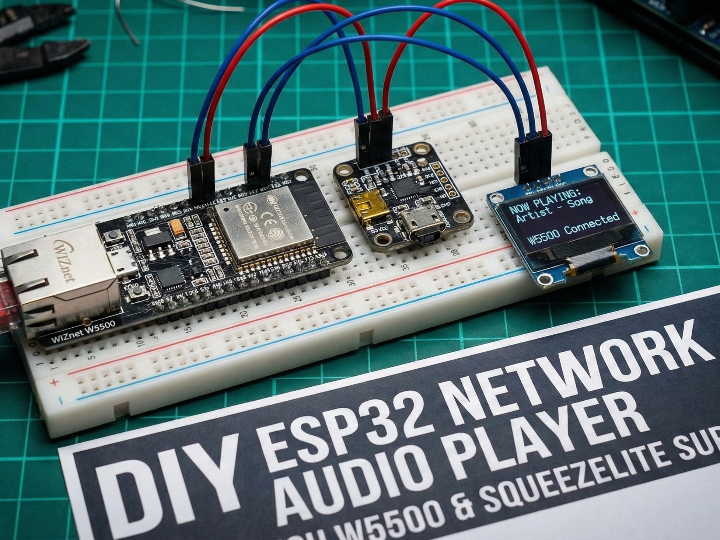
This project turns ESP32 / ESP32-S3 boards into fully featured network audio players that plug directly into the Lyrion / Logitech Music Server (LMS) ecosystem.
On top of Wi-Fi and Bluetooth, it supports wired Ethernet via LAN8720, DM9051 and WIZnet W5500, and can act simultaneously as:
- an LMS/Squeezebox player,
- an AirPlay 1 receiver,
- a Bluetooth speaker, and
- a Spotify Connect device,
all running on a single ESP32.
2. Quick background – What is squeezelite?
Generate Image: Gemini 3
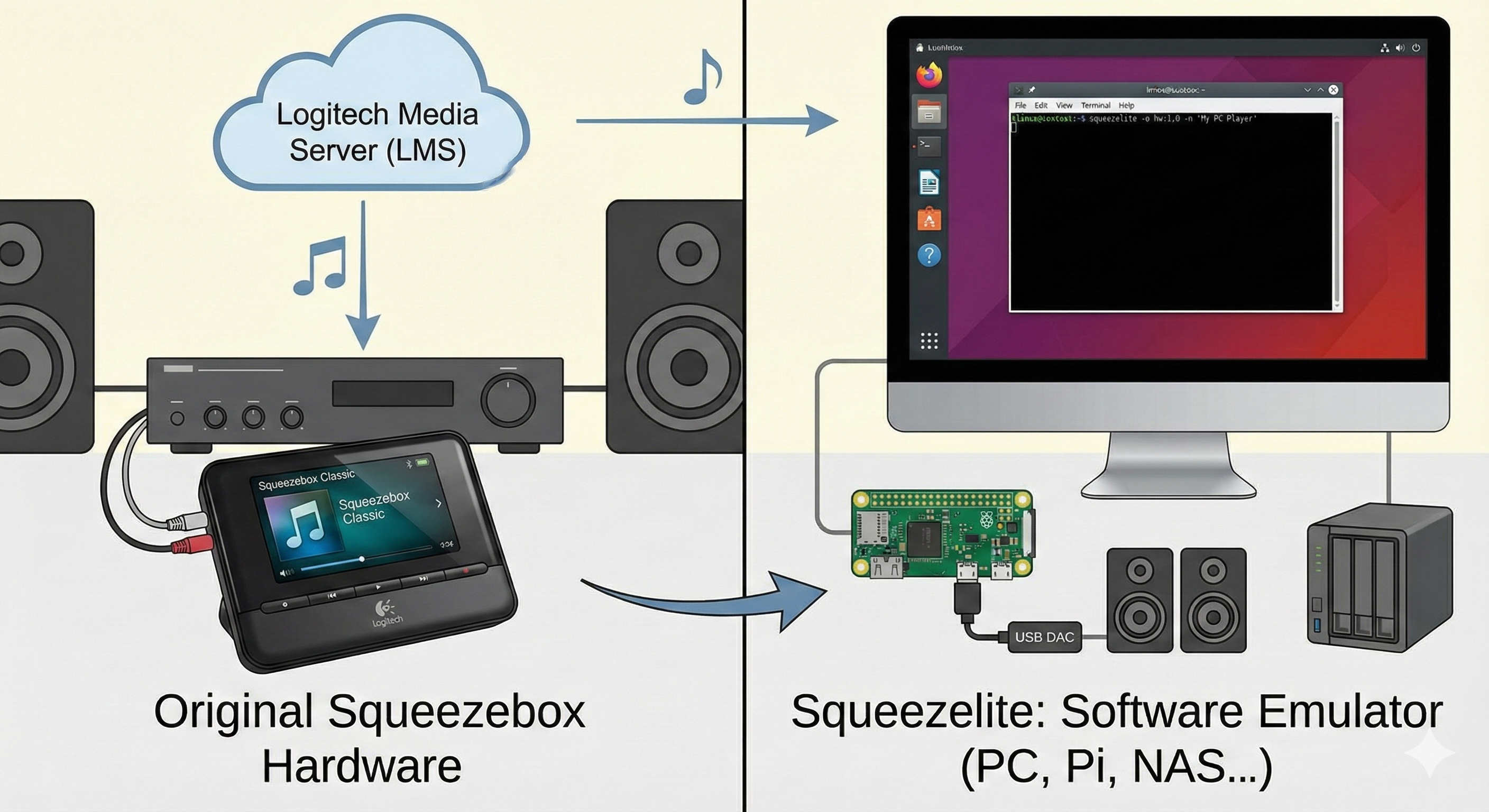
Before we look at squeezelite-esp32, it helps to understand the original squeezelite project it builds on.
- Definition
- On Linux/BSD/Windows, squeezelite is a small headless Squeezebox emulator – a software client for Lyrion (Logitech) Music Server.
- It is designed for high-quality audio, including USB DACs and high sample rates (up to 384 kHz in many builds).
- Role in the LMS ecosystem
- LMS (Lyrion Music Server, formerly Logitech Media Server) was originally developed to drive Logitech’s Squeezebox hardware streamers.
- squeezelite replaces that hardware with a software player that can run on PCs, Raspberry Pi, NASes and other platforms.
- Key characteristics
- Headless: no built-in GUI. It is controlled via LMS’s web UI or mobile apps (iPeng, Material Skin, Squeezer, etc.).
- Sync & gapless: supports playback synchronization, gapless playback, and direct streaming for plugins like Spotify.
- Codec support: via FFmpeg/libFLAC/mpg123/etc. it can decode FLAC, MP3, AAC, ALAC, Ogg, WMA and more.
So:
squeezelite-esp32 takes this small, headless software Squeezebox client and ports it onto ESP32 – then layers on Bluetooth, AirPlay, Spotify Connect, displays, buttons, and Ethernet (including W5500) to create an all-in-one embedded player.
3. What this project is — squeezelite-esp32 in a nutshell
Generate Image: Gemini 3
3.1 Capabilities
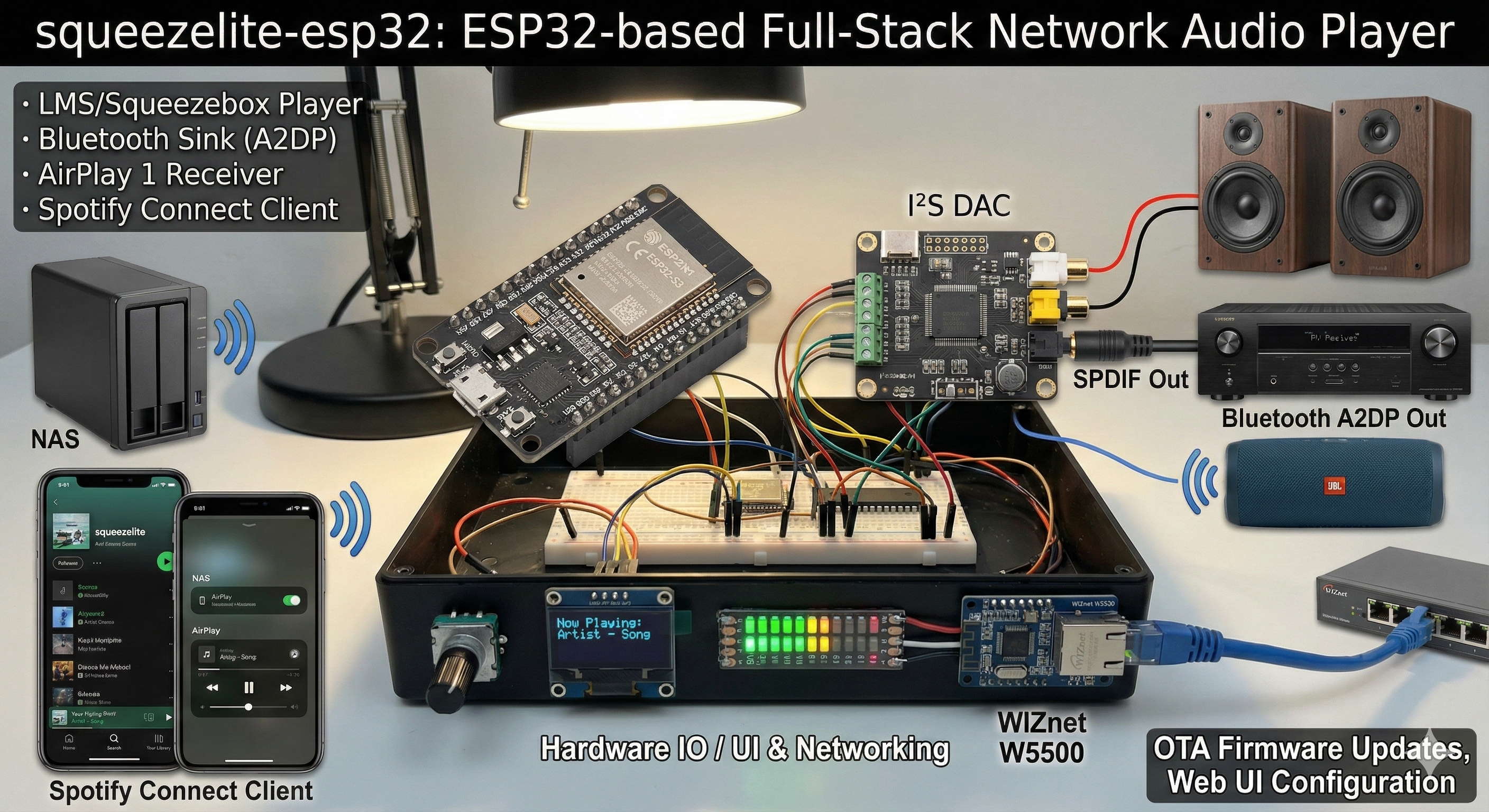
According to the README, squeezelite-esp32 is an audio software suite for Espressif’s ESP32 / ESP32-S3 Wi-Fi/Bluetooth chips.
Streaming / input:
- Acts as an LMS/Squeezebox player – playing local library content and any streaming services LMS exposes (Spotify/Deezer/Tidal/Qobuz, etc.).
- Bluetooth sink – can be selected as a BT speaker from a phone or computer.
- AirPlay 1 receiver – shows up as an AirPlay target for Apple devices and can be synced with other LMS players.
- Spotify Connect client – via the integrated cspot component, appears as a device in the official Spotify app.
Audio outputs:
- I²S DAC (on-board or external)
- SPDIF (coax/optical, depending on board)
- Bluetooth A2DP out to wireless speakers
Hardware IO / UI:
- Buttons and rotary encoders
- IR receiver
- Multiple SPI/I²C displays
- SSD1306, SH1106, SSD1322, ST7735, ST7789, ILI9341 and more
- LED strips for VU meters / status
- Web UI for configuration and status
- OTA firmware updates over Wi-Fi or Ethernet
In one sentence:
It turns an ESP32 into a multi-room capable LMS player + AirPlay receiver + Bluetooth speaker + Spotify Connect endpoint, with rich hardware integration.
4. Original language, author & community
4.1 Language & repository
- Main repo:
sle118/squeezelite-esp32on GitHub (English README). - It started from philippe44’s ESP32 port of squeezelite, and has since grown into a feature-rich, community-driven fork.
4.2 Author: Sébastien “sle118”
- GitHub profile: Sébastien, based in Quebec City, Canada.
- The profile pins squeezelite-esp32 at the top with the tagline:
“ESP32 Music streaming based on Squeezelite, with support for multi-room sync, AirPlay, Bluetooth, Hardware buttons, display and more.”
- He also maintains a separate Web Installer repository (
squeezelite-esp32-installer) with a hosted GUI atsle118.github.io/squeezelite-esp32-installer/, making it possible to flash devices from a browser.
Beyond this project, his repos and gists show integrations with Home Assistant, ZEN32 indicator scripts, and other embedded smart-home/audio work, positioning him squarely in the DIY audio + smart home space.
4.3 Community & ecosystem
- Lyrion (Slimdevices) forum
- There is a dedicated thread, “ANNOUNCE: Squeezelite-ESP32 (dedicated thread)”, separate from the SqueezeAMP hardware thread.
- Users share builds, enclosures, bug reports, and feature suggestions; hardware like SqueezeAMP and other ESP32 boards are often discussed in the context of this firmware.
- Sonocotta & other hardware vendors
- Sonocotta’s Loud-ESP32 / Louder-ESP32 / HiFi-ESP32 boards are explicitly pitched as “amp + DAC + squeezelite combo” designed to expand LMS wireless setups.
- The Louder-ESP32 user manual states:
- “All ESP32-based boards are tested with Squeezelite-ESP32 software, which can be flashed using nothing but a web browser… You can use Squeezelite-ESP32 installer for that purpose.”
- Sonocotta’s ESP Audio Dock / ESParagus Media Center devices also use squeezelite-esp32 firmware, with their own Web Installer branded “ESP Audio Dock” but based on the same project.
- Home Assistant & Music Assistant
- Home Assistant’s Squeezebox integration supports LMS players directly, and community threads compare “squeezelite vs ESPHome media player” for whole-home audio.
- Users report running several squeezelite-esp32 speakers around the house as targets for TTS and music automation, often discovered automatically by Music Assistant.
Overall, squeezelite-esp32 has become the de facto ESP32-based software player in the LMS/Squeezebox world.
5. How it works — architecture & flow
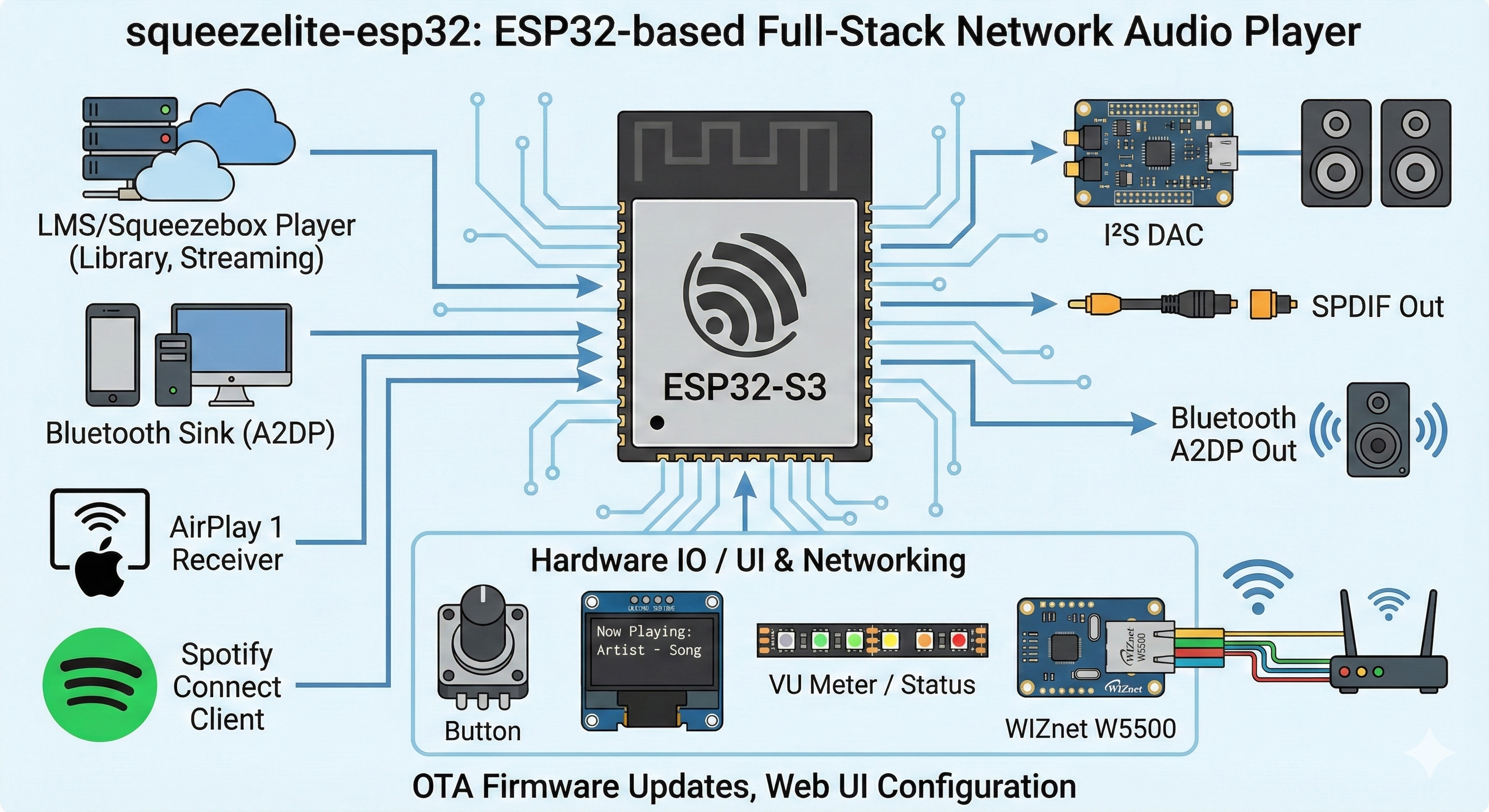
Drawing from the README and discussions, the internal architecture can be thought of in five layers.
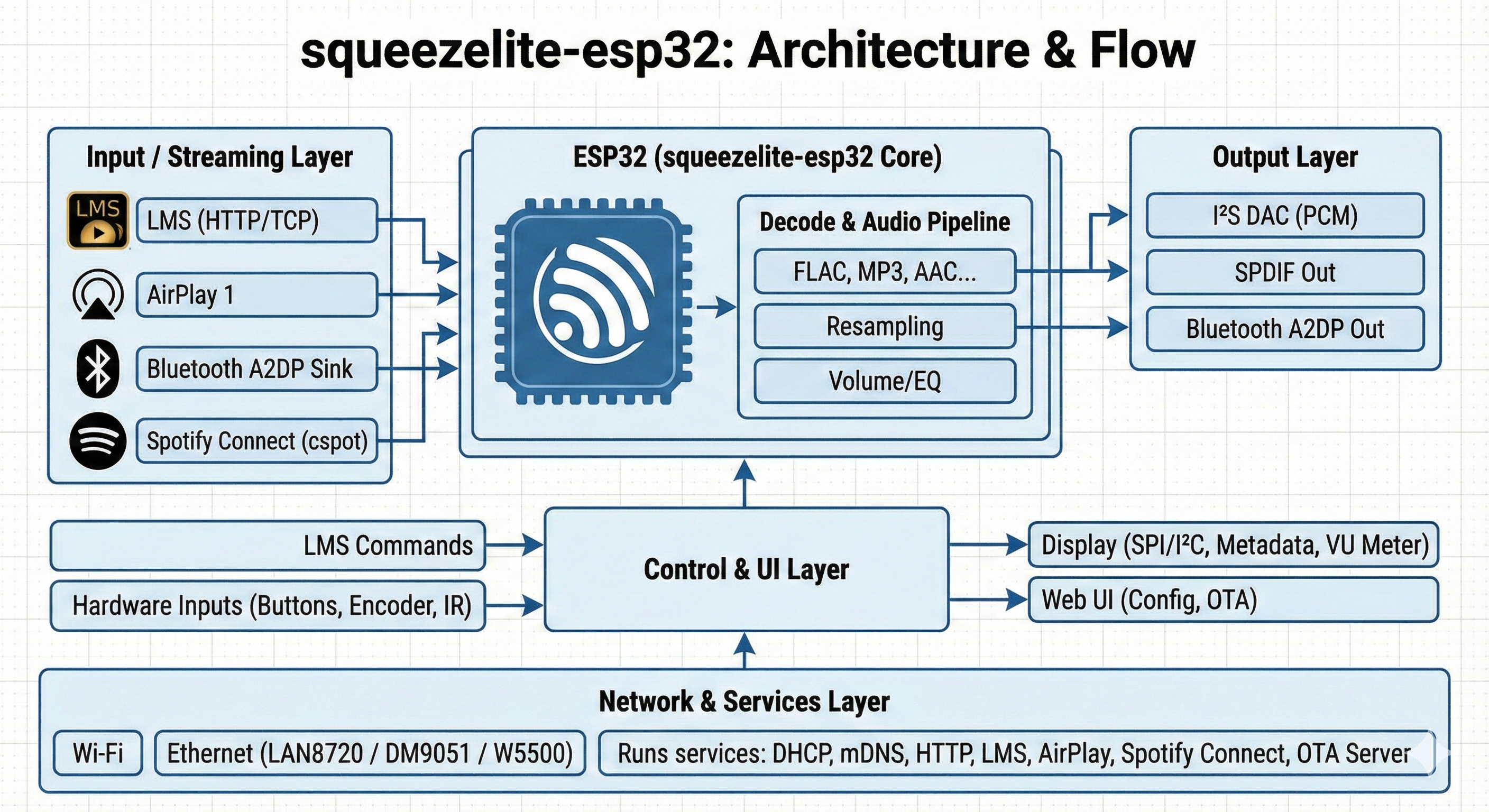
Generate Image: Gemini 3
Input / streaming layer
- Receives audio streams from LMS over HTTP/TCP.
- Accepts AirPlay 1 streams.
- Acts as a Bluetooth A2DP sink.
- Handles Spotify Connect sessions via cspot.
Decode & audio pipeline
- Uses squeezelite’s decoding engine to handle FLAC, MP3, AAC, ALAC, etc.
- Applies resampling, gain/volume, 10-band EQ, and crossfade when configured.
Output layer (I²S / SPDIF / Bluetooth)
- Sends PCM samples to an I²S DAC (often with PSRAM buffering).
- Optionally outputs SPDIF (depending on the board).
- Can re-encode/forward audio to Bluetooth speakers.
Control & UI layer
- Consumes LMS commands (play/pause, track skip, volume, sync).
- Processes hardware inputs: buttons, rotary encoders, IR remote.
- Drives SPI/I²C displays with track metadata, status, VU meters.
- Offers a web-based UI (HTTP server) for configuration, logs, and OTA.
Network & services layer
- Runs on top of Wi-Fi or Ethernet (LAN8720 / DM9051 / W5500).
- Handles DHCP, mDNS, HTTP, LMS, AirPlay, Spotify Connect, and the OTA update server.
6. Ethernet & W5500 — where WIZnet fits
6.1 Official support
The README spells out Ethernet support clearly:
“Ethernet using a Microchip LAN8720 with RMII interface or Davicom DM9051 / W5500 over SPI.”
So squeezelite-esp32 officially supports:
- LAN8720 (RMII, PHY only), and
- DM9051 / W5500 as SPI MAC/PHY devices.
A forked README on Sweproj elaborates on the SPI configuration syntax:
6.2 Real-world usage
From issues and discussions:
- A typical W5500 wiring uses the ESP32’s second SPI bus, e.g.:
- CS = GPIO 5, MOSI = 23, MISO = 19, SCLK = 18, INT = 15.
- A matching config string looks like:
Sonocotta’s boards go further and provide a dedicated W5500 header on the PCB; the Louder-ESP32 manual explicitly says all ESP32 boards are tested with squeezelite-esp32 and can be flashed via the web installer.
Effectively, W5500 has become the standard SPI Ethernet chip for ESP32-based LMS players built on this project.
7. Where this project has impact
Core player in the LMS/Squeezebox ecosystem
- On the Lyrion forums, squeezelite-esp32 has its own long-running dedicated thread, separate from SqueezeAMP hardware, and is treated as the go-to firmware for ESP32-based players.
Shipping in commercial streamers and amps
Sonocotta’s Loud/Louder-ESP32 and ESParagus Media Center devices all use squeezelite-esp32 as their software core, with their manuals and Tindie listings highlighting LMS integration and squeezelite support.
Bridge into Home Assistant / Music Assistant
- Home Assistant provides a Squeezebox integration that works seamlessly with LMS and thus with squeezelite-esp32 players; Music Assistant can auto-discover and manage them as whole-home speakers.
Preferred pattern for DIY ESP32 Hi-Fi
- In DIY audio circles, when someone asks “How do I build a serious ESP32-based LMS/AirPlay/Spotify streamer?”, the most common answer is:
ESP32 audio board + squeezelite-esp32 (+ optional W5500 for wired LAN).
8. Quick reproduce – if you want to try it
1) Choose hardware
- Minimum: an ESP32-WROVER (4 MB Flash + 4 MB PSRAM) with I²S DAC or a Bluetooth speaker.
- Nicer options:
- SqueezeAMP, MuseLuxe,
- Sonocotta’s Loud-ESP32 / Louder-ESP32 / HiFi-ESP32
- ESParagus Media Center boards (all tested with squeezelite-esp32).
2) Flash the firmware (easiest path)
- Open the official Web Installer:
https://sle118.github.io/squeezelite-esp32-installer/. - Connect the board via USB, pick the appropriate hardware profile (e.g. “I2S-4MFlash” generic target) and version, click Connect, then Install.
3) (Optional) Enable W5500 Ethernet
- Wire W5500 to SPI (CS + MOSI/MISO/SCLK + INT).
- Add or edit the config string to something like:
following your board’s pinout.
4) Integrate with LMS & services
- Install Lyrion/Logitech Music Server on a server or NAS.
- Add the squeezelite-esp32 player in LMS, enable streaming plugins (Spotify/Tidal/Qobuz, etc.).
- Optionally, add AirPlay and Spotify Connect via the ESP32 player itself and tie everything into Home Assistant or Music Assistant for whole-home audio.
이 프로젝트는
ESP32/ESP32-S3 보드를 Logitech Media Server(LMS) 생태계에 완전히 통합된 네트워크 오디오 플레이어로 바꿔 주는 펌웨어입니다.
Wi-Fi와 Bluetooth는 물론, W5500·DM9051·LAN8720 같은 이더넷 칩까지 지원해서,
LMS 플레이어 + AirPlay 수신기 + Bluetooth 스피커 + Spotify Connect 디바이스를 ESP32 한 장으로 구현할 수 있습니다.
2. Quick background – squeezelite가 뭐지?
squeezelite-esp32를 이해하려면 먼저 squeezelite가 뭔지 짚고 가는 게 좋습니다.
squeezelite란?
원래 PC/라즈베리파이·NAS 등에서 돌아가는 소프트웨어 Squeezebox 클라이언트입니다.
Debian/Fedora 설명을 빌리면:
“Squeezelite is a small headless Squeezebox emulator… a headless client for Lyrion(Logitech) Music Server, used in place of dedicated Squeezebox hardware.”
역할
예전에 Logitech이 만든 네트워크 플레이어 Squeezebox를 소프트웨어로 에뮬레이션하는 프로그램이고,
LMS(Logitech/Lyrion Music Server)에서 음악을 스트리밍 받아 재생합니다.
특징
완전 헤드리스(headless): 자체 GUI 없이 LMS 웹 UI나 iOS/Android 앱(예: iPeng, Material Skin, Squeezer)으로만 제어합니다.
고음질·멀티룸에 초점을 맞춰, 여러 샘플레이트, gapless 재생, 동기화된 멀티 플레이어 재생을 지원합니다.
그래서 squeezelite-esp32는
이 “작은 헤드리스 LMS 플레이어”를 ESP32 위로 옮긴 뒤,
거기에 Bluetooth·AirPlay·Spotify Connect·디스플레이·버튼·이더넷(W5500)까지 붙여
임베디드용 올인원 플레이어로 발전시킨 버전이라고 보면 됩니다.
3. What this project is — squeezelite-esp32 개요
3.1 전체 기능
GitHub README에 따르면, squeezelite-esp32는 **Espressif ESP32/ESP32-S3 Wi-Fi·Bluetooth 칩셋용 오디오 소프트웨어 모음(audio software suite)**입니다.
스트리밍 기능
LMS(Logitech Media Server)를 통한 재생
로컬 라이브러리 + 플러그인 기반의 Spotify/Deezer/Tidal/Qobuz 등 스트리밍 서비스
LMS의 멀티룸 동기화 기능 그대로 활용
Bluetooth sink
스마트폰/PC에서 Bluetooth 스피커처럼 사용할 수 있음
AirPlay 1 수신
iPhone, macOS, iTunes 등에서 AirPlay 출력 대상이 됨 (LMS와 멀티룸 동기화 가능)
Spotify Connect
cspot 통합으로 “Spotify에서 보이는 기기”로 동작 (Spotify 앱에서 직접 선택)
오디오 출력 경로
I²S DAC (내장 또는 외장)
SPDIF (동축/광)
Bluetooth A2DP 스피커
하드웨어 IO·UI
버튼 / 로터리 인코더 / IR 리모컨
각종 SPI/I²C 디스플레이
SSD1306 / SH1106 / SSD1322 / ST7735 / ST7789 / ILI9341 등
LED 스트립(VU-meter, 상태 표시용)
웹 UI 기반 설정·상태 조회, OTA 펌웨어 업데이트
한 문장으로 요약하면:
ESP32 한 장으로
LMS 플레이어 + AirPlay 수신기 + Bluetooth 스피커 + Spotify Connect 디바이스를
동시에 구현하는 펌웨어입니다.
4. Original language & Author / Community
4.1 언어 & 리포지터리
메인 리포지터리: sle118/squeezelite-esp32 (영어 README).
원작 기반: philippe44의 squeezelite-esp32 포트에서 출발해, sle118이 크게 확장/유지보수하고 있습니다.
4.2 저자: Sébastien “sle118”
GitHub 프로필: Sébastien, 위치는 **캐나다 퀘벡 시티(Quebec City)**로 표기되어 있습니다.
프로필에 squeezelite-esp32가 고정(pin)되어 있고, 설명에
“ESP32 Music streaming based on Squeezelite, with support for multi-room sync, AirPlay, Bluetooth, Hardware buttons, display and more”
라고 직접 적어 두었습니다.
별도 리포로 Web Installer (squeezelite-esp32-installer)도 운영 중이며,
“Web installer for the squeezelite-esp32 project”라고 소개합니다.
ESP32·오디오·스마트홈 쪽을 넘나드는 프로젝트를 여러 개 운영하고 있어,
DIY 오디오 + Home Assistant/스마트홈 교차점에 서 있는 메이커/개발자라고 보는 게 자연스러워요.
4.3 커뮤니티 & 파급력
Lyrion(Slimdevices) 포럼
“ANNOUNCE: Squeezelite-ESP32 (dedicated thread)”라는 전용 스레드가 있고,
여기서 SqueezeAMP(하드웨어)와 Squeezelite-ESP32(소프트웨어)를 분리해서 논의합니다.
수많은 사용자가 자신이 만든 보드·케이스·세팅을 공유하고, 버그 리포트·패치·새 칩(ESP32-C6/C5 등) 지원 논의를 합니다.
Sonocotta / 상용 보드 생태계
Sonocotta의 Loud-ESP32 / Louder-ESP32 / HiFi-ESP32 보드들은
“LMS 무선 오디오를 쉽게 확장하는 amp+DAC+squeezelite 콤보”라고 홍보하며, 펌웨어로 squeezelite-esp32를 탑재합니다.
Seeed Studio에서 판매하는 ESParagus Media Center 제품군도 동일 펌웨어를 사용하며, 별도 Web Installer(sonocotta/esp32-audio-dock)가 제공됩니다.
Home Assistant / Music Assistant
Home Assistant 커뮤니티에는 “Squeezelite vs ESPHome media player” 비교 글과, LMS·Music Assistant로 squeezelite-esp32 플레이어를 통합하는 사례가 올라옵니다.
실제로 “집 안에 squeezelite-esp32 스피커를 여러 개 설치해서 TTS/음악 자동화를 한다”는 사용기들도 여럿 찾아볼 수 있습니다.
→ 그래서 이 프로젝트는 LMS/Squeezebox 생태계에서 “ESP32 기반 표준 플레이어”에 가까운 포지션을 차지하고 있습니다.
5. How it works — 아키텍처 & 동작 방식
README 및 관련 문서를 기준으로, 내부 구조를 크게 다섯 레이어로 나눌 수 있습니다.
입력/스트리밍 계층
LMS로부터 HTTP/TCP 스트림 수신
AirPlay 1 스트림 수신
Bluetooth A2DP 수신
Spotify Connect(cspot) 세션 관리
디코딩 & 오디오 파이프라인
squeezelite 코어를 기반으로 FLAC/MP3/AAC/ALAC 등 디코딩
필요 시 리샘플링, 볼륨/게인, 10밴드 EQ, 크로스페이드 적용
출력 계층(I²S/SPDIF/Bluetooth)
I²S DAC (내장 또는 외장, PSRAM 기반 버퍼)
SPDIF 출력
Bluetooth 스피커(재송출)
제어 & UI
LMS 명령 (재생·멈춤·다음 곡·볼륨 등)
물리 버튼/로터리 인코더/IR 리모컨 입력
SPI/I²C 디스플레이에 앨범/상태 표시
웹 UI(HTTP 서버)로 설정·상태 조회 및 OTA 업데이트
네트워크 & 서비스 계층
Wi-Fi 또는 Ethernet(LAN8720/DM9051/W5500) 네트워크 스택
DHCP/mDNS, HTTP 서버, LMS·AirPlay·Spotify Connect 서비스가 이 레이어에서 동작
6. Ethernet & W5500 — 여기서 WIZnet이 하는 일
6.1 공식 지원
README에는 Ethernet 지원에 대해 이렇게 적혀 있습니다.
“Ethernet using a Microchip LAN8720 with RMII interface or Davicom DM9051/W5500 over SPI.”
즉, squeezelite-esp32는
LAN8720 (RMII)
DM9051 / W5500 (SPI)
두 계열 이더넷 칩을 정식 지원합니다.
Sweproj 포크의 README에서는 SPI 이더넷 설정 문법이 명시되어 있습니다.
6.2 실제 사용 예
GitHub 이슈/디스커션과 외부 문서를 보면 다음과 같은 패턴이 많이 등장합니다.
SPI2 버스 공유:
CS = 5, MOSI = 23, MISO = 19, SCLK = 18, INT = 15 같은 구성
설정 예시:
Sonocotta의 보드들은 아예 PCB와 매뉴얼에 “optional W5500 header”를 인쇄해 두고,
“W5500을 꽂으면 유선 LAN으로 쓸 수 있다”고 안내합니다.
→ W5500은 이 생태계에서 “ESP32 오디오 스트리머용 SPI Ethernet 표준 칩” 역할을 하고 있다고 봐도 과언이 아닙니다.
7. Where this content has impact
LMS/Squeezebox 생태계의 핵심 플레이어
Lyrion 포럼 전용 스레드와 3rd-party software 섹션에서
squeezelite-esp32는 SqueezeAMP를 비롯한 많은 하드웨어의 기본 소프트웨어로 논의됩니다.
상용 스트리머·앰프에 탑재
Sonocotta Loud/Louder-ESP32, ESParagus Media Center 라인업은
제품 설명에서 “LMS 무선 오디오를 손쉽게 확장하는 squeezelite 기반 장치”라고 소개합니다.
Tindie 리뷰에서도 “Louder-ESP32는 LMS 셋업 확장용으로 훌륭하다”고 직접 언급합니다.
Home Assistant / Music Assistant와의 브리지
Home Assistant 문서에는 Lyrion Music Server(Squeezebox) 통합이 공식 지원되며,
커뮤니티 글에서는 squeezelite-esp32 플레이어를 HA 자동화·Music Assistant와 함께 쓰는 사례가 다수 공유됩니다.
DIY·메이커 씬에서의 레퍼런스
“ESP32로 제대로 된 Hi-Fi 네트워크 플레이어를 만들고 싶다”는 글/질문에
squeezelite-esp32와 Sonocotta 보드 조합이 가장 자주 추천되는 솔루션 중 하나입니다.
8. Quick reproduce — 직접 써보기
하드웨어 고르기
최소: ESP32-WROVER(4MB Flash + 4MB PSRAM) + I²S DAC or Bluetooth 스피커
추천: SqueezeAMP, MuseLuxe, Sonocotta Loud/Louder-ESP32, ESParagus 시리즈 등 “squeezelite-esp32 지원”이 명시된 보드들.
펌웨어 설치
공식 Web Installer:
https://sle118.github.io/squeezelite-esp32-installer/에 접속 → USB로 ESP32 연결 →
보드/플랫폼 선택 → connect → flash.
(선택) W5500 Ethernet 사용
SPI로 W5500을 연결하고, 설정에eth_config=model=w5500,cs=<gpio>,speed=<Hz>,intr=<gpio>
형태로 입력.
필요한 경우 DM9051/LAN8720도 동일한 방식으로 설정 가능.
LMS/서비스 연동
서버에 Logitech Media Server 설치 후, squeezelite-esp32 플레이어를 등록.
LMS 플러그인으로 Spotify/Tidal/Qobuz 등을 추가하거나, Spotify Connect/AirPlay/Bluetooth를 바로 사용해 멀티룸 오디오 시스템을 구성.