



SD Card Reader
ESP32 handheld SD browser with OLED UI and a partial W5500 Ethernet offload path for TCP file transfer; novel embedded utility, but not a TOE-based design.
Thumbnail: AI-generated image
1. Title
ESP32 Handheld SD Card Browser Firmware with OLED UI and Planned W5500 Ethernet File Transfer
2. Introduction
AI-generated image
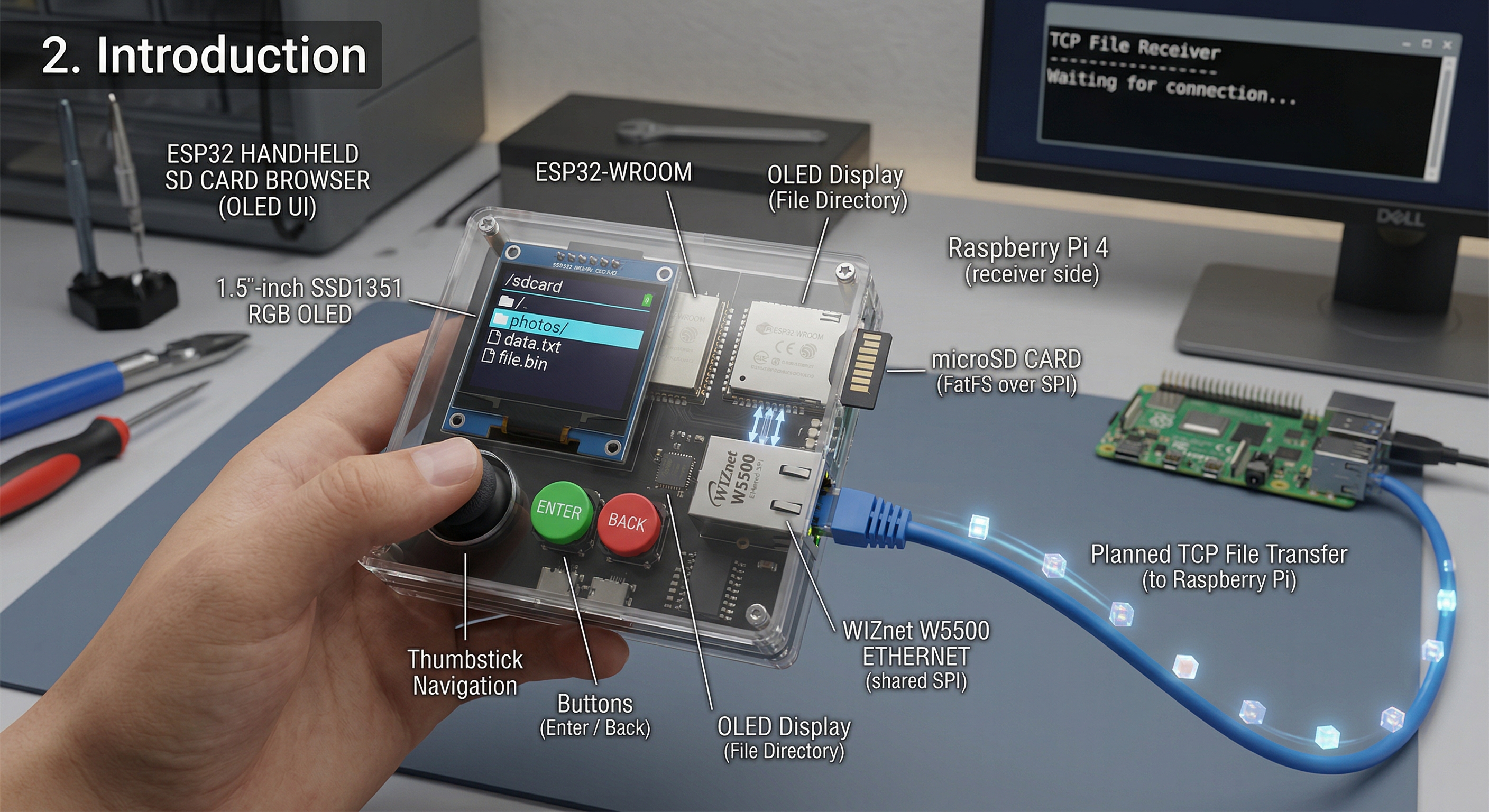
This project is best understood as application firmware for a handheld ESP32-based removable-media viewer, not simply as an SD card demo repository. The available materials show firmware for a small standalone embedded device that mounts a microSD card, renders its directory tree on a 1.5-inch RGB OLED, and lets the user browse files using a thumbstick and two hardware buttons. The README describes it as an “ESP32-based handheld file browser for SD cards,” and the main runtime code confirms that the active firmware behavior is centered on button input, thumbstick input, SD card mounting, and OLED rendering.
More specifically, this is firmware for a portable file browser appliance built around ESP32-WROOM and ESP-IDF 5.5.1. Its immediate product role is local: insert an SD card, power the device, and browse its filesystem directly on the embedded display without needing a PC host. The visible task structure in main.c creates separate FreeRTOS tasks for the buttons, thumbstick, SD card bring-up, and OLED-driven browser UI, which makes the product identity much clearer than the repository name alone.
At the same time, the project is not only a local browser. The materials also show a W5500 Ethernet path intended for TCP-based file transfer, plus a Raspberry Pi receiver script that accepts streamed files from the device. That means the broader product direction is not “screen-only SD reader,” but a handheld media browser that can evolve into a portable wired file offload tool. However, the currently visible runtime still centers on local browsing. app_main() initializes the shared SPI bus and launches the button, thumbstick, SD, and OLED tasks, but it does not currently call ethernet_init() or ethernet_send_file(). So the networked transfer path is present in the codebase, but it is not yet part of the main user flow shown in the active firmware entry point.
This distinction matters for accurate curation. The repository contains both:
- a working local handheld browser firmware path, and
- a partially integrated wired file-transfer extension
So the project should be presented as firmware for a handheld SD card browser device, with a planned W5500-based wired transfer feature, not as a finished Ethernet file-transfer product yet.
3. Quick background / plain-language explanation
AI-generated image
In plain language, this firmware turns an ESP32 board into a small handheld SD card viewer.
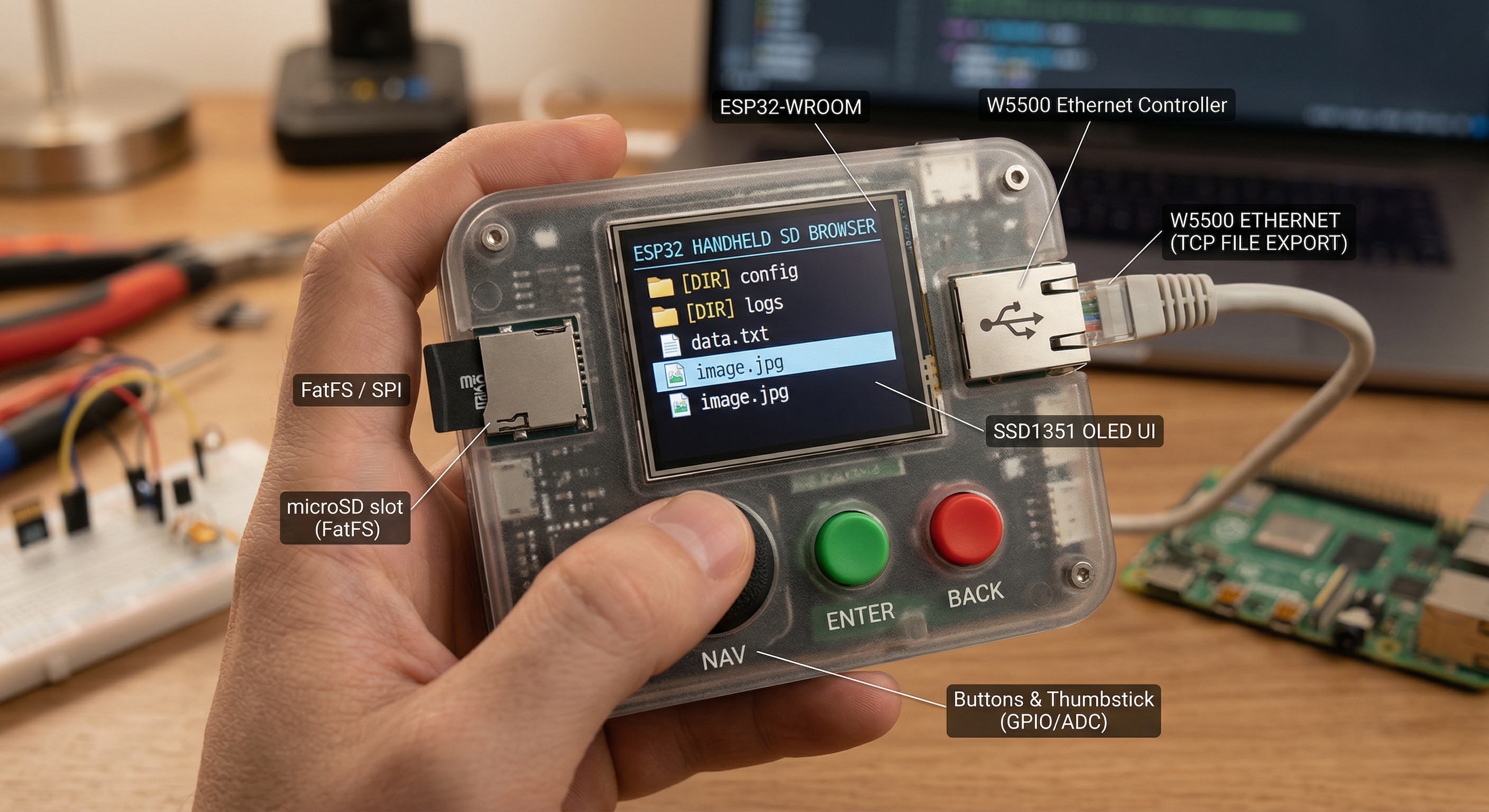
The user inserts a microSD card, and the device mounts it using FatFS over SPI, then draws the directory contents on a color OLED. A thumbstick moves the selection up and down, the green button enters a directory, and the red button moves back up one level. That means the core product behavior is closer to a portable embedded file browser than to a storage adapter or PC peripheral.
The firmware also reflects a clear hardware-product mindset. The README and design notes define concrete pins for:
- two physical buttons
- thumbstick X/Y analog input
- a microSD module on SPI
- an SSD1351 OLED on a separate SPI bus
- a W5500 Ethernet controller sharing the SD card’s SPI bus
That hardware map is important because it shows the project is not just “code that can browse directories.” It is firmware for a real handheld embedded device with a local UI, where display responsiveness and simple physical navigation matter more than bulk-transfer throughput. The design document even explains why the SD card remains mounted for the full session: keeping it mounted removes repeated remount latency and makes the browser feel responsive. That is a product-level design decision, not a generic repository detail.
The Ethernet extension needs a plain-language explanation too. The project includes a W5500-based Ethernet module and a Python receiver script for Raspberry Pi. In practical terms, this means the device is intended to move from being “a handheld thing that can inspect an SD card” toward “a handheld thing that can browse an SD card and push a selected file out over wired Ethernet.” The README lists W5500 Ethernet and TCP file transfer as project items, and the code already contains a TCP send path, but the main firmware loop has not yet wired that feature into the UI flow.
So the plainest accurate description is:
This is firmware for a handheld ESP32 file browser device that reads SD cards locally on an OLED display, with an in-progress W5500 Ethernet path for wired file export.
4. What this project is
AI-generated image
This project is firmware for a handheld SD card browsing device, built around ESP32-WROOM and ESP-IDF, with a local OLED interface and physical navigation controls. It is not firmware for a router, not a generic Ethernet storage bridge, and not just a peripheral driver collection. Its immediate role is to make an SD card’s directory structure visible and navigable on-device, without needing a host PC. The visible runtime creates separate FreeRTOS tasks for input sampling, SD card bring-up, and display rendering, which is exactly what would be expected in a small interactive handheld appliance.
More specifically, this firmware targets a device that sits somewhere between:
- a portable media browser
- a debugging / inspection tool for SD cards
- and a field utility for browsing and later exporting files
That third point matters. The W5500 and Raspberry Pi transfer tooling show that the project is not stopping at “visualize files on a screen.” It is moving toward a product that can inspect removable media locally and then transfer selected content over wired Ethernet. The transfer module opens a file from the SD card, connects over TCP to a remote host, sends a header containing filename and size, then streams the file in chunks and waits for an ACK byte. That is a clear product direction toward portable file offload, not just local browsing. But again, the main entry point does not yet integrate that path into the handheld UI flow, so it should be described as a planned or partially integrated extension, not finished core behavior.
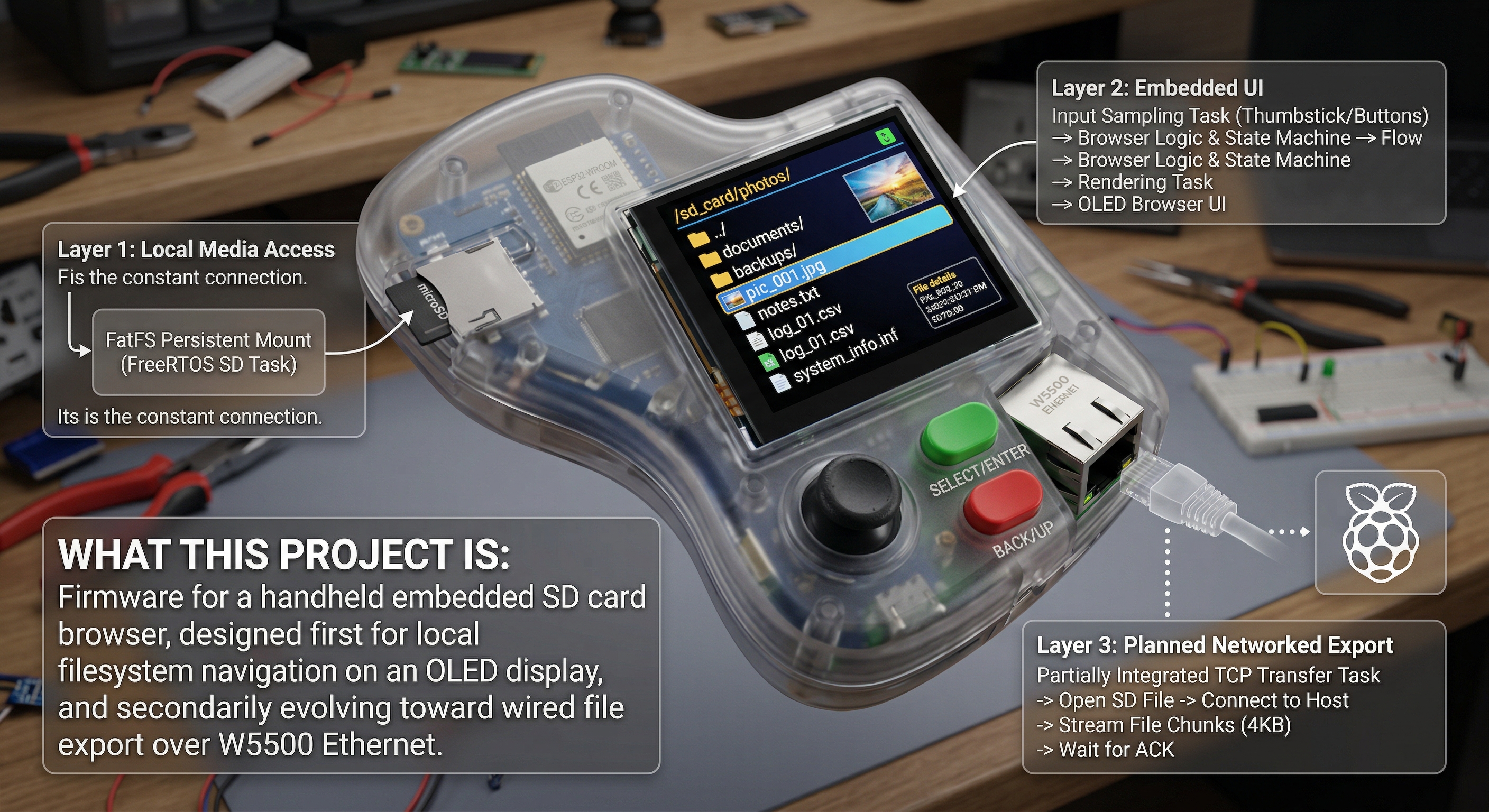
From a system perspective, the current firmware identity can be described in three layers:
1) Local media-access firmware
The SD card is mounted with FatFS, and the browser UI directly uses opendir() / readdir() against the mounted filesystem. The SD card stays mounted during the session, which makes the whole device behave like a persistent local media browser rather than an on-demand mount/unmount tool.
2) Embedded UI firmware
The OLED is not acting as a simple debug console. It is the actual product UI, with a path header, visible rows, highlight state, and navigation logic. The physical thumbstick and button mapping make the firmware clearly device-oriented.
3) Planned networked file-export firmware
The repository also includes a W5500 Ethernet component and a TCP file receiver on Raspberry Pi. That gives the firmware a second intended role: turning the handheld browser into a portable wired file-transfer endpoint. The important caveat is that the visible main firmware still centers on local browsing, so the W5500 feature should be framed as present in code, not yet fully integrated in the shown main workflow.
Because of that, the most accurate product-level description is:
This is firmware for a handheld embedded SD card browser, designed first for local filesystem navigation on an OLED display, and secondarily evolving toward wired file export over W5500 Ethernet.
What kind of product or market does it fit?
This firmware does not primarily target industrial control, SCADA, or gateway markets. Its more natural fit is:
- portable embedded utility devices
- maker handheld tools
- field media inspection devices
- compact offline file browsers
- and potentially portable wired file-offload tools for labs, makerspaces, repair benches, or classroom demos
That makes this project commercially and curatorially different from the previous Modbus gateway firmware. This one is not a network infrastructure product first. It is a user-facing handheld appliance firmware with a small-screen UI and a possible Ethernet-assisted export function.
WIZnet classification at this stage
One important early point should already be stated. Even though W5500 is present in the hardware plan and Ethernet component, the visible implementation uses ESP-IDF esp_eth with the W5500 SPI Ethernet driver, which Espressif documents as RAW MAC mode connected to the software TCP/IP stack. Espressif’s documentation explicitly notes that while W5500 itself is a hardwired TCP/IP controller, the ESP-IDF W5500 driver uses RAW MAC mode, making it compatible with the software TCP/IP stack instead of exposing the W5500 hardwired socket stack directly. That means this project is not a TOE/ioLibrary Driver project in the same sense as the previous gateway firmware; it is a W5500 + ESP-IDF esp_eth + lwIP design. (ESP 구성 요소 레지스트리)
That distinction will be explained in more detail in Part 2.
5. Author & external / community background
The available materials show that Aneel Badesha is a computer engineering student at Simon Fraser University in Vancouver and describes his interests as focused mainly on firmware, embedded systems, and operating systems development. That profile fits the project well: the repository looks like serious hands-on embedded engineering rather than a copy-and-paste tutorial assembly.
The project itself also shows signs of thoughtful engineering discipline. The README, design document, component structure, and notes about debugging issues suggest a builder who is documenting hardware trade-offs and firmware architecture deliberately. The design notes cover decisions such as:
- FatFS vs littlefs
- SPI vs SDMMC
- custom OLED driver vs ported Linux driver
- separate SPI buses
- permanent mount lifetime
- and the rationale for choosing W5500 over LAN8720 for this use case
That gives the project more external value than a bare demo, even if the public footprint is still modest. The project is recent, with visible development activity in late February and early March 2026, which helps on the newness scoring axis. Public-facing influence, however, still appears limited from the reviewed materials: this looks more like a technically solid individual engineering project than a widely circulated community product so far. Public sources reviewed here do indicate the author has a portfolio site and a Devpost profile, but the visible public profile still appears to be at an early stage rather than a large established maker brand. (Devpost - The home for hackathons)
So the fair external-value judgment for Part 1 is:
- technical credibility: good
- project freshness: good
- public reach / market response: still limited based on the visible public materials
- curation value for WIZnet: meaningful, because the project shows a concrete handheld product concept that adds W5500 for a specific system reason rather than just for a generic Ethernet checkbox
6. How it works for general users / operators
AI-generated image
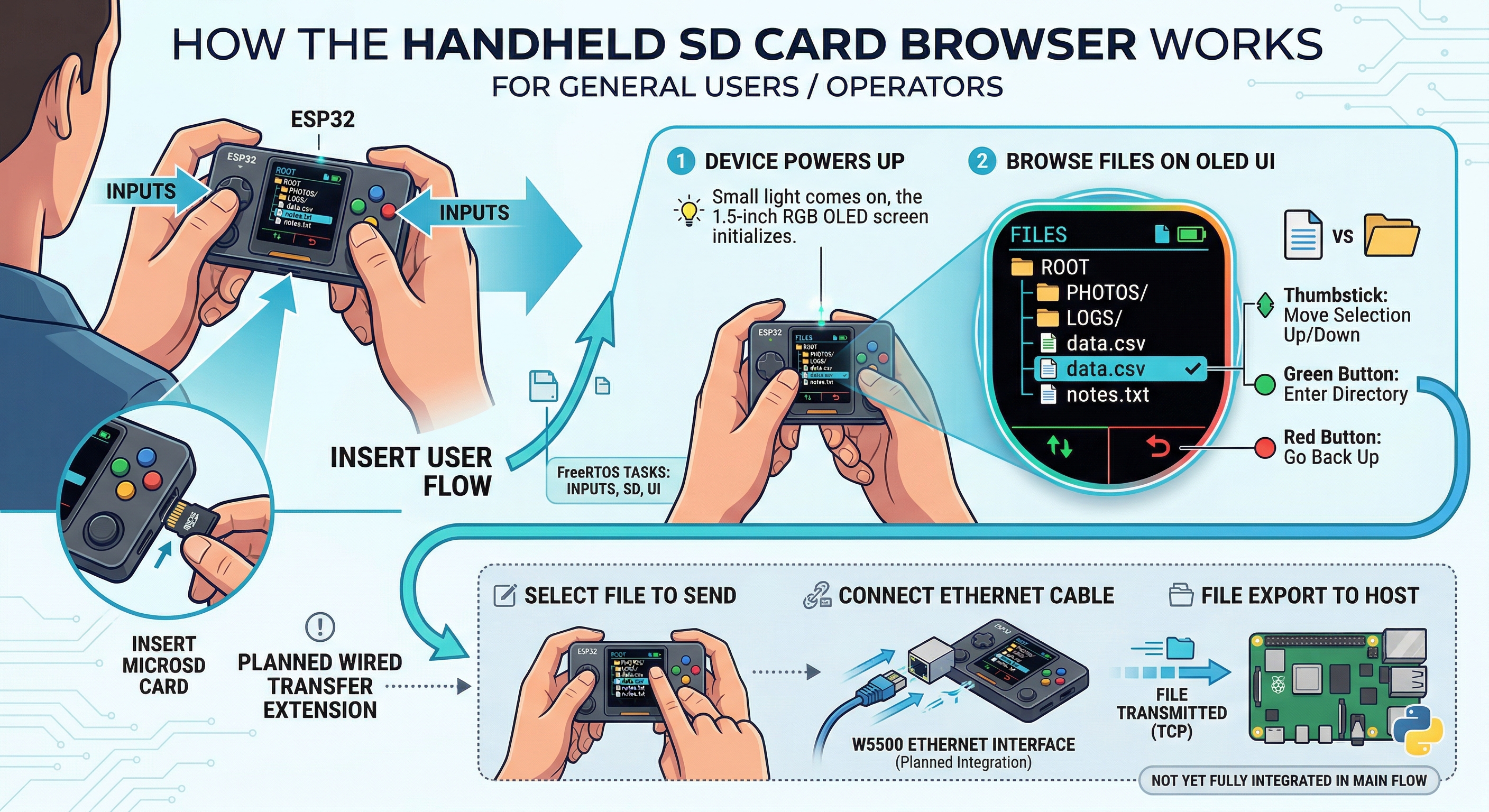
For end users, this firmware behaves like a handheld SD card browser. The device powers up, initializes the shared SPI bus, starts separate FreeRTOS tasks for the buttons, thumbstick, SD card, and OLED, waits for the SD card to become ready, and then renders the mounted filesystem on the display. The active user flow is fully local: move through entries with the thumbstick, enter folders with the green button, and go back with the red button.
That makes the current product experience closer to a portable file-inspection tool than to a network appliance. The OLED task does not simply print debug text; it keeps track of browser state, current path, selected row, and scroll offset, then redraws the directory view when the user navigates. The SD task also writes a boot-time timestamp file to the card, which shows the firmware is already treating the card as live removable storage rather than as a passive demo peripheral.
The networked transfer behavior should be described carefully. The repository includes a W5500 Ethernet component and a Raspberry Pi receive script, so the broader operator story is “browse locally, then later send a file over wired Ethernet.” But in the currently visible app_main() path, Ethernet is not started and no file-transfer action is wired into the OLED UI. So the actual operator experience today is still primarily local browsing, with wired transfer prepared in code but not yet integrated into the active handheld flow.
7. How it works for developers
From a developer perspective, this is product firmware for a small embedded UI device, built in a clean component-oriented ESP-IDF structure rather than as a single monolithic example. The README lays out separate components for buttons, thumbstick, SD card, OLED display, and Ethernet, and the main firmware uses explicit task-level separation for those functions.
The runtime architecture is straightforward and strong for this class of device:
- input tasks keep button and thumbstick state updated behind a mutex
- the SD card task mounts the card and prepares the storage path
- the OLED task owns the UI and the browser state machine
- the Ethernet component is implemented separately from the active UI path, which keeps the local browser logic clean and leaves room for later file-transfer integration
The SD browser implementation is not based on a custom file indexer. It uses the mounted FatFS path and standard directory operations such as opendir() and readdir(), then stores file and directory names into a fixed browser structure for rendering. That is a sensible design for a small handheld browser because it keeps the UI responsive without introducing unnecessary abstraction.
The Ethernet path is more mature than the README checklist alone suggests. The repository already includes ethernet_init(), an IP wait flow, and ethernet_send_file(), which opens a file from the SD card, connects to a remote TCP host, sends filename and size metadata, streams file contents in 4 KB chunks, then waits for an ACK byte. The Raspberry Pi helper script implements the matching receive side for that simple protocol. So the file-transfer subsystem is real code, not just a TODO note, even though it is not yet called by the main handheld UI.
8. WIZnet role / lwIP vs TOE / why W5500 is used
This project includes W5500 as the wired Ethernet controller. The hardware plan in the README places W5500 on the same SPI3 / VSPI bus as the SD card, with a separate chip-select, interrupt, and reset line. The main firmware also explicitly initializes SPI3 once and comments that this bus is shared by the SD card and W5500 Ethernet.
Where W5500 sits in the system
In this product, W5500 is not the center of the device. The center is still the ESP32-WROOM handheld browser appliance. W5500 sits beside that local UI/storage path as the wired export interface that can later move selected files off the SD card over LAN. That is a different role from infrastructure gateways: here WIZnet is being used as a device-side transfer path, not as a persistent network service engine.
What data flows through it
The visible Ethernet component uses a TCP client flow to send file contents to a remote server. The transmit sequence is:
- open a file from the SD card
- connect to a remote TCP server
- send filename length, filename, and file size
- stream file contents in chunks
- wait for a 1-byte ACK from the receiver
So the W5500 path is intended for wired file export, not for Modbus, SCADA, telnet service, or industrial device polling.
TOE or lwIP?
This project uses W5500 hardware, but the visible implementation is not a TOE/ioLibrary Driver design.
The Ethernet component includes esp_eth.h, esp_eth_mac_spi.h, esp_eth_phy.h, esp_netif.h, and standard BSD socket headers, then creates the W5500 MAC/PHY instances with esp_eth_mac_new_w5500() and esp_eth_phy_new_w5500(). It then attaches the Ethernet driver to the ESP network interface stack and uses normal socket(), connect(), send(), and recv() calls for file transfer.
Espressif’s official W5500 component documentation is explicit on this point: although W5500 contains a hardwired TCP/IP stack, the ESP-IDF W5500 driver does not use that TCP/IP stack, and instead integrates the chip in a way that works with the software TCP/IP stack. Espressif’s configuration help also describes the W5500 driver in ESP-IDF as RAW MAC mode, making it compatible with the software stack rather than exposing W5500’s own hardware socket layer. (ESP Component Registry)
So the correct classification for this project is:
- WIZnet chip used: W5500
- Stack type: ESP-IDF
esp_eth+ lwIP / BSD sockets - TOE / ioLibrary Driver usage: No
- Hybrid Networking: Not really in the current product sense — the current firmware does not combine active Wi-Fi and wired Ethernet roles the way a gateway product does; it is primarily a handheld local browser with an optional wired transfer extension. (ESP Component Registry)
Why W5500 is used here
The README gives a strong system-level reason: LAN8720 would require the ESP32 internal EMAC and RMII pins, which is a poor fit for this handheld device and its pin budget. W5500 works over SPI, can share the existing SPI3 bus used by the SD card, and has native ESP-IDF support. That is exactly the kind of product-level rationale that matters in WIZnet curation: W5500 is used here because it makes Ethernet practical in a compact embedded appliance where pin count and board simplicity matter more than maximum throughput.
9. Why it matters
AI-generated image
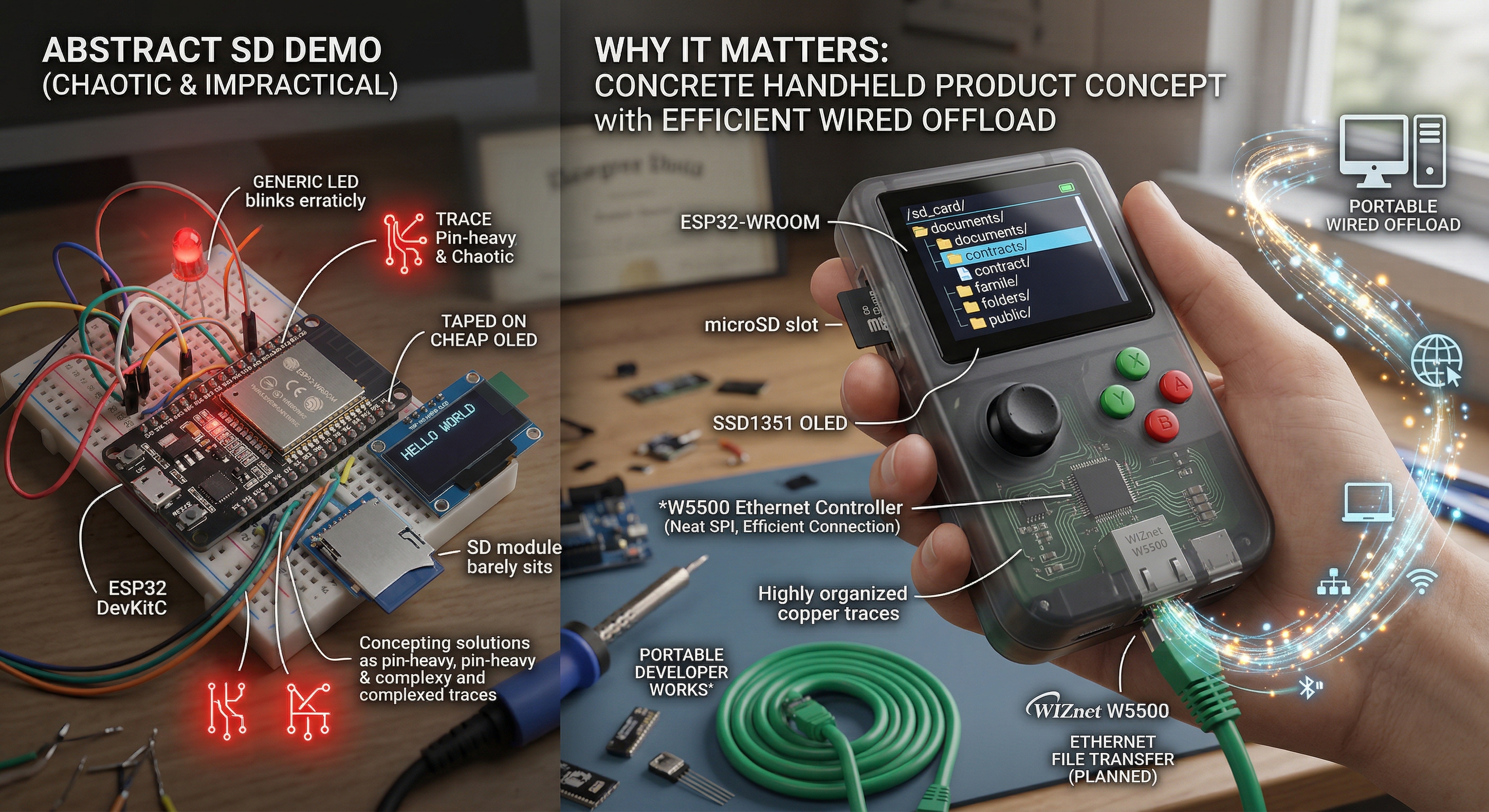
This project matters because it is not just “another SD card demo.” It shows a concrete handheld embedded product concept: a portable device that can browse removable media locally on a real screen with physical controls, and then extend into wired export. That is a more product-shaped concept than a simple SD read/write example on a development board.
It also matters because the W5500 role is used with a clear system purpose. In many small embedded projects, Ethernet is added as a generic checkbox. Here, the available materials show a practical reason: the device is fundamentally local and handheld, but W5500 gives it a clean path to become a portable wired file offload tool without redesigning the whole board around RMII Ethernet.
From a firmware-engineering perspective, the project also shows good discipline for a student-led build: clear component boundaries, documented hardware trade-offs, a task-based UI architecture, and a separate receive-side test tool. That lifts it above the level of a quick breadboard experiment.
10. Market context / product fit
AI-generated image
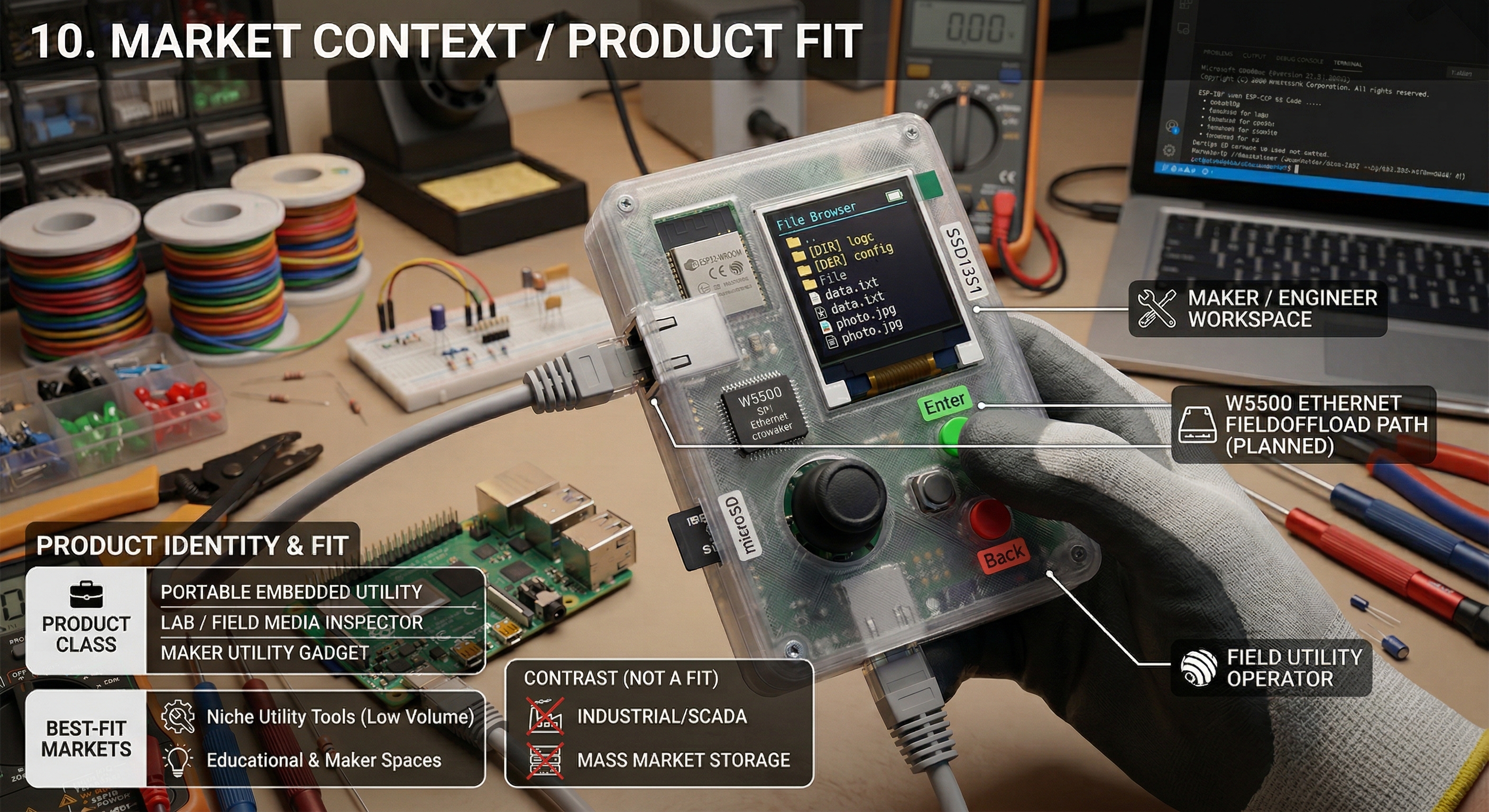
This firmware does not naturally fit industrial gateway or factory-control categories. Its more realistic fit is in portable embedded utility devices.
The strongest product categories are:
- handheld maker tools
- portable SD card inspection devices
- field service utilities for removable media
- bench-top or lab file browsers
- portable wired file-offload tools if the Ethernet path is fully integrated later
This is a niche market fit, but not an empty one. Small dedicated embedded tools often matter because they remove the need to carry a full PC or laptop into a workflow. In that sense, the product direction is closer to a single-purpose handheld utility than to a mass-market storage product. The likely value is not in large-scale consumer volume, but in maker, educational, field-service, and bench-utility usefulness.
The external-value signal is also helped by freshness. The public commit history shows visible development concentrated in late February and early March 2026, which supports the “new content” scoring angle. At the same time, the visible public reach still appears limited, so this should be scored as fresh and technically solid, but still early in public traction.
11. SPE applicability
This project has low direct SPE relevance.
The current Ethernet addition is based on W5500 standard Ethernet over SPI, not on Single Pair Ethernet hardware. The product also does not target the kind of field-level industrial networking role where SPE provides the clearest advantage. This is a handheld local device with optional wired file transfer, not an always-on sensor/actuator node in an SPE-style field network.
So the correct evaluation is:
- Current SPE hardware: No
- Strong SPE expansion value: No
- Frontier-market fit for SPE: Low
If the project were redesigned into a fixed embedded storage-access or field logging node, SPE might become more relevant. But based on the visible product identity today, SPE is not the natural next step. The more natural next step is simply finishing the W5500-based wired file-transfer workflow inside the handheld UI.
12. Quick notes / caveats
A few caveats are important for accurate curation.
First, the README lists the W5500 Ethernet driver and TCP file transfer as unfinished checklist items, but the visible source already contains a working-looking Ethernet initialization and file send path. That means the repository is in an intermediate state where the README progress section slightly lags behind the code. The safer wording is that Ethernet transfer is implemented in component form but not yet integrated into the main handheld user flow.
Second, this project should not be scored as a TOE/ioLibrary Driver showcase. It uses W5500 hardware, but the visible code path is clearly ESP-IDF Ethernet driver + software TCP/IP stack, not direct W5500 hardwired socket programming. (ESP Component Registry)
Third, Hybrid Networking should also be scored conservatively. The repository includes both SD + display logic and a wired Ethernet extension, but it does not show a meaningful ESP Wi-Fi × Hardwired Ethernet coexistence story like the earlier industrial gateway project did. This is better categorized as a local handheld device with a wired transfer extension, not a true hybrid network appliance.
Q: What is the main purpose of this project (firmware)?
A: It is firmware for an ESP32-based portable, standalone file browser. Designed to operate without a PC, it allows users to insert a MicroSD card and browse files locally using a 1.5-inch OLED display and physical inputs (a thumbstick and buttons).
Q: What role does the W5500 Ethernet feature play?
A: It acts as an extension for transferring files from the SD card to an external device (such as a Raspberry Pi) via wired Ethernet (TCP). While the underlying transfer code is implemented, it is currently a "planned" feature that has not yet been fully integrated into the main UI workflow.
Q: Why was the W5500 chosen over the LAN8720 for Ethernet?
A: Because of strict pin constraints. The LAN8720 requires multiple RMII pins, whereas the W5500 uses SPI. This allows the W5500 to share the existing SPI bus with the SD card, making it a much better fit for a compact, handheld device design.
Q: Does it directly use the W5500's Hardware TCP/IP Offload Engine (TOE)?
A: No. Instead of directly utilizing the hardware sockets, the project uses the ESP-IDF esp_eth driver in RAW MAC mode. This means it relies on the ESP32's software TCP/IP stack (lwIP) to handle the networking.
Q: What markets or use cases is this firmware best suited for?
A: It is not intended for industrial gateways or network infrastructure. Instead, it is highly suited for handheld maker tools, field media inspection devices, and compact offline file browsing and transfer utilities for workshops or labs. (As a result, its applicability to industrial Single Pair Ethernet (SPE) is very low.)
13. References
- Repository README and hardware / architecture description.
- Main firmware entry point and task-based browser UI.
- Ethernet component using
esp_ethand BSD sockets. - Raspberry Pi receive-side transfer tool.
- Author GitHub profile README.
- Espressif W5500 component documentation, including the note that W5500’s hardwired TCP/IP stack is not used in the ESP driver. (ESP Component Registry)
- Espressif W5500 configuration help showing RAW MAC mode under ESP-IDF. (esp32.ai)
- WIZnet W5500 official product overview. (WIZnet Document System)