



pico-iiot-bridge
RP2350 + WIZnet W6100 IIoT gateway: FreeRTOS SMP with web UI/CLI, persistent config, serial-to-TCP and Modbus RTU→tag DB, Ethernet sockets for DHCP/HTTP.
Thumbnail Image: AI-generated image
Pico I-IoT Bridge: RP2350 + WIZnet W6100 industrial protocol gateway with Web UI, CLI, and persistent config
Introduction
pico-iiot-bridge is an industrial IoT bridge/gateway project built on the Raspberry Pi RP2350 (Pico 2 class) and WIZnet W6100 hardwired Ethernet. The repository frames the device as a protocol converter for industrial automation, bridging legacy serial/protocol networks to IP-based systems, with a real-time FreeRTOS foundation and configuration-first workflow. (GitHub)
What this is
At its current stage, the project already looks like a practical “IIoT edge box” firmware stack rather than a single demo:
- FreeRTOS SMP on RP2350 with task-based subsystems (networking, HTTP config server, CLI, protocol tasks). (GitHub)
- W6100 Ethernet as the primary networking interface (10/100 wired). (GitHub)
- Web configuration interface (HTTP server + responsive UI) and a serial CLI for headless setups. (GitHub)
- Persistent configuration in flash (network/serial/TCP settings), with explicit attention to dual-core safety. (GitHub)
- Roadmap toward common industrial gateway roles: serial-to-TCP, Modbus TCP↔RTU bridging, remote I/O, MQTT, OPC UA. (GitHub)
Repository activity is early but real: GitHub currently shows 0 stars / 1 fork / 85 commits. (GitHub)
Author & Community
The project is published by antoniozlp as a public GitHub repository. Community signals are still small (0 stars), but the structure is “SDK-like” (modular subsystems, build integration, vendor networking stack, and clear prerequisites), which typically indicates the author is targeting reuse and extension rather than a one-off experiment. (GitHub)
How it works
AI-generated image
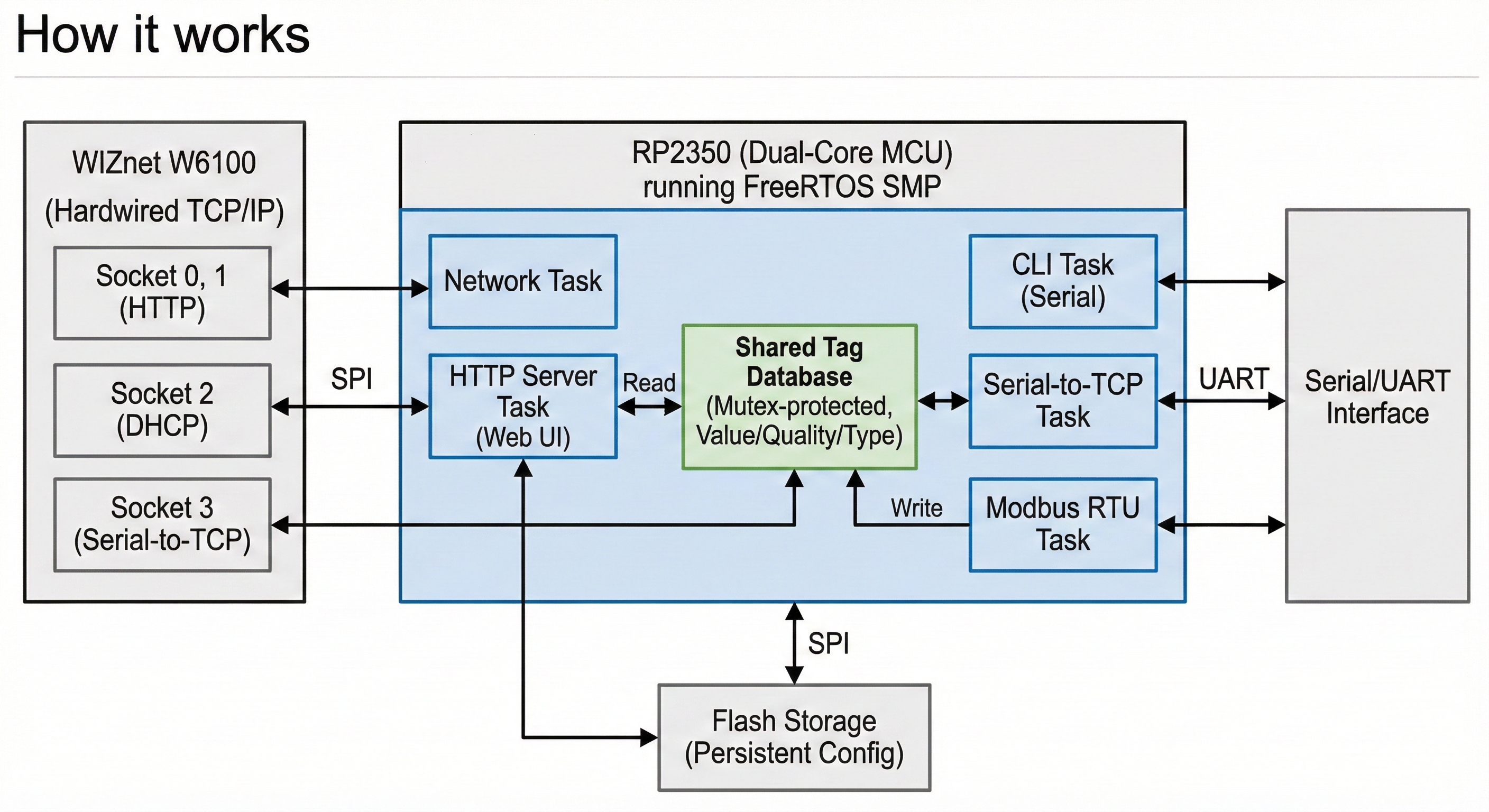
1) System architecture: tasks + shared tag database
In the provided ZIP snapshot, src/main.c brings up a set of FreeRTOS tasks in a predictable gateway sequence:
- Network task (bring up W6100, link detection, DHCP/static, notify dependents)
- HTTP server task (configuration UI + CGI endpoints + JSON outputs)
- CLI task (serial configuration commands like
config read/write ..., plus reboot/task stats) - Serial-to-TCP task (transparent UART↔TCP bridge)
- Modbus RTU task (client polling via nanoMODBUS)
A key design choice is the Tag Database: a centralized, named variable store so different tasks can exchange “process values” without tight coupling. Producers (e.g., Modbus polling) write tags via a queue (non-blocking), while consumers (HTTP/UI today; MQTT/OPC UA later) read them with mutex protection. The tag quality model explicitly uses SCADA/OPC-style states (GOOD / BAD / UNCERTAIN) and typed payloads (BOOL, UINTx, INTx, FLOAT). (Code evidence: src/tag-database/tag_database.*, plus config structures in system_config.h.)
2) WIZnet data path: W6100 hardware sockets used as the system’s network “bus”
The firmware uses WIZnet’s ioLibrary style sockets (not a separate software TCP/IP stack on the MCU) and allocates sockets by service:
- HTTP server reserves sockets 0 and 1 (configured as
g_http_socket_num_list = {0, 1}inhttp_server_task.c). - DHCP client runs on socket 2 (in
network_task.c,DHCP_SOCKET = 2, with a 1ms timer feedingDHCP_time_handler()and a retry policy). - Serial-to-TCP bridge uses socket 3 (in
serial_to_tcp.c,S2TCP_SOCKET_NUM = 3) and supports server/client mode with connection state handling and buffered UART/TCP copies.
This is a good “evidence-backed” example of how W6100’s multi-socket hardware becomes a simple resource scheduler for embedded gateways: one chip, multiple concurrent services.
3) Network bring-up and configuration flow (static or DHCP)
The project stores Ethernet settings in a WIZnet wiz_NetInfo structure (IP/subnet/gateway/DNS/MAC + DHCP/static mode) and exposes them through both the Web UI and CLI.
- If DHCP is enabled, the network task starts DHCP, runs it continuously, and applies the leased config in the callback (then notifies other tasks the network is “READY”).
- If static, it applies
wiz_NetInfodirectly and still publishes a “READY” notification to dependent tasks.
The Web UI’s network page (embedded HTML headers in src/http-server/html/) includes fields for MAC/IP/subnet/gateway/DNS and a DHCP selector—practical for shop-floor installs where you want to configure a gateway without rebuilding firmware.
4) Industrial protocol bridging path: Modbus RTU → Tags → IP interfaces
The Modbus RTU client uses nanoMODBUS (code evidence: src/modbus/modbus_rtu.c) and a flash-persisted configuration model:
- up to 10 requests per client,
- up to 10 registers/coils per request,
- and per-register mapping into tag handles (
tag_handles[]), with an explicit “unmapped” sentinel (255).
The HTTP server exposes configuration endpoints for Modbus client enable/serial selection and datapoint request definitions, including tag mappings (evidence: CGI handlers in src/http-server/http_utils.c). This makes the system immediately usable as a “Modbus data collector with a web-configurable register map,” even before MQTT/OPC UA are added.
5) A practical engineering detail: dual-core safe flash writes on RP2350
One standout implementation detail is the flash-storage layer (src/pico-flash-storage/): it coordinates writes across both cores so neither core executes from flash while flash is being erased/programmed. The implementation uses a coordinator task and a guard task with RAM-resident busy-wait loops and interrupts disabled during critical sections. For an RP2350 FreeRTOS SMP project, this is exactly the kind of “hard problem” that often gets ignored—and it matters for a gateway expected to survive config changes in the field.
Why WIZnet (W6100) fits this project
The repo’s hardware target is explicitly the W6100-EVB-Pico2 evaluation board, i.e., a Pico2-compatible RP2350 platform “with additional Ethernet via W6100.” (WIZnet Document System)
WIZnet’s documentation also makes two integration points very concrete:
- SPI pin reservation: GPIO16–21 are internally connected to W6100 for MISO/CS/SCLK/MOSI/RST/INT and can’t be repurposed when Ethernet is used. (WIZnet Document System)
- Protocol headroom: W6100 supports hardwired TCP/UDP with IPv4/IPv6 dual stack, and multiple sockets with onboard buffering—useful for gateways that eventually need more than “just one TCP port.” (WIZnet Document System)
In this firmware, W6100 is already doing what it’s good at: running multiple concurrent services (HTTP, DHCP, serial server/client) with a consistent socket API and predictable behavior on wired networks. The hardware’s IPv6 capability is present in the platform choice, even if the current configuration UI is still IPv4-oriented.
Why it matters
AI-generated image
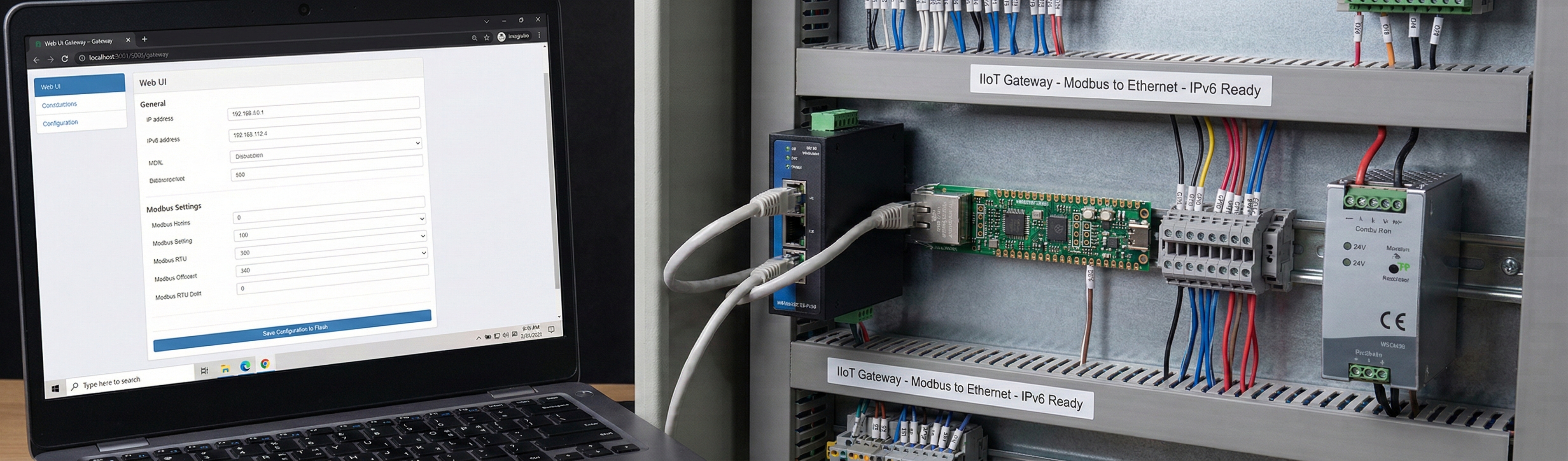
This project aligns with a real market shape: DIN-rail / panel gateways and serial device servers that sit between OT (serial/Modbus) and IT (Ethernet/TCP/HTTP/MQTT). Even in its current state, the repo shows several “productizable” traits:
- Immediate usability without recompile: web UI + CLI + flash persistence are the difference between a lab demo and something you can install. (GitHub)
- Industrial protocol direction: Modbus RTU is already implemented and structured to map registers into a common tag layer; Modbus TCP↔RTU and remote I/O are called out as next steps. (GitHub)
- Network future-proofing: selecting W6100 (dual stack IPv4/IPv6) is a meaningful signal for long-lived industrial environments and newer enterprise networks. (WIZnet)
Reason: (mass-production potential) the architecture matches common commercial gateway patterns (web-configurable register maps, persistent settings, multiple TCP services on one Ethernet chip). (niche market) labs, small factories, and retrofit projects that need a compact “serial/Modbus to Ethernet” bridge.
Quick notes
- Hardware documentation: the project is tested on W6100-EVB-Pico2, and WIZnet provides board-level references (including pinout and downloadable schematics/gerbers on the doc page). (WIZnet Document System)
- Demo media: the repo/ZIP snapshot doesn’t include a short video/GIF; capturing “Web UI change → reboot → Modbus poll → tags JSON updates” would make validation much faster for new users.
- Docs referenced vs. present: the README references a tag database example file and a proposal document, but those were not present in the provided ZIP snapshot—worth syncing to reduce friction for adopters. (GitHub)
- Licensing: the ZIP snapshot does not include a top-level LICENSE file; some vendor code (WIZnet port) contains its own licensing headers, but downstream reuse typically benefits from an explicit repository-wide license statement.
References
https://github.com/antoniozlp/pico-iiot-bridge
https://docs.wiznet.io/Product/Chip/Ethernet/W6100/w6100-evb-pico2
https://wiznet.io/products/ethernet-chips/w6100