



NeOS — A tiny OS on Tang Nano 9K
NeOS builds a mini RISC-V OS on a Tang Nano 9K FPGA and connects W5500 Ethernet to explore networking on a tiny custom FPGA computer.
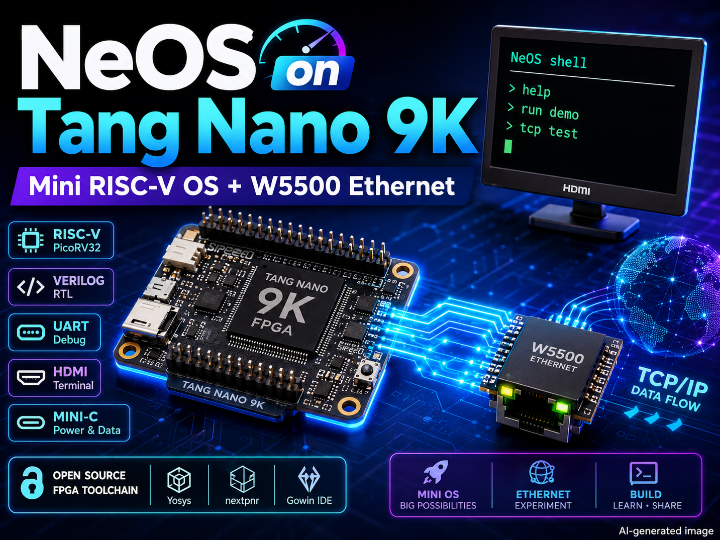
NeOS — A Mini RISC-V OS on Tang Nano 9K FPGA with W5500 Ethernet Experiment
Recommended Components
- WIZnet W5500
- Sipeed Tang Nano 9K
- Gowin GW1NR-LV9 FPGA
- PicoRV32 RISC-V Soft CPU
- UART
- HDMI Text Terminal
- Verilog
- Mini-C Interpreter / Compiler
- Open-source FPGA Toolchain
PROJECT DESCRIPTION
📌 Overview
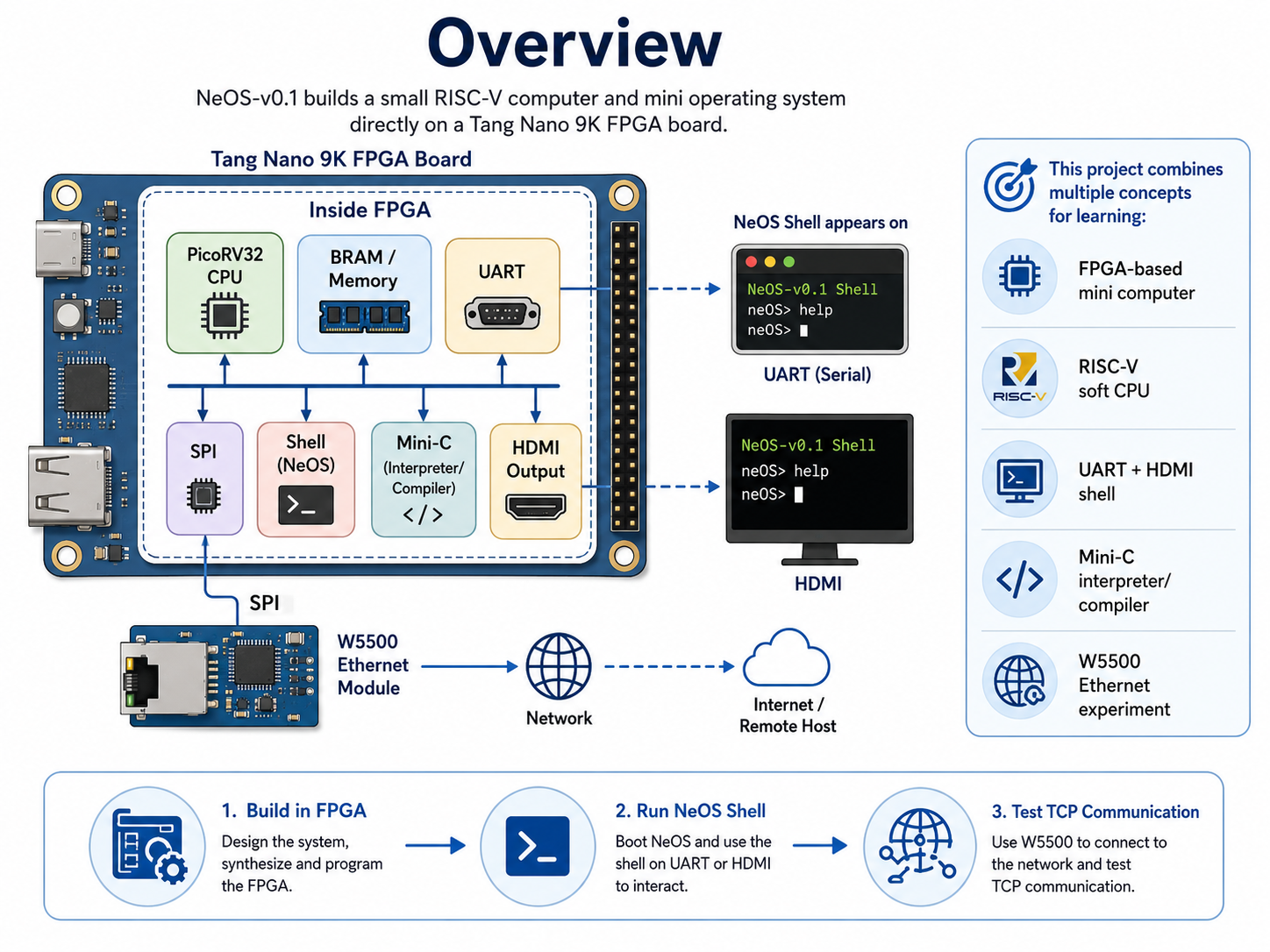
NeOS-v0.1 is a project that builds a small RISC-V computer and mini operating system directly on a Tang Nano 9K FPGA board. Instead of uploading firmware to an existing MCU, this project creates the CPU, memory, UART, LEDs, HDMI output, and SPI peripheral inside the FPGA, then runs a shell and Mini-C execution environment on top of it.
This project is close to an educational computer-building project. It lets users explore FPGA design, RISC-V architecture, operating systems, compilers, and I/O devices in one compact system. When the board runs, the NeOS shell appears on both UART and HDMI, allowing users to run simple commands, demo programs, and Mini-C code.
From a WIZnet perspective, the interesting part is that the project connects W5500 Ethernet to this FPGA-based SoC. A small RISC-V soft CPU controls the W5500 over SPI and uses the W5500’s TCP/IP capability to experiment with Ethernet communication.
📌 What is NeOS?
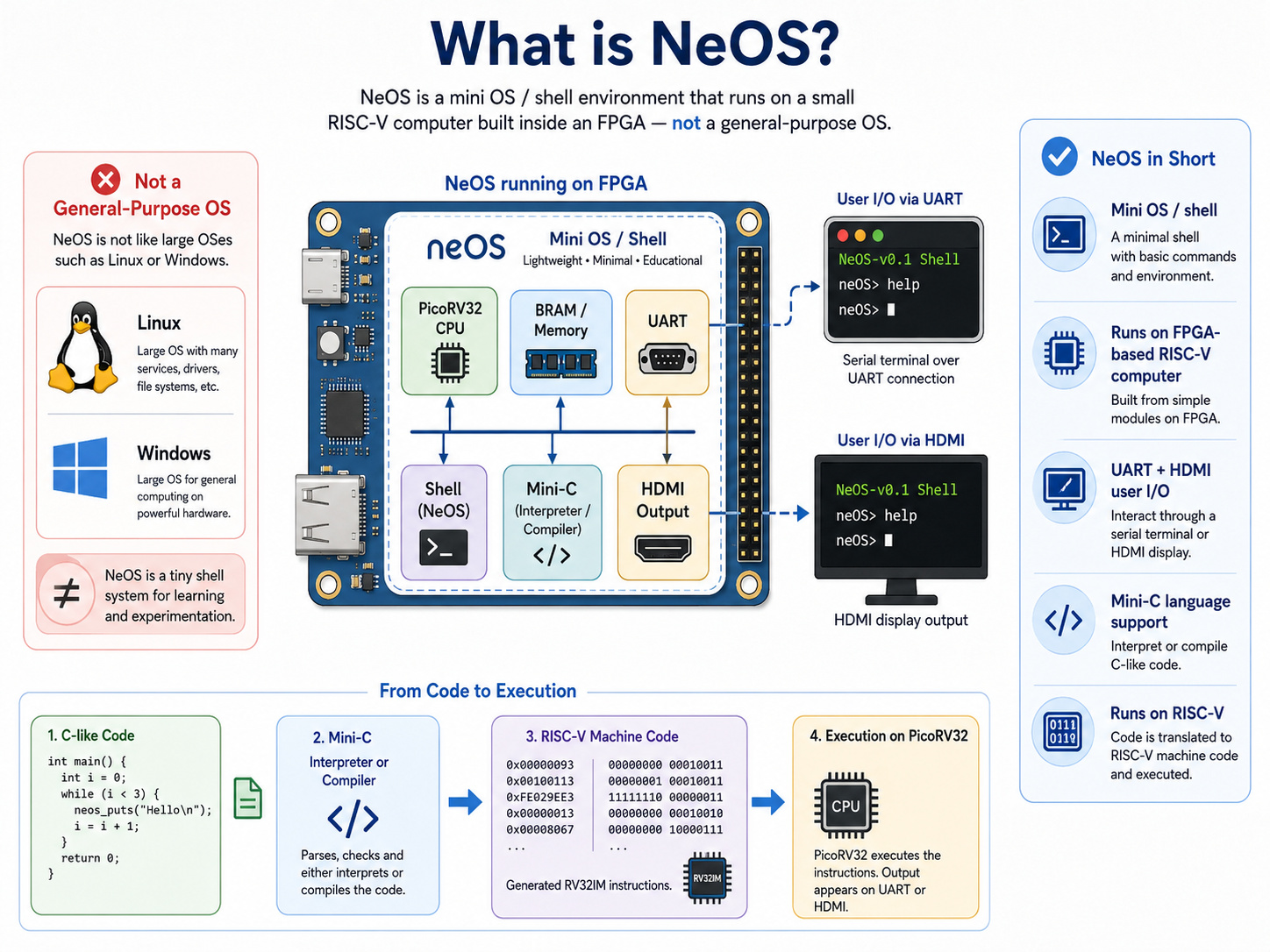
NeOS is not a general-purpose operating system like Linux or Windows.
More accurately, it is a mini OS / shell environment running on a small RISC-V computer built inside an FPGA.
In this project, the FPGA becomes a small computer. A PicoRV32 RISC-V CPU runs inside the FPGA, internal BRAM is used as memory, and UART and HDMI act as user I/O. Users can view the NeOS screen through an HDMI monitor or serial terminal and run simple programs.
One of the most interesting parts is the Mini-C interpreter and compiler. Users can enter simple C-style code, and NeOS can either interpret it or compile it into RISC-V machine code and run it. In other words, the project demonstrates a small computer where the CPU, OS, shell, and compiler are all built and connected from the ground up.
📌 What This Project Shows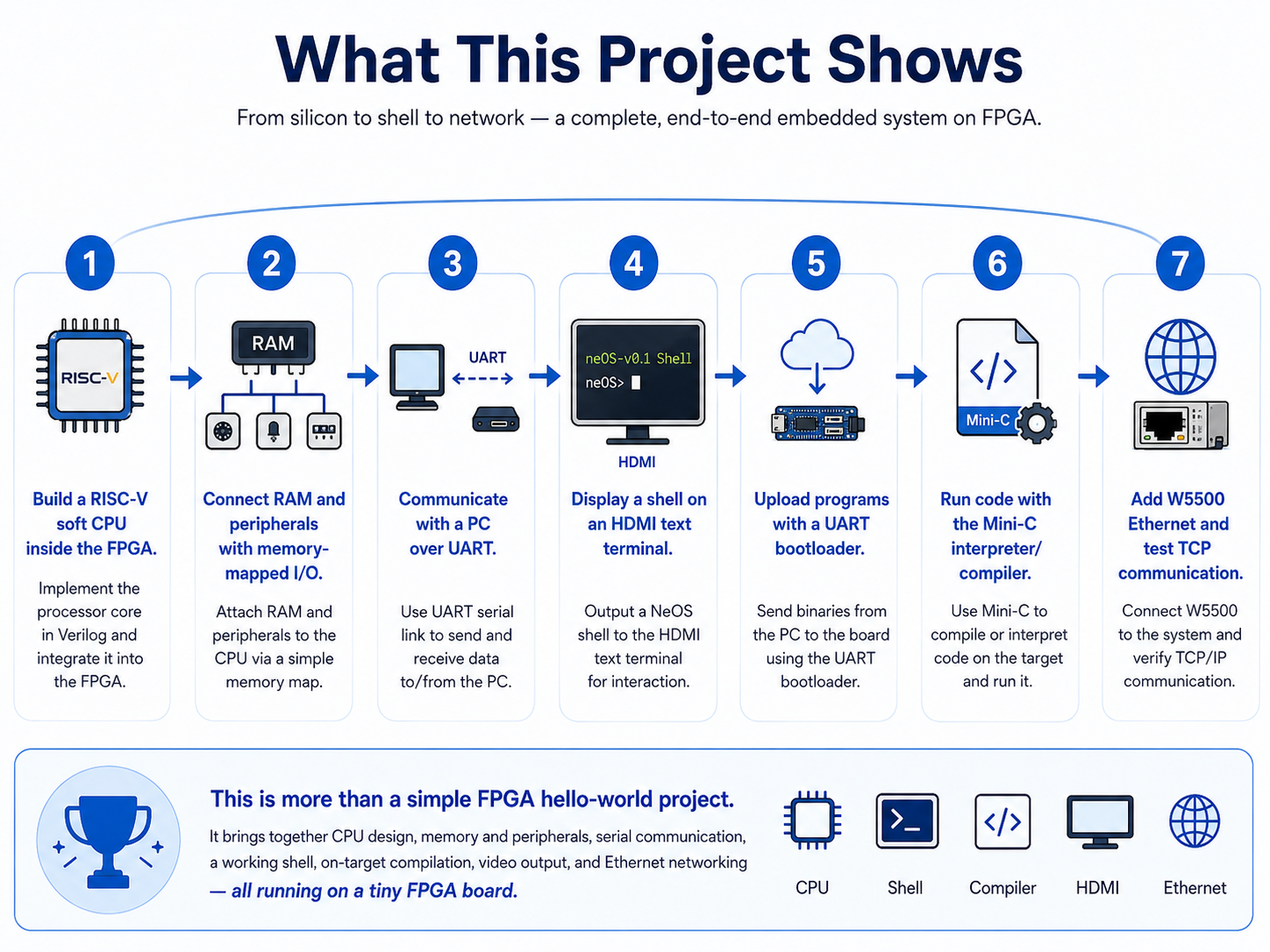
This project shows how to build a small computer system from scratch using an FPGA.
The main flow is:
- Build a RISC-V soft CPU inside the FPGA.
- Connect RAM and peripherals through a memory-mapped design.
- Communicate with a PC over UART.
- Display a shell on an HDMI text terminal.
- Upload programs quickly through a UART bootloader.
- Run simple code through a Mini-C interpreter/compiler.
- Add W5500 Ethernet and experiment with TCP communication.
This is not just a simple FPGA “Hello World” project. It is a mini FPGA computer project that brings together CPU design, a shell, a compiler, video output, and Ethernet networking.
📌 Why W5500 is Used
The Tang Nano 9K FPGA board does not provide a ready-made Ethernet function like many MCU boards do. Also, the RISC-V SoC in this project is very small, so implementing a full TCP/IP stack inside the FPGA or software would be heavy and complex.
This is where the W5500 becomes useful. The W5500 provides Ethernet PHY and hardwired TCP/IP functionality. By controlling the W5500 over SPI, the small RISC-V SoC can experiment with TCP communication without implementing the entire network stack by itself.
In this project, the W5500 acts as the Ethernet controller that adds wired networking to a mini computer built on FPGA. The FPGA implements an SPI master, and the W5500 is controlled through that SPI connection.
📌 Role and Application of the WIZnet Chip
WIZnet chip used: W5500
In this project, the W5500 is the wired Ethernet expansion device for the FPGA-based NeOS system. Most W5500 examples are built around existing MCUs such as Arduino, STM32, or ESP32. This project is different because a custom RISC-V CPU inside an FPGA controls the W5500.
At the Verilog level, an SPI master for W5500 is connected to the SoC. The SPI peripheral is exposed as memory-mapped I/O, and the top-level module routes the W5500 SPI signals to external pins.
The board pin constraints also define dedicated W5500 SPI Ethernet pins. The Tang Nano 9K right header maps signals such as spi_sck, spi_mosi, spi_miso, spi_cs_n, and spi_rst_n.
On the software side, the project includes a small driver that directly handles the W5500 TCP socket functions. This allows NeOS to initialize the W5500, configure IP settings, open a TCP connection, and send or receive data.
📌 Network Stack Note
The W5500 usage in this project should be understood as TOE-style use of the W5500 hardwired TCP/IP socket engine, not as an lwIP-based MACRAW implementation.
However, one point is important. This project does not simply import the official WIZnet socket library. Instead, it implements a custom low-level driver that directly handles the W5500 registers and socket commands required for TCP communication.
A more accurate description is:
NeOS does not use the official WIZnet socket library, but it directly controls the W5500 hardwired TCP/IP socket engine at the register level. This makes it a custom TOE-style Ethernet example.
This is especially interesting because a small FPGA SoC can perform TCP communication through W5500 without carrying its own software TCP/IP stack.
📌 Hybrid Network Status
This project is not a Hybrid Network example.
NeOS includes UART, HDMI, and W5500 Ethernet, but there is no visible Wi-Fi or BLE wireless network path. Therefore, it is better understood as a wired Ethernet experiment that adds W5500 to an FPGA/RISC-V system, rather than a project that combines wired and wireless networking.
📌 Features
RISC-V SoC implemented on FPGA
The project uses a PicoRV32 soft CPU to build a small RISC-V computer inside the FPGA. CPU, RAM, UART, LEDs, HDMI terminal, and SPI peripheral are connected like a small SoC.
HDMI text terminal
The project outputs a text terminal to an HDMI monitor. The NeOS shell can be viewed not only over UART but also on an HDMI display.
UART bootloader
After the initial FPGA bitstream is flashed, applications can be uploaded quickly over UART. This makes the C development loop much faster after the first setup.
Mini-C interpreter/compiler
NeOS can interpret simple C-style code or compile it directly into RV32IM machine code and execute it. This is a useful feature for learning how a small OS and compiler work.
W5500 Ethernet experiment
The FPGA SoC includes an SPI master for W5500 and uses the W5500 TCP socket function to experiment with Ethernet communication.
Open-source FPGA toolchain
The project uses Yosys, nextpnr-himbaechel, gowin_pack, and openFPGALoader, allowing users to build the FPGA bitstream without a vendor IDE.
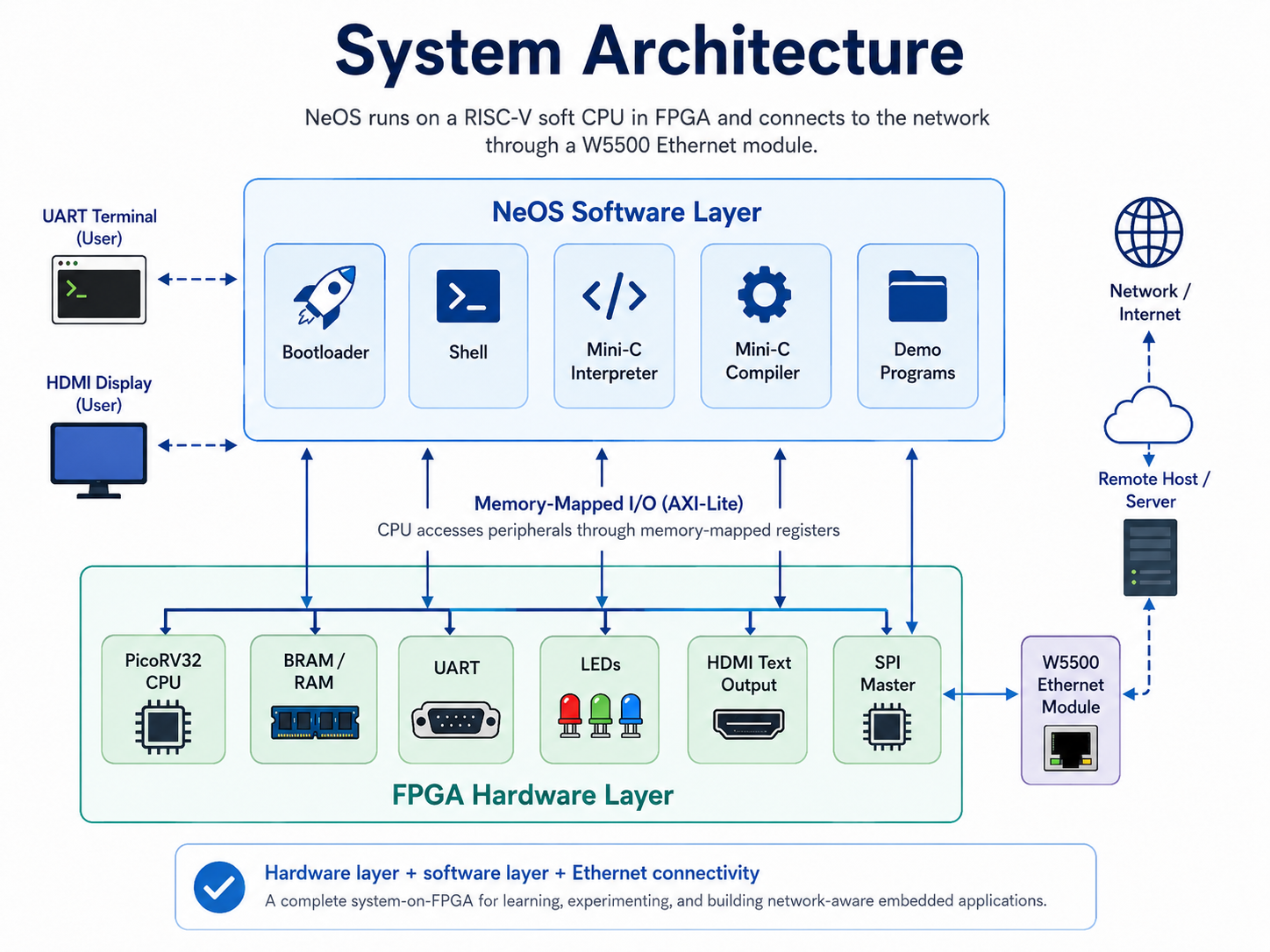
📌 System Architecture
This project can be divided into two main layers: FPGA hardware layer and NeOS software layer.
In the FPGA hardware layer, the Tang Nano 9K contains a PicoRV32 CPU, RAM, UART, LEDs, HDMI text output, and SPI master. The CPU accesses each peripheral through memory-mapped I/O.
In the NeOS software layer, the bootloader, shell, Mini-C interpreter, Mini-C compiler, and demo programs run on the RISC-V CPU. Users can interact with the system through a UART terminal or HDMI display.
The W5500 connects these two layers to the outside network world. The SPI master inside the FPGA controls the W5500, and the NeOS software uses the W5500 TCP function to communicate with external devices.
📌 Usage, Market, and Application Value
NeOS is not a finished commercial OS or production-ready firmware. It is better understood as an educational mini computer project for learning FPGA, RISC-V, operating systems, compilers, and networking together.
Because it builds CPU, RAM, UART, HDMI terminal, SPI peripheral, mini shell, and compiler on a low-cost FPGA board, it helps users experience how a computer is built internally at a small scale.
The most natural use case is education and hands-on learning. In computer architecture courses, students often learn separately about CPU execution, memory maps, peripheral I/O, bootloaders, shells, and compilers. NeOS brings these elements together into one compact project.
A second use case is FPGA SoC experimentation. FPGA users can build their own custom SoC by connecting a CPU with the peripherals they need. NeOS shows how a PicoRV32 CPU can be connected to RAM, UART, HDMI, LEDs, and SPI, then controlled from software.
A third use case is learning about small operating systems and compilers. NeOS goes beyond printing text to a board. It includes shell commands, a Mini-C interpreter, and a Mini-C compiler. The fact that user-entered C-like code can be converted into RV32IM machine code and executed in RAM makes it useful for studying the boundary between OS design and compiler design.
A fourth use case is FPGA Ethernet experimentation with W5500. Adding networking to an FPGA SoC usually requires many components, such as Ethernet MAC, PHY, DMA, and a TCP/IP stack. With W5500, a small soft CPU can experiment with TCP communication more easily because the chip provides hardwired TCP/IP support.
Possible application directions include:
- FPGA/RISC-V education kit: A curriculum project where students can learn CPU, memory map, UART, HDMI, SPI, and Ethernet together.
- Computer architecture lab platform: A board-level project for observing instruction execution, RAM, peripheral I/O, bootloader behavior, and compiler output.
- W5500 Ethernet peripheral experiment: A custom soft CPU controlling W5500 to perform TCP communication.
- HDMI terminal mini computer: A retro-computing or maker project that displays a shell on HDMI instead of only using UART.
- Network bootloader research: The current project focuses on UART bootloading, but W5500 could enable future TCP-based loading or remote update experiments.
- FPGA-based IoT or measurement prototype: Sensors or control peripherals could be added, with W5500 sending data to a PC or server.
From a market perspective, this project fits better with FPGA education boards, RISC-V training, open-source hardware workshops, maker communities, university labs, and research prototypes than with mass-market products. The use of a low-cost FPGA board and open-source FPGA toolchain helps lower the entry barrier.
This project should still be viewed as a learning, research, and prototyping platform rather than something to use directly in a commercial product. Its value is not that it is a polished general-purpose OS. Its value is that it lets users build a tiny computer from CPU to OS, compiler, and Ethernet.
From a WIZnet perspective, this project is meaningful because it shows that the W5500 is not only an Ethernet chip for MCUs. It can also be used as a TCP/IP network companion chip for a custom RISC-V soft-core SoC. This gives a useful insight for FPGA education, RISC-V SoC experiments, and custom hardware prototyping.
📌 Why This Project Is Useful
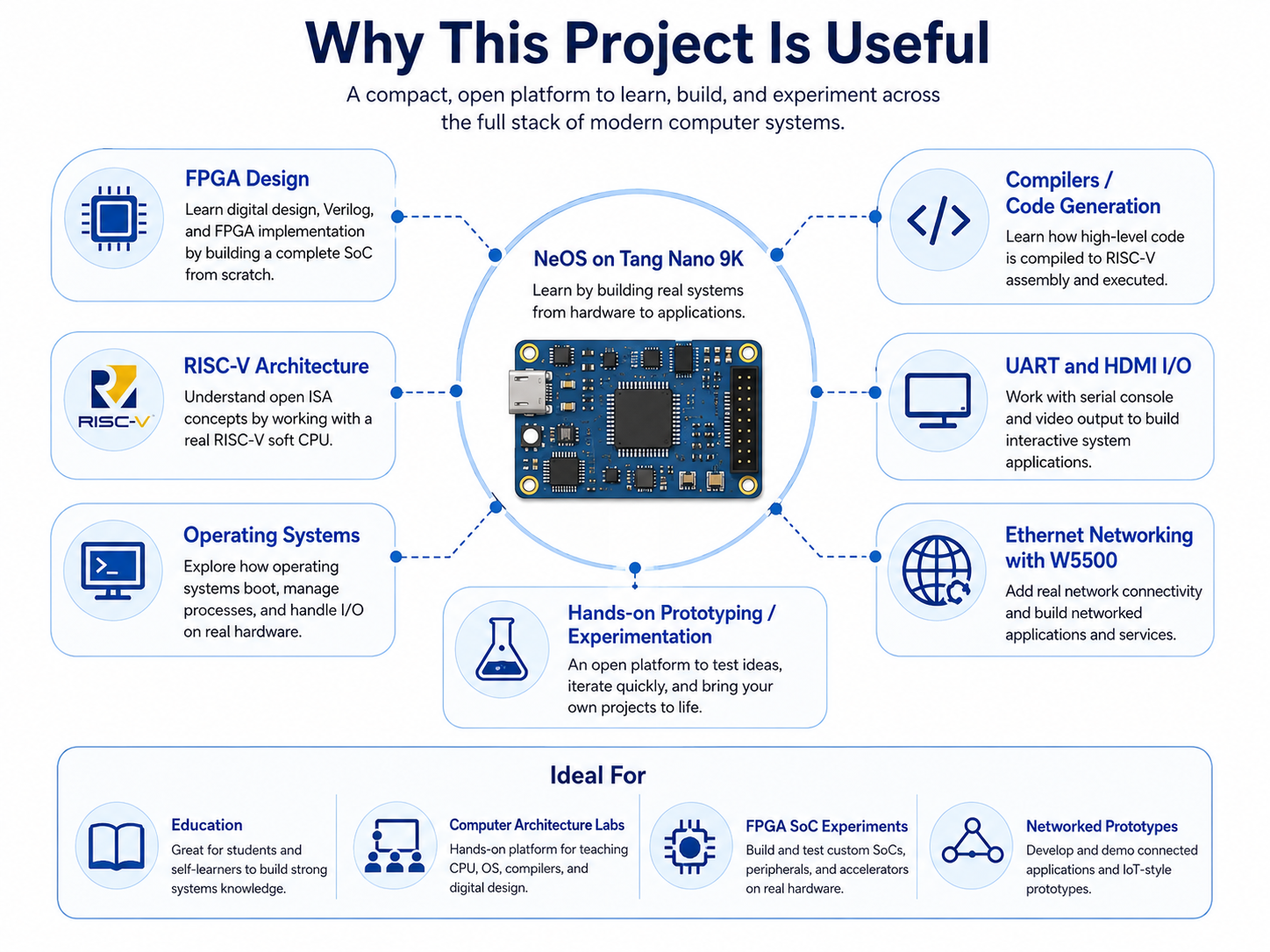
This project is useful for people who want to learn FPGA, RISC-V, operating systems, compilers, and networking together.
It provides learning value in areas such as:
- How to place a soft CPU inside an FPGA
- How to connect CPU and peripherals through a memory map
- How to build UART and HDMI terminal output
- How to implement a bootloader and shell
- How a small compiler generates machine code
- How W5500 can add TCP Ethernet capability to a tiny SoC
The W5500 plays an important role here. It allows the small FPGA SoC to experiment with Ethernet communication without implementing an entire TCP/IP stack inside the FPGA system.
📌 Additional Insight for W5500 Makers
The biggest insight from this project is that W5500 can act like a network companion chip for an FPGA soft-core CPU.
W5500 is usually seen with MCUs. But NeOS connects W5500 to a custom PicoRV32-based SoC. This shows that W5500 is not limited to Arduino, STM32, or ESP32 platforms. It can also be connected to user-built CPUs and educational SoCs.
The project also highlights the strength of W5500’s TOE architecture. NeOS is a tiny 32KB BRAM-based system, and it would be difficult to run a typical software TCP/IP stack inside it. With W5500’s hardwired socket function, even a small custom system can open a TCP connection and exchange data.
For WIZnet makers, this structure can inspire projects such as:
- Ethernet peripheral learning for FPGA soft CPUs
- Adding TCP client capability to a RISC-V educational SoC
- Combining an HDMI terminal with an Ethernet shell
- W5500-based network bootloader experiments
- Learning how to implement network commands in a small OS
Although still experimental, the fact that W5500 is connected to a custom FPGA mini computer makes this project worth highlighting.
📌 Things to Know Before Building
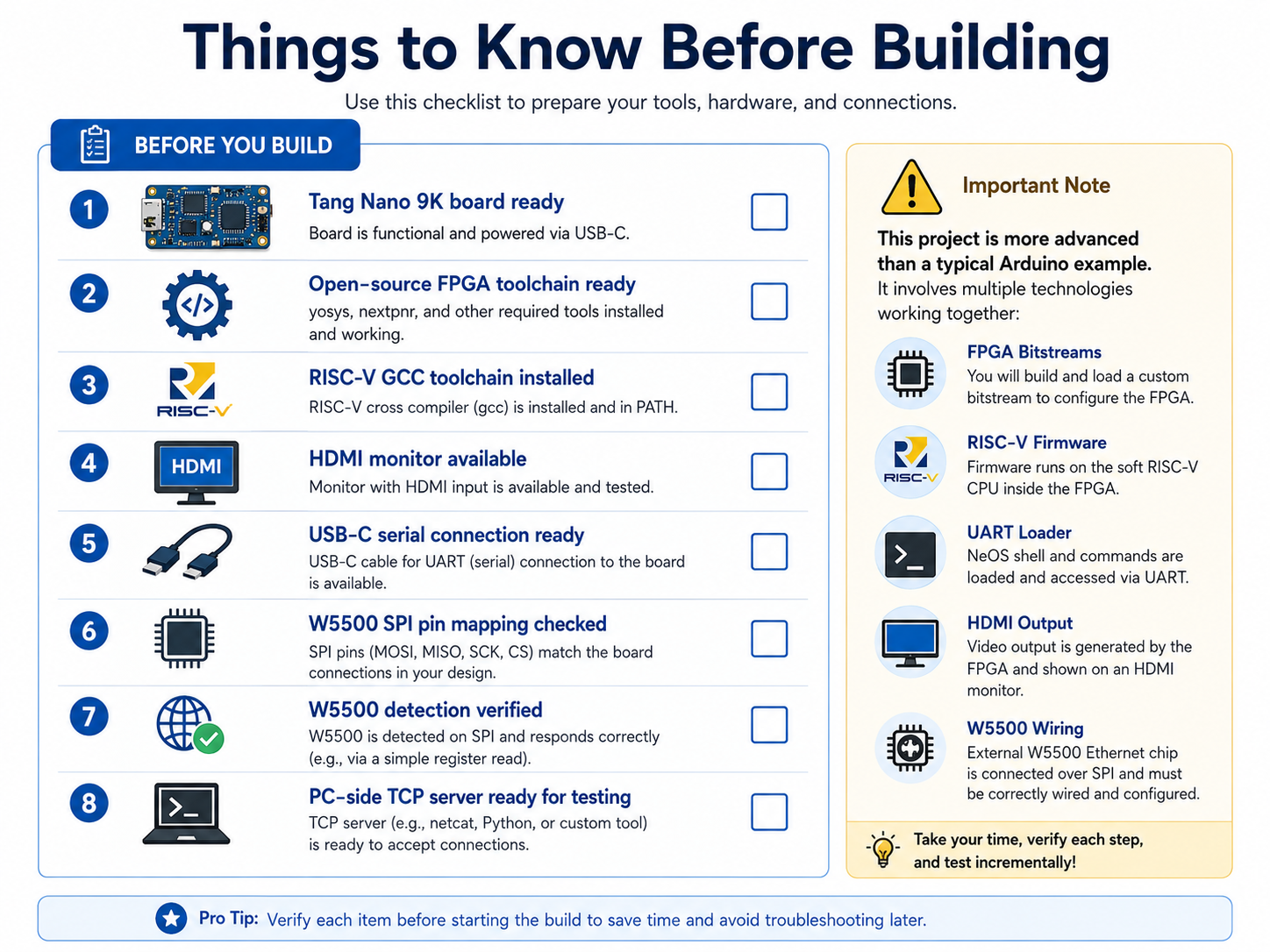
This project is more advanced than a typical Arduino example. It involves FPGA bitstreams, RISC-V firmware, a UART loader, HDMI output, and W5500 wiring.
Before building, users should check:
- Whether they are using a Tang Nano 9K board
- Whether the open-source FPGA toolchain is ready
- Whether the RISC-V GCC toolchain is installed
- Whether an HDMI monitor and USB-C serial connection are ready
- Whether the W5500 SPI pin mapping matches the actual wiring
- Whether the W5500 is detected correctly
- Whether a PC-side TCP server is ready when testing TCP communication
The project can be built with an open-source FPGA toolchain without a vendor IDE, but users who are new to FPGA and RISC-V development should follow the steps carefully.
📌 Summary
NeOS-v0.1 is an educational mini OS project that implements a PicoRV32 RISC-V CPU, UART, LEDs, HDMI text terminal, bootloader, shell, Mini-C interpreter, and Mini-C compiler on a Tang Nano 9K FPGA.
The key WIZnet-related part is the W5500 SPI Ethernet experiment. The FPGA includes an SPI master for controlling the W5500, and the NeOS software includes a custom driver that directly controls the W5500 TCP socket function.
This is not a Hybrid Network project, but it is a unique example of connecting W5500 directly to an FPGA-based RISC-V mini computer and implementing custom TOE-style TCP communication.
📌 FAQ
Q1. What is this project?
It is a project that builds a small RISC-V SoC and mini OS on a Tang Nano 9K FPGA. It includes a UART shell, HDMI text terminal, Mini-C interpreter/compiler, and UART bootloader.
Q2. Is NeOS a general-purpose operating system?
No. It is not a general-purpose OS like Linux. It is an educational mini OS / shell environment running on a small RISC-V computer built inside an FPGA.
Q3. Which WIZnet chip is used?
The project uses WIZnet W5500. It is connected to the FPGA through an SPI master and used for TCP Ethernet experiments.
Q4. Is W5500 used through lwIP or TOE?
It is best understood as TOE-style usage. The project does not use lwIP; it directly controls the W5500 TCP socket function at the register level.
Q5. Does it use the official WIZnet socket library?
No. It uses a custom low-level driver that directly implements the needed W5500 register and TCP socket operations.
Q6. Is this a Hybrid Network project?
No. It includes W5500 wired Ethernet, but there is no visible Wi-Fi or BLE network path. It is better described as a wired Ethernet experiment.
Q7. What is the most interesting part?
The most interesting part is that a custom FPGA RISC-V SoC controls the W5500 and performs TCP communication. It is an example of using W5500 with a custom FPGA computer, not only with an MCU.
Q8. Where can this be applied?
It can be used for FPGA/RISC-V education, computer architecture labs, mini OS and compiler learning, W5500 Ethernet peripheral experiments, FPGA-based IoT prototypes, and network bootloader research.