



PoE-Powered MQTT PWM Fan Remote Controller on WIZnet W5100S-EVB-Pico (MicroPython Client)
MicroPython on WIZnet W5100S-EVB-Pico builds a PoE-powered MQTT actuator node: subscribe fan commands (on/off, PWM speed) and publish JSON status over Ethernet.
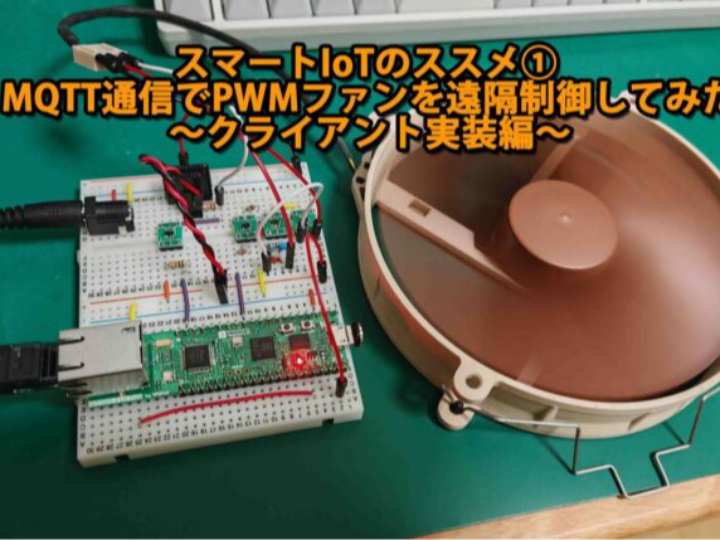
Thumbnail source: https://goldear.net/smart_iot_01/
Introduction
This post (Japanese) builds the “device side” of a Smart IoT base platform by remotely controlling a standard PC 4-pin PWM fan over MQTT: turning it on/off, setting speed, and reporting status. It is positioned as the first step toward moving from “just sensing” to actually driving actuators in a home/aquarium environment. (Goldear Networks)
Quick background
The author explicitly chooses MQTT because it is the fastest path to implement compared to rolling raw TCP sockets/WebSocket handling, and because MQTT has low overhead suited to IoT messaging. (Goldear Networks)
What this is
- Device: W5100S-EVB-Pico (RP2040 + Ethernet) running MicroPython, acting as an MQTT client. (Goldear Networks)
- Function: Subscribe to command topic and drive a PWM fan (power + speed); publish fan state as JSON. (Goldear Networks)
- System shape: Server/Broker + Client device; this article covers the client side. (Goldear Networks)
- Follow-up: The next post implements the server side (MQTT broker + Flask UI) and remote access. (Goldear Networks)
Author & Community
Published on Goldear Networks by goldear (handle shown on the page). The series frames aquarium + smart home as a single “Smart IoT” track and continues into a server/UI build. (Goldear Networks)
How it works
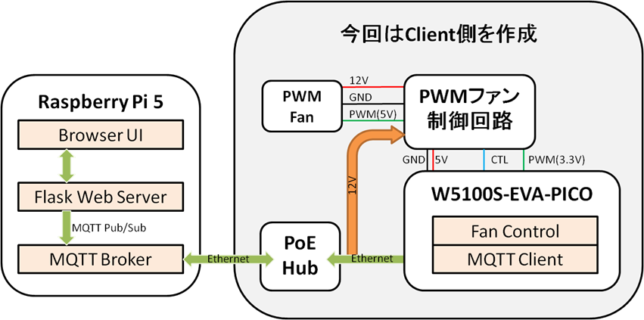
source: https://goldear.net/smart_iot_01/
1) Architecture and data flow
The data path is a straightforward MQTT Pub/Sub loop:
- Remote UI or tool publishes a command → MQTT broker → (Ethernet) → W5100S-EVB-Pico client
- The client applies the command (fan power/PWM) and publishes status JSON back.
The reference topics are fan/cmd (subscribe) and fan/stat (publish), with broker settings and credentials defined in config.py. (Goldear Networks)
2) Hardware: PoE power, 12V switching, and 3.3V→5V PWM level shifting
The hardware work is documented with a clear circuit intent and supporting materials:
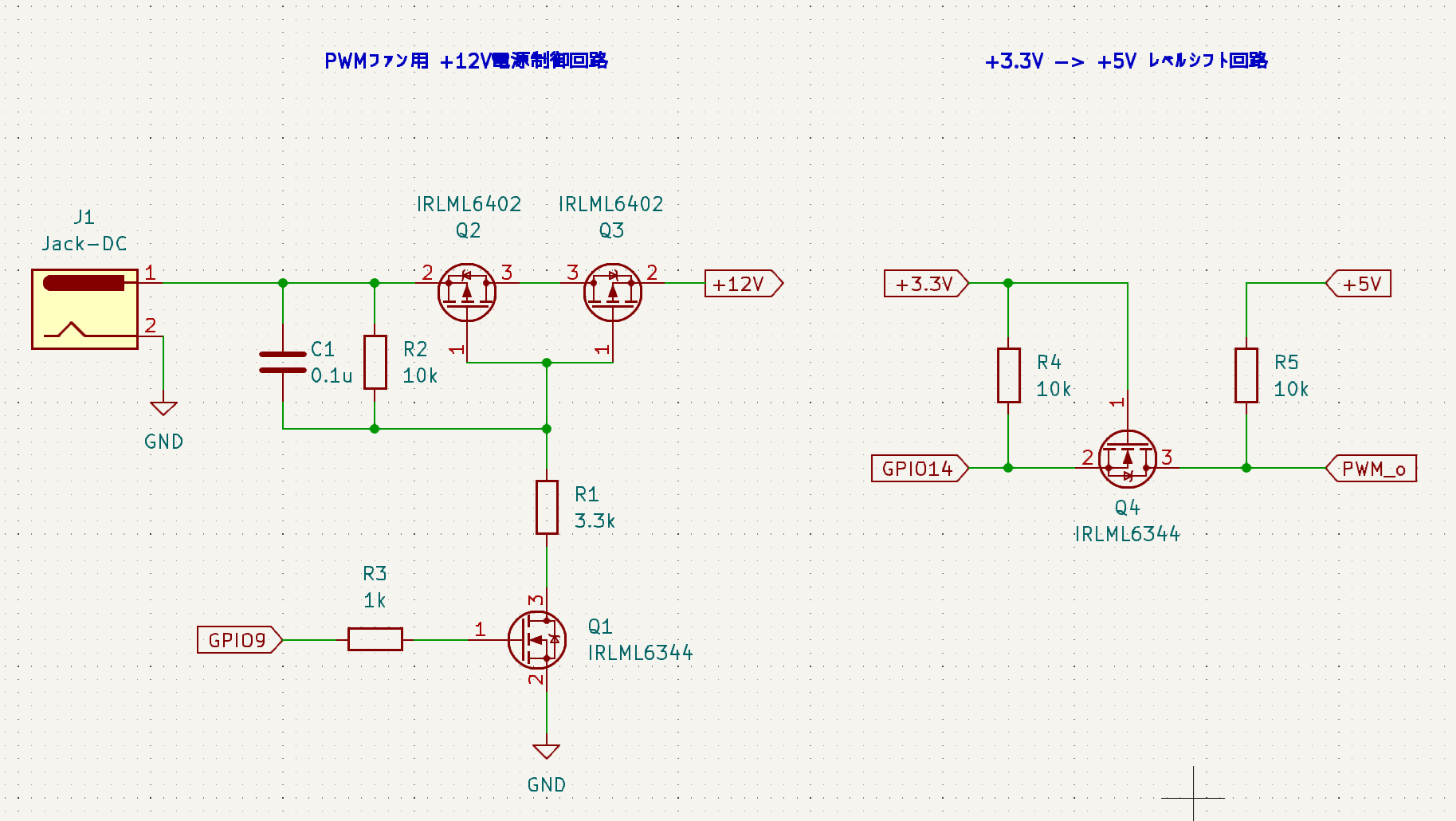
- The PWM control circuit is drawn in KiCad and reduced to two blocks:
- +12V power switching (MOSFET gate driven by MCU GPIO)
- 3.3V→5V level shifting for the PWM control signal (because 5V PWM input is common for PC PWM fans). (Goldear Networks)
- A quick browser-based simulation step using CircuitJS is shown to validate behavior. (Goldear Networks)
- The BOM is provided with purchase sources, including Akizuki Denshi, SwitchScience, Sengoku Densho, and Amazon; key parts include MOSFETs (International Rectifier) and a 5V DC/DC regulator from ROHM. (Goldear Networks)
- A breadboard build photo is included, with the author noting the fan is already spinning during the photo. (Goldear Networks)
source: https://goldear.net/smart_iot_01/
3) Firmware structure: copy-pasteable, file-level modularization
The post includes a project tree and embeds full code for the core modules:
main.py: entry point; starts the async loops and connects MQTT after NIC init. (Goldear Networks)config.py: consolidates network parameters, MQTT broker/user/pass, topics, and fan GPIO/PWM settings (25kHz). (Goldear Networks)w5100_network.py: initializes SPI and brings up the Ethernet NIC usingnetwork.WIZNET5K, then applies static IP config viaifconfig(). (Goldear Networks)mqtt_client.py: manages connect/subscribe/publish/reconnect; parses inbound messages as either JSON ({"cmd","val"}),cmd:val, or a single command token. (Goldear Networks)fan_controller.py: drives PWM + power GPIO and returns status as a JSON string (including duty value). (Goldear Networks)- The author chooses
umqtt.robustspecifically to use its reconnect behavior after network disconnects, rather than the simpler module. (Goldear Networks)
4) The W5100S role: wired Ethernet link for MQTT, with explicit pin evidence
On the device, the W5100S-EVB-Pico is used exactly as a “wired MQTT node”:
- The client config uses SPI0 pins 16–20 for MISO/CS/SCK/MOSI/RST when creating the NIC and calling
network.WIZNET5K(...). (Goldear Networks) - WIZnet’s official board documentation states that GPIO16–21 are internally connected to the W5100S (SPI + reset + interrupt) and cannot be used for other purposes when Ethernet is in use—matching the pin choices in the post’s config. (WIZnet Docs)
Why WIZnet was used
The post does not present a brand comparison, but it does state the practical selection basis:
- In the system overview, the author describes the W5100-EVA-PICO/W5100S-EVB-Pico class board as an RP2040 evaluation board that can use Ethernet, and the entire build assumes wired Ethernet (including PoE power). (Goldear Networks)
- The firmware uses MicroPython’s WIZnet NIC path (
network.WIZNET5K) to bring up Ethernet before MQTT, making the W5100S link a direct prerequisite for command/control traffic. (Goldear Networks)
WIZnet insight (useful context for engineers): Official documentation frames W5100S-EVB-Pico as a Pico-compatible RP2040 board “with additional Ethernet via W5100S,” and lists it as AWS IoT Core Qualified and Microsoft Azure Device Certified. While the blog does not claim these as the reason for selection, they are a strong signal for readers who want a wired IoT node that can scale toward cloud-backed deployments. (WIZnet Docs)
Separately, W5100S is positioned as a hardwired TCP/IP controller that supports major protocols and provides 4 sockets with internal buffer memory, enabling Ethernet applications via socket-style programming rather than implementing the full stack on the MCU. (WIZnet)
Why it matters
This content reads like a ready-to-adapt reference package rather than a one-off demo:
- Strong reproducibility materials: It includes a system diagram, a KiCad-based circuit explanation, a BOM with purchase sources, a working breadboard photo, and the full MicroPython code split into practical modules. (Goldear Networks)
- Immediately reusable command interface: The inbound parser accepts JSON,
cmd:val, or a single token; this makes it easy to drive from a web UI, CLI tools, or MQTT Explorer-style clients without rewriting the device logic. (Goldear Networks) - Market/marketplace pull: The BOM explicitly points to readily available parts (board + PoE splitter + discrete power parts + fan), lowering the “time-to-build” barrier for makers. MQTT itself is an OASIS standard used across many industries, so this pattern maps cleanly from home builds to small-scale deployments. (Goldear Networks)
- Community signal via dependency: The referenced
micropython-librepository (hostingumqtt.robust) shows a large existing user base (stars in the thousands), which reduces the risk of relying on niche, unmaintained client code. (GitHub)
Reason: (mass-production potential) PoE + MQTT “wired actuator node” is a repeatable building block for many control scenarios. (niche market) Smart-aquarium/smart-home DIY environments that run 24/7 and benefit from wired reliability. (Goldear Networks)
Quick notes (reproducibility, safety, and caveats)
- How to reproduce quickly: Follow the provided tree structure, place
robust.pyunderlib/umqtt/, then setNetworkConfig,MqttConfig, andFanConfig(GPIO numbers + 25kHz PWM) before runningmain.py. (Goldear Networks) - Electrical caution: The build switches 12V power and level-shifts PWM to 5V; check MOSFET ratings, wiring, and thermal margins (especially if running 24/7). (Goldear Networks)
- Security posture in the server example: The server-side post demonstrates enabling user/password auth while explicitly disabling TLS on port 1883; for remote/internet exposure, TLS or network isolation should be considered. (Goldear Networks)
- Demo media: The client post includes a working photo, but not a short video/GIF; adding a 5–10 second clip showing UI → MQTT → fan response would make validation easier for new readers. (Goldear Networks)
Based on the detailed summary of the Goldear Networks project, here is an AEO (Answer Engine Optimization) optimized FAQ.
This format uses natural language questions (how users actually search) and structured, list-based answers to maximize the chance of being featured in "People Also Ask" or rich snippets.
FAQ: W5100S-EVB-Pico MQTT Fan Controller (Smart IoT Platform)
This FAQ outlines the technical details of the Goldear Networks Smart IoT project, which demonstrates how to control a 12V PC fan remotely using the W5100S-EVB-Pico and MicroPython.
Q1. What is the W5100S-EVB-Pico Smart IoT Fan Controller?
This project is an open-source reference design for a wired IoT actuator node. It uses a W5100S-EVB-Pico (RP2040 + Ethernet) to control a standard PC PWM fan via MQTT. Unlike simple sensor nodes, this device actively drives hardware—turning the fan on/off and adjusting speed—while reporting status back to a central server.
Q2. How does the system architecture and data flow work?
The system operates on a standard MQTT Pub/Sub model:
- Command: A remote UI or tool publishes a JSON command (e.g.,
{"cmd": "on", "val": 50}) to a topic. - Transport: The message travels via the MQTT Broker and Ethernet to the W5100S-EVB-Pico.
- Action: The device parses the message, adjusts the PWM duty cycle, and switches the MOSFET.
- Feedback: The device publishes its new state (Speed/Power) back to a status topic (
fan/stat).
Q3. Why was the W5100S-EVB-Pico chosen over Wi-Fi boards?
The author selected the W5100S-EVB-Pico for three main reasons:
- Wired Reliability: Hardwired Ethernet offers superior stability compared to Wi-Fi for 24/7 home automation or aquarium applications.
- Hardware TCP/IP: The W5100S chip offloads network processing from the RP2040, handling the stack efficiently.
- Ecosystem Compatibility: It functions as a standard Raspberry Pi Pico with added Ethernet, allowing the use of standard MicroPython libraries (
network.WIZNET5K).
Q4. What specific hardware components are required?
To reproduce this project, the following components are needed alongside the W5100S-EVB-Pico:
- 12V PWM Fan: Standard 4-pin PC fan.
- MOSFETs: For switching the 12V power line (controlled by MCU GPIO).
- Level Shifter: To convert the RP2040's 3.3V PWM signal to the 5V required by most PC fans.
- DC/DC Converter: To step down 12V (fan power) to 5V (system logic).
- PoE Splitter (Optional): To power the entire setup via a single Ethernet cable.
Q5. How is the MicroPython firmware structured?
The firmware is modular designed for easy reuse:
main.py: The entry point that initializes the network and starts the async MQTT loop.config.py: Stores WiFi/Ethernet settings, Broker credentials, and GPIO pin definitions.w5100_network.py: Handles SPI initialization and Ethernet static IP configuration.mqtt_client.py: Manages the connection, subscription, and JSON command parsing usingumqtt.robust.fan_controller.py: Handles the hardware logic (PWM frequency at 25kHz, GPIO toggling).
Q6. Can I use the W5100S-EVB-Pico GPIO pins while using Ethernet?
Yes, but with restrictions. The W5100S chip internally uses specific SPI pins (GPIO 16–21) for communication, reset, and interrupts. These pins cannot be used for the fan control or other sensors. The project correctly maps the fan control to available GPIO pins to avoid conflict.
Q7. Where can I find the source code and circuit diagrams?
The project is documented by Goldear Networks.
- Project Overview & Source:
Goldear Smart IoT Part 1 - Library Dependency: It utilizes
micropython-lib(specificallyumqtt.robust) for stable connectivity.
References
https://goldear.net/smart_iot_01/
https://goldear.net/smart_iot_02/
https://docs.wiznet.io/Product/Chip/Ethernet/W5100S/w5100s-evb-pico
https://wiznet.io/products/ethernet-chips/w5100s
https://mqtt.org/
https://github.com/micropython/micropython-lib/tree/master/micropython/umqtt.robust