



ESP-Miner-LAN
ESP-Miner-LAN turns ESP32-S3 Bitaxe miners into hardwired LAN miners with a W5500 module, adding stable LAN/WiFi networking and 24/7 mining reliability.
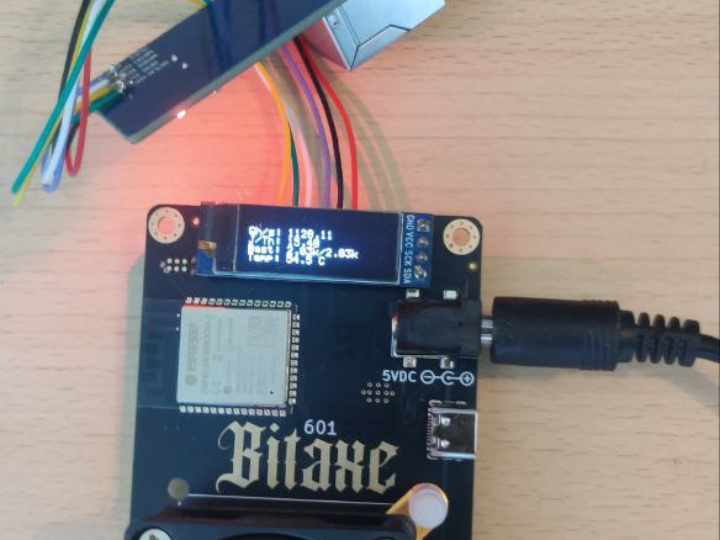
Introduction
This project is a custom firmware that upgrades ESP32-S3–based Bitcoin ASIC miners (Bitaxe family) from WiFi-only devices into LAN-capable miners using a WIZnet W5500 Ethernet controller.
Based on the original ESP-Miner (bitaxeorg) v2.10.1, it integrates the ESP-IDF Ethernet driver and W5500 to create a dual-network stack (LAN + WiFi), with a clear policy:
If a W5500 is detected and correctly configured, Ethernet is preferred.
Otherwise, it gracefully falls back to WiFi.
This content doesn’t just say “you can add LAN.” It shows:
why W5500 was chosen,
how it is wired to the ESP32-S3,
where it hooks into the ESP-Miner mining loop, and
how this work sits at the center of a small but very active hardware/community ecosystem.
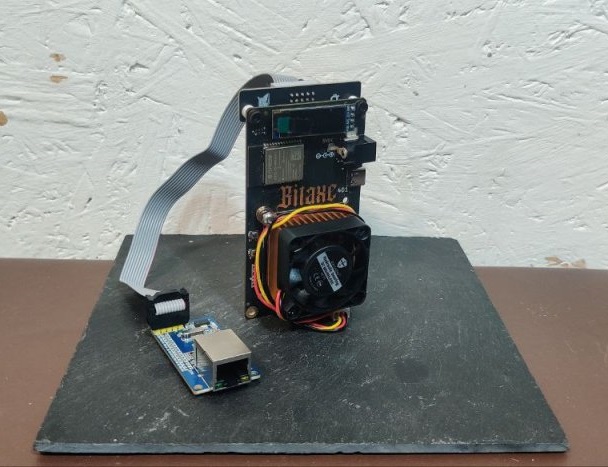
Original Image: https://www.gobrrr.me/product/bitaxe-lan/
Overview
At a glance, ESP-Miner-LAN:
is based on ESP-Miner v2.10.1,
targets Bitaxe 6xx/8xx boards, NerdAxe, and other ESP32-S3 Bitcoin ASIC designs,
keeps the original:
mining loop (Stratum client),
web dashboard (AxeOS),
and extends the network layer with:
WiFi support (unchanged), plus
W5500 Ethernet support, with automatic LAN-first, WiFi-fallback behavior.
In short, it’s the same miner and same UI, but with a much stronger, wired network path beneath it.
Original Language & Author / Community
Language / Repository
GitHub: CryptoIceMLH/ESP-Miner-LAN
Language: English
License: GPL-3.0
Author & Organization
GitHub handle: CryptoIceMLH (CryptoICE)
States clearly in the README that this is a LAN-enabled fork of ESP-Miner v2.10.1.
Links to Molon Labe Holdings and a BTC donation address.
Molon Labe Holdings
Tagline: “Sovereign ₿itcoin Tech Innovator”
Focus areas:
SolarBit — solar-powered solo mining
ImmergeAxe — advanced thermal/immersion management for miners
BTC-Node-Satellite / BitSatRelay — satellite/mesh-style Bitcoin node connectivity
In practice: a small, highly hands-on R&D studio obsessed with “self-sovereign Bitcoin infrastructure.”
X (Twitter) & Discord

X: @MolonLabeVC (https://x.com/MolonLabeVC)
Follower count: over ~3,000 followers (thousands-level).
Regularly posts about Bitaxe LAN mods, SolarBit, ImmergeAxe, giveaways (e.g., Bitaxe LAN adapters), and ongoing R&D.

Discord: “BTC Tech Nerd Army!” (https://discord.com/channels/1297481882740588617/1426146248301215774)
Frequently promoted on X as the go-to place for:
Bitaxe / ESP-Miner-LAN support
Solar mining experiments
Satellite/mesh node experiments
Live tests, R&D feedback, tuning tips
Effectively functions as a live lab where hardware, firmware, and real-world PoW experiments meet.
So, while ESP-Miner-LAN is “just a GitHub repo,” it also sits at the center of a small but influential ecosystem of people actually running and hacking on this hardware.
How It Works — Architecture & Code Mechanics
1. High-Level Architecture
Internally, ESP-Miner-LAN follows the classic ESP-Miner layering, with Ethernet added at the platform layer:
ASIC Driver Layer
Controls the SHA-256 ASIC(s) on the Bitaxe board (e.g., BM1366): registers, clock, voltage, board revision quirks.
The config-xxx.csv files (102/201/601/800x, etc.) contain per-board manufacturing parameters and are merged into the firmware image via merge_bin*.sh.
Stratum Network Layer
Speaks Stratum over TCP to a mining pool or solo node:
fetches jobs (block header templates),
dispatches them to the ASIC worker,
submits valid hashes as shares.
This layer largely doesn’t care whether the network underneath is WiFi or Ethernet; it just uses the TCP/IP stack exposed by ESP-IDF/lwIP.
Network / Platform Layer (WiFi + Ethernet)
Initializes:
ESP32-S3 WiFi stack, and
ESP-IDF Ethernet driver for W5500.
Uses event callbacks to track:
link-up / link-down,
IP acquisition events (DHCP or static).
Policy:
If W5500 Ethernet links up and gets an IP → use LAN as primary.
If not → fallback to WiFi.
Web UI Layer (AxeOS)
A built-in HTTP server providing the AxeOS dashboard:
hash rate & temperature monitoring,
pool/node configuration,
clock/voltage tuning,
advanced settings.
Whether the miner is on WiFi or W5500 Ethernet, the user experience is the same: open a browser to the IP and use AxeOS.
2. W5500 ↔ ESP32-S3 Wiring
From the README’s W5500 Ethernet Module Wiring Guide:
Wiring (ESP32-S3 ↔ W5500 via SPI)
MOSI → GPIO 40
MISO → GPIO 39
SCLK → GPIO 41
CS → GPIO 42
VCC → 5V
GND → GND
SPI Configuration
Bus: HSPI (SPI2)
Clock: 20 MHz
Mode: SPI Mode 0 (CPOL=0, CPHA=0)
No dedicated IRQ pin — runs in polling mode.
BAP Pin Conflict (BitAxe Access Protocol)
GPIO 39/40 are shared between:
W5500 SPI (MISO/MOSI) and
the BAP UART (RX/TX).
With the default pin map you cannot use W5500 and BAP simultaneously.
If you need both, you must:
reassign pins via idf.py menuconfig, and
adjust the physical wiring to match.
3. W5500 on ESP-IDF + lwIP
ESP-Miner-LAN uses the official ESP-IDF W5500 Ethernet driver.
In idf.py menuconfig →
Component config → Ethernet W5500 Configuration you set:
ENABLE_ETHERNET = y
W5500_SPI_MOSI/MISO/SCLK/CS = 40/39/41/42
W5500_SPI_CLOCK_MHZ = 20
W5500_USE_DHCP = y (recommended default)
Under the hood, the flow is the standard ESP-IDF W5500 pattern:
Initialize SPI2 (HSPI) with spi_bus_initialize().
Create W5500 MAC + PHY objects via esp_eth_mac_new_w5500() / esp_eth_phy_new_w5500().
Call esp_eth_driver_install() and attach an Ethernet netif via esp_netif_new() + esp_netif_attach().
If DHCP is enabled, start the DHCP client (esp_netif_dhcpc_start()).
When IP_EVENT_ETH_GOT_IP fires:
mark Ethernet as “ready,”
register that netif as the current interface for Stratum and the AxeOS web server.
For Static IP:
Disable W5500_USE_DHCP, then:
either configure IP via the AxeOS web UI, or
edit IP settings directly in ethernet_w5500.c (or the equivalent network config code).
Result: W5500 is presented to the rest of the firmware as a standard lwIP network interface, and higher-level code (mining/web) doesn’t need to know if it’s WiFi or wired.
Why W5500?
1. Best Fit for ESP32-S3 + Ethernet
ESP32-S3 does not include an internal Ethernet MAC.
To get wired LAN you must either:
use an SPI Ethernet controller (like W5500), or
add an external MAC+PHY over RMII/MII (more complex hardware + firmware).
W5500 bundles MAC + PHY + TCP/IP stack into a single chip, and:
connects to ESP32-S3 via a simple SPI bus,
dramatically reduces PCB complexity, BOM size, and bring-up pain.
From a hardware developer’s perspective, for an ESP32-S3 Bitaxe, the choice is natural:
“If we want wired Ethernet without turning the board into a monster,
SPI + W5500 is the cleanest option.”
2. Network Characteristics That Match Mining
Mining is a 24/7 workload where network reliability and predictability matter:
WiFi is vulnerable to interference, AP reboots, signal fading, and environmental changes.
Wired Ethernet + hardware TCP/IP (W5500) provides:
more stable latency and jitter,
offloaded packet handling (less CPU noise on the ESP32-S3),
fewer moving parts in the critical path.
This aligns directly with the project’s ethos. As MolonLabeVC puts it on X:
“WiFi is for normies. Real miners hardwire.”
If you care about self-sovereign, dependable uptime, LAN + W5500 is a very logical choice.
3. ESP-IDF Support + Module / Product Ecosystem
ESP-IDF officially supports W5500 Ethernet, with:
examples,
driver code,
netif integration.
Hardware-wise, there is an abundance of:
generic W5500 modules, and
dedicated products like the GoBrrr Bitaxe LAN Adapter designed specifically for Bitaxe.
This makes it easy to form a full pipeline:
open-source firmware (ESP-Miner-LAN)
↔ ready-made W5500 hardware (Bitaxe LAN Adapter)
↔ community tuning/support (BTC Tech Nerd Army Discord).
4. Product & UX Story
The GoBrrr Bitaxe LAN Adapter essentially wraps W5500 into a:
Bitaxe-form-factor board with:
W5500 Ethernet,
ribbon cable,
a neat 3D-printed case.
For a user, the UX becomes:
Plug the LAN adapter into the Bitaxe,
Flash ESP-Miner-LAN,
Connect Ethernet, and you have a “Bitaxe LAN”.
W5500’s modularity and mature ecosystem help turn what could be a complex integration into a simple upgrade kit story.
Where This Project Has Impact
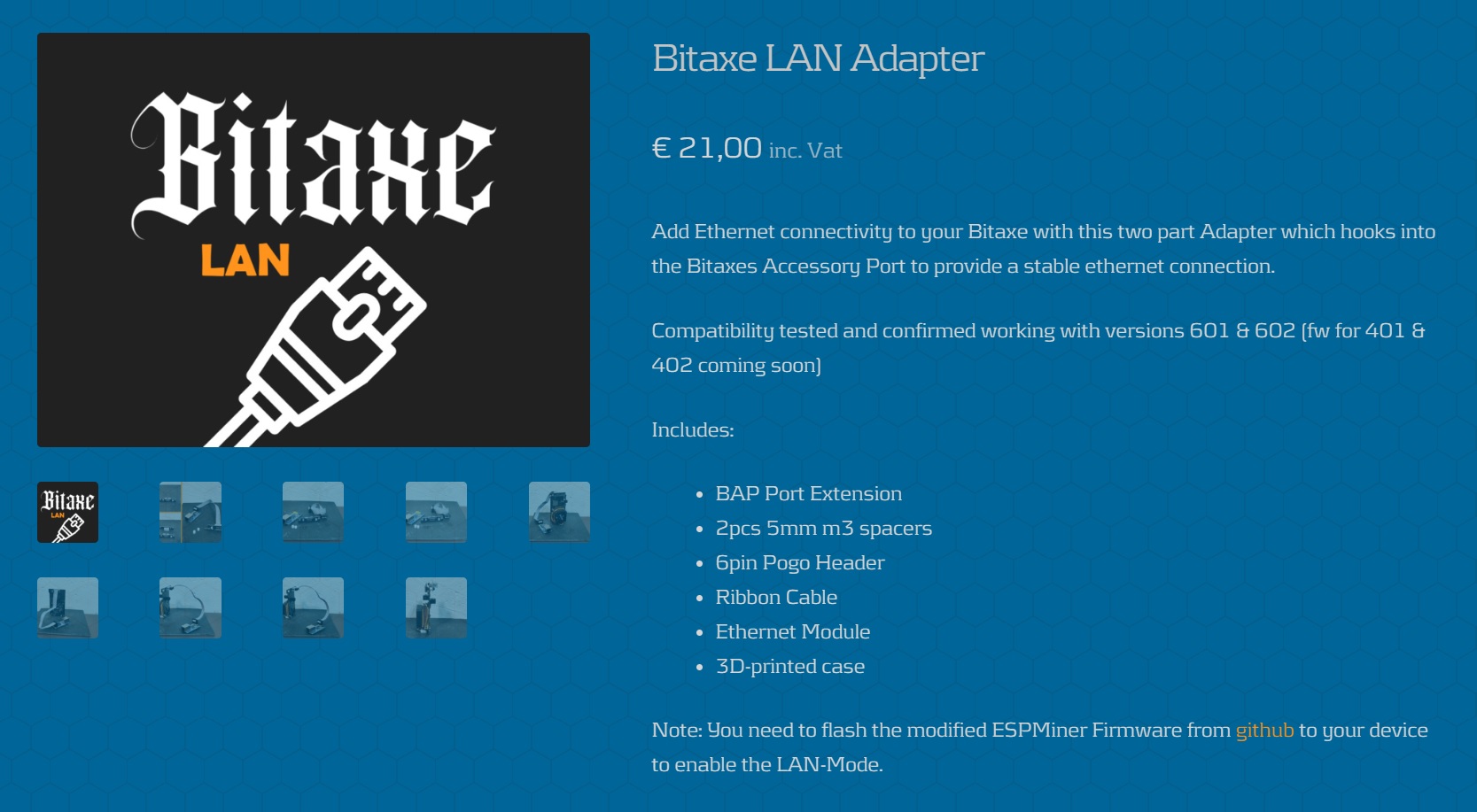
Original Image: https://www.gobrrr.me/product/bitaxe-lan/
LAN Reference for the Bitaxe / ESP-Miner Ecosystem
ESP-Miner-LAN acts as a de facto reference for adding LAN to:
Bitaxe 6xx/8xx boards,
NerdAxe / NerdQaxe,
and similar ESP32-S3 ASIC designs.
Since it shares structure with ESP-Miner, other forks can easily borrow ideas from this code.
Open-Source ↔ Hardware ↔ Community Feedback Loop
GitHub: ESP-Miner-LAN firmware
Hardware: GoBrrr Bitaxe LAN Adapter
Community: BTC Tech Nerd Army Discord
This creates a tight feedback loop where users can:
read the code,
buy a LAN adapter,
and get tuning/support in real time.
A “Real-World” W5500 Case Study for WIZnet Makers
Beyond simple Ethernet demos, this project covers:
ESP-IDF Ethernet integration,
DHCP vs static IP setups,
GPIO conflicts,
power budgeting,
and actual 24/7 deployment.
It’s an excellent real-world example of how W5500 can be used in a production-like environment, not just in lab exercises.
Quick Reproduce (Checklist)
Hardware
Supported Bitaxe board (e.g., 601/602/8xx).
W5500 Ethernet module or GoBrrr Bitaxe LAN Adapter.
Wiring (ESP32-S3 ↔ W5500)
MOSI: GPIO 40
MISO: GPIO 39
SCLK: GPIO 41
CS: GPIO 42
Power: 5V & GND
Keep SPI lines short (≤15 cm), twisted pairs recommended.
Firmware Build
Run idf.py menuconfig → Ethernet W5500 Configuration:
ENABLE_ETHERNET = Y
W5500_USE_DHCP = Y (or set static later)
SPI pins & clock verified.
Build & flash:
idf.py build
idf.py flash
Bring-Up & Test
Check your router’s DHCP table or use AxeOS to find the IP.
With Ethernet plugged in: confirm the miner runs over W5500 LAN.
Unplug Ethernet: confirm it falls back to WiFi and stays mining.
Introduction
본 프로젝트는 **ESP32-S3 기반 비트코인 ASIC 마이너(Bitaxe 계열)**에
WIZnet W5500 Ethernet을 더해,
기존의 WiFi-only 채굴기를 유선 LAN을 우선 사용하는 채굴기로 진화시키는 펌웨어입니다.
원작인 ESP-Miner(bitaxeorg) 펌웨어(v2.10.1)를 기반으로 하되,
ESP-IDF의 Ethernet 드라이버와 W5500을 연결해 LAN + WiFi 듀얼 네트워크 구조를 만들고,
W5500이 연결·설정되어 있으면 자동으로 LAN을 우선 사용하도록 설계되어 있습니다.
이 컨텐츠는 단순히 “LAN도 됩니다” 수준을 넘어서,
왜 W5500을 선택했는지,
ESP32-S3와 어떤 구조로 붙어 있는지,
채굴 루프(ESP-Miner)의 어디에 LAN이 끼어드는지,
그리고 이 작업을 중심으로 어떤 커뮤니티/제품 생태계가 형성되어 있는지
까지 한 번에 보여주는, 꽤 밀도 높은 실전 사례입니다.
Overview
ESP-Miner-LAN은 다음과 같은 특징을 가진 프로젝트입니다:
기반: ESP-Miner v2.10.1 (bitaxeorg)
대상 하드웨어: Bitaxe 6xx/8xx 계열, NerdAxe, 기타 ESP32-S3 기반 비트코인 ASIC 보드
네트워크:
기존 WiFi 채굴 유지
W5500 Ethernet을 추가해 LAN 지원
W5500이 정상 연결되면 LAN 우선, 실패 시 WiFi 폴백
UI: ESP-Miner 계열 공통 웹 대시보드(AxeOS) 그대로 사용
요약하자면, 채굴 로직과 UI는 그대로 두고, 네트워크 레이어만 W5500으로 강화한 브랜치입니다.
Original Language & Author / Community
언어 / 리포지터리
GitHub: CryptoIceMLH/ESP-Miner-LAN
언어: 영어
라이선스: GPL-3.0
저자 및 조직
GitHub 핸들 CryptoIceMLH (CryptoICE)
README에서 “ESP-Miner v2.10.1 기반 LAN 버전”임을 명시
프로젝트 사이트로 Molon Labe Holdings를 링크
Molon Labe Holdings
모토: “Sovereign ₿itcoin Tech Innovator”
주요 활동:
태양광 기반 솔로 마이닝 SolarBit
침지/열 관리 솔루션 ImmergeAxe
위성·메시 기반 BTC 노드 통신 등
성격: “말보다 PoW”를 중시하는, 자기 주권 비트코인 인프라 R&D 스튜디오
X (Twitter) & Discord 커뮤니티
X: @MolonLabeVC
팔로워: 3,000명에 가까운(2,800+ 수준의) BTC·하드웨어·마이닝 관심 유저
Bitaxe LAN Mod, SolarBit, ImmergeAxe, LAN 어댑터 기브어웨이, 실험 결과 등을 꾸준히 공유
Discord: “BTC Tech Nerd Army!”
X에서 반복적으로 초대하는 기술 커뮤니티
Bitaxe/ESP-Miner-LAN, 태양광, 위성 노드 등
하드웨어·펌웨어 튜닝, 라이브 테스트, R&D 피드백이 활발히 오가는 곳
→ 그래서 이 프로젝트는
**개인 프로젝트이면서 동시에, 수천 명의 팔로워와 활발한 Discord를 거점으로 하는 “작은 생태계의 중심 펌웨어”**라고 볼 수 있습니다.
How It Works — 코드/구조 관점
1) 전체 구조
ESP-Miner-LAN의 내부 구조는 크게 네 레이어로 나눌 수 있습니다.
ASIC 드라이버 레이어
SHA-256 ASIC(예: BM1366)의 레지스터, 주파수, 전압, 보드 리비전별 특성을 관리
루트에 있는 config-xxx.csv 파일들이 각 보드에 대한 제조 설정값을 담고,merge_bin*.sh 스크립트로 펌웨어 바이너리와 병합되어 플래시에 기록됩니다.
Stratum 네트워크 레이어
풀/노드와 TCP(Stratum 프로토콜)로 통신
Job(작업)을 받아 ASIC 워커에게 전달하고,
유효 해시 결과를 share로 제출
이 레이어는 “네트워크가 WiFi냐 LAN이냐”를 거의 모른 채,
아래에서 올라온 lwIP 소켓 인터페이스만 씁니다.
네트워크/플랫폼 레이어 (WiFi + Ethernet)
ESP32-S3의 WiFi 스택과
ESP-IDF W5500 Ethernet 드라이버를 초기화
이벤트 기반으로:
어떤 인터페이스가 먼저 링크업/IP 획득을 했는지 확인
W5500(Ethernet)이 정상 동작하면 LAN을 메인 인터페이스로 사용
그렇지 않은 경우 WiFi로 폴백
웹 UI (AxeOS)
HTTP 서버로 동작하는 웹 대시보드
해시율/온도/풀 주소/클럭·전압 등 설정
LAN이든 WiFi든, 결국 같은 IP 스택 위에서 동일 UI가 떠 있기 때문에
사용자는 “접속 IP”만 신경 쓰면 됩니다.
2) W5500 + ESP32-S3 연결
하드웨어 배선
MOSI → GPIO 40
MISO → GPIO 39
SCLK → GPIO 41
CS → GPIO 42
VCC → 5V
GND → GND
SPI 설정
버스: HSPI(SPI2)
클록: 20MHz
모드: SPI Mode 0
IRQ 핀 없이, polling 방식으로 동작
핀 충돌 (BAP와 공유)
GPIO 39/40은 W5500 SPI와 BAP(Bitaxe Access Protocol) UART가 공유되는 핀
기본 핀맵에서는 W5500과 BAP를 동시에 사용할 수 없고,
둘 다 쓰려면 menuconfig에서 핀을 재매핑하고, 하드웨어 배선도 수정해야 합니다.
3) ESP-IDF + lwIP 위에서의 W5500 동작
ESP-Miner-LAN은 ESP-IDF가 제공하는 공식 W5500 Ethernet 드라이버를 사용합니다.
idf.py menuconfig →
Component config → Ethernet W5500 Configuration에서:
ENABLE_ETHERNET = y
W5500_SPI_MOSI/MISO/SCLK/CS = 40/39/41/42
W5500_SPI_CLOCK_MHZ = 20
W5500_USE_DHCP = y (기본, DHCP 권장)
대략적인 초기화 플로우는 다음과 같습니다.
spi_bus_initialize()로 SPI2(HSPI) 초기화
esp_eth_mac_new_w5500() / esp_eth_phy_new_w5500()로 MAC/PHY 객체 생성
esp_eth_driver_install() 후esp_netif_new() + esp_netif_attach()로 ETH용 netif 생성
DHCP 사용 시 esp_netif_dhcpc_start()로 IP 할당
IP_EVENT_ETH_GOT_IP 이벤트에서
“Ethernet이 준비되었다”는 플래그를 세우고
Stratum/웹 서버가 사용할 인터페이스로 등록
Static IP를 쓰고 싶다면
W5500_USE_DHCP를 끄고,
AxeOS 웹 UI 또는 ethernet_w5500.c 내부 코드에서 IP를 직접 설정하는 방식으로 변형할 수 있습니다.
즉, W5500은 ESP-IDF Ethernet 드라이버를 통해 lwIP netif로 추상화되고,
상위 채굴/웹 코드는 “WiFi냐 LAN이냐”를 거의 의식하지 않고 동일한 TCP/IP 레이어를 사용합니다.
Why W5500? — 이 프로젝트가 W5500을 선택한 이유
1) ESP32-S3와 가장 잘 맞는 유선 이더넷 솔루션
ESP32-S3에는 내장 Ethernet MAC이 없음
유선 LAN을 쓰려면
SPI 이더넷 컨트롤러(W5500 등)를 쓰거나
외부 MAC+PHY + RMII/MII로 무거운 구성을 해야 함
W5500은
MAC + PHY + TCP/IP를 한 칩에 통합하고
ESP32-S3와는 SPI 4선 + CS만 연결하면 되므로
회로 난이도, 부품 수, 디버깅 비용을 크게 줄여줍니다.
2) 채굴 워크로드에 잘 맞는 네트워크 특성
채굴은 24/7 장시간 동작,
네트워크 끊김이나 jitter가 share 제출에 직접 영향을 줌
WiFi는 간섭/재부팅/신호 약화 등 변수가 많고,
**유선 LAN + 하드와이어드 TCP/IP(W5500)**은
레이턴시·지터가 더 일정하고
MCU 쪽 네트워크 처리 부하가 줄어
채굴기 입장에서 훨씬 예측 가능한 동작을 제공합니다.
MolonLabeVC가 자주 말하듯,
“WiFi is for normies. Real miners hardwire.”
라는 철학이, W5500 + Bitaxe LAN 선택에 그대로 반영되어 있습니다.
3) ESP-IDF 공식 지원 + 모듈/제품 생태계
ESP-IDF가 W5500 드라이버·예제를 공식 제공 →
펌웨어 쪽에서 재사용 가능 코드가 이미 존재
하드웨어 쪽에는
범용 W5500 모듈,
Bitaxe 전용 GoBrrr Bitaxe LAN Adapter 같은 상용 제품까지 있어
“오픈소스 펌웨어 ↔ 하드웨어 키트 ↔ 커뮤니티 지원”의 파이프라인을 만들기 쉽습니다.
Where This Project Has Impact
Bitaxe / ESP-Miner 생태계의 LAN 레퍼런스
Bitaxe 6xx/8xx, NerdAxe, NerdQaxe 등 다양한 보드에 LAN 기능을 붙이는 대표 참고 펌웨어 역할
ESP-Miner 원본과 구조를 공유하므로, 다른 포크에서도 쉽게 아이디어를 가져다 쓸 수 있음
오픈소스 코드 ↔ 상용 어댑터 ↔ 커뮤니티의 선순환
GitHub(ESP-Miner-LAN)
GoBrrr Bitaxe LAN Adapter(제품)
BTC Tech Nerd Army Discord(지원/튜닝/라이브 테스트)
로 이어지는 선순환 구조
WIZnet Maker 관점에서의 “실전 교과서”
ESP-IDF W5500 연동,
DHCP/Static 구성,
GPIO 충돌 처리,
전력 예산,
24/7 채굴 운용까지 포함한 진짜 운영 코드
“Hello, Ethernet” 예제가 아니라 현장에서 쓰이는 W5500 프로젝트를 보고 싶을 때 딱 좋은 UCC
Quick Reproduce (요약 체크리스트)
하드웨어
지원되는 Bitaxe 보드(예: 601/602/800x)
W5500 모듈 또는 GoBrrr Bitaxe LAN Adapter
배선 (ESP32-S3 ↔ W5500)
MOSI: GPIO 40 / MISO: 39 / SCLK: 41 / CS: 42 / 5V & GND
15cm 이하 배선, 트위스트 페어 권장
펌웨어 빌드
idf.py menuconfig → Ethernet W5500 설정
ENABLE_ETHERNET=Y, W5500_USE_DHCP=Y 확인
idf.py build → idf.py flash
동작 확인
라우터에서 IP 확인 또는 AxeOS 웹 UI 접속
LAN 연결 시 Ethernet 사용, 미연결 시 WiFi 폴백 여부 테스트