



Circuitpython with 4 Networks W5100S W5500 ESP32S2 ESP32 SPI
A CircuitPython demo that tests four network interfaces—W5100S, W5500, ESP32-S2, and ESP32SPI—showing how to unify Ethernet + Wi-Fi under one API.
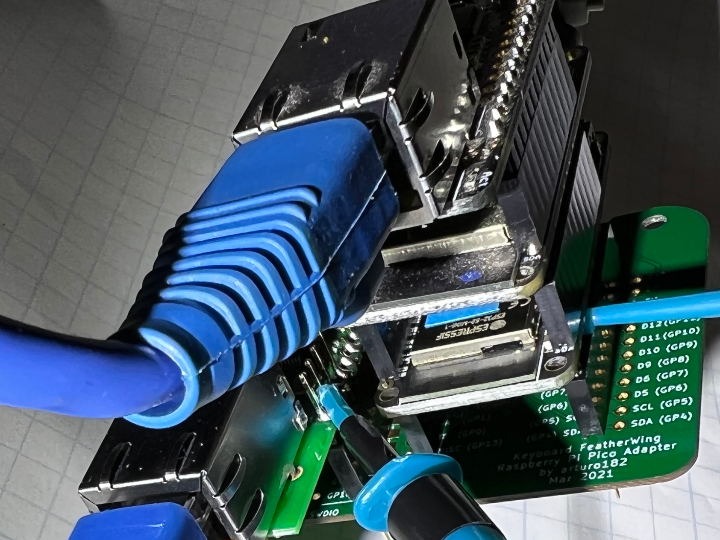
(Gist by anecdata / active on Fosstodon @anecdata)
Overview
This content is a single code.py for CircuitPython that:
brings up four separate network interfaces:
WIZnet W5100S – Raspberry Pi Pico W5100S Ethernet HAT
WIZnet W5500 – WIZnet Ethernet FeatherWing
ESP32SPI – Adafruit AirLift FeatherWing (ESP32 Wi-Fi coprocessor)
ESP32-S2 on-board Wi-Fi – the microcontroller’s native radio
obtains an IP address for each interface,
then performs an HTTP GET to the same test pagehttp://wifitest.adafruit.com/testwifi/index.html
via each interface in sequence, printing the result.
In other words: one board, one script, four completely different network paths, all exercised through a common requests-style API.
Original Language & Author / Community
Language & Location
Platform: GitHub Gist
File: code.py
Language: English
Author: anecdata
GitHub user anecdata maintains several CircuitPython gists and projects that combine:
WIZnet W5100S, W5500, W6100 boards,
Raspberry Pi Pico / Pico-W,
ESP32-based boards,
and Adafruit’s networking libraries.
They have contributed fixes and improvements to CircuitPython itself, including work around WIZnet-based boards such as W5100S-EVB-Pico2.
This gist is part of a larger, ongoing series of experiments where they stack multiple Ethernet/Wi-Fi interfaces and compare behavior, performance, and driver quirks.
Fosstodon (Mastodon) presence
Original Image: https://fosstodon.org/@anecdata
anecdata is active on Mastodon as @anecdata@fosstodon.org.
Fosstodon is an invite-only Mastodon instance focused on people interested in:
free & open-source software (FOSS),
Linux,
microcontrollers,
privacy,
and related tech topics.
On Fosstodon, anecdata regularly posts:
#CircuitPython experiments,
multi-interface network tests (“WIZapalooza” style posts with W5100S/W5500/W6100 + Wi-Fi),
links to new gists and code snippets.
So this gist should be seen less as a throwaway example and more as a snapshot from an ongoing, long-running WIZnet + CircuitPython test series.

How It Works — Architecture & Code Mechanics
1. One SPI bus, multiple network chips
At the top of the script, a single SPI bus is created and shared by:
WIZnet W5100S (Pico HAT),
WIZnet W5500 (FeatherWing),
ESP32SPI (AirLift FeatherWing).
The ESP32-S2 uses its internal Wi-Fi stack separately.
import board
from digitalio import DigitalInOut, Direction

from adafruit_wiznet5k.adafruit_wiznet5k import WIZNET5K
import adafruit_wiznet5k.adafruit_wiznet5k_socket as wiznet5k_socket

from adafruit_esp32spi import adafruit_esp32spi
import adafruit_esp32spi.adafruit_esp32spi_socket as esp_socket

import wifi, socketpool, ssl, adafruit_requests
from secrets import secrets

spi = board.SPI()
W5100S (Pico HAT)
Uses a dedicated reset pin and chip-select:
RESET → board.A3
CS → board.D6
Gets a unique MAC address (ending in …06, 246).
Calls WIZNET5K(spi, cs, reset=..., mac=...) then brings up DHCP and prints its IP.
W5500 (FeatherWing)
Shares the same SPI bus but with a different CS pin:
CS → board.A5
Uses another MAC address (ending in …06, 247) and another WIZNET5K instance.
This clean separation of CS pins allows two WIZnet chips to coexist cleanly on one SPI bus.
ESP32SPI (AirLift FeatherWing)
Uses the standard AirLift triple:
CS → board.D13
READY → board.D11
RESET → board.D12
The ESP32 is treated as a Wi-Fi coprocessor, with esp.connect_AP(...) to join the network.
ESP32-S2 on-board Wi-Fi
Uses the native wifi.radio.connect() call.
Wraps it in socketpool.SocketPool and adafruit_requests.Session for a requests-like experience.
2. Swapping sockets under adafruit_requests
The clever part is how the code reuses one HTTP API across multiple transports.
For each interface, it:
Binds the appropriate socket module and interface to adafruit_requests
Performs a GET to the same URL
Prints the text response.
W5100S:
adafruit_requests.set_socket(wiznet5k_socket, eth_5100S)
print("Fetching text via W5100S from", TEXT_URL)
with adafruit_requests.get(TEXT_URL) as r:
    print(r.text)
W5500:
adafruit_requests.set_socket(wiznet5k_socket, eth_5500)
print("Fetching text via W5500 from", TEXT_URL)
with adafruit_requests.get(TEXT_URL) as r:
    print(r.text)
ESP32SPI (AirLift):
adafruit_requests.set_socket(esp_socket, esp)
print("Fetching text via ESP32SPI from", TEXT_URL)
with adafruit_requests.get(TEXT_URL) as r:
    print(r.text)
ESP32-S2 native Wi-Fi:
pool = socketpool.SocketPool(wifi.radio)
requests = adafruit_requests.Session(pool, ssl.create_default_context())
print("Fetching text via ESP32-S2 from", TEXT_URL)
with requests.get(TEXT_URL) as r:
    print(r.text)
From an application-developer perspective, the HTTP layer never really changes—only the socket provider does. That pattern is very valuable for writing portable, multi-interface networking code in CircuitPython.
Why It Matters (for WIZnet & Makers)
1. A clear “four-network” comparison template
This example shows, in one place:
how to bring up W5100S + W5500 + ESP32SPI + ESP32-S2 Wi-Fi together,
how to assign unique MAC addresses to multiple WIZnet interfaces,
and how to sequence through each path to the same HTTP endpoint.
For WIZnet users, it’s an excellent reference layout for:
trying multiple WIZnet chips on one project,
comparing Ethernet vs Wi-Fi behavior under the same workload,
or building redundancy/failover logic on top.
2. Learning the WIZnet + CircuitPython library pattern
The gist is also a practical “recipe” for:
using the adafruit_wiznet5k driver,
integrating with adafruit_requests via set_socket(),
and sharing the SPI bus across multiple peripherals.
If you’re integrating W5100S/W5500 into a CircuitPython project, this is a very compact, real-world code sample to crib from.
3. Part of a broader WIZnet experiment series
The Gist notes it follows earlier “3 Networks” experiments and precedes later “wifi + W5100S + W5500 + W6100” tests. That makes it:
a mid-point in a longer series of multi-interface WIZnet stress tests, not a one-off.
especially useful if you’re interested in how these chips behave across versions, boards and driver updates.
Fosstodon Community & Benefits for WIZnet Users
What is Fosstodon?

Fosstodon.org is an invite-only instance of Mastodon, the open-source, federated micro-blogging platform.
Its focus is explicitly on:
free & open-source software (FOSS),
Linux,
programming,
microcontrollers and hardware,
privacy and networking topics.
Because it’s a Mastodon instance in the Fediverse, accounts on Fosstodon can interact with other Mastodon servers and compatible services (Pixelfed, PeerTube, etc.).

How anecdata uses it
Posts under @anecdata@fosstodon.org about:
#CircuitPython and #PythonOnHardware,
WIZnet boards (W5100S, W5500, W6100) and Pico/ESP32 combos,
network performance notes, buffer sizes, quirks, and fixes.
Frequently shares links to gists like this one—so Fosstodon is effectively the front porch for their experiments.
Benefits for WIZnet users and staff
For WIZnet product users:
You get early visibility into:
new CircuitPython examples using W5100S/W5500/W6100,
real-world performance measurements and edge cases,
wiring and configuration patterns that actually work.
It’s a good place to ask practical questions about:
combining Ethernet + Wi-Fi,
using WIZnet boards with CircuitPython,
and debugging odd networking behavior.
For WIZnet engineers / advocates:
Fosstodon (and anecdata’s feed in particular) provides a live signal of how WIZnet hardware is used in the FOSS/maker world.
It’s a friendly venue to:
spot integration issues early,
see how people stack WIZnet boards with Pico/ESP32/CircuitPython,
and meet power-users who are essentially doing long-term field testing for free.
Quick Reproduce (Checklist)
Hardware
A Feather ESP32-S2–class board.
WIZnet W5500 FeatherWing.
WIZnet W5100S Pico HAT (or equivalent).
Optional: AirLift FeatherWing (ESP32SPI), if not using on-board Wi-Fi.
CircuitPython Setup
Install a recent CircuitPython build on the board.
Copy the required libraries to CIRCUITPY/lib:
adafruit_wiznet5k
adafruit_esp32spi
adafruit_requests
Create a secrets.py with your Wi-Fi SSID and password.
Load the Code
Save the Gist’s code.py to the root of the board (CIRCUITPY/code.py).
Run & Observe
Open a serial console (REPL) and reset the board.
You should see:
each interface’s IP address printed in turn, and
the test HTML from wifitest.adafruit.com fetched via:
W5100S
W5500
ESP32SPI
ESP32-S2 Wi-Fi
This makes ESP-Maker-style, multi-network experiments with WIZnet hardware remarkably approachable—and that’s exactly why this gist is worth curating.
Overview
이 컨텐츠는 CircuitPython에서 유선·무선을 섞어 4개의 네트워크 인터페이스를 동시에 올리고, 동일한 웹 페이지를 순서대로 요청해보는 실험 프로젝트입니다.
사용된 네트워크 구성은 다음 네 가지입니다.
WIZnet W5100S – Raspberry Pi Pico용 WIZnet Ethernet HAT
WIZnet W5500 – WIZnet Ethernet FeatherWing
ESP32SPI – Adafruit AirLift FeatherWing (ESP32 WiFi 코프로세서)
ESP32-S2 내장 WiFi – Feather ESP32-S2 자체 무선
코드는 각 인터페이스의 IP 주소를 출력한 뒤, Adafruit 테스트 서버(http://wifitest.adafruit.com/testwifi/index.html)를 W5100S → W5500 → ESP32SPI → ESP32-S2 순서로 HTTP GET 하여 결과를 출력합니다.
Original Language & Author / Community
언어 / 위치
Gist: CircuitPython with 4 Networks: W5100S + W5500 + ESP32-S2 + ESP32SPI
언어: 영어, 파일 이름: code.py
저자: anecdata
GitHub 핸들 anecdata — WIZnet W5100S Pico HAT, W5100S-EVB-Pico, W5500 등과 CircuitPython을 결합한 Gist를 여러 개 올리고 있습니다.
Adafruit CircuitPython 본체에도 기여하고 있으며, 릴리즈 노트에 WIZnet W5100S-EVB-Pico2 관련 수정에 감사 인사(@anecdata) 가 명시되어 있습니다.
Fosstodon(Mastodon) 활동
fosstodon.org/@anecdata 계정으로 활동하며,
#CircuitPython 태그로 W5100S, W5500, W6100 등 WIZnet 보드를 묶어 테스트하는 “WIZapalooza” 실험,
UDP 버퍼 크기, Pico/ESP32 네트워크 성능 비교,
WIZnet Ethernet HAT 가격·가성비 분석 등
을 자주 올립니다.
즉, 이 Gist는 “한 번 해보고 끝난 코드”가 아니라,
여러 세대의 WIZnet 보드·네트워크 스택을 길게 실험해 온 엔지니어가 정리한 중간 결과물에 가깝습니다.
How It Works — 코드 메커니즘
1) 공통 SPI 버스 위에 4개의 네트워크
코드 상단에서 하나의 SPI 버스를 만들고, 거기에 WIZnet 두 개와 ESP32SPI를 모두 매단 뒤, ESP32-S2는 자체 WiFi 스택을 사용합니다.
import board
from digitalio import DigitalInOut, Direction
from adafruit_wiznet5k.adafruit_wiznet5k import WIZNET5K
import adafruit_wiznet5k.adafruit_wiznet5k_socket as wiznet5k_socket
from adafruit_esp32spi import adafruit_esp32spi
import adafruit_esp32spi.adafruit_esp32spi_socket as esp_socket
import wifi, socketpool, ssl, adafruit_requests
from secrets import secrets

spi = board.SPI()
WIZnet W5100S (Pico HAT)
별도의 리셋핀(A3)과 CS(D6)를 지정하여 WIZNET5K 드라이버 인스턴스를 생성합니다.
고유 MAC 주소(…06, 246)를 부여하고, DHCP를 통해 IP를 받은 뒤 바로 출력합니다.
WIZnet W5500 FeatherWing
같은 SPI 버스를 공유하되, CS를 A5로 바꿔서 W5100S와 충돌하지 않도록 했습니다.
이 역시 WIZNET5K 드라이버로 초기화하고 별도 MAC(…06, 247)을 사용합니다.
MAC_ADDR_5100S = (0xDE, 0xAD, 0xBE, 0xEF, 0x06, 246)
eth_5100S_rst = DigitalInOut(board.A3)
eth_5100S_rst.direction = Direction.OUTPUT
eth_5100S_cs = DigitalInOut(board.D6)
eth_5100S = WIZNET5K(spi, eth_5100S_cs, reset=eth_5100S_rst, mac=MAC_ADDR_5100S)

MAC_ADDR_5500 = (0xDE, 0xAD, 0xBE, 0xEF, 0x06, 247)
eth_5500_cs = DigitalInOut(board.A5)
eth_5500 = WIZNET5K(spi, eth_5500_cs, mac=MAC_ADDR_5500)
ESP32SPI(Airlift FeatherWing)
ESP32를 WiFi 코프로세서로 쓰는 Adafruit 전통 구조.
CS/READY/RESET 핀(D13/D11/D12)을 지정한 뒤 connect_AP()로 AP에 붙습니다.
ESP32-S2 내장 WiFi
wifi.radio.connect()로 직접 AP에 접속하고, socketpool.SocketPool + adafruit_requests.Session으로 HTTP 세션을 구성합니다.
2) adafruit_requests로 네트워크별 HTTP 테스트
핵심은 같은 adafruit_requests API를 다른 소켓·인터페이스에 번갈아 연결하는 패턴입니다.
W5100S로 요청
adafruit_requests.set_socket(wiznet5k_socket, eth_5100S)
print("Fetching text via W5100S from", TEXT_URL)
with adafruit_requests.get(TEXT_URL) as r:
    print(r.text)
W5500로 요청
adafruit_requests.set_socket(wiznet5k_socket, eth_5500)
print("Fetching text via W5500 from", TEXT_URL)
with adafruit_requests.get(TEXT_URL) as r:
    print(r.text)
ESP32SPI(Airlift)로 요청
adafruit_requests.set_socket(esp_socket, esp)
print("Fetching text via ESP32SPI from", TEXT_URL)
with adafruit_requests.get(TEXT_URL) as r:
    print(r.text)
ESP32-S2 내장 WiFi로 요청
pool = socketpool.SocketPool(wifi.radio)
requests = adafruit_requests.Session(pool, ssl.create_default_context())
print("Fetching text via ESP32-S2 from", TEXT_URL)
with requests.get(TEXT_URL) as r:
    print(r.text)
이 패턴 덕분에, 애플리케이션 코드(HTTP 요청)는 그대로 두고, “소켓 + 인터페이스”만 갈아끼우며 비교 테스트를 할 수 있습니다. WIZnet 이더넷이든 ESP32 WiFi든 동일한 상위 API로 다룰 수 있다는 점을 명확히 보여줍니다.
Why It Matters (WIZnet & Maker 관점)
“4중 네트워크” 구조를 한눈에 보여주는 예제
W5100S + W5500 + ESP32SPI + ESP32-S2를 한 스크립트에서 동시에 초기화하고 테스트하는 사례는 흔치 않습니다.
WIZnet 칩을 Pico HAT / FeatherWing / EVB 등 다양한 폼팩터에서 동시에 사용하는 구조를 연구할 때 좋은 출발점입니다.
WIZnet + CircuitPython 라이브러리 패턴 학습
adafruit_wiznet5k 드라이버와 adafruit_requests의 set_socket 패턴을 그대로 보여주므로,
다른 프로젝트에 W5100S/W5500을 붙일 때 참고 코드로 활용하기 좋습니다.
연속 실험의 일부라는 점
Gist 설명에 이 프로젝트가
“3 Networks” Gist(FeatherS2 + AirLift + Ethernet FeatherWing)와,
후속 “Native wifi + WIZnet W5100S + W5500 + W6100” Gist
의 후속·연장선이라고 적혀 있습니다.
즉, 여러 세대의 WIZnet 보드를 묶어서 장기간 네트워크 실험을 해 온 시리즈 중 하나라는 의미를 갖습니다.
Fosstodon 커뮤니티 소개 & WIZnet 유저/직원의 Benefit
Fosstodon이란?
fosstodon.org는 트위터(X)와 비슷한 마이크로블로깅 서비스인 Mastodon의 한 인스턴스(서버)입니다.
Mastodon 자체는 오픈소스·분산형 소셜 네트워크로, 여러 서버가 연합(Fediverse) 구조로 연결되어 있는 것이 특징입니다.
Fosstodon의 공식 소개 문구는 다음과 같습니다.
Fosstodon is an invite only Mastodon instance that is open to those who are interested in technology; particularly free & open source software.
2023년 9월 이후 **초대제(invite-only)**로 전환되어, 기존 사용자 초대가 있어야 가입할 수 있습니다.
즉, FOSS(자유·오픈소스 소프트웨어)와 기술, 특히 리눅스·마이크로컨트롤러·프라이버시 같은 주제에 관심 있는 사람들이 모여 있는 Mastodon 서버라고 보면 됩니다.
Mastodon 특성상:
광고가 없고,
타임라인은 기본적으로 시간 순(chronological),
인스턴스마다 자체 규칙과 분위기를 갖는 커뮤니티형 SNS입니다.
anecdata가 Fosstodon에서 하는 활동
@anecdata@fosstodon.org 계정으로 활동하면서,
#CircuitPython, #microcontrollers, #PythonOnHardware 등 태그로
WIZnet W5100S/W5500/W6100 EVB, Pico W, ESP32 계열과의 조합 실험을 자주 포스팅합니다.
예를 들어,
**“WIZapalooza”**라는 이름으로 *“wifi + W5100S + W5500 + W6100을 하나씩 돌아가며 HTTPS 요청을 보내본다”*는 글을 올리기도 했습니다.
WIZnet 제품 사용자 / 직원이 얻을 수 있는 이점
WIZnet 제품을 쓰는 메이커·개발자 입장에서:
CircuitPython + WIZnet 조합에 대한 실제 예제 코드와 성능 경험담을 빠르게 접할 수 있습니다(UDP 버퍼, 피코 vs ESP32 비교 등).
비슷한 하드웨어 스택을 쓰는 사람들과
배선 방법,
라이브러리 버전,
네트워크 튜닝 팁
을 서로 공유하기 좋은 장입니다.
WIZnet 내부 엔지니어 / 에반젤리스트 입장에서는:
CircuitPython, Adafruit, Mastodon Fediverse와 같은 FOSS 친화 커뮤니티에서 WIZnet 보드가 어떻게 쓰이는지 실시간으로 관찰할 수 있고,
anecdata처럼
W5100S-EVB-Pico2 지원,
CircuitPython 네트워킹 관련 피드백
을 직접 올리는 개발자와 가볍게 소통하며 요구사항·버그 리포트를 빠르게 받는 창구로도 활용할 수 있습니다.
Quick Reproduce (요약 체크리스트)
하드웨어
Feather ESP32-S2 + WIZnet W5500 FeatherWing + WIZnet W5100S Pico HAT(또는 동등한 조합)
SPI 버스를 공유할 수 있도록 배선/FeatherWing 스택 구성
CircuitPython 설정
adafruit_wiznet5k, adafruit_esp32spi, adafruit_requests 라이브러리 복사
secrets.py에 WiFi SSID/Password 추가
code.py 배치
Gist의 code.py를 그대로 복사 후 보드에 올리기
실행 & 확인
REPL 시리얼 로그에서
W5100S / W5500 / ESP32SPI / ESP32-S2 각각의 IP 주소와
wifitest.adafruit.com에서 가져온 HTML 텍스트가 순서대로 출력되는지 확인