



BeeMS
BeeMS is an open-source MIT BMS for UT Arlington FSAE E27, pairing CAN safety logic with W5500 Ethernet telemetry via a CAN-to-ETH bridge and PC/SCADA tools.
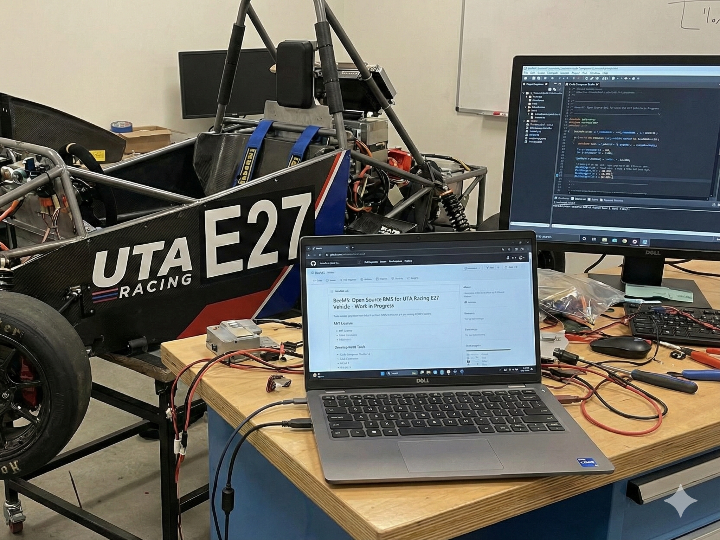
BeeMS — An open-source BMS project for Formula SAE Electric (UT Arlington “E27”)
Generate AI Image
Introduction
BeeMS is an open-source Battery Management System (BMS) repository developed in the context of a university racing program (Formula SAE Electric). The BeeMS README states that this project is a “BMS for University Of Texas At Arlington’s FSAE Race team’s E27 vehicle” and that it is work in progress.
In Formula SAE Electric, a BMS typically exists to support three core needs:
- Monitor the accumulator (battery pack): cell/pack conditions such as voltage and temperature
- Protect the pack under abnormal conditions: over-voltage, under-voltage, over-temperature, and related safety behaviors
- Communicate with the vehicle control system (often via CAN) and support logging/diagnostics
BeeMS is best read as an example of a common student EV workflow: a team builds and iterates on a vehicle-ready BMS internally, and publishes that work as an open repository.
What this project is

Generate AI Image
Here’s what BeeMS explicitly declares about itself (from the README and repository metadata):
- Purpose: BMS for UT Arlington Formula SAE team’s E27 vehicle
- Status: Work in progress
- License: MIT
- Toolchain (explicitly stated in the repo):
- Code Composer Studio 12 (DriverLib dependency)
- KiCad 9, using a shared symbol/footprint library called “zzLocal”
- Repository scale (team-project signal): the GitHub page shows 341 commits and 10 contributors
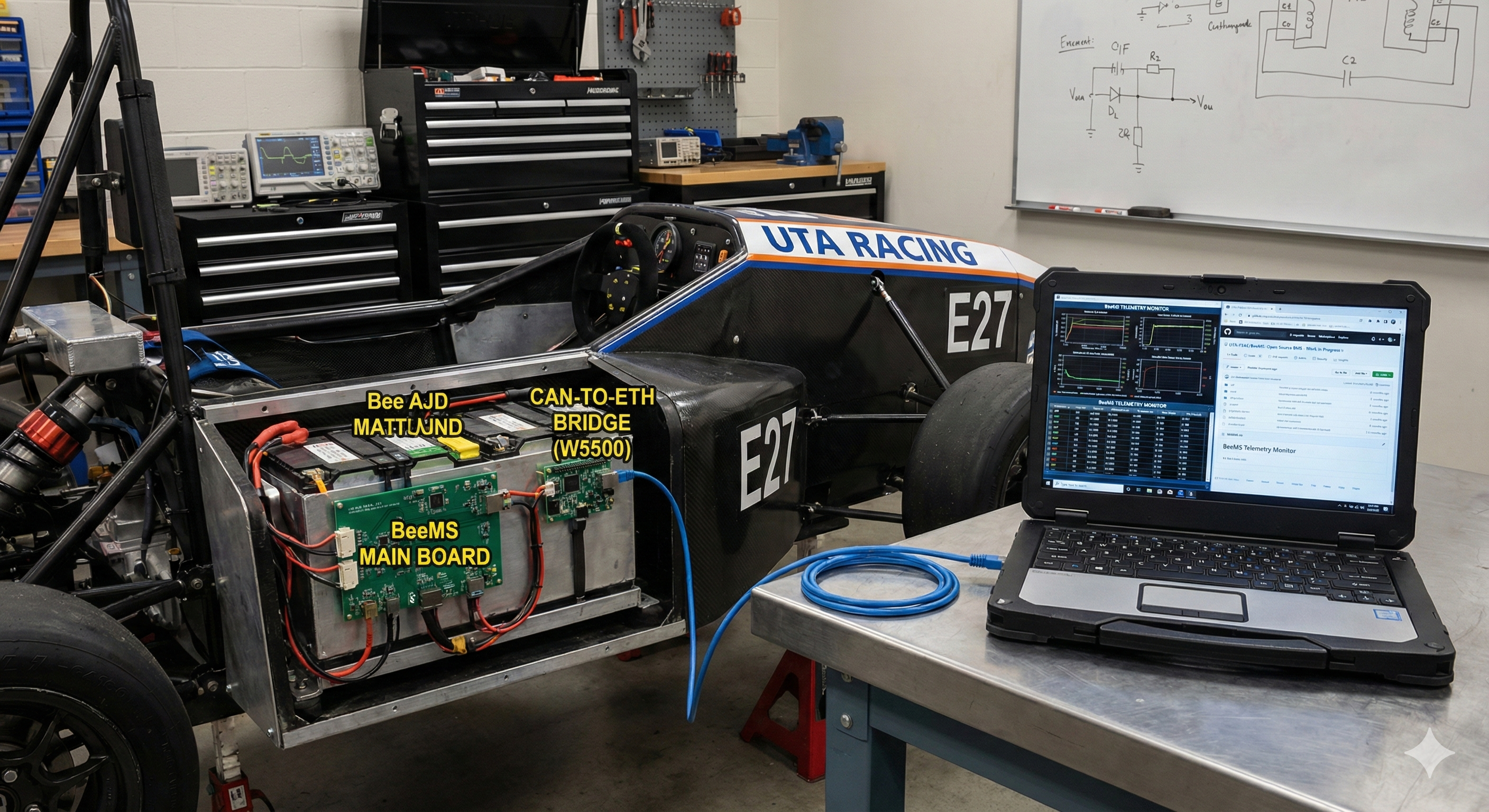
The important takeaway: BeeMS is not a single “example sketch.” It’s organized like a team vehicle electrical project, and it publishes the tools needed for both software and hardware work—useful context for other teams or makers looking for reference material.
Generate AI Image
Author & Team
1) Maintainer / contributor clarification (repo-level facts)
The BeeMS README includes a clarification about contributor attribution: the goerge account is not relevant, and it appeared due to a naming typo involving “george / George Boone.” This note is included so readers interpret the contributor list correctly.
Based on the GitHub profile, George Boone (@gregclacker) describes himself as a UT Arlington Computer Engineering undergraduate and notes interests aligned with embedded/hardware work (including PCB-related work).
2) The “E27 vehicle” context: UT Arlington Formula SAE (UTA Racing)
BeeMS states its purpose directly:
“BMS for University Of Texas At Arlington’s FSAE Race team’s E27 vehicle.”
UT Arlington’s Formula SAE team is UTA Racing, and their official site describes the program as designing and building a formula-style race car each year to compete in Formula SAE.
Helpful team references (so readers can verify activity and learn context around vehicle cycles, build seasons, and competition presence):
- UTA Racing main site: https://fsae.uta.edu/
- About: https://fsae.uta.edu/about/
- Legacy / history: https://fsae.uta.edu/legacy/
- SAE participation overview: https://fsae.uta.edu/sae-international/
- Example vehicle page (season outcomes and results): https://fsae.uta.edu/f23/
(UTA Racing’s Legacy page notes long-term participation and multiple vehicles over time; the vehicle pages share season-level competition outcomes.)
3) Team communication channels (useful for anyone following development)
UTA Racing also shares updates through multiple channels—useful if you want to track the team’s build season cadence, events, and competition prep alongside BeeMS development:
- Instagram: https://www.instagram.com/utaracing/?hl=en
- LinkedIn: https://www.linkedin.com/company/utaracing
- Facebook: https://www.facebook.com/UTArlingtonRacing/
- YouTube: https://www.youtube.com/@UTAFSAE
For third-party readers, these channels help you understand the broader vehicle-development timeline (design → integration → testing → competition), which can make a team BMS repo like BeeMS easier to interpret.
How it works (W5500 role & data flow)
Generate AI Image
BeeMS is structured to cover both the BMS core and the field diagnostics/monitoring pipeline in a single repository. At the GitHub root, you’ll find:
BeeMS/— the main BMS logic/firmware areaCAN to ETH trx MSPM0G3507_A/— a dedicated CAN → Ethernet transceiver/bridge projectCanEthernetMonitor.java— a PC-side monitoring tool for CAN/Ethernet telemetryRapidSCADA/RS/BeeMS/— SCADA integration artifactshardware/— circuit/PCB-related materials
1) Extending in-vehicle CAN to off-vehicle Ethernet diagnostics
BeeMS keeps the in-vehicle network and off-vehicle tooling separate and explicit:
- The repository includes a dedicated project named
CAN to ETH trx MSPM0G3507_A/, which is meant to move vehicle CAN data into the Ethernet side for off-car monitoring. - A PC-side tool (
CanEthernetMonitor.java) is included to view the telemetry arriving over Ethernet. - A RapidSCADA folder is also present, showing how this telemetry can be carried into a SCADA-style monitoring stack.
2) What W5500 does here
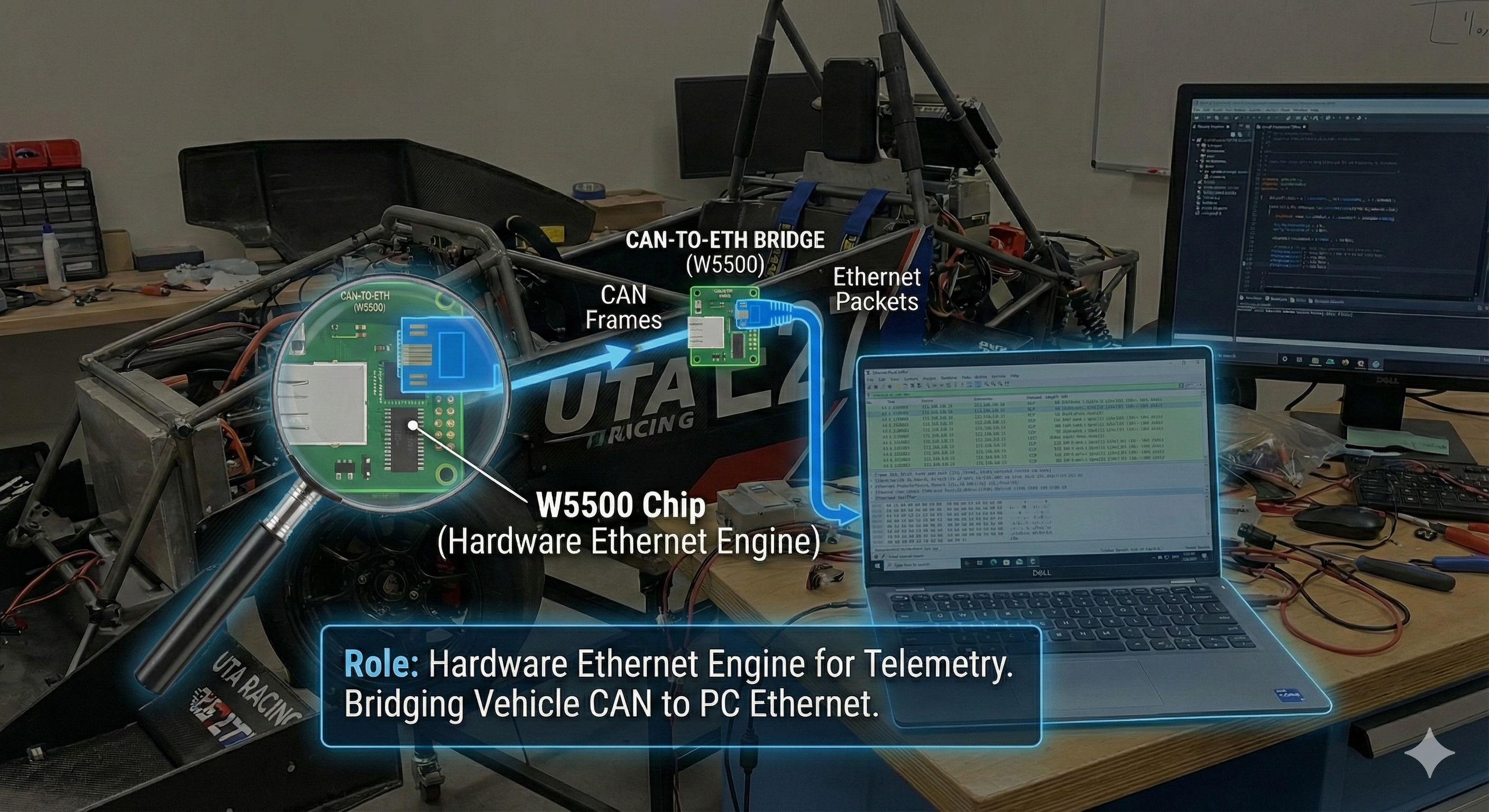
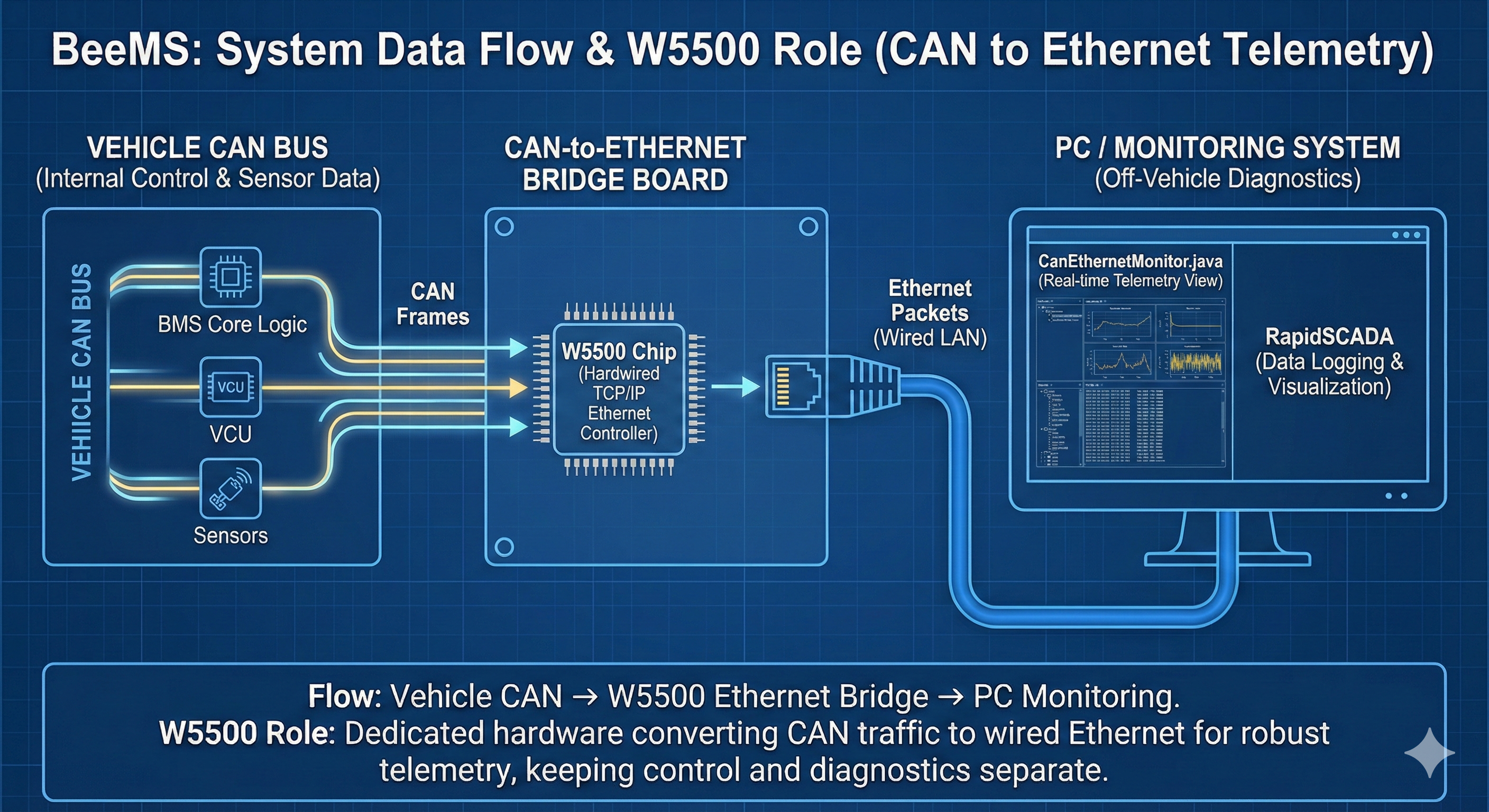
In BeeMS, W5500 does not replace CAN as the vehicle’s essential control network. Instead, it is used as the wired LAN interface for pulling vehicle state/diagnostic data out to a PC/dashboard/SCADA system.
From the MasterBoard schematic images provided, the board includes an RJ45 connector and a WIZnet W5500 marking together—indicating the Ethernet path is designed around RJ45 + W5500 wired Ethernet for external monitoring/logging.
3) Practical data flow: “Vehicle CAN → W5500 Ethernet → PC”
The repository layout makes the intended telemetry pipeline clear:
- Vehicle CAN traffic (from BMS/VCU/sensor nodes)
- The CAN→Ethernet transceiver receives CAN frames
- Frames are packed into a transportable packet format
- Packets are transmitted over LAN using W5500 Ethernet
- A PC receives and visualizes the telemetry via
CanEthernetMonitor.java, or via SCADA artifacts underRapidSCADA/...
A practical takeaway for teams: the separation is clean—CAN is for real-time in-vehicle control, while Ethernet is for logging/diagnostics/telemetry.
Suggested reading order (if you’re using BeeMS as a reference)
- Root README (scope + toolchain)
CAN to ETH trx MSPM0G3507_A/(how they externalize CAN diagnostics)CanEthernetMonitor.java(what the PC expects to display)RapidSCADA/...(how they think about “operations-grade” monitoring)BeeMS/(core BMS logic, protection/state behavior)
Why it matters
- A realistic reference for FSAE EV teams
BeeMS is explicitly scoped to a real Formula SAE Electric vehicle (UT Arlington’s E27) and is openly marked as WIP. For student EV teams, this is a useful kind of reference because it reflects the reality that a BMS project isn’t just “a firmware loop”—it lives alongside vehicle CAN integration, diagnostics/logging, and PCB work. - Clear separation of control vs. monitoring
By including a CAN→Ethernet bridge, a PC monitoring tool, and SCADA artifacts in the same repo, BeeMS shows a practical team approach: keep the safety-critical control network on CAN, and provide a robust off-vehicle path for telemetry/diagnostics via Ethernet. - MIT license + explicit toolchain disclosure
The project’s MIT license supports learning and reuse. The repository also tells you exactly what you need to work on it (CCS 12 + DriverLib, KiCad 9 with the “zzLocal” library), which reduces friction for anyone trying to study or adapt the work.
Quick notes
- BeeMS is clearly labeled work in progress. Treat it as an in-development team project rather than a finished “drop-in BMS reference.”
- A BMS interfaces with a high-voltage accumulator system, which carries real safety risk. This repository can be valuable for learning and architecture reference, but real-world deployment requires proper safety validation and compliance with team/competition rules.
- The repository includes the components needed to study an end-to-end diagnostics approach—CAN→Ethernet bridge, Java monitor tool, and SCADA artifacts—not just BMS code.
- The README includes a contributor-attribution correction; if you’re researching authorship and maintenance, read the README note first.
If you’d like, I can turn the “How it works” section into a compact diagram-friendly version (one paragraph + one bullet flow) for a magazine layout, or write a 160-character summary for the post thumbnail/metadata.
Introduction
BeeMS는 대학 레이싱 프로젝트(Formula SAE Electric) 맥락에서 개발되는 오픈소스 배터리 관리 시스템(BMS) 저장소입니다. BeeMS 리포지터리 README에는 이 프로젝트가 **“University Of Texas At Arlington(UT Arlington) FSAE 레이스 팀의 E27 차량을 위한 BMS”**이며 work in progress라고 명시되어 있습니다.
Formula SAE Electric 환경에서 BMS는 보통 다음을 위해 필요합니다.
배터리 팩(Accumulator)의 상태(전압/온도 등) 모니터링
이상 상황(과전압/저전압/과온 등) 보호 동작
차량 제어계와의 통신(주로 CAN) 및 로깅/진단
BeeMS는 “팀 차량용 BMS를 팀 내부에서 구현/개발하는” 전형적인 학생 전기차 개발 흐름을 오픈 레포로 공개한 사례로 이해하면 됩니다.
What this project is
BeeMS 저장소가 스스로 밝히는 사실(README/GitHub 메타)은 다음과 같습니다.
프로젝트 목적: UT Arlington FSAE 레이스 팀 E27 차량용 BMS
개발 상태: Work in progress
라이선스: MIT
개발 툴체인(레포에서 명시):
Code Composer Studio 12(DriverLib 의존)
KiCad 9(공용 심볼/풋프린트 라이브러리 “zzLocal”)
레포 규모(팀 프로젝트 신호): GitHub 페이지에 341 commits, Contributors 10으로 표시됩니다.
이 파트에서 중요한 메시지는 한 가지입니다.
BeeMS는 “단일 예제 코드”가 아니라, 팀 차량용 전장 프로젝트 형태로 관리되는 레포이며, 소프트웨어/하드웨어 개발에 필요한 도구까지 공개돼 있어 다른 팀이나 메이커가 참고하기 좋다는 점입니다.
Author & Team (보강본)
1) BeeMS 작성자/관리자(레포 기준으로 확인 가능한 범위)
BeeMS README에는 기여자 표기가 잘못 잡힌 사례를 직접 정정해 둡니다. goerge 계정은 무관하며, 표기 오타(george/George Boone) 때문에 그렇게 보였다는 주석이 포함돼 있습니다. FSAE UTA
GitHub 프로필 기준으로 **George Boone(@gregclacker)**는 본인을 UT Arlington Computer Engineering 학부생이라고 소개하고, 임베디드/하드웨어(PCB 등) 관련 관심사를 적어두었습니다.
2) “BMS for UT Arlington’s FSAE E27 vehicle” 맥락 설명
BeeMS는 README에서 목적을 명확히 밝힙니다:
“BMS for University Of Texas At Arlington's FSAE Race team's E27 vehicle.” FSAE UTA
여기서 UT Arlington의 Formula SAE 팀은 UTA Racing으로, 팀 공식 사이트는 “매년 Formula SAE 시리즈에 출전할 formula-style race car를 설계·제작한다”고 소개합니다. FSAE UTA+1
또한 팀의 Legacy 페이지는 FSAE에 1982년부터 참가했고 30대 이상의 차량을 출전시켜 왔다고 설명합니다. FSAE UTA
차량 페이지(예: F23)에서는 특정 시즌 성과(예: FSAE Michigan 5th overall, 1st Autocross, 1st Endurance)처럼 팀의 레이스 활동 결과도 공개합니다. FSAE UTA
정리하면 BeeMS는 “임베디드 BMS 예제”라기보다, 실제 Formula SAE 팀 차량(E27) 개발의 일부로 진행되는 BMS 레포라는 점에서 읽을 맥락이 분명합니다. FSAE UTA+1
3) 팀 활동/커뮤니케이션 채널(SNS) — 다른 유저가 참고할 포인트
UTA Racing은 공식 웹사이트 외에도 여러 채널을 운영하며, 팀/프로젝트 업데이트를 공유합니다.
Instagram: @utaracing 계정으로 팀 활동/차량/이벤트를 게시합니다. (프로필 표기 기준 팔로워 약 4.5k 수준) 인스타그램+1
LinkedIn: “UTA Racing” 회사/조직 페이지가 있고, 팀 소개 및 활동을 게시합니다. LinkedIn
Facebook: “UTA Racing Formula SAE” 페이지를 운영합니다. (페이지 표기 기준 좋아요 약 4.4k 수준) Facebook+1
YouTube: @UTAFSAE 핸들로 팀 소개/영상 콘텐츠를 운영합니다. YouTube
이런 채널은 BeeMS 같은 팀 개발 레포를 읽을 때도 도움이 됩니다.
예를 들어 “올해 차량 개발 흐름/행사/대회 준비” 같은 맥락을 함께 보면, BeeMS가 어떤 단계(설계·통합·테스트)에서 쓰이는 구성요소인지 이해가 더 쉬워집니다. FSAE UTA+1
How it works (W5500 역할 & 데이터 플로우)
How it works: BeeMS의 시스템 구성(큰 그림)
BeeMS 레포는 “BMS 한 덩어리”가 아니라, 차량용 BMS 시스템을 구성하는 여러 조각을 한 저장소에 모아 관리하는 형태입니다. GitHub 루트에 다음이 함께 존재합니다.
BeeMS/ (BMS 본체 로직/펌웨어 쪽으로 쓰이는 메인 폴더)
CAN to ETH trx MSPM0G3507_A/ (CAN → Ethernet 트랜시버(변환기) 프로젝트)
CanEthernetMonitor.java (PC에서 CAN/Ethernet을 모니터링하는 도구)
RapidSCADA/RS/BeeMS/ (SCADA 연동 흔적)
hardware/ (회로/PCB 관련)
즉, BeeMS는 아래처럼 역할을 나눠 “팀 차량에서 쓰기 쉬운 형태”로 구성된 레포라고 이해하면 됩니다.
1) BMS 본체(차량 안에서 안전/상태를 담당)
배터리 팩의 상태(전압/온도 등)를 읽고
규정/안전 기준에 맞춰 보호 로직을 수행하고
차량 제어계에 CAN 등으로 상태를 공유
(이 영역이 BeeMS/ 중심)
2) CAN→Ethernet 트랜시버(진단/텔레메트리용 “브릿지”)
차량 내부 CAN 메시지를 받아
유선 LAN(Ethernet)으로 PC나 모니터링 시스템에 보내는 역할
(이 영역이 CAN to ETH trx MSPM0G3507_A/ 중심)
3) PC/SCADA 모니터(테스트/디버그용)
Ethernet으로 들어오는 텔레메트리 데이터를 받아 화면에 표시하거나,
SCADA로 저장/시각화하는 쪽으로 확장
(CanEthernetMonitor.java, RapidSCADA/...)
W5500은 여기서 “무슨 역할”인가?
BeeMS에서 W5500은 **BMS 본체의 필수 통신(CAN)**을 대체하는 게 아니라, 다음 목적을 위한 유선 네트워크 인터페이스로 들어갑니다.
“차량 CAN에 있는 상태/진단 데이터를, 차량 밖 PC/대시보드/SCADA로 빼내는 통로”
즉, 역할을 한 줄로 말하면:
W5500 = CAN 텔레메트리를 Ethernet으로 내보내기 위한 하드웨어 네트워크 엔진
이 방식의 장점(제3자 관점)은 분명합니다.
CAN 로깅/분석을 위해 차량에 노트북을 붙일 때
USB-CAN 동글 대신
“차량에 박혀있는 보드가 Ethernet으로 쏴주게” 만들 수 있음
대회/트랙 테스트처럼 현장 환경이 거칠 때도
Wi-Fi보다 유선이 예: 지터/끊김/간섭에 유리할 수 있음
SCADA/대시보드로 확장할 때도
Ethernet 입력이 보통 더 자연스럽습니다.
데이터 플로우: “차량 CAN → W5500 → PC” 흐름을 어떻게 만들었나
레포 구성에서 가장 강하게 드러나는 데이터 플로우는 이겁니다:
차량 CAN(BMS/VCU/센서 보드들이 메시지 송신)
CAN→ETH 트랜시버가 CAN 프레임을 수신
트랜시버가 수신 프레임을 “전송용 포맷(패킷)”으로 묶음
**W5500(Ethernet)**을 통해 LAN으로 송신
PC에서 CanEthernetMonitor.java 같은 도구나 SCADA가 수신/시각화
여기서 중요한 실무 팁은:
CAN은 실시간/차량 내부 통신(제어계)
Ethernet은 로깅/진단/텔레메트리(개발/운영 도구)
라는 역할 분담이 깔끔하다는 점입니다.
“이 레포를 참고하려는 사람”을 위한 읽는 순서
BeeMS를 레퍼런스로 삼고 싶다면, 아래 순서가 효율적입니다.
루트 README: 프로젝트 범위/툴체인(CCS, KiCad) 확인
CAN→ETH 트랜시버 폴더: “차량 밖으로 데이터를 빼내는” 설계 의도를 먼저 파악
CanEthernetMonitor.java: PC에서 어떤 형태로 데이터를 보려 했는지 감 잡기
RapidSCADA 폴더: 더 큰 모니터링/로그 시스템으로 확장하려는 방향 확인
마지막으로 BeeMS 본체 폴더: 보호/상태 머신/측정 로직의 실제 구현을 따라가기
안전 메모(중요)
BeeMS는 학생 레이스카용 BMS이고, 실제 HV 배터리 시스템과 연결되는 영역입니다.
이 레포는 레퍼런스로 훌륭하지만, 그대로 복제해 적용하는 건 별개입니다. 실제 적용 시에는 반드시 팀 규정/대회 규정/안전 검증이 필요합니다.
좋아. 아래는 BeeMS 큐레이션 본문에 바로 넣을 수 있는 형태로, 요청하신 How it works / Why it matters / Quick notes만 “소개하는 톤”으로 깔끔하게 정리한 버전이야. (추정 표현은 최대한 빼고, 레포에 실제로 있는 구성과 업로드된 회로/도면에서 확인되는 요소 중심으로 씀)
How it works
BeeMS는 “BMS 본체”와 “현장 진단/모니터링”까지 한 레포에서 다루는 구조입니다. GitHub 루트에 BMS 본체 폴더(BeeMS), CAN→ETH 트랜시버 프로젝트, PC 모니터 도구(Java), SCADA 구성 폴더(RapidSCADA), **하드웨어 폴더(hardware)**가 함께 존재합니다. (GitHub)
1) 차량 내부 통신(CAN) → 차량 외부 진단(Ethernet)로 확장
레포에 CAN to ETH trx MSPM0G3507_A라는 별도 프로젝트가 포함되어 있어, 차량 네트워크(CAN) 데이터를 Ethernet 측으로 전달하는 트랜시버를 별도 구성으로 운영합니다. (GitHub)
PC 쪽에는 CanEthernetMonitor.java가 포함되어 있어, Ethernet으로 나오는 데이터를 PC에서 확인하는 도구가 함께 제공됩니다. (GitHub)
RapidSCADA/RS/BeeMS 폴더가 포함되어 있어, 데이터 모니터링을 SCADA 쪽으로 붙이는 구성도 레포에 들어 있습니다. (GitHub)
2) W5500은 “차량 밖으로 데이터를 빼는 유선 LAN 인터페이스”
사용자가 올린 MasterBoard 도면(이미지)에서 RJ45 커넥터와 WIZnet W5500 표기가 함께 확인됩니다.
즉 BeeMS의 네트워크 확장(차량 외부 모니터링/로깅)은 RJ45 + W5500 기반 유선 Ethernet을 전제로 설계된 보드가 포함돼 있습니다.
Why it matters
1) FSAE 전기차 팀에 현실적인 참고자료
BeeMS는 README에서 “UT Arlington FSAE 팀 E27 차량용 BMS”라고 목적을 명시하고 있고, 프로젝트 상태도 WIP로 밝힙니다. (GitHub)
학생 팀 입장에서는 “BMS 개발”이 단순 펌웨어 문제가 아니라 **차량 통신(CAN), 진단/로깅, 하드웨어(PCB)**까지 포함된다는 점에서, 이런 레포 구성 자체가 참고가 됩니다.
2) “제어 통신(CAN)”과 “운영/진단(Ethernet)”을 분리하는 방식
레포에 CAN→Ethernet 트랜시버와 PC 모니터, SCADA 폴더가 함께 들어 있는 점은, 차량 내부 제어계와 별개로 차량 밖에서 진단 데이터를 보는 파이프라인을 갖추려는 팀 운영 방식과 잘 맞습니다. (GitHub)
3) 오픈소스 라이선스(MIT) + 공개된 개발 툴체인
라이선스가 MIT로 표기되어 있어, 학습/개선/재사용 관점에서 접근성이 높습니다. (GitHub)
개발 도구로 Code Composer Studio 12와 **KiCad 9(공용 라이브러리 zzLocal)**를 명시해, “무엇으로 빌드/수정해야 하는지”가 분명합니다. (GitHub)
Quick notes
Work in progress로 명시된 레포입니다. 즉, “완제품 BMS 레퍼런스”가 아니라 팀 개발 중인 프로젝트라는 전제를 두고 참고하는 게 안전합니다. (GitHub)
**고전압 배터리 시스템(BMS)**은 위험도가 높습니다. 이 레포는 학습/레퍼런스로 유용하지만, 실제 적용 시에는 팀 규정/대회 규정/안전 검증이 필수입니다.
레포에는 CAN→Ethernet 트랜시버, Java 모니터, SCADA 폴더가 함께 존재하므로, “차량 밖에서 데이터를 보는 것”까지 포함해 참고할 수 있습니다. (GitHub)
README에 기여자 표기 정정(오타로 인한 잘못된 contributor 노출)이 포함되어 있어, 인물/기여자 확인 시 README의 설명을 먼저 보는 것이 좋습니다. (GitHub)