Wiznet makers

mason

Published May 20, 2026 ©

154 UCC

21 WCC

33 VAR

0 Contests

0 Followers

0 Following

Original Link

W5500 LAN optie voor RFX-433EMC/RFX-868

W5500 LAN optie voor RFX-433EMC/RFX-868
COMPONENTS Hardware components

WIZnet - W5500

x 1


PROJECT DESCRIPTION

프로젝트가 하는 일

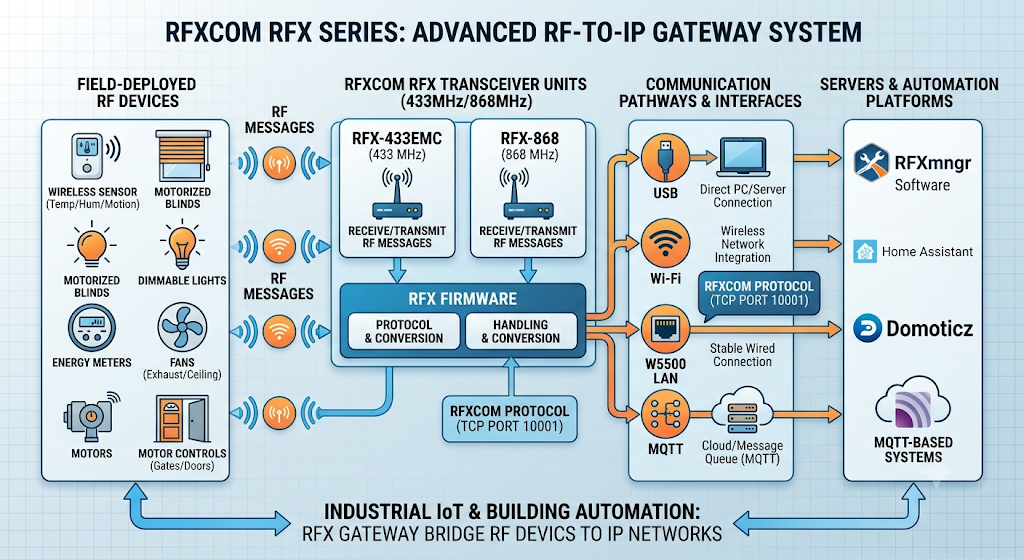
RFXCOM RFX 시리즈는 RF 센서, 블라인드, 조명, 미터, 팬, 모터 제어 장치 등 다양한 현장 장비와 통신합니다. 장치는 RF 메시지를 수신하거나 송신하고, 이를 RFXmngr, Home Assistant, Domoticz, MQTT 기반 자동화 시스템에서 사용할 수 있는 형태로 전달합니다.

RFX-433EMC는 433 MHz 대역을, RFX-868은 868 MHz 대역을 사용합니다. 펌웨어 구성에 따라 USB, Wi-Fi, W5500 LAN, MQTT 방식으로 운용할 수 있으며, LAN/Wi-Fi 운용 시 RFXCOM 프로토콜은 TCP 포트 10001을 사용합니다.

Industrial IoT 또는 상업용 건물 자동화에서는 이 장치를 RF-to-IP 게이트웨이로 볼 수 있습니다. 현장의 RF 장비가 RFX 트랜시버와 통신하고, RFX 펌웨어가 프로토콜을 처리한 뒤, W5500 LAN 경로를 통해 서버나 자동화 플랫폼으로 데이터를 전달하는 구조입니다.

이미지 출처 : AI 생성

RFX-433EMC USB/Wifi/MQTT

이미지 출처 : rfxcom.com

WIZnet이 들어가는 위치

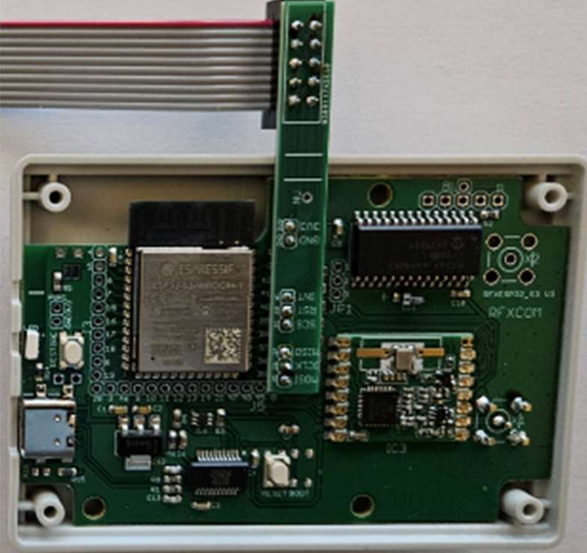
이 구성에서 사용되는 WIZnet 제품은 W5500 Ethernet Controller입니다. W5500은 RFX 보드에 SPI 기반으로 연결되어 유선 Ethernet 인터페이스를 제공합니다.

문서에 제시된 DIY 배선은 다음과 같습니다.

W5500  ->  RFX
3V3    ->  3V3
GND    ->  GND
MISO   ->  37
MOSI   ->  35
SCLK   ->  36
SCS    ->  39
RST    ->  40
INT    ->  41

이 배선에서 W5500은 단순한 외장 LAN 어댑터가 아니라, RFX 보드가 직접 제어하는 Ethernet 컨트롤러입니다. SPI 데이터 라인뿐 아니라 칩 선택, 리셋, 인터럽트 신호가 함께 사용되므로 보드 레벨 연결 품질이 LAN 안정성에 직접 영향을 줍니다.

W5500은 하드웨어 TCP/IP 스택을 내장한 Ethernet 컨트롤러입니다. 내장 MAC/PHY, 32 KB 내부 버퍼, 8개 하드웨어 소켓을 제공하므로, 메인 펌웨어가 전체 TCP/IP 스택을 소프트웨어로 처리하지 않고도 유선 네트워크 기능을 구현할 수 있습니다.

W5500 LAN optie voor RFX-433EMC/RFX-868

이미지 출처 : rfxcom.com

구현 노트

제공된 자료는 사용자 가이드 PDF이며, 실제 RFXCOM 펌웨어 소스 코드는 공개되어 있지 않습니다. 따라서 W5500 초기화 코드나 소켓 처리 루프는 확인할 수 없습니다. 확인 가능한 범위는 하드웨어 연결, 펌웨어 운용 방식, TCP 포트, 설정 절차, 디버그 방법입니다.

전체 구조는 다음과 같이 정리할 수 있습니다.

 
RFX-433EMC / RFX-868
  ├─ RF transceiver
  │   ├─ RFX-433EMC: 433 MHz
  │   └─ RFX-868: 868 MHz
  ├─ USB-C
  │   ├─ 전원 공급
  │   ├─ 펌웨어 업데이트
  │   ├─ 디버그 메시지 확인
  │   └─ 복구 명령 실행
  ├─ W5500 LAN
  │   ├─ SPI 기반 Ethernet 연결
  │   ├─ TCP 포트 10001 사용
  │   └─ 최대 2개 동시 연결
  └─ 상위 시스템
      ├─ RFXmngr
      ├─ Home Assistant / Domoticz
      └─ MQTT 기반 자동화 시스템
 

LAN 설정은 사용자가 W5500 레지스터를 직접 다루는 방식이 아닙니다. RFX 장치를 USB로 연결하고, 터미널에서 디버그 메시지를 확인한 뒤, 브라우저에서 장치 IP에 접속해 hostname, local IP, subnet mask, gateway를 설정합니다.

상업용 설치에서는 DHCP보다 고정 IP 구성이 적합합니다. 자동화 서버가 항상 같은 주소로 장치를 찾아야 하며, 현장 유지보수 시에도 고정 IP가 문제 추적에 유리합니다.

실무 팁 / 주의사항

  • 지원 모델을 먼저 확인해야 합니다. W5500 LAN 옵션은 RFX-433EMC 또는 RFX-868 대상으로 설명되어 있습니다.
  • 3.3 V 전원 방향을 반드시 확인해야 합니다. W5500은 3.3 V 기반으로 연결되므로 전원 핀 오류는 보드 손상으로 이어질 수 있습니다.
  • 고정 IP 사용을 권장합니다. 상업용 자동화 환경에서는 장치 IP가 바뀌지 않는 것이 중요합니다.
  • LAN 디버그는 USB 터미널로 확인합니다. 설정 중에는 USB 연결을 유지해 상태 메시지를 보는 것이 좋습니다.
  • 빨간 LED 점멸은 LAN 연결 문제를 의미합니다. 케이블, 스위치 포트, 전원, W5500 장착 상태를 우선 확인해야 합니다.
  • 필요한 RF 프로토콜만 활성화합니다. 사용하지 않는 수신 프로토콜을 끄면 RF 수신 안정성에 도움이 됩니다.

FAQ

Q: 왜 W5500을 사용하나요?
A: W5500은 RFX 장치에 안정적인 유선 Ethernet 연결을 추가합니다. 하드웨어 TCP/IP 스택을 사용하므로 임베디드 장치에서 네트워크 처리 부담을 줄이고, Wi-Fi보다 예측 가능한 현장 네트워크 구성이 가능합니다.

Q: W5500은 RFX 보드에 어떻게 연결되나요?
A: SPI 방식으로 연결됩니다. MISO, MOSI, SCLK, SCS, RST, INT와 3.3 V, GND가 필요합니다.

Q: 이 프로젝트에서 W5500의 역할은 무엇인가요?
A: W5500은 RFXCOM 프로토콜 데이터를 유선 LAN으로 전달하는 네트워크 인터페이스 역할을 합니다. 상위 프로그램은 장치의 Local IP와 TCP 포트 10001로 접속합니다.

Q: 초보자도 따라할 수 있나요?
A: 완전한 초보자용 작업은 아닙니다. 케이스를 열고 보드 핀을 확인해야 하며, SPI 배선, USB 터미널, IP 설정에 대한 기본 지식이 필요합니다.

Q: Wi-Fi 대신 W5500 LAN을 쓰는 이유는 무엇인가요?
A: Wi-Fi는 설치가 간단하지만 무선 간섭, AP 설정, 연결 실패 상태를 고려해야 합니다. W5500 LAN은 배선이 필요하지만, 고정 IP 기반의 안정적인 유선 접속점을 만들 수 있어 Industrial IoT와 상업용 자동화 환경에 더 적합합니다.


What the Project Does

The RFXCOM RFX series communicates with various field devices such as RF sensors, blinds, lights, meters, fans, and motor control devices. The device receives or transmits RF messages and delivers them in a format that can be used by RFXmngr, Home Assistant, Domoticz, or MQTT-based automation systems.

The RFX-433EMC uses the 433 MHz band, while the RFX-868 uses the 868 MHz band. Depending on the firmware configuration, the device can operate through USB, Wi-Fi, W5500 LAN, or MQTT. When operating over LAN or Wi-Fi, the RFXCOM protocol uses TCP port 10001.

In Industrial IoT or commercial building automation, this device can be viewed as an RF-to-IP gateway. Field RF devices communicate with the RFX transceiver, the RFX firmware processes the protocol, and data is then delivered to a server or automation platform through the W5500 LAN path.

Image source: AI-generated

RFX-433EMC USB/Wifi/MQTT

Image source: rfxcom.com

Where WIZnet Fits

The WIZnet product used in this configuration is the W5500 Ethernet Controller. The W5500 connects to the RFX board over SPI and provides a wired Ethernet interface.

The DIY wiring shown in the document is as follows.

 
W5500  ->  RFX
3V3    ->  3V3
GND    ->  GND
MISO   ->  37
MOSI   ->  35
SCLK   ->  36
SCS    ->  39
RST    ->  40
INT    ->  41
 

In this wiring configuration, the W5500 is not a simple external LAN adapter. It is an Ethernet controller directly controlled by the RFX board. In addition to the SPI data lines, chip select, reset, and interrupt signals are also used, so the quality of the board-level connection directly affects LAN stability.

The W5500 is an Ethernet controller with an embedded hardware TCP/IP stack. It provides an integrated MAC/PHY, 32 KB internal buffer, and 8 hardware sockets, allowing the main firmware to implement wired networking without handling the full TCP/IP stack in software.

W5500 LAN optie voor RFX-433EMC/RFX-868

Image source: rfxcom.com

Implementation Notes

The available material is a user guide PDF, and the actual RFXCOM firmware source code is not publicly available. Therefore, the W5500 initialization code or socket handling loop cannot be verified. The verifiable scope is limited to hardware connections, firmware operation method, TCP port usage, configuration procedure, and debugging method.

The overall structure can be summarized as follows.

 
RFX-433EMC / RFX-868
  ├─ RF transceiver
  │   ├─ RFX-433EMC: 433 MHz
  │   └─ RFX-868: 868 MHz
  ├─ USB-C
  │   ├─ Power supply
  │   ├─ Firmware update
  │   ├─ Debug message monitoring
  │   └─ Recovery command execution
  ├─ W5500 LAN
  │   ├─ SPI-based Ethernet connection
  │   ├─ Uses TCP port 10001
  │   └─ Supports up to 2 simultaneous connections
  └─ Host system
      ├─ RFXmngr
      ├─ Home Assistant / Domoticz
      └─ MQTT-based automation system
 

LAN configuration is not performed by directly modifying W5500 registers. Instead, the RFX device is connected over USB, debug messages are checked through a terminal, and the user accesses the device IP address in a browser to configure the hostname, local IP, subnet mask, and gateway.

For commercial installations, a static IP configuration is more suitable than DHCP. The automation server must always be able to find the device at the same address, and a fixed IP also makes troubleshooting easier during field maintenance.

Practical Tips / Precautions

Check the supported model first. The W5500 LAN option is described for the RFX-433EMC or RFX-868.

Make sure the 3.3 V power orientation is correct. Since the W5500 operates on 3.3 V, incorrect power pin connection may damage the board.

Using a static IP is recommended. In commercial automation environments, it is important that the device IP address does not change.

LAN debugging is performed through the USB terminal. During setup, it is recommended to keep the USB connection active and monitor the status messages.

A blinking red LED indicates a LAN connection problem. Check the cable, switch port, power, and W5500 installation status first.

Enable only the RF protocols that are required. Disabling unused receive protocols can help improve RF reception stability.

FAQ

Q: Why use the W5500?
A: The W5500 adds a stable wired Ethernet connection to the RFX device. Since it uses a hardware TCP/IP stack, it reduces network processing load on the embedded device and enables a more predictable field network configuration than Wi-Fi.

Q: How is the W5500 connected to the RFX board?
A: It is connected over SPI. MISO, MOSI, SCLK, SCS, RST, INT, 3.3 V, and GND are required.

Q: What is the role of the W5500 in this project?
A: The W5500 acts as the network interface that transfers RFXCOM protocol data over wired LAN. The host application connects to the device’s local IP address and TCP port 10001.

Q: Can beginners follow this project?
A: This is not a complete beginner-level task. The user needs to open the enclosure, identify board pins, and have basic knowledge of SPI wiring, USB terminals, and IP configuration.

Q: Why use W5500 LAN instead of Wi-Fi?
A: Wi-Fi is easier to install, but it requires consideration of wireless interference, AP settings, and connection failure states. W5500 LAN requires wiring, but it provides a stable wired access point based on a fixed IP address, making it more suitable for Industrial IoT and commercial automation environments.


Documents
Comments Write