



X65-SBC
X65-SBC
What the Project Does
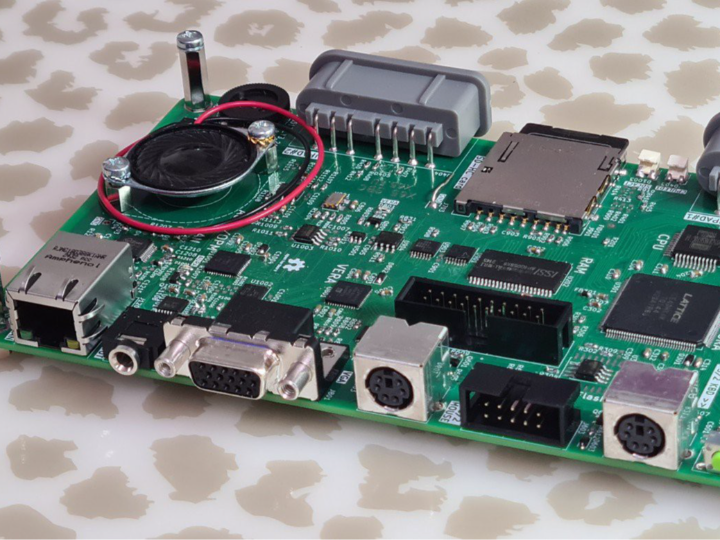
X65-SBC는 단일 보드 위에 65C02 또는 65C816 CPU, 2MB SRAM, VGA 출력, PS/2 키보드/마우스, 스테레오 오디오, SDHC 카드, USB-C 기반 디버그 인터페이스를 통합한 오픈소스 레트로 컴퓨팅 플랫폼이다. 구조적으로는 CPU가 중심이고, 메모리 맵과 주변장치 제어는 NORA FPGA가 담당하며, 비디오와 일부 오디오는 VERA FPGA, 오디오 합성은 AURA FPGA가 맡는다. 이 프로젝트의 핵심은 “옛 CPU 아키텍처를 직접 이해할 수 있는 단순성”을 유지하면서도, 실제 사용 가능한 입출력 장치를 현대 부품으로 재구성했다는 점이다.
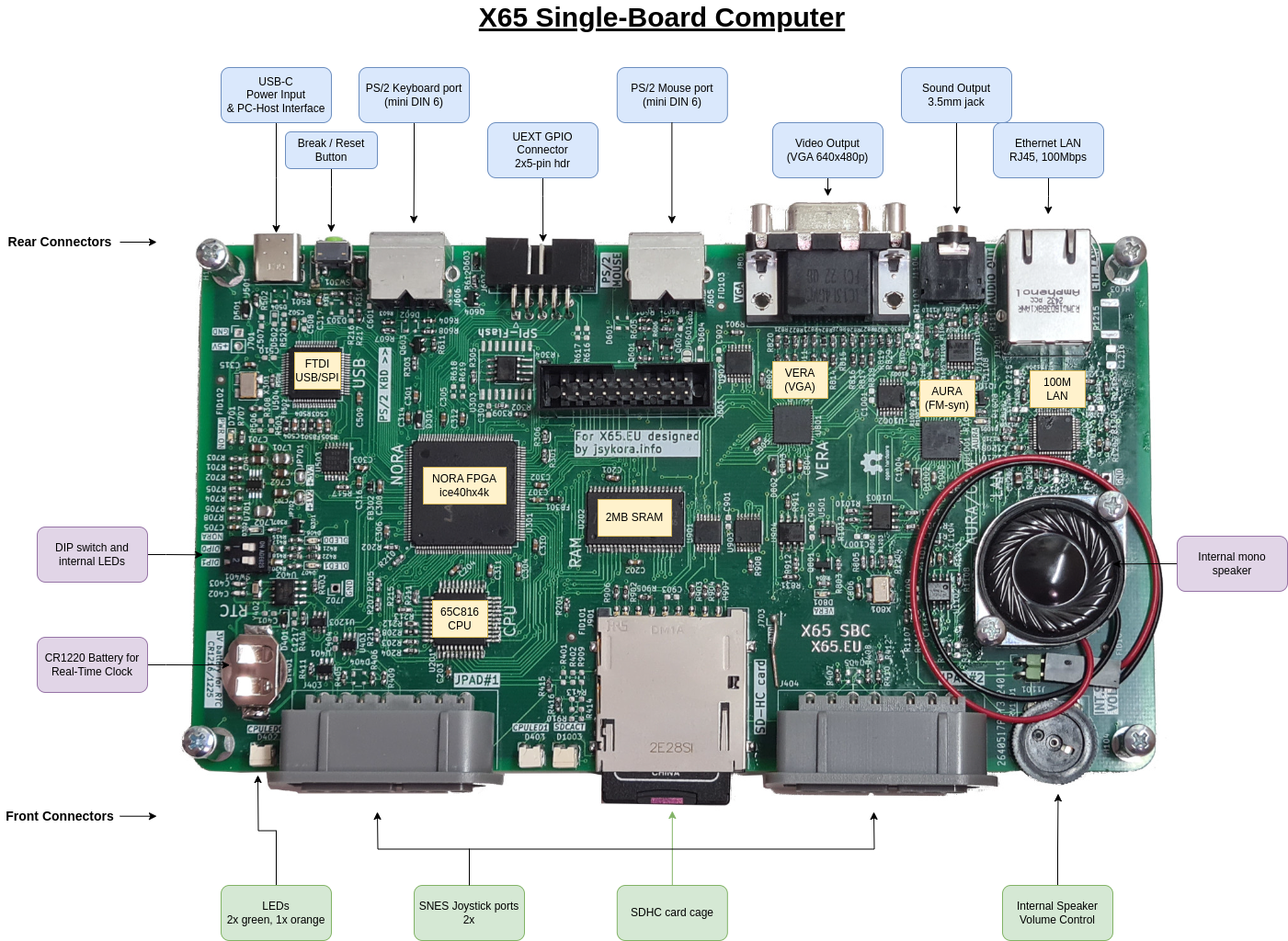
이미지 출처 : https://hackaday.io/project/194866-x65-sbc
레트로 컴퓨팅 플랫폼이라는 관점에서 보면, X65-SBC는 단순한 6502 계열 실험 보드가 아니라 “완전한 독립형 컴퓨터”에 가깝다. 사용자는 VGA 모니터, PS/2 키보드와 마우스, 오디오 출력, SD 카드 저장장치를 연결해 독립적으로 시스템을 구동할 수 있고, 필요하면 USB-C를 통해 호스트 PC에서 디버깅과 플래시 프로그래밍도 수행할 수 있다. 이 프로젝트는 Commander X16과의 소프트웨어 호환성을 지향하지만, 설계 자체는 더 개방적이고 분석 가능한 하드웨어 플랫폼으로 구성되어 있다.
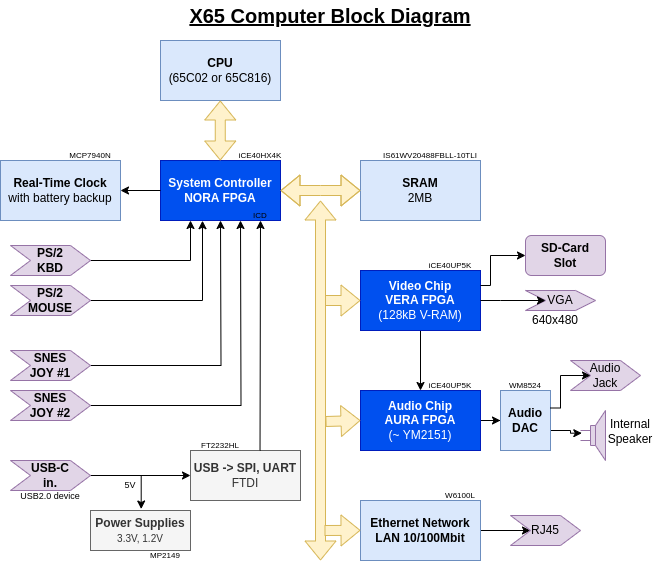
이미지 출처 : https://hackaday.io/project/194866-x65-sbc
Where WIZnet Fits
이 보드에서 WIZnet 제품은 W6100이다. 공개 설명 자료와 저장소 문서 모두 X65-SBC의 LAN 인터페이스가 **W6100 기반 10/100Mbps Ethernet 포트(RJ45)**이며, 하드웨어 통합 TCP/IP v4/v6 스택을 사용한다고 명시한다. 즉, 이더넷 기능은 CPU가 소프트웨어 스택을 직접 돌리는 방식이 아니라, 전용 네트워크 칩이 상당 부분을 담당하는 구조다.
이 선택은 레트로 컴퓨팅 플랫폼에 특히 잘 맞는다. 65C02/65C816 같은 CPU는 오늘날 기준으로 처리 성능과 메모리 자원이 매우 제한적이므로, 네트워크 프레임 처리와 TCP/IP 스택을 전부 메인 CPU에서 소프트웨어로 구현하면 시스템 복잡도가 급격히 올라간다. 반대로 W6100을 쓰면 CPU는 메모리 맵으로 노출된 네트워크 장치를 제어하고, 실제 패킷 처리와 프로토콜 부담은 W6100 쪽으로 넘길 수 있다. 이 프로젝트처럼 FPGA가 주소 공간을 정리하고 여러 주변장치를 붙이는 보드에서는, 이런 하드웨어 오프로딩 방식이 설계 일관성 면에서도 자연스럽다. 이는 저장소에 W6100이 별도 I/O 블록으로 매핑되어 있다는 점에서도 드러난다.
또한 W6100은 IPv4/IPv6 듀얼 스택 계열이라는 점에서, “레트로 시스템이지만 네트워크는 현재 환경에 붙는다”는 목적과도 잘 맞는다. 이 칩은 단순한 부가 기능이 아니라 시스템 아키텍처의 정식 구성요소로 보아야 한다.
Implementation Notes
이 저장소에서 확인되는 가장 직접적인 근거는 README의 하드웨어 설명이다.
LAN 10/100Mbps Ethernet port (RJ45) implemented by Wiznet W6100 chip, with hardware-integrated TCP/IP v4/v6 stack.
이 문장은 단순 소개 문구가 아니라, X65-SBC에서 W6100이 어떤 역할을 맡는지 구조적으로 정의한다. 즉, RJ45 포트 뒤에 일반 MAC/PHY 조합이 있는 것이 아니라, W6100 자체가 네트워크 종단 장치로 들어가 있다는 의미다. 레트로 CPU가 직접 저수준 네트워크 스택을 감당하지 않아도 되도록 보드를 설계했다는 해석이 가능하다.
두 번째로 중요한 근거는 I/O 레지스터 문서다.
$9F80 ... $9F8F W6100L ethernet controller
이 부분은 W6100이 단순히 보드에 실장되어 있다는 수준을 넘어서, CPU 주소 공간 안에 실제 I/O 장치로 편입되어 있음을 보여준다. X65는 $9F00~$9FFF 영역을 장치 레지스터용으로 예약하고 있고, 그 안에서 $9F80~$9F8F 블록을 W6100L에 할당한다. 레트로 플랫폼 관점에서는 이것이 매우 중요하다. 네트워크 장치가 추상 드라이버 뒤에 숨지 않고, 다른 사운드·비디오·FPGA 주변장치와 마찬가지로 메모리 맵드 I/O 철학 안에 들어와 있기 때문이다.
다만, 이번에 확인한 공개 자료 범위에서는 W6100용 상위 네트워크 소프트웨어 드라이버나 실제 애플리케이션 코드까지는 검증하지 못했다. 확인 가능한 근거는 하드웨어 탑재, I/O 매핑, 시스템 설명까지이며, “운영체제/런타임 상에서 어떤 네트워크 프로그램이 실제 동작하는가”는 저장소에서 바로 드러나는 수준까지는 확인되지 않았다. 따라서 현재 단계에서 확실하게 말할 수 있는 것은 하드웨어 통합과 버스 매핑은 명확히 되어 있고, 소프트웨어 활용 범위는 추가 확인이 필요하다는 점이다.
Practical Tips / Pitfalls
레트로 CPU에 이더넷을 붙일 때는 소프트웨어 TCP/IP보다 W6100 같은 오프로딩 칩이 구조적으로 유리하다. CPU 시간과 RAM을 아낄 수 있다.
X65처럼 메모리 맵드 I/O 구조를 쓰는 보드에서는, W6100 레지스터 블록 주소를 문서와 실제 디코드 로직에서 일관되게 유지해야 한다. 문서상 X65는 $9F80~$9F8F를 사용한다.
W6100을 붙였다고 바로 네트워크 소프트웨어가 완성되는 것은 아니다. 하드웨어 통합과 별개로 부트 코드, 초기화 루틴, 소켓 사용 정책은 별도 검증이 필요하다.
레트로 플랫폼에서는 DHCP보다 고정 IP가 초기 bring-up에 더 단순할 수 있다. 특히 디버그 단계에서는 링크 업, 레지스터 접근, ARP 응답 같은 기본 단계부터 확인하는 편이 낫다.
FPGA와 외부 네트워크 칩을 함께 쓰는 보드는 SPI 배선 품질, 리셋 시퀀스, 링크 상태 확인 루틴이 중요하다. 레트로 보드라고 해도 이 부분은 현대 임베디드 보드와 동일하게 다뤄야 한다.
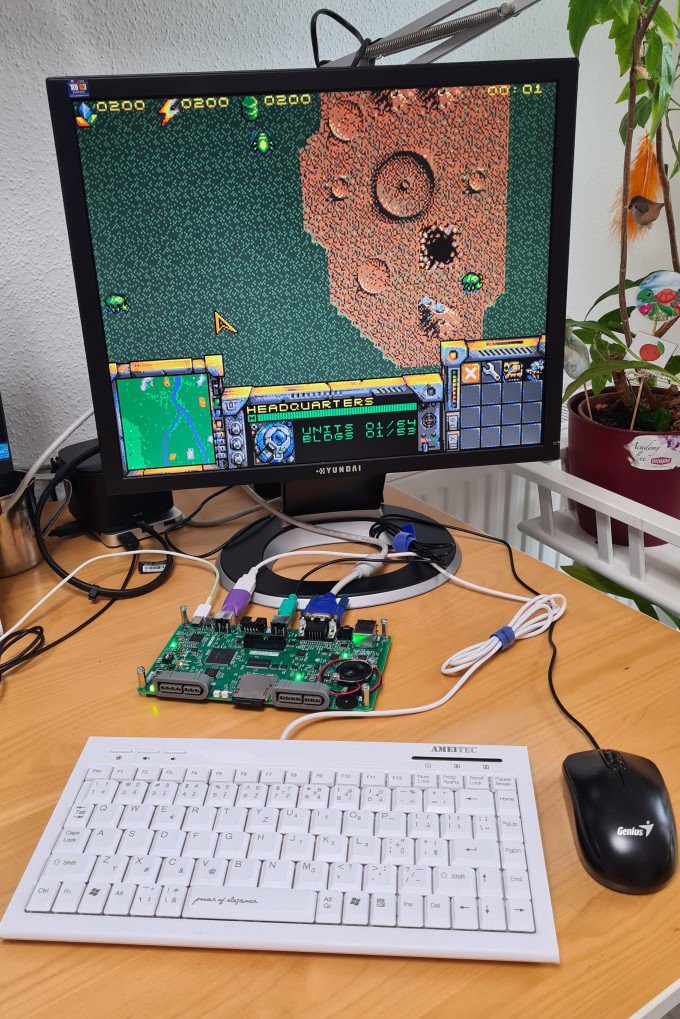
이미지 출처 : https://hackaday.io/project/194866-x65-sbc
FAQ
왜 이 프로젝트에 W6100이 맞나?
X65-SBC의 중심 CPU는 65C02/65C816 계열이므로, 네트워크 스택을 전부 소프트웨어로 구현하면 CPU 부담이 커진다. W6100은 하드웨어 통합 TCP/IP v4/v6 스택을 제공하므로, 레트로 CPU는 장치 제어에 집중하고 네트워크 프로토콜 처리는 W6100에 넘기는 구조를 취할 수 있다. 이런 분업은 레트로 컴퓨터의 단순성과 현대 네트워크 연결성을 동시에 확보하는 데 유리하다.
이 칩은 플랫폼에 어떻게 연결되나?
저장소 문서상 W6100은 CPU 주소 공간의 I/O 블록 일부로 노출된다. doc/ioregs.md에는 $9F80 ... $9F8F가 W6100L ethernet controller로 정의되어 있다. 즉, 적어도 시스템 소프트웨어 입장에서는 W6100이 메모리 맵드 장치처럼 보이며, 그 뒤의 버스 변환과 칩 선택은 NORA FPGA 기반 시스템 로직이 담당하는 구조로 해석하는 것이 자연스럽다.
이 프로젝트 안에서 W6100의 구체적 역할은 무엇인가?
역할은 명확하다. X65-SBC의 RJ45 기반 10/100 Ethernet 인터페이스를 제공하고, 레트로 CPU 시스템에 네트워크 기능을 추가하는 것이다. W6100은 단순 Ethernet PHY가 아니라 하드웨어 통합 TCP/IP v4/v6 스택을 가진 장치로 설명되므로, 이 프로젝트에서 W6100은 외부 통신을 담당하는 독립 네트워크 서브시스템이다.
초보자도 따라 할 수 있나?
가능은 하지만, 완전 초보자용 프로젝트는 아니다. 이유는 이 보드가 단순 MCU 개발 보드가 아니라 CPU, SRAM, FPGA, 비디오, 오디오, 디버거, 네트워크가 함께 얽힌 완전한 컴퓨터 구조이기 때문이다. 최소한 메모리 맵, 버스, FPGA 주변장치, 그리고 임베디드 네트워크 초기화 개념을 이해해야 W6100 부분도 제대로 다룰 수 있다. 다만 오픈 하드웨어와 문서가 공개되어 있어 학습 플랫폼으로서의 가치는 크다.
W6100 대신 Wi-Fi나 소프트웨어 TCP/IP 스택을 쓰는 것과 비교하면?
레트로 컴퓨팅 플랫폼에서는 W6100 쪽이 훨씬 일관적이다. Wi-Fi는 무선 설정, 보안, 드라이버 복잡도, 타이밍 변수가 늘어나고, 소프트웨어 TCP/IP 스택은 CPU와 RAM 사용량을 크게 요구한다. 반면 W6100은 유선 Ethernet과 하드웨어 오프로딩을 제공하므로, 시스템 구조를 단순하게 유지하면서도 안정적인 네트워크 인터페이스를 만들기 쉽다. 특히 X65처럼 전체 시스템을 이해 가능한 수준으로 유지하려는 프로젝트 철학과도 잘 맞는다.
What the Project Does
X65-SBC is an open-source retro computing platform that integrates a 65C02 or 65C816 CPU, 2MB SRAM, VGA output, PS/2 keyboard and mouse, stereo audio, an SDHC card, and a USB-C-based debug interface on a single board. Architecturally, the CPU sits at the center of the system, while the NORA FPGA handles memory mapping and peripheral control, the VERA FPGA manages video and part of the audio path, and the AURA FPGA is responsible for audio synthesis. The key idea behind this project is that it preserves the simplicity of an older CPU architecture that users can understand directly, while rebuilding the I/O subsystem with modern components that are practical to use today.
Image source: https://hackaday.io/project/194866-x65-sbc
From the perspective of a retro computing platform, X65-SBC is closer to a complete standalone computer than to a simple 6502-family experiment board. Users can connect a VGA monitor, PS/2 keyboard and mouse, audio output, and SD card storage, then run the system independently. When needed, USB-C can also be used from a host PC for debugging and flash programming. The project aims for software compatibility with the Commander X16, but the hardware itself is designed as a more open and analyzable platform.
Image source: https://hackaday.io/project/194866-x65-sbc
Where WIZnet Fits
The WIZnet product used on this board is the W6100. Both the public project description and the repository documentation state that the X65-SBC LAN interface is a W6100-based 10/100 Mbps Ethernet port (RJ45) using a hardware-integrated IPv4/IPv6 TCP/IP stack. In other words, Ethernet is not implemented by having the CPU run the full software stack directly. Instead, a dedicated network chip handles a significant part of the networking function.
This is a particularly good fit for a retro computing platform. CPUs such as the 65C02 and 65C816 are extremely limited by modern standards in both processing performance and memory resources, so implementing full network frame handling and the TCP/IP stack in software on the main CPU would increase system complexity very quickly. By using the W6100, the CPU can control the network device through a memory-mapped interface, while the actual packet processing and protocol workload are offloaded to the W6100. In a board like this, where the FPGA organizes the address space and ties together multiple peripherals, that kind of hardware offload is also a natural architectural choice. This is further supported by the fact that the repository maps the W6100 into its own dedicated I/O block.
The W6100 also makes sense because it belongs to the IPv4/IPv6 dual-stack family, which fits the goal of building a retro system that can still connect to a modern network environment. It should be treated not as a minor add-on, but as a formal part of the overall system architecture.
Implementation Notes
The most direct evidence available in the repository is the hardware description in the README.
LAN 10/100Mbps Ethernet port (RJ45) implemented by Wiznet W6100 chip, with hardware-integrated TCP/IP v4/v6 stack.
This is not just a general introductory sentence. It defines the structural role of the W6100 in the X65-SBC. In other words, there is not simply a generic MAC/PHY combination behind the RJ45 connector. The W6100 itself is acting as the network endpoint device. That strongly suggests the board was designed so that the retro CPU does not have to handle a low-level network stack on its own.
The second important piece of evidence comes from the I/O register documentation.
$9F80 ... $9F8F W6100L ethernet controller
This shows that the W6100 is more than just a chip mounted on the board. It is integrated into the CPU’s address space as an actual I/O device. X65 reserves the $9F00–$9FFF region for device registers, and within that range, the $9F80–$9F8F block is assigned to the W6100L. From a retro platform perspective, this matters a great deal. The network device is not hidden behind an abstract driver layer. Like the sound, video, and FPGA peripherals, it is brought directly into the memory-mapped I/O model of the system.
That said, within the range of public material reviewed here, I could not verify higher-level network software drivers or actual application code built on top of the W6100. The evidence that can be confirmed covers the hardware integration, I/O mapping, and system-level description, but not yet the exact form of network software running at the operating system or runtime level. So at this stage, the safe conclusion is that the hardware integration and bus mapping are clearly defined, while the full scope of software use still requires additional verification.
Practical Tips / Pitfalls
Using an offload chip such as the W6100 is structurally more suitable than a pure software TCP/IP stack when adding Ethernet to a retro CPU. It saves both CPU time and RAM.
On a board like the X65 that uses a memory-mapped I/O structure, the W6100 register block address must remain consistent between the documentation and the actual decode logic. In the X65 documentation, the assigned range is $9F80–$9F8F.
Adding a W6100 does not automatically complete the network software. Beyond the hardware integration, the boot code, initialization sequence, and socket usage policy all still need to be validated separately.
On a retro platform, a static IP configuration may be simpler than DHCP during the initial bring-up stage. During debugging, it is often better to verify basic steps first, such as link-up status, register access, and ARP response.
Boards that combine an FPGA with an external network chip need careful attention to SPI signal quality, reset sequencing, and link-status verification. Even on a retro board, those areas need to be handled with the same discipline as on a modern embedded design.
Image source: https://hackaday.io/project/194866-x65-sbc
FAQ
Why is the W6100 a good fit for this project?
The central CPU in the X65-SBC belongs to the 65C02/65C816 family, so implementing the entire network stack in software would put a heavy burden on the processor. Because the W6100 provides a hardware-integrated IPv4/IPv6 TCP/IP stack, the retro CPU can focus on device control while the protocol processing is offloaded to the W6100. This division of labor is well suited to a retro computer that wants to preserve architectural simplicity while still offering practical modern connectivity.
How is this chip connected to the platform?
According to the repository documentation, the W6100 is exposed as part of the CPU’s I/O address space. In doc/ioregs.md, the range $9F80 ... $9F8F is defined as the W6100L ethernet controller. From the perspective of system software, the W6100 therefore appears as a memory-mapped device, while the underlying bus translation and chip-select behavior are naturally interpreted as being handled by the NORA FPGA-based system logic.
What exactly does the W6100 do in this project?
Its role is clear. It provides the RJ45-based 10/100 Ethernet interface for the X65-SBC and adds network capability to the retro CPU system. Because the W6100 is described not as a simple Ethernet PHY but as a device with a hardware-integrated IPv4/IPv6 TCP/IP stack, it functions here as an independent network subsystem responsible for external communication.
Can beginners follow this project?
It is possible, but this is not really a beginner-level project. The reason is that the board is not just a simple MCU development board. It is a complete computer architecture combining a CPU, SRAM, FPGA logic, video, audio, debugging support, and networking. To understand the W6100 portion properly, a user should at least be comfortable with memory maps, buses, FPGA-based peripherals, and embedded network initialization concepts. That said, because the hardware and documentation are open, it still has strong value as a learning platform.
How does it compare with using Wi-Fi or a software TCP/IP stack instead of the W6100?
For a retro computing platform, the W6100 is much more consistent with the overall design approach. Wi-Fi adds wireless configuration, security handling, driver complexity, and timing variability, while a software TCP/IP stack demands much more CPU time and RAM. The W6100, by contrast, provides wired Ethernet and hardware offload, making it easier to keep the system architecture simple while still delivering a stable network interface. That aligns especially well with the X65 design philosophy of keeping the whole system understandable at an architectural level.