


SNMP Environmental Monitor
SNMP Environmental Monitor

Arduino - Arduino UNO
x 1

Arduino - Arduino Ethernet Shield 2
x 1

Arduino - Arduino IDE
x 1
프로젝트가 하는 일
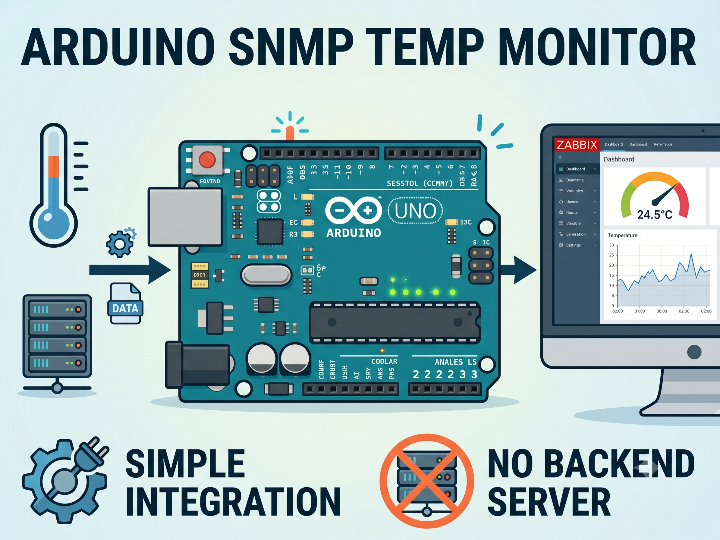
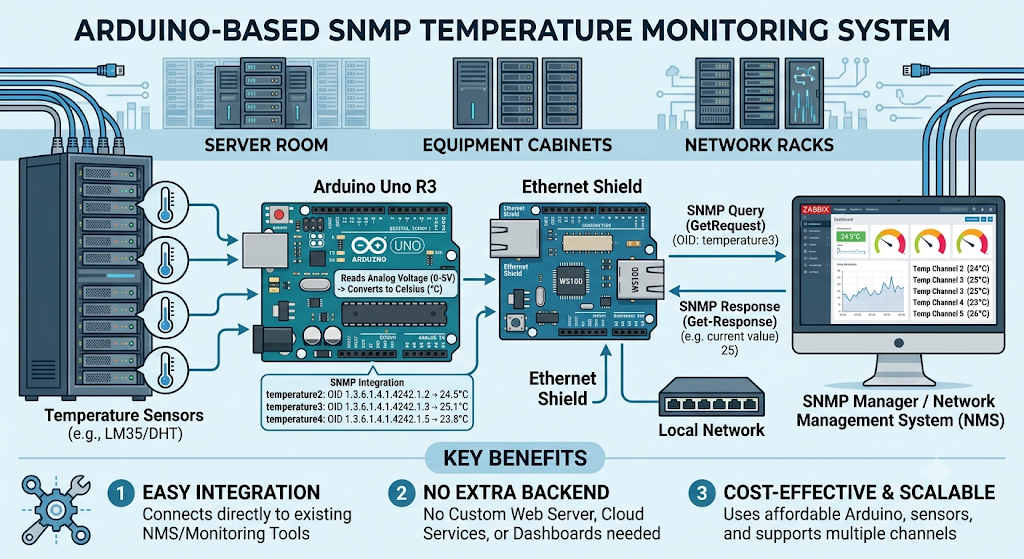
이 장치는 서버룸, 장비함, 네트워크 랙처럼 지속적인 온도 감시가 필요한 공간을 대상으로 합니다. Arduino Uno는 여러 개의 온도 센서를 아날로그 핀에 연결하고, 각 센서의 전압 값을 섭씨 온도로 변환합니다.
변환된 온도 값은 SNMP에서 조회할 수 있는 커스텀 OID에 매핑됩니다. 예를 들어 temperature2, temperature3, temperature4, temperature5와 같은 항목은 각각 하나의 온도 채널을 나타냅니다. SNMP 매니저가 특정 OID를 요청하면 Arduino는 현재 측정된 온도 값을 정수 형태로 응답합니다.
이 방식의 장점은 기존 네트워크 관리 시스템과 쉽게 연결된다는 점입니다. 별도의 웹 서버, 클라우드 서비스, 대시보드 백엔드를 만들지 않아도 SNMP 기반 모니터링 도구에서 장비 상태를 직접 읽을 수 있습니다.
이미지 출처 : AI 생성
이미지 출처 : https://projecthub.arduino.cc/doc_fbi/snmp-environmental-monitor-f8e1d2
WIZnet이 들어가는 위치
이 프로젝트에서 사용되는 WIZnet 제품은 W5500입니다. 실제 하드웨어는 Arduino Ethernet Shield 2이며, 이 보드는 W5500 Ethernet Controller를 사용해 Arduino Uno에 유선 이더넷 기능을 추가합니다.
W5500은 Arduino와 네트워크 사이에서 TCP/UDP 기반 통신과 소켓 처리를 담당합니다. Arduino는 센서 값을 읽고 SNMP 응답 데이터를 구성하는 데 집중하고, W5500은 이 데이터가 유선 LAN을 통해 SNMP 매니저까지 전달되도록 네트워크 인터페이스 역할을 수행합니다.
서버룸 모니터링에서는 장시간 안정성이 중요합니다. Wi-Fi는 설치가 간단하지만 무선 간섭, AP 상태, 인증 문제 같은 운영 변수가 있습니다. 반면 W5500 기반 유선 이더넷은 고정된 네트워크 경로를 제공하므로, SNMP처럼 주기적으로 장비 상태를 확인하는 구조에 잘 맞습니다.
구현 노트
원문 프로젝트는 GitHub 저장소가 아니라 Arduino Project Hub 페이지의 인라인 코드로 제공됩니다. 아래 코드는 원문 코드의 핵심 부분을 정리한 것입니다.
이더넷 및 SNMP 라이브러리 구성
#include <Ethernet.h>
#include <SPI.h>
#include <Agentuino.h>

static byte mac[] = { 0xDE, 0xAD, 0xBE, 0xEF, 0xFE, 0xED };
static byte ip[] = { 192, 168, 111, 33 };Ethernet.h는 W5500 기반 Ethernet Shield를 사용하기 위한 Arduino 네트워크 라이브러리입니다. SPI.h는 Arduino Uno와 W5500 사이의 SPI 통신을 담당하며, Agentuino.h는 Arduino에서 SNMP 에이전트 기능을 구현하는 데 사용됩니다.
원문 코드에는 IP, 게이트웨이, 서브넷 값이 선언되어 있지만 실제 초기화는 Ethernet.begin(mac) 형태로 되어 있습니다. 서버룸에 배치할 장비라면 DHCP만 의존하기보다 DHCP 예약 또는 정적 IP 설정을 사용하는 편이 운영에 더 적합합니다.
W5500 초기화와 SNMP 수신 루프
void setup() {
  Ethernet.begin(mac);
  api_status = Agentuino.begin();
  Agentuino.onPduReceive(pduReceived);
}

void loop() {
  Agentuino.listen();
}Ethernet.begin(mac)은 Ethernet Shield를 초기화하고 네트워크 연결을 준비합니다. 이후 Agentuino.begin()이 SNMP 에이전트를 시작하고, Agentuino.onPduReceive(pduReceived)가 SNMP 요청을 처리할 콜백 함수를 등록합니다.
메인 루프에서는 Agentuino.listen()이 계속 실행됩니다. 이 함수는 들어오는 SNMP PDU를 확인하고, 요청이 들어오면 등록된 콜백을 통해 알맞은 응답을 생성합니다. 이 구조에서 W5500은 SNMP 요청과 응답이 오가는 유선 네트워크 경로입니다.
온도 OID 응답 처리
const char temperature2[] PROGMEM = "1.3.6.1.3.2016.5.0.2";

status = pdu.VALUE.encode(SNMP_SYNTAX_INT, term2);
Agentuino.responsePdu(&pdu);temperature2는 특정 온도 센서 채널을 나타내는 커스텀 OID입니다. SNMP GET 요청이 이 OID로 들어오면 코드가 현재 온도 값인 term2를 정수 타입으로 인코딩하고, Agentuino.responsePdu(&pdu)를 통해 응답을 보냅니다.
나머지 센서 채널도 같은 방식으로 처리됩니다. 즉, 각 온도 센서는 하나의 SNMP OID로 표현되고, 네트워크 관리 시스템은 필요한 OID를 조회해 현재 온도를 확인할 수 있습니다.
실무 팁 / 주의사항
- 서버룸 감시 장비는 주소가 바뀌면 안 되므로 DHCP 예약 또는 정적 IP 구성을 권장합니다.
- Arduino Ethernet Shield 2는 W5500과 microSD가 SPI 버스를 공유합니다. Uno에서는 W5500 선택에 디지털 10번, SD 카드 선택에 디지털 4번이 사용되므로 핀 충돌을 피해야 합니다.
- LM35 같은 아날로그 온도 센서는 배선 길이와 노이즈에 영향을 받을 수 있습니다. 팬, 전원 장치, 긴 점퍼선이 많은 환경에서는 센서 배선을 짧게 유지하고 GND 기준을 안정적으로 잡아야 합니다.
- SNMP 커뮤니티 문자열과 접근 범위는 내부망 기준으로 제한해야 합니다. 이 구조는 내부 모니터링용 장비에 적합하며, 외부망에 직접 노출하는 방식은 피해야 합니다.
- 장애 분석 시 먼저 LINK LED와 ACT LED를 확인하면 물리 링크 문제와 펌웨어 문제를 빠르게 구분할 수 있습니다.
FAQ
Q: 왜 이 프로젝트에 W5500을 사용하나요?
A: 서버룸 온도 감시는 장시간 안정적으로 동작해야 하는 작업입니다. W5500은 TCP/UDP 기반 네트워크 통신과 소켓 처리를 칩에서 담당하므로, Arduino Uno 같은 소형 MCU에서 SNMP 장비를 단순하게 구성할 수 있습니다.
Q: Arduino Uno에는 어떻게 연결되나요?
A: 이 프로젝트는 별도 W5500 모듈을 배선하는 방식이 아니라 Arduino Ethernet Shield 2를 Uno 위에 장착하는 방식입니다. Shield는 SPI로 Arduino와 통신하고, RJ45 포트를 통해 유선 LAN에 연결됩니다.
Q: 이 프로젝트에서 W5500의 역할은 무엇인가요?
A: W5500은 SNMP 요청과 응답이 오가는 유선 이더넷 인터페이스입니다. Arduino는 온도 값을 계산하고 Agentuino는 SNMP PDU를 처리하며, W5500은 이 데이터를 네트워크에서 조회할 수 있게 만듭니다.
Q: 초보자도 따라할 수 있나요?
A: Arduino 스케치 업로드, 아날로그 센서 연결, IP 주소 설정, SNMP OID 조회 방법을 알고 있다면 구현할 수 있습니다. 실제 서버룸에 적용하려면 정적 IP, SNMP 접근 제어, 센서 보정, 전원 안정성까지 함께 확인해야 합니다.
Q: Wi-Fi나 ENC28J60 대신 W5500을 쓰는 이유는 무엇인가요?
A: Wi-Fi는 무선 환경의 영향을 받고, ENC28J60은 소프트웨어 네트워크 스택 부담이 커질 수 있습니다. W5500은 TCP/UDP 가능한 IP 스택을 칩에서 제공하므로 Arduino Uno 기반 SNMP 모니터링 장비에 더 단순하고 안정적인 구조를 제공합니다.
What the Project Does
This device is designed for spaces that require continuous temperature monitoring, such as server rooms, equipment cabinets, and network racks. The Arduino Uno connects multiple temperature sensors to its analog pins and converts each sensor’s voltage value into a Celsius temperature reading.
The converted temperature values are mapped to custom OIDs that can be queried through SNMP. For example, entries such as temperature2, temperature3, temperature4, and temperature5 each represent one temperature channel. When an SNMP manager requests a specific OID, the Arduino responds with the currently measured temperature value as an integer.
The advantage of this approach is that it integrates easily with existing network management systems. Without building a separate web server, cloud service, or dashboard backend, SNMP-based monitoring tools can directly read the device status.
Image source: AI-generated
Image source: https://projecthub.arduino.cc/doc_fbi/snmp-environmental-monitor-f8e1d2
Where WIZnet Fits
The WIZnet product used in this project is the W5500. The actual hardware is the Arduino Ethernet Shield 2, which adds wired Ethernet capability to the Arduino Uno using the W5500 Ethernet Controller.
The W5500 handles TCP/UDP-based communication and socket processing between the Arduino and the network. The Arduino focuses on reading sensor values and preparing SNMP response data, while the W5500 acts as the network interface that delivers this data over wired LAN to the SNMP manager.
Long-term stability is important in server room monitoring. Wi-Fi is easy to install, but it introduces operational variables such as wireless interference, access point status, and authentication issues. In contrast, W5500-based wired Ethernet provides a fixed network path, making it well suited for systems that periodically check device status, such as SNMP monitoring.
Implementation Notes
The original project is provided as inline code on an Arduino Project Hub page, rather than as a GitHub repository. The code below summarizes the key parts of the original code.
Ethernet and SNMP Library Configuration
#include <Ethernet.h>
#include <SPI.h>
#include <Agentuino.h>

static byte mac[] = { 0xDE, 0xAD, 0xBE, 0xEF, 0xFE, 0xED };
static byte ip[] = { 192, 168, 111, 33 };
Ethernet.h is the Arduino networking library used for the W5500-based Ethernet Shield. SPI.h handles SPI communication between the Arduino Uno and the W5500, while Agentuino.h is used to implement SNMP agent functionality on the Arduino.
The original code declares IP address, gateway, and subnet values, but the actual initialization uses Ethernet.begin(mac). For a device deployed in a server room, relying only on DHCP is less practical than using DHCP reservation or a static IP configuration.
W5500 Initialization and SNMP Receive Loop
void setup() {
  Ethernet.begin(mac);
  api_status = Agentuino.begin();
  Agentuino.onPduReceive(pduReceived);
}

void loop() {
  Agentuino.listen();
}
Ethernet.begin(mac) initializes the Ethernet Shield and prepares the network connection. After that, Agentuino.begin() starts the SNMP agent, and Agentuino.onPduReceive(pduReceived) registers the callback function that handles SNMP requests.
In the main loop, Agentuino.listen() runs continuously. This function checks incoming SNMP PDUs and, when a request arrives, generates the appropriate response through the registered callback. In this structure, the W5500 provides the wired network path for SNMP requests and responses.
Temperature OID Response Handling
const char temperature2[] PROGMEM = "1.3.6.1.3.2016.5.0.2";

status = pdu.VALUE.encode(SNMP_SYNTAX_INT, term2);
Agentuino.responsePdu(&pdu);
temperature2 is a custom OID that represents a specific temperature sensor channel. When an SNMP GET request arrives for this OID, the code encodes the current temperature value, term2, as an integer type and sends the response using Agentuino.responsePdu(&pdu).
The remaining sensor channels are handled in the same way. Each temperature sensor is represented by one SNMP OID, and the network management system can query the required OID to check the current temperature.
Practical Tips / Pitfalls
For server room monitoring devices, the IP address should not change. DHCP reservation or static IP configuration is recommended.
The Arduino Ethernet Shield 2 shares the SPI bus between the W5500 and the microSD slot. On the Uno, digital pin 10 is used for W5500 chip select, and digital pin 4 is used for SD card chip select, so pin conflicts should be avoided.
Analog temperature sensors such as the LM35 can be affected by cable length and electrical noise. In environments with fans, power supplies, and long jumper wires, keep the sensor wiring short and maintain a stable ground reference.
The SNMP community string and access scope should be restricted to the internal network. This structure is suitable for internal monitoring equipment and should not be exposed directly to an external network.
When diagnosing failures, first check the LINK LED and ACT LED. This helps separate physical link problems from firmware issues.
FAQ
Q: Why does this project use the W5500?
A: Server room temperature monitoring must operate reliably over long periods. The W5500 handles TCP/UDP-based network communication and socket processing in hardware, which makes it easier to build an SNMP device with a small MCU such as the Arduino Uno.
Q: How does it connect to the Arduino Uno?
A: This project does not use a separately wired W5500 module. Instead, the Arduino Ethernet Shield 2 is mounted directly on top of the Uno. The shield communicates with the Arduino over SPI and connects to the wired LAN through an RJ45 port.
Q: What role does the W5500 play in this project?
A: The W5500 is the wired Ethernet interface through which SNMP requests and responses pass. The Arduino calculates the temperature values, Agentuino processes the SNMP PDUs, and the W5500 makes the data accessible over the network.
Q: Can beginners follow this project?
A: Yes, if they are familiar with uploading Arduino sketches, connecting analog sensors, configuring IP addresses, and querying SNMP OIDs. For actual server room deployment, they should also check static IP settings, SNMP access control, sensor calibration, and power stability.
Q: Why use the W5500 instead of Wi-Fi or ENC28J60?
A: Wi-Fi is affected by the wireless environment, and the ENC28J60 can place more burden on the software network stack. The W5500 provides a TCP/UDP-capable IP stack in the chip, which gives an Arduino Uno-based SNMP monitoring device a simpler and more stable architecture.
-
arduino code
