


ESP32-shield-module-W5500-RS485
ESP32-shield-module-W5500-RS485

Espressif - ESP32
x 1


WIZnet - W5500
x 1
What the Project Does
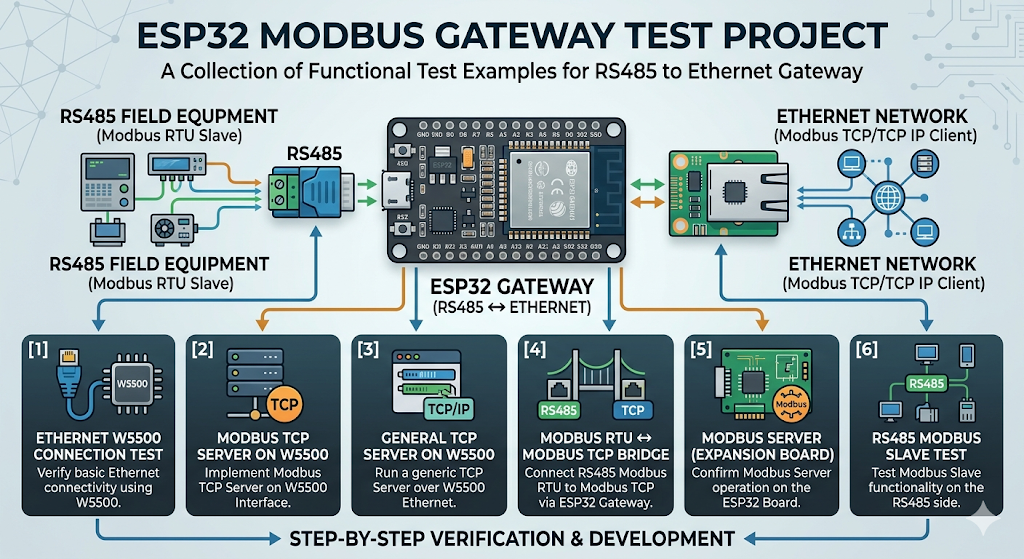
이 저장소는 하나의 완성형 펌웨어보다는 기능별 테스트 예제를 모아 둔 구성에 가깝습니다.
핵심 목적은 ESP32를 RS485 현장 장비와 Ethernet 네트워크 사이의 게이트웨이로 사용하는 것입니다.
저장소에는 다음과 같은 예제가 포함되어 있습니다.
1_tes_ethernet_w5500
W5500 기반 Ethernet 연결 동작을 확인하는 예제입니다.2_tes_ethernet_w5500_modbus
W5500 위에서 Modbus TCP 서버를 구성하는 예제입니다.3_tes_ethernet_TCP_server_w5500
W5500 기반 일반 TCP 서버를 구동하는 예제입니다.4_Modbus_RTU_TCP_expansion_board_esp32_oso
RS485 Modbus RTU와 Ethernet Modbus TCP를 연결하는 브리지 예제입니다.5_Modbus_server_w5500_expansion_board_esp32_oso
W5500 기반 Modbus 서버 동작을 확인하는 예제입니다.6_Modbus_slave_expansion_board_esp32_oso
RS485 측 Modbus 슬레이브 동작을 시험하는 예제입니다.
즉, 이 프로젝트는 현장 측 RS485 장비와 상위 Ethernet 네트워크를 연결하는 구조를 단계적으로 검증할 수 있도록 구성되어 있습니다.
이미지 출처: AI 생성
Hardware Configuration
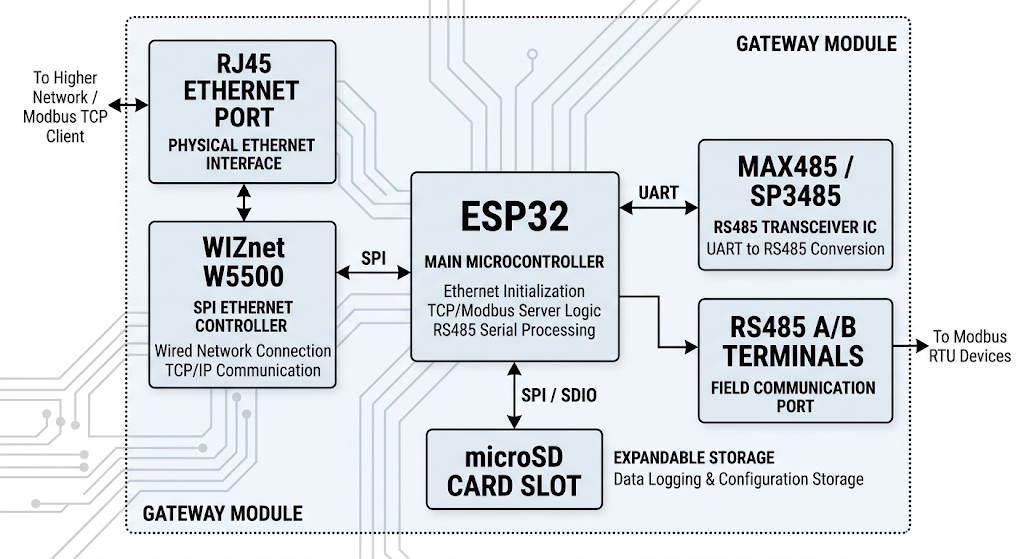
이 프로젝트의 하드웨어는 ESP32 + W5500 + MAX485/SP3485 + microSD 구성으로 이해하시면 됩니다.
- ESP32
메인 마이크로컨트롤러로, Ethernet 초기화, TCP/Modbus 서버 구동, RS485 시리얼 처리 로직을 실행합니다. - WIZnet W5500
SPI 기반 Ethernet 컨트롤러로, 유선 네트워크 연결과 TCP/IP 통신을 담당합니다. - MAX485 / SP3485
RS485 트랜시버 IC로, ESP32의 UART 신호를 RS485 물리 계층으로 변환합니다. - RJ45 Ethernet 포트
상위 Ethernet 네트워크 또는 Modbus TCP 클라이언트와 연결되는 물리 인터페이스입니다. - RS485 A/B 단자
Modbus RTU 장비가 연결되는 현장 통신 포트입니다. - microSD 카드 슬롯
데이터 로깅이나 설정 저장 같은 확장 기능에 활용할 수 있는 저장 장치입니다.
코드 기준으로 확인되는 연결 정보는 다음과 같습니다.
- W5500 CS 핀:
GPIO 5 - W5500 RESET 핀:
GPIO 4 - RS485 포트:
Serial2 - RS485 통신 예시:
9600 baud,SERIAL_8N1
즉, 이 보드는 ESP32가 전체 제어를 맡고, W5500이 Ethernet 통신을 처리하며, MAX485/SP3485가 RS485 인터페이스를 담당하는 게이트웨이형 구조라고 보시면 됩니다.
이미지 출처: AI 생성
Possible Applications
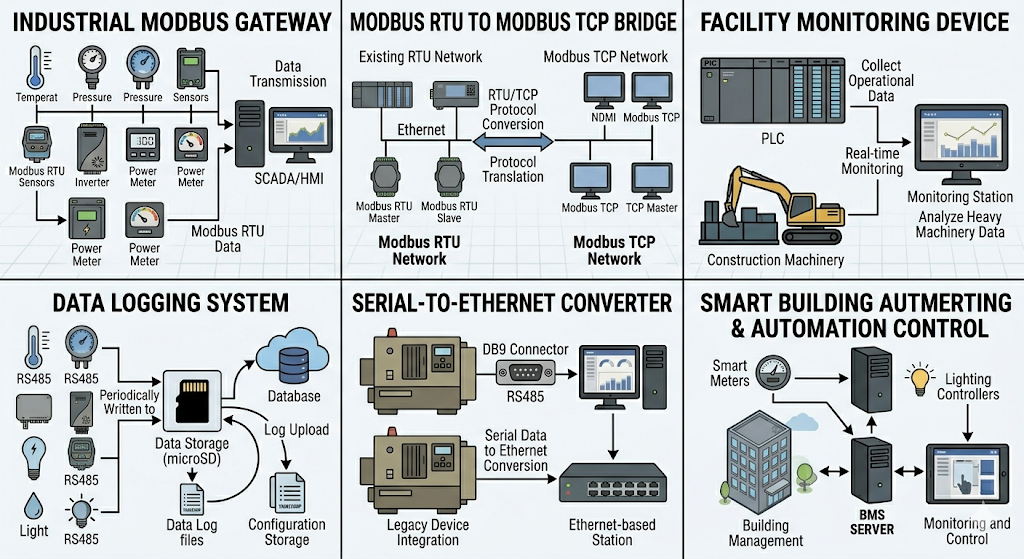
이 구조는 단순한 테스트 보드에 그치지 않고, 실제 현장에서 다음과 같은 용도로 확장해 사용하실 수 있습니다.
- 산업용 Modbus 게이트웨이
RS485 기반 센서, 인버터, 계측기 데이터를 Ethernet 네트워크로 전달하는 용도에 적합합니다. - 설비 모니터링 장치
PLC나 현장 장비의 RS485 데이터를 수집해 상위 SCADA, HMI, 또는 서버로 전달하는 중간 장치로 사용할 수 있습니다. - Serial-to-Ethernet 변환기
기존 RS485 장비를 교체하지 않고, Ethernet 기반 모니터링 시스템에 연결할 때 유용합니다. - Modbus RTU to Modbus TCP 브리지
기존 RTU 설비를 TCP 네트워크에 통합해야 하는 환경에서 가장 직접적으로 활용할 수 있습니다. - 데이터 로깅 시스템
microSD를 함께 사용하면 현장 데이터를 저장하고, 필요 시 Ethernet으로 업로드하는 구조로 확장할 수 있습니다. - 스마트 빌딩 및 자동화 제어
전력계, 제어기, 환경 센서처럼 RS485를 사용하는 장비를 네트워크 기반 관리 시스템에 연결하는 데 적합합니다.
즉, 이 프로젝트는 기존 RS485 장비를 Ethernet 기반 운영 환경에 자연스럽게 편입시키는 응용 구조로 이해하시면 됩니다.
이미지 출처 : AI 생성
Where WIZnet Fits
이 프로젝트에서 사용된 WIZnet 제품은 W5500입니다.
W5500은 SPI로 연결되는 하드웨어 TCP/IP 오프로딩 이더넷 컨트롤러로, 이 프로젝트에서는 다음 역할을 담당합니다.
- Ethernet 링크 구성
- TCP 서버 또는 Modbus TCP 서버의 네트워크 처리
- 소켓 및 버퍼 관리
- ESP32의 네트워크 처리 부담 완화
이 구조의 장점은 분명합니다.
RS485 기반 장비를 다룰 때는 통신 주기, 재시도 처리, 레지스터 매핑 같은 제어 로직이 중요합니다. W5500이 Ethernet 통신을 맡아 주면 ESP32는 RS485 처리와 애플리케이션 로직에 더 집중할 수 있습니다. 유선 연결이 필요한 산업용 환경에서도 안정적인 구성이 가능합니다.
Practical Tips / Pitfalls
- W5500 리셋 핀을 먼저 제어한 뒤 Ethernet을 초기화하시는 편이 안전합니다.
- 예제 기준 W5500 CS 핀은 5번입니다. 커스텀 보드에서는 이 값이 다르면 통신이 실패할 수 있습니다.
- TCP 서버를 열기 전에 하드웨어 인식과 링크 상태를 먼저 확인하시는 것이 좋습니다.
- RS485 트랜시버는 송수신 방향 제어가 필요한지 함께 점검하셔야 합니다.
- DHCP와 고정 IP 예제가 함께 있으므로, 실제 장비 적용 시에는 한 방식으로 통일하시는 편이 좋습니다.
- 브리지 장비는 최대 연결 수보다 재접속 처리와 주기 안정성이 더 중요합니다.
FAQ
Q: 왜 이 프로젝트에 W5500을 사용하나요?
A: RS485 장비를 Ethernet 네트워크에 연결하는 구조에서는 유선 연결의 안정성과 명확한 네트워크 처리 구조가 중요합니다. W5500은 TCP/IP 처리와 소켓 관리를 맡기 쉬워서 ESP32가 RS485와 Modbus 로직에 더 집중할 수 있습니다.
Q: ESP32에는 어떻게 연결하나요?
A: W5500은 SPI 인터페이스로 연결됩니다. 예제에서는 CS 핀으로 5번, 리셋 핀으로 4번을 사용하고 있으며, 실제 보드에서는 SPI 배선과 핀 정의가 정확히 일치해야 합니다.
Q: 이 프로젝트에서 W5500의 구체적인 역할은 무엇인가요?
A: Modbus TCP 서버와 일반 TCP 서버의 Ethernet 통신 계층을 담당합니다. 특히 RTU↔TCP 브리지 예제에서는 RS485 장비 데이터를 상위 Ethernet 네트워크로 전달하는 출구 역할을 합니다.
Q: 초보자도 따라 할 수 있나요?
A: 완전 초보자보다는 ESP32, UART, SPI를 한 번이라도 다뤄 보신 분께 더 적합합니다. Modbus RTU와 Modbus TCP의 차이를 알고 계시면 훨씬 수월하게 이해하실 수 있습니다.
Q: ESP32 Wi-Fi 대신 W5500을 쓰는 이유는 무엇인가요?
A: 이 프로젝트의 목적은 현장 장비와 상위 시스템을 안정적으로 연결하는 데 있습니다. 이동성보다 배선된 연결의 예측 가능성과 유지보수 편의성이 중요할 때 W5500 기반 Ethernet 구성이 더 적합합니다.
What the Project Does
This repository is closer to a collection of function-specific test examples than a single, complete firmware project.
Its main purpose is to use the ESP32 as a gateway between RS485 field devices and an Ethernet network.
The repository includes the following examples:
- 1_tes_ethernet_w5500
An example for verifying basic Ethernet connectivity using the W5500. - 2_tes_ethernet_w5500_modbus
An example for setting up a Modbus TCP server on top of the W5500. - 3_tes_ethernet_TCP_server_w5500
An example for running a general TCP server based on the W5500. - 4_Modbus_RTU_TCP_expansion_board_esp32_oso
A bridge example that connects RS485 Modbus RTU and Ethernet Modbus TCP. - 5_Modbus_server_w5500_expansion_board_esp32_oso
An example for verifying Modbus server operation over the W5500. - 6_Modbus_slave_expansion_board_esp32_oso
An example for testing Modbus slave operation on the RS485 side.
In other words, this project is organized to step by step validate a gateway structure that links RS485 field devices to a higher-level Ethernet network.
Image source: AI-generated
Hardware Configuration
The hardware in this project can be understood as an ESP32 + W5500 + MAX485/SP3485 + microSD configuration.
- ESP32
The main microcontroller, responsible for Ethernet initialization, TCP/Modbus server operation, and RS485 serial processing. - WIZnet W5500
An SPI-based Ethernet controller that handles wired network connectivity and TCP/IP communication. - MAX485 / SP3485
An RS485 transceiver IC that converts the ESP32’s UART signals into the RS485 physical layer. - RJ45 Ethernet Port
The physical interface connected to the upper Ethernet network or a Modbus TCP client. - RS485 A/B Terminal
The field communication port used to connect Modbus RTU devices. - microSD Card Slot
A storage device that can be used for extended functions such as data logging or configuration storage.
The following connection details can be identified from the code:
- W5500 CS pin: GPIO 5
- W5500 RESET pin: GPIO 4
- RS485 port: Serial2
- Example RS485 settings: 9600 baud, SERIAL_8N1
In summary, this board can be understood as a gateway-style structure in which the ESP32 handles overall control, the W5500 manages Ethernet communication, and the MAX485/SP3485 handles the RS485 interface.
Image source: AI-generated
Possible Applications
This structure is not limited to a simple test board. It can be extended for practical use in the following applications:
- Industrial Modbus Gateway
Suitable for delivering data from RS485-based sensors, inverters, and meters to an Ethernet network. - Equipment Monitoring Device
Can be used as an intermediate device that collects RS485 data from PLCs or field equipment and sends it to higher-level SCADA, HMI, or server systems. - Serial-to-Ethernet Converter
Useful when connecting existing RS485 devices to an Ethernet-based monitoring system without replacing the original equipment. - Modbus RTU to Modbus TCP Bridge
Directly applicable in environments where existing RTU-based equipment needs to be integrated into a TCP network. - Data Logging System
By using the microSD card together, the system can be extended to store field data locally and upload it over Ethernet when needed. - Smart Building and Automation Control
Suitable for connecting RS485-based devices such as power meters, controllers, and environmental sensors to network-based management systems.
In short, this project can be understood as an application structure that allows existing RS485 devices to be integrated naturally into an Ethernet-based operating environment.
Image source: AI-generated
Where WIZnet Fits
The WIZnet product used in this project is the W5500.
The W5500 is an SPI-connected Ethernet controller with hardware TCP/IP offloading, and in this project it is responsible for the following roles:
- Ethernet link setup
- Network handling for a TCP server or Modbus TCP server
- Socket and buffer management
- Reducing the network processing burden on the ESP32
The advantages of this structure are clear.
When working with RS485-based devices, control logic such as communication timing, retry handling, and register mapping is important. If the W5500 takes care of Ethernet communication, the ESP32 can focus more on RS485 processing and application logic. This also makes the structure suitable for industrial environments where stable wired connections are required.
Practical Tips / Pitfalls
- It is safer to control the W5500 reset pin first and then initialize Ethernet.
- In the example code, the W5500 CS pin is set to 5. On a custom board, communication may fail if this value does not match the actual wiring.
- Before starting the TCP server, it is a good idea to check hardware detection and link status first.
- You should also verify whether the RS485 transceiver requires transmit/receive direction control.
- Since both DHCP and static IP examples are included, it is better to standardize on one method when applying this to a real device.
- For bridge devices, reconnection handling and timing stability are usually more important than the maximum number of simultaneous connections.
FAQ
Q: Why is the W5500 used in this project?
A: In a structure that connects RS485 devices to an Ethernet network, stable wired connectivity and a clear network handling architecture are important. The W5500 makes it easier to offload TCP/IP and socket management, allowing the ESP32 to focus more on RS485 and Modbus logic.
Q: How is it connected to the ESP32?
A: The W5500 is connected through the SPI interface. In the example code, GPIO 5 is used as the CS pin and GPIO 4 as the reset pin, so the SPI wiring and pin definitions must match the actual board design.
Q: What exactly does the W5500 do in this project?
A: It handles the Ethernet communication layer for the Modbus TCP server and general TCP server. In the RTU-to-TCP bridge example, it serves as the network-side endpoint that exposes RS485 device data to the upper Ethernet network.
Q: Can beginners follow this project?
A: It is more suitable for users who have at least some experience with ESP32, UART, and SPI rather than complete beginners. If you already understand the difference between Modbus RTU and Modbus TCP, the project will be much easier to follow.
Q: Why use the W5500 instead of the ESP32’s built-in Wi-Fi?
A: The purpose of this project is to connect field devices and upper-level systems in a stable way. When predictable wired connectivity and easier maintenance are more important than mobility, an Ethernet-based design using the W5500 is a better fit.
-
Github Code
