


bme280_logging
bme280_logging

Arduino - Arduino UNO
x 1


WIZnet - W5500
x 1
Arduino - Arduino IDE
x 1
Summary
이 프로젝트는 Arduino Uno가 BME280 센서에서 온도, 습도, 기압을 읽고, Ethernet Shield를 통해 데이터를 HTTP JSON 형식으로 제공하는 환경 모니터링 데모입니다. Python 스크립트는 Arduino의 고정 IP 주소를 주기적으로 호출해 temp, pres, hum 값을 수집하고, InfluxDB에 저장한 뒤 Grafana에서 시계열 대시보드로 표시합니다.
전체 데이터 흐름은 BME280 → Arduino Uno → Ethernet Shield → Python Collector → InfluxDB → Grafana로 구성됩니다. Arduino는 BME280을 I2C로 읽고, 포트 80에서 간단한 HTTP 서버처럼 동작합니다. 서버 측 Python 스크립트는 Arduino의 JSON 응답을 가져와 시계열 데이터베이스에 기록합니다. 이 구조는 복잡한 클라우드 SDK나 MQTT 브로커 없이도 센서 수집, 저장, 시각화 과정을 한 번에 확인할 수 있어 환경 모니터링 데모에 적합합니다.
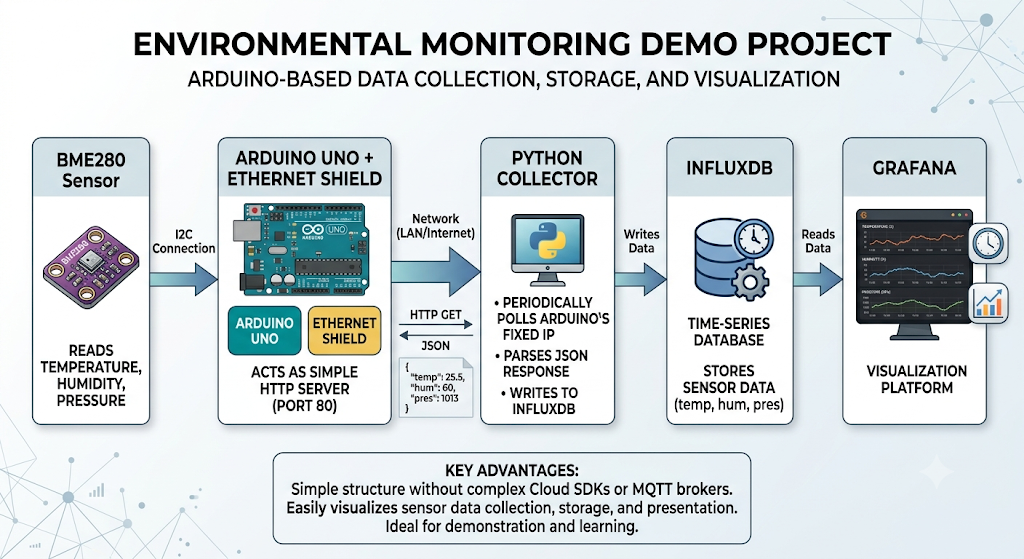
이미지 출처 : AI 생성
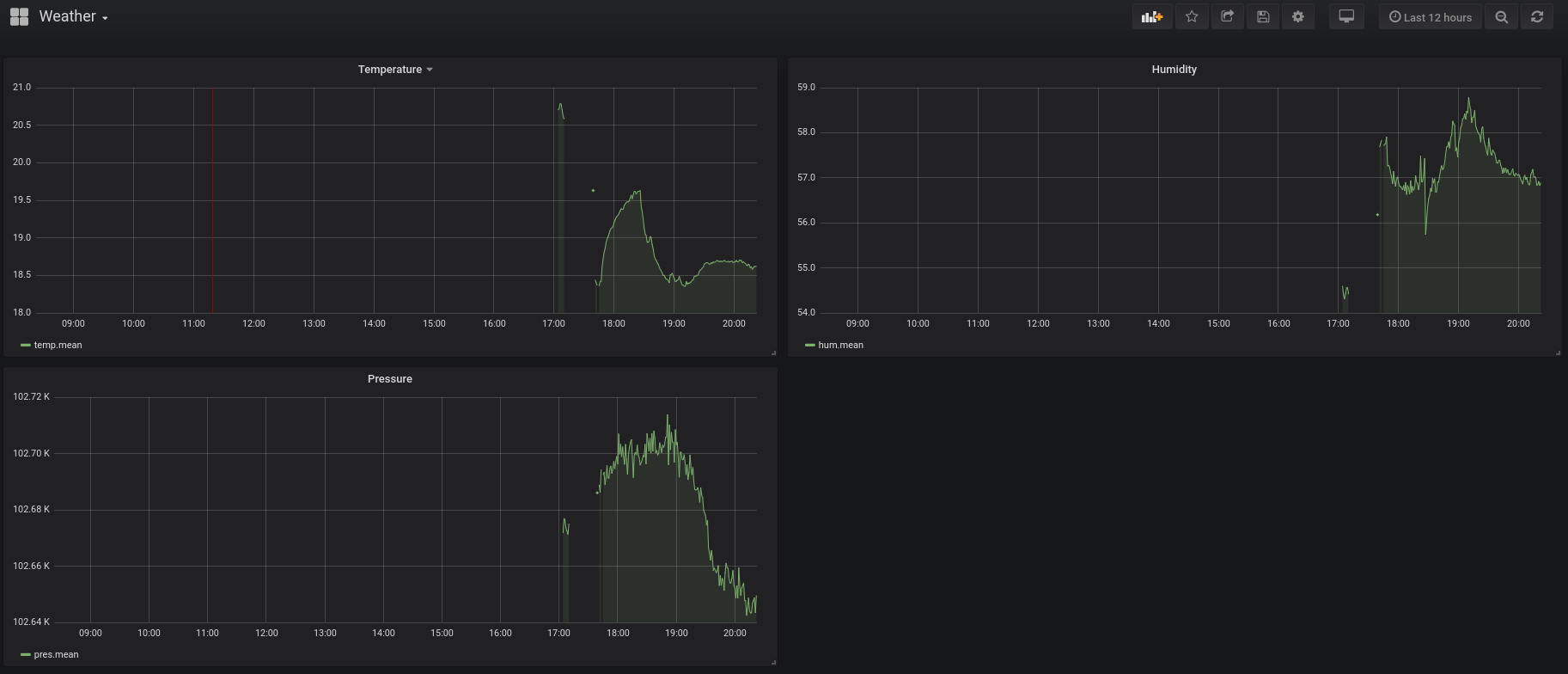
이미지 출처 : https://github.com/crablab/bme280_logging
Where WIZnet Fits
This project does not currently use WIZnet products.
원본 저장소에는 W5500, W5100, WIZnet이라는 제품명이 직접 등장하지 않습니다. 다만 네트워크 인터페이스가 Arduino Ethernet Shield와 표준 Arduino Ethernet 라이브러리에 의존하므로, 이 위치에 WIZnet W5500 기반 Ethernet Shield 또는 W5500 모듈을 적용할 수 있습니다.
W5500은 Arduino와 SPI로 연결되는 하드웨어 TCP/IP Ethernet 컨트롤러입니다. 이 프로젝트에서 W5500을 사용한다면 Arduino는 BME280 측정과 HTTP 응답 생성에 집중하고, W5500은 TCP/IP 처리, 소켓 관리, Ethernet 링크 처리를 담당합니다. Arduino Uno처럼 RAM과 Flash가 제한적인 MCU에서는 네트워크 처리를 외부 Ethernet 컨트롤러에 맡기는 구조가 단순하고 안정적입니다.
환경 모니터링 데모는 대역폭보다 지속적인 연결 안정성이 중요합니다. 유선 Ethernet은 Wi-Fi보다 설치 위치와 링크 상태가 예측 가능하며, 공유기와 케이블이 고정된 환경에서는 장시간 폴링 방식의 센서 수집에 적합합니다.
Implementation Notes
원본 Arduino 코드는 표준 Ethernet 라이브러리를 사용해 고정 IP 기반 HTTP 서버를 구성합니다. 아래 코드는 Arduino의 MAC 주소, IP 주소, 서버 포트를 설정하는 부분입니다.
// File: arduino.ino
byte mac[] = { 0xDE, 0xAD, 0xBE, 0xEF, 0xFE, 0xED };
IPAddress ip(192, 168, 1, 91);
EthernetServer server(80);

Ethernet.begin(mac, ip);
server.begin();
이 코드는 Arduino가 192.168.1.91 주소에서 HTTP 요청을 받을 수 있도록 네트워크 엔드포인트를 만듭니다. W5500 기반 Ethernet Shield를 사용할 경우에도 Arduino Ethernet API와 호환되는 보드라면 같은 구조를 유지할 수 있습니다.
센서 데이터는 HTTP 응답 본문에 JSON 형태로 출력됩니다. Arduino는 BME280에서 측정값을 읽은 뒤 temp, pres, hum 필드로 반환합니다.
// File: arduino.ino
bme.read(pres, temp, hum, tempUnit, presUnit);

ethernet.println("HTTP/1.1 200 OK");
ethernet.println("Content-Type: application/json");
ethernet.println();

ethernet.print("{");
ethernet.print("\"temp\":");
ethernet.print(temp);
ethernet.print(",");
ethernet.print("\"pres\":");
ethernet.print(pres);
ethernet.print(",");
ethernet.print("\"hum\":");
ethernet.print(hum);
ethernet.print("}");
이 방식의 장점은 단순함입니다. Arduino는 센서 값을 저장하지 않고, 현재 값을 네트워크로 노출하기만 합니다. 데이터 저장과 시각화는 서버 측 Python, InfluxDB, Grafana가 담당합니다.
Python 수집기는 Arduino의 HTTP 엔드포인트를 호출하고, 받은 JSON 값을 InfluxDB에 기록합니다.
# File: server.py
r = requests.get("http://192.168.1.91")
data = r.json()

client.write_points(temp)
client.write_points(pres)
client.write_points(hum)

time.sleep(60)
이 구조에서 W5500의 역할은 Arduino와 Python 수집기 사이의 유선 네트워크 연결을 안정적으로 유지하는 것입니다. 센서 수집 주기가 60초라면 성능보다 링크 안정성, IP 설정, 전원 안정성, 케이블 연결 상태가 더 중요합니다.
Practical Tips / Pitfalls
W5500 모듈을 직접 연결할 경우 SPI 핀인 SCK, MOSI, MISO, CS와 전원, GND, RESET 배선을 확인해야 합니다.
BME280은 I2C, W5500은 SPI를 사용하므로 두 장치의 버스가 분리되어 배선 구조가 비교적 단순합니다.
고정 IP를 사용할 때는 공유기 DHCP 범위와 충돌하지 않는 주소를 선택해야 합니다.
장시간 데모에서는 Ethernet 링크 LED, 케이블 접촉, 공유기 포트 상태를 먼저 확인하는 것이 좋습니다.
Arduino Uno는 RAM이 작으므로 긴 문자열을 조합하기보다 print()로 JSON을 순차 출력하는 방식이 안전합니다.
InfluxDB와 Grafana를 외부망에 노출할 경우 인증, 방화벽, 보존 정책을 별도로 설정해야 합니다.
Similar Project
유사점
| 항목 | 공통점 |
|---|---|
| 센서 | 두 프로젝트 모두 BME280으로 온도, 습도, 기압을 측정합니다. |
| 네트워크 | Wi-Fi가 아니라 유선 Ethernet을 사용합니다. |
| WIZnet 활용 구조 | Ethernet Shield 또는 W5500 모듈을 통해 MCU를 네트워크에 연결합니다. |
| 서버 방식 | 보드가 HTTP 서버처럼 동작해 센서 데이터를 제공합니다. |
| 용도 | 환경 데이터를 웹 또는 대시보드에서 확인하는 모니터링 데모입니다. |
차이점
| 항목 | bme280_logging | 비교 프로젝트 |
|---|---|---|
| 플랫폼 | Arduino Uno | ESP32-DEV |
| 데이터 형식 | JSON 응답 | HTML 웹 페이지 |
| 데이터 저장 | Python이 수집 후 InfluxDB에 저장 | 별도 DB 저장 없이 웹 페이지 표시 중심 |
| 시각화 | Grafana 대시보드 | 브라우저 웹 UI |
| 프로젝트 성격 | 장시간 센서 로깅 파이프라인 | W5500 기반 임베디드 웹 서버 데모 |
요약
두 프로젝트는 BME280 센서 데이터를 유선 Ethernet으로 제공한다는 점에서 유사합니다.
하지만 bme280_logging은 InfluxDB와 Grafana를 사용하는 데이터 로깅 시스템이고, Bruno 프로젝트는 ESP32가 직접 웹 페이지를 제공하는 W5500 웹 서버 데모라는 점에서 목적이 다릅니다.
FAQ
Q: 왜 이 프로젝트에 W5500을 적용할 수 있나요?
A: 원본 프로젝트가 Arduino Ethernet 라이브러리 기반의 유선 네트워크 구조를 사용하기 때문입니다. W5500 기반 Ethernet Shield는 Arduino가 센서 처리와 HTTP 응답에 집중하도록 하고, TCP/IP와 Ethernet 링크 처리는 외부 컨트롤러에서 담당하게 할 수 있습니다.
Q: W5500은 Arduino Uno에 어떻게 연결되나요?
A: W5500은 SPI로 Arduino Uno와 연결됩니다. Shield 형태라면 Arduino 위에 장착해 사용할 수 있고, 모듈 형태라면 SCK, MOSI, MISO, CS, RESET, 전원, GND 배선을 직접 확인해야 합니다. BME280은 I2C를 사용하므로 W5500의 SPI 연결과 충돌하지 않습니다.
Q: 이 프로젝트에서 W5500은 어떤 역할을 하나요?
A: W5500은 Arduino가 측정한 BME280 값을 Python 수집 서버가 읽을 수 있도록 유선 Ethernet 인터페이스를 제공합니다. Arduino 코드에서는 EthernetServer가 HTTP 요청을 처리하고, W5500은 그 통신이 실제 Ethernet 네트워크로 전달되도록 돕는 위치에 있습니다.
Q: 초보자도 따라할 수 있나요?
A: 기본적인 Arduino 업로드 경험, I2C 센서 연결, IP 주소 설정, Python 실행 환경이 필요합니다. MQTT나 클라우드 플랫폼 없이 HTTP JSON, InfluxDB, Grafana 흐름을 확인할 수 있어 환경 모니터링 데모로는 접근성이 좋은 편입니다.
Q: Wi-Fi 대신 W5500 유선 Ethernet을 쓰는 이유는 무엇인가요?
A: 환경 모니터링은 빠른 전송 속도보다 일정한 주기로 끊기지 않고 데이터를 가져오는 것이 중요합니다. 유선 Ethernet은 무선 간섭, 신호 세기 변화, AP 재연결 문제를 줄일 수 있어 고정 설치형 센서 로깅에 적합합니다.
Source
Original Project: crablab/bme280_logging — https://github.com/crablab/bme280_logging
Arduino firmware: arduino.ino
Python collector: server.py
Project README: hardware, wiring, InfluxDB, Grafana workflow
License: MIT License, copyright Hugh Wells, 2019
WIZnet reference: W5500 hardware TCP/IP Ethernet controller
Tags
#W5500 #WIZnet #ArduinoUno #BME280 #Ethernet #InfluxDB #Grafana #Python #EnvironmentalMonitoring #IoT #SensorLogging
Summary
This project is an environmental monitoring demo in which an Arduino Uno reads temperature, humidity, and pressure from a BME280 sensor and provides the data in HTTP JSON format through an Ethernet Shield. A Python script periodically calls the Arduino’s fixed IP address, collects the temp, pres, and hum values, stores them in InfluxDB, and displays them as a time-series dashboard in Grafana.
The overall data flow is structured as follows:
BME280 → Arduino Uno → Ethernet Shield → Python Collector → InfluxDB → Grafana
The Arduino reads the BME280 over I2C and operates like a simple HTTP server on port 80. The server-side Python script retrieves the Arduino’s JSON response and records it in a time-series database. This structure is suitable for an environmental monitoring demo because it allows sensor collection, storage, and visualization to be tested together without a complex cloud SDK or MQTT broker.
Image source: AI-generated
Image source: https://github.com/crablab/bme280_logging
Where WIZnet Fits
This project does not currently use WIZnet products.
The original repository does not directly mention product names such as W5500, W5100, or WIZnet. However, since the network interface depends on an Arduino Ethernet Shield and the standard Arduino Ethernet library, a WIZnet W5500-based Ethernet Shield or W5500 module can be applied in this position.
The W5500 is a hardware TCP/IP Ethernet controller connected to the Arduino via SPI. If the W5500 is used in this project, the Arduino can focus on BME280 measurement and HTTP response generation, while the W5500 handles TCP/IP processing, socket management, and Ethernet link operation. For an MCU with limited RAM and Flash, such as the Arduino Uno, delegating network processing to an external Ethernet controller makes the structure simpler and more stable.
For an environmental monitoring demo, continuous connection stability is more important than bandwidth. Wired Ethernet provides more predictable installation and link conditions than Wi-Fi, making it suitable for long-term polling-based sensor collection in an environment where the router and cable connections are fixed.
Implementation Notes
The original Arduino code uses the standard Ethernet library to configure a fixed-IP HTTP server. The code below sets the Arduino’s MAC address, IP address, and server port.
// File: arduino.ino
byte mac[] = { 0xDE, 0xAD, 0xBE, 0xEF, 0xFE, 0xED };
IPAddress ip(192, 168, 1, 91);
EthernetServer server(80);

Ethernet.begin(mac, ip);
server.begin();
This code creates a network endpoint so that the Arduino can receive HTTP requests at 192.168.1.91. If a W5500-based Ethernet Shield is used, the same structure can be maintained as long as the board is compatible with the Arduino Ethernet API.
Sensor data is output in JSON format in the HTTP response body. The Arduino reads the measured values from the BME280 and returns them as the temp, pres, and hum fields.
// File: arduino.ino
bme.read(pres, temp, hum, tempUnit, presUnit);

ethernet.println("HTTP/1.1 200 OK");
ethernet.println("Content-Type: application/json");
ethernet.println();

ethernet.print("{");
ethernet.print("\"temp\":");
ethernet.print(temp);
ethernet.print(",");
ethernet.print("\"pres\":");
ethernet.print(pres);
ethernet.print(",");
ethernet.print("\"hum\":");
ethernet.print(hum);
ethernet.print("}");
The advantage of this approach is simplicity. The Arduino does not store sensor values; it only exposes the current values over the network. Data storage and visualization are handled by the server-side Python script, InfluxDB, and Grafana.
The Python collector calls the Arduino’s HTTP endpoint and writes the received JSON values to InfluxDB.
# File: server.py
r = requests.get("http://192.168.1.91")
data = r.json()

client.write_points(temp)
client.write_points(pres)
client.write_points(hum)

time.sleep(60)
In this structure, the role of the W5500 is to maintain a stable wired network connection between the Arduino and the Python collector. If the sensor collection interval is 60 seconds, link stability, IP configuration, power stability, and cable connection quality are more important than raw performance.
Practical Tips / Pitfalls
When connecting a W5500 module directly, check the SPI pins SCK, MOSI, MISO, and CS, as well as power, GND, and RESET wiring.
The BME280 uses I2C, while the W5500 uses SPI, so the two devices use separate buses and the wiring structure remains relatively simple.
When using a fixed IP address, choose an address that does not conflict with the router’s DHCP range.
For long-term demos, it is useful to check the Ethernet link LED, cable contact, and router port status first.
The Arduino Uno has limited RAM, so it is safer to output JSON sequentially with print() rather than building long strings.
If InfluxDB and Grafana are exposed to an external network, authentication, firewall rules, and retention policies should be configured separately.
Similar Project
Similarities
| Item | Common Point |
|---|---|
| Sensor | Both projects use the BME280 to measure temperature, humidity, and pressure. |
| Network | Both projects use wired Ethernet instead of Wi-Fi. |
| WIZnet Usage Structure | Both connect the MCU to the network through an Ethernet Shield or W5500 module. |
| Server Method | In both projects, the board operates like an HTTP server and provides sensor data. |
| Purpose | Both are monitoring demos for checking environmental data through a web page or dashboard. |
Differences
| Item | bme280_logging | Comparison Project |
|---|---|---|
| Platform | Arduino Uno | ESP32-DEV |
| Data Format | JSON response | HTML web page |
| Data Storage | Python collects the data and stores it in InfluxDB | Focuses on web page display without separate DB storage |
| Visualization | Grafana dashboard | Browser-based web UI |
| Project Character | Long-term sensor logging pipeline | W5500-based embedded web server demo |
Summary
The two projects are similar in that they both provide BME280 sensor data over wired Ethernet. However, bme280_logging is a data logging system that uses InfluxDB and Grafana, while Bruno’s project is a W5500 web server demo where the ESP32 directly serves a web page.
FAQ
Q: Why can W5500 be applied to this project?
A: Because the original project uses a wired network structure based on the Arduino Ethernet library. A W5500-based Ethernet Shield allows the Arduino to focus on sensor processing and HTTP response generation, while TCP/IP and Ethernet link handling can be managed by the external controller.
Q: How does the W5500 connect to the Arduino Uno?
A: The W5500 connects to the Arduino Uno over SPI. If it is used as a Shield, it can be mounted directly on top of the Arduino. If it is used as a module, the SCK, MOSI, MISO, CS, RESET, power, and GND wiring should be checked manually. Since the BME280 uses I2C, it does not conflict with the W5500’s SPI connection.
Q: What role does the W5500 play in this project?
A: The W5500 provides the wired Ethernet interface that allows the Python collector to read BME280 values measured by the Arduino. In the Arduino code, EthernetServer handles HTTP requests, while the W5500 is positioned to carry that communication over the actual Ethernet network.
Q: Can beginners follow this project?
A: Basic Arduino upload experience, I2C sensor wiring, IP address configuration, and a Python runtime environment are required. Since the project uses HTTP JSON, InfluxDB, and Grafana without MQTT or a cloud platform, it is relatively approachable as an environmental monitoring demo.
Q: Why use W5500 wired Ethernet instead of Wi-Fi?
A: Environmental monitoring is less about high transfer speed and more about collecting data at regular intervals without interruption. Wired Ethernet reduces issues such as wireless interference, signal strength changes, and AP reconnection, making it suitable for fixed sensor logging installations.
Source
Original Project: crablab/bme280_logging — https://github.com/crablab/bme280_logging
Arduino firmware: arduino.ino
Python collector: server.py
Project README: hardware, wiring, InfluxDB, Grafana workflow
License: MIT License, copyright Hugh Wells, 2019
WIZnet reference: W5500 hardware TCP/IP Ethernet controller
Tags
#W5500 #WIZnet #ArduinoUno #BME280 #Ethernet #InfluxDB #Grafana #Python #EnvironmentalMonitoring #IoT #SensorLogging
-
Github Code


