


Arduino-Advanced-SNMP-Project-Agentuino-
Arduino-Advanced-SNMP-Project-Agentuino-

Arduino - Arduino Mega 2560
x 1

WIZnet - W5100
x 1
프로젝트 개요
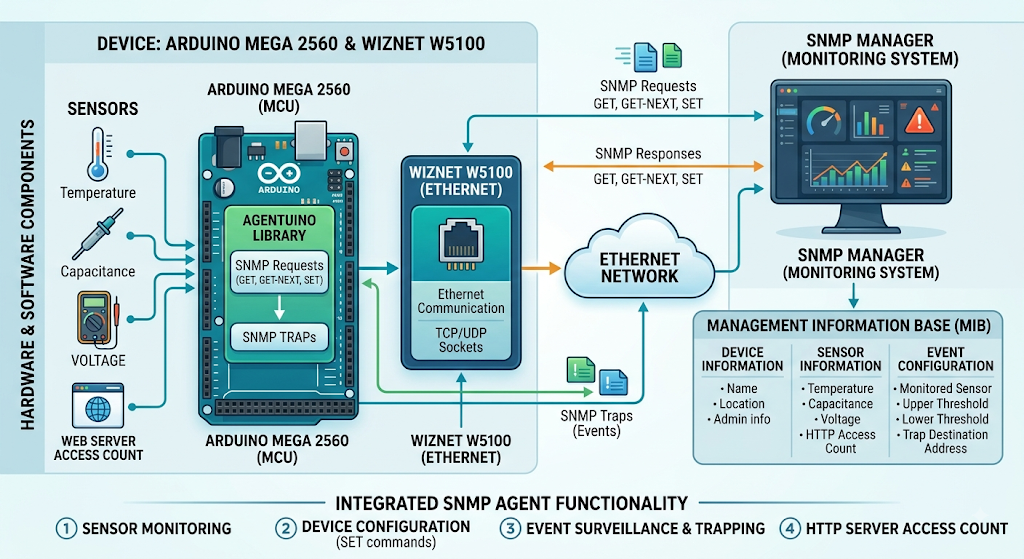
이 프로젝트는 Arduino Mega 2560과 WIZnet W5100을 이용해 SNMP 기반 네트워크 관리 장치를 구현합니다. Agentuino 라이브러리가 SNMP GET, GET-NEXT, SET 요청과 Trap을 처리하고, W5100은 Ethernet 통신과 TCP/UDP 소켓을 담당합니다.
전체 데이터 흐름은 다음과 같습니다.
센서 → Arduino Mega 2560 → Agentuino → W5100 → Ethernet → SNMP Manager
SNMP Manager에서는 MIB를 통해 다음 정보를 조회하거나 설정할 수 있습니다.
- 장치 정보: 이름, 위치, 관리자 정보
- 센서 정보: 온도, 정전용량, 전압, 웹 서버 접속 횟수
- 이벤트 정보: 감시할 센서, 상한·하한 임계값, Trap 수신 주소
Arduino는 설정된 주기에 따라 센서 값을 갱신합니다. 지정된 이벤트 조건을 만족하면 SNMP Trap을 관리 시스템으로 전송하며, 일부 MIB 항목은 SET 명령을 통해 원격으로 변경할 수 있습니다.
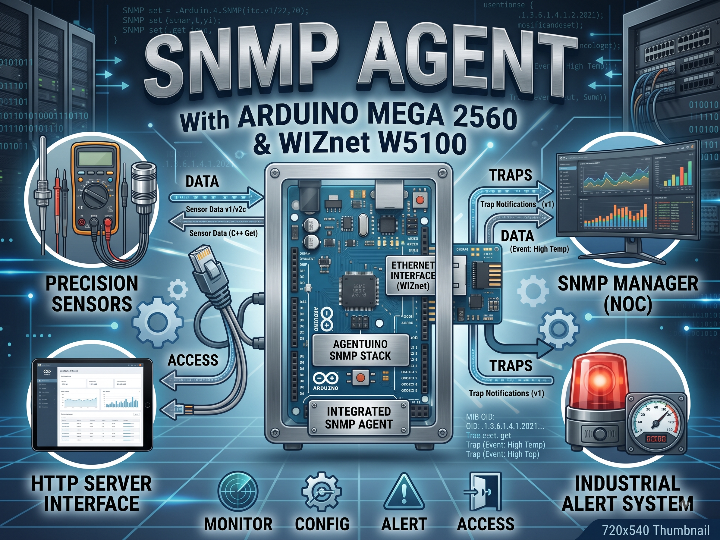
따라서 이 프로젝트는 단순히 센서 값을 SNMP로 읽는 예제가 아닙니다. 센서 모니터링, 장치 설정, 이벤트 감시, Trap 알림, HTTP 서버 기능을 하나의 Arduino 장치에 통합한 SNMP Agent 구현입니다.
이미지 출처 : AI 생성
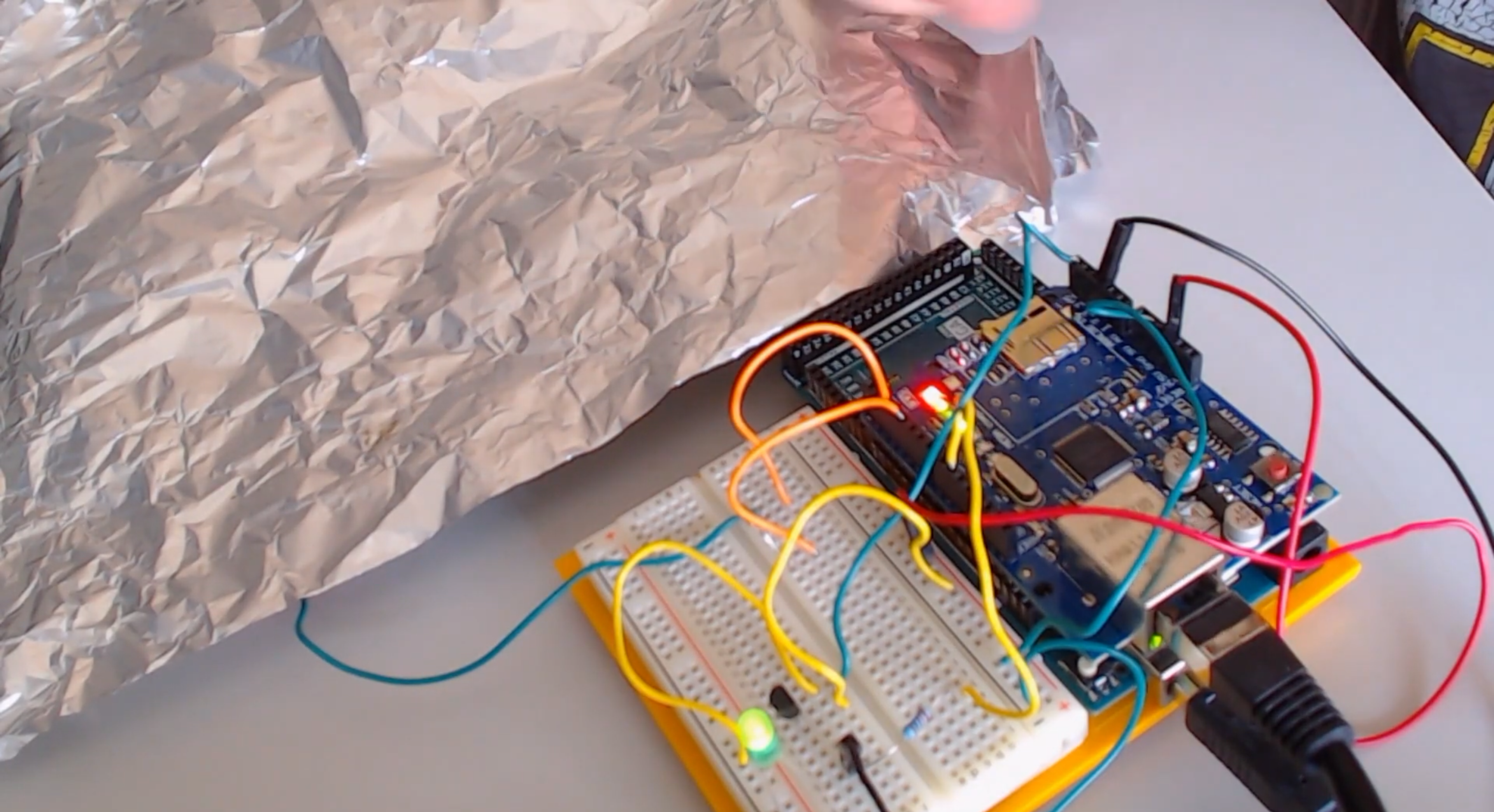
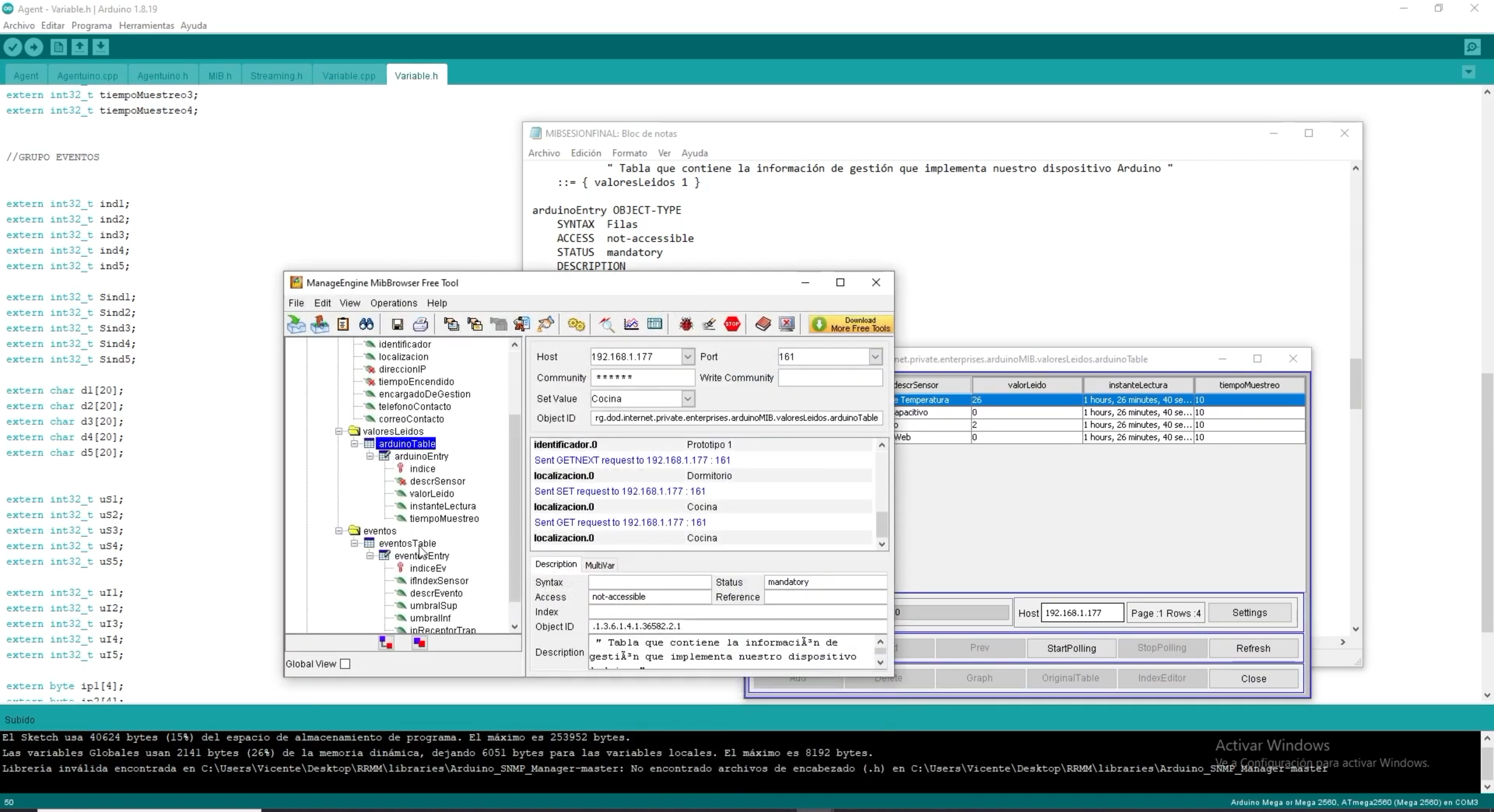
이미지 출처 : https://www.youtube.com/watch?v=vtchX_gNrCQ
Video
WIZnet이 들어가는 위치
이 프로젝트에서 사용되는 WIZnet 제품은 W5100입니다.
W5100은 Arduino Mega 2560과 SPI로 연결되며 실제 Ethernet 통신을 담당합니다. TCP/IPv4와 UDP 처리를 하드웨어에서 수행하고 최대 4개의 하드웨어 소켓을 제공합니다.
프로젝트에서는 W5100을 통해 세 가지 주요 네트워크 통신이 이루어집니다.
UDP 161: SNMP 요청 및 응답
UDP 162: SNMP Trap 전송
TCP 80: HTTP 서버
역할을 구분하면 Arduino Mega 2560은 센서 측정, MIB 데이터 관리, 이벤트 조건 판단과 같은 애플리케이션 로직을 처리합니다. W5100은 Agentuino와 Arduino Ethernet Library에서 전달받은 데이터를 실제 Ethernet 네트워크로 송수신합니다.
특히 이 프로젝트는 SNMP와 HTTP를 동시에 실행하면서 여러 센서도 주기적으로 처리합니다. TCP/IP 처리를 W5100에 맡기는 구조는 AVR 기반 Mega 2560에서 네트워크 스택 구현 부담을 줄이고 애플리케이션 로직을 비교적 단순하게 유지하는 데 적합합니다.
구현 노트
Ethernet과 SNMP Agent 초기화
파일: Agent.ino
#include <Ethernet.h>

EthernetServer server(80);

Ethernet.begin(mac, ipArduino, gateway, subnet);
api_status = Agentuino.begin();
Ethernet.begin()은 W5100의 네트워크 통신을 초기화하고, Agentuino.begin()은 SNMP Agent를 시작합니다.
초기화가 끝난 뒤 메인 루프에서는 다음 함수를 반복 실행합니다.
Agentuino.listen();
Agentuino.listen()은 UDP로 들어오는 SNMP 패킷을 확인하고 요청을 처리합니다.
원본 프로젝트는 Arduino의 기본 IP 주소를 192.168.1.177로 설정하고 있습니다. 실제 환경에서 사용할 때는 현재 네트워크의 주소 체계에 맞게 변경해야 합니다.
또한 저장소에는 다음 코드가 사용됩니다.
Ethernet.begin(mac, ipArduino, gateway, subnet);
이 부분은 사용하는 Arduino Ethernet Library 버전의 Ethernet.begin() 함수 인자 순서를 확인할 필요가 있습니다. 변수 이름만 보고 그대로 적용하기보다는 현재 라이브러리 API에 맞춰 DNS, Gateway, Subnet 설정이 올바르게 전달되는지 검증하는 것이 좋습니다.
SNMP 요청 수신과 Trap 전송
파일: Agentuino.cpp
Udp.begin(SNMP_DEFAULT_PORT);

Udp.beginPacket(RemIP, 162);
Udp.write(Message, strlen(Message));
Udp.endPacket();
SNMP_DEFAULT_PORT는 Agentuino.h에서 161번 포트로 정의되어 있습니다.
따라서 W5100은 UDP 161번 포트에서 SNMP Manager의 요청을 수신합니다. 이벤트가 발생하면 Agentuino가 Trap 메시지를 구성하고, W5100을 통해 지정된 관리 시스템의 UDP 162번 포트로 전송합니다.
네트워크 흐름은 다음과 같습니다.
SNMP Manager → UDP 161 → W5100 → Agentuino → MIB 처리
Trap의 경우 반대 방향으로 동작합니다.
이벤트 발생 → Agentuino Trap 생성 → W5100 → UDP 162 → SNMP Manager
MIB와 Arduino 변수 연결
SNMP 요청이 들어오면 Agentuino는 요청된 OID를 MIB.h에 정의된 항목과 비교합니다.
예를 들어 온도 센서 OID에 GET 요청이 들어오면 현재 sensortemp 값을 SNMP 응답으로 반환합니다. 읽기 전용 항목에 SET 요청이 들어오면 오류를 반환하고, 쓰기가 허용된 장치 정보나 설정값은 전달받은 값을 실제 Arduino 변수에 반영합니다.
이 구조를 통해 SNMP의 MIB 객체와 Arduino 내부 데이터가 직접 연결됩니다.
즉, MIB는 단순한 설명 파일이 아니라 SNMP Manager가 Arduino 내부 데이터에 접근하기 위한 인터페이스 정의 역할을 합니다.
센서와 이벤트 처리
Variable.cpp에서는 프로젝트에서 관리하는 주요 값들이 구현되어 있습니다.
대표적으로 다음 항목이 포함됩니다.
온도 센서
정전용량 센서
전압 측정값
HTTP 서버 접속 횟수
각 센서는 설정된 주기에 따라 값을 갱신합니다.
이벤트 기능에서는 특정 센서의 현재 값과 사용자가 지정한 상한 또는 하한 임계값을 비교합니다. 조건을 만족하면 Agentuino.Trap()을 호출해 SNMP Manager로 알림을 보냅니다.
이를 통해 SNMP Manager가 계속 센서 값을 조회하지 않더라도 특정 상태가 발생했을 때 Arduino가 먼저 이벤트를 보고할 수 있습니다.
실전 팁 / 주의점
Mega 2560의 SPI 연결을 확인해야 합니다. W5100 Ethernet Shield는 SPI를 사용하므로 Mega 2560의 SPI 핀과 Chip Select 구성을 먼저 확인하는 것이 좋습니다.
원본의 IP 주소를 그대로 사용하지 않는 것이 좋습니다. 192.168.1.177이 현재 네트워크의 다른 장치와 충돌하지 않는지 확인해야 합니다.
Ethernet.begin()의 인자 순서를 확인해야 합니다. 원본 코드의 변수 이름과 현재 사용 중인 Ethernet Library API가 정확히 일치하는지 검증해야 합니다.
W5100의 소켓 수를 고려해야 합니다. W5100은 최대 4개의 하드웨어 소켓을 제공하므로 HTTP와 SNMP 외에 추가 서비스를 연결할 경우 소켓 사용 상태를 확인해야 합니다.
Agentuino의 고정 버퍼 크기도 확인해야 합니다. 긴 OID나 큰 문자열을 추가하면 W5100의 네트워크 버퍼보다 Agentuino 내부 버퍼가 먼저 제한 요소가 될 수 있습니다.
기본 SNMP community 문자열은 변경하는 것이 좋습니다. 원본 프로젝트는 기본값으로 public을 사용하므로 실제 네트워크에서는 별도 값으로 변경하는 편이 적절합니다.
Ethernet 링크 상태 확인을 추가하면 디버깅이 쉬워집니다. W5100 인식 문제, 케이블 연결 문제, 애플리케이션 오류를 서로 구분할 수 있도록 링크 상태를 확인하는 코드를 추가하는 것이 좋습니다.
FAQ
Q: 이 프로젝트에서 왜 WIZnet W5100을 사용하나요?
W5100은 TCP/UDP와 Ethernet 통신을 하드웨어에서 처리합니다. 따라서 Mega 2560은 네트워크 프로토콜 처리보다 센서 측정, MIB 관리, 이벤트 판단과 같은 애플리케이션 로직에 집중할 수 있습니다.
Q: W5100은 Arduino Mega 2560에 어떻게 연결되나요?
SPI 인터페이스를 사용합니다. Arduino Ethernet Shield 기반 구성에서는 Mega 2560의 SPI 신호와 W5100의 Chip Select 신호를 이용해 통신합니다. 실제 배선이나 별도 모듈을 사용할 경우 사용 중인 보드의 핀맵을 함께 확인해야 합니다.
Q: W5100은 이 프로젝트에서 정확히 어떤 역할을 하나요?
SNMP Manager와 Arduino 사이의 Ethernet 통신을 담당합니다. UDP 161번 포트에서 SNMP 요청을 받고 응답을 전달하며, 이벤트 발생 시 UDP 162번으로 Trap을 전송합니다. 프로젝트의 TCP 80번 HTTP 서버도 같은 W5100을 사용합니다.
Q: 초보자도 이 프로젝트를 따라 할 수 있나요?
기본 Arduino 예제보다 난도가 높은 편입니다. Arduino와 Ethernet Shield 사용 경험뿐 아니라 IP, UDP, SNMP OID, GET/SET, Trap, MIB에 대한 기본적인 이해가 필요합니다. 다만 MIB와 Agentuino 소스가 함께 제공되기 때문에 SNMP Agent 내부 구조를 공부하기 위한 예제로 활용할 수 있습니다.
Q: HTTP와 SNMP를 동시에 실행할 때 무엇을 확인해야 하나요?
가장 먼저 W5100의 하드웨어 소켓 사용량을 확인해야 합니다. 현재 프로젝트처럼 HTTP TCP 서버와 SNMP UDP 서비스를 동시에 사용할 수 있지만, 추가 네트워크 서비스를 넣거나 TCP 연결이 장시간 유지되면 사용할 수 있는 소켓이 부족해질 수 있습니다.
Project Overview
This project implements an SNMP-based network management device using an Arduino Mega 2560 and a WIZnet W5100. The Agentuino library handles SNMP GET, GET-NEXT, SET requests, and Traps, while the W5100 manages Ethernet communication and TCP/UDP sockets.
The overall data flow is as follows:
Sensors → Arduino Mega 2560 → Agentuino → W5100 → Ethernet → SNMP Manager
Through the MIB, the SNMP Manager can monitor or configure the following information:
Device information: Name, location, administrator information
Sensor information: Temperature, capacitance, voltage, and web server access count
Event information: Monitored sensor, upper and lower thresholds, and Trap destination address
The Arduino updates sensor values according to configured sampling intervals. When a specified event condition is met, it sends an SNMP Trap to the management system. Some MIB objects can also be modified remotely using SNMP SET commands.
This project therefore goes beyond simply reading sensor values through SNMP. It implements an SNMP Agent that integrates sensor monitoring, device configuration, event monitoring, Trap notifications, and HTTP server functionality into a single Arduino device.
Image Source: AI-generated
Image Source: https://www.youtube.com/watch?v=vtchX_gNrCQ
Video
Where WIZnet Fits
The WIZnet product used in this project is the W5100.
The W5100 connects to the Arduino Mega 2560 through SPI and handles the actual Ethernet communication. It performs TCP/IPv4 and UDP processing in hardware and provides up to four hardware sockets.
The project uses the W5100 for three primary network services:
UDP 161: SNMP requests and responses
UDP 162: SNMP Trap transmission
TCP 80: HTTP server
In terms of responsibility, the Arduino Mega 2560 handles application-level tasks such as sensor measurement, MIB data management, and event-condition evaluation. The W5100 transmits and receives data from Agentuino and the Arduino Ethernet Library over the physical Ethernet network.
This is particularly useful because the project runs SNMP and HTTP simultaneously while periodically processing multiple sensors. Offloading TCP/IP communication to the W5100 reduces the networking workload on the AVR-based Mega 2560 and helps keep the application logic relatively simple.
Implementation Notes
Initializing Ethernet and the SNMP Agent
File: Agent.ino
#include <Ethernet.h>

EthernetServer server(80);

Ethernet.begin(mac, ipArduino, gateway, subnet);
api_status = Agentuino.begin();
Ethernet.begin() initializes network communication through the W5100, while Agentuino.begin() starts the SNMP Agent.
After initialization, the following function is repeatedly called in the main loop:
Agentuino.listen();
Agentuino.listen() checks for incoming SNMP packets over UDP and processes the requests.
The original project configures the Arduino with the default IP address 192.168.1.177. When deploying the project on a real network, this address should be changed to match the local network configuration.
The repository also uses the following code:
Ethernet.begin(mac, ipArduino, gateway, subnet);
For this line, it is important to verify the argument order of Ethernet.begin() for the version of the Arduino Ethernet Library being used. Rather than relying only on the variable names, confirm that the DNS, Gateway, and Subnet parameters are being passed correctly according to the current library API.
Receiving SNMP Requests and Sending Traps
File: Agentuino.cpp
Udp.begin(SNMP_DEFAULT_PORT);

Udp.beginPacket(RemIP, 162);
Udp.write(Message, strlen(Message));
Udp.endPacket();
SNMP_DEFAULT_PORT is defined as port 161 in Agentuino.h.
The W5100 therefore receives SNMP Manager requests on UDP port 161. When an event occurs, Agentuino builds a Trap message and sends it through the W5100 to UDP port 162 of the configured management system.
The network flow is as follows:
SNMP Manager → UDP 161 → W5100 → Agentuino → MIB Processing
For SNMP Traps, the direction is reversed:
Event Occurs → Agentuino Generates Trap → W5100 → UDP 162 → SNMP Manager
Connecting the MIB to Arduino Variables
When an SNMP request is received, Agentuino compares the requested OID with the objects defined in MIB.h.
For example, when a GET request is sent to the temperature sensor OID, the current sensortemp value is returned in the SNMP response. If a SET request is sent to a read-only object, an error is returned. For writable device information or configuration values, the received value is applied to the corresponding Arduino variable.
This structure directly connects SNMP MIB objects to internal Arduino data.
In other words, the MIB is not merely a descriptive file. It acts as an interface definition that allows the SNMP Manager to access data inside the Arduino.
Sensor and Event Processing
Variable.cpp implements the primary values managed by the project.
These include:
Temperature sensor
Capacitive sensor
Voltage measurement
HTTP server access count
Each sensor value is updated according to its configured sampling interval.
The event logic compares the current value of a selected sensor against user-defined upper or lower thresholds. When a condition is met, the firmware calls Agentuino.Trap() to notify the SNMP Manager.
This allows the Arduino to report an event proactively instead of requiring the SNMP Manager to continuously poll sensor values.
Practical Tips / Pitfalls
Check the Mega 2560 SPI connection. The W5100 Ethernet Shield uses SPI, so it is important to verify the SPI pins and Chip Select configuration on the Mega 2560 before testing the application.
Do not use the original IP address without checking the network. Make sure that 192.168.1.177 does not conflict with another device on the local network.
Verify the argument order of Ethernet.begin(). Confirm that the variable names in the original code match the API of the Ethernet Library version currently being used.
Consider the W5100 socket limit. The W5100 provides up to four hardware sockets. If additional services are added beyond HTTP and SNMP, socket usage should be monitored carefully.
Check Agentuino's fixed buffer sizes. When adding long OIDs or large strings, Agentuino's internal buffers may become a limitation before the W5100 network buffers do.
Change the default SNMP community string. The original project uses public as the default value. A different community string should be configured before using the device on an operational network.
Add Ethernet link-status checks for easier debugging. Checking the link state helps distinguish W5100 detection problems, Ethernet cable issues, and application-level errors.
FAQ
Q: Why is the WIZnet W5100 used in this project?
The W5100 handles TCP/UDP and Ethernet communication in hardware. This allows the Mega 2560 to focus on application logic such as sensor measurement, MIB management, and event evaluation rather than handling the full network protocol workload.
Q: How is the W5100 connected to the Arduino Mega 2560?
It uses the SPI interface. In an Arduino Ethernet Shield configuration, the Mega 2560 communicates with the W5100 through its SPI signals and the W5100 Chip Select signal. If a separate module or custom wiring is used, the pinout of the specific board should also be checked.
Q: What exactly does the W5100 do in this project?
It handles Ethernet communication between the Arduino and the SNMP Manager. It receives SNMP requests on UDP port 161 and delivers the corresponding responses. When an event occurs, it sends a Trap to UDP port 162. The project's HTTP server on TCP port 80 also uses the same W5100.
Q: Can beginners follow this project?
It is more advanced than a basic Arduino example. In addition to experience with Arduino and Ethernet Shields, a basic understanding of IP networking, UDP, SNMP OIDs, GET/SET operations, Traps, and MIB structures is recommended. However, because both the MIB and Agentuino source code are provided, the project can serve as a useful reference for learning how an SNMP Agent works internally.
Q: What should be checked when running HTTP and SNMP at the same time?
The first consideration is W5100 hardware socket usage. The current project can run an HTTP TCP server and SNMP UDP service simultaneously, but adding more network services or keeping TCP connections open for long periods may exhaust the available sockets.
-
Github Code
