



W5500io-M Module TCP Protocol Driver Solution
W5500io-M Module TCP Protocol Driver Solution
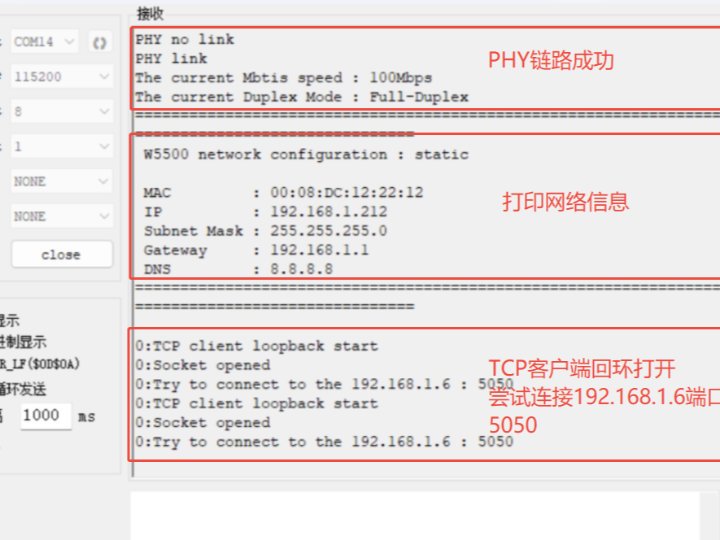
1. Introduction
TCP (Transmission Control Protocol) is the core transport layer protocol of the Internet protocol suite, forming socket communication together with the IP protocol. Its characteristics include: establishing connection-oriented communication through a three-way handshake; achieving ordered and reliable transmission through packet numbering and automatic retransmission; using a sliding window mechanism for flow control; implementing congestion control through algorithms such as slow start; supporting bidirectional full-duplex communication; and providing byte stream services without distinguishing application layer data boundaries. TCP is widely used in scenarios such as remote monitoring data acquisition, remote equipment control, communication between IoT devices and the cloud, and embedded web server interaction. Its high reliability makes it the preferred protocol for scenarios requiring stable transmission, such as financial transactions and file transfers.
The W5500io-M is a high-performance SPI-to-Ethernet module launched by Weishi, featuring the following characteristics:
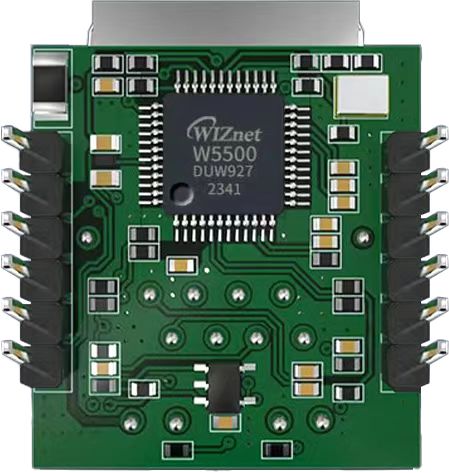
- Simple Design: Integrates MAC, PHY, 32KB buffer, and RJ45 Ethernet port. It connects directly to the main controller via a 4-wire SPI interface, operates on 3.3V power, and its compact size is suitable for embedded scenarios.
- Easy to Use: Users no longer need to port the complex TCP/IP protocol stack to the MCU; they can directly develop based on application layer data.
- Abundant Resources: Provides a wealth of MCU application examples and hardware reference designs for direct use, significantly shortening development time. Hardware compatibility with the W5100Sio-M module facilitates solution development and iteration.
- Wide Applications: Widely used in industrial control, smart grids, charging piles, security and fire protection, new energy, energy storage, and other fields.
2 Project Environment
2.1 Hardware Preparation
- W5500io-M
- STM32F103VCT6
- EBV
- Network cable
- STLINK-V2
- Several DuPont wires
- Switch or router
2.2 Software Preparation
- Example Link: w5500.com/w5500.html
- Development Environment: Keil uVision 5
- Serial Port Assistant
2.3 Solution Diagram
W5500io-M Pin Definitions

//W5500_SCS ---> Chip Select Pin
//W5500_SCLK ---> Provides SPI clock pulse
//W5500_MISO ---> Master Input, Slave Output
//W5500_MOSI ---> Master Output, Slave Input
//W5500_RESET ---> Low-level reset pin
//W5500_INT ---> Interrupt pin; pulls the INT pin low when an interrupt occurs.
3 3步实现TCP通讯
使用W5500IO-M只需3个简单步骤,即可让您的设备稳定接入以太网实现TCP通讯:
1:连接SPI接口
模块提供标准SPI接口(SCLK, MOSI, MISO, SCS)直接与您的STM32单片机连接。
3.3V单电源供电,兼容主流开发板,无需额外电源电路设计。
W5500IO模块接STM32F103的SPI2硬件接线定义
//W5500_SCS ---> STM32_GPIOD7 /*W5500的片选引脚*/
//W5500_SCLK ---> STM32_GPIOB13 /*W5500的时钟引脚*/
//W5500_MISO ---> STM32_GPIOB14 /*W5500的MISO引脚*/
//W5500_MOSI ---> STM32_GPIOB15 /*W5500的MOSI引脚*/
//W5500_RESET ---> STM32_GPIOD8 /*W5500的RESET引脚*/
//W5500_INT ---> STM32_GPIOD9 /*W5500的INT引脚*/
2. Connect the Network Cable
The module integrates a network port with a built-in network transformer, eliminating the need for an external magnetic coupling isolation circuit.
Supports 10/100Mbps auto-sensing, plug and play.
3. Download Examples
The W5500 chip has a built-in hardware protocol stack, supporting TCP/IP/UDP/ICMP/DHCP, significantly reducing the MCU's workload.
Rich examples are provided to accelerate the development process. Examples can be obtained from w5500.com/w5500.html.
4. Code Explanation
4.1 TCP Server
Next, let's see how to implement a TCP server mode on the W5500, listening on the port and performing a loopback test.
In loopback_tcps(), the TCP Server state machine runs, performing corresponding operations based on different SOCKET states. The SOCKET state changes are shown in the following figure:
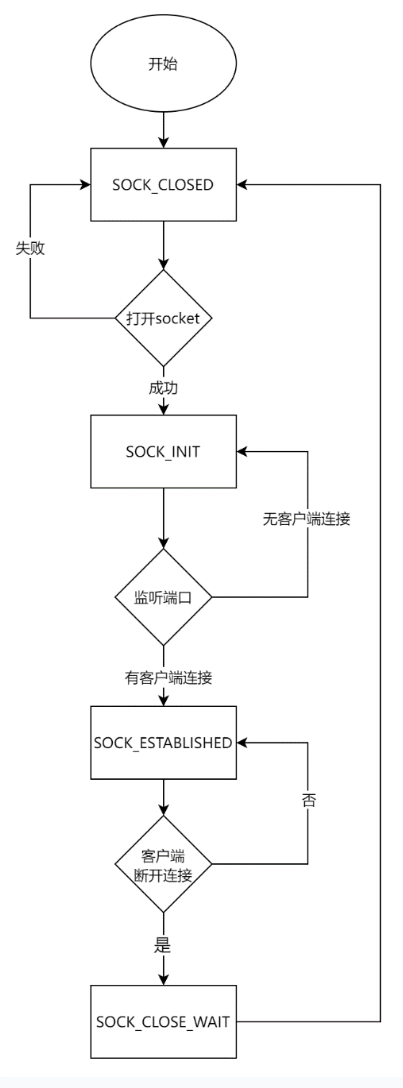
The code for the function loopback_tcps() is as follows:
/**
* @brief   tcp server loopback test
* @param   sn:    socket number
* @param   buf:   Data sending and receiving cache
* @param   port:  Listen port
* @return  value for SOCK_ERRORs,return 1:no error
*/
int32_t loopback_tcps(uint8_t sn, uint8_t *buf, uint16_t port)
{
  int32_t ret;
  uint16_t size = 0, sentsize = 0;

#ifdef _LOOPBACK_DEBUG_
  uint8_t destip[4];
  uint16_t destport;
#endif

  switch (getSn_SR(sn))
  {
  case SOCK_ESTABLISHED:
     if (getSn_IR(sn) & Sn_IR_CON)
     {
#ifdef _LOOPBACK_DEBUG_
        getSn_DIPR(sn, destip);
        destport = getSn_DPORT(sn);

        printf("%d:Connected - %d.%d.%d.%d : %d\r\n", sn, destip[0], destip[1], destip[2], destip[3], destport);
#endif
#if KEEPALIVE_ENABLE == 1
        // We need to send a packet of data to activate keepalive
        ret = send(sn, (uint8_t *)"", 1); // Data send process
        if (ret < 0)                      // Send Error occurred (sent data length < 0)
        {
           close(sn); // socket close
           return ret;
        }
        setSn_IR(sn, Sn_IR_CON);
     }
     if ((size = getSn_RX_RSR(sn)) > 0) // Don't need to check SOCKERR_BUSY because it doesn't not occur.
     {
        if (size > DATA_BUF_SIZE)
           size = DATA_BUF_SIZE;
        ret = recv(sn, buf, size);

        if (ret <= 0)
           return ret; // check SOCKERR_BUSY & SOCKERR_XXX. For showing the occurrence of SOCKERR_BUSY.
        size = (uint16_t)ret;
        sentsize = 0;
        buf[size] = 0x00;
        printf("rece data:%s\r\n", buf);
        while (size != sentsize)
        {
           ret = send(sn, buf + sentsize, size - sentsize);
           if (ret < 0)
           {
              close(sn);
              return ret;
           }
           sentsize += ret; // Don't care SOCKERR_BUSY, because it is zero.
        }
     }
     break;
  case SOCK_CLOSE_WAIT:
#ifdef _LOOPBACK_DEBUG_
     printf("%d:CloseWait\r\n", sn);
#endif
     if ((ret = disconnect(sn)) != SOCK_OK)
        return ret;
#ifdef _LOOPBACK_DEBUG_
     printf("%d:Socket Closed\r\n", sn);
#endif
     break;
  case SOCK_INIT:
#ifdef _LOOPBACK_DEBUG_
     printf("%d:Listen, TCP server loopback, port [%d]\r\n", sn, port);
#endif
     if ((ret = listen(sn)) != SOCK_OK)
        return ret;
     break;
  case SOCK_CLOSED:
#ifdef _LOOPBACK_DEBUG_
     printf("%d:TCP server loopback start\r\n", sn);
#endif
     if ((ret = socket(sn, Sn_MR_TCP, port, 0x00)) != sn)
        return ret;
#ifdef _LOOPBACK_DEBUG_
     printf("%d:Socket opened\r\n", sn);
#endif
     break;
  default:
     break;
  }
  return 1;
}- Lines 10-11 declare variables for storing function call return values, the size of received data, and tracking the amount of data sent.
- Lines 13-16, if the `_LOOPBACK_DEBUG_` macro is defined, declare two variables, `destip` and `destport`, to store the client's IP address and port number.
- Lines 18-91 execute a state machine, performing different actions based on the Socket's state.
- Lines 20-61, when the Socket state is `SOCK_ESTABLISHED`, check if the `Sn_IR_CON` flag is set. If so, the connection is successful. If the `_LOOPBACK_DEBUG_` macro is defined, print a successful connection message, including the client's IP address and port number. Send an empty data packet to activate TCP's keepalive mechanism. If sending fails, close the Socket and return an error code. Clear the `Sn_IR_CON` flag in the interrupt register. If the Socket has data to receive, read and process the data. Send the received data back to the client as is. If sending fails, the socket is closed and an error code is returned.
- Lines 62-71, when the socket state is SOCK_CLOSE_WAIT: If the _LOOPBACK_DEBUG_ macro is defined, the closing wait information is printed. The disconnect(sn) function is called to close the connection. If closing fails, an error code is returned. If the _LOOPBACK_DEBUG_ macro is defined, the socket is printed as closed.
- Lines 72-78, when the socket state is SOCK_INIT: If the _LOOPBACK_DEBUG_ macro is defined, the listening information is printed. The listen(sn) function is called to start listening on the specified port. If listening fails, an error code is returned.
- Lines 79-90, when the socket state is SOCK_CLOSED: If the _LOOPBACK_DEBUG_ macro is defined, the TCP server loopback test start information is printed. The socket(sn, Sn_MR_TCP, port, 0x00) function is called to open the socket. If opening fails, an error code is returned. If the _LOOPBACK_DEBUG_ macro is defined, it prints a message indicating that the socket is open; at the end of the function execution, it returns 1, indicating that no error occurred.
4.2 TCP Client
Next, let's see how to implement TCP client mode on the W5500 and perform loopback testing by connecting to the server.
In `loopback_tcps()`, the TCP client state machine runs, performing corresponding operations based on different socket states. The socket state changes are shown in the following diagram:
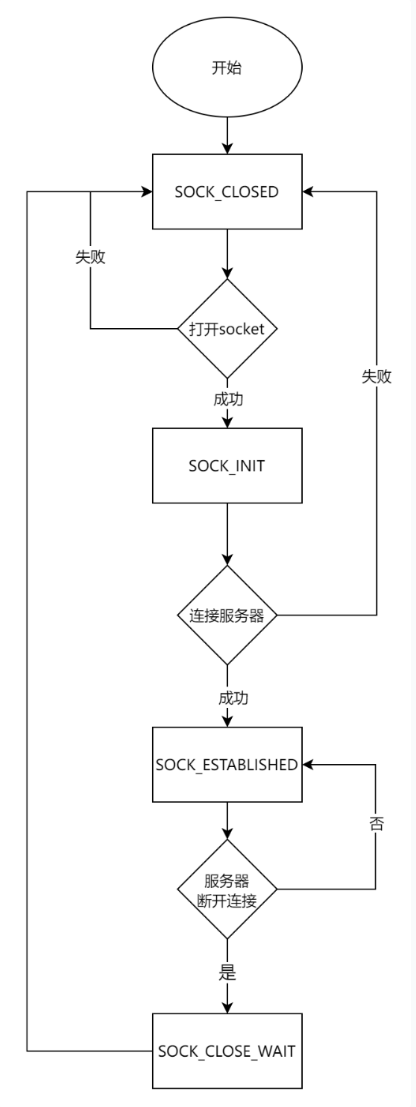
Please note: When we want to improve throughput, we can set Sn_TXBUF_SIZE (socket n send buffer size register) and Sn_RXBUF_SIZE (socket n receive buffer size register) to reallocate the socket buffer size and increase the size of the TCP protocol buffer array.
The loopback_tcpc() function contains the following:
/**
* @brief   tcp client loopback test
* @param   sn:         socket number
* @param   buf:        Data sending and receiving cache
* @param   destip:     Destination IP address
* @param   destport:   Destination port
* @return  value for SOCK_ERRORs,return 1:no error
*/
int32_t loopback_tcpc(uint8_t sn, uint8_t *buf, uint8_t *destip, uint16_t destport)
{
  int32_t ret; // return value for SOCK_ERRORs
  uint16_t size = 0, sentsize = 0;

  // Destination (TCP Server) IP info (will be connected)
  // >> loopback_tcpc() function parameter
  // >> Ex)
  uint8_t dip[4] = {192, 168, 0, 214};
  uint16_t dport = 5000;
  getSn_DIPR(sn, dip);
  dport = getSn_DPORT(sn);
  // Port number for TCP client (will be increased)
  static uint16_t any_port = 50000;

  // Socket Status Transitions
  // Check the W5500 Socket n status register (Sn_SR, The 'Sn_SR' controlled by Sn_CR command or Packet send/recv status)
  switch (getSn_SR(sn))
  {
  case SOCK_ESTABLISHED:
     if (getSn_IR(sn) & Sn_IR_CON) // Socket n interrupt register mask; TCP CON interrupt = connection with peer is successful
     {
        // We need to send a packet of data to activate keepalive
        ret = send(sn, (uint8_t *)"", 1); // Data send process
        if (ret < 0)                      // Send Error occurred (sent data length < 0)
        {
           close(sn); // socket close
           return ret;
        }
#ifdef _LOOPBACK_DEBUG_
        printf("%d:Connected to - %d.%d.%d.%d : %d\r\n", sn, destip[0], destip[1], destip[2], destip[3], destport);
#endif
        setSn_IR(sn, Sn_IR_CON); // this interrupt should be write the bit cleared to '1'
     }

     //////////////////////////////////////////////////////////////////////////////////////////////
     // Data Transaction Parts; Handle the [data receive and send] process
     //////////////////////////////////////////////////////////////////////////////////////////////
     if ((size = getSn_RX_RSR(sn)) > 0) // Sn_RX_RSR: Socket n Received Size Register, Receiving data length
     {
        if (size > DATA_BUF_SIZE)
           size = DATA_BUF_SIZE;   // DATA_BUF_SIZE means user defined buffer size (array)
        ret = recv(sn, buf, size); // Data Receive process (H/W Rx socket buffer -> User's buffer)
        buf[size] = 0x00;
        printf("rece from %d.%d.%d.%d:%d data:%s\r\n", dip[0], dip[1], dip[2], dip[3], dport, buf);
        if (ret <= 0)
           return ret; // If the received data length <= 0, receive failed and process end
        size = (uint16_t)ret;
        sentsize = 0;
        // Data sentsize control
        while (size != sentsize)
        {
           ret = send(sn, buf + sentsize, size - sentsize); // Data send process (User's buffer -> Destination through H/W Tx socket buffer)
           if (ret < 0)                                     // Send Error occurred (sent data length < 0)
           {
              close(sn); // socket close
              return ret;
           }
           sentsize += ret; // Don't care SOCKERR_BUSY, because it is zero.
        }
     }
     //////////////////////////////////////////////////////////////////////////////////////////////
     break;
  case SOCK_CLOSE_WAIT:
#ifdef _LOOPBACK_DEBUG_
     printf("%d:CloseWait\r\n", sn);
#endif
     if ((ret = disconnect(sn)) != SOCK_OK)
        return ret;
#ifdef _LOOPBACK_DEBUG_
     printf("%d:Socket Closed\r\n", sn);
#endif
     break;
  case SOCK_INIT:
#ifdef _LOOPBACK_DEBUG_
     printf("%d:Try to connect to the %d.%d.%d.%d : %d\r\n", sn, destip[0], destip[1], destip[2], destip[3], destport);
#endif
     if ((ret = connect(sn, destip, destport)) != SOCK_OK)
        return ret; //    Try to TCP connect to the TCP server (destination)
     break;
  case SOCK_CLOSED:
     close(sn);
     if ((ret = socket(sn, Sn_MR_TCP, any_port++, 0x00)) != sn)
     {
        if (any_port == 0xffff)
           any_port = 50000;
        return ret; // TCP socket open with 'any_port' port number
     }
#ifdef _LOOPBACK_DEBUG_
     printf("%d:TCP client loopback start\r\n", sn);
     printf("%d:Socket opened\r\n", sn);
#endif
     break;
  default:
     break;
  }
  return 1;
}- Line 19 calls the `getSn_DIPR()` function to retrieve the target IP address of the socket sn and stores it in the `dip` array.
- Line 20 calls the `getSn_DPORT()` function to retrieve the target port number of the socket sn and stores it in the `dport` variable. These two lines of code prepare the target address information.
- Line 22 declares and initializes the static variable `any_port` to 50000 to store the local port number.
- Line 26 uses a `switch` statement to perform different processing based on the socket's state `sn`. Lines 28-72, when the socket state is `SOCK_ESTABLISHED`, perform the following operations:
- Check the interrupt register; if the `Sn_IR_CON` bit is set, the connection is successful.
- Send an empty byte of data to activate keepalive.
- Clear the `Sn_IR_CON` interrupt flag.
- Check if there is data to receive; if so, receive the data and store it in the `buf` buffer.
- Print the received data.
- Loop to send data until all data has been sent.
- Lines 74-83: When the Socket state is SOCK_CLOSE_WAIT, disconnect; lines 85-91: When the Socket state is SOCK_INIT, attempt to connect to the target server; line 93: When the Socket state is SOCK_CLOSED, close and reopen the Socket using an incremented local port number; lines 93-107: By default, no operation is performed; line 109: If no error occurs, return 1.
4.3 TCP Protocol Control Driver
Connect the W5500io-M module to the microcontroller as prepared in the hardware configuration. Connect the RJ45 port of the W5500io-M module to the router via a network cable.
Note: The test example requires the PC and W5500 to be on the same network segment. The W5500io-M module is connected to the PC via a network cable. DHCP is set to static IP.
This can be achieved by modifying line 7 of the following code: dhcp = NETINFO_STATIC
wiz_NetInfo default_net_info = {
   .mac = {0x00, 0x08, 0xdc, 0x12, 0x22, 0x12},
   .ip = {192, 168, 1, 212},
   .gw = {192, 168, 1, 1},
   .sn = {255, 255, 255, 0},
   .dns = {8, 8, 8, 8},
   .dhcp = NETINFO_DHCP  // dhcp get ip
                        //.dhcp = NETINFO_STATIC  //static ip
};
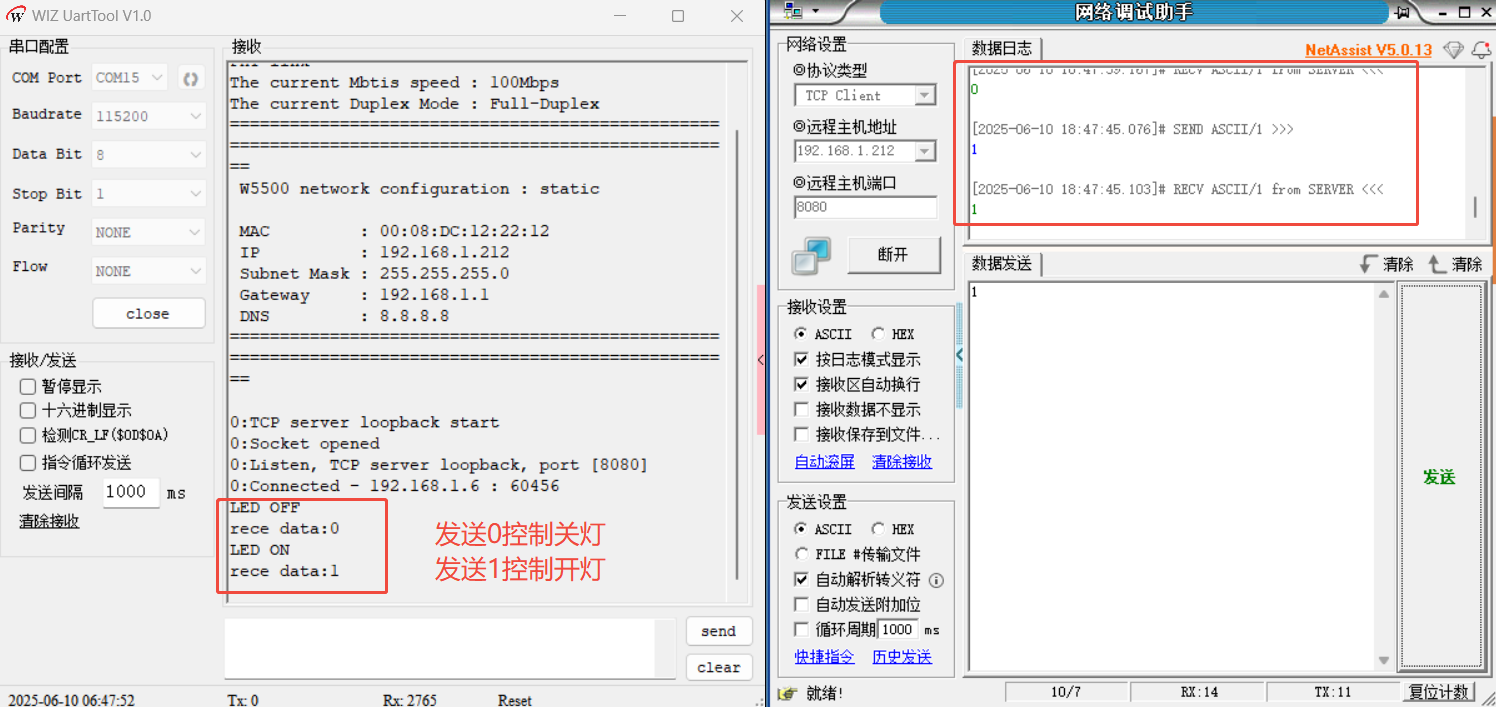
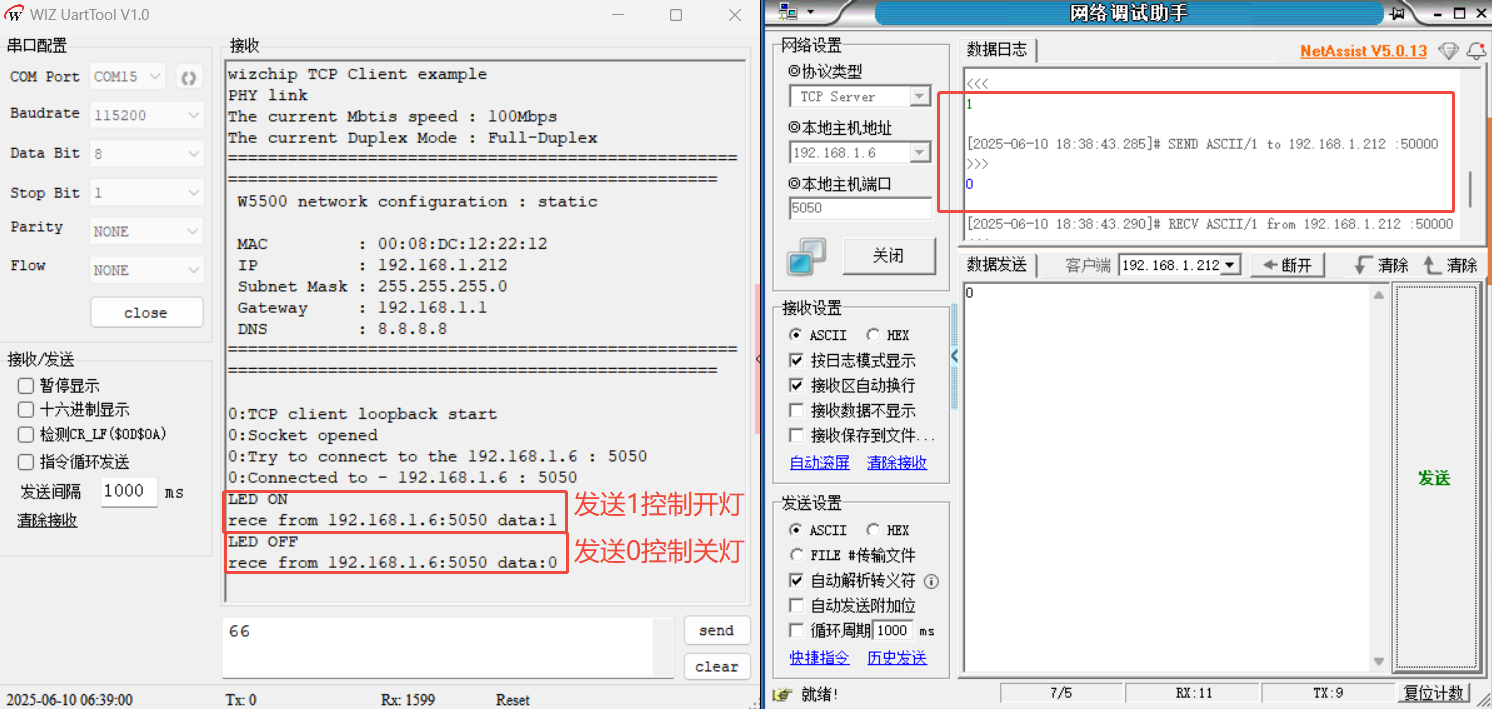
Next, we will simulate TCP control of the LED's on/off state by adding the following code to loopback_tcpc(SOCKET_ID, ethernet_buf, dest_ip, dest_port);
if ((size = getSn_RX_RSR(sn)) > 0) // Sn_RX_RSR: Socket n Received Size Register, Receiving data length
 {
    if (size > DATA_BUF_SIZE)
       size = DATA_BUF_SIZE;   // DATA_BUF_SIZE means user defined buffer size (array)
    ret = recv(sn, buf, size); // Data Receive process (H/W Rx socket buffer -> User's buffer)
    buf[size] = 0x00;
    if(ret > 0) {
        if(buf[0] == '1' && size == 1) {//发送1
            printf("LED ON\r\n");//可添加控制打开LED灯指令
        } else if(buf[0] == '0' && size == 1) {//发送0
            printf("LED OFF\r\n");//可添加控制关闭LED灯指令
        } else {
            printf("%s\r\n", buf);
        }
    }
5. TCP Communication Configuration and Interaction
5.1 W5500io-M Module as Server to Control LEDs
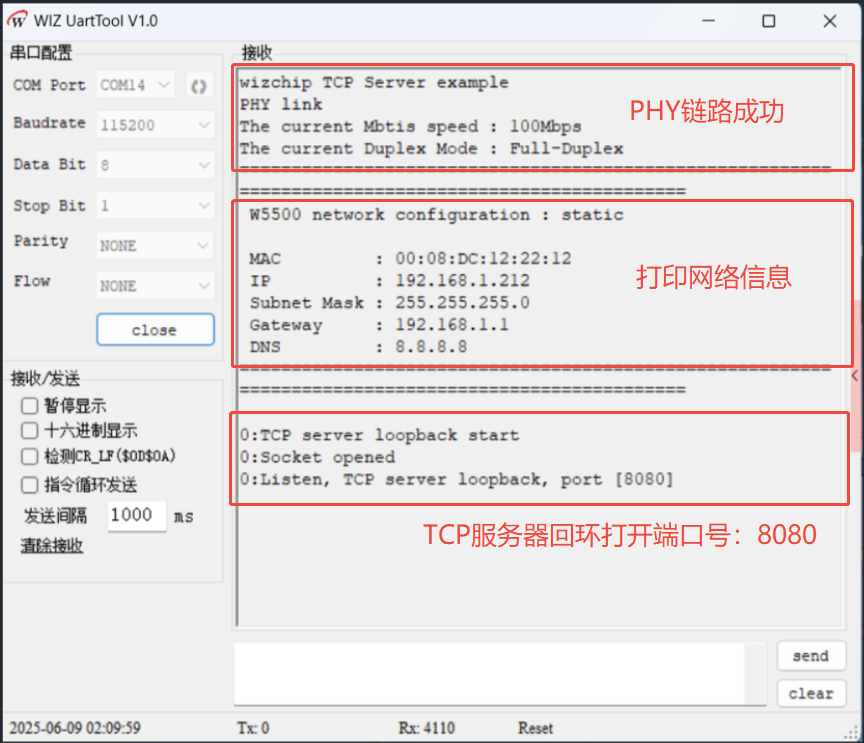
Next, let's see how to implement TCP server mode on the W5500, listen on the port, and control the LEDs.
The W5500 uses TCP communication to receive messages from the client and control the LEDs, as shown in the following figure:
5.2 W5500io-M Module as a Client to Control LEDs
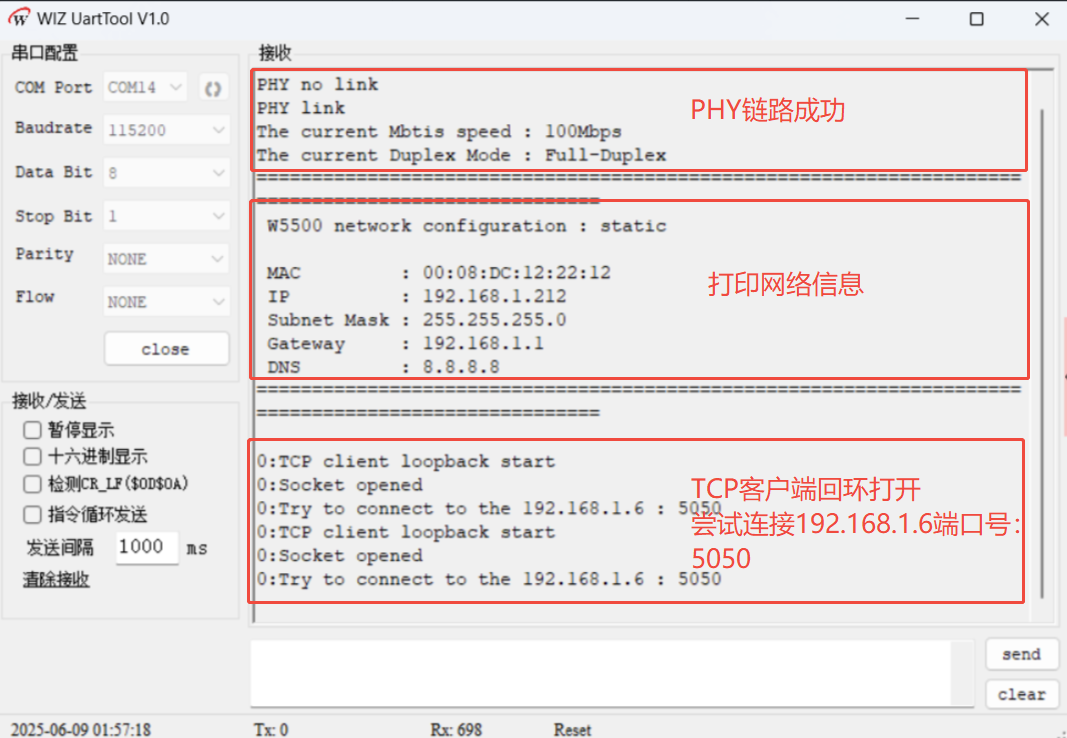
Next, let's see how to implement a TCP client mode on the W5500 to connect to the server and control LEDs.
6 Summary
This article details a solution for implementing TCP communication using an STM32 microcontroller and the W5500io-M module. The module and microcontroller are connected via a hardware SPI interface, and a static IP address is configured to ensure network connectivity. On the software side, the W5500's full hardware protocol stack is used to implement data transmission and reception and loopback testing. Thank you for watching! If you have any questions about this article or would like to learn more about this product, please feel free to leave a message via private message or in the comments section. We will reply to your message as soon as possible!
———————————————— Copyright Notice: This article is an original article by CSDN blogger "Playing with Ethernet," and is licensed under CC 4.0 BY-SA. Please include the original source link and this statement when reprinting.
Original link: https://blog.csdn.net/2301_81684513/article/details/148681538