



Modbus TCP Server: W5500io-M implements email alerts for excessive data.
Modbus TCP Server: W5500io-M implements email alerts for excessive data.
1. Introduction
Modbus is a serial communication protocol originally designed for industrial automation. Its simplicity, openness, and ease of implementation have made it the de facto standard for communication between industrial electronic devices.
Modbus operates around three core components: the master, the slave, and registers. The master sends data requests or write commands to specific slaves, which then process these commands (reading or modifying their own register data) and return a response to the master. This synchronous model of master polling and slave response makes it ideal for status monitoring and control of industrial equipment.
SMTP (Simple Mail Transfer Protocol) is an email transmission protocol based on TCP/IP, employing a client-server model and store-and-forward mechanism, specifically designed for sending and transmitting emails.
SMTP operates around three core components: the sending SMTP client, the receiving SMTP server, and the command/response mechanism. The sending client connects to the server, specifies the sender and recipient using text commands (such as MAIL FROM, RCPT TO, DATA), and transmits the email content. The receiving server processes the commands and authentication information, and then stores the email in the target mailbox or forwards it. This command sequence-based model ensures reliable email transmission over the internet.
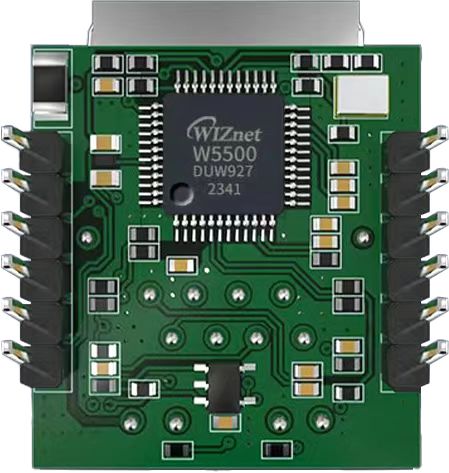
The W5500io-M is a high-performance SPI-to-Ethernet module from W5500io-M, featuring the following characteristics:
- Simple Design: Integrates MAC, PHY, 32KB buffer, and RJ45 Ethernet port. It connects directly to the main controller via a 4-wire SPI interface, operates on 3.3V power, and its compact size is suitable for embedded systems.
- Easy to Use: Users no longer need to port complex TCP/IP protocol stacks to the MCU; they can directly develop based on application-layer data.
- Abundant Resources: Provides rich MCU application examples and hardware reference designs for direct reference, significantly shortening development time. Hardware compatibility with the W5100Sio-M module facilitates solution development and iteration.
- Wide Applications: Widely used in industrial control, smart grids, charging piles, security and fire protection, new energy, and energy storage.
2. Project Environment
2.1 Hardware Environment
- W5500io-M
- STM32F103VCT6 EVB
- Network cable
- Several DuPont wires
- Switch or router
2.2 Software Environment
- Modbus Master Suite
- Freescale Serial Port Assistant
- Example program link: https://www.w5500.com/w5500.html
3 Hardware Connections and Solutions
3.3 W5500 Hardware Connections
//W5500_SCS ---> STM32_GPIOD7 /*W5500's chip select pin*/
//W5500_SCLK ---> STM32_GPIOB13 /*W5500's clock pin*/
//W5500_MISO ---> STM32_GPIOB14 /*W5500's MISO pin*/
//W5500_MOSI ---> STM32_GPIOB15 /*W5500's MOSI pin*/
//W5500_RESET ---> STM32_GPIOD8 /*W5500's RESET pin*/ //W5500_INT ---> STM32_GPIOD9 /*INT pin of W5500*/
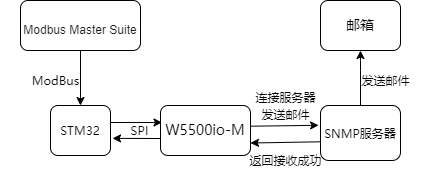
3.4 Scheme Diagram
4. Example Modification
You need to download the Modbus_TCP_Server and SMTP examples and then modify them. The links for downloading the examples are provided in the software environment section above; you can download them yourself.
(1) After downloading, open the Modbus_TCP_Server example, and then add the dns.c, dns.h, smtp.c, smtp.h, do_dns.c, and do_dns.h files from the SMTP example to the Modbus_TCP_Server example.
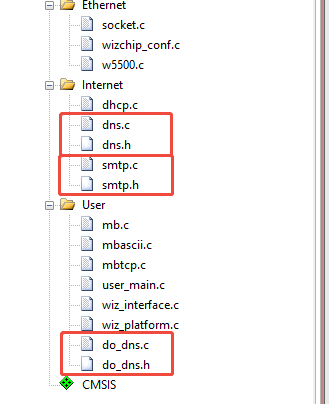
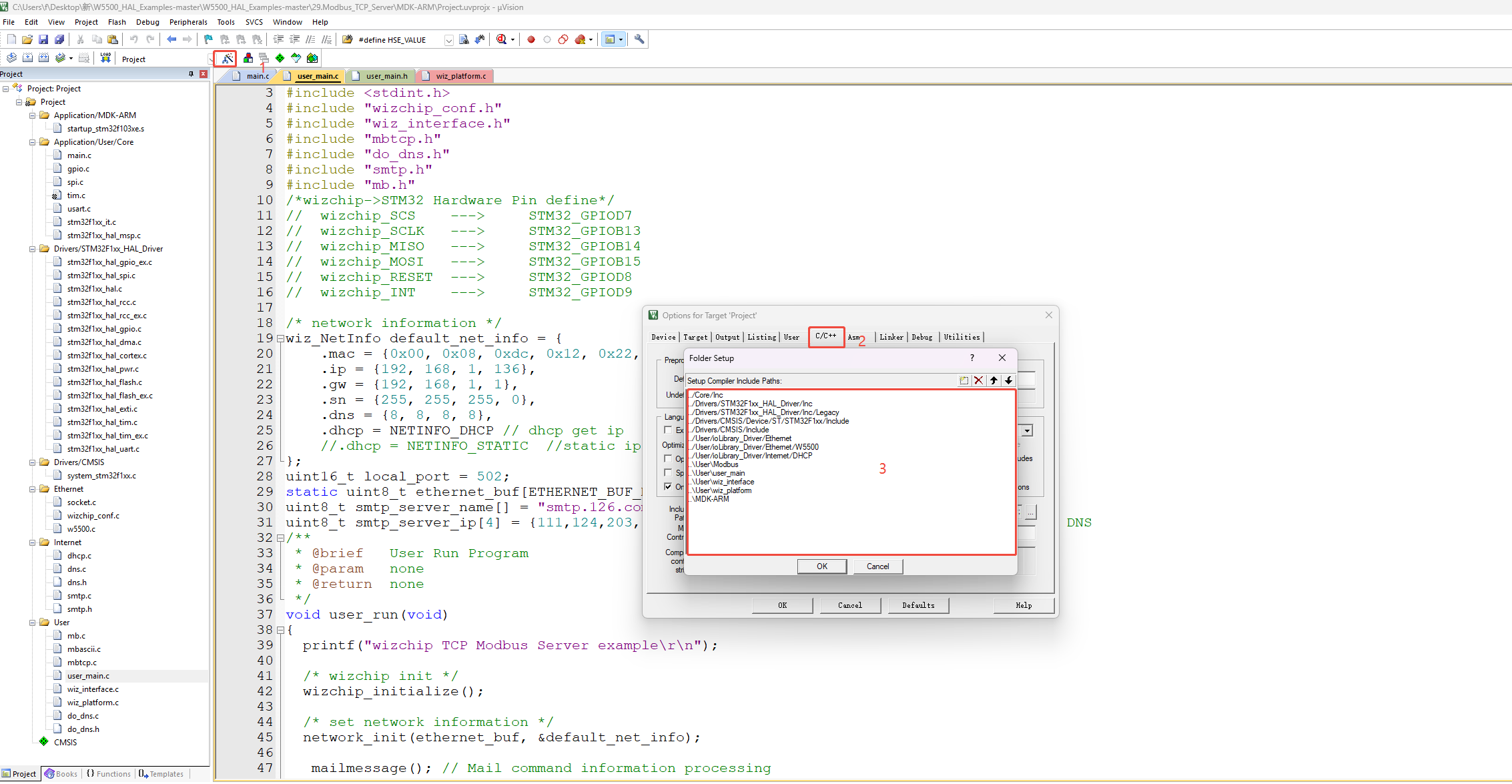
(2) Add the file path
(3) Add the socket required for one SMTP connection to line 5 of user_main.h
#ifndef __USER_MAIN_H__
#define __USER_MAIN_H__

#define SOCKET_ID 0
#define SMTP_SOCKET_ID 1
#define ETHERNET_BUF_MAX_SIZE (1024 * 2)
/**
* @brief   User Run Program
* @param   none
* @return  none
*/
void user_run(void);
#endif
(4) Open user_main.c, add the do_smtp function in while(1), and replace the SOCKET ID with the SMTP SOCKET ID we defined.
 while (1)
 {
   do_Modbus(SOCKET_ID);

    do_smtp(SMTP_SOCKET_ID, ethernet_buf, smtp_server_ip);
    }
(5) We found mb.c to modify the function that parses Modbus data. Since Modbus TCP does not require CRC verification, we added a length condition on line 3 and added an else of function to parse the write to a single register on line 21. This function parses the returned concentration value. If the concentration is too high, it prints the concentration. At this time, Avalue has been assigned a value.
void mbTCPtoEVB(uint8_t sn)
{
    if (MBtcp2evbFrame() != 0 && recv_len >= 12) // Frame received complete
    {
        if (pucASCIIBufferCur[0] == 0x01) // Check whether the device address is 0x01
        {
            if ((uint8_t)pucASCIIBufferCur[1] == 0x05) // Write to a single device
            {
                if ((uint8_t)pucASCIIBufferCur[4] == 0xff)
                {
                    LED_ON();
                    printf("LED ON\r\n");
                }
                else if ((uint8_t)pucASCIIBufferCur[4] == 0x00)
                {
                    LED_OFF();
                    printf("LED OFF\r\n");
                }
                send(sn, recv_data, recv_len);
            }
            else if((uint8_t)pucASCIIBufferCur[1] == 0x06)
            {
                Avalue = ((uint16_t)pucASCIIBufferCur[4] << 8) | pucASCIIBufferCur[5];
               if (Avalue > 30)
               {
                   printf("Alert: Concentration too high%u > 30\r\n", Avalue);
               }
                send(sn, recv_data, recv_len);
            }
            else if ((uint8_t)pucASCIIBufferCur[1] == 0x01) // Read Write to a single device
            {
                if (recv_data[recv_len - 1] != 0x01)
                {
                    printf("len error!%x\r\n", recv_data[recv_len - 1]);
                }
                else
                {
                    printf("Read OK!\r\n");
                    send_data[0] = recv_data[0];
                    send_data[1] = recv_data[1];
                    send_data[2] = recv_data[2];
                    send_data[3] = recv_data[3];
                    send_data[4] = 0x00;
                    send_data[5] = 0x04;
                    send_data[6] = 0x01;
                    send_data[7] = 0x01;
                    send_data[8] = 0x01;
                    send_data[9] = ~HAL_GPIO_ReadPin(LED_GPIO_Port, LED_Pin);
                    send_len = 10;
                    send(sn, send_data, send_len);
                    memset(send_data, 0, send_len);
                }
            }
            }
            else
            {
                printf("error code!\r\n");
            }
        }
        else
        {
            printf("address error!\r\n");
        }
    }
(6) Pass out the defined Avalue in line 11 of mb.h.
#ifndef _MB_H_
#define _MB_H_

/**
* @brief Parse Modbus TCP instructions and process them accordingly
*
* According to the given sequence number, the Modbus TCP data is converted into an EVB instruction and processed accordingly.
*
* @param sn socket number
*/
extern  uint16_t Avalue;
void mbTCPtoEVB(uint8_t sn);

#endif
(7) At this point, return to while(1), add a condition check, and then execute the message sending operation.
 while (1)
 {
   do_Modbus(SOCKET_ID);
        if(Avalue>30){
        do_smtp(SMTP_SOCKET_ID, ethernet_buf, smtp_server_ip);}
    }
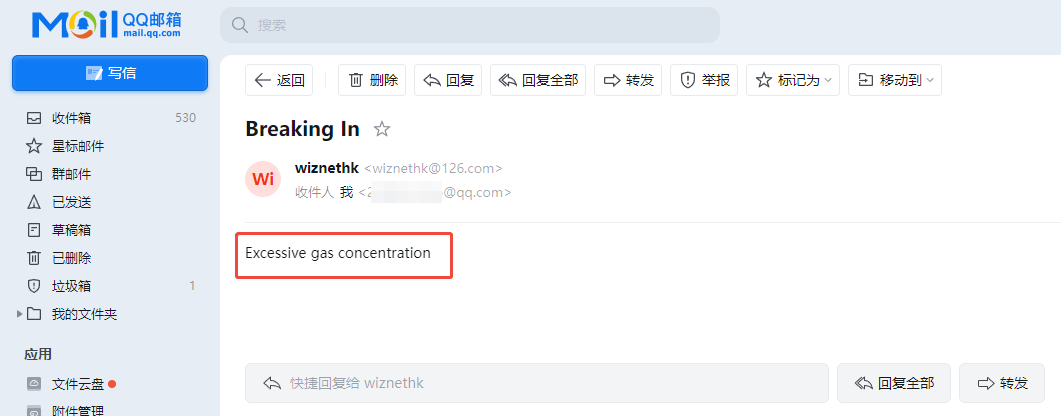
(8) Modify the email address for receiving emails, as well as the subject and content of the emails in stmp.c. Modify the email account for receiving emails on line 15. You can modify the sender's email login address and sender's email address on lines 7 and 13. Modify the email login password on line 10. Modify the subject and content of the emails on lines 21 and 22. The system sends alarm emails to a specified QQ email address through the 126 email server. First, a connection is established using the HELO command. Then, the username and password are authenticated using Base64 encoding using AUTH LOGIN. Next, the sender (MAIL FROM) and recipient (RCPT TO address is 232++++16@qq.com) are set. Then, the email content is transmitted using the DATA command. The email subject is "Breaking In", the body content is "Excessive gas concentration", and the transmission ends with \r\n.\r\n.
#define ETHERNET_MAX_BUF_SIZE (1024 * 2)
uint8_t Mail_Send_OK;
char hello[50] = "HELO localhost";                       // Identity command
char hello_reply[] = "250 OK";                           // Id successfully responded
char AUTH[50] = "AUTH LOGIN";                            // Authentication request
char AUTH_reply[] = "334 dXNlcm5hbWU6";                  // The authentication request was successfully sent
char name_126[100] = "wiznethk@126.com";                 // 126 Login email address
char base64name_126[200];                                // 126 base64 encoding of the login mailbox name
char name_reply[] = "334 UGFzc3dvcmQ6";                  // The login name was sent successfully
char password_126[50] = "ZPURADLGRUPQLVBK";              // 126 Email login password
char base64password_126[100];                            // base64 123 Password for logging in to the mailbox
char password_reply[] = "235 Authentication successful"; // Login successful response
char from[] = "wiznethk@126.com";                        // Sender email
char from_reply[] = "250 Mail OK";
char to[] = "232++++16@qq.com"; // Recipient email address
char to_reply[] = "250 Mail OK";·
char data_init[10] = "data";                 // Request data transfer
char data_reply[] = "354";                   // The request was successfully responded to HEAD
char Cc[] = "";                              // Cc to email
char subject[] = "Breaking In";            // subject
char content[] = "Excessive gas concentration";            // text part
char mime_reply[] = "250 Mail OK queued as"; // The email was sent successfully
char mailfrom[50] = "MAIL FROM:<>";
char rcptto[50] = "rcpt to:<>";
char mime[200] = "From:\r\n";
char mime1[50] = "To:\r\n";
char mime2[50] = "Cc:\r\n";
char mime3[50] = "Subject:\r\n";
char mime4[50] = "MIME-Version:1.0\r\nContent-Type:text/plain\r\n\r\n";
char mime5[50] = "\r\n.\r\n";
(9) At the end of stmp.c, after successful sending, an empty loop will be entered, which will cause you to be unable to exit here. You can remove the empty loop of while(1) and add a delay inside. When the email is successfully sent, it means that the concentration has exceeded the standard. If no delay is added, warning messages will be sent continuously. Please add a delay according to your needs.
 case SOCK_CLOSED:
   socket(sn, Sn_MR_TCP, anyport++, 0x00);
   break;
 default:
   break;
 }
    if(Mail_Send_OK)
    {
      // while(1){
        HAL_Delay(20000);
      // }
    }
}
5. Configuring the Connection
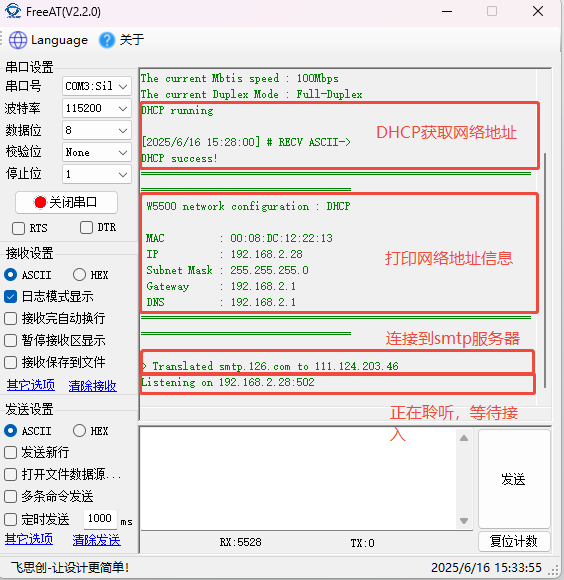
5.1 Serial Port Printing
5.2 Modbus Master Suite
Modbus Master Suite is a tool for communication and interaction between devices using the Modbus protocol. It supports multiple Modbus protocols, can connect to devices via serial port or network, can read and write various register data, and has functions such as function code testing, data conversion, and verification.
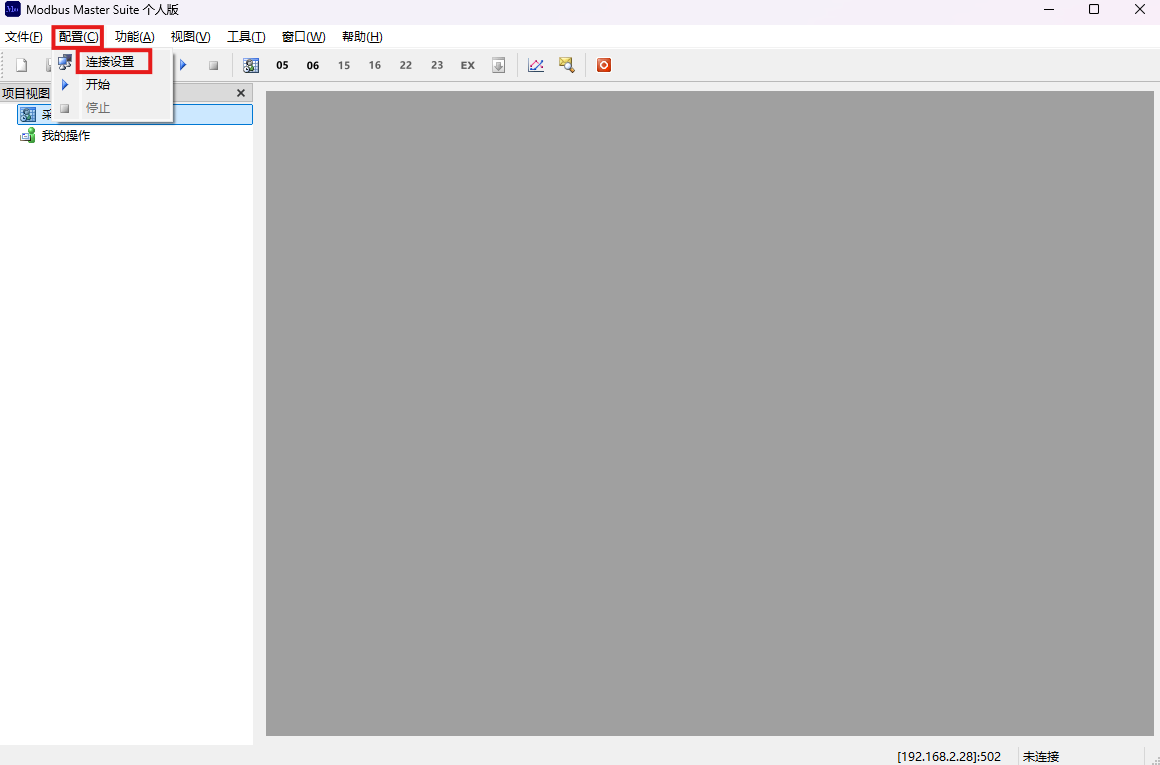
(1) First, click "Settings," then click "Connection Settings."
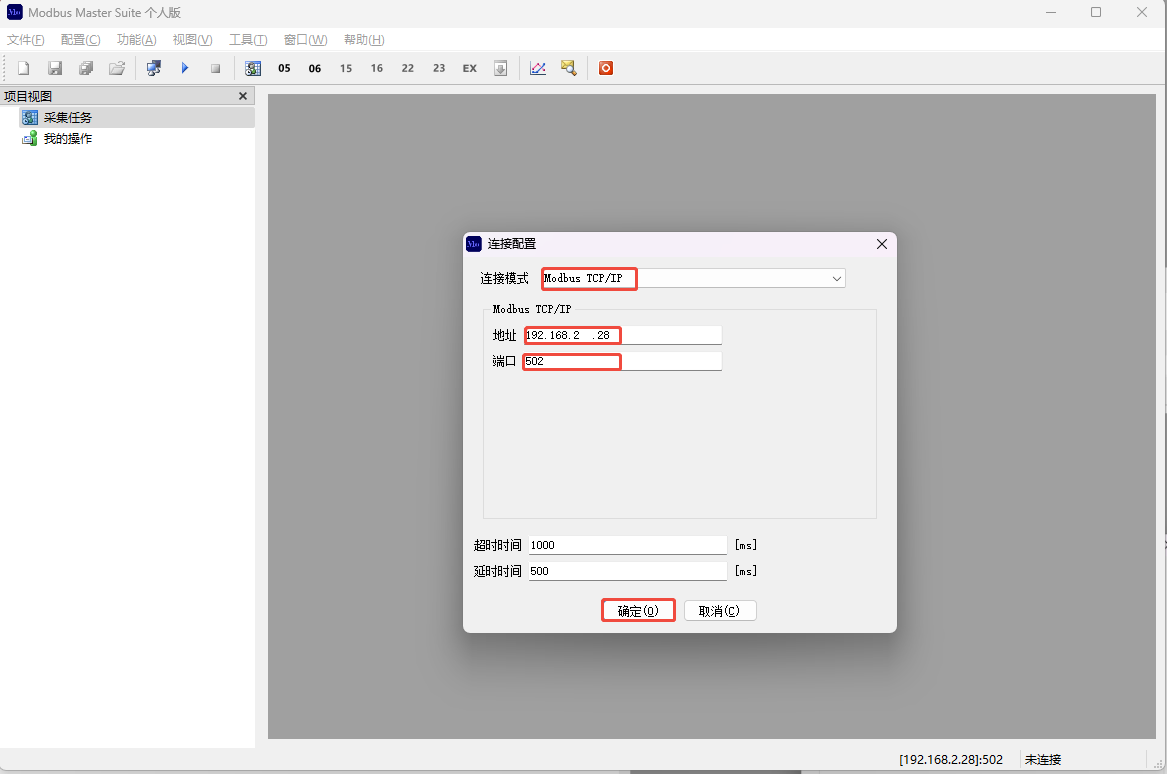
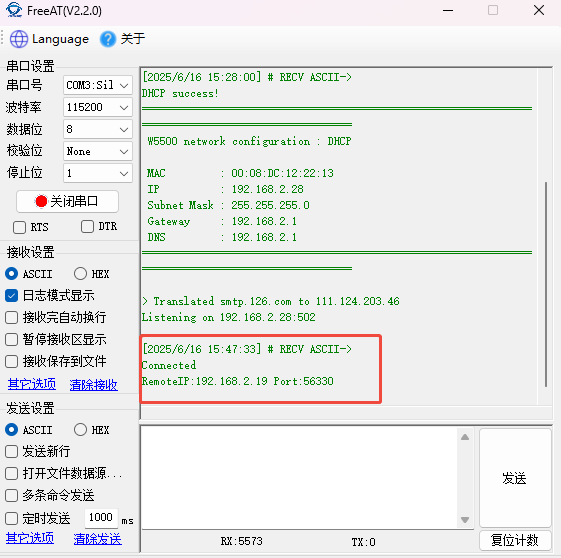
(2) Select the Modbus TCP/IP connection mode. Enter the address and port number values printed on the serial port above, then click "OK." The connection will be successful.
(3) After a successful connection, the serial port will display connection information.
6 Sending Data
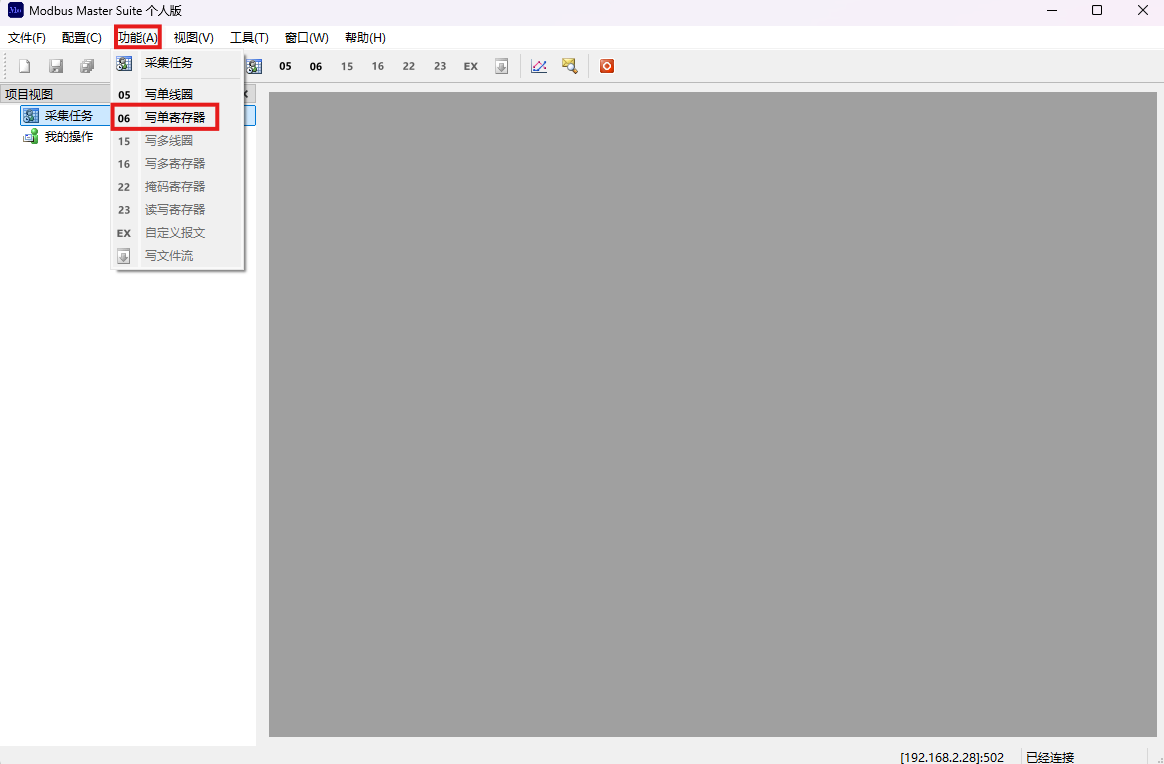
(1) Next, on the Modbus Master Suite, click on the function, and then click on Write Single Register
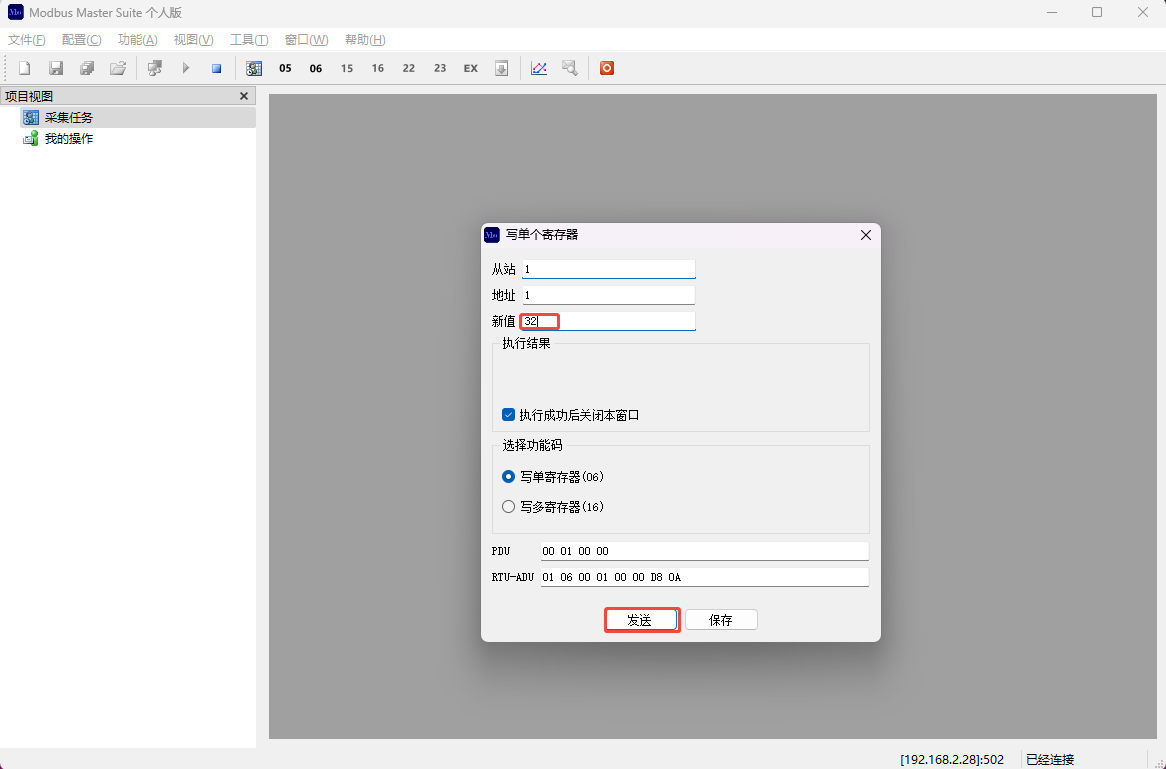
(2) Fill in the slave address, register address, and the value to be written in sequence, and then click Send
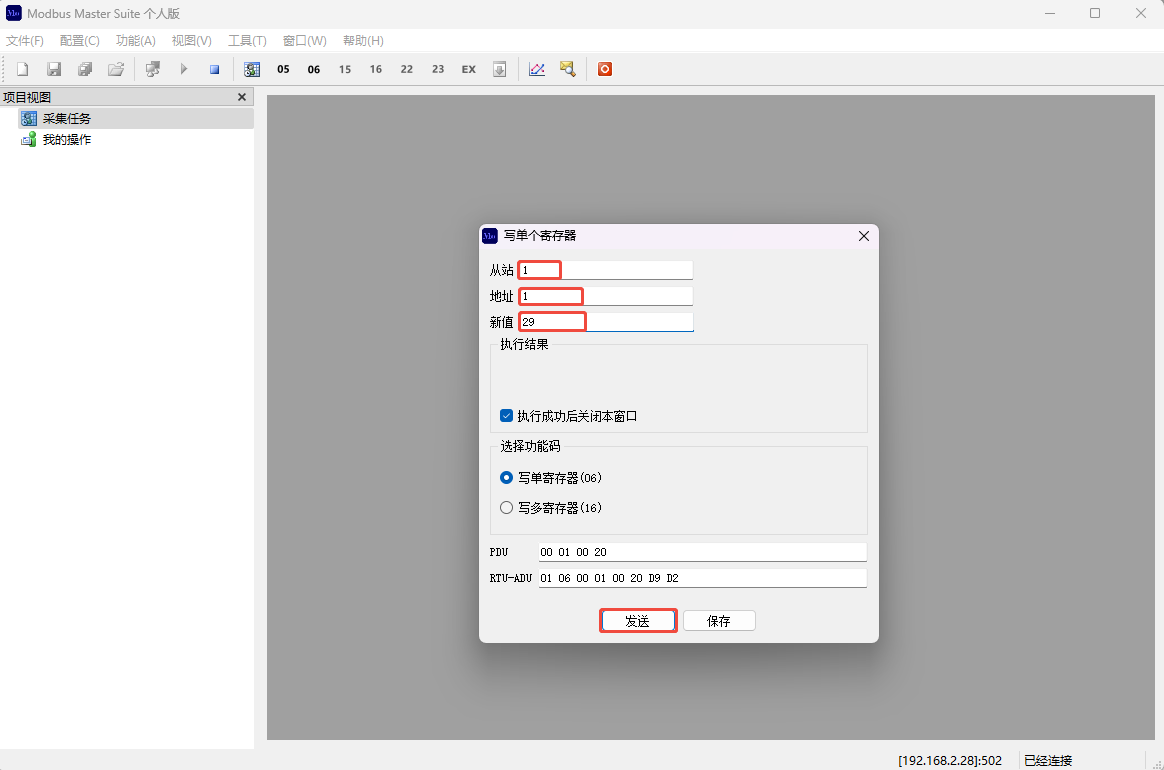
(3) At this time, our value is set to less than 30, and the serial port does not print any abnormal information
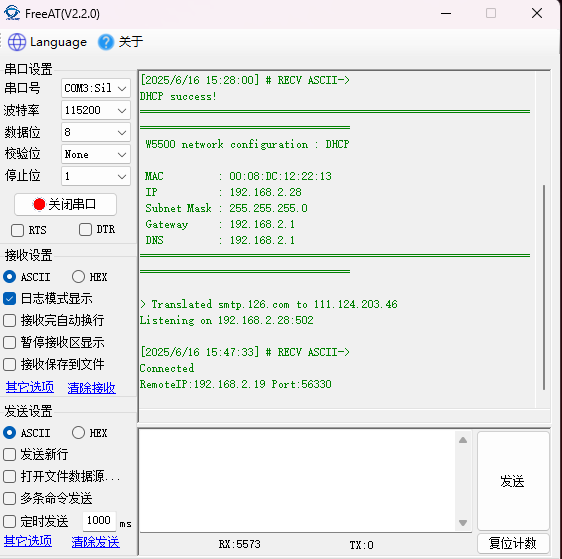
(4) Configure again. This time, we increase the value to 32, and then click Send.
7. Demonstration and Analysis of Results
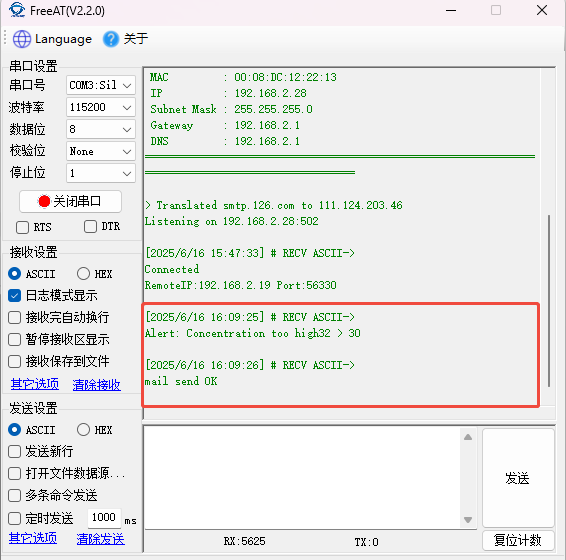
(1) At this point, we can see the concentration value printed on the serial port, and the email sent successfully.
(2) Opening the email, we can see that an alarm email indicating excessive gas concentration has been received.
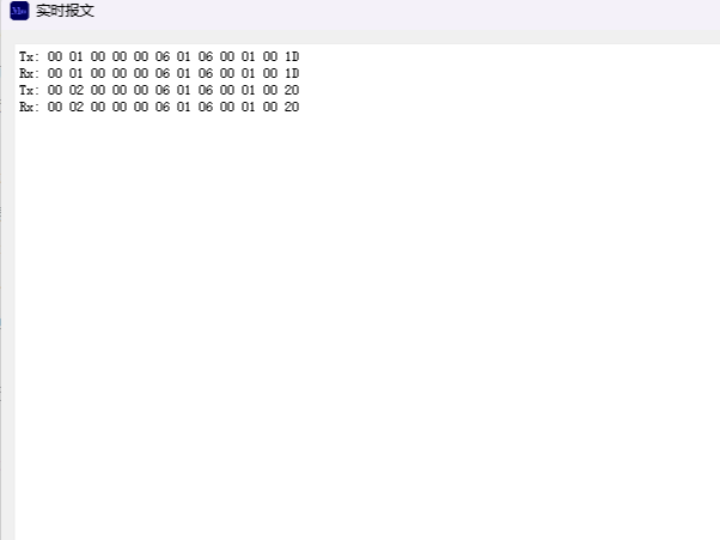
(3) Let's look at the message we just sent. Since the two messages are not very different, I will analyze the one with a concentration of 32.
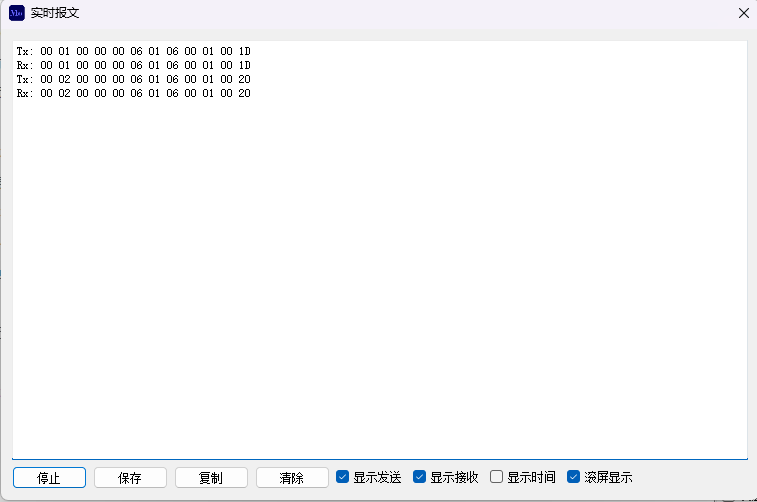
| Byte Range (Hexadecimal) | Field Name | Field Value (Hexadecimal) | Decimal Value | Meaning |
| 00 20 | Transaction Identifier (TID) | 00 20 | 32 | Master-defined transaction ID (different from message 1, indicating a separate request) |
| 00 00 | Protocol Identifier (PID) | 00 00 | 0 | Fixed to 0 (Modbus protocol identifier) |
| 00 06 | Length (LEN) | 00 06 | 6 | Number of subsequent PDU bytes (Unit Identifier + Function Code + Data, 6 bytes total) |
| 01 | Unit Identifier (UID) | 01 | 1 | Target Slave Address (still 1, same slave as message 1) |
| 06 | Function Code (FC) | 06 | 6 | Write to Preset Single Register: Modify 1 Value of Holding Register |
| 00 01 | Register Address | 00 01 | 1 | Starting address of the holding register to be written (same as message 1, operating on the same register address) |
| 00 20 | Value to be written | 00 20 | 32 | Data to be written to the register (decimal 32, 16-bit unsigned integer) |
Function Summary:
The master station sends an instruction to the slave device with ID = 1: Write the value 32 to the holding register at address 1.
8. Summary
This system, through the combination of STM32 and W5500, achieves a lightweight deployment of a Modbus TCP server, while simultaneously establishing a link between sensor data and remote alarms via SMTP service. The solution balances the stability of industrial communication with the flexibility of IoT applications. Sensor thresholds, email content, and hardware interfaces can be adjusted according to actual needs, making it suitable for distributed monitoring scenarios requiring real-time performance and reliability. Thank you for reading. If you have any questions about this article or would like to learn more about the products, please feel free to send a private message or leave a comment in the comment section. We will reply to you promptly!
————————————————
Copyright Notice: This article is an original article by CSDN blogger "Playing with Ethernet," licensed under CC 4.0 BY-SA. Please include the original source link and this statement when reprinting.
Original Link: https://blog.csdn.net/2301_81684513/article/details/148796196