



How to Learn W6300 Firmware Flow, Protocol Handling, and Performance for Education and Maker Project
This source is not a board-level W6300 project with reproducible hardware and firmware files. It is a generic article about WIZnet’s ioLibrary ecosystem, so the
How to Learn W6300 Firmware Flow, Protocol Handling, and Performance for Education and Maker Projects?
Summary
This source is not a board-level W6300 project with reproducible hardware and firmware files. It is a generic article about WIZnet’s ioLibrary ecosystem, so the strongest technical grounding comes from WIZnet’s official W6300 documentation and driver resources. For education and maker use, the real value is understanding the boundary: the host MCU owns bring-up, configuration, and application flow, while W6300 provides a hardwired dual IPv4/IPv6 TCP/IP engine that changes how protocol handling and performance should be taught.
What the Project Does
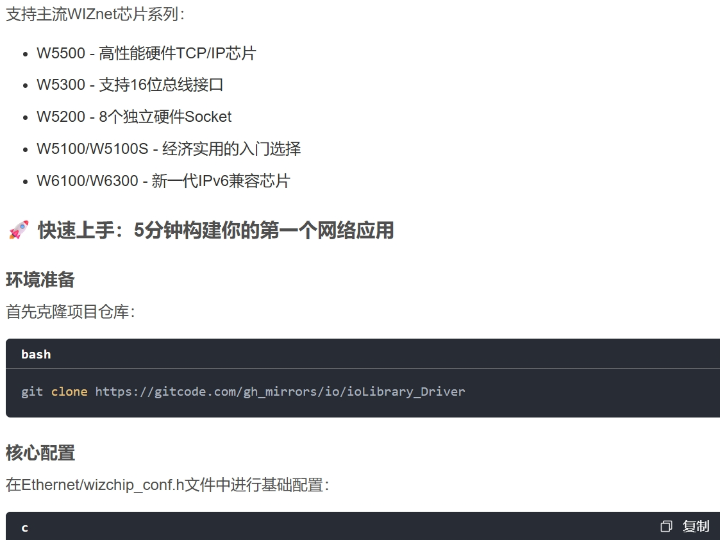
The CSDN article is essentially a general introduction to ioLibrary_Driver, not a verified W6300 hardware build. It discusses socket-style APIs, basic configuration, and application protocols, but it does not present a concrete W6300 target board, a verifiable firmware tree, or board-specific code that can be tied to an actual maker project.
For education and maker readers, the useful interpretation is architectural rather than procedural. The article points toward the WIZnet software model: configure the chip through a host-side library, then use socket-like APIs for application development. WIZnet’s official W6300 pages confirm that W6300 is part of the W5x00/W6x00 ecosystem supported by ioLibrary_Driver, and that W6300-specific dual-stack work is intended to use io6Library.
That makes the material useful as a learning map. A student or maker can understand the expected sequence without being misled into thinking the article is a complete lab manual: first establish the host interface, then initialize the networking chip, then configure addressing and sockets, and only after that build protocol logic on top.
Where WIZnet Fits
The exact WIZnet product here is the W6300. WIZnet’s official documentation describes it as a hardwired Internet controller with dual IPv4/IPv6 support, and its documented protocol coverage includes TCP, UDP, IPRAW, IPv6-related functions, and PPPoE.
That matters because W6300 is not just an Ethernet add-on. It is positioned as a dual-stack hardware TCP/IP device, and WIZnet explicitly says io6Library is for IPv6 and dual TCP/IP stack controllers such as W6300. In practice, that means the chip is better suited than older IPv4-only parts when the learning goal includes protocol breadth, dual-stack thinking, and the transition from simple socket use to more advanced network behavior.
For maker and education work, W6300’s role is also about system shape. The host MCU stays focused on application control, while the Ethernet controller absorbs much of the transport complexity. That is a cleaner teaching model than forcing learners to port and debug a full software stack before they can even open a socket.
Implementation Notes
A code-verified W6300 project is not present in the source article, so exact project file paths cannot honestly be cited. This project does not currently provide verifiable board-level W6300 implementation evidence. The safest implementation discussion is therefore architectural and based on official WIZnet resources.
Conceptual integration example based on WIZnet ioLibrary:
/* Conceptual host interface setup */
void w6300_platform_init(void) {
/* Register SPI/QSPI or bus callbacks */
/* Initialize reset, chip select, and interrupt pins */
}
/* Conceptual network setup */
void w6300_network_init(void) {
wiz_NetInfo netinfo = {
.mac = {0x00, 0x08, 0xDC, 0x11, 0x22, 0x33},
.ip = {192, 168, 0, 50},
.sn = {255, 255, 255, 0},
.gw = {192, 168, 0, 1},
.dns = {8, 8, 8, 8},
.dhcp = NETINFO_STATIC
};
wizchip_setnetinfo(&netinfo);
}
int w6300_tcp_example(void) {
uint8_t sn = 0;
socket(sn, Sn_MR_TCP4, 5000, 0);
listen(sn);
return 0;
}
This example is conceptual because the source article does not expose a real W6300 project tree. It reflects the documented WIZnet model: the MCU sets up the host interface and network identity, then uses WIZnet’s API layer to drive socket behavior. That separation is the most important firmware-flow lesson in this material.
Protocol handling should be taught in layers. Start with the host interface and chip initialization. Then configure addressing and verify chip state. Then move into TCP or UDP sockets. Only after that should learners explore lower-level modes such as IPRAW or dual-stack-specific behavior. That progression matches the W6300 protocol scope documented by WIZnet and the split between ioLibrary_Driver and io6Library.
Performance should also be explained carefully. W6300’s datasheet says it supports Quad SPI and is designed to maximize 100 Mbps Ethernet communication speed using WIZnet’s dual-stack hardware TCP/IP technology. WIZnet’s Japanese overview page also reports iperf3 results on RP2350 showing up to 91.2 Mbits/sec in QSPI Quad mode at 43 MHz, compared with 24.4 Mbits/sec for a software lwIP path under the same test family. Those figures are useful educational anchors because they show that performance is strongly tied to host-interface mode and offload architecture, not just clock speed alone.
Practical Tips / Pitfalls
- Treat the CSDN article as an overview, not a reproducible W6300 maker project. It mirrors library-level ideas more than a real hardware build.
- For W6300, interface choice is part of performance. Official materials emphasize Quad SPI and high-speed host communication, so firmware flow and bus design are tightly connected.
- Use
io6Librarywhen the lesson includes IPv6 or dual-stack behavior. WIZnet explicitly positions it for W6300-class devices. - Start with socket APIs before raw modes. The Berkeley-socket-style interface in
ioLibrary_Driveris the easier entry point for students and makers. - Do not treat hardware TCP/IP offload as “no firmware work.” The MCU still owns reset, host-bus setup, chip initialization, and application behavior. This is an inference from WIZnet’s documented library model and chip role.
- When discussing performance, stick to documented interface modes and measured cases. WIZnet publishes capability and example measurements, but not universal application benchmarks.
FAQ
Q: Why use W6300 for education and maker work instead of a simpler Ethernet chip?
A: Because W6300 is positioned as a dual IPv4/IPv6 hardwired TCP/IP controller. It supports a broader teaching path: basic sockets first, then dual-stack concepts and wider protocol coverage without changing to a different software architecture.
Q: How does W6300 connect to the platform?
A: The source article does not provide a verified pin map, so it would be misleading to invent a board-specific wiring table. At the architecture level, WIZnet’s official material emphasizes Quad SPI and high-speed host interfacing as key parts of W6300 integration.
Q: What role does W6300 play in this project?
A: In this source context, W6300 is the hardware network engine beneath the MCU. The MCU configures and drives the application, while W6300 provides Ethernet and TCP/IP behavior through the WIZnet library model.
Q: Can beginners follow this material?
A: Yes, but only as a conceptual guide. The article is useful for understanding the software model, but hands-on W6300 work still requires the official documentation and example ecosystems because the source does not provide a complete board project.
Q: How does W6300 compare with W5500 for learning?
A: W5500 is often simpler for first exposure to WIZnet-style Ethernet, while W6300 is the better teaching target when the lesson includes IPv6, dual-stack behavior, broader protocol modes, and host-interface performance trade-offs. That comparison is based on official product positioning, not on the CSDN article itself.
Source
Original source: CSDN article “ioLibrary_Driver深度解析与实战指南.” It is a general library overview and points readers toward a mirrored ioLibrary_Driver project rather than documenting a specific W6300 hardware build.
Supporting references: WIZnet W6300 official overview and datasheet pages, WIZnet W6300 library page, W6300 evaluation-board pages, and the official Wiznet/ioLibrary_Driver repository.
Tags
#W6300 #WIZnet #ioLibrary #io6Library #EmbeddedEthernet #IPv6 #DualStack #ProtocolHandling #Performance #Education #Maker
W6300으로 교육 및 메이커 프로젝트에서 펌웨어 흐름, 프로토콜 처리, 성능을 어떻게 학습할 수 있을까?
Summary
이 소스는 재현 가능한 하드웨어와 펌웨어 파일이 포함된 보드 수준의 W6300 프로젝트가 아닙니다. WIZnet ioLibrary 생태계를 소개하는 일반적인 글에 가깝기 때문에, 기술적으로 더 신뢰할 수 있는 근거는 WIZnet의 공식 W6300 문서와 드라이버 자료입니다. 교육 및 메이커 관점에서 핵심은 경계를 이해하는 데 있습니다. 호스트 MCU는 bring-up, 설정, 애플리케이션 흐름을 담당하고, W6300은 하드웨어 기반 듀얼 IPv4/IPv6 TCP/IP 엔진을 제공하므로 프로토콜 처리와 성능을 가르치는 방식 자체가 달라집니다.
What the Project Does
이 CSDN 글은 검증 가능한 W6300 하드웨어 빌드가 아니라 ioLibrary_Driver에 대한 일반적인 소개입니다. socket 스타일 API, 기본 설정, 응용 프로토콜을 설명하지만, 실제 메이커 프로젝트에 연결할 수 있는 구체적인 W6300 타깃 보드, 검증 가능한 펌웨어 트리, 보드별 코드를 제시하지는 않습니다.
교육 및 메이커 독자에게 유용한 해석은 절차보다 아키텍처 중심입니다. 이 글은 WIZnet 소프트웨어 모델을 가리킵니다. 호스트 측 라이브러리로 칩을 설정하고, 이후 socket 유사 API를 사용해 애플리케이션을 만드는 구조입니다. WIZnet 공식 W6300 자료도 W6300이 ioLibrary_Driver 지원 생태계에 속하며, W6300 특유의 듀얼 스택 작업에는 io6Library를 사용하도록 안내합니다.
이 때문에 이 자료는 학습 지도 역할은 할 수 있습니다. 학생이나 메이커는 이 글을 완전한 실습 문서로 오해하지 않고도 기대되는 순서를 이해할 수 있습니다. 먼저 호스트 인터페이스를 확립하고, 그다음 네트워크 칩을 초기화하고, 주소와 소켓을 설정한 뒤, 마지막으로 그 위에 프로토콜 로직을 올리는 흐름입니다.
Where WIZnet Fits
이 글에서 다루는 정확한 WIZnet 제품은 W6300입니다. WIZnet 공식 문서에 따르면 W6300은 듀얼 IPv4/IPv6를 지원하는 하드웨어 인터넷 컨트롤러이며, TCP, UDP, IPRAW, IPv6 관련 기능, PPPoE를 지원합니다.
이 점이 중요한 이유는 W6300이 단순한 Ethernet 확장 칩이 아니기 때문입니다. 듀얼 스택 하드웨어 TCP/IP 장치로 포지셔닝되어 있고, WIZnet은 io6Library가 W6300 같은 IPv6 및 듀얼 TCP/IP 스택 컨트롤러용이라고 명시합니다. 실무적으로 보면, 이 칩은 단순 socket 사용에서 더 넓은 프로토콜 범위와 듀얼 스택 설계로 넘어가는 학습에 더 적합합니다.
교육 및 메이커 프로젝트 관점에서도 W6300의 역할은 시스템 구조와 관련이 있습니다. 호스트 MCU는 애플리케이션 제어에 집중하고, Ethernet 컨트롤러는 전송 계층 복잡도를 흡수합니다. 이는 학습자가 소켓 하나 열기 전부터 전체 소프트웨어 스택을 포팅하고 디버깅해야 하는 구조보다 훨씬 깔끔한 교육 모델입니다.
Implementation Notes
코드로 검증 가능한 W6300 프로젝트는 원문에 포함되어 있지 않으므로, 정확한 프로젝트 파일 경로를 정직하게 인용할 수는 없습니다. 이 소스는 보드 수준의 W6300 구현 근거를 직접 제공하지 않습니다. 따라서 구현 설명은 공식 WIZnet 자료를 기반으로 한 아키텍처 수준이 가장 안전합니다.
Conceptual integration example based on WIZnet ioLibrary
/* Conceptual host interface setup */
void w6300_platform_init(void) {
/* Register SPI/QSPI or bus callbacks */
/* Initialize reset, chip select, and interrupt pins */
}
/* Conceptual network setup */
void w6300_network_init(void) {
wiz_NetInfo netinfo = {
.mac = {0x00, 0x08, 0xDC, 0x11, 0x22, 0x33},
.ip = {192, 168, 0, 50},
.sn = {255, 255, 255, 0},
.gw = {192, 168, 0, 1},
.dns = {8, 8, 8, 8},
.dhcp = NETINFO_STATIC
};
wizchip_setnetinfo(&netinfo);
}
int w6300_tcp_example(void) {
uint8_t sn = 0;
socket(sn, Sn_MR_TCP4, 5000, 0);
listen(sn);
return 0;
}
이 예제는 개념 설명용입니다. 원문이 실제 W6300 프로젝트 트리를 제공하지 않기 때문입니다. 하지만 WIZnet이 문서화한 모델은 잘 반영합니다. MCU는 호스트 인터페이스와 네트워크 식별 정보를 준비하고, 그다음 WIZnet API 계층을 통해 socket 동작을 구동합니다. 이 분리가 바로 이 자료에서 가장 중요한 펌웨어 흐름 학습 포인트입니다.
프로토콜 처리는 계층적으로 가르치는 편이 맞습니다. 먼저 호스트 인터페이스와 칩 초기화를 안정화하고, 다음으로 주소 설정과 칩 상태를 확인하고, 그 뒤에 TCP 또는 UDP 소켓으로 넘어갑니다. 그다음 단계에서야 IPRAW나 듀얼 스택 특유의 동작을 다루는 것이 자연스럽습니다. 이 순서는 W6300의 공식 프로토콜 범위와 ioLibrary_Driver, io6Library의 분리 구조와도 맞습니다.
성능 역시 조심스럽게 설명해야 합니다. W6300 데이터시트는 Quad SPI를 지원하며, WIZnet의 듀얼 스택 하드웨어 TCP/IP 기술로 100 Mbps Ethernet 통신 속도를 극대화하도록 설계되었다고 설명합니다. 또한 WIZnet의 일본어 개요 페이지는 RP2350 기반 iperf3 결과로 QSPI Quad mode 43 MHz에서 최대 91.2 Mbits/sec를 제시하고, 같은 계열 비교에서 소프트웨어 lwIP 경로는 24.4 Mbits/sec를 보입니다. 이런 수치는 성능이 단순 MCU 클록이 아니라, 호스트 인터페이스 모드와 오프로드 구조에 크게 좌우된다는 점을 교육용으로 보여주기에 적합합니다.
Practical Tips / Pitfalls
- 이 CSDN 글은 재현 가능한 W6300 메이커 프로젝트가 아니라 개요 문서로 보는 편이 맞습니다. 라이브러리 아이디어를 소개하는 수준에 더 가깝습니다.
- W6300에서는 인터페이스 선택이 곧 성능 요소입니다. 공식 자료가 Quad SPI와 고속 호스트 통신을 강조하므로, 펌웨어 흐름과 버스 설계는 서로 강하게 연결됩니다.
- IPv6나 듀얼 스택 동작까지 가르칠 계획이라면
io6Library를 사용하는 편이 적절합니다. WIZnet도 W6300 계열 장치에 대해 그렇게 포지셔닝합니다. - 처음에는 raw mode보다 socket API부터 시작하는 것이 좋습니다.
ioLibrary_Driver의 Berkeley-socket 스타일 인터페이스가 학생과 메이커에게 더 익숙합니다. - 하드웨어 TCP/IP 오프로드가 있다고 해서 펌웨어 작업이 사라지는 것은 아닙니다. MCU는 여전히 reset, 호스트 버스 설정, 칩 초기화, 애플리케이션 로직을 담당합니다.
- 성능을 설명할 때는 일반론적인 속도 향상보다는, 문서화된 인터페이스 모드와 실제 측정 사례 중심으로 말하는 편이 정확합니다. WIZnet은 기능과 예시 결과를 제공하지만 모든 응용에 대한 보편적 벤치마크를 주지는 않습니다.
FAQ
Q: 더 단순한 Ethernet 칩 대신 교육과 메이커 작업에 왜 W6300을 쓰나요?
A: W6300은 듀얼 IPv4/IPv6 하드웨어 TCP/IP 컨트롤러로 포지셔닝되어 있기 때문입니다. 기본 socket 학습뿐 아니라 듀얼 스택 개념과 더 넓은 프로토콜 범위를 같은 구조 안에서 가르칠 수 있습니다.
Q: W6300은 플랫폼에 어떻게 연결되나요?
A: 원문은 검증 가능한 핀맵을 제공하지 않으므로, 그 글만 보고 보드별 배선표를 제시하는 것은 부정확합니다. 아키텍처 차원에서는 WIZnet 공식 자료가 Quad SPI와 고속 호스트 인터페이스를 W6300 통합의 핵심 요소로 강조합니다.
Q: 이 프로젝트에서 W6300은 어떤 역할을 하나요?
A: 이 소스 맥락에서 W6300은 MCU 아래에서 동작하는 하드웨어 네트워크 엔진입니다. MCU는 설정과 애플리케이션을 담당하고, W6300은 WIZnet 라이브러리 모델을 통해 Ethernet 및 TCP/IP 동작을 제공합니다.
Q: 초보자도 따라갈 수 있나요?
A: 가능합니다. 다만 개념 중심 자료라는 점을 이해해야 합니다. WIZnet 라이브러리 모델과 프로토콜 범위를 이해하는 데는 도움이 되지만, 실제 실습을 하려면 공식 W6300 문서와 예제 생태계를 함께 봐야 합니다.
Q: 학습용으로 W6300과 W5500은 어떤 차이가 있나요?
A: W5500은 WIZnet 스타일 Ethernet을 처음 접할 때 더 단순한 선택인 경우가 많고, W6300은 IPv6, 듀얼 스택 동작, 더 넓은 프로토콜 범위, 호스트 인터페이스 성능까지 포함해 가르치고 싶을 때 더 적합합니다. 이 비교는 CSDN 글이 아니라 공식 제품 포지셔닝에 근거합니다.
Source
Original source: CSDN article “ioLibrary_Driver深度解析与实战指南.” 이 글은 특정 W6300 하드웨어 빌드를 문서화한 자료라기보다, ioLibrary_Driver 미러 프로젝트를 소개하는 일반 개요에 가깝습니다.
Supporting references: WIZnet W6300 공식 개요 및 데이터시트 페이지, WIZnet W6300 라이브러리 페이지, W6300 평가보드 페이지, 공식 Wiznet/ioLibrary_Driver 저장소.
Tags
#W6300 #WIZnet #ioLibrary #io6Library #EmbeddedEthernet #IPv6 #DualStack #ProtocolHandling #Performance #Education #Maker