



How to Initialize W5500 Ethernet with CircuitPython on ESP32-S3?
This project explores how an ESP32-S3 board running CircuitPython 10.1.3 can use a WIZnet W5500 Ethernet module as a wired network interface while still keeping
How to Initialize W5500 Ethernet with CircuitPython on ESP32-S3?
Summary
This project explores how an ESP32-S3 board running CircuitPython 10.1.3 can use a WIZnet W5500 Ethernet module as a wired network interface while still keeping ESP32-S3 wireless features available for other tasks. The W5500 connects over SPI and provides Ethernet transport, DHCP-based IP setup, socket access, and wired network stability, while the ESP32-S3 remains responsible for CircuitPython execution, USB behavior, Wi-Fi, ESP-NOW experiments, and application logic.
What the Project Does
The source article investigates a practical CircuitPython workflow problem on ESP32-S3: USB mass-storage mode and Web Workflow can conflict, and disabling the USB drive in boot.py can make Web Workflow more stable. The author then tests whether W5500 Ethernet can become the network path for browser-based remote editing or a Web Workflow-like file server. The article uses CircuitPython 10.1.3 on a VCC-GND YD-ESP32-S3 board and discusses W5500 initialization through the Adafruit WIZnet5k driver.
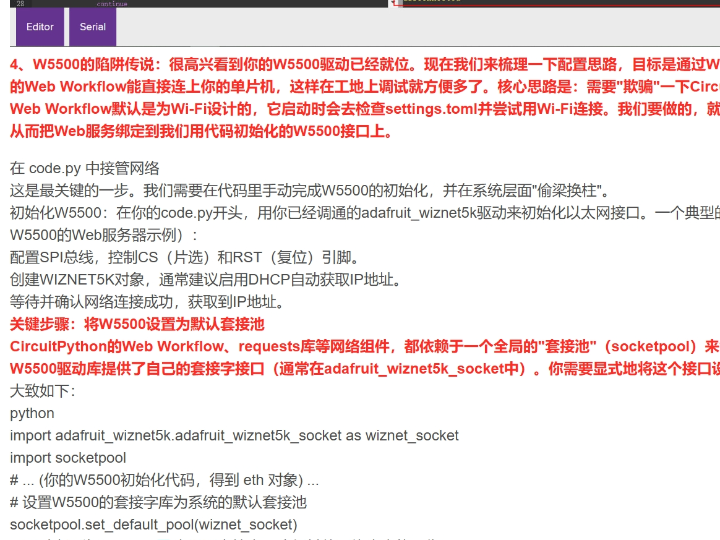
The important architectural result is that W5500 can be initialized as a wired Ethernet interface in user code, but CircuitPython’s built-in Web Workflow is still tied closely to the firmware’s Wi-Fi startup path. The source article reports that attempts to redirect Web Workflow through W5500 using a default socket-pool idea did not fully solve the problem, because the built-in workflow appears to rely on the Wi-Fi layer rather than only on a replaceable socket abstraction.
For an education-focused project, the value is not only the final result but also the investigation path. Students can see the difference between “a board has network sockets available” and “the firmware’s built-in service can bind to that interface.” That distinction is useful when teaching CircuitPython networking, SPI peripherals, W5500 Ethernet, and dual-network ESP32-S3 designs.
Where WIZnet Fits
The WIZnet product in this project is the W5500. It is used as an SPI-connected wired Ethernet controller for the ESP32-S3.
W5500 fits as a second network path beside the ESP32-S3’s built-in Wi-Fi. In this arrangement, Wi-Fi remains useful for CircuitPython Web Workflow, classroom demonstrations, or ESP-NOW experiments, while W5500 provides a stable wired interface for custom HTTP services, file listing, data upload, local dashboards, or classroom network exercises. The source article explicitly frames the hardware as dual-network capable: ESP32-S3 Wi-Fi and W5500 Ethernet are independent resources, with Wi-Fi handled by the ESP32-S3 radio and wired Ethernet handled through SPI.
The technical reason to use W5500 is that it moves much of the Ethernet and TCP/IP work into a dedicated chip. W5500 provides a hardware TCP/IP stack, SPI host interface, 32 KB internal buffer memory, and eight sockets. For CircuitPython, that matters because the interpreter, libraries, USB handling, and user code are already competing for MCU time and memory. A socket-oriented Ethernet controller keeps the learning exercise focused on SPI initialization, network object creation, DHCP, and application protocols rather than low-level Ethernet packet processing.
Implementation Notes
The source article provides the integration direction but does not expose a complete reusable project repository with fixed line numbers. The code below is therefore not copied from the article. It is a conceptual integration example based on WIZnet ioLibrary concepts and the Adafruit CircuitPython WIZnet5k library.
Conceptual integration example based on WIZnet ioLibrary:
import board
import busio
import digitalio
from adafruit_wiznet5k.adafruit_wiznet5k import WIZNET5K

spi = busio.SPI(board.SCK, MOSI=board.MOSI, MISO=board.MISO)

cs = digitalio.DigitalInOut(board.D10)
reset = digitalio.DigitalInOut(board.D9)

eth = WIZNET5K(spi, cs, reset=reset, is_dhcp=True)

print("W5500 IP address:", eth.pretty_ip(eth.ip_address))
This code configures the ESP32-S3 SPI bus, assigns chip-select and reset pins, creates the W5500 Ethernet object, and requests an IP address through DHCP. The exact pin names should be changed to match the ESP32-S3 board wiring. Adafruit’s WIZnet5k documentation describes the library as a CircuitPython interface for WIZnet5k Ethernet modules, and Adafruit’s Ethernet guide notes that the module can perform DHCP setup after connection.
Conceptual integration example based on WIZnet ioLibrary:
import adafruit_requests
from adafruit_wiznet5k import adafruit_wiznet5k_socket as wiznet_socket

adafruit_requests.set_socket(wiznet_socket, eth)

response = adafruit_requests.get("http://example.com")
print(response.text)
response.close()
This second layer binds HTTP requests to the W5500-backed socket implementation. It is useful for teaching the difference between the network interface object, socket layer, and application protocol layer. However, this is not the same as moving CircuitPython’s built-in Web Workflow onto W5500. The official CircuitPython workflow documentation describes Web Workflow as a browser-based workflow over the local network, usually Wi-Fi, and the source article’s test found that the built-in workflow does not automatically switch to W5500 just because user code initializes Ethernet sockets.
For an ESP32-S3 dual-network design, the practical pattern is to keep native Web Workflow on Wi-Fi when the firmware supports it, then use W5500 for a separate user-level service. That service can be a small HTTP file viewer, a telemetry endpoint, a classroom sensor dashboard, or a device-status page. The source article reports partial success with a custom HTTP server that can show file lists and file contents over the network, which is a realistic substitute when full built-in Web Workflow over Ethernet is not available.
Practical Tips / Pitfalls
- Disable USB mass storage only when the teaching setup needs Web Workflow stability more than drag-and-drop file access. Keep USB CDC serial available for recovery and debugging.
- Do not assume W5500 initialization means built-in Web Workflow will use Ethernet. Treat W5500 as a user-code network interface unless the firmware explicitly supports that workflow path.
- Verify SPI wiring first: SCK, MOSI, MISO, CS, reset, 3.3 V power, and ground. Most W5500 failures in a classroom are wiring, pin-name, or power problems.
- Use DHCP for the first lesson, then teach static IP afterward. DHCP proves that the physical link, router, and W5500 driver are working.
- Keep Wi-Fi and W5500 roles separate. Wi-Fi can serve Web Workflow or ESP-NOW experiments; W5500 can serve wired HTTP, telemetry, or local network services.
- Avoid exposing classroom file servers to untrusted networks. A simple HTTP server is useful for learning, but it should stay on a controlled LAN.
- Document the board-specific pins. ESP32-S3 boards vary, and CircuitPython
board.SCK,board.MOSI, andboard.MISOmay not match the pins wired to the W5500 module.
FAQ
Q: Why use W5500 with CircuitPython on ESP32-S3?
A: W5500 gives the ESP32-S3 a wired Ethernet path through SPI. That is useful when students need to compare Wi-Fi and Ethernet behavior, build local HTTP services, or keep network experiments stable without depending only on the classroom wireless environment.
Q: How does W5500 connect to the ESP32-S3?
A: W5500 connects through SPI using SCK, MOSI, MISO, chip-select, reset, 3.3 V power, and ground. In CircuitPython, the firmware creates a busio.SPI object, wraps CS and reset pins with digitalio.DigitalInOut, then creates a WIZNET5K Ethernet object with DHCP enabled.
Q: What role does W5500 play in this project?
A: W5500 provides the wired Ethernet interface for user-code networking. It can support HTTP requests, custom socket services, telemetry, or file-listing servers, but the tested article shows that it does not automatically replace the Wi-Fi path used by CircuitPython’s built-in Web Workflow.
Q: Can beginners follow this project?
A: Yes, if the lesson is framed as a networking lab rather than a finished product tutorial. Students should know basic CircuitPython file structure, SPI wiring, IP addressing, DHCP, and how to recover a board through USB serial if Web Workflow or USB drive settings become confusing.
Q: How does W5500 compare with Wi-Fi in this ESP32-S3 design?
A: Wi-Fi is easier for built-in CircuitPython Web Workflow because the workflow is normally tied to Wi-Fi settings and firmware support. W5500 is better for demonstrating wired network stability, fixed lab infrastructure, custom HTTP services, and Ethernet-based device behavior. In a dual-network design, Wi-Fi is the convenient development path and W5500 is the deterministic wired application path.
Source
Original article: CSDN, “CircuitPython 10.1.3 ESP32-S3 USB磁盘与Web Workflow不可兼得等原则问题” by Groundwork Explorer. License: CC BY-SA 4.0 as shown on the accessible CSDN page.
Supporting references: CircuitPython Web Workflow documentation, Adafruit WIZnet5k library documentation, and Adafruit Ethernet for CircuitPython guide.
Tags
#W5500 #WIZnet #ESP32S3 #CircuitPython #WebWorkflow #Ethernet #WiFi #SPI #Education #DualNetwork #AdafruitWiznet5k
ESP32-S3에서 CircuitPython으로 W5500 Ethernet을 초기화하는 방법은?
Summary
이 프로젝트는 CircuitPython 10.1.3을 실행하는 ESP32-S3 보드에서 WIZnet W5500 이더넷 모듈을 유선 네트워크 인터페이스로 사용하는 방법을 다룹니다. W5500은 SPI로 연결되며 Ethernet 전송, DHCP 기반 IP 설정, socket 접근, 유선 네트워크 안정성을 제공합니다. ESP32-S3는 CircuitPython 실행, USB 동작, Wi-Fi, ESP-NOW 실험, 애플리케이션 로직을 계속 담당합니다.
What the Project Does
원문은 ESP32-S3에서 발생할 수 있는 CircuitPython workflow 문제를 조사합니다. USB mass-storage mode와 Web Workflow가 충돌할 수 있으며, boot.py에서 USB drive를 비활성화하면 Web Workflow 안정성이 개선될 수 있다는 점을 다룹니다. 이후 작성자는 W5500 Ethernet을 브라우저 기반 원격 편집이나 Web Workflow와 유사한 file server의 네트워크 경로로 사용할 수 있는지 테스트합니다.
핵심 결과는 W5500을 사용자 코드에서 유선 Ethernet 인터페이스로 초기화할 수는 있지만, CircuitPython의 내장 Web Workflow는 여전히 firmware의 Wi-Fi 시작 경로와 강하게 연결되어 있다는 점입니다. 즉, W5500 socket을 초기화했다고 해서 Web Workflow가 자동으로 Ethernet 경로를 사용하지는 않습니다.
교육용 프로젝트 관점에서는 이 결과 자체가 중요합니다. 학생들은 “보드에 네트워크 socket이 있다”는 것과 “firmware 내장 서비스가 그 인터페이스에 bind될 수 있다”는 것이 서로 다르다는 점을 배울 수 있습니다. 이는 CircuitPython networking, SPI peripheral, W5500 Ethernet, ESP32-S3 dual-network 설계를 설명하기에 좋은 사례입니다.
Where WIZnet Fits
이 프로젝트에서 사용하는 WIZnet 제품은 W5500입니다. W5500은 ESP32-S3에 SPI로 연결되는 유선 Ethernet controller입니다.
W5500은 ESP32-S3의 내장 Wi-Fi 옆에 두 번째 네트워크 경로로 배치됩니다. 이 구조에서 Wi-Fi는 CircuitPython Web Workflow, classroom demonstration, ESP-NOW 실험에 사용할 수 있고, W5500은 custom HTTP service, file listing, data upload, local dashboard, classroom network exercise에 사용할 수 있습니다.
W5500을 사용하는 기술적 이유는 Ethernet 및 TCP/IP 작업의 상당 부분을 전용 칩으로 분리할 수 있기 때문입니다. W5500은 hardware TCP/IP stack, SPI host interface, 32 KB internal buffer memory, 8 sockets를 제공합니다. CircuitPython 환경에서는 interpreter, library, USB handling, user code가 이미 MCU 시간과 메모리를 사용하므로, socket-oriented Ethernet controller를 사용하면 학습 범위를 SPI 초기화, network object 생성, DHCP, application protocol로 좁힐 수 있습니다.
Implementation Notes
원문은 W5500 통합 방향을 보여주지만, 고정된 line number를 가진 완전한 재사용 가능 repository 형태로 제공되지는 않습니다. 따라서 아래 코드는 원문에서 복사한 코드가 아닙니다. WIZnet ioLibrary 개념과 Adafruit CircuitPython WIZnet5k library 사용 방식에 기반한 개념적 통합 예시입니다.
Conceptual integration example based on WIZnet ioLibrary:
import board
import busio
import digitalio
from adafruit_wiznet5k.adafruit_wiznet5k import WIZNET5K

spi = busio.SPI(board.SCK, MOSI=board.MOSI, MISO=board.MISO)

cs = digitalio.DigitalInOut(board.D10)
reset = digitalio.DigitalInOut(board.D9)

eth = WIZNET5K(spi, cs, reset=reset, is_dhcp=True)

print("W5500 IP address:", eth.pretty_ip(eth.ip_address))
이 코드는 ESP32-S3의 SPI bus를 설정하고, chip-select와 reset 핀을 지정한 뒤, W5500 Ethernet object를 생성하고 DHCP로 IP 주소를 요청합니다. 실제 핀 이름은 사용하는 ESP32-S3 보드와 W5500 모듈 배선에 맞게 변경해야 합니다.
Conceptual integration example based on WIZnet ioLibrary:
import adafruit_requests
from adafruit_wiznet5k import adafruit_wiznet5k_socket as wiznet_socket

adafruit_requests.set_socket(wiznet_socket, eth)

response = adafruit_requests.get("http://example.com")
print(response.text)
response.close()
이 두 번째 계층은 HTTP 요청을 W5500 기반 socket 구현에 연결합니다. 교육용으로는 network interface object, socket layer, application protocol layer의 차이를 설명하기 좋습니다. 그러나 이것은 CircuitPython의 내장 Web Workflow를 W5500으로 이동시키는 것과는 다릅니다.
ESP32-S3 dual-network 설계에서는 native Web Workflow는 firmware가 지원하는 Wi-Fi 경로에 유지하고, W5500은 별도의 user-level service에 사용하는 방식이 현실적입니다. 그 service는 작은 HTTP file viewer, telemetry endpoint, classroom sensor dashboard, device-status page가 될 수 있습니다.
Practical Tips / Pitfalls
- USB mass storage 비활성화는 Web Workflow 안정성이 drag-and-drop file access보다 중요할 때만 적용하는 것이 좋습니다.
- W5500을 초기화했다고 해서 내장 Web Workflow가 Ethernet을 자동으로 사용한다고 가정하면 안 됩니다.
- SPI 배선을 먼저 확인해야 합니다. SCK, MOSI, MISO, CS, reset, 3.3 V power, ground가 정확해야 합니다.
- 첫 실습은 DHCP로 시작하는 것이 좋습니다. DHCP 성공은 physical link, router, W5500 driver가 동작한다는 좋은 확인 지점입니다.
- Wi-Fi와 W5500의 역할을 분리해야 합니다. Wi-Fi는 Web Workflow 또는 ESP-NOW 실험에, W5500은 wired HTTP, telemetry, local network service에 사용하는 구성이 명확합니다.
- classroom file server를 신뢰할 수 없는 네트워크에 노출하지 않아야 합니다. 간단한 HTTP server는 학습에 유용하지만 controlled LAN 안에서만 사용하는 것이 안전합니다.
- board-specific pin mapping을 문서화해야 합니다. ESP32-S3 보드는 종류가 많고, CircuitPython의
board.SCK,board.MOSI,board.MISO가 실제 W5500 배선과 다를 수 있습니다.
FAQ
Q: ESP32-S3에서 CircuitPython과 함께 W5500을 사용하는 이유는 무엇인가요?
A: W5500은 SPI를 통해 ESP32-S3에 유선 Ethernet 경로를 제공합니다. 학생들이 Wi-Fi와 Ethernet의 동작 차이를 비교하거나, local HTTP service를 만들거나, classroom wireless 환경에만 의존하지 않는 안정적인 네트워크 실습을 할 때 유용합니다.
Q: W5500은 ESP32-S3에 어떻게 연결되나요?
A: W5500은 SPI로 연결됩니다. SCK, MOSI, MISO, chip-select, reset, 3.3 V power, ground가 필요합니다. CircuitPython에서는 busio.SPI object를 만들고, CS와 reset 핀을 digitalio.DigitalInOut으로 감싼 뒤, DHCP가 활성화된 WIZNET5K Ethernet object를 생성합니다.
Q: 이 프로젝트에서 W5500은 어떤 역할을 하나요?
A: W5500은 user-code networking을 위한 유선 Ethernet 인터페이스입니다. HTTP request, custom socket service, telemetry, file-listing server를 지원할 수 있지만, 테스트 결과상 CircuitPython 내장 Web Workflow의 Wi-Fi 경로를 자동으로 대체하지는 않습니다.
Q: 초보자도 따라할 수 있나요?
A: 가능합니다. 다만 완성품 튜토리얼보다는 networking lab으로 접근하는 것이 좋습니다. 학생들은 기본적인 CircuitPython file structure, SPI wiring, IP addressing, DHCP, USB serial recovery 방법을 알고 있어야 합니다.
Q: 이 ESP32-S3 설계에서 W5500은 Wi-Fi와 어떻게 다르나요?
A: Wi-Fi는 CircuitPython 내장 Web Workflow에 더 편리합니다. Web Workflow는 보통 Wi-Fi 설정과 firmware 지원에 연결되어 있기 때문입니다. W5500은 wired network stability, fixed lab infrastructure, custom HTTP service, Ethernet 기반 device behavior를 보여주는 데 더 적합합니다. Dual-network 설계에서는 Wi-Fi가 편리한 개발 경로이고, W5500은 안정적인 유선 application 경로입니다.
Source
Original article: CSDN, “CircuitPython 10.1.3 ESP32-S3 USB磁盘与Web Workflow不可兼得等原则问题” by Groundwork Explorer.
License: CC BY-SA 4.0 as shown on the accessible CSDN page.
Supporting references: CircuitPython Web Workflow documentation, Adafruit WIZnet5k library documentation, and Adafruit Ethernet for CircuitPython guide.
Tags
#W5500 #WIZnet #ESP32S3 #CircuitPython #WebWorkflow #Ethernet #WiFi #SPI #Education #DualNetwork #AdafruitWiznet5k