



How to Build a Telnet Server with W5500 on ESP32-S3 CircuitPython?
This project shows how an ESP32-S3 running CircuitPython can use the WIZnet W5500 Ethernet controller to implement a Telnet server.
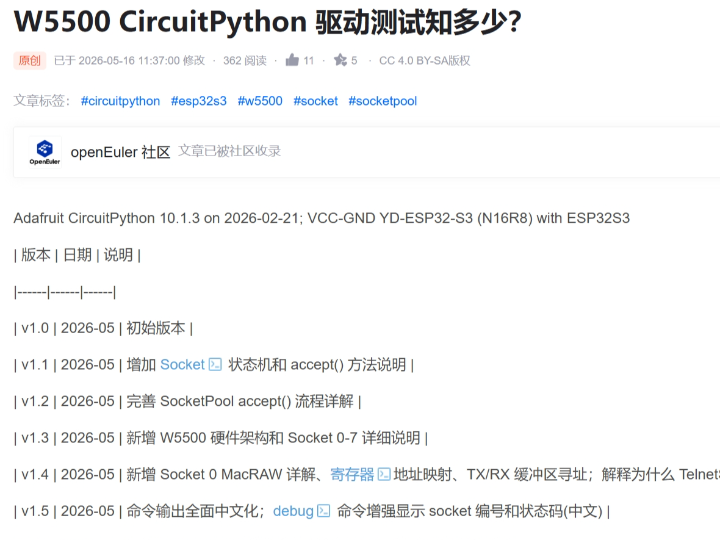
How to Build a Telnet Server with W5500 on ESP32-S3 CircuitPython?
Summary
This project shows how an ESP32-S3 running CircuitPython can use the WIZnet W5500 Ethernet controller to implement a Telnet server. The ESP32-S3 runs the Python application, command parser, and debug loop, while the W5500 provides the wired Ethernet interface, hardware TCP/IP stack, socket resources, and packet buffering needed to expose a simple TCP service on port 23.
What the Project Does
The source article tests W5500 CircuitPython driver behavior on an ESP32-S3 board using two Telnet server implementations. TelnetServerAlone.py directly calls low-level W5500 socket methods, while TelnetServerPool.py uses the CircuitPython SocketPool abstraction to expose a more standard socket workflow. The article was first published on May 16, 2026, and its revision log shows that the author expanded the work to cover socket state machines, accept() flow, W5500 socket numbering, Socket 0 behavior, and debug output.
The project creates a TCP server on Telnet port 23. A client connects from a PC or another network device, receives a welcome prompt, and can type commands such as help, status, debug, uptime, echo, exit, and quit. The server reads bytes from the W5500 socket, builds command lines, executes command handlers, and writes responses back through the same TCP connection.
The implementation is useful for education because it makes socket state visible. Instead of hiding everything behind a high-level HTTP library, the Telnet server exposes the practical mechanics of listening sockets, accepted client sockets, connection status codes, RX availability, send loops, disconnect handling, and debug reporting.
Where WIZnet Fits
The WIZnet product used in this project is the W5500. It acts as the SPI-connected Ethernet controller and TCP socket engine for the ESP32-S3.
The article initializes W5500 with CircuitPython using busio.SPI(board.GPIO12, MOSI=board.GPIO11, MISO=board.GPIO13), GPIO10 as chip-select, and GPIO14 as reset. It then creates the W5500 object with static network configuration: IP address 172.16.30.75, subnet mask 255.255.255.0, gateway 172.16.30.254, and DNS server 8.8.8.8.
W5500 is a good fit here because Telnet is a simple TCP server workload. The chip provides a hardwired TCP/IP stack, SPI interface, eight independent sockets, and internal TX/RX buffer memory, so the CircuitPython program can focus on server behavior rather than implementing Ethernet packet handling or a full TCP/IP stack in Python. WIZnet’s official W5500 page describes the chip as supporting hardwired TCP/IP protocols, eight simultaneous sockets, SPI mode 0/3, and 32 KB internal memory for TX/RX buffers.
For classroom use, the design also gives two programming layers to compare. Direct W5500 socket control is closer to the hardware and exposes register-level behavior through driver methods. SocketPool is closer to native CircuitPython socket programming and is easier for students who already know TCP server concepts. CircuitPython’s socketpool documentation describes SocketPool as the socket resource pool associated with a connected network interface and recommends it in place of CPython’s OS-backed socket pool model.
Implementation Notes
The source article provides real code in the page body. The snippets below are short excerpts from the article and are referenced by file name.
In TelnetServerAlone.py, W5500 is initialized with explicit ESP32-S3 pins and a static IP address:
spi = busio.SPI(board.GPIO12, MOSI=board.GPIO11, MISO=board.GPIO13)
cs = digitalio.DigitalInOut(board.GPIO10)
rst = digitalio.DigitalInOut(board.GPIO14)
nic = WIZNET5K(spi, cs, rst, is_dhcp=False,
               mac=(0xDE, 0xAD, 0xBE, 0xEF, 0xFE, 0xED), debug=False)
nic.ifconfig = ('172.16.30.75', '255.255.255.0', '172.16.30.254', '8.8.8.8')
This code exists to make the W5500 a predictable Ethernet endpoint for the Telnet lab. Static IP configuration is practical in a classroom because students can connect directly to a known address without first debugging DHCP or router lease tables. The fixed SPI pins also make the wiring repeatable across the tested ESP32-S3 board.
In TelnetServerAlone.py, the server directly opens a W5500 listening socket and checks the socket state:
self.listen_socket = 1
self.nic.socket_close(self.listen_socket)
time.sleep(0.1)
self.nic.socket_listen(self.listen_socket, self.port)
status = self.nic.socket_status(self.listen_socket)
if status == SNSR_SOCK_LISTEN:
    self.running = True
This is the hardware-oriented version of the server. It deliberately uses W5500 socket numbers and status values, so students can see what “listening” means on the chip itself. The code also avoids Socket 0 for the Telnet server and later creates a new listening socket when a client connection occupies the previous one.
The same file processes connected clients by reading the socket status, checking available RX data, and pulling bytes from the W5500 buffer:
status = self.nic.socket_status(self.client_socket)
if status != SNSR_SOCK_ESTABLISHED:
    self._close_client()
    return

available = self.nic.socket_available(self.client_socket)
if available > 0:
    ret, data = self.nic.socket_read(self.client_socket, available)
This is the core debugging point of the project. A Telnet server is not just a loop that calls recv(). On W5500, the firmware can inspect socket states such as closed, listening, connecting, established, and close-wait-like conditions. The article’s debug command maps status values including 0x00, 0x13, 0x14, 0x15, 0x17, 0x1C, and 0x22 to readable labels, which makes socket-state troubleshooting visible during a live session.
In TelnetServerPool.py, the alternative implementation wraps W5500 with SocketPool:
self.socket_pool = SocketPool(nic)
self.listen_socket = self.socket_pool.socket()
self.listen_socket.bind((None, self.port))
self.listen_socket.listen()
conn, addr = self.listen_socket.accept()
This version exists to show the higher-level CircuitPython networking path. It is closer to native socket programming: create a socket, bind it to a port, listen, accept a connection, and then read or write through the accepted socket object. Compared with direct W5500 socket control, it reduces hardware-specific code but hides some of the socket-number and status-code detail that is valuable for driver-level debugging.
Practical Tips / Pitfalls
- Start with static IP only after verifying the subnet. The article uses
172.16.30.75/24with gateway172.16.30.254; a PC on a different subnet will not connect without routing. - Test W5500 initialization before testing Telnet. Confirm SPI pins, chip-select, reset, MAC address, and printed IP address first.
- Keep Telnet on a trusted LAN. Telnet is unencrypted and should be treated as a teaching and debugging tool, not a secure remote administration channel.
- Avoid Socket 0 for this lab unless the lesson specifically covers W5500 MacRAW behavior. The article’s server logic uses other sockets for Telnet service.
- Use socket status codes as part of the lesson.
LISTEN,ESTABLISHED, andCLOSEDstates explain more than a generic “connection failed” printout. - Close sockets deliberately. CircuitPython object cleanup and W5500 hardware socket cleanup are related, but students should still learn when to call
close()orsocket_close(). - Add watchdog-safe loop timing. The article’s server loop uses short sleeps; production-like examples should also consider stalled clients and long-running sessions.
FAQ
Q: Why use W5500 for a CircuitPython Telnet server on ESP32-S3?
A: W5500 provides a hardware TCP/IP stack, Ethernet MAC/PHY, SPI control path, socket resources, and internal packet buffers. That lets the ESP32-S3 run the CircuitPython command server while W5500 handles the lower network transport work.
Q: How does W5500 connect to the ESP32-S3 in this project?
A: The tested code connects W5500 over SPI using GPIO12 for SCK, GPIO11 for MOSI, GPIO13 for MISO, GPIO10 for chip-select, and GPIO14 for reset. The network interface is then configured with a static IP so Telnet clients can connect to a known address.
Q: What role does W5500 play in this Telnet server?
A: W5500 is the TCP server endpoint. The CircuitPython program decides how to parse commands and generate responses, but W5500 owns the Ethernet link, socket state, RX/TX buffering, and TCP connection handling.
Q: Can beginners follow this project?
A: Yes, if it is taught as a socket-state lab. Students should already know basic CircuitPython files, SPI wiring, IP addresses, ports, and how to use a Telnet client. The direct socket version is better for understanding W5500 internals, while the SocketPool version is easier for learning normal TCP server structure.
Q: How does W5500 compare with native CircuitPython sockets?
A: Native CircuitPython socket-style code usually relies on a network interface exposed through socketpool, such as Wi-Fi or another connected interface. W5500 can be used through SocketPool for a familiar API, but it also allows direct driver-level socket inspection. For teaching, that is the main advantage: students can compare high-level socket programming with the W5500’s actual hardware socket states.
Source
Original article: CSDN, “W5500 CircuitPython 驱动测试知多少?” by Groundwork Explorer. The article is marked CC 4.0 BY-SA on the accessible CSDN page.
Supporting references: WIZnet W5500 official product page for hardware TCP/IP, socket, SPI, and buffer specifications; CircuitPython socketpool documentation for the socket abstraction model.
Tags
#W5500 #WIZnet #ESP32S3 #CircuitPython #TelnetServer #SocketPool #Ethernet #SPI #Education #SocketDebugging #HardwiredTCPIP
ESP32-S3 CircuitPython에서 W5500으로 Telnet Server를 구현하는 방법은?
Summary
이 프로젝트는 CircuitPython을 실행하는 ESP32-S3가 WIZnet W5500 Ethernet controller를 사용해 Telnet server를 구현하는 방법을 보여줍니다. ESP32-S3는 Python application, command parser, debug loop를 실행하고, W5500은 port 23에서 단순 TCP service를 제공하기 위한 wired Ethernet interface, hardware TCP/IP stack, socket resource, packet buffering을 담당합니다.
What the Project Does
원문은 ESP32-S3 보드에서 W5500 CircuitPython driver 동작을 두 가지 Telnet server 구현으로 테스트합니다. TelnetServerAlone.py는 low-level W5500 socket method를 직접 호출하고, TelnetServerPool.py는 CircuitPython SocketPool abstraction을 사용해 더 표준적인 socket workflow를 제공합니다.
프로젝트는 Telnet port 23에서 TCP server를 생성합니다. PC나 다른 network device에서 client가 접속하면 welcome prompt를 받고, help, status, debug, uptime, echo, exit, quit 같은 command를 입력할 수 있습니다. Server는 W5500 socket에서 byte를 읽고, command line을 구성하고, command handler를 실행한 뒤, 같은 TCP connection을 통해 response를 다시 씁니다.
교육용으로 이 구현이 유용한 이유는 socket state가 눈에 보이기 때문입니다. High-level HTTP library 뒤에 모든 것을 숨기지 않고, listening socket, accepted client socket, connection status code, RX availability, send loop, disconnect handling, debug reporting의 실제 동작을 보여줍니다.
Where WIZnet Fits
이 프로젝트에서 사용하는 WIZnet 제품은 W5500입니다. W5500은 ESP32-S3에 SPI로 연결되는 Ethernet controller이자 TCP socket engine입니다.
원문 코드는 W5500을 CircuitPython에서 busio.SPI(board.GPIO12, MOSI=board.GPIO11, MISO=board.GPIO13)로 초기화하고, GPIO10을 chip-select, GPIO14를 reset으로 사용합니다. 이후 W5500 object에 static network configuration을 설정합니다. IP address는 172.16.30.75, subnet mask는 255.255.255.0, gateway는 172.16.30.254, DNS server는 8.8.8.8입니다.
W5500은 Telnet처럼 단순한 TCP server workload에 잘 맞습니다. W5500은 hardwired TCP/IP stack, SPI interface, 8 independent sockets, internal TX/RX buffer memory를 제공하므로, CircuitPython program은 Ethernet packet handling이나 Python 기반 TCP/IP stack 구현이 아니라 server behavior에 집중할 수 있습니다.
수업에서는 두 가지 programming layer를 비교할 수 있습니다. Direct W5500 socket control은 hardware에 가깝고 driver method를 통해 register-level behavior를 노출합니다. SocketPool은 native CircuitPython socket programming에 더 가깝고, TCP server 개념을 이미 알고 있는 학생에게 더 쉽습니다.
Implementation Notes
원문은 페이지 본문에 실제 코드를 제공합니다. 아래 snippet은 원문에서 확인 가능한 짧은 발췌이며 file name 기준으로 설명합니다.
TelnetServerAlone.py에서 W5500은 명시적인 ESP32-S3 pin과 static IP address로 초기화됩니다.
spi = busio.SPI(board.GPIO12, MOSI=board.GPIO11, MISO=board.GPIO13)
cs = digitalio.DigitalInOut(board.GPIO10)
rst = digitalio.DigitalInOut(board.GPIO14)
nic = WIZNET5K(spi, cs, rst, is_dhcp=False,
               mac=(0xDE, 0xAD, 0xBE, 0xEF, 0xFE, 0xED), debug=False)
nic.ifconfig = ('172.16.30.75', '255.255.255.0', '172.16.30.254', '8.8.8.8')
이 코드는 W5500을 Telnet 실습에서 예측 가능한 Ethernet endpoint로 만들기 위해 존재합니다. Static IP configuration은 교육 환경에서 실용적입니다. 학생들은 DHCP나 router lease table을 먼저 디버깅하지 않고도 알려진 주소로 접속할 수 있습니다. 고정된 SPI pin 역시 테스트한 ESP32-S3 보드에서 배선을 반복 가능하게 만듭니다.
TelnetServerAlone.py는 W5500 listening socket을 직접 열고 socket state를 확인합니다.
self.listen_socket = 1
self.nic.socket_close(self.listen_socket)
time.sleep(0.1)
self.nic.socket_listen(self.listen_socket, self.port)
status = self.nic.socket_status(self.listen_socket)
if status == SNSR_SOCK_LISTEN:
    self.running = True
이 부분은 hardware-oriented server 구현입니다. W5500 socket number와 status value를 의도적으로 사용하므로, 학생들은 “listening” 상태가 W5500 chip 내부에서 어떤 의미인지 볼 수 있습니다. 또한 Telnet server에 Socket 0을 피하고, client connection이 기존 listening socket을 점유하면 새 listening socket을 만드는 구조를 설명하기 좋습니다.
같은 파일은 연결된 client를 처리할 때 socket status를 읽고, 수신 가능한 RX data를 확인한 뒤, W5500 buffer에서 byte를 가져옵니다.
status = self.nic.socket_status(self.client_socket)
if status != SNSR_SOCK_ESTABLISHED:
    self._close_client()
    return

available = self.nic.socket_available(self.client_socket)
if available > 0:
    ret, data = self.nic.socket_read(self.client_socket, available)
이 부분이 프로젝트의 핵심 debugging 지점입니다. Telnet server는 단순히 recv()만 반복 호출하는 loop가 아닙니다. W5500에서는 closed, listening, connecting, established, close-wait 계열 상태를 firmware에서 직접 확인할 수 있습니다. 원문의 debug command는 0x00, 0x13, 0x14, 0x15, 0x17, 0x1C, 0x22 같은 status value를 사람이 읽을 수 있는 label로 매핑하여 live session 중 socket-state troubleshooting을 가능하게 합니다.
TelnetServerPool.py의 대안 구현은 W5500을 SocketPool로 감쌉니다.
self.socket_pool = SocketPool(nic)
self.listen_socket = self.socket_pool.socket()
self.listen_socket.bind((None, self.port))
self.listen_socket.listen()
conn, addr = self.listen_socket.accept()
이 버전은 더 높은 수준의 CircuitPython networking path를 보여주기 위해 존재합니다. Socket을 만들고, port에 bind하고, listen하고, connection을 accept한 뒤, accepted socket object를 통해 읽고 쓰는 일반적인 socket programming 구조와 가깝습니다. Direct W5500 socket control과 비교하면 hardware-specific code가 줄어들지만, driver-level debugging에 유용한 socket number와 status code detail은 덜 보입니다.
Practical Tips / Pitfalls
- Static IP를 사용하기 전에 subnet을 확인해야 합니다. 원문 예제는
172.16.30.75/24와 gateway172.16.30.254를 사용하므로, PC가 다른 subnet에 있으면 routing 없이는 접속되지 않습니다. - Telnet을 테스트하기 전에 W5500 initialization을 먼저 확인해야 합니다. SPI pin, chip-select, reset, MAC address, 출력된 IP address를 먼저 검증하는 것이 좋습니다.
- Telnet은 신뢰할 수 있는 LAN에서만 사용해야 합니다. Telnet은 암호화되지 않으므로 secure remote administration이 아니라 teaching/debugging tool로 다뤄야 합니다.
- 수업 목적이 W5500 MacRAW 동작이 아니라면 Socket 0 사용은 피하는 것이 좋습니다. 원문 server logic도 Telnet service에 다른 socket을 사용합니다.
- Socket status code를 수업에 적극적으로 활용해야 합니다.
LISTEN,ESTABLISHED,CLOSED상태를 보여주면 단순한 “connection failed” 출력보다 훨씬 이해가 쉽습니다. - Socket을 명시적으로 닫아야 합니다. CircuitPython object cleanup과 W5500 hardware socket cleanup은 관련이 있지만, 학생들은 언제
close()또는socket_close()를 호출해야 하는지 배워야 합니다. - Watchdog에 안전한 loop timing을 고려해야 합니다. 원문 server loop는 짧은 sleep을 사용하지만, 제품형 예제에서는 stalled client와 long-running session도 고려해야 합니다.
FAQ
Q: ESP32-S3 CircuitPython Telnet server에 W5500을 사용하는 이유는 무엇인가요?
A: W5500은 hardware TCP/IP stack, Ethernet MAC/PHY, SPI control path, socket resource, internal packet buffer를 제공합니다. ESP32-S3는 CircuitPython command server를 실행하고, W5500은 그 아래의 network transport 작업을 처리합니다.
Q: 이 프로젝트에서 W5500은 ESP32-S3에 어떻게 연결되나요?
A: 테스트된 코드는 W5500을 SPI로 연결하며, GPIO12를 SCK, GPIO11을 MOSI, GPIO13을 MISO, GPIO10을 chip-select, GPIO14를 reset으로 사용합니다. 이후 Telnet client가 알려진 주소로 접속할 수 있도록 static IP를 설정합니다.
Q: 이 Telnet server에서 W5500은 어떤 역할을 하나요?
A: W5500은 TCP server endpoint입니다. CircuitPython program은 command parsing과 response 생성을 담당하고, W5500은 Ethernet link, socket state, RX/TX buffering, TCP connection handling을 담당합니다.
Q: 초보자도 따라할 수 있나요?
A: socket-state lab으로 진행하면 가능합니다. 학생들은 기본적인 CircuitPython file 구조, SPI wiring, IP address, port, Telnet client 사용법을 알고 있어야 합니다. Direct socket version은 W5500 내부 동작 이해에 좋고, SocketPool version은 일반 TCP server 구조 학습에 더 쉽습니다.
Q: W5500은 native CircuitPython sockets와 어떻게 다르나요?
A: Native CircuitPython socket-style code는 일반적으로 Wi-Fi나 다른 connected interface가 socketpool을 통해 제공하는 network interface에 의존합니다. W5500도 SocketPool을 통해 익숙한 API로 사용할 수 있지만, direct driver-level socket inspection도 가능합니다. 교육 관점에서 가장 큰 장점은 high-level socket programming과 W5500 hardware socket state를 비교해 볼 수 있다는 점입니다.
Source
Original article: CSDN, “W5500 CircuitPython 驱动测试知多少?” by Groundwork Explorer. The article is marked CC 4.0 BY-SA on the accessible CSDN page.
Supporting references: WIZnet W5500 official product page for hardware TCP/IP, socket, SPI, and buffer specifications; CircuitPython socketpool documentation for the socket abstraction model.
Tags
#W5500 #WIZnet #ESP32S3 #CircuitPython #TelnetServer #SocketPool #Ethernet #SPI #Education #SocketDebugging #HardwiredTCPIP