Wiznet makers

mark

Published December 05, 2025 © Apache License 2.0 (Apache-2.0)

68 UCC

8 WCC

40 VAR

0 Contests

0 Followers

0 Following

Original Link

[Follow me, Episode 4] Basic Task 1: Complete the initialization of the W5500 main control board (st

[Follow me, Episode 4] Basic Task 1: Complete the initialization of the W5500 main control board (static IP configuration)

COMPONENTS
PROJECT DESCRIPTION

2.1 Task Description

Complete the initialization of the W5500 main control board (static IP configuration) and ensure it can be pinged by computers on the local area network. Simultaneously, the W5500 should be able to ping websites on the internet. Capture ping packets from the local PC using packet capture software (Wireshark, Sniffer, etc.), display and analyze the data.

2.2 Code Implementation

import time
import board
import busio
import asyncio
import digitalio
from adafruit_wiznet5k.adafruit_wiznet5k import WIZNET5K
# 网口 SPI 引脚定义
SPI0_SCK = board.GP18
SPI0_TX = board.GP19
SPI0_RX = board.GP16
SPI0_CSn = board.GP17
# RESET 引脚定义
W5x00_RSTn = board.GP20
print("Wiznet5k Ping Test (no DHCP)")
# 静态IP设置
# MAC地址
MAC = (0x00, 0x01, 0x02, 0x03, 0x04, 0x05)
# IP地址
IP_ADDRESS = (192, 168, 1, 101)
# 子网掩码
SUBNET_MASK = (255, 255, 255, 0)
# 网关
GATEWAY_ADDRESS = (192, 168, 1, 1)
# DNS
DNS_SERVER = (8, 8, 8, 8)
# 网络接口对象
eth = None
''' 网络初始化 '''
async def init():
   global eth
   # REST引脚初始化
   rst_pin = digitalio.DigitalInOut(W5x00_RSTn)
   rst_pin.direction = digitalio.Direction.OUTPUT
   # SPI CS引脚初始化
   cs = digitalio.DigitalInOut(SPI0_CSn)
   # SPI初始化
   spi_bus = busio.SPI(SPI0_SCK, MOSI=SPI0_TX, MISO=SPI0_RX)
   # 官网示例先重置 W5500
   rst_pin.value = False
   time.sleep(1)
   rst_pin.value = True
   # 网口初始化
   eth = WIZNET5K(spi_bus, cs, is_dhcp=False, mac=MAC)
   # 配置网络
   eth.ifconfig = (IP_ADDRESS, SUBNET_MASK, GATEWAY_ADDRESS, DNS_SERVER)
   print("芯片版本:", eth.chip)
   print("MAC地址:", [hex(i) for i in eth.mac_address])
   print("IP地址:", eth.pretty_ip(eth.ip_address))
   print("请求电子工程世界IP地址: %s" % eth.pretty_ip(eth.get_host_by_name("www.eeworld.com.cn")))
   while True:
       await asyncio.sleep_ms(1)

2.3 Results Demonstration

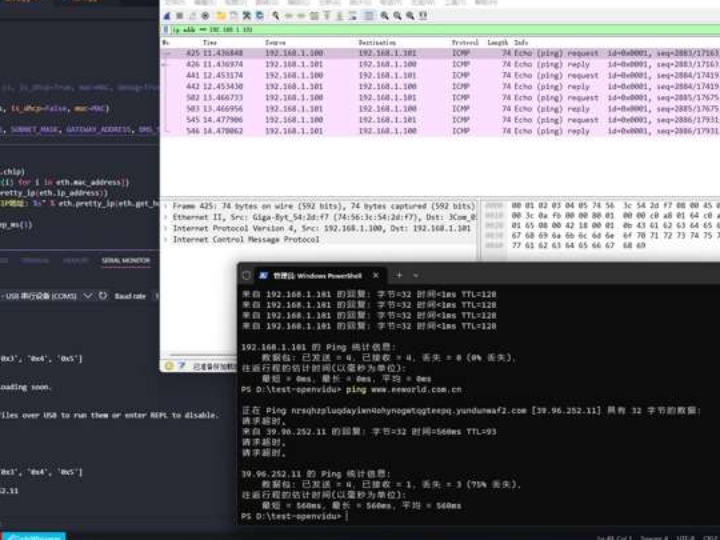
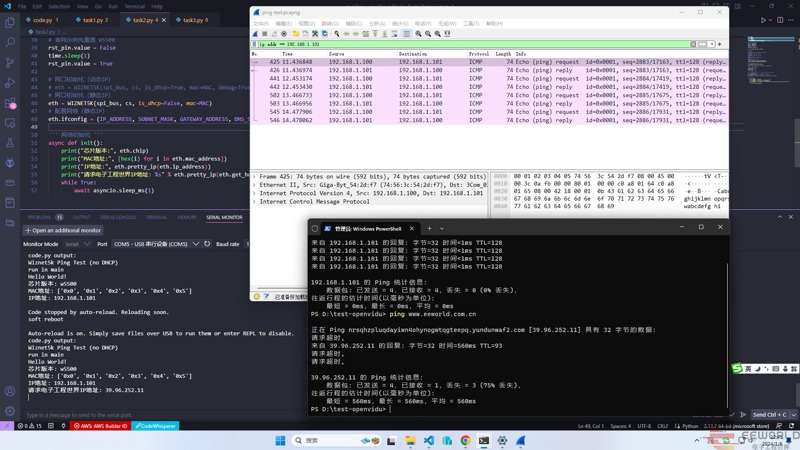
The Wireshark packet capture screenshot shows that when the computer pings the development board's IP address, there are request and response packets, as shown in the image above. Please see the attached packet capture file. The console screenshot shows that requesting an IP address from the "Electronic Engineering World" website also received a response and printed the actual IP address of the "Electronic Engineering World" website, which is consistent with the IP address obtained by pinging "Electronic Engineering World" from the computer terminal.

2.4 Summary

After installing the CircuitPython development environment on the W5500-EVB-Pico... Loading the w5500 driver library makes network access very simple and convenient. However, the library's current support for SocketPool is not very good, which can cause some problems in certain situations.

Documents
Comments Write