



Application of W5500io-M module's HTTP function: Calling the Xinzhi Weather API to obtain weather
Application of W5500io-M module's HTTP function: Calling the Xinzhi Weather API to obtain weather data.
1. Introduction
HTTP (Hypertext Transfer Protocol) is an application-layer protocol for distributed, collaborative, hypermedia information systems. Based on the TCP/IP communication protocol, it transmits data and forms the foundation of data communication on the World Wide Web (WWW). HTTP was initially designed to provide a method for publishing and receiving HTML pages. Resources requested via HTTP or HTTPS are identified by Uniform Resource Identifiers (URIs).

The W5500io-M is a high-performance SPI-to-Ethernet module from WIS, featuring the following characteristics:
Simple Design: Integrates MAC, PHY, 32KB buffer, and RJ45 Ethernet port. It connects directly to the main controller via a 4-wire SPI interface, operates on 3.3V power, and its compact size is suitable for embedded scenarios.
Easy to Use: Users no longer need to port a complex TCP/IP protocol stack to the MCU; they can directly develop based on application-layer data.
Abundant Resources: Provides a wealth of MCU application examples and hardware reference designs for direct use, significantly shortening development time. Hardware compatibility with the W5100Sio-M module facilitates solution development and iteration.
Wide Applications: Widely used in industrial control, smart grids, charging piles, security and fire protection, new energy, and energy storage.
Product Link: Product Details
2. Project Environment
2.1 Hardware Preparation
W5500io-M module
STM32F103VCT6 development board
One network cable
Several DuPont wires
Switch or router
2.2 Software Preparation
Example link: w5500.com/w5500.html
Development environment: Keil uVision 5
Serial port assistant
Weather account
cJSON file
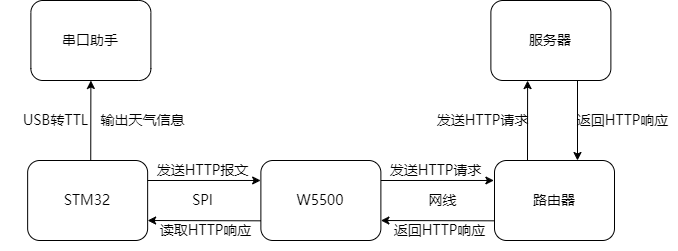
2.3 Scheme Diagram
3. Xinzhi Weather Registration
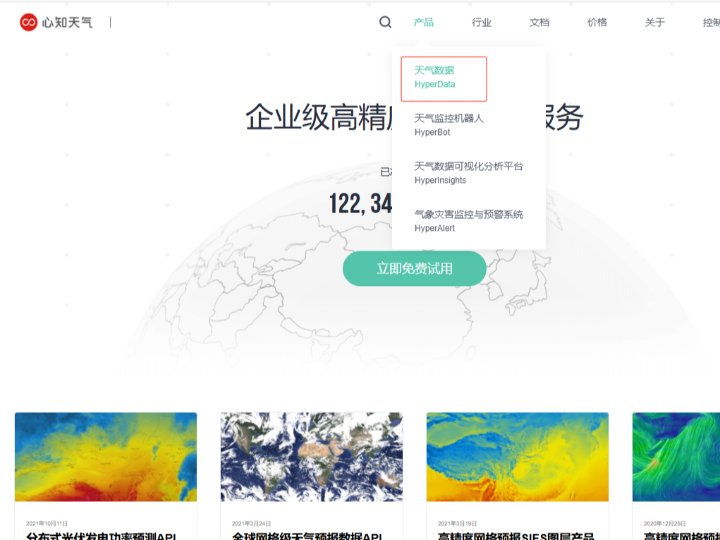
(1) Log in to the Xinzhi Weather official website: Xinzhi Weather - High-Precision Meteorological Data - Weather Data API Interface - Industry Meteorological Solutions
After registration, click "Products" to enter "Weather Data"
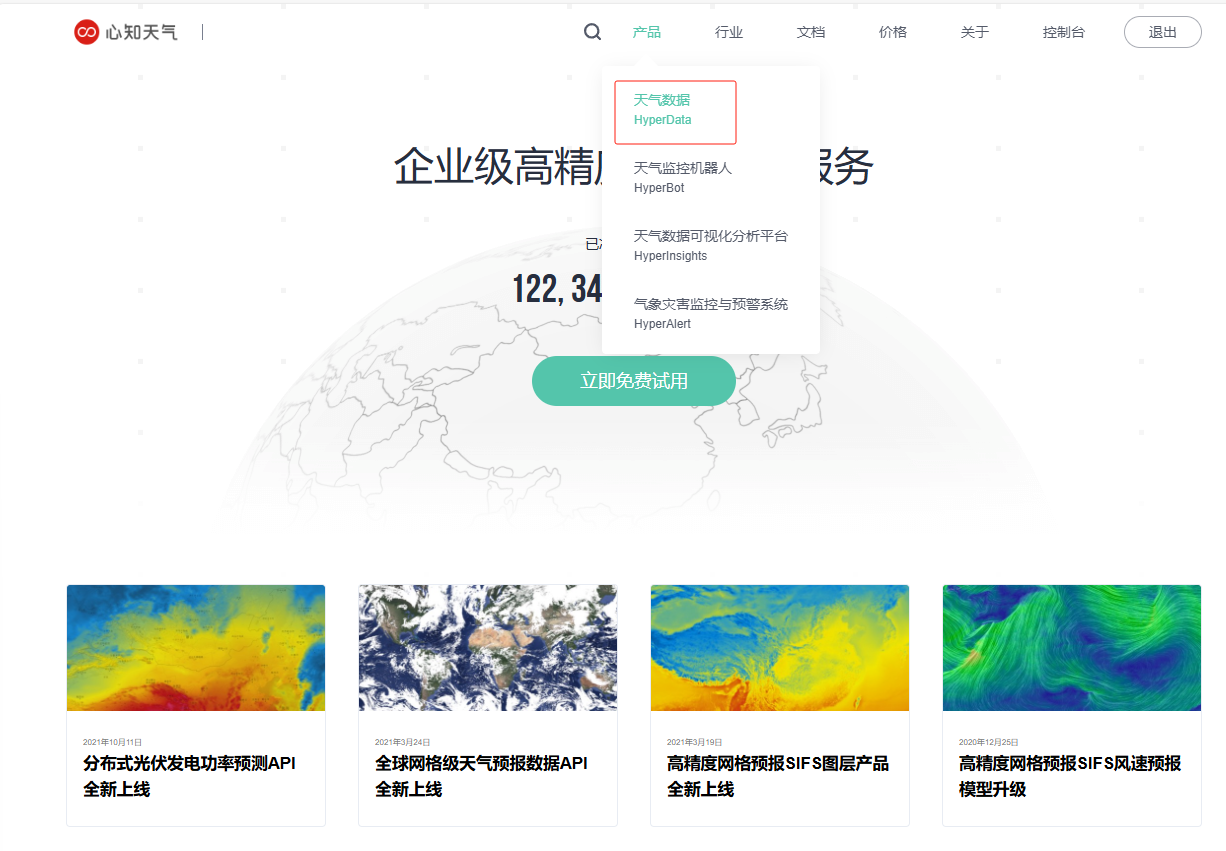
(2) Try it for free now

(3) Apply for free
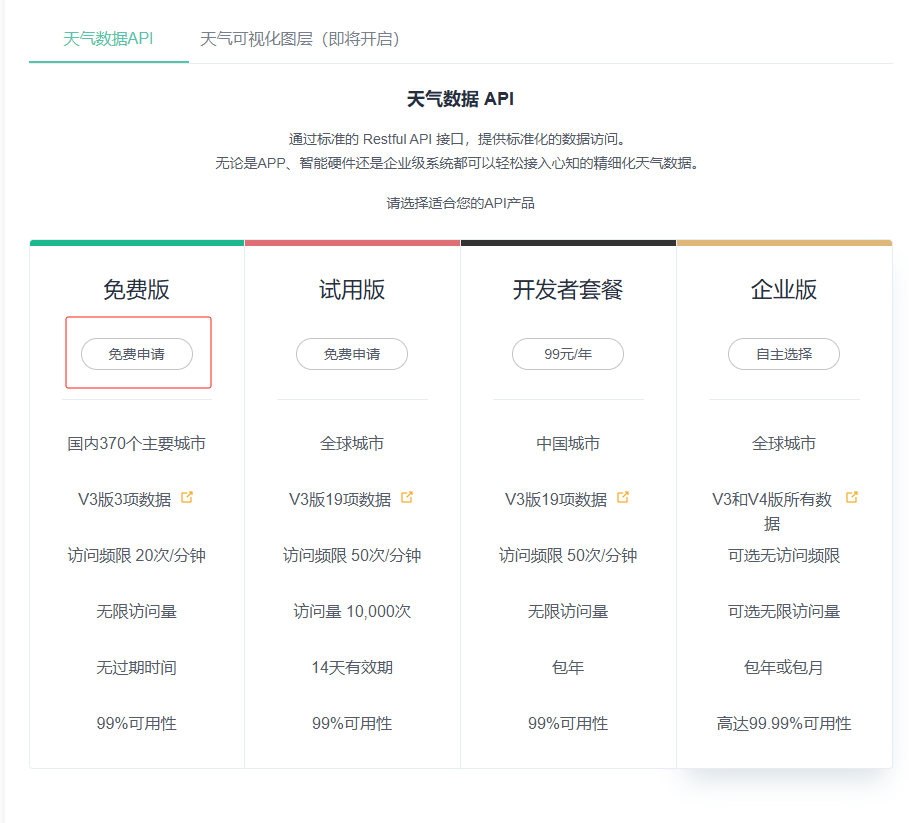
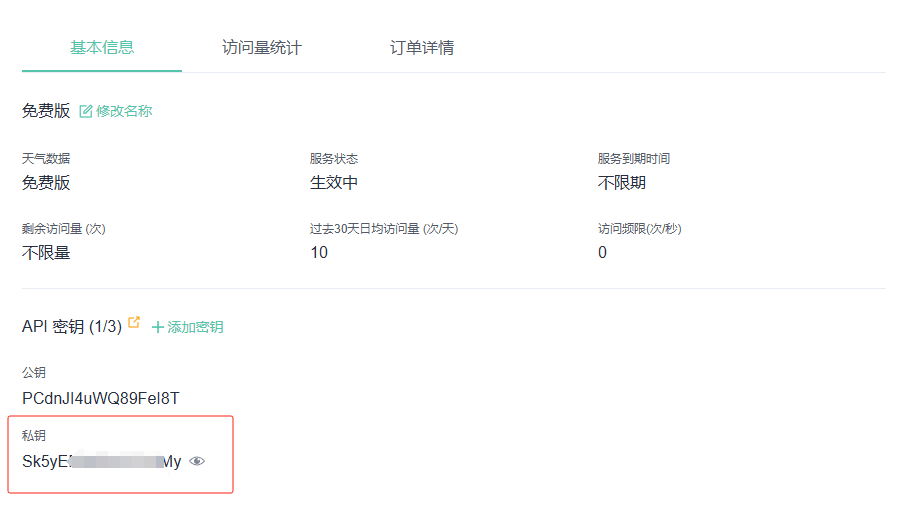
(4) After applying, you can view your private key (which will be needed in the API later).
4. Real-time Weather API
Open the Real-time Weather API documentation Weather · Xinzhi Technology
API address: https://api.seniverse.com/v3/weather/now.json?key=your_api_key&location=beijing&language=zh-Hans&unit=c
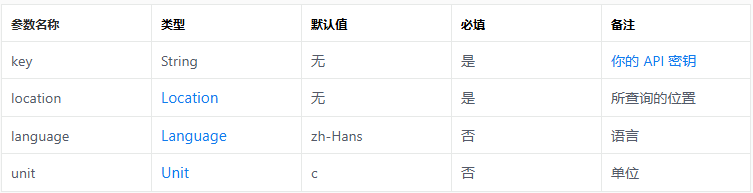
Request Parameter Description
5. Example Modification
This example uses an HTTP client:
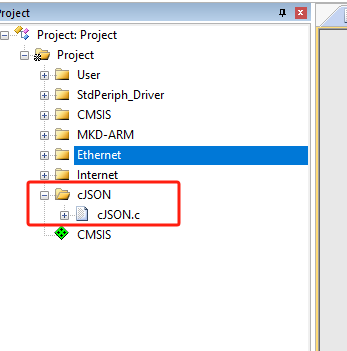
5.1 Adding a cJSON file
(1) Add a cJSON file for later parsing of the JSON data returned by the Xinzhi Weather API.
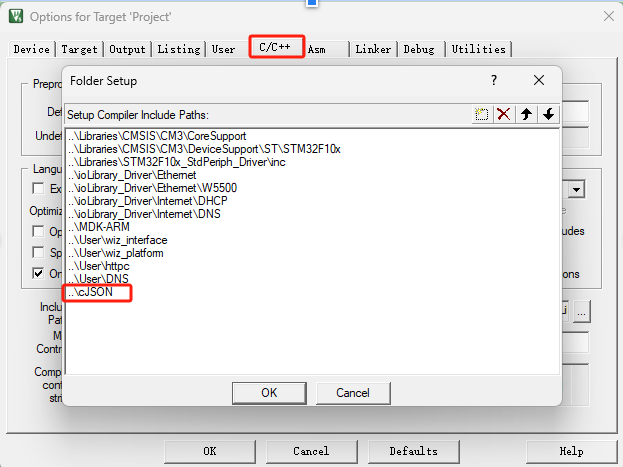
(2) Add the corresponding header file directory to the project.
5.2 Modify main.c
(1) In the main.c file, change the content of the org_server_name array from "httpbin.org" to "api.seniverse.com"
uint8_t org_server_name[] = "api.seniverse.com";5.3 Modify httpclient.c
(1) Add the cJSON.h header file and define variables
#include "cJSON.h"
uint8_t parse_complete = 0;// Add a global variable to track the parsing status
char weather[30]; // Character array to store weather information
char temp[30]; // Character array to store temperature information
(2) Replace the HTTP_GetPkt function, replace the key parameter in the request URL with the private key you applied for on the Xinzhi Weather platform, and replace the value of the location parameter with the pinyin name of the target city (e.g., Shenzhen corresponds to "shenzhen"). Note that you should not use Chinese city names.
uint32_t HTTP_GetPkt(uint8_t *pkt)
{
*pkt = 0;
strcat((char*)pkt, "GET /v3/weather/now.json?key=自己私钥&location=城市&language=zh-Hans&unit=c HTTP/1.1\r\n");
strcat((char*)pkt, "Host: api.seniverse.com");
strcat((char*)pkt, "\r\n\r\n");
return strlen((char*)pkt);
}
(3) Add a function to parse the JSON data for weather data
void receive_data_analysis(char* json_string, char* weather, char* temp)
{
// Parse the JSON string
cJSON *root = cJSON_Parse(json_string);
if (root == NULL) {
printf("Error before: [%s]\r\n", cJSON_GetErrorPtr());
return;
}
// Get the results array
cJSON *results = cJSON_GetObjectItem(root, "results");
if (!cJSON_IsArray(results)) {
printf("Error: 'results' is not an array\r\n");
cJSON_Delete(root);
return;
}
// Get the first result
cJSON *first_result = cJSON_GetArrayItem(results, 0);
if (first_result == NULL) {
printf("Error: No results" found\r\n");
cJSON_Delete(root);
return;
}
//Extract temperature information
cJSON *temperature = cJSON_GetObjectItem(cJSON_GetObjectItem(first_result, "now"), "temperature");
if (cJSON_IsString(temperature) && (temperature->valuestring != NULL)) {
strncpy(temp, temperature->valuestring, 30);
printf("Temperature: %s\r\n", temperature->valuestring);
} else {
printf("Error: 'temperature' not found or not a string\r\n");
}
//Extract weather information
cJSON *text = cJSON_GetObjectItem(cJSON_GetObjectItem(first_result, "now"), "text");
if (cJSON_IsString(text) && (text->valuestring != NULL)) {
strncpy(weather, text->valuestring, 30); printf("weather:%s\r\n", weather);
} else {
printf("Error: 'text' not found or not a string\r\n");
}
cJSON_Delete(root); // Release memory
}
(4) Replace the do_http_client function
void do_http_client(uint8_t sn, uint8_t *buf, uint8_t *destip, uint16_t destport)
{
uint16_t local_port = 50000;
uint16_t len;
static uint32_t content_length = 0;
static char* json_start = NULL;
switch (getSn_SR(sn))
{
case SOCK_INIT:
connect(sn, destip, destport);
break;
case SOCK_ESTABLISHED:
if (flag == 0)
{
len = HTTP_GetPkt(buf);
send(sn, buf, len);
flag = 1;
parse_complete = 0; // Reset parsing status
content_length = 0; // Reset content length
}
len = getSn_RX_RSR(sn);
if (len > 0)
{
uint16_t recv_len = recv(sn, buf, len);
buf[recv_len] = '\0';
// Find the starting position of the JSON (skip the HTTP header)
if (!json_start) {
json_start = strstr((char*)buf, "\r\n\r\n");
if (json_start) {
json_start += 4; // Skip blank lines
// Try to get the Content-Length
char* cl_header = strstr((char*)buf, "Content-Length: ");
if (cl_header) {
content_length = atoi(cl_header + 16);
}
}
} else {
// If the starting position has been found before, append data
strncat(json_start, (char*)buf, recv_len);
}
/ // Check if complete JSON has been received
if (json_start && (content_length == 0 || strlen(json_start) >= content_length))
{
printf("\r\nReceived JSON:\r\n%s\r\n", json_start);
/ // Parse pure JSON data
receive_data_analysis(json_start, weather, temp);
/ // Reset state
json_start = NULL;
parse_complete = 1;
/ // Actively close the connection
disconnect(sn);
close(sn);
}
}
break;
case SOCK_CLOSE_WAIT:
close(sn);
break;
case SOCK_CLOSED:
close(sn);
socket(sn, Sn_MR_TCP, local_port, 0x00);
break;
default:
break;
}
}
6. Function Verification
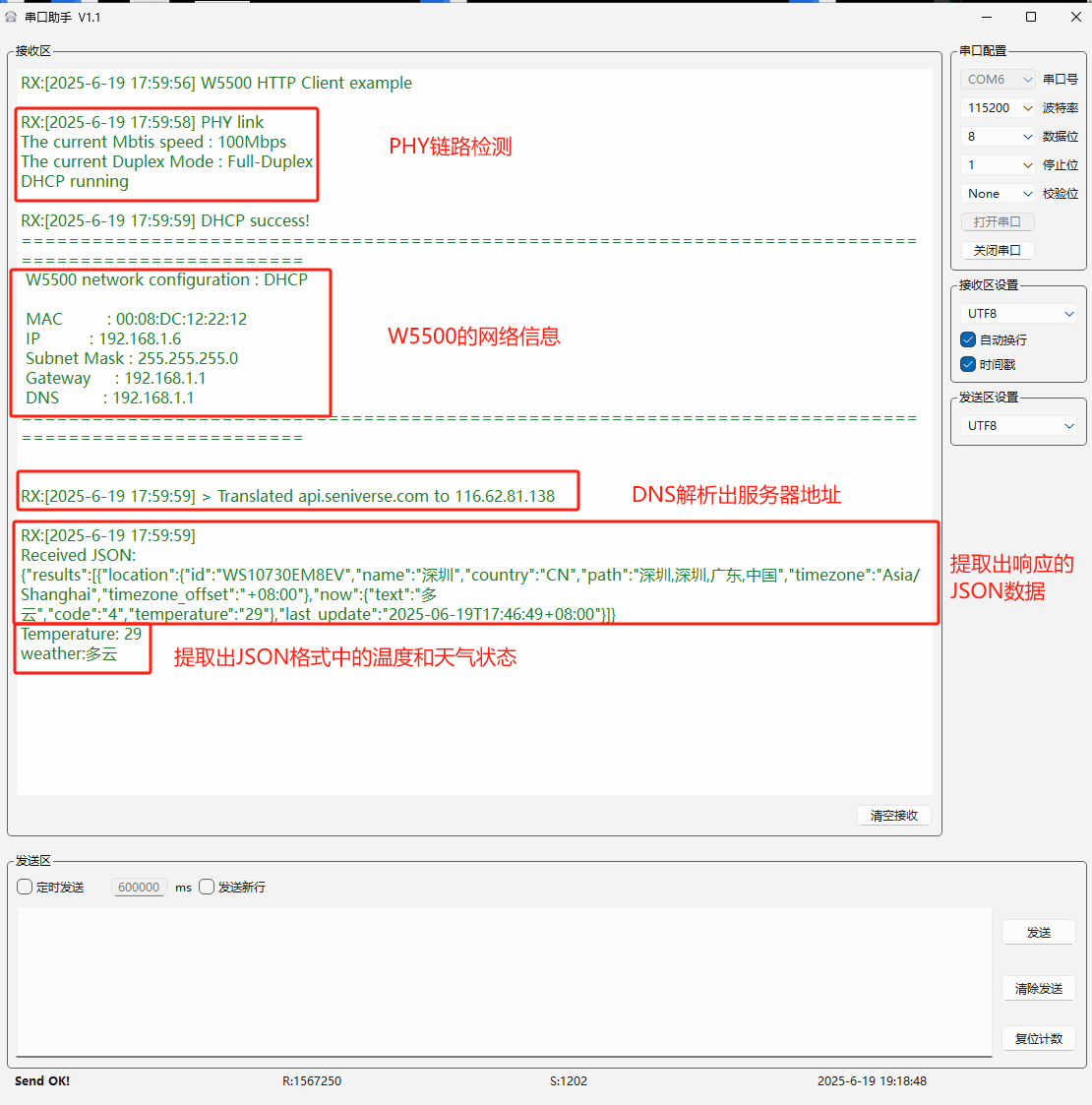
After burning and running the program, the system will perform the following operations in sequence: First, it will perform a PHY link check to ensure a normal physical layer connection; then, it will print the configured network address information to confirm the network configuration; subsequently, the system will display the server address obtained through DNS resolution to ensure a correct connection to the target server; next, the program will display the acquired JSON data to verify the integrity of the received data; finally, the system will parse and display the parsed temperature and weather status information.
7. Summary
This article details how to use the HTTP function of the W5500io-M module to obtain weather status information by calling the Xinzhi Weather API. Thank you for your patience in reading! If you have any questions during the reading process, or would like to learn more about this product and its applications, please feel free to leave a message via private message or in the comments section. We will reply to your message as soon as possible to provide you with more detailed answers and assistance!
———————————————— Copyright Notice: This article is an original article by CSDN blogger "Playing with Ethernet", and follows the CC 4.0 BY-SA copyright agreement. Please include the original source link and this statement when reprinting.
Original link: https://blog.csdn.net/2301_81684513/article/details/149506542