



farm_env_sensor
farm_env_sensor
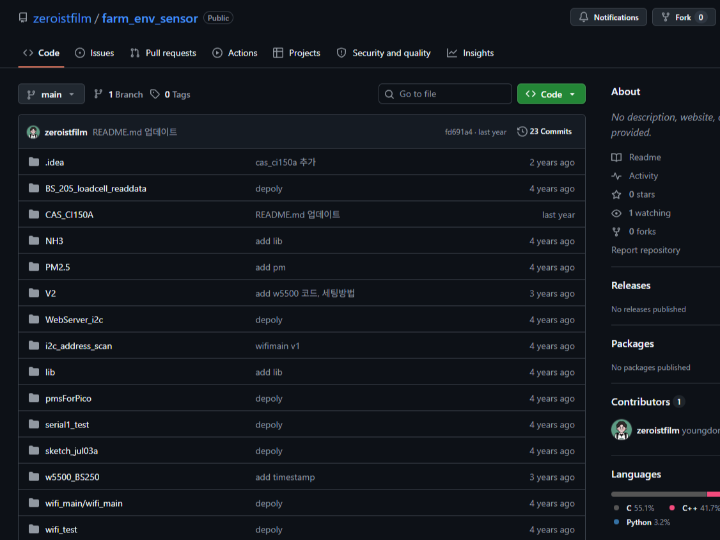
Smart Farm Environment Monitoring with W5100S-EVB-Pico & WizFi360-EVB-Pico
Overview
This project demonstrates a smart farm environmental monitoring system built on the RP2040, using WIZnet's W5100S-EVB-Pico and WizFi360-EVB-Pico to transmit real-time sensor data over Ethernet and Wi-Fi. A Python logger on the PC side polls the sensor node via HTTP every second and stores readings into a CSV file for analysis.
The system is especially suited for livestock environments (poultry, pig farms) where monitoring ammonia (NH3), fine dust (PM2.5), oxygen (O2), temperature/humidity, and animal weight is critical.
Components
| Component | Description |
|---|---|
| WIZnet W5100S-EVB-Pico | RP2040 + Hardwired TCP/IP Ethernet |
| WIZnet WizFi360-EVB-Pico | RP2040 + WizFi360 Wi-Fi module |
| NH3 Sensor | Ammonia gas (UART) |
| PM2.5 Sensor (PMS series) | Fine dust (UART) |
| Environmental Sensor | Temperature / Humidity (I2C 0x22) |
| Gas Sensor | Composite gas (I2C 0x78) |
| O2 Sensor | Oxygen concentration (I2C 0x72) |
| BS-205 / BS-250 + CAS CI150A | Load cell for animal weight (UART) |
| Arduino IDE + Python 3 | Firmware & data logging |
System Architecture
[ Sensors ]
  NH3, PM2.5   ──(UART)──┐
  Env/Gas/O2   ──(I2C)───┤──► [ RP2040 ] ──► HTTP WebServer (JSON)
  Load Cell    ──(UART)──┘         │
                             W5100S (Ethernet)
                             or WizFi360 (Wi-Fi)
                                   │
                       [ Python Data Logger (PC) ]
                        GET http://192.168.0.x/
                        → Parse JSON → Save to data.csv
Board Setup
For W5100S-EVB-Pico — Arduino IDE → Preferences → Additional Board Manager URLs:
https://github.com/WIZnet-ArduinoEthernet/arduino-pico/releases/download/global/package_rp2040-ethernet_index.jsonFor WizFi360-EVB-Pico:
https://github.com/earlephilhower/arduino-pico/releases/download/global/package_rp2040_index.json⚠️ The earlephilhower board manager also lists W5100S-EVB-Pico but is not compatible with its Ethernet functionality. Use the WIZnet-specific manager for the wired variant.
Hardware Connections
| Interface | TX | RX | Usage |
|---|---|---|---|
| Serial1 (UART0) | GP0 | GP1 | NH3 / PM2.5 sensor |
| Serial2 (UART1) | GP8 | GP9 | Load cell |
| Sensor | I2C Address |
|---|---|
| Environmental (Temp/Humidity) | 0x22 |
| Gas sensor | 0x78 |
| O2 sensor | 0x72 |
Firmware Overview
The core WebServer_i2c sketch reads all sensors and serves a JSON response over HTTP:
Serial1.begin(9600);   // UART0: NH3 / PM2.5 Serial2.begin(9600);   // UART1: Load cell Wire.begin();          // I2C: 0x22, 0x78, 0x72
 // GET / → { "nh3": ..., "pm25": ..., "temp": ..., "o2": ..., "weight": ... }
Two deployment variants are included:
w5500_BS250— W5500 Ethernet + BS-250 load cellwizfi360_BS205— WizFi360 Wi-Fi + BS-205 load cell
Python Data Logger
import requests, time, datetime
from csv import DictWriter
import os
 def get_request():     response = requests.get('http://192.168.0.177/')     data = response.json()
    data['time'] = datetime.datetime.now()     with open("data.csv", 'a', newline='') as f:         writer = DictWriter(f, fieldnames=data.keys())         if os.path.getsize('data.csv') == 0:             writer.writeheader()
        writer.writerow(data)  while True:     get_request()
    time.sleep(1)
Polls the sensor node every second, timestamps each reading, and appends to data.csv — ready for Excel or any visualization tool.
Why W5100S-EVB-Pico and WizFi360-EVB-Pico?
W5100S: Hardwired TCP/IP offload
Unlike most MCU networking solutions where the TCP/IP stack runs in software and competes for CPU time, the W5100S implements the entire stack in hardware silicon. For this project specifically, that means:
- Long-term stability — Farm sensors run continuously for months. Software stacks can accumulate timing errors or memory issues over time; the hardwired engine simply stays up.
- CPU headroom — The RP2040 simultaneously manages two UART streams and an I2C bus. Offloading TCP/IP to silicon ensures network handling never delays sensor reads.
- Consistent response time — The Python logger polls every second. Hardware TCP/IP delivers deterministic latency that interrupt-driven software stacks cannot fully guarantee.
W5100S-EVB-Pico: integration advantage
Rather than wiring a separate W5100S module to a Pico over SPI, this board integrates both on a single PCB — fewer failure points, smaller footprint, and one power rail. The developer also noted in the README that the WIZnet-specific board manager must be used (not the generic earlephilhower one) to correctly enable the hardwired Ethernet peripheral.
WizFi360-EVB-Pico: same codebase, no cables
Running Ethernet across a large farm is often impractical. The WizFi360-EVB-Pico adds Wi-Fi while keeping the same RP2040 core and Arduino sketch structure — the sensor logic, pin assignments, and HTTP server code are nearly identical to the wired version. This dramatically reduces the effort of supporting both wired and wireless nodes in a single deployment.
At a Glance
| W5100S-EVB-Pico | WizFi360-EVB-Pico | |
|---|---|---|
| Connectivity | Wired Ethernet (RJ45) | Wi-Fi 802.11 b/g/n |
| TCP/IP | Hardwired silicon | AT command (WizFi360) |
| CPU overhead | Near zero | Low |
| Best for | Fixed nodes, stable environment | Field nodes, no cable runs |
| Shared RP2040 + sketch base | ✅ | ✅ |
Use Cases
- 🐄 Livestock farms — NH3, PM2.5, O2, temperature, weight monitoring
- 🌿 Greenhouses — Climate and air quality control
- 🏭 Industrial — Wired Ethernet for 24/7 reliable deployment
- 🔬 Research / Lab — Wireless portable setup
References
- GitHub: https://github.com/zeroistfilm/farm_env_sensor
- W5100S-EVB-Pico Board Manager guide: https://inmile.tistory.com/42
- WizFi360-EVB-Pico Getting Started: https://www.hackster.io/giung-kim/how-to-use-wizfi360-evb-pico-in-arduino-065b98
- WIZnet Docs: https://docs.wiznet.io
Tags: W5100S-EVB-Pico, WizFi360-EVB-Pico, RP2040, Smart Farm, IoT, Environmental Sensor, NH3, PM2.5, Arduino, WebServer