



“Catching the UDP Firehose”: Bringing WIZnet W6300 QSPI Ethernet to Propeller 2 (Spinner Edge II)
A Propeller 2 + W6300 bring-up story: QSPI pin planning, power-debug lessons, and early driver porting to handle high-rate UDP streams.
WIZnet - W6300
x 1
WIZnet - W6100 driver codebase
x 1
Introduction
Let’s start with the pain point.
In some projects—like network-driven lighting control—UDP packets don’t arrive politely. They arrive like a firehose. In the original setup (using W6100), the author saw UDP bursts overrun buffers because the host couldn’t pull data out fast enough.
So the goal here is simple: move to WIZnet W6300, use QSPI, and try to keep up with high-rate UDP without dropping packets.
WIZnet Product Integration
Here’s the integration flow:
Propeller 2 (host) → QSPI (4-bit) → W6300 → Ethernet network
W6300 is attractive because it targets high-throughput operation over QSPI, and it has larger internal buffer memory (32KB). For “UDP stream” workloads, that combination is exactly what you want to test.
One big lesson from the thread: QSPI isn’t only a software choice—it’s also a pin-planning choice. On Propeller 2, pin placement affects whether you can use smartpin tricks or a streamer/DMA-style approach. The discussion even suggests using jumpers so you can experiment with different pin orders without a full board respin.
Technical Implementation
Let’s walk through what happened during bring-up.
1) “Is it alive?” checks
Link/activity indicators came up (PHY side looked alive)
Reset behavior was verified (forcing reset drops link, then it recovers)
2) First SPI/QSPI reads: why only 0x00?
Early reads returned only zeros even though the bus looked correct.
The fix ended up being a classic hardware gotcha: a 1.2V rail issue caused foldback and reboots. Once the rail problem was resolved, register reads started behaving.
3) Datasheet mismatch note
A pin-description mismatch across datasheet revisions was mentioned, and the author leaned on reference behavior during layout.
4) Driver porting status
The encouraging part: common register access worked early, and the driver felt “close.”
The remaining issue: once moving beyond common registers, transmitted payload data appeared corrupt—suggesting the next fixes were around block selection constants / buffer access paths.
Reproduction Guide
If you want to reproduce a similar bring-up workflow, do it like this:
Choose QSPI early
If you’re chasing throughput, commit to QSPI and plan the pinout accordingly.
Validate power rails before blaming SPI
Especially verify the 1.2V rail (shorts, low resistance, foldback symptoms).
Confirm PHY-level signs of life
Check link/activity and reset behavior.
Start with a tiny “known read”
Read a well-known common register / chip-ID path first.
Port the driver in small steps
Common regs → socket setup → RX/TX buffer mapping and block selection.
Core Features and Performance
Here’s the performance motivation in plain terms.
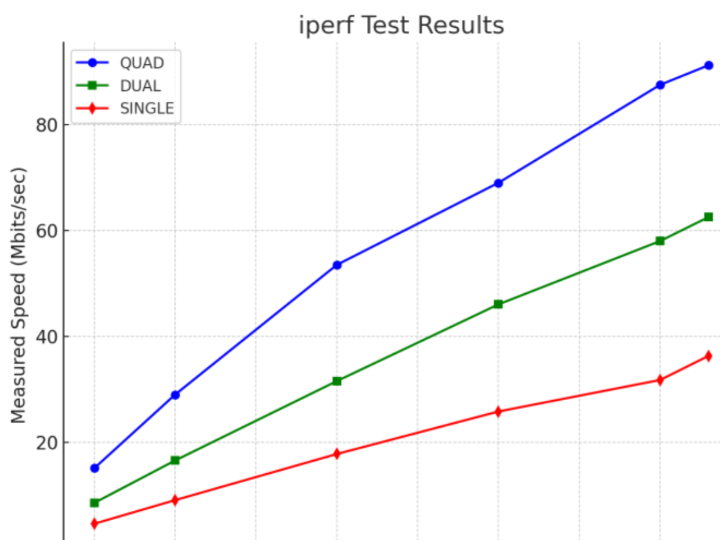
W6300 is positioned for high throughput over QSPI in WIZnet’s materials (often described as “up to ~90 Mbps” class, depending on conditions).
In the thread, the author explicitly aims for that performance class to handle bursty UDP.
The practical takeaway: even if you don’t hit a headline number, QSPI + bigger buffering is a strong recipe when your primary enemy is packet loss under burst load.
Code Snippet
Here’s a minimal, pseudo-code style “first win” step adapted from the forum’s SPI read sequence: prove you can read the chip’s common register space before attempting full socket I/O.
Once this is stable, you can move on to socket creation and verify RX/TX buffer mapping.
Applications and Extensions
Once W6300 QSPI is stable, here are natural next steps:
High-rate UDP receivers for lighting control workflows (E1.31-based)
Real-time telemetry collectors that can’t afford drops
Embedded gateways where hardware TCP/IP offload and predictable sockets matter
Performance experiments: smartpin-driven QSPI vs streamer/DMA transfers (planned)
Conclusion
To wrap up, this project is a clean reminder that “fast Ethernet” is a full-stack problem.
W6300 gives you the networking muscle—QSPI and larger buffering—but success depends on pin planning, power integrity, and a disciplined bring-up sequence.
- Call to Action: If your design is dropping UDP packets under burst load, try a W6300 + QSPI approach—and share your pinout and throughput results with the maker.wiznet.io community.