


[W55RP20] Rust Networking Guide – Updated Edition
A text-based Rust networking guide for W55RP20, based on Lihan’s original work, with UART debugging improvements and a MACRAW reference using cotton.
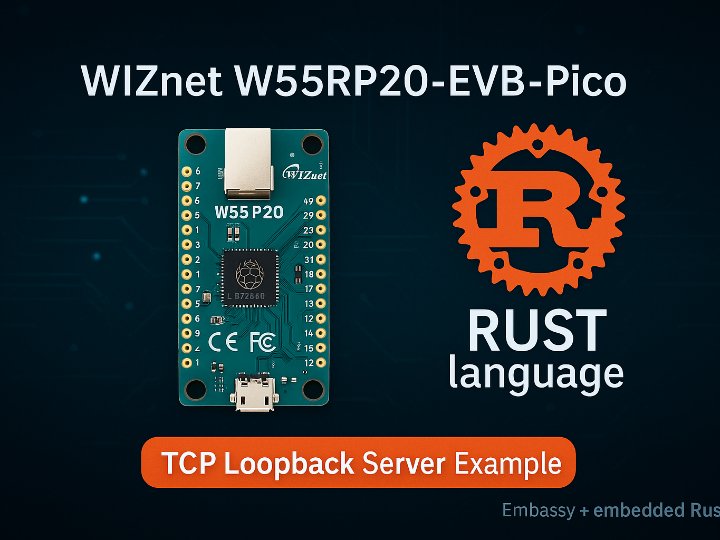
Mozzila Foundation -> Rust Foundation - Rust Programming Language (rustlang)
x 1
Overview
This document is based on the original W55RP20 Rust Embassy Guide written by Lihan and published on maker.wiznet.io:
https://maker.wiznet.io/Lihan__/projects/w55rp20-rust-embassy-guide/
The original guide demonstrates how to run Rust networking examples on the W55RP20-EVB-Pico board and is primarily presented in an image-based format.
This document rewrites the same content into a fully text-based guide, allowing all commands and steps to be copied and executed directly.
In addition to the original content, this updated edition includes:
- A UART-based debugging approach proposed by Lihan, intended for environments where RTT or probe-based debugging is not available
- A brief reference to MACRAW-based W5500 operation using cotton, added as an architectural reference for readers who want to understand lower-level networking composition
The goal of this document is to provide a practical, reproducible Rust networking guide for W55RP20, while preserving the intent of the original work and extending it with field-tested improvements.
Environment
- OS: Windows 11
- Board: W55RP20-EVB-Pico
- Network: Ethernet with DHCP
- Optional: USB–UART adapter (e.g. HW-417-V1.2)
Rust Installation and Update
Install Rust if it is not already installed:
Verify the installation:
Update rustup and the toolchain:
Install ELF to UF2 Converter (RP2040)
Clone Embassy Repository
Embassy uses
rust-toolchain.tomlto pin a specific Rust version.
This behavior is expected.
Locate the W55RP20 Example
Add RP2040 Target
Build the Example
Convert ELF to UF2
Flash and Run
Hold the BOOTSEL button
Connect the board via USB
Drag the generated .uf2 file to the mounted drive
The board reboots and runs automatically
UART Debugging (Proposed by Lihan)
When RTT or probe-based debugging is not available, Lihan proposed using UART output for debugging.
Wiring
- GP0 (TX) → USB–UART RX
- GP1 (RX) → USB–UART TX
- GND → GND
Terminal Settings
- Baudrate: 115200
- Data format: 8N1
Applying the UART Debug Patch
This patch enables UART logs for startup, DHCP status, IP address, and TCP connection events.
MAC Address Configuration
In the example source code, set the MAC address as follows:
Note on MACRAW Reference (cotton)
This document briefly references that a similar loopback configuration can be implemented using MACRAW mode with cotton, where the W5500 operates as a raw Ethernet device and is connected to a higher-level stack such as smoltcp.
This reference is provided for architectural understanding only.
Appendix: MACRAW Loopback Example using cotton (Reference)
Overview
In addition to the Embassy-based networking example,
a loopback (echo) implementation using W5500 MACRAW mode can also be built with cotton.
In this approach, the W5500 operates as a raw Ethernet device, and higher-level networking (IP/TCP) is handled by smoltcp.
This configuration is useful for understanding how Rust embedded networking can be fully decomposed and reassembled.
This section is provided as a reference only and is not part of the main build-and-run flow.
Where to Find the Actual Source Code
The cotton project already provides working examples that demonstrate:
- W5500 operating in MACRAW mode
- Integration with smoltcp
- Packet-level control below the TCP/IP stack
The most relevant sources can be found in the cotton repository:
These examples show how the W5500 is exposed as a smoltcp::phy::Device and can be reused to implement a TCP loopback.
Loopback Structure (Conceptual)
A typical MACRAW-based loopback using cotton follows this structure:
- Initialize W5500 in MACRAW mode
- Provide a MAC address to the driver
- Bind the driver to smoltcp Interface
- Create a TCP socket
- Echo received data back to the sender
Minimal Loopback Skeleton (Reference)
This skeleton is intentionally incomplete and focuses on architecture, not copy-and-run usage.
For a complete working example, refer to the cotton repository examples listed above.
Positioning Note
- Embassy example: recommended for immediate development and deployment
- cotton MACRAW example: reference architecture for understanding raw Ethernet and stack composition
Reference
cotton project repository:
https://github.com/pdh11/cotton
Original W55RP20 guide by Lihan:
https://maker.wiznet.io/Lihan__/projects/w55rp20-rust-embassy-guide/
개요
이 문서는 maker.wiznet.io에 Lihan이 작성한
W55RP20 Rust Embassy Guide를 기반으로 작성되었습니다.
원문 가이드는 W55RP20-EVB-Pico 보드에서 Rust 네트워킹 예제를 실행하는 과정을 설명하며, 이미지 중심으로 구성되어 있습니다.
본 문서에서는 동일한 내용을 텍스트 기반으로 재작성하여, 모든 명령과 절차를 그대로 복사하여 실행할 수 있도록 정리했습니다.
또한 본 업데이트 버전에는 다음 내용이 추가되어 있습니다.
- RTT 또는 디버그 프로브를 사용할 수 없는 환경을 고려하여, Lihan이 제안한 UART 기반 디버깅 방식
- 고급 사용자를 위한 참고 자료로서, cotton을 이용한 MACRAW 기반 W5500 동작 방식에 대한 간단한 안내
이 문서의 목적은 원문의 의도를 유지하면서,
현장에서 바로 재현 가능한 실용적인 W55RP20 Rust 네트워킹 가이드를 제공하는 데 있습니다.
환경
- 운영체제: Windows 11
- 보드: W55RP20-EVB-Pico
- 네트워크: Ethernet (DHCP)
- 선택 사항: USB–UART 어댑터 (HW-417-V1.2 등)
Rust 설치 및 업데이트
Rust가 설치되어 있지 않은 경우:
설치 확인:
업데이트:
UF2 변환 도구 설치
Embassy 저장소 받기
Embassy는
rust-toolchain.toml을 통해 Rust 버전을 고정합니다.
이는 정상적인 동작입니다.
W55RP20 예제 위치
RP2040 타깃 추가
빌드
ELF → UF2 변환
실행
BOOTSEL 버튼을 누른 상태에서 USB 연결
생성된 .uf2 파일을 드라이브에 드래그
자동 재부팅 후 실행
UART 디버깅 (Lihan 제안 방식)
RTT 또는 디버그 프로브를 사용할 수 없는 환경에서는,
Lihan이 제안한 UART 출력 방식을 통해 디버깅할 수 있습니다.
배선
- GP0 (TX) → USB–UART RX
- GP1 (RX) → USB–UART TX
- GND → GND
터미널 설정
- Baudrate: 115200
- 8N1
UART 디버깅 diff 적용
이 패치는 시작 메시지, DHCP 상태, IP 주소, TCP 연결 상태를 UART로 출력합니다.
MAC 주소 설정
예제 코드에서 MAC 주소를 다음과 같이 설정합니다.
부록: cotton 기반 MACRAW 루프백 예제 (참고)
개요
Embassy 기반 네트워킹 예제 외에도,
cotton을 사용하여 W5500을 MACRAW 모드로 동작시키는 루프백(에코) 구성이 가능합니다.
이 방식에서는 W5500이 원시 이더넷 장치로 동작하며,
IP/TCP 계층은 smoltcp가 담당합니다.
Rust 임베디드 네트워킹을 최소 단위까지 분해해 이해하기 위한 구조적 참고용 구성입니다.
본 섹션은 참고용이며, 본 문서의 주 실행 흐름에는 포함되지 않습니다.
실제 소스 코드 위치
cotton 프로젝트에는 이미 다음을 포함한 예제가 제공됩니다.
- W5500 MACRAW 모드 동작
- smoltcp 연동
- TCP/IP 스택 하위 계층 제어
관련 소스는 다음 경로에서 확인할 수 있습니다.
해당 예제들은 W5500을 smoltcp::phy::Device로 연결하는 과정을 보여주며,
이를 기반으로 TCP 루프백을 구성할 수 있습니다.
루프백 구조 개요
cotton 기반 MACRAW 루프백은 다음 흐름을 가집니다.
- W5500을 MACRAW 모드로 초기화
- MAC 주소 설정
- smoltcp Interface 구성
- TCP 소켓 생성 및 listen
- 수신 데이터를 그대로 송신 (echo)
최소 루프백 구조 예시 (참고용)
위 코드는 구조 이해용 예시이며,
실제 동작 가능한 전체 예제는 cotton 저장소의 예제를 참고하시기 바랍니다.
위치 정리
- Embassy 예제: 즉시 실행 가능한 실전 경로
- cotton MACRAW 예제: 네트워크 구조 이해를 위한 레퍼런스
참고
cotton 프로젝트:
https://github.com/pdh11/cotton
Lihan 원문 가이드:
https://maker.wiznet.io/Lihan__/projects/w55rp20-rust-embassy-guide/


