



NRC7394 W5500 Bridge Firmware for Fixed Wi-Fi HaLow Node Deployment
Prebuilt NRC7394/W5500 bridge firmware assigns one AP and multiple STA nodes with static IPs and boot-time AP ping checks.
1. Overview
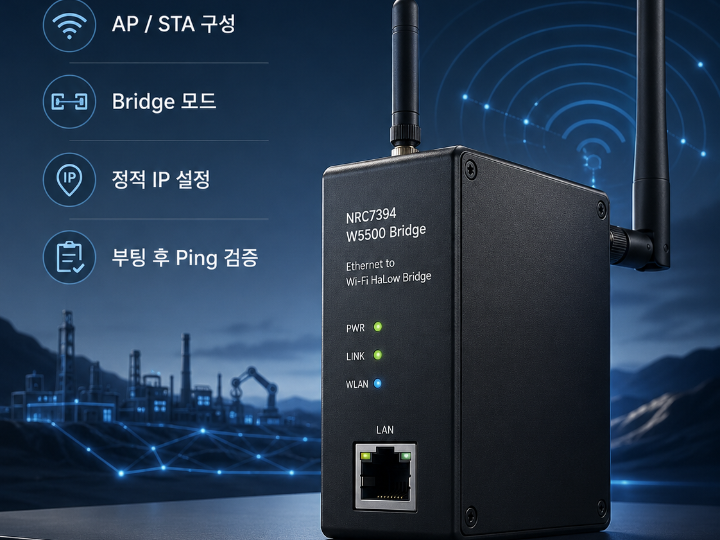
This project provides a fixed firmware build set for an NRC7394 and W5500 based Ethernet-to-Wi-Fi HaLow bridge configuration.
The repository is not a general application framework. It is closer to a deployment-ready firmware submission package derived from the NRC7394 SDK W5500 Ethernet bridge example. Its main purpose is to prepare predictable firmware binaries for a small multi-node HaLow bridge network.
The current package defines three initial nodes:
| Node | Wi-Fi Mode | Network Mode | Static IP | Gateway |
|---|---|---|---|---|
| 1 | AP | Bridge | 192.100.114.1 | 192.100.114.1 |
| 2 | STA | Bridge | 192.100.114.2 | 192.100.114.1 |
| 3 | STA | Bridge | 192.100.114.3 | 192.100.114.1 |
Node 1 acts as the Wi-Fi HaLow access point. Nodes 2 and 3 act as stations. All nodes use bridge mode and fixed addressing.
2. What Problem It Solves
The project solves a practical deployment problem: preparing repeatable firmware images for a small Wi-Fi HaLow bridge network where each node has a known role and address.
Instead of manually editing firmware settings per board, the build uses FW_NODE_ID to determine the node role and IP address at compile time. This makes node-specific firmware generation easier and reduces the chance of mismatched AP/STA settings.
The second practical improvement is validation. The updated firmware starts a short ping test from STA nodes to the AP gateway after connection succeeds. This gives a simple first-level connectivity check immediately after boot.
3. System Structure
The intended system can be understood as follows:
[Wired Ethernet Device or Segment]
            |
            v
        [W5500]
   Ethernet MAC/PHY side
            |
            v
 [NRC7394 Bridge Firmware]
            |
            v
   Wi-Fi HaLow AP or STA Link
            |
            v
 [Remote HaLow Node / Ethernet Side]
At the system level:
- W5500 provides the wired Ethernet-facing interface.
- NRC7394 provides the Wi-Fi HaLow wireless side.
- Firmware bridge mode connects the Ethernet side and the HaLow side.
- Node identity is selected at build time through
FW_NODE_ID. - Node 1 becomes the AP and gateway reference.
- Nodes 2 and later become STA nodes.
4. Operation Flow
1. Build firmware with FW_NODE_ID
2. Firmware selects AP or STA role
3. Firmware applies bridge mode
4. Firmware applies static IP, netmask, and gateway
5. AP node starts as the HaLow access point
6. STA node connects to the AP
7. STA node runs a short ping test to the AP gateway
8. Ethernet traffic can pass through the bridge path
The key logic is not complicated, which is a good thing. Embedded networking does not become better just because someone buries it under twelve layers of cleverness.
5. Source-Level Changes
The project modifies the original NRC7394 SDK W5500 bridge example in three important places.
5.1 Build-Time Node Selection
The Makefile passes FW_NODE_ID as a compiler definition. This lets the same source base produce multiple node-specific firmware binaries.
Example intent:
FW_NODE_ID=1 -> AP node
FW_NODE_ID=2 -> STA node
FW_NODE_ID=3 -> STA node
This is useful when preparing a fixed set of bridge devices for a controlled deployment.
5.2 Wi-Fi and IP Configuration
The Wi-Fi configuration is changed so that:
FW_NODE_ID == 1selects AP mode.- Other node IDs select STA mode.
- Network mode is fixed to Bridge.
- Static IP becomes
192.100.114.<FW_NODE_ID>. - Gateway is fixed to
192.100.114.1.
This keeps the network deterministic but also makes the address plan rigid.
5.3 STA-to-AP Ping Check
The updated firmware adds a short ping sequence after STA connection succeeds.
The STA node pings the configured gateway, which is the AP node address. This does not prove full application-layer reliability, but it is a useful sanity check for link establishment, IP configuration, and basic reachability.
6. WIZnet W5500 Role
W5500 is the wired Ethernet side of the bridge design.
In a typical embedded system, W5500 gives a microcontroller Ethernet connectivity through a hardware TCP/IP capable Ethernet controller. In this project, its practical role is to provide the Ethernet-facing interface for the NRC7394 W5500 bridge firmware.
The important distinction is this:
- W5500 is a TOE-capable Ethernet controller.
- The repository itself mainly documents bridge firmware configuration and generated binaries.
- The visible source patch does not prove that the application is using W5500 TCP/UDP socket offload as an application-layer network endpoint.
- For this project, W5500 should be described primarily as the Ethernet interface used by the bridge firmware, not as a standalone application TCP/IP engine.
7. TOE Applicability
W5500 includes a hardwired TCP/IP stack, so the hardware is TOE-capable in the WIZnet sense.
However, this repository is about bridge firmware. The confirmed changes are AP/STA role selection, bridge mode, static addressing, build-time node selection, and STA-to-AP ping validation. The repository does not provide enough visible source evidence to claim that the firmware’s main bridge path depends on W5500 socket-level TCP/IP offload.
Best wording:
The design uses W5500, a hardware TCP/IP capable Ethernet controller, as the wired Ethernet interface. The repository does not provide enough evidence to claim that application-level TCP/UDP offload is the main purpose of the firmware; the confirmed system role is Ethernet-to-Wi-Fi HaLow bridging.
8. Build and Deployment Model
The repository includes Docker files for a reproducible SDK build environment.
The intended build process is:
1. Clone or prepare the NRC7394 SDK
2. Copy Dockerfile.sdk and docker-compose.yml into the SDK root
3. Start the Docker build container
4. Enter the SDK build environment
5. Select the sample_w5500_eth application
6. Build with a specific FW_NODE_ID
7. Repeat for each node
Example build identity:
FW_NODE_ID=1 -> node01 AP firmware
FW_NODE_ID=2 -> node02 STA firmware
FW_NODE_ID=3 -> node03 STA firmware
The repository already includes generated binaries for the first three nodes.
9. Engineering Value
The value of this project is practical, not flashy.
It is useful because it:
- Converts a generic SDK example into node-specific bridge firmware.
- Reduces manual configuration mistakes.
- Separates AP and STA behavior through compile-time node IDs.
- Provides fixed IP addressing for controlled test networks.
- Adds a simple connectivity check from STA nodes to the AP.
- Includes Docker build support for repeatability.
This is the kind of work that looks small until someone has to flash ten boards by hand and then debug which one has the wrong gateway.
10. Best-Fit Use Cases
This project is most suitable for:
- Wi-Fi HaLow Ethernet bridge evaluation
- Long-range IoT Ethernet extension
- Industrial sensor or controller link testing
- Field node connectivity validation
- NRC7394 SDK-based bridge firmware customization
- W5500-based embedded Ethernet bridge experiments
It is less suitable as-is for:
- Production networks without address review
- Dynamic DHCP-based deployments
- Security-critical networks requiring documented authentication policy
- Performance benchmarking
- General-purpose W5500 TCP/UDP application development
11. Risk and Limitation Analysis
Fixed Public-Looking IP Range
The configured 192.100.114.x range is not a standard private IPv4 range. For isolated lab networks this may be acceptable, but for real deployments it should be changed to a proper private range such as 10.x.x.x, 172.16.x.x, or 192.168.x.x.
NVS Override Risk
The README notes that existing NVS Wi-Fi settings may override compiled defaults. This is an important validation issue. A board flashed with the correct firmware may still behave incorrectly if old runtime configuration remains stored.
Limited Source Scope
The repository includes patches and binaries rather than a full standalone firmware source tree. This is enough to understand the intended changes, but not enough to fully audit the bridge implementation, Ethernet driver path, RF configuration, security policy, or production behavior.
No Performance Evidence
There are no throughput, latency, packet loss, RF distance, or long-duration stability results in the repository. The ping addition is useful as a boot-time check, but it is not a performance test.
Regulatory and RF Setup Not Covered
Wi-Fi HaLow deployments are frequency- and region-sensitive. The patch shows a country code and channel setting, but production use would still require proper regulatory, antenna, RF, and certification review.
12. Adoption Conditions
This project becomes valuable when the user already has:
- NRC7394 hardware or EVK
- W5500-connected Ethernet bridge hardware
- Access to the NRC7394 SDK
- A controlled test network
- A need for repeatable AP/STA node firmware images
- A clear plan for IP address allocation
Before using it outside a lab, the following should be checked:
- Replace
192.100.114.xwith a proper private address plan. - Clear NVS before validating compiled defaults.
- Confirm the exact W5500 hardware wiring and driver mode.
- Confirm bridge behavior under real traffic, not just ping.
- Verify security settings.
- Run long-duration stability and throughput tests.
- Review RF channel, country code, and regulatory constraints.
13. Final Technical Judgment
This is a focused firmware packaging and configuration project for NRC7394/W5500 bridge deployment.
Its strongest point is not novelty. Its strength is operational clarity: one AP node, multiple STA nodes, fixed bridge mode, fixed addressing, repeatable builds, and a simple STA-to-AP reachability test.
The project should be presented as an embedded bridge firmware deployment aid, not as a complete networking product. It is useful for controlled evaluation, firmware submission, and early field testing, but it still needs network address cleanup, security review, RF validation, and real traffic testing before being treated as production-ready.
KR – 기술 검토용 버전
1. 개요
이 저장소는 NRC7394와 W5500을 이용한 Ethernet-to-Wi-Fi HaLow 브리지 펌웨어 제출용 패키지다.
새로운 네트워크 프로토콜을 구현한 프로젝트라기보다는, NRC7394 SDK의 sample_w5500_eth 예제를 기반으로 노드별 역할과 IP 구성을 고정하고, 제출 가능한 바이너리 형태로 정리한 저장소에 가깝다.
핵심 구성은 단순하다.
| 노드 | Wi-Fi 역할 | 네트워크 모드 | 정적 IP | Gateway |
| 1 | AP | Bridge | 192.100.114.1 | 192.100.114.1 |
| 2 | STA | Bridge | 192.100.114.2 | 192.100.114.1 |
| 3 | STA | Bridge | 192.100.114.3 | 192.100.114.1 |
Node 1은 HaLow AP 역할을 하고, Node 2와 Node 3은 STA로 접속한다. 세 노드는 모두 Bridge 모드로 동작한다.
2. 프로젝트의 본질
이 프로젝트의 본질은 “NRC7394 + W5500 브리지 예제를 노드별 고정 펌웨어로 만드는 작업”이다.
즉, 사용자가 매번 수동으로 AP/STA 설정, IP 주소, Gateway를 바꾸는 대신 FW_NODE_ID 값만 바꿔 빌드하면 각 노드에 맞는 펌웨어가 생성되도록 구성했다.
이 구조는 대량 생산용 자동화까지는 아니지만, 적어도 소규모 테스트 노드 여러 개를 준비할 때 설정 실수를 줄여준다.
3. 시스템 구조
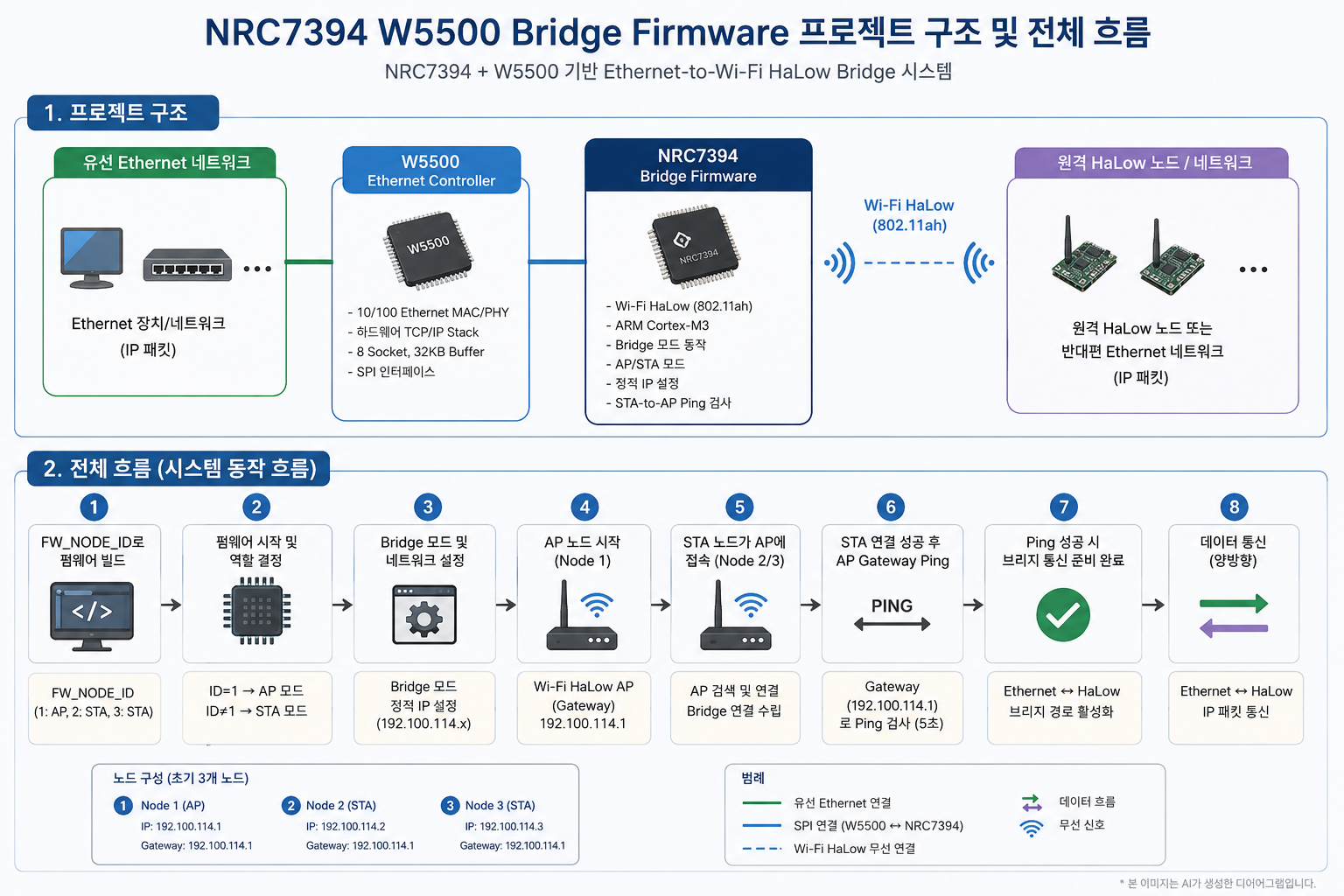
전체 구조는 다음처럼 볼 수 있다.
[유선 Ethernet 장치 또는 네트워크]
              |
              v
           [W5500]
    유선 Ethernet 인터페이스
              |
              v
 [NRC7394 W5500 Bridge Firmware]
              |
              v
        Wi-Fi HaLow AP/STA 링크
              |
              v
 [원격 HaLow 노드 / 반대편 Ethernet 구간]
각 구성요소의 역할은 다음과 같다.
| 구성요소 | 역할 |
| NRC7394 | Wi-Fi HaLow 무선 연결 담당 |
| W5500 | 유선 Ethernet 인터페이스 담당 |
| Bridge firmware | Ethernet 측과 HaLow 측을 연결 |
| FW_NODE_ID | 노드 역할과 IP를 빌드 시점에 결정 |
| Node 1 | AP 및 Gateway 기준점 |
| Node 2 이상 | STA 노드 |
4. 동작 흐름
1. FW_NODE_ID를 지정해 펌웨어 빌드
2. 펌웨어가 노드 ID를 기준으로 AP 또는 STA 역할 선택
3. 네트워크 모드를 Bridge로 설정
4. 정적 IP, Netmask, Gateway 적용
5. Node 1은 AP로 동작
6. Node 2/3은 STA로 AP에 접속
7. STA 연결 성공 후 AP Gateway로 ping 수행
8. Ethernet-HaLow 브리지 경로 사용
이 흐름에서 중요한 점은 “동적 설정”보다 “고정된 배포 구성을 반복 가능하게 만드는 것”이다.
5. 코드 변경의 의미
5.1 FW_NODE_ID 기반 빌드
Makefile은 FW_NODE_ID를 컴파일 define으로 전달한다.
이 방식의 장점은 하나의 코드베이스에서 여러 노드용 펌웨어를 만들 수 있다는 점이다.
FW_NODE_ID=1 -> AP 노드
FW_NODE_ID=2 -> STA 노드
FW_NODE_ID=3 -> STA 노드
이것은 현장 테스트나 데모 환경에서 꽤 유용하다. 사람이 수동으로 파일 열고 숫자 바꾸다가 망치는, 그 유서 깊은 인류의 전통을 조금 줄여준다.
5.2 AP/STA 자동 분기
wifi_user_config.h는 FW_NODE_ID 값을 보고 Wi-Fi 역할을 결정한다.
FW_NODE_ID == 1이면 AP- 그 외 노드는 STA
- 네트워크 모드는 Bridge
- IP는
192.100.114.<FW_NODE_ID> - Gateway는
192.100.114.1
즉, Node 1은 기준 AP가 되고, 나머지 노드는 AP에 붙는 STA 브리지 노드가 된다.
5.3 STA-to-AP Ping 추가
v2 펌웨어의 중요한 차이는 STA 노드가 AP 연결에 성공한 뒤 Gateway로 ping을 보낸다는 점이다.
이 ping은 다음을 빠르게 확인한다.
- STA가 AP에 붙었는지
- Gateway IP 설정이 맞는지
- 기본적인 IP reachability가 있는지
- 부팅 직후 연결 상태가 최소한 정상인지
다만 ping 성공이 곧 전체 브리지 성능, 장시간 안정성, TCP/UDP 품질, RF 품질을 보장하는 것은 아니다.
6. W5500의 역할
이 프로젝트에서 W5500은 유선 Ethernet 쪽 인터페이스 역할을 한다.
W5500 자체는 WIZnet의 Hardwired TCP/IP stack을 내장한 Ethernet controller다. 일반적인 MCU 시스템에서는 SPI로 연결되어 TCP, UDP, IPv4, ICMP, ARP 등의 처리를 하드웨어 기반으로 지원할 수 있다.
하지만 이 저장소에서 확인되는 핵심 변경은 W5500 socket application이 아니라 브리지 펌웨어 설정이다.
따라서 정확한 표현은 다음과 같다.
이 프로젝트는 W5500을 Ethernet 인터페이스로 사용하는 NRC7394 Wi-Fi HaLow 브리지 펌웨어다. W5500은 하드웨어 TCP/IP 오프로드 기능을 가진 칩이지만, 이 저장소만으로는 애플리케이션 레벨 TCP/UDP socket offload를 주목적으로 사용한다고 단정하기 어렵다.
7. TOE 적용 여부
판정은 이렇게 나누는 것이 정확하다.
| 항목 | 판단 |
| W5500 자체 TOE 가능 여부 | 가능 |
| 이 프로젝트가 W5500을 포함하는지 | 포함 |
| 이 저장소의 핵심 목적이 TCP/IP socket offload인지 | 확인 불가 |
| 확인 가능한 핵심 목적 | Ethernet-to-Wi-Fi HaLow Bridge 펌웨어 구성 |
| 가장 안전한 표현 | TOE-capable W5500 기반 브리지 펌웨어 |
즉, “W5500이 있으니 TOE 칩을 사용했다”는 말은 가능하다.
하지만 “이 펌웨어가 W5500 TOE 기능을 적극 활용한 TCP/IP 애플리케이션이다”라고 쓰면 과장이다.
8. Docker 빌드 구조
저장소에는 Docker 기반 SDK 빌드 환경이 포함되어 있다.
구성은 단순하다.
- Ubuntu 22.04 기반 컨테이너
- ARM bare-metal 빌드 도구 포함
gcc-arm-none-eabibinutils-arm-none-eabilibnewlib-arm-none-eabimakepython3lzop- SDK 디렉터리를
/work로 마운트 /work/package에서 빌드 수행
이 구조는 개발자 PC 환경 차이로 빌드가 깨지는 문제를 줄여준다. 임베디드 빌드에서 이 정도만 해도 정신 건강에 유익하다.
9. 기술적 가치
이 프로젝트의 가치는 화려함이 아니라 실용성에 있다.
좋은 점은 다음과 같다.
- SDK 예제를 실제 노드 배포 형태로 정리했다.
- AP/STA 역할을 빌드 파라미터로 분리했다.
- 정적 IP 기반으로 노드 식별이 쉽다.
- STA 연결 후 AP ping으로 최소 연결 확인이 가능하다.
- Docker 빌드 환경이 있어 재현성이 좋아진다.
- 제출용 바이너리가 이미 포함되어 있다.
특히 여러 보드를 같은 실험망에 넣을 때, “이 보드가 AP였나 STA였나” 같은 지옥의 기억력 테스트를 줄여준다.
10. 적용 가능한 분야
이 프로젝트는 다음 분야에 적합하다.
| 분야 | 적용 의미 |
| Wi-Fi HaLow 평가 | NRC7394 기반 장거리 무선 링크 확인 |
| Ethernet 무선 연장 | 유선 Ethernet 구간을 HaLow로 확장 |
| 산업용 센서망 | 멀리 떨어진 센서/장비 연결 테스트 |
| 스마트 시티/농업 IoT | 장거리 저전력 연결 실험 |
| 브리지 펌웨어 검증 | AP/STA 고정 구성 테스트 |
| W5500 연동 실험 | W5500 기반 Ethernet 인터페이스 확인 |
11. 주의해야 할 설계 지점
11.1 IP 대역 문제
현재 설정된 192.100.114.x는 일반적인 사설망 대역이 아니다.
실험실 내부에서만 완전히 고립해서 쓴다면 큰 문제가 없을 수 있다. 하지만 실제 네트워크나 외부 라우팅 환경과 연결될 가능성이 있다면 반드시 사설 IP 대역으로 바꾸는 것이 안전하다.
권장 예시는 다음과 같다.
10.100.114.0/24
172.16.114.0/24
192.168.114.0/24
현재처럼 255.255.0.0을 쓰면 한 브로드캐스트 도메인이 지나치게 커질 수도 있다. 세 노드 테스트라면 /24가 더 자연스럽다.
11.2 NVS 설정 잔존 문제
README는 기존 보드에 NVS Wi-Fi 설정이 남아 있으면 컴파일된 기본값을 덮어쓸 수 있다고 경고한다.
이건 매우 현실적인 문제다. 펌웨어는 맞게 빌드했는데 보드는 예전 설정으로 동작하는 상황이 생길 수 있다.
검증 전에는 NVS 초기화 또는 설정 삭제가 필요하다.
11.3 전체 소스가 아닌 패치 중심 구조
저장소에는 전체 SDK 소스가 들어 있는 것이 아니라 패치, 빌드 노트, 바이너리가 중심이다.
따라서 다음 사항은 이 저장소만으로 완전히 검증하기 어렵다.
- W5500 드라이버 내부 동작
- 브리지 데이터 경로의 세부 구현
- MACRAW 사용 여부
- 실제 TCP/UDP offload 사용 여부
- 보안 설정
- RF 설정 전체
- 장시간 안정성
11.4 성능 검증 부재
ping 추가는 좋은 개선이지만, ping은 어디까지나 최소 연결 확인이다.
실제 제품화 또는 현장 적용 전에는 다음 검증이 필요하다.
- Throughput
- Latency
- Packet loss
- 장시간 soak test
- 전원 재인가 후 복구성
- AP 재시작 후 STA 재접속
- Ethernet link down/up 복구
- RF 거리별 성능
- 장애물/NLoS 환경 성능
12. 채택 조건
이 프로젝트를 바로 활용하기 좋은 조건은 다음과 같다.
- NRC7394 SDK 사용 경험이 있다.
- NRC7394 EVK 또는 관련 하드웨어가 있다.
- W5500 연결 보드가 있다.
- 고정 AP/STA 구조의 테스트망이 필요하다.
- DHCP보다 정적 IP 기반 검증이 편한 환경이다.
- 소수 노드의 HaLow 브리지 데모 또는 검증이 목적이다.
반대로 다음 상황에서는 추가 작업이 필요하다.
- 운영망에 투입해야 한다.
- 보안 정책이 중요하다.
- DHCP 기반 자동 구성이 필요하다.
- 수십 개 이상의 노드를 관리해야 한다.
- 성능 수치를 외부에 제시해야 한다.
- 국가별 RF 인증 조건을 만족해야 한다.
13. 개선 제안
이 저장소를 더 완성도 있게 만들려면 다음 보강이 필요하다.
문서 개선
- 실제 하드웨어 연결도 추가
- NRC7394와 W5500 연결 방식 명시
- Flash 방법 추가
- NVS 초기화 방법 추가
- AP/STA 검증 로그 예시 추가
- v1과 v2 차이 표 추가
네트워크 개선
- 사설 IP 대역으로 변경
/16대신/24검토- 노드 수 확장 시 IP 계획 문서화
- Gateway와 Bridge 동작 범위 명확화
검증 개선
- ping 결과 예시
- iperf 또는 유사 throughput 테스트
- 장시간 안정성 테스트
- Ethernet cable disconnect/reconnect 테스트
- AP 재부팅 후 STA 복구 테스트
- RF 거리별 성능 데이터
배포 개선
- 노드별 빌드 스크립트 추가
FW_NODE_ID=1..N자동 빌드- 바이너리 해시값 제공
- 펌웨어 버전 관리 체계 추가
14. 최종 판단
이 프로젝트는 NRC7394와 W5500을 이용한 Wi-Fi HaLow Ethernet bridge 펌웨어를 노드별로 빌드하고 제출하기 위한 실용적 저장소다.
가장 큰 장점은 단순하고 명확하다는 점이다.
- Node 1은 AP
- Node 2/3은 STA
- 모두 Bridge 모드
- IP는 노드 ID 기반
- STA는 연결 후 AP Gateway ping
- Docker로 빌드 환경 재현
반면, 이 저장소만으로 완제품 수준의 안정성, 보안성, RF 성능, TCP/IP offload 활용 수준까지 주장하기는 어렵다.
따라서 가장 적절한 평가는 다음과 같다.
NRC7394 SDK W5500 bridge 예제를 기반으로, AP/STA 노드 역할과 정적 IP를 고정하고 STA-to-AP ping 검증을 추가한 Wi-Fi HaLow Ethernet bridge 펌웨어 제출 패키지다. 실험망과 초기 검증에는 유용하지만, 운영망 적용 전에는 IP 대역, NVS 초기화, 보안, RF, 장시간 성능 검증이 필요하다.
15. 작성자 / 저장소 정보
- 저장소 소유자:
khlee1025 - 저장소명:
newratek - 공개 프로필 기준 확인 가능한 정보: GitHub 사용자명과 공개 저장소 정보
- 확인 가능한 공개 저장소 수: 2개
- 이 저장소의 설명:
NRC7394 W5500 bridge firmware submission - 개인 실명, 소속, 경력 정보는 공개 프로필 기준으로 확인되지 않음