


ESP32-S3 + WIZnet W5500 — MicroPython Ethernet (TOE) Guide
Use the W5500's Hardwired TCP/IP (TOE) from MicroPython on the ESP32-W5500-Dev-V1: flash the prebuilt firmware, bring the interface up, and verify all 16 exampl
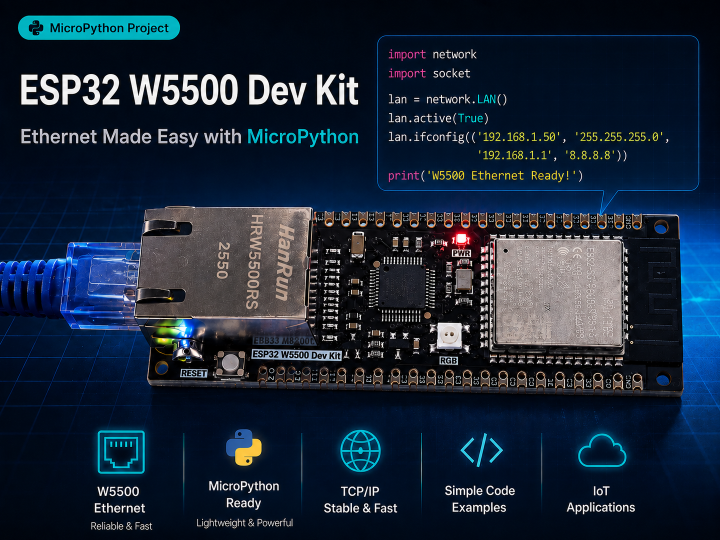

WIZnet - W5500
x 1

ESP32-S3 + WIZnet MicroPython series
- W5500 MACRAW guide
- W5500 TOE guide (this article)
- W6300 MACRAW guide (coming soon)
- W6300 TOE guide (coming soon)
This guide walks through using the W5500's Hardwired TCP/IP function (TOE mode) from MicroPython on the ESP32-W5500-Dev-V1 board (ESP32-S3-WROOM-1 + W5500 SPI Ethernet SoM), starting from a blank board. In the MACRAW guide, TCP/IP was handled by MicroPython's built-in lwIP stack. Here the W5500 handles TCP/IP itself, and MicroPython uses the chip's hardware sockets through the network.WIZNET_TOE driver. The driver is not in upstream MicroPython yet, so there is one extra step: flashing a firmware build that includes it (section 0).
- Board: ESP32-W5500-Dev-V1 (ESP32-S3-WROOM-1 + W5500 SPI Ethernet SoM) — the same board as the MACRAW guide, sold as the ESP32 W5500 Dev Kit
- Example repository: github.com/simryang/esp32-w5500-toe-examples
- Firmware: MicroPython fork
simryang/micropython, branchesp32-wiznet-toe-backend(v1.30.0-preview lineage), board definitionWIZNET_ESP32_W5500_DEV_KIT. A prebuiltfirmware.binis available on the example repository's Releases page (section 0). - Mode: TOE — the W5500 runs the TCP/IP stack. Connection management, retransmission and window control happen inside the chip; the MCU exchanges commands and data over SPI.
Every command and log below was run on real hardware on 2026-09-10, firmware commit 3396e59d1 (Release v0.2), with the board reset before each example. Follow the steps in order and you should get the same results.
Board specs
| Item | Value |
|---|---|
| MCU | ESP32-S3-WROOM-1 |
| SPIRAM | Octal SPIRAM |
| Ethernet chip | WIZnet W5500 (SPI) — used in TOE mode in this guide |
| Ethernet SPI pins | see section 1 |
What changes in TOE mode
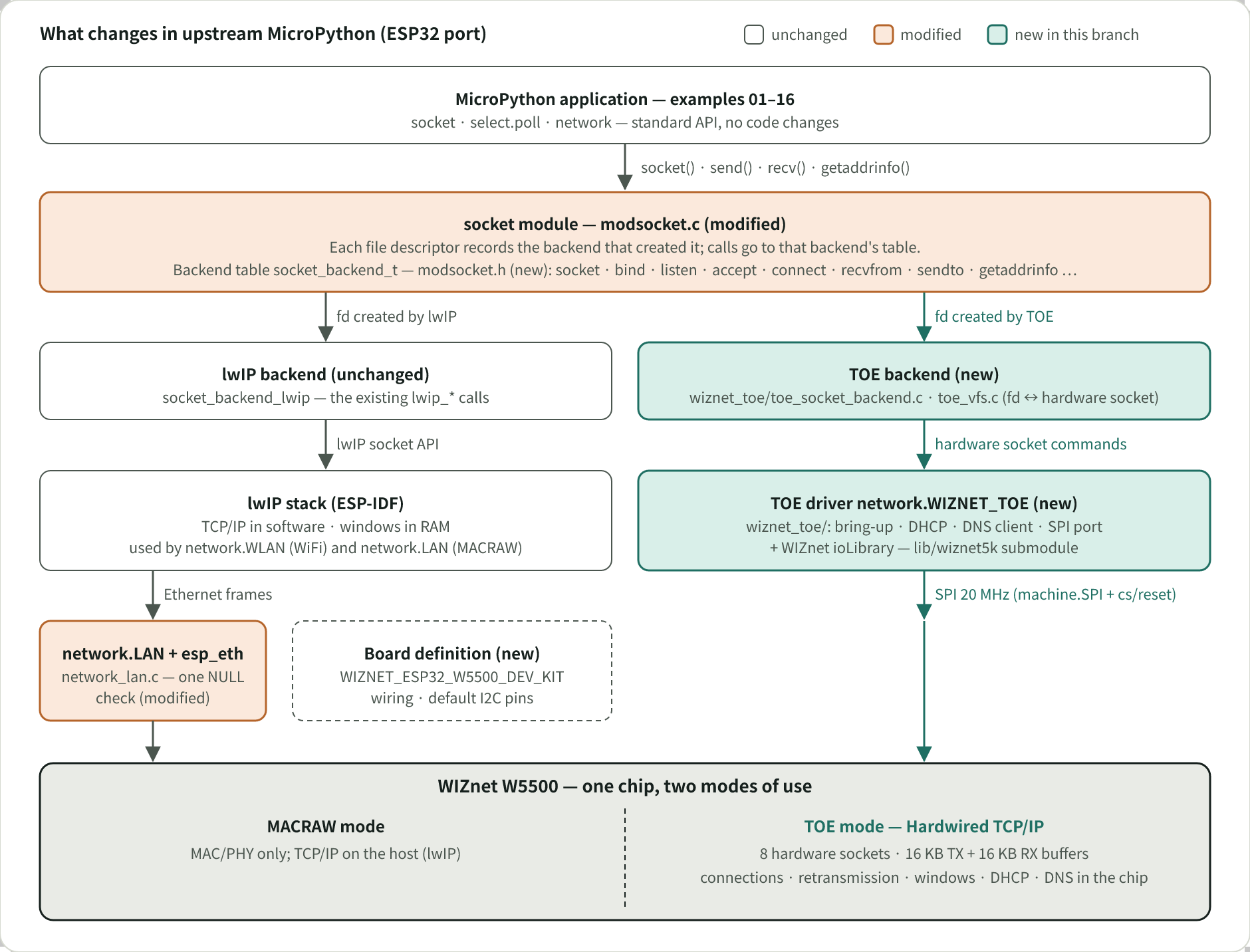
The W5500 has 8 hardware sockets and 16 KB of transmit plus 16 KB of receive buffer memory (datasheet v1.1.0). In MACRAW mode that memory only queues Ethernet frames and lwIP does the TCP/IP work. In TOE mode three things change, and the rest of this guide follows from them.
1) Socket buffers live on the chip, and their total is fixed. The 16 KB of TX and 16 KB of RX memory is divided among the hardware sockets. A larger buffer per socket means fewer usable sockets. The default is 2 KB per socket, 8 sockets. This split determines throughput and is covered in section 3.
2) accept() consumes a hardware socket per client. The W5500 has no accept queue; a hardware socket in LISTEN state becomes the connection. The driver hides this: accept() returns a new file descriptor for the connection and the listener moves to another hardware socket, back in LISTEN state. Ordinary select.poll() server code therefore works unchanged. Each connected client holds one hardware socket, so when none is free the listener accepts no new connections until a client disconnects.
3) Sockets use no host RAM. Because the socket buffers are on the chip, opening a socket adds nothing to the ESP-IDF heap. Measurements against MACRAW on the same firmware are in the table in section 5.
Environment setup
Prepare the following on the PC.
1) Install the Python tools
pip install esptool mpremoteesptool— flashes firmware to the board.mpremote— connects to the REPL, copies files, and runs scripts.
2) Get the firmware
This is the one step that differs from the MACRAW guide. The network.WIZNET_TOE driver is not in upstream MicroPython, so the builds on micropython.org do not work here.
A prebuilt image is on the example repository's Releases page as firmware.bin. It is built for the board definition WIZNET_ESP32_W5500_DEV_KIT, so the SPI wiring is included and network.WIZNET_TOE() can be called without arguments. The release notes state the MicroPython commit it was built from. This guide was written with v0.2 (commit 3396e59d1).
To build it yourself, check out branch esp32-wiznet-toe-backend of the fork simryang/micropython and run the following in an ESP-IDF v5.5.1 environment:
cd ports/esp32

make BOARD=WIZNET_ESP32_W5500_DEV_KIT submodules

make BOARD=WIZNET_ESP32_W5500_DEV_KIT
When building for the generic ESP32_GENERIC_S3 board, enabling the MICROPY_PY_NETWORK_WIZNET_TOE option includes the driver. In that case the SPI wiring must be passed to the constructor as shown in section 1.
3) Put the board in bootloader mode and find its port
Connect the board over USB. This board does not enter the bootloader through esptool's automatic reset, so hold BOOT, press and release RESET, then release BOOT. The board enumerates as a new serial port (USB VID 303A, PID 1001). On Windows, check Device Manager → "Ports (COM & LPT)" for the COM number. Replace COMx below with that number.
4) Flash the firmware
python -m esptool --chip esp32s3 -p COMx -b 460800 --after watchdog_reset write_flash 0x0 firmware.binfirmware.bin is a combined image (bootloader, partition table and application) written at offset 0; erase_flash is not needed. The --after watchdog_reset option reboots the board into the application when flashing finishes. Without it the board stays in the bootloader and you have to press RESET. After the reboot the REPL is on the board's native USB port (PID 4001), which has a different COM number from the bootloader port. The CH340 UART is a separate third port and carries the boot log.
5) Verify the connection
mpremote connect COMxCOMx is now the application port. You should see the MicroPython banner and the >>> prompt. Exit the REPL with Ctrl+] or Ctrl+X.
6) Prepare the example files
git clone https://github.com/simryang/esp32-w5500-toe-examples.git

cd esp32-w5500-toe-examples

mpremote connect COMx fs cp net_init.py :net_init.py
The examples are run one at a time from section 4.
Driver structure. The ESP32 port's socket module calls socket, connect, accept, poll, name resolution and the other operations through a backend table (socket_backend_t). The default backend is lwIP; the TOE driver is a second backend of the same shape. Each file descriptor records which backend created it, so calls on a TOE socket go to the W5500 and calls on a WiFi socket go to lwIP. This is what lets 13_wifi_coexist.py use WiFi and W5500 sockets in one firmware, and what keeps the MACRAW driver (network.LAN) usable from the same firmware (see section 6). The backend table is compiled in, which is why a separate build is needed.
Hardware wiring
Same board as the MACRAW guide, so the wiring is the same. The pin assignment below was confirmed from the board schematic (ESP32-W5500-Dev-V1_SCH.pdf). If you use a different board, do not copy these pin numbers; check that board's schematic.
| Signal | GPIO |
|---|---|
| SCK | 12 |
| MOSI | 11 |
| MISO | 13 |
| CS | 10 |
| INT | 14 |
| RESET | 9 |
The network.WIZNET_TOE constructor takes the wiring the same way network.LAN does. The SPI bus is passed as a machine.SPI object, and its baudrate is the SPI clock the W5500 is driven at. The cs= and reset= pins are given alongside it. There is no int= argument: in TOE mode the chip handles TCP/IP, so the driver does not read the INT pin. Firmware built for the board definition (the firmware.bin on Releases) includes this wiring, so network.WIZNET_TOE() with no arguments returns the same object. The examples work either way.
Tuning: socket buffer size and SPI clock
The chip's total buffer memory is fixed, so the buffer per socket and the number of sockets are adjusted with these settings:
nic.config(sock_kb=4)            # buffer per socket, 1/2/4/8/16 KB, applied from the next active(True)

nic.config('usable_socks')       # how many sockets the current setting allows

nic.config(spi_hz=20_000_000)    # SPI clock, applied immediately
11_throughput.py measures receive throughput for these combinations. Actual output for a 512 KB TCP download with varying read sizes (one run per combination):
sock_kb=2  usable_socks=8  spi_hz=20000000  ip=192.168.7.106
    read   512 B ->    321 KB/s
    read  1024 B ->    547 KB/s
    read  2048 B ->    731 KB/s
    read  4096 B ->    702 KB/s
    read  8192 B ->    694 KB/s
sock_kb=4  usable_socks=4  spi_hz=20000000  ip=192.168.7.106
    read   512 B ->    286 KB/s
    read  1024 B ->    547 KB/s
    read  2048 B ->    850 KB/s
    read  4096 B ->   1147 KB/s
    read  8192 B ->   1095 KB/s
sock_kb=8  usable_socks=2  spi_hz=20000000  ip=192.168.7.106
    read   512 B ->    321 KB/s
    read  1024 B ->    548 KB/s
    read  2048 B ->    817 KB/s
    read  4096 B ->   1170 KB/s
    read  8192 B ->   1481 KB/s
restored sock_kb=2 (usable_socks=8)
Two things can be seen. First, throughput rises until the read size reaches the socket buffer size and does not rise beyond it, because recv() cannot return more than the socket buffer holds. Second, a larger buffer per socket (fewer sockets) gives higher throughput.
Repeating each combination five times and taking the median gives the following (the single run above is a few percent lower):
sock_kb | usable sockets | actually openable | best read size | throughput |
|---|---|---|---|---|
| 2 (default) | 8 | 7 | 2048 B | 788 KB/s |
| 4 | 4 | 3 | 4096 B | 1157 KB/s |
| 8 | 2 | 1 | 8192 B | 1489 KB/s |
The DHCP client uses one socket while the interface is active, so the number of sockets you can actually open is one less than usable_socks. At sock_kb=8 only one socket can be opened, which suits a single stream but not a server. Decide how many sockets you need first, then choose the largest buffer that allows it.
SPI clock. The default is 20 MHz. The W5500 datasheet gives the theoretical design speed of the SPI clock as 80 MHz and the minimum guaranteed speed, measured with a stable waveform, as 33.3 MHz. The ESP32-S3 derives its SPI clock by integer division of 80 MHz, so the steps above 20 MHz are 26.67 MHz and 40 MHz. On this board, one hour at 40 MHz — 2,451 downloads of 512 KB (1,225 MB, every byte compared), 245,100 TCP and UDP echoes and 98 DHCP renewals — completed without errors. The default is kept at 20 MHz to allow for signal quality on other boards and wiring; on this board it can be raised with nic.config(spi_hz=40_000_000).
If bulk transfers start failing at a higher clock, check the socket count before the clock. A driver that leaks a file descriptor on close fails at a fixed socket count regardless of clock, and when that happens during a high-clock measurement it is easily mistaken for a clock problem.
Verify functionality with the examples (16 in total, PASS on hardware)
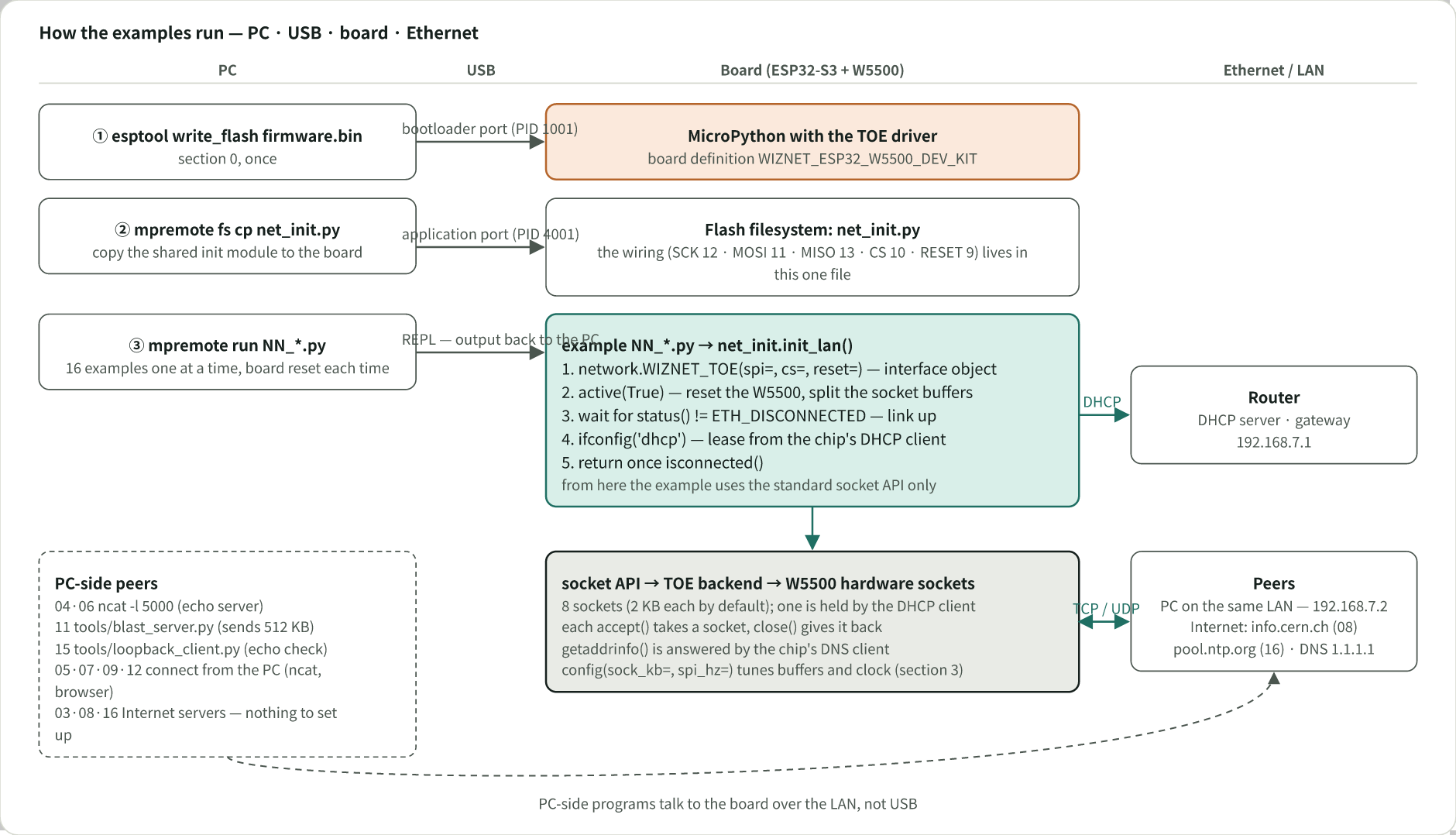
Run each example with mpremote connect COMx run <file>. The LAN cable must be connected and the router must be able to hand out a DHCP lease.
mpremote connect COMx run 01_link.pyAll 16 were run this way on 2026-09-10, resetting the board before each one.
| # | File | What it checks | Note |
|---|---|---|---|
| 01 | 01_link.py | Link, status(), MAC, SPI and buffer settings | quickref[1] |
| 02 | 02_dhcp.py | The DHCP step run directly, without net_init | quickref[1] |
| 03 | 03_dns.py | Domain lookup with socket.getaddrinfo (W5500's built-in DNS client) | standard socket |
| 04 | 04_tcp_client.py | TCP client — connect/send/recv/close | standard socket |
| 05 | 05_tcp_server.py | TCP echo server (accept loop) | standard socket |
| 06 | 06_udp_client.py | UDP client — sendto/recvfrom | standard socket |
| 07 | 07_udp_server.py | UDP echo server | standard socket |
| 08 | 08_http_get.py | Minimal HTTP GET | adapted from MicroPython's examples |
| 09 | 09_http_server.py | Minimal HTTP server | adapted from MicroPython's examples |
| 10 | 10_reconnect_stress.py | active(False)/active(True) 5 times, 120 s link and heap monitoring | written for this guide |
| 11 | 11_throughput.py | Throughput per read size × sock_kb combination | written for this guide |
| 12 | 12_poll_server.py | Multi-client echo server with select.poll() (one listener) | standard socket |
| 13 | 13_wifi_coexist.py | WiFi and W5500 sockets at the same time | written for this guide |
| 14 | 14_static_ip.py | Static IP configuration | quickref[1] |
| 15 | 15_loopback.py | Loopback measurement in the manner of WIZnet's SPI Performance document | WIZnet docs[2] |
| 16 | 16_ntp.py | SNTP request over UDP (packet built by hand) | written for this guide |
04 and 06 need an echo server on the PC; for example, run ncat -l 5000 -k -e /bin/cat on a PC in the same network. 11 and 15 have PC-side programs in the repository's tools/ folder.
05 is a TCP echo server that accepts clients in a loop and returns whatever it receives. It is the same code as 05 in the MACRAW guide; the only difference is that init_lan() brings up the TOE driver.
import socket
from net_init import init_lan

LISTEN_PORT = 5000
CHUNK = 256

lan = init_lan()
print("listening on", lan.ifconfig()[0], LISTEN_PORT)

s = socket.socket(socket.AF_INET, socket.SOCK_STREAM)
s.setsockopt(socket.SOL_SOCKET, socket.SO_REUSEADDR, 1)
s.bind(("0.0.0.0", LISTEN_PORT))
s.listen(1)

while True:
    conn, addr = s.accept()
    print("client connected:", addr)
    try:
        while True:
            data = conn.recv(CHUNK)
            if not data:
                break
            print("recv:", data)
            conn.send(data)  # echo
    finally:
        conn.close()
        print("client disconnected:", addr)
Run logs
Actual output on hardware (board IP 192.168.7.106, PC IP 192.168.7.2).
01_link.py
link up, active = True connected = True

status = GOT_IP

mac = 14:c1:9f:d9:39:63

spi_hz = 20000000 actual = 20000000

sock_kb = 2 usable_socks = 8
02_dhcp.py
link up, address before DHCP: 0.0.0.0

lease acquired in 682 ms

ip: 192.168.7.106

subnet: 255.255.255.0

gateway: 192.168.7.1

dns: 1.1.1.1
03_dns.py (the query is handled by the W5500's built-in DNS client)
www.wiznet.io -> 183.111.138.249
8.8.8.8 -> 8.8.8.8
05_tcp_server.py (a client on the PC connected and sent one line)
listening on 192.168.7.106 5000

client connected: ('192.168.7.2', 14866)

recv: b'hello from host\n'

client disconnected: ('192.168.7.2', 14866)
08_http_get.py (646-byte body received; only the beginning is shown)
b'HTTP/1.1 200 OK\r\nDate: Thu, 10 Sep 2026 06:13:59 GMT\r\nServer: Apache\r\n

Last-Modified: Wed, 05 Feb 2014 16:00:31 GMT\r\nContent-Length: 646\r\n

Connection: close\r\nContent-Type: text/html\r\n\r\n<html><head></head><body>

<header>\n<title>http://info.cern.ch</title>\n</header>\n\n<h1>http://info.cern.ch

 - home of the first website</h1>\n...'
10_reconnect_stress.py (interface restarted 5 times)
initial link OK: ('192.168.7.106', '255.255.255.0', '192.168.7.1', '1.1.1.1')

cycle 0 recovered in 2490 ms

  free heap: 8314320

cycle 1 recovered in 2236 ms

  free heap: 8314320

cycle 2 recovered in 13565 ms

  free heap: 8314320

cycle 3 recovered in 2245 ms

  free heap: 8314320

cycle 4 recovered in 2241 ms

  free heap: 8314320
Cycle 2 took 13.6 s to recover (the cause was not investigated); the other four took 2.2–2.5 s. Heap usage did not change in any of the five. During the 120 s of monitoring that follows, the link stayed up and the heap stayed constant.
12_poll_server.py (three clients from the PC, one after another)
listening on 192.168.7.106:5000 with poll

client connected: ('192.168.7.2', 29804)

recv: b'client-0 says hi\n'

client disconnected

client connected: ('192.168.7.2', 29805)

recv: b'client-1 says hi\n'

client disconnected

client connected: ('192.168.7.2', 29806)

recv: b'client-2 says hi\n'

client disconnected
The same server also passed a test with three clients connected at the same time (each client received its own data back).
13_wifi_coexist.py
ethernet : 192.168.7.106

before WiFi is up:

  W5500 socket                 -> HTTP/1.1 200 OK

wifi     : stack up, scanning...

  22 access points visible

with WiFi stack active:

  W5500 socket                 -> HTTP/1.1 200 OK
14_static_ip.py (no DHCP client, so all 8 sockets are available)
ip:       192.168.7.23

subnet:   255.255.255.0

gateway:  192.168.7.1

dns:      1.1.1.1

status:   5 (ETH_GOT_IP = 5)

usable_socks: 8 - none held by DHCP

dns lookup: 172.66.147.243
15_loopback.py (the PC-side program sends 512 KB and compares the echoed data byte by byte)
loopback server on 192.168.7.106:5000  (chunk 2048 B, spi 20000000 Hz, sock_kb 2)

client: ('192.168.7.2', 33673)

  524288 B in 1249 ms = 3.36 Mbps (420 KB/s)
16_ntp.py
interface: 192.168.7.106  dns: 1.1.1.1

pool.ntp.org     121.174.142.82 -> 2026-09-10 06:19:03 UTC  (rtt 9 ms)
Note on 12 and 13. 12_poll_server.py has the usual structure — one listener, client sockets from accept() registered with select.poll() — and runs on the TOE driver without changes. Each connected client holds one hardware socket, so with the default 8 sockets the server can hold up to 6 clients at once (one socket for DHCP, one for the listener). When all sockets are in use the listener accepts no new connections until one client disconnects. 13_wifi_coexist.py confirms that HTTP requests over the W5500 socket keep succeeding while the WiFi stack comes up and scans; this is the per-descriptor backend dispatch from section 0 in operation.
Performance comparison
Against WIZnet's published measurements. WIZnet publishes W5500 SPI throughput measured with a TCP loopback test[2] (conditions: STM32F103C8 at 72 MHz, SPI 36 MHz, test tool AX2, "Loopback Test (Only TCPs/1CH)"). 15_loopback.py runs the same kind of test and reports the same unit (Mbps).
| MCU / language | SPI clock | socket buffer | Mbps | |
|---|---|---|---|---|
| WIZnet published | Cortex-M3 72 MHz / C | 36 MHz | 4 KB | 3.50 |
| WIZnet published, best | Cortex-M3 72 MHz / C | 36 MHz | 16 KB (16 KB data buffer) | 3.63 |
| This guide | ESP32-S3 / MicroPython | 20 MHz | 4 KB | 4.92 |
| This guide | ESP32-S3 / MicroPython | 20 MHz | 8 KB | 6.77 |
The MCUs differ (240 MHz ESP32-S3 versus 72 MHz Cortex-M3), so this does not compare driver quality. It shows that MicroPython at SPI 20 MHz reaches throughput in the range of the published figures.
Against MACRAW mode on the same board. Measured on the same firmware, wiring and SPI clock with only the stack changed. The details are in a separate document; the summary is:
| MACRAW (lwIP) | TOE | |
|---|---|---|
| Download throughput, best | 818 KB/s | 1489 KB/s |
| Loopback | 3.30 Mbps | 6.77 Mbps |
ESP-IDF heap at bring-up (constructor + active(True) + address) | 14,440 B | 776 B |
| Heap per idle connected socket | 454 B | 0 B |
| Heap per socket with 512 KB of unread receive data | 6.3 KB | 0 B |
| Concurrent sockets | as memory allows | up to 7 |
The heap figures were measured on 2026-09-10 by initializing both stacks in turn within one boot and reading the total free bytes of the ESP-IDF heap regions. The throughput figures are the medians of five runs from the comparison document. TOE's 1489 KB/s is at sock_kb=8 (one usable socket); at the default setting with seven usable sockets it is 788 KB/s, about 3% below MACRAW. TOE mode is best understood as trading socket count for throughput.
Notes
Close sockets before active(False). Restarting the interface invalidates every file descriptor the driver manages. A socket object left without close() prints a bare OSError: line, with no error number, when its finalizer runs at the next garbage collection (one line per abandoned socket). It does not affect operation; the underlying error is EBADF. The number is missing because no exception argument can be allocated during garbage collection.
Reset the board before measuring. Interrupting a script with Ctrl-C leaves its socket objects on the heap. If the next initialization frees those descriptors and the numbers are reused before garbage collection runs, a descriptor belonging to a live connection can be closed. The symptom is a transfer that stops part-way without an error. Starting from a board reset avoids this.
GPIO 9 is the W5500 RESET pin and also the ESP32-S3 port's default I2C SCL pin. On a generic ESP32_GENERIC_S3 build, creating machine.I2C(0) without pin arguments assigns SCL 9 and SDA 8, and the W5500 is reset every time the bus is configured. The board definition WIZNET_ESP32_W5500_DEV_KIT moves the default I2C pins to SCL 5 and SDA 4. On other builds, specify the I2C pins explicitly.
Using TOE and network.LAN in the same boot. From firmware 3396e59d1, the two drivers can be used alternately within one boot. Initializing LAN after TOE, TOE after LAN, and TOE again after that were all confirmed to obtain an address. Re-activating network.LAN after the TOE driver has been used is not guaranteed: the two drivers drive the CS pin differently, and only the TOE driver reconfigures the pin on initialization. To return to MACRAW in the same session, reset the board.
Data verification in throughput measurements. A benchmark that only counts bytes does not detect transfer errors. The measurements in this guide compared the full received data against the original, separately from the timing. The problems found this way are covered in a separate document.
Appendix. Porting to another board or chip
For anyone who wants to use this driver elsewhere, this is what to change and in what order to check it, case by case. File locations refer to the fork simryang/micropython, branch esp32-wiznet-toe-backend.
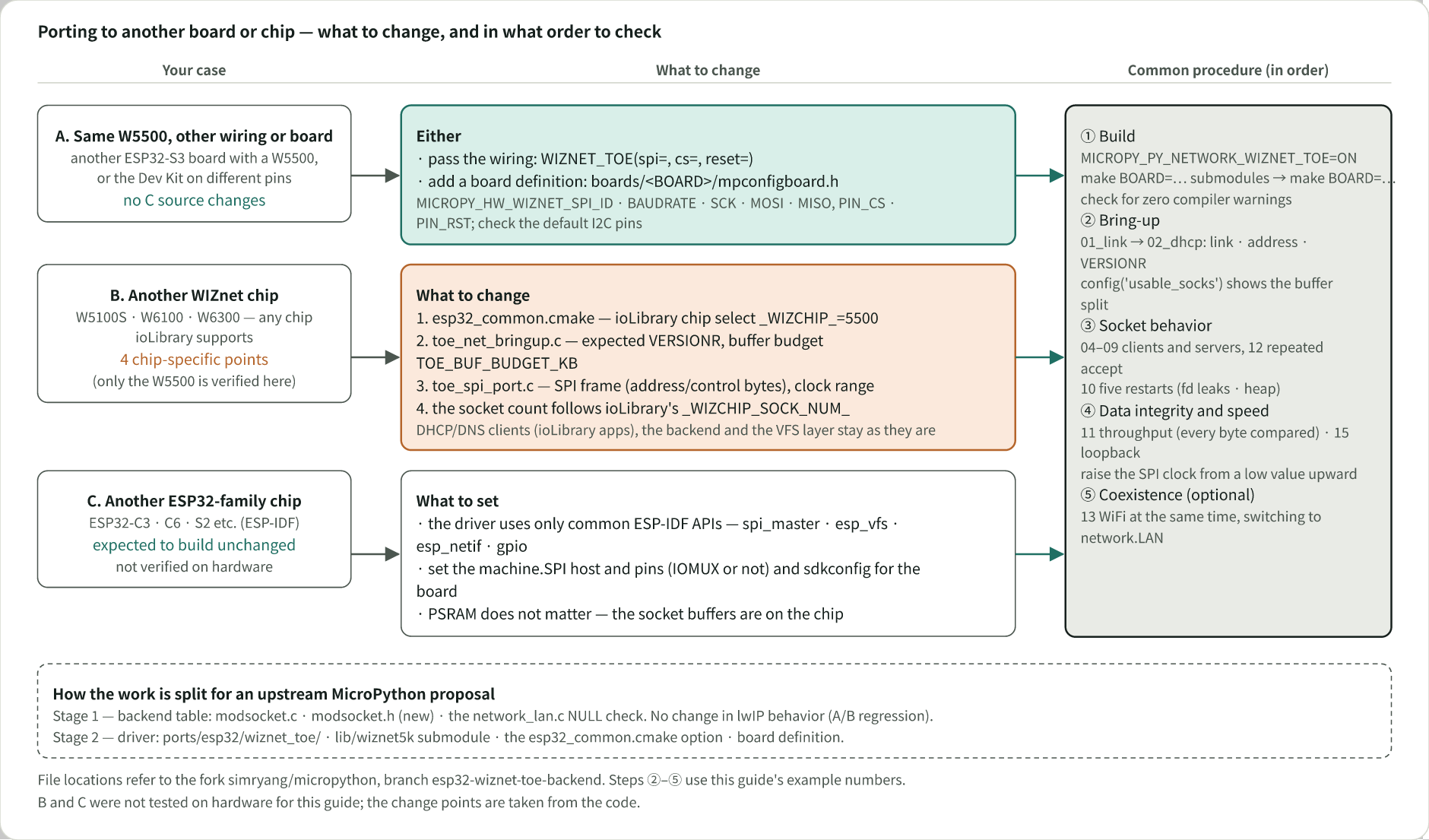
A. Same W5500, different wiring or board — no C source changes. Pass the wiring to network.WIZNET_TOE(spi=, cs=, reset=). For an argument-less constructor, add a board definition under ports/esp32/boards/<BOARD>/ and define MICROPY_HW_WIZNET_SPI_ID, MICROPY_HW_WIZNET_SPI_BAUDRATE, MICROPY_HW_WIZNET_SPI_SCK/MOSI/MISO, MICROPY_HW_WIZNET_PIN_CS and MICROPY_HW_WIZNET_PIN_RST in mpconfigboard.h (the same names upstream's network_wiznet5k.c reads). Check that the port's default I2C and UART pins do not overlap the W5500 pins, and put set(MICROPY_PY_NETWORK_WIZNET_TOE ON) in mpconfigboard.cmake.
B. Another WIZnet chip (W5100S, W6100, W6300, …) — for a chip ioLibrary supports there are four points to change: the chip selection _WIZCHIP_ in esp32_common.cmake, the expected VERSIONR value and the buffer budget TOE_BUF_BUDGET_KB in toe_net_bringup.c, and the SPI frame layout (address and control bytes) and clock range in toe_spi_port.c. The socket count follows ioLibrary's _WIZCHIP_SOCK_NUM_. The DHCP and DNS clients (ioLibrary application code) and the backend and VFS layers stay as they are. The only chip verified on hardware for this guide is the W5500.
C. Another ESP32-family chip (ESP32-C3, C6, S2, …) — the driver uses only ESP-IDF's spi_master, esp_vfs, esp_netif and gpio APIs, so it is expected to build without source changes. Set the machine.SPI host number and pins (whether they are IOMUX pins) and the sdkconfig for the board. PSRAM does not matter, because the socket buffers are on the chip. This was not verified on hardware.
Common order of checks — (1) build with make BOARD=<BOARD> submodules then make BOARD=<BOARD> and confirm there are no compiler warnings. (2) Check link and address with 01_link.py and 02_dhcp.py, and the buffer split with config('usable_socks'). (3) Check socket behavior and descriptor leaks with the clients and servers in 04–09, repeated accept in 12, and the five restarts in 10. (4) Measure data integrity and throughput with 11 (every byte compared) and 15, raising the SPI clock from a low value. (5) If needed, confirm WiFi coexistence with 13.
Proposing to upstream MicroPython — the plan is two stages. Stage 1 is the backend table (modsocket.c, the new modsocket.h, the NULL check in network_lan.c), for which an A/B regression showed no change in lwIP behavior. Stage 2 is the driver (ports/esp32/wiznet_toe/), the lib/wiznet5k submodule, the esp32_common.cmake option and the board definition.
References
[1] MicroPython ESP32 port quickref — network.LAN methods and the ETH_* status codes. network.WIZNET_TOE uses the same method names and status code values.
[2] WIZnet W5500 official documentation
- Product page: docs.wiznet.io/Product/Chip/Ethernet/W5500
- Datasheet v1.1.0 (SPI clock specification in §6 Electrical Specifications): W5500_ds_v110e.pdf
- SPI Performance (loopback test conditions and results): docs.wiznet.io/Product/Chip/Ethernet/W5500/Application/spi-performance
[3] MACRAW guide for the same board: maker.wiznet.io/josephsr/projects/esp32-s3-wiznet-w5500--micropython-ethernet-macraw-guide
[4] Example repository and firmware (Releases): github.com/simryang/esp32-w5500-toe-examples
[5] MicroPython fork with the driver (branch esp32-wiznet-toe-backend): github.com/simryang/micropython/tree/esp32-wiznet-toe-backend
-
esp32-wiznet-toe-backend

-
TOE examples